-
Morphs from G3 to G8
There is a link to Redz PDF to transfer Gen3 morphs to Gen8 on page 4 of this thread
Double DeformationMake sure you are working on the base shape, if you model around a morphed figure and rig then you will get the morph projected into the mdoel as well as baked into the base shape. If you must model around a shape, when using the Transfer Utility set the Source Shape to the morph used (or to Current if it's multiple morphs), then check Reverse Source Shape from Target in the extended options (click the button at the bottom of the dialogue to show more options).
Thanks.
Aiko and Hiro has lost their animeYes you are all right, I had forgotten that the newer anime has evolved into a more realistic face and a stylized body.
I also forgot that there was a simple Aiko without numbers. I wonder what she looked like back then. I dont think I could find her in the shop. Redfern, could you share a couple front and back images of Akio 1 I can see what the original one looks like?
Honestly, I don't know the real difference between Stephanie and Victoria I was going through my G3 morphs and found very little overall difference. G8 has very few morphs but that it most likely because I havent gotten any for them yet. G3 as a lot of morphs but I had a hard time figuring out how to get her lighter in pwtoon. it took 2 lights, set to each type of light before she would render right. But she still doesnt look right, especially beside g8. Personally, due to the compatiblity of clothes Id rather stick with G1 for now until I figure out how to get the clothes from my extensive 3/4 library up to g8, along with all the morphs I love with the textures I need for my future webcomic. Right now I'm just exploring options and deciding what I want. For now I'm settling with the classic and very versatile Genesis. She can be evertyingI need thanks to the morph packs I bought a long time ago.
hiding / deleting geo from clothing?Could you not just hide the items from the scene and only keep the item you want to morph before exporting with GoZ?
When I export an item without GoZ (I never use GoZ) this works for me.
Thank you DAZ - ZevO SaleForgive me, Zev0 as I'm a big fan of yours but I really don't understand the point of this product. Why can't a user just dial in any morph - all the dials are there? I'm probably missing the point altogether, as usual.
To the subject of the OP - I do wish sales were not linked to the purchase of things I don't see a need for. This is especially true lately because most sales are linked to G8 products and I don't use G8 so why would I but a G8 product to get a G3 product at 40% discount?
Having said that, I couldn't resist Grandmother for G8 (it is advertised along with Edie but Edie is not required). Only after I bought it did I realise that she could do with some Zev0 magic for ageing and vascularity. I have those for G3 (and use them extensively) but not, of course, for G8.
Aiko and Hiro has lost their animeEven though I'm REALLY "old school", starting with Aiko "1" (it had no numical designation) based upon the geometry and mapping of Michael 1/2 and the first Stephanie Petite, I can't really complain about the generational changes. Weird, I know. But I purchased Aiko (1), Aiko 3 and Aiko 4 more for their stylized body shapes rather than the "large eyes, small mouth" facial features. For Aiko 3 I had to wait for the release of a Thorne/Sarsa product and Beth capsces Kioki morph set to actually "tone down" the so called anime/manga facial proportions. True, A3 came with a "realistic" haed morph, but it didn't really give me the lip shapes I wanted.
So, while I have not purchased them, the latest itertaion of Aiko with her runway model body and arguably more realistic features more closely fit the needs I had over a decade ago.
Still, it is funny how the "brand" intent has kinda' shifted. Using absurdly theoretical hyperbole, it's like successive models of Corvette are tweaked until the car looks more like a Mustang. the brand recognition is there, but only in the vaguest way resembles the original product.
Sincerely,
Bill
Edie 8So, Carrie58, did you use the transfer tools to move Toon Generations up to G8? Or move Edie down to G3?
I moved toonGen2 to G8 using SingularBlues script and it's 100% Edie8 and 50% ToonGen2 ,and age at 32 ,both dialed in
hiding / deleting geo from clothing?Thanks. creating a morph might be an option. Curious, if you know if there's a way to GOZ a single piece of clothing to zbrush from a character setup? .. typically when i try to modify a single piece of clothing, it sends everything in the scene to zbrush.
Thanks again.
Edie 8i see the 50% of Edie and someone else, but my mixes surely don;t seem to come out the same. they still look more like Edie.
I use several different morphs, a lot, so maybe they overpower Edie a bit, but 50% of her is definitely still there!
well 3 characters at 50% means Edie is 33% of the mix:)
Or 16.5% of the total look, technically, I think, since 50% of each applied morph is complimented by 50% G8F base.
I mean Edie's slider was at 50% and then a lot of little tweaks from both other characters and morph kits. The predominant character was Edie, no other predominant morph like they showed in the promos where it was mostly V8 or another character, with a small amount of Edie.
Edie 8i see the 50% of Edie and someone else, but my mixes surely don;t seem to come out the same. they still look more like Edie.
I use several different morphs, a lot, so maybe they overpower Edie a bit, but 50% of her is definitely still there!
well 3 characters at 50% means Edie is 33% of the mix:)
Or 16.5% of the total look, technically, I think, since 50% of each applied morph is complimented by 50% G8F base.
Dynamic Clothing Control tutorial? (I can't figure out how to use it)Thank you FSM. Let me try your suggestion.
Meanwhile, I think I found a lenghty workaround for it. I exported the pants as an obj, then imported it and conformed to the figure using transfer utility and seem to have worked. The only problem now is the intersected parts of the pants have been exported as a joint mesh, so lower part morphs like a skirt. I guess I need to do some remodeling.
Edie 8So, Carrie58, did you use the transfer tools to move Toon Generations up to G8? Or move Edie down to G3?
Character Imperfectionatorhttps://www.daz3d.com/forums/discussion/241981/asymmetry-in-character-critique-requested#latest
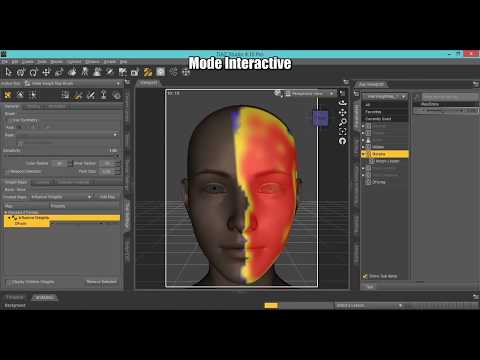
This product can create differences using the weight maps where you want, and although the new morphs do not support HD, the base morph can be in HD.
I think this will be a really cool product, but I'm not sure it will have the sublety/realism I'm looking for. Maybe it will. I hope so. :) Though being incompatible with HD elements gives me more reservations, since realism is what I'm after. We'll see!
Super Natural Brows (Solved)Thank you! It works beautifully now. When I imported the brows they placed beneath the chin but fixed when I did the steps you gave me again and hid all the objects in the scene before export/import/transfer except for the brows and they placed correctly. Was able to fit the brows without a problem.
Diomede's Notepad, Sketchpad, and Chilling PadThanks, Sonja. I am very happy with the way the wet hair morph turned out. The hair is prop hair because of the toon look, but it was created with strand-based dynamic hair. There is a dynamic hair conversion plugin that makes creating morphs a breeze.
Super Natural Brows (Solved)This did work but I have another question. The brows will no longer morph once imported but Is there a way to get them to follow the expression morphs built into the genesis base or will the brows always remain static? Thanks for your reply.
Are you fitting the brows to the original Genesis figure, or to Genesis 3 or 8?
In order to have the brows follow expressions it’s important when performing the transfer utility to choose ‘none’ as the type in the dropdown menu. This should be sufficient for Genesis 3 and 8.
The older figures don’t have autofollow enabled for expressions, so to have the brows follow on Genesis or Genesis 2, it’s first necessary to tick autofollow for the expressions in the parameters tab, before fitting the brows.
I hope this helps. Redz.
Thank you for the reply Redz. I am enjoying your product very much. It's very unique and adds realism. I followed your instructions. The drop down area of the menu is grayed out for me but I can see the word 'none' is already selected. I have exported/imported the brows. Posted images to show the settings. Once the brows are imported and I right click on them the only option is change parent, no fit to is listed.


Okay, it looks as though your source and target are mixed up in the transfer utility. G3F should be the source and the brows the target, not the other way around. Then leave the projection template at ‘none’ and it should, hopefully work. You will likely need to apply the Iray uber base also as objs load with default Daz shaders.
Super Natural Brows (Solved)This did work but I have another question. The brows will no longer morph once imported but Is there a way to get them to follow the expression morphs built into the genesis base or will the brows always remain static? Thanks for your reply.
Are you fitting the brows to the original Genesis figure, or to Genesis 3 or 8?
In order to have the brows follow expressions it’s important when performing the transfer utility to choose ‘none’ as the type in the dropdown menu. This should be sufficient for Genesis 3 and 8.
The older figures don’t have autofollow enabled for expressions, so to have the brows follow on Genesis or Genesis 2, it’s first necessary to tick autofollow for the expressions in the parameters tab, before fitting the brows.
I hope this helps. Redz.
Thank you for the reply Redz. I am enjoying your product very much. It's very unique and adds realism. I followed your instructions. The drop down area of the menu is grayed out for me but I can see the word 'none' is already selected. I have exported/imported the brows. Posted images to show the settings. Once the brows are imported and I right click on them the only option is change parent, no fit to is listed.
Diomede's Notepad, Sketchpad, and Chilling PadWow. That is ambitious and I can't wait to see the finished result. LOVE the wet hair morph! Its going to be a bit of a shock when she get to the modern world! She might be safer with the tiger lol
Creating a MorphHello, i hope i'm in the right section since i'm a beginner but this is not a beginner section XD
Well, i know a little Zbrush and i would lIke to make a Morph of Sakura, i'd like to stretch a bit her eyes and put her nose a bit lower (something like Dragon ball Face)
But i really don't know how to do it, i mean, i know how to import the model in zbrush, i know what tool to use but i don't know how it works when i import her back in Daz, if i stretch the eyes, i think i will have to stretch the eye ball too or it's gonna look weird.
When i change face's expression will the bone follow correctly my new morph or not ?
thank you for your reply and if you know any good tutorials about this with zbrush it would be awesome !
Character Imperfectionatorhttps://www.daz3d.com/forums/discussion/241981/asymmetry-in-character-critique-requested#latest
This product can create differences using the weight maps where you want, and although the new morphs do not support HD, the base morph can be in HD.
Daz 3D is part of

Connect
DAZ Productions, Inc.
7533 S Center View Ct #4664
West Jordan, UT 84084Licensing Agreement | Terms of Service | Privacy Policy | EULA
© 2026 Daz Productions Inc. All Rights Reserved.