-
Daz Central Plugin Re-install
@Fixmypcmike When I used DIM they would not always register as installed in Daz Central and also did not prompt for a new location. I will give it another go. Thanks for the reply.
@Jestmart Not really a helpful reply. I would not call myself an advanced user but I am advanced enough that I can edit an .ini or registry string to update the location of the install path. Not rocket science. I was assuming DIM is going away at some point since they introduced a new install product. I also tried to re-install using DIM and it did not prompt. I am just looking for the actual file or registry entry to update.
Daz Central Plugin Re-installIf you are using Unreal and Z-Brush you are an advance user and shouldn't be using Central as that is a dumbed down version of DIM aimed at new users.
Not necessarily, different kinds of advanced that may or may not overlap.
Daz Central Plugin Re-installIf you are using Unreal and Z-Brush you are an advance user and shouldn't be using Central as that is a dumbed down version of DIM aimed at new users.
Nvidia Ampere (2080 Ti, etc. replacements) and other rumors...Just ordered two MSI RTX 3090 Ventus cards, will arrive on October 20th. Here's hoping I can fit them on my PC, they're apparently 2.7 slots compared to my current 2.2 slot 2080 Ti's. And I also hope DAZ has an update by then that can utilize the 3xxx series. Will post benchmarks on the other thread when I do.
thats 700 watts just for the GPUs, that will be like running a space heater under your desk. Its bad enough for me here in the South with one lousy RTX 2060 cranking in the bedroom for an all night render. And that's with central air at 73 degrees. I would have to have a separate wall unit air conditioner in the bedroom if I had 2 x 3090s.
I already have a space heater under my desk with both my 2080 Ti's lol. According to HWinfo, top one usually consumes around 220W, bottom one up to 260W. I'm expecting the 3090's to consume about 10% more. I do plan to underclock them though, or at least the top one, otherwise I'll get too much throttling constantly.
Nvidia Ampere (2080 Ti, etc. replacements) and other rumors...Just ordered two MSI RTX 3090 Ventus cards, will arrive on October 20th. Here's hoping I can fit them on my PC, they're apparently 2.7 slots compared to my current 2.2 slot 2080 Ti's. And I also hope DAZ has an update by then that can utilize the 3xxx series. Will post benchmarks on the other thread when I do.
thats 700 watts just for the GPUs, that will be like running a space heater under your desk. Its bad enough for me here in the South with one lousy RTX 2060 cranking in the bedroom for an all night render. And that's with central air at 73 degrees. I would have to have a separate wall unit air conditioner in the bedroom if I had 2 x 3090s.
Daz Central Plugin Re-installI have recently update unreal and zbrush. When I attempt to re-install the plugin for these apps from Daz Central I am not prompted for the location of the app.
Is there any way to reset this so that I am prompted for install location?
Is there a manual way to change the install location for plugins that are associated with other apps?
Any help would be appreciated.
Metadata update failedI have all the pose thumbnails. Just missing the product thumnail from the Smart pane directory.
The poses also work for me. Not sure why your poses are unreadable.
Because you installed it with DIM or Daz Central, I installed it with Daz Connect (online method)
If uninstalling, deleting the product (right-click on its container in the Content Library, then refreshing metadata and reinstalling doesn't fix the issue please report it to Daz.
Sorry but I said I already tried it several times before reporting it. It's planned for the Jan. 4, 2021 ticket
Not a fan of the new product library layoutIt would be great for Daz to put the purchase details and item descriptions back in the library pages, but I will be surprised if it ever actually happens. Done is done, and I imagine they had their reasons for removing all that in the first place.
I'm not sure about that. If enough people speak up, they'll probably come around (if they don't on their own recognicance).
...that happened over on DA when they introduced the "eclipse" format first as an option which pretty much few if any members there liked, and then made it the standard UI agaist most of the community's wishes. .
Makes me wonder if the same may happen with Daz Central.
That Eclipse deal has a lot of baggage, starting with "Wix owns DA."
Metadata update failedI have all the pose thumbnails. Just missing the product thumnail from the Smart pane directory.
The poses also work for me. Not sure why your poses are unreadable.
Because you installed it with DIM or Daz Central, I installed it with Daz Connect (online method)
If uninstalling, deleting the product (right-click on its container in the Content Library, then refreshing metadata and reinstalling doesn't fix the issue please report it to Daz.
Not a fan of the new product library layoutIt would be great for Daz to put the purchase details and item descriptions back in the library pages, but I will be surprised if it ever actually happens. Done is done, and I imagine they had their reasons for removing all that in the first place.
I'm not sure about that. If enough people speak up, they'll probably come around (if they don't on their own recognicance).
...that happened over on DA when they introduced the "eclipse" format first as an option which pretty much few if any members there liked, and then made it the standard UI agaist most of the community's wishes. .
Makes me wonder if the same may happen with Daz Central.
Blendshapes don't maintain negative morph rotation values, only positiveHi,
After exporting a character into Maya, I've noticed that any morphs I export along don't maintain full functionality as blendshapes. A very simple example: eyes side-side, or mouth side-side. The blend shape slider goes from 0 to +1, whereas in Daz they go from -1 to +1, allowing the morph to make eyes look left to right or make the mouth go left to right. In the shapes editor, I can only make them move one way or return them to the central position. At first I didn't see the problem because I thought I could just put in the negative values manually, but that reveals that the surrounding geometry actually doesn't play ball at all. In the case of the eyes, turning them positively moves the eyelids and eyelashes along with the rotation. Turning them negatively causes them to bulge out of their sockets as they expand in size.
I have no idea how to get around this problem. Who can help?
Metadata update failedI have all the pose thumbnails. Just missing the product thumnail from the Smart pane directory.
The poses also work for me. Not sure why your poses are unreadable.
Because you installed it with DIM or Daz Central, I installed it with Daz Connect (online method)
Good to know! I use DIM for everything.
Metadata update failedI have all the pose thumbnails. Just missing the product thumnail from the Smart pane directory.
The poses also work for me. Not sure why your poses are unreadable.
Because you installed it with DIM or Daz Central, I installed it with Daz Connect (online method)
Not a fan of the new product library layoutGiven that the entire apparent purpose of the change, as it currently stands, is to force-feed us promotions for the not yet properly functional DAZ Central, which someone clearly decided to let out of the gate before it was fully tested and ready...
Oh, you mean like going live on sales, but not having looked over the programming, etc. before doing so, and then people massively complaining about another borked sale. Naw .... Daz doesn't do that =)
Not a fan of the new product library layoutWhat genius thought we'd be benefitted by this new (non) feature? Aren't these things discussed at a team meeting, or is their some "decider" who just gets to willy-nilly make decisions "for the good of all"?Given that the entire apparent purpose of the change, as it currently stands, is to force-feed us promotions for the not yet properly functional DAZ Central, which someone clearly decided to let out of the gate before it was fully tested and ready...
Not a fan of the new product library layoutThe people that need to be aware of this are aware of this, extra tickets to customer support won't change anything.
As far as I am aware, there are plans to bring back the information that used to be there, but these changes will take time.
Therein lies the problem. Reassuring as your post may be, @DAZ_Rawb, it's not definitive. Daz could still decide to leave things as they are today, because they are not providing official word, not making a firm commitment to the customers, that information we want/need will be incorporated back into the Product Library pages.
Regardless, I really appreciate you taking the time to come in and reassure everybody. However, your post has quickly gotten pushed back as people comment on the topic, replying to earlier posts, before reading to the end of the thread. (As most of us do.) It won't take long for your post to be buried several pages back, with more disgruntled comments on what appears to be Daz taking away valuable information.
A better solution would be for Daz to communicate with their customers. Let's assume this change is temporary, part of the effort to switchover to new software for the store, and that once the new software is fully integrated into the site, the Product Library pages will revert back to having full information, (prehaps even additional functionality.) The people affected by this change are going to be those who use the Product Libray, so why not include a sentence at the top of the boilerplate that reassures customers the current lack of information is only temporary? For example:
This page format is currently "under construction." We promise to bring back the information that makes these pages so helpful to you, our customers, as soon as possible, along with some added functionality people have been asking for. Please bear with us as we work on these changes.
There is a time to keep plans under wraps, and a time to be transparent. Because Daz is not being transparent about the changes to the Product Library, customers are understandably both wary and upset.
What gets me is that Daz never comes out and apologizes for inconveniencing customers, either for messing up people's libraries with Daz Central, or now with this. A little humility would go a long way.
When you're a big fish in a very tiny pond, you don't have to be humble.
There are other ponds, even small fish could leap to.
According to the email I got, my problem has been solved...went to my product library and nothing has changed. Soooo I sent them this.
I received a form letter telling me my issue has been solved...no it has not. Considering I received a form letter for an issue that has not been solved, I have to assume no one read my issue and/or did not investigate the problem.
It may be that there is a fix that hasn't yet rolled out to the public version of the site.
If the customer doesn't see the fix, it hasn't been solved. It would have been acurate to update the ticket with a fix has been implemented, it should appear.... on or soon (please not Daz soon
 ) after N date.
I've never had a problem with change, I encourage it and welcome it. However, when change is detrimental to the customer base, the company needs to open their eyes and listen and not give form responses with falsehoods and vague promises.
Indeed, I love well-managed change. I'm sure as hell glad I'm still not relying on a ZX81.
Second that. I'm suffering from DAZ-fatigue by now. Too often glaring problems were addressed in the forum, but late (or never) solved. More and more I get the impression that it's all about winning new users, with no regard for the wishes and needs of long-time established users. I need a functioning library asap, for the thousands of items I own. If not, I have to research the internet for Information and built up my own catalog, which will be time-consuming and, well, one hell of a work. You can be very sure that this isn't an incentive to buy much more.
You can thank Microsoft for starting the trend...
There is very little that I can't do if not done with computers, I know how to use the programs and set them up to maximise the efficiency in what I want to get done - I don't need any kind of cute avatars asking me "What do you want to do today?", nor do I need anyone to invent any new ways to organize my files or find them - I just wish they would stop "improving" things as with every "improvement" the productivity and useability goes down the drain until you figure out the tricks to remove and/or bypass the "improvements".
I find myself agreeing with you again it seems. :)
The people that need to be aware of this are aware of this, extra tickets to customer support won't change anything.
As far as I am aware, there are plans to bring back the information that used to be there, but these changes will take time.
The part in bold makes me nervous.
Comics - Force Six Annihilators, Killer Butterfly, Mark of the Griffin, Dynamic Spider-Man Plus2nd Mark of the Griffin #2

2nd Villainy of the Vile
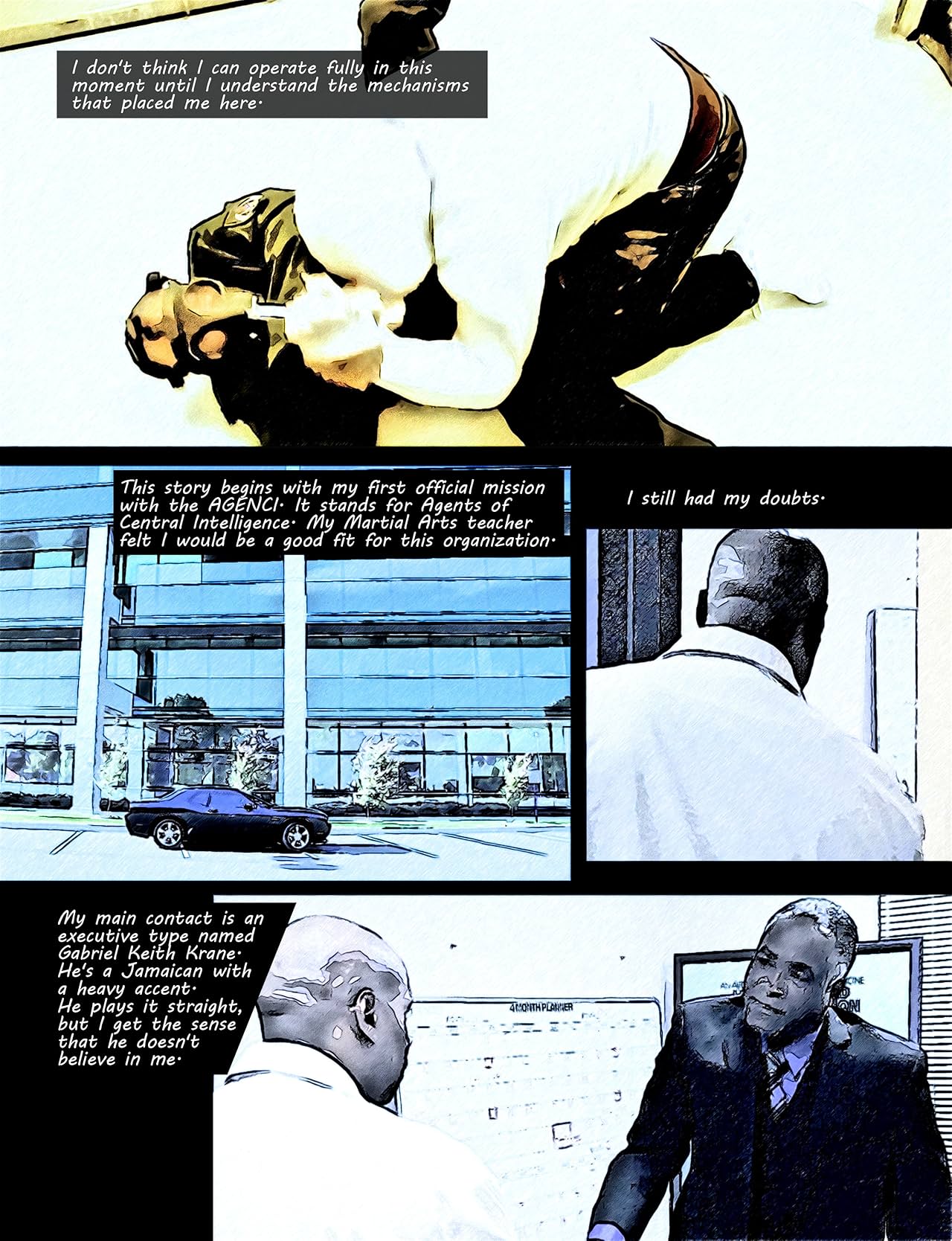
This story follows the first official mission of the Griffin with the AGENCI. Marcus Griffin thought he was working for the Agents of Central Intelligence. He will eventually discover the truth. Until then, he investigates a wonder drug that has been sabotaged. The source of contamination has been traced to a testing plant. The Griffin will be sent to uncover a sinister plot and will reflect on the larger plot that placed him in peril.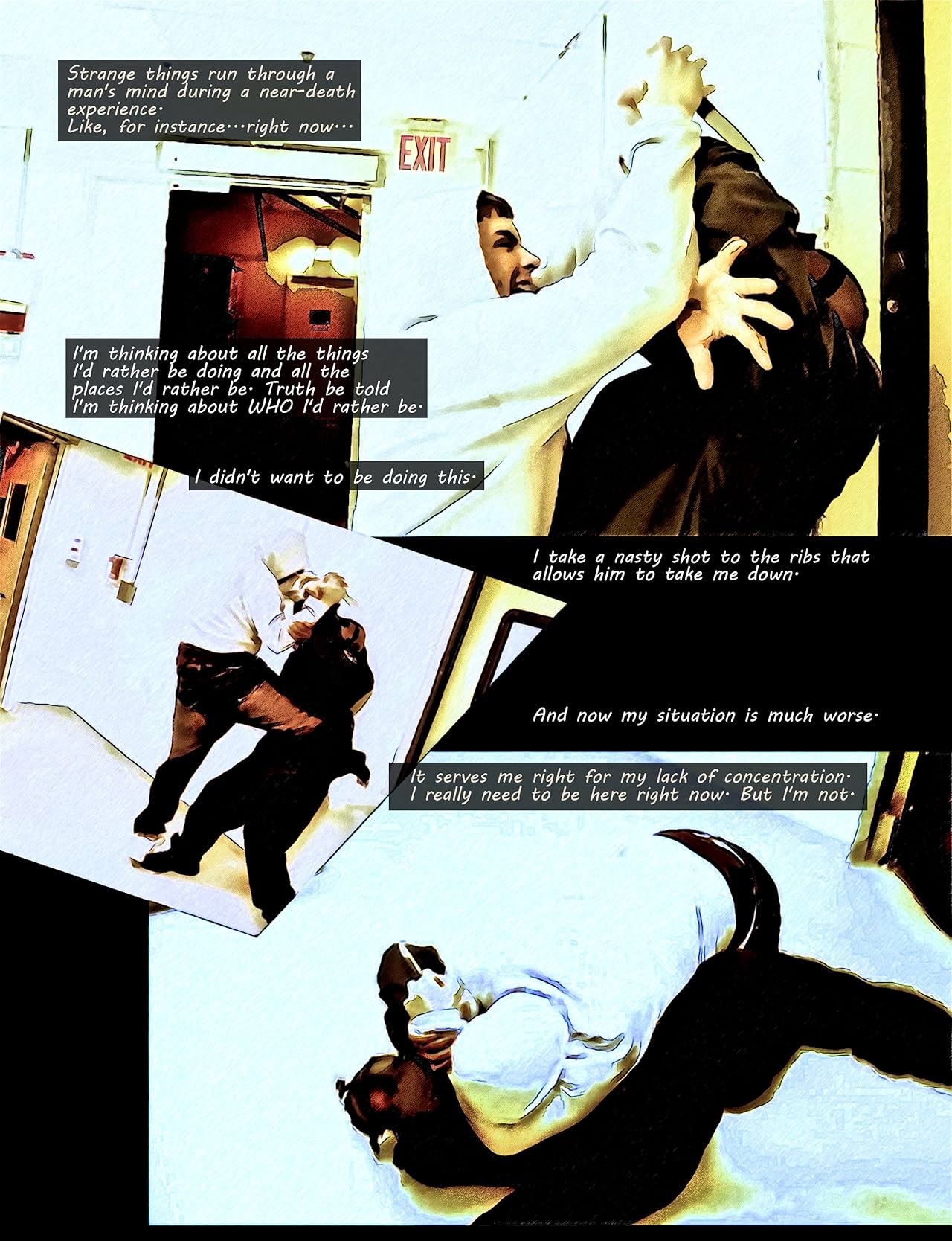
Available on comiXology
Central City Sewers on sale now CommercialR-O Studios it's not easy to tell what got miss placed but start by checking the pathway for the textures. The folder should read as stated above. If you own any of my other products locate Runtime/Textures/AntFarm and open that file. Drop the "City Central Sewer" folder in there. There should be no difference between the two downloads but if there is please submit a Bug Report, they will fix it.
Parkside point is partly missing or unwellAnyway having bought it i got the page saying download with daz central and daz central said i see no parkside point.... (this happens quite a bit i noticedAnother possibility; there have been random problems lately with files not actually being present on the DAZ download servers. In particular, if DAZ Central is given as the only download method, that doesn't mean all of the others will fail; it means all of them will fail, including DAZ Central — the files are just not there to be downloaded.
Open a support ticket (click on "Help" at the top of this page, then select "Contact Us") to let DAZ know the store software needs a good hard kick. Again.
I can raise a ticket but i have tickets going back to August that as far as i am concerned are not sorted so support is not frankly on my christmas card list
Parkside point is partly missing or unwellAnyway having bought it i got the page saying download with daz central and daz central said i see no parkside point.... (this happens quite a bit i noticedAnother possibility; there have been random problems lately with files not actually being present on the DAZ download servers. In particular, if DAZ Central is given as the only download method, that doesn't mean all of the others will fail; it means all of them will fail, including DAZ Central — the files are just not there to be downloaded.
Open a support ticket (click on "Help" at the top of this page, then select "Contact Us") to let DAZ know the store software needs a good hard kick. Again.
Daz 3D is part of

Connect
DAZ Productions, Inc.
7533 S Center View Ct #4664
West Jordan, UT 84084Licensing Agreement | Terms of Service | Privacy Policy | EULA
© 2026 Daz Productions Inc. All Rights Reserved.