-
AIUTO...CHI CONOSCE L’ITALIANO? PARTE DODICIMa per i render statici è anni, se non decadi, indietro rispetto ad Iray purtroppo :'(
Tipo? Cosa ha IRay che manca in Filament?

Siccome non uso IRay magari mi sfugge.
Qualità Imago. Di' pure quello che vuoi sui suoi difetti, ma il risultato finale lascia senza respiro.
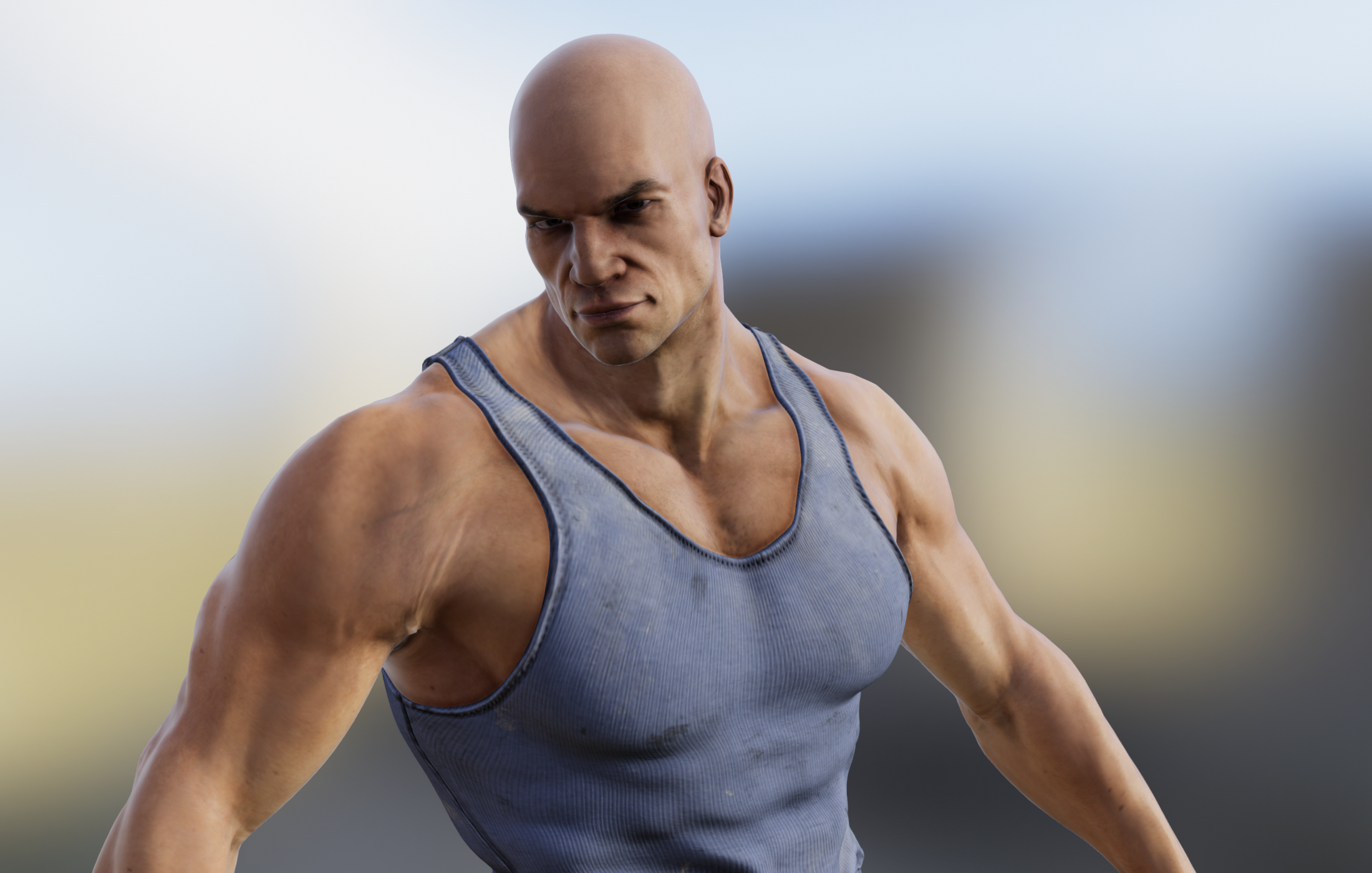
Per esempio, guarda i dettagli sulle facce di questi personaggi che ho usato per la cover del mio speciale di Halloween.
Poi già lo so che a te non piace, perché sa di setup fotografico ecc. ecc., ma è esattamente quello che io e chi mi supporta cerchiamo!
Quindi pazienza tutti i difetti, pazienza l'hardware che svuota le tasche: Iray è Iray, e per adesso è insostituibile.
Avevo molte speranze in Filament, ma a quanto pare è molto, molto indietro.Poi sono d'accordissimo con te sul fatto che sia un passo da gigante rispetto a 3Delight per le animazioni, dato che è impossibile fare animazioni con Iray se non sei una multinazionale di Hollywood!
Infatti quello mi piace molto, e magari proverò a farci qualcosa anch'io!
Pensa addirittura che ho cambiato la shortcut "9" da Texture Shaded a Filament: significa che lo userò come viewport principale! :DMa ho fiducia sul fatto che possa migliorare molto!
Ad esempio, vedevo sul thread principale che un PA ha già cacciato fuori dei render molto interessanti, e ci sta lavorando da tempo.
Però sembra più complesso: su Iray usi il semplice comportamento della luce, essendo basato su calcoli di fisica, quello invece è più simulato a quanto pare, tipo 3Delight.Comunque ho fatto i vari benchmark, e la Beta è più veloce del 6.4% in rendering! Niente male!
AIUTO...CHI CONOSCE L’ITALIANO? PARTE DODICIMa per i render statici è anni, se non decadi, indietro rispetto ad Iray purtroppo :'(Tipo? Cosa ha IRay che manca in Filament?
Siccome non uso IRay magari mi sfugge.
Daz Studio Pro BETA - version 4.12.2.60! (*UPDATED*)A few reports from my side:
- Iray (photoreal) is definitely faster for TitanV.
- Filament shouldn't be used for every single view at the same time in your UI (example: Top-left-right-front views). It consumes too much VRAM and causes iray to stop working :)
- Filament is too bright. I have to lower exposure to compansate overbright ares.
- Filament is too "transparent" on hairs or anything that has cutout opacity mapping.
- Filament is too "bumpy" on skin.
- Filament is not affected by every Tone mapping options under filament's draw settings (burnout settings doesn't effect the image)
- My hopes of using Filament in animations went down in flames when I noticed iray decals are not showing up at all in filament :(
- Animation keyframe clutters shown on timeline are now fixed on loading the scene, I also noticed copy-pasting tcb keyframes still corrupts, but doesn't crash daz studio by going into blank view/endless loop anymore. Going to linear and back to tcb for those broken keyframes fixes the animation.
- New animation keyframe clutters are introduced in timeline in completely random times. I can't exactly figure when this happens. However, refreshing the timeline sometimes triggers the clutter with the characters having dforce simulated clothes in the scene. Clutters are mostly introduced when there is no other motion on the characters other than dforce simulation on their clothes. I'm not 100% sure about this, but the clutter is there anyway. I am also not sure about how to reproduce this (yet).
Daz Studio Pro BETA - version 4.12.2.60! (*UPDATED*)Hi,
I'm quite new in Daz and I missed something like Eevee, now I hope Filament will be a complete solution and to me it looks promissing. I'm in "Comic/Cartoon" let's say, so I don't need 100% realism. I hope we will be able to create something like this: https://google.github.io/filament/webgl/helmet.htmlRegards
New DS Filament Render EngineI don't understand why Filament and Iray handle lighting so differently if they are both PBR. Why do the renders look so different? Is it because Iray shaders aren't interpreted "properly" by Filament? Filament examples I've seen so far are really disappointing. As a viewport preview, they don't look any closer to a final Iray render than a Texture Shaded preview does. They are different, but not better, to my eyes. Am I misunderstanding the purpose of using Filament in the viewport?
because PBR doesnt mean it is using raytracing, it is just how materials interact with each other, its physical based Shading actually.
New DS Filament Render EngineHow are some of you getting such smooth renders? Everything I do comes in super grainy. I must be missing something really important ;). It's things like this that make me really dislike that Daz makes no manual for its software. I have NO idea whatsoever how to use this.
Laurie
It might be the bump causing it? The Filament engine seems to "read" bumps quite a bit differently. Try lowering the Bump in the surfaces tab WAY down and see if that helps.
New DS Filament Render Enginemmm minimising it gets a line, full screen it doesn't so your viewport needs to match your render size by looks, interesting
Oh my goodness, I think you've solved it! Full Screen Mode rendered it without any lines!
So it appears that as long as your Viewport Window is larger than (or around the same size as) your Render Size, there are no lines?
@3diva please forgive this question as it's probably something super simple that I'm completely overlooking or not realizing, but how did you get to full screen mode on your viewport to animate this in a pixel size bigger than 977x784, or is this the default setting for you as well and you ran with it? That's the only size I can get my active viewport to set at and when I render that out the line is gone, but when I try to make it like 1920x1080 I get that line. This looks like it could be a gamechanger for many folks as I love the image I'm looking at that I created, but I would love to render it at a bigger resolution if possible right now, or hopefully in a future update. Thank you!
You have to set the render size to roughly the same size as your viewport size or less, I believe. I THINK it might depend on how big of a screen you have, but I'm not sure. I got a fairly large monitor for my birthday (display resolution 2560x1440) so I was able to get a fairly large preview size by rendering after going to Full-Screen Mode (Shift + F11). You might have to set the render option to a keyboard short cut so that once you go to full-screen mode you can just use the Render shortcut.
I would check to see what size your screen is and set the render size to around the same size or smaller than that.
@3diva Ah ha, shift F11! I will give that a whirl once my computer frees up this animation shot I started and see if that works. Sadly I'm using a 27 inch TV for my monitor that's maybe 1920x1080, I don't know as it's like 8 years old, but I am planning on getting myself a really good monitor here soon for my xmas gift to myself. I'll try your idea with setting render to a shortcut, that might just work. Thank you :)
@wendyluvscats two monitors is on the agenda for me too, that would be ideal! I'll double check my TV resolution too to make sure it's as big as can be, but I think I'm stuck with lower res for the time being with filament since I'm using a TV lol.
New DS Filament Render EngineSo, to spell things out a little more clearly, Filament is not a replacement for Iray.
It's more designed to be a game-engine level renderer with PBR roots. This means that materials using basic PBR properties in Iray should come over and look halfway decent right out of the box. In order to get it looking great it's going typically require some more tricks and "cheats". Even after doing some tweaking Iray is more than likely still going to pull out ahead in quality just because it makes light typically bounce like we expect light to bounce so it looks more real. The trade-off is the rendering time obviously, what takes Iray tens of minutes per frame Filament can run in tenths of a second. So if you are doing a web-comic series or building your own animation without a server-farm of high grade Nvidia equipment, then spending some extra time getting Filament to look good makes sense.
I'm impressed by the work that is being shown off so far in this thread. I know that Filament will likely be a bit more tricky to get looking good but judging by some of the stuff I have seen being passed around internally showing off what it is capable of, I'm sure you all will show off some amazing things in the near future. I've attached one of those images I've seen bouncing around, but it was definitely not made by me because I am not that talented of an artist. Hopefully it can give you a glimpse into what Filament in Daz Studio is capable of if you spend some time learning how to make it sing.
Hey guys! The render that rawb dropped is one of my Filament works. I've been working with filament for a while now to try and make it look the best it possibly can (or at least the best i can make it), and I've given daz a load of art and tutorial content for when it properly releases. I really hope you guys like it, it's going to lower the bar of entry for so many budding artists. I know a lot of potential users, especially in developing countries, who find it difficult to get a hold of expensive Nvidia cards. Even fairly affluent people are probably going to think twice about shelling out $2000 for a entry-tier render rig. Even though it's not quite as glamorous as iray, i really enjoy using it, and i hope you guys do too. Remember that it's going to grow and evolve over time, and it's going to get plenty of PA support. I have faith in the creativity of this community, make something awesome!
If you have any questions, or need any help, i'll lurk around this thread and see where i can pitch in.
Here's another couple of renders i'm allowed to share...
Thank you for sharing all of this, @KindredArts! Can't wait to see the stuff you put out to go with it, I always know it's gonna be quality and also easy enough for a new artist like me to figure out. As someone who currently has a very underpowered rig for Iray (six year old processor, single GTX 1070 Ti are what I've got to work with until money allows and I keep spending all that on content), it's awesome to see that Filament can do lovely work, even if it's not fancy, photorealistic Iray.
I really appreciate what it's offered me in terms of a viewport tool; people have complaints but me and my low bar over here are loving it. Iray cameras work with it, which means I can finally compose scenes using the ones that come with all the ridiculously geometry-heavy stuff I own, and be able to see something other than the black blobs. That's made it possible for me to very quickly find and delete unneeded geometry so that other optimization tools have a chance to get in there, which they just didn't before. I went to bed nearly crying with frustration two nights ago and dreading the returns I was gonna have to do. Woke up to the new beta + Filament and it was like light at the end of the tunnel.
Iray renders, well, those'll still be "leave it overnight and pray," but I'm currently flipping between Textured, Filament, and Iray for previews almost without thinking and the impact on my workflow has been incredible. It's giving me my best shot so far at optimizing for Iray on the rig I've got. I would love to do finished pieces with it some day for a different look, and in the meantime I think it's going to be amazing for doing scene-building and thumbnails for composition prior to switching to Iray for final lighting, tweaks, and rendering.
So, as someone new to renders as art themselves rather than just concepts for other art, I'm appreciating what Filament does already, and looking forward to everything that it brings us as it grows. I like the aesthetic of KindredArts' renders and can see myself doing similar ones and enjoying them a lot!
(P.S. @KindredArts, is it okay if I send you a sitemail? I have a question about something I'd like to buy but don't want to derail things here.)
New DS Filament Render EngineHope this helps!
That's an amazing little introduction there Kindred Arts.
Also, thank you for these great renders, it really shows off the early days of what Filament in Daz Studio is capable of.
New DS Filament Render EngineSo, to spell things out a little more clearly, Filament is not a replacement for Iray.
It's more designed to be a game-engine level renderer with PBR roots. This means that materials using basic PBR properties in Iray should come over and look halfway decent right out of the box. In order to get it looking great it's going typically require some more tricks and "cheats". Even after doing some tweaking Iray is more than likely still going to pull out ahead in quality just because it makes light typically bounce like we expect light to bounce so it looks more real. The trade-off is the rendering time obviously, what takes Iray tens of minutes per frame Filament can run in tenths of a second. So if you are doing a web-comic series or building your own animation without a server-farm of high grade Nvidia equipment, then spending some extra time getting Filament to look good makes sense.
I'm impressed by the work that is being shown off so far in this thread. I know that Filament will likely be a bit more tricky to get looking good but judging by some of the stuff I have seen being passed around internally showing off what it is capable of, I'm sure you all will show off some amazing things in the near future. I've attached one of those images I've seen bouncing around, but it was definitely not made by me because I am not that talented of an artist. Hopefully it can give you a glimpse into what Filament in Daz Studio is capable of if you spend some time learning how to make it sing.
Hey guys! The render that rawb dropped is one of my Filament works. I've been working with filament for a while now to try and make it look the best it possibly can (or at least the best i can make it), and I've given daz a load of art and tutorial content for when it properly releases. I really hope you guys like it, it's going to lower the bar of entry for so many budding artists. I know a lot of potential users, especially in developing countries, who find it difficult to get a hold of expensive Nvidia cards. Even fairly affluent people are probably going to think twice about shelling out $2000 for a entry-tier render rig. Even though it's not quite as glamorous as iray, i really enjoy using it, and i hope you guys do too. Remember that it's going to grow and evolve over time, and it's going to get plenty of PA support. I have faith in the creativity of this community, make something awesome!
If you have any questions, or need any help, i'll lurk around this thread and see where i can pitch in.
Here's another couple of renders i'm allowed to share...
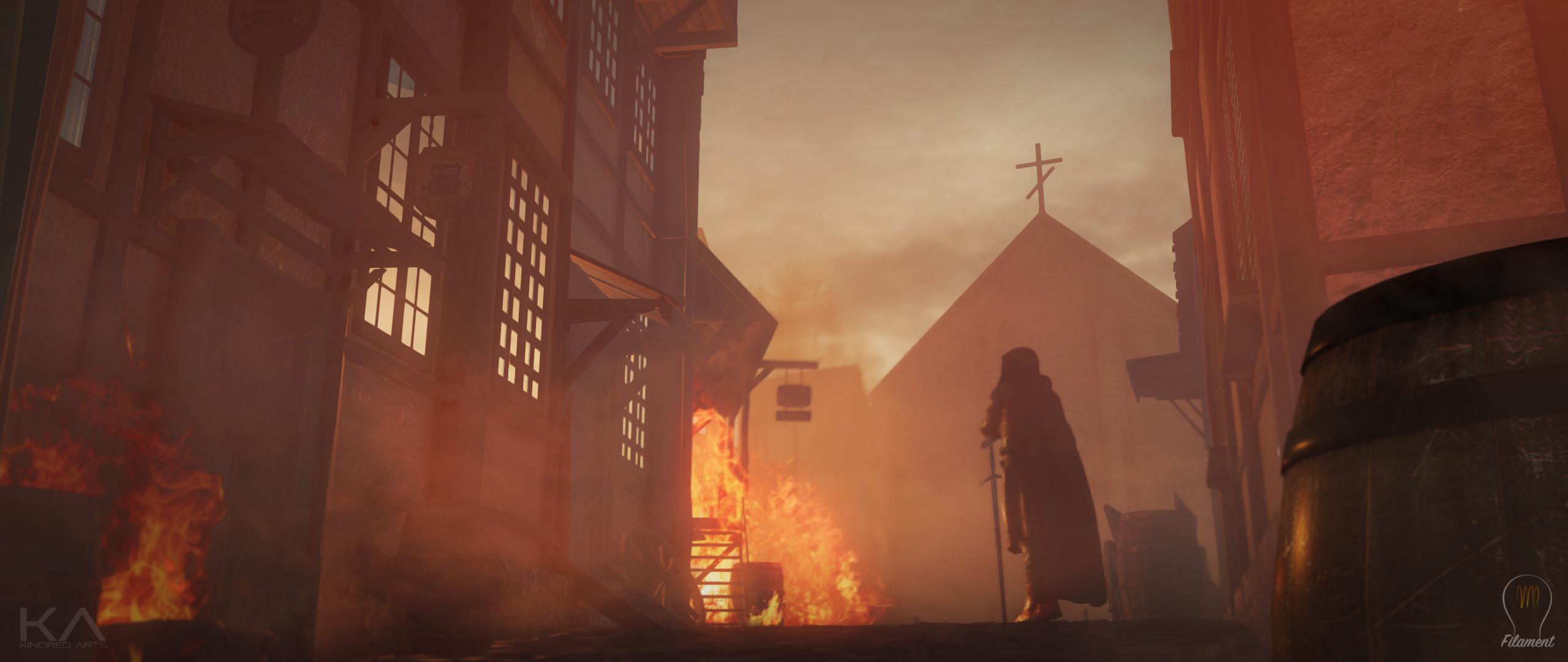
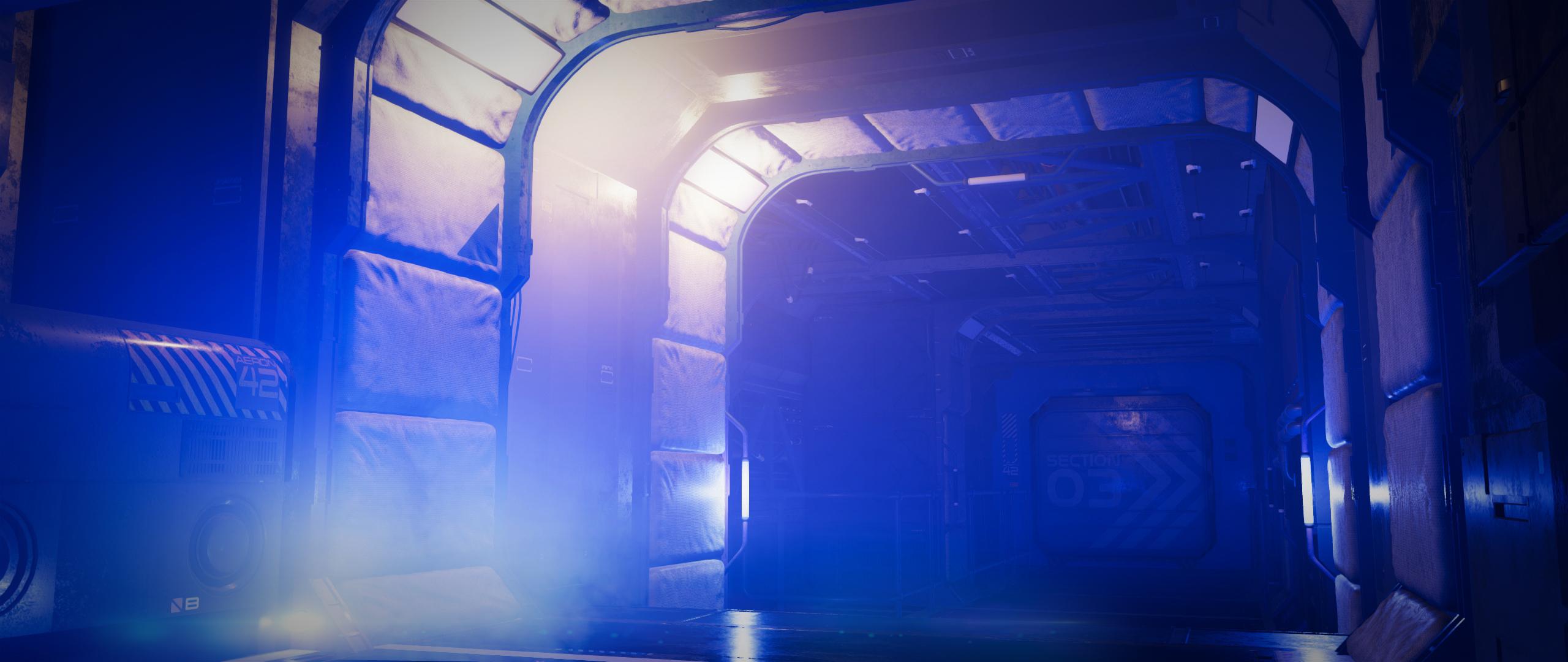
That looks amazing, KA! How did you get the fog, bloom, and light glare effects? Is that postwork or are those raw renders?
Hiya!
There's definitely postwork there, but not necessarily more than i'd do with iray. I have a set that will release with filament that will allow you to have one-click fog/smoke effects. However, that doesn't help you right now, so lets walk you through how to do it for free.
Firstly i've opened an environment, this is Poseidon station on my store (any scene will do!)
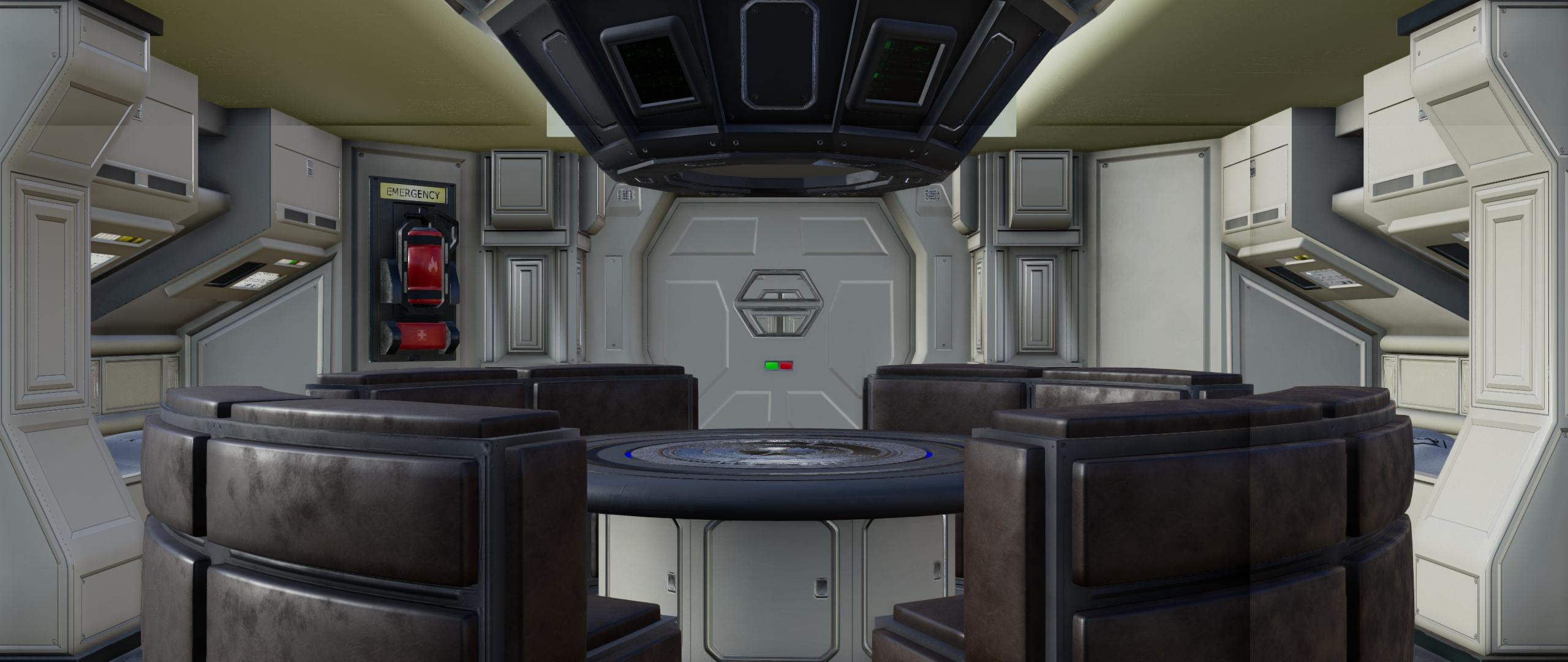
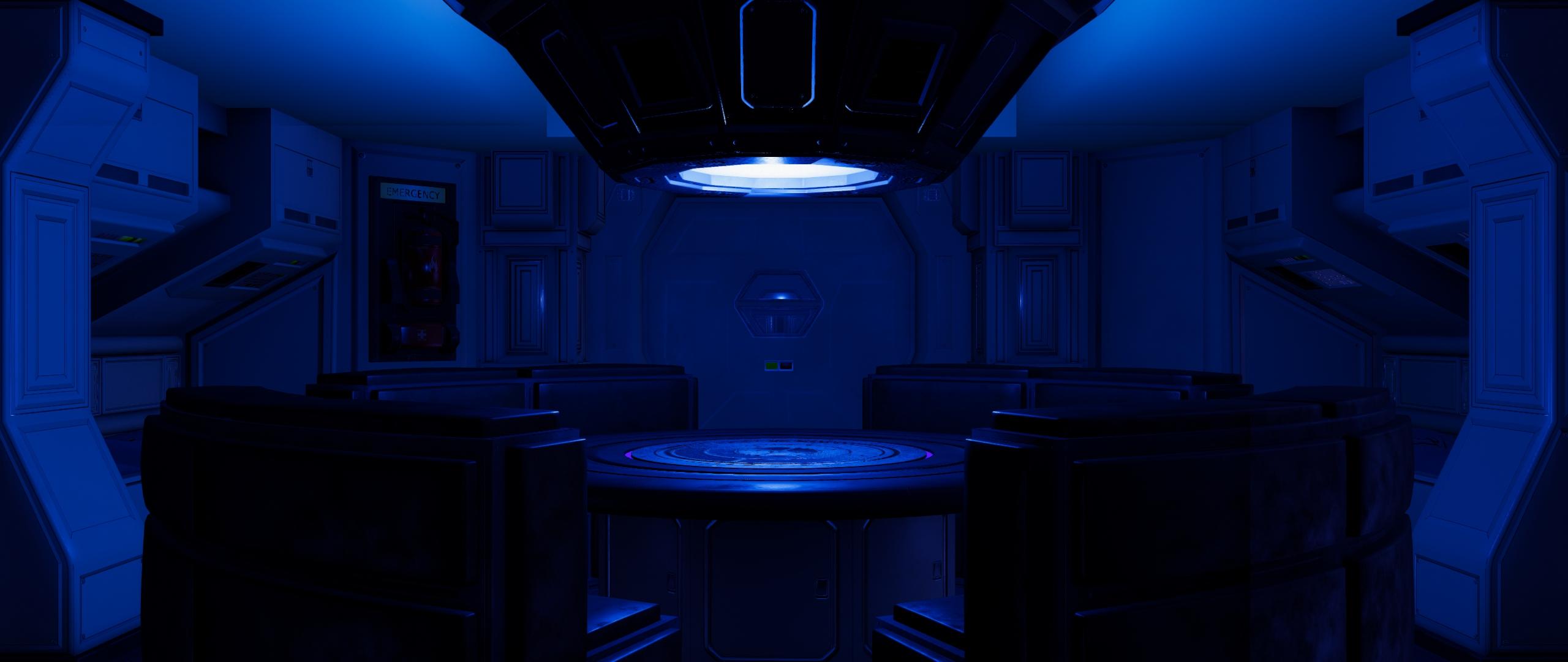
As you can see, pretty blank and depressing. Your first lighting pass should be your HDRI selection which should be your key scene color. I've planned for a standard blue and orange setup here, so a blue HDRI.
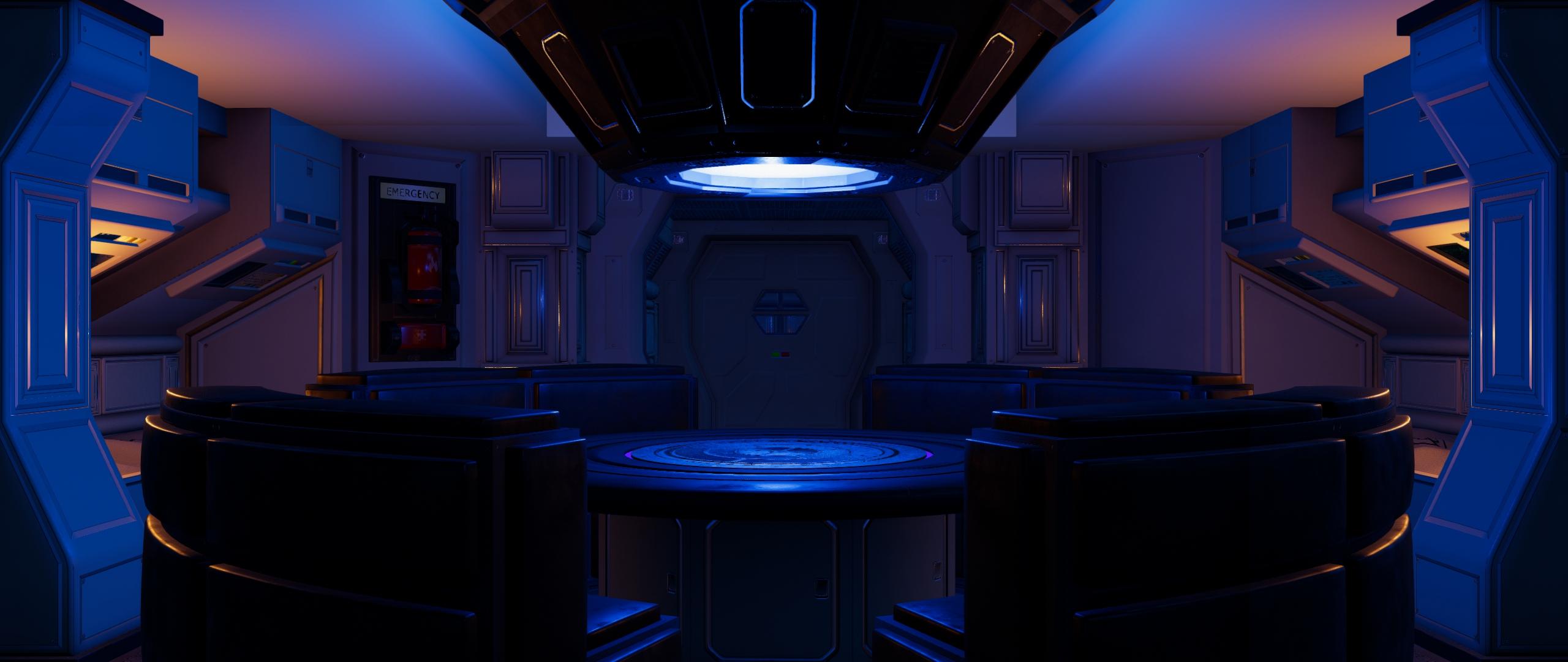
Now for my orange key lights on each side.
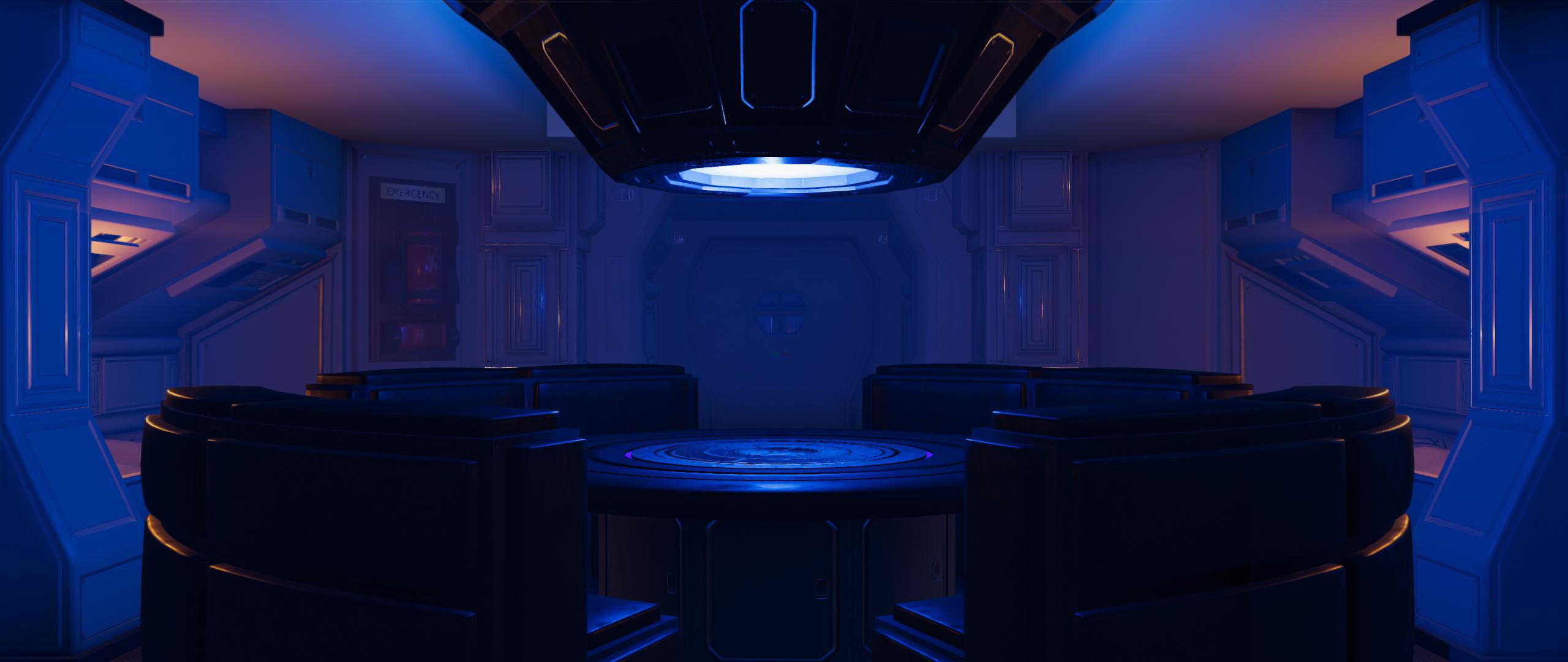
Now is where the bloom/atmosphere comes in. Again, this is a bit of a fiddly proccess but i've made this tutorial since you posted, so its not that bad. You need to have a plane in front of the camera, a plane behind the light, and a plane by each of the bunks. I'll show you where i placed this later, but you're basically trying to place them as near to your light sources as you can, whilst also trying to hide them in the scene. Simple black and white gradients in the cutout opacity on your planes will help hide them. This is what it looks like...
Then finally, since its a smokey tutorial, i added some smoke to the center light. I just grabbed a cylinder primitive, placed it around the table, then grabbed a free smoke picture from pixabay (here), and added it to the cutout/opacity of the cylinder. Then, i used a dformer on the bottom of the cylinder to expand the bottom and give that wide falloff. Easy peasy. Here's the setup with the planes/cylinder etc at full opacity.
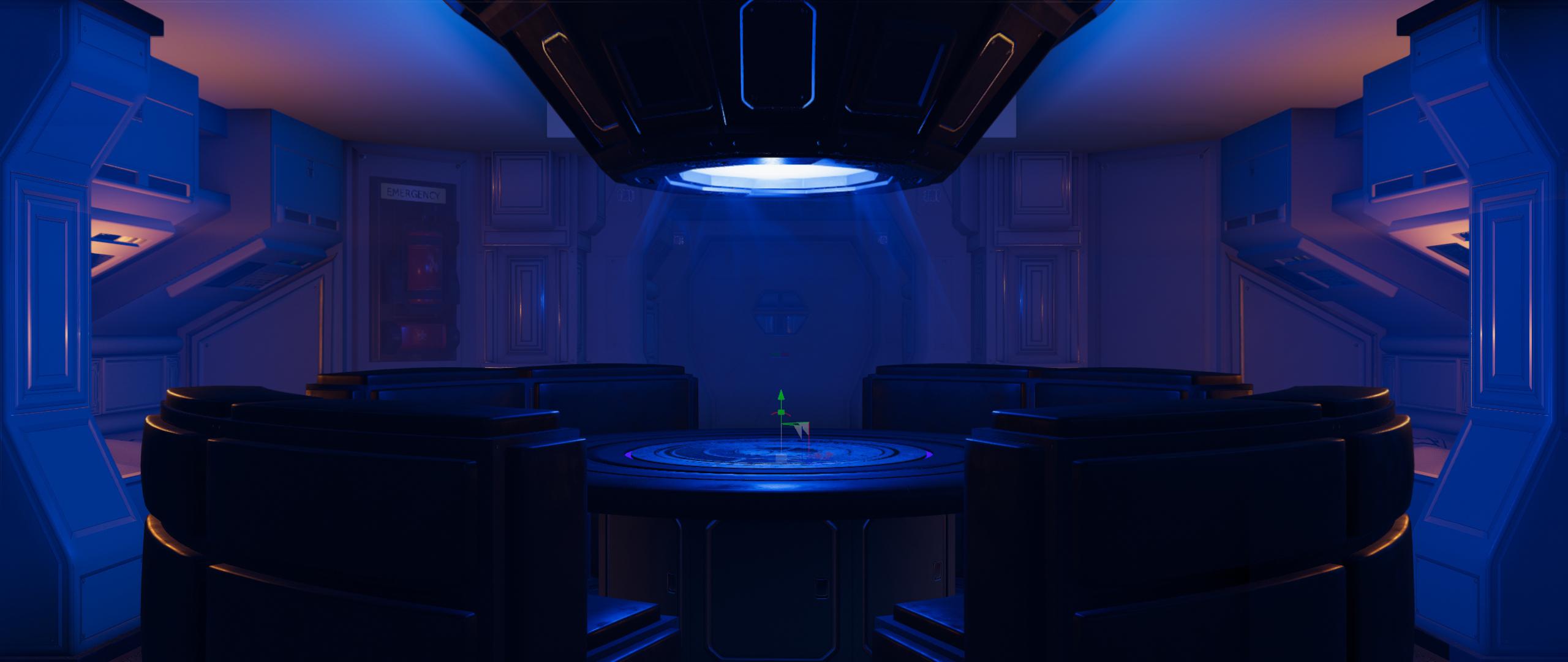
Thats it, just filament. You can do a little clone stamp clean up, some contrast/color work in photoshop and call it a day. Here's where i put all my planes etc...
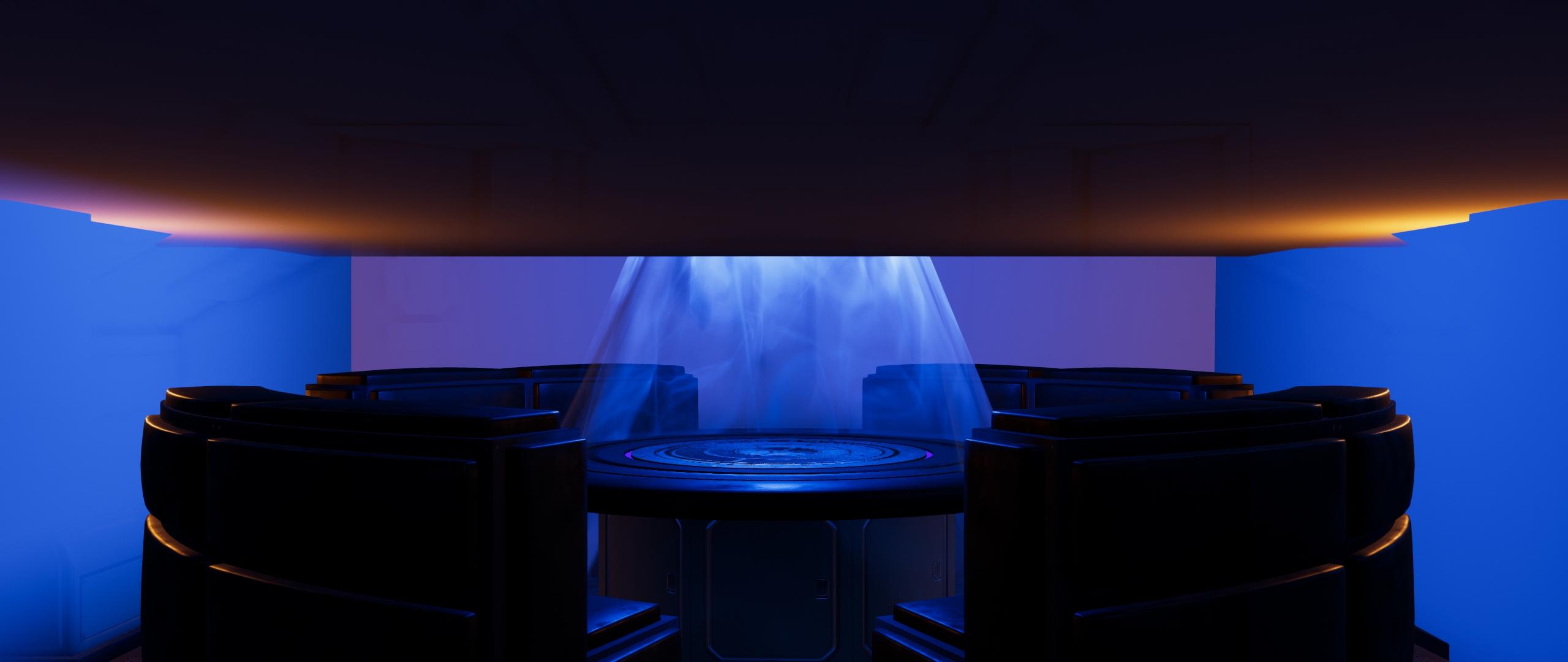
Hope this helps!
What is DTLP7?They are HDRI maps, so you will only see them applied in Iray Preview or once you render.Or in Filament, if you're using the current beta (and not using a Mac (which I believe BrainMuffin does, so disregard)).
Yes, I'm on an old iMac. If I had 100k subs on my YouTube channel I might be able to get a new one. :-)
New DS Filament Render Enginehttps://opensource.google/projects/filament
Getting Started with Filament on Android ~ written by Philip Rideout Graphics Develope https://medium.com/@philiprideout
I look forward to see what you guys do with it
New DS Filament Render EngineSo, to spell things out a little more clearly, Filament is not a replacement for Iray.
It's more designed to be a game-engine level renderer with PBR roots. This means that materials using basic PBR properties in Iray should come over and look halfway decent right out of the box. In order to get it looking great it's going typically require some more tricks and "cheats". Even after doing some tweaking Iray is more than likely still going to pull out ahead in quality just because it makes light typically bounce like we expect light to bounce so it looks more real. The trade-off is the rendering time obviously, what takes Iray tens of minutes per frame Filament can run in tenths of a second. So if you are doing a web-comic series or building your own animation without a server-farm of high grade Nvidia equipment, then spending some extra time getting Filament to look good makes sense.
I'm impressed by the work that is being shown off so far in this thread. I know that Filament will likely be a bit more tricky to get looking good but judging by some of the stuff I have seen being passed around internally showing off what it is capable of, I'm sure you all will show off some amazing things in the near future. I've attached one of those images I've seen bouncing around, but it was definitely not made by me because I am not that talented of an artist. Hopefully it can give you a glimpse into what Filament in Daz Studio is capable of if you spend some time learning how to make it sing.
It renders incredibly fast and I'm really excited to see what changes and evolution we'll see with Filament! Once some of the bugs are worked out I think this will be quite viable for animators who aren't necessarily after 100% photorealism. I, too, am really looking forward to seeing what the community does with it!
New DS Filament Render EngineSo, to spell things out a little more clearly, Filament is not a replacement for Iray.
It's more designed to be a game-engine level renderer with PBR roots. This means that materials using basic PBR properties in Iray should come over and look halfway decent right out of the box. In order to get it looking great it's going typically require some more tricks and "cheats". Even after doing some tweaking Iray is more than likely still going to pull out ahead in quality just because it makes light typically bounce like we expect light to bounce so it looks more real. The trade-off is the rendering time obviously, what takes Iray tens of minutes per frame Filament can run in tenths of a second. So if you are doing a web-comic series or building your own animation without a server-farm of high grade Nvidia equipment, then spending some extra time getting Filament to look good makes sense.
I'm impressed by the work that is being shown off so far in this thread. I know that Filament will likely be a bit more tricky to get looking good but judging by some of the stuff I have seen being passed around internally showing off what it is capable of, I'm sure you all will show off some amazing things in the near future. I've attached one of those images I've seen bouncing around, but it was definitely not made by me because I am not that talented of an artist. Hopefully it can give you a glimpse into what Filament in Daz Studio is capable of if you spend some time learning how to make it sing.
Hey guys! The render that rawb dropped is one of my Filament works. I've been working with filament for a while now to try and make it look the best it possibly can (or at least the best i can make it), and I've given daz a load of art and tutorial content for when it properly releases. I really hope you guys like it, it's going to lower the bar of entry for so many budding artists. I know a lot of potential users, especially in developing countries, who find it difficult to get a hold of expensive Nvidia cards. Even fairly affluent people are probably going to think twice about shelling out $2000 for a entry-tier render rig. Even though it's not quite as glamorous as iray, i really enjoy using it, and i hope you guys do too. Remember that it's going to grow and evolve over time, and it's going to get plenty of PA support. I have faith in the creativity of this community, make something awesome!
If you have any questions, or need any help, i'll lurk around this thread and see where i can pitch in.
Here's another couple of renders i'm allowed to share...
That looks amazing, KA! How did you get the fog, bloom, and light glare effects? Is that postwork or are those raw renders?
New DS Filament Render Enginethanks for the update Rawb, much appreciated.
The Filament spec is pretty well written, except for the blank page where SSS should be. A blog post sounds like they're faking SSS for performance reasons.
I'm interested in using it as a Eevee-style preview renderer. The biggest gap seems to be lack of Translucency+SSS, which changes the look a lot.
Big question is, is that unfinished, or can subsurface stuff not be translated from MDL to Filament with reasonable effort...
New DS Filament Render EngineSo, to spell things out a little more clearly, Filament is not a replacement for Iray.
It's more designed to be a game-engine level renderer with PBR roots. This means that materials using basic PBR properties in Iray should come over and look halfway decent right out of the box. In order to get it looking great it's going typically require some more tricks and "cheats". Even after doing some tweaking Iray is more than likely still going to pull out ahead in quality just because it makes light typically bounce like we expect light to bounce so it looks more real. The trade-off is the rendering time obviously, what takes Iray tens of minutes per frame Filament can run in tenths of a second. So if you are doing a web-comic series or building your own animation without a server-farm of high grade Nvidia equipment, then spending some extra time getting Filament to look good makes sense.
I'm impressed by the work that is being shown off so far in this thread. I know that Filament will likely be a bit more tricky to get looking good but judging by some of the stuff I have seen being passed around internally showing off what it is capable of, I'm sure you all will show off some amazing things in the near future. I've attached one of those images I've seen bouncing around, but it was definitely not made by me because I am not that talented of an artist. Hopefully it can give you a glimpse into what Filament in Daz Studio is capable of if you spend some time learning how to make it sing.
Hey guys! The render that rawb dropped is one of my Filament works. I've been working with filament for a while now to try and make it look the best it possibly can (or at least the best i can make it), and I've given daz a load of art and tutorial content for when it properly releases. I really hope you guys like it, it's going to lower the bar of entry for so many budding artists. I know a lot of potential users, especially in developing countries, who find it difficult to get a hold of expensive Nvidia cards. Even fairly affluent people are probably going to think twice about shelling out $2000 for a entry-tier render rig. Even though it's not quite as glamorous as iray, i really enjoy using it, and i hope you guys do too. Remember that it's going to grow and evolve over time, and it's going to get plenty of PA support. I have faith in the creativity of this community, make something awesome!
If you have any questions, or need any help, i'll lurk around this thread and see where i can pitch in.
Here's another couple of renders i'm allowed to share...
What is DTLP7?They are HDRI maps, so you will only see them applied in Iray Preview or once you render.Or in Filament, if you're using the current beta (and not using a Mac (which I believe BrainMuffin does, so disregard)).
New DS Filament Render EngineSo, to spell things out a little more clearly, Filament is not a replacement for Iray.
It's more designed to be a game-engine level renderer with PBR roots. This means that materials using basic PBR properties in Iray should come over and look halfway decent right out of the box. In order to get it looking great it's going typically require some more tricks and "cheats". Even after doing some tweaking Iray is more than likely still going to pull out ahead in quality just because it makes light typically bounce like we expect light to bounce so it looks more real. The trade-off is the rendering time obviously, what takes Iray tens of minutes per frame Filament can run in tenths of a second. So if you are doing a web-comic series or building your own animation without a server-farm of high grade Nvidia equipment, then spending some extra time getting Filament to look good makes sense.
Perhaps you could share some of those "tricks and cheats"?
New DS Filament Render Enginethanks DAZ_Rawb

I am especially thrilled I can now use DAZ studio on my older computer thanks to Filament, that computer was strictly Carrara, Blender and some music apps before as no graphics card, Filament renders very well on it, I will also be using D|S more for animation not just a means to get content into other apps and render backgrounds thanks to this!
I really don't mind not having to export everything to FBX and convert stuff to use it
 New DS Filament Render Engine
So, to spell things out a little more clearly, Filament is not a replacement for Iray.
It's more designed to be a game-engine level renderer with PBR roots. This means that materials using basic PBR properties in Iray should come over and look halfway decent right out of the box. In order to get it looking great it's going typically require some more tricks and "cheats". Even after doing some tweaking Iray is more than likely still going to pull out ahead in quality just because it makes light typically bounce like we expect light to bounce so it looks more real. The trade-off is the rendering time obviously, what takes Iray tens of minutes per frame Filament can run in tenths of a second. So if you are doing a web-comic series or building your own animation without a server-farm of high grade Nvidia equipment, then spending some extra time getting Filament to look good makes sense.
I'm impressed by the work that is being shown off so far in this thread. I know that Filament will likely be a bit more tricky to get looking good but judging by some of the stuff I have seen being passed around internally showing off what it is capable of, I'm sure you all will show off some amazing things in the near future. I've attached one of those images I've seen bouncing around, but it was definitely not made by me because I am not that talented of an artist. Hopefully it can give you a glimpse into what Filament in Daz Studio is capable of if you spend some time learning how to make it sing.
Daz 3D is part of

Connect
DAZ Productions, Inc.
7533 S Center View Ct #4664
West Jordan, UT 84084Licensing Agreement | Terms of Service | Privacy Policy | EULA
© 2026 Daz Productions Inc. All Rights Reserved.