-
New DS Filament Render Engine
As Rawb said, Filament isn't meant to be a replacement for Iray: https://www.daz3d.com/forums/discussion/comment/6112287/#Comment_6112287
It's not as pretty as Iray and it's not meant to be competition with Iray, as far as I can tell. It's not bad looking at all though for what it can do - which is render at lightning speed. It also handles scene navigation incredibly well, even with huge sets and tons of geometry and textures in the scene. I'm really impressed with it for a preview style and I think it has HUGE promise as a renderer for animations and games and anything else needing really fast rendering.
New DS Filament Render EngineAh, so it was the normals that were making the skin look bad ;). At any rate, I don't see it replacing Iray any time soon :). Good exercise tho :D
Laurie
That's a big improvement.
I have a feeling that Filament will be its own thing, rather than an Iray companion. Filament renders have a pretty distinctive look that works well for comics and animations, where volume and speed of renders are a priority. For stand-alone character renders, I don't see it replacing Iray.
@KindredArts Good news about emissives. For the sci-fi type renders Filament favours, they're a big deal, as well as for people who want to convert from Iray, generally.
New DS Filament Render EngineYou may want to check the Filament docs, which include a description of the surface options. I don't see a built-in way to add glows https://google.github.io/filament/Materials.html#materialmodels/litmodel/emissive
I see it does have an emissive surface though, just iray emissive does not appear to affect it
No emissive or unlit materials as yet, but there is the ability to do this, it just needs to be ported by the programming guys. I've voiced extreme interest in this happening, because some of the promo shots i did for release included hundreds of point lights that probably wouldn't have been necessary if we had unlit textures. They know it needs to happen, and i'll keep whinging until it happens, so hopefully it shouldn't be long

 New DS Filament Render Engine
You may want to check the Filament docs, which include a description of the surface options. I don't see a built-in way to add glows https://google.github.io/filament/Materials.html#materialmodels/litmodel/emissive
I see it does have an emissive surface though, just iray emissive does not appear to affect it
No emissive or unlit materials as yet, but there is the ability to do this, it just needs to be ported by the programming guys. I've voiced extreme interest in this happening, because some of the promo shots i did for release included hundreds of point lights that probably wouldn't have been necessary if we had unlit textures. They know it needs to happen, and i'll keep whinging until it happens, so hopefully it shouldn't be long
New DS Filament Render EngineYou may want to check the Filament docs, which include a description of the surface options. I don't see a built-in way to add glows https://google.github.io/filament/Materials.html#materialmodels/litmodel/emissive
I see it does have an emissive surface though, just iray emissive does not appear to affect it
New DS Filament Render EngineYou may want to check the Filament docs, which include a description of the surface options. I don't see a built-in way to add glows https://google.github.io/filament/Materials.html#materialmodels/litmodel/emissive
New DS Filament Render EngineNot to be too greedy but I'd love it if that (openGL based I guess) texture shaded mode in the viewport was expaned to be a renderer was made to do the opacities and SBH well enough to produuce a nice claymation sort of final render. I've tried the openGL Advanced selection hoping for a similar look at what I see in the texture shaded viewport but more refined in the the renderer drop-down menu but everytime I've tried to use it DAZ Studio locks up & I have to abort it.
If you choose Viewport as the Render Engine you will get whatever is active in the Viewport, with the same settings (except for Iray) though without non-rendering elements (such Gizmos and the mouse pointer). You can get strand-based hair to show using the settings for Tessellation and Preview Hairs
Richard, I am interested in what you mention here about choosing Viewport as the Render Engine. However, in render settings, I do not have Viewport as an option for Render Engine (only Basic OpenGL, Intermediate OpenGL, NVIDIA Iray, 3Delight, and Scripted 3Delight). Is Viewport something only found in the Beta or am I looking in the wrong place?
Yes, Filament and the supporting chnages are in the Beta only at this time.
Daz Studio Pro BETA - version 4.12.2.60! (*UPDATED*)A few reports from my side:
- Iray (photoreal) is definitely faster for TitanV.
- Filament shouldn't be used for every single view at the same time in your UI (example: Top-left-right-front views). It consumes too much VRAM and causes iray to stop working :)
- Filament is too bright. I have to lower exposure to compansate overbright ares.
- Filament is too "transparent" on hairs or anything that has cutout opacity mapping.
- Filament is too "bumpy" on skin.
- Filament is not affected by every Tone mapping options under filament's draw settings (burnout settings doesn't effect the image)
- My hopes of using Filament in animations went down in flames when I noticed iray decals are not showing up at all in filament :(
- Animation keyframe clutters shown on timeline are now fixed on loading the scene, I also noticed copy-pasting tcb keyframes still corrupts, but doesn't crash daz studio by going into blank view/endless loop anymore. Going to linear and back to tcb for those broken keyframes fixes the animation.
- New animation keyframe clutters are introduced in timeline in completely random times. I can't exactly figure when this happens. However, refreshing the timeline sometimes triggers the clutter with the characters having dforce simulated clothes in the scene. Clutters are mostly introduced when there is no other motion on the characters other than dforce simulation on their clothes. I'm not 100% sure about this, but the clutter is there anyway. I am also not sure about how to reproduce this (yet).
When you say "keyframe clutters", are you referring to the bug that causes random clusters of keyframes to appear on the Timeline? Because I sometimes encounter this bug when dealing with IK chains, especially complex ones. It makes me wonder if maybe it's related to high CPU usage or something.
Yep, "bug that causes random clusters of keyframes to appear on the Timeline?" this one. Correct.When the scene is loaded, they are not there, when you refresh timeline, suddenly in some "still" parts, they appear out of nowhere. And literally cover every single frame. In the past, refresh was fixing this. Now, refresh brings these in and not fixable. I didn't notice any impact on animation by these clutters (yet), however, I simply lost track and can't see anything between tens or even hundreds of clutter frames.
New DS Filament Render Enginemmm minimising it gets a line, full screen it doesn't so your viewport needs to match your render size by looks, interesting
Oh my goodness, I think you've solved it! Full Screen Mode rendered it without any lines!
So it appears that as long as your Viewport Window is larger than (or around the same size as) your Render Size, there are no lines?
@3diva please forgive this question as it's probably something super simple that I'm completely overlooking or not realizing, but how did you get to full screen mode on your viewport to animate this in a pixel size bigger than 977x784, or is this the default setting for you as well and you ran with it? That's the only size I can get my active viewport to set at and when I render that out the line is gone, but when I try to make it like 1920x1080 I get that line. This looks like it could be a gamechanger for many folks as I love the image I'm looking at that I created, but I would love to render it at a bigger resolution if possible right now, or hopefully in a future update. Thank you!
You have to set the render size to roughly the same size as your viewport size or less, I believe. I THINK it might depend on how big of a screen you have, but I'm not sure. I got a fairly large monitor for my birthday (display resolution 2560x1440) so I was able to get a fairly large preview size by rendering after going to Full-Screen Mode (Shift + F11). You might have to set the render option to a keyboard short cut so that once you go to full-screen mode you can just use the Render shortcut.
I would check to see what size your screen is and set the render size to around the same size or smaller than that.
This should be a temporary requirement, I think - see http://docs.daz3d.com/doku.php/public/software/dazstudio/4/change_log#4_12_2_53
Filament (PBR) renders (via Render Settings > Engine: 'Viewport' when the active viewport DrawStyle is set to 'Filament (PBR)') no longer attempts to tile using the active viewport size
That's really good news! Thank you, Richard! :)
Daz Studio Pro BETA - version 4.12.2.60! (*UPDATED*)A few reports from my side:
- Iray (photoreal) is definitely faster for TitanV.
- Filament shouldn't be used for every single view at the same time in your UI (example: Top-left-right-front views). It consumes too much VRAM and causes iray to stop working :)
- Filament is too bright. I have to lower exposure to compansate overbright ares.
- Filament is too "transparent" on hairs or anything that has cutout opacity mapping.
- Filament is too "bumpy" on skin.
- Filament is not affected by every Tone mapping options under filament's draw settings (burnout settings doesn't effect the image)
- My hopes of using Filament in animations went down in flames when I noticed iray decals are not showing up at all in filament :(
Well, they are Iray Decals. Decals, and Section Planes, use features of Iray so you are not going to see them work with other engines.
- Animation keyframe clutters shown on timeline are now fixed on loading the scene, I also noticed copy-pasting tcb keyframes still corrupts, but doesn't crash daz studio by going into blank view/endless loop anymore. Going to linear and back to tcb for those broken keyframes fixes the animation.
- New animation keyframe clutters are introduced in timeline in completely random times. I can't exactly figure when this happens. However, refreshing the timeline sometimes triggers the clutter with the characters having dforce simulated clothes in the scene. Clutters are mostly introduced when there is no other motion on the characters other than dforce simulation on their clothes. I'm not 100% sure about this, but the clutter is there anyway. I am also not sure about how to reproduce this (yet).
New DS Filament Render EngineOk, here is my crappy Filament viewport with an Iray render. Of course I have no idea about any of it...lol. It looks like crap and I'm clueless as how to fix it because I have nothing to go on. Also, the figure's eyebrows are not showing up with Filament. Is that normal?
Laurie
Odd that Filament does not render the shadows from the hair on the neck.
New DS Filament Render EngineOk, here is my crappy Filament viewport with an Iray render. Of course I have no idea about any of it...lol. It looks like crap and I'm clueless as how to fix it because I have nothing to go on. Also, the figure's eyebrows are not showing up with Filament. Is that normal?
Laurie
The noise on the skin is the normal map i think.Go into your characters skin surface settings and turn the normal strength down to something like 0.1.
Turn bump down too, if you're still getting noise. I still think its your normals though.
New DS Filament Render EngineOk, here is my crappy Filament viewport with an Iray render. Of course I have no idea about any of it...lol. It looks like crap and I'm clueless as how to fix it because I have nothing to go on. Also, the figure's eyebrows are not showing up with Filament. Is that normal?
Laurie
New DS Filament Render EngineSevrin I suspect a shader preset is needed
I am still not finding a way to get ambient glow for flames to use with my lights
I found glass varied a lot by shader too
...and my M3 and V3 skins actually looked half decent just with Poser materials in this test https://www.facebook.com/wendy5/videos/10222142032973824
A set of shaders would help. Something like Skin Builder, Alter8 or Anagenesis for Filament would be nice. I suspect that something like that is in the works, based on KA's and Rawb's comments. And yeah, the skin tones in your video are a good enough for a lot of purposes. I don't see a whole lot of PAs adding Filament materials to their character offerings, though, when most no longer even support 3DL which a lot of people still use.
I get that Filament is not for every render, or even for every user. I'm lucky to have an RTX card, so Iray works well, and I don't see myself committing to Filament, apart from the occasional experiments.
New DS Filament Render EngineOne area that will need clarification is how to handle skin. This is Aria set against one of Dreamlight's Beach Scenes rendered with Iray and with Filament at the same exposure setting. The background is decently saturated, infact overly so but doesn't require much in the way of adjustment. The dress is washed out, but doesn't look to bad. The skin, I don't know what to do with. Or the hair, for that matter.
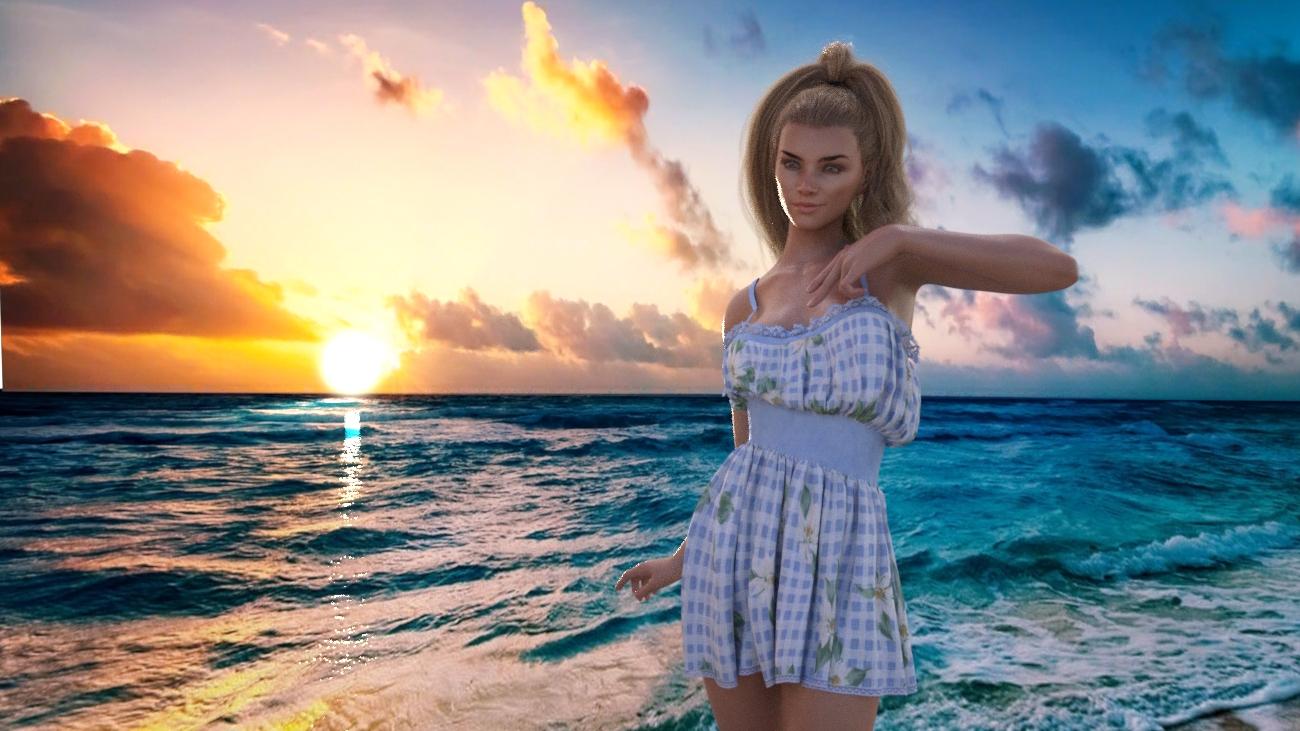
 How do I improve this Iray rendering?
6666666666666*3Just a follow-up...
This is a 12' x 12' x 10' room, with a sphere as the light-source, 2.5" in diameter, like a standard lightbulb. The surface was set to emission pure white, 6500K temp, single-sided, no profile, luminance 1600 (100 watt bulb), Luminance units "Watts", Luminous Efficacy (lm/W) 17.50 {100 watt filament light}
The pictures show that the "default scale" of Daz is horribly inaccurate. The 100 watt bulb, without a cover, barely lights-up the ceiling. The room paint is off-white, and setup with actual paint-like "flat" surface. (Nearly no gloss and gloss-diffused heavily.)
The following pictures are scaled by 50% (Scaled everything in the whole scene) Light-falloff is getting more realistic and luminance is becoming more realistic...
The following is 25%, and just about there... Still a little dim for a 100-watt, uncovered lightbulb.
Next is 15% scale of the daz-world... Perfect... That is what you expect a 100 watt bulb to look like, uncovered, in a 12x12x10 foot room. However, people use 60-watts standard, covered with something. Two or three, if they like it super-bright.
The last two are 15% scale, and a 60-watt bulb. One with a person in the room, which looks correct and has the expected soft shadows.
How do you get the whole daz-world scaled correctly? Put it all in one "GROUP" and scale the group. Now all your lights will look correct and behave like they should, when you punch-in real-world numbers for the settings. (Wiki is a great resource for real-world values, since Daz doesn't supply standard settings and they don't even use lights correctly themselves, as per IRAY doccumentation.)
Before you ask... NO, you can't just make the light brighter, because that doesn't change the "Real world light decay" (falloff), of the light. It will always look too bright at the source and like laser-light at a distance. Like your models are giants and the lights you are using are from another alternate reality. (Falloff, the "glow strength" decay, seen on the ceiling and walls.)
First of all Thank you!
Second, please excuse this Oddyssey of a post, this gets very "inside baseball," for daz3d iray.
I sometimes randomly do searches regarding daz3d + iray + "insert a variable here" because of curiosity, a problem, or to verify something that I have noticed that seems odd. This time the variable was "pixel filter"...because I noticed a larger number was delaying the first few itterations by a substantial amount of time (for me) but I found gold, rather, lighting gold, with your explanation of scale. Thank you so much for solving this one for me. I always wondered why the "real world lights" seemed awfully ineffective (thank you for explaining with the humble 60 watt bulb) in their job. I never thought to play with scale, that's impressive! Care to "double check" G8F proportions while you're at it, somethings seem "off"? Have you made Daz aware of this lighting issue? Rather than scaling the whole scene, there might be a way on their end to apply this fix in the next beta. Thank you, thank you, thank you. I now have my afternoon's work cut out for me.
Updating, didn't want to make a new post, so bear with me for this wall of text. Character is nude (because I want to test how the characters stand up to this), so I don't see myself doing a screenshot unless I do some censoring. Looks nice so far, recreated the scene with a primative cube, used matte paint mat for the walls, and dropped my G8F model into it, using same "light bulb" settings as perscribed. Looks nice after an hour in most aspects. The scale down to 15% for all objects in the group wasn't much of an issue, but I do know that with poses where parenting one figure to another will probably create headaches for uses, but that can be solved by unparenting and adjusting poses if you are using premade interacting figure poses that have been moved around slightly. One big issue that I have noticed is my G8F now has seams in the areas where component (arms, torso, upper legs) mats join and the SSS is quite overpowered in areas like the nose and ears. I will re-apply the mat settings (I save them as presets) for my character and maybe do another test; should that not work, this scale trick might
fundamentally be broken right out of the gatefor characters that have exposed skin in the areas where component mats meet: nevermind, see below. Even if so, for fully clothed and covered figures, this is a game changer. If anyone has a solution to the "seam issue", feel free to speak up, but I suspect I will do some searching as the first test continues.Okay, The "Seam Issue" has to do with Spectral Rendering (which I have used since it was introduced), and others have had it https://www.daz3d.com/forums/discussion/186251/olympia-8/p8 > though my character is not Olympia, it seems spectral rendering breaks G8F and probably other characters mats somewhat. Guess I'm not going to be using that again, though I might retest when the next beta comes out. Shame really, cause I think this rendering feature helped out quite a bit, but seams are pretty damned ugly and create undesireable post-work creep into my creative pipeline.
Update, did some quick renders, second one was cut very short (I am excited to try this on several projects I have on the go!), but the issue I mentioned had nothing to do with the fix, so the Adjusted for Light Scaling down of a scene yields some impressive results. On the other hand, shame about that Spectral Rendering which appears broken in the latestest Beta build > yes, I like bleeding edge, just not visible bleeding edge. Once again, thank you to JD_Mortal, you saw a target that I completely missed, despite the fact that scale abnormality has been mentioned in several places I've researched in the past.The results, even on these quick renders, make "corrective scaling" my go-to solution for all serious renders using Daz3d Iray. Would be nice if we can get things to behave (like dforce simulation - just don't even try it at the reduced scale) at this reduced scale, but you can always re-scale, do the simulation and then go back down for the render.
Yet another point to consider on this "Corrective Scaling Technique" as I am going to call it, is that when you reduce the size of your items, you have to take into account how this affects rendering variables. I'm fairly sure tone mapping is unaffected (thank God), but others are changed. For example, the f/stop on your cameras will in turn also be affected, meaning the numbers you would normally use with Depth of Field need to be scaled up relatively, and visual focal point appears to be "lying" now, so while you can see your focal point, it does appear to be off in your render. I should attatch some screen shots of the image I have been working on for two days, while blast-testing this technique; in my current image, I have doubled the focal distance (camera settings) from where it visually sits to focus on what I want it to focus on (eyes - it's always the eyes!) and gotten the subject of the image into focus, but this will vary and I'm wondering if just scaling the distance up by a factor of 85% would work as a universal formula, as opposed to just doubling it. In my recent image which I have started rendering more times that I would care to count, my visual focal point is about 60 and every time my character came out blurry in the face. When I doubled it to 120, the face became clear, but if I take the 60 and scale it by 85% I arrive at 60 + (85% X 60) = 60 + 51 = 111, so doubling is fairly close, but I would imagine that there is a point at which doubling (too keep the math simple) only works within visual tolerance at a certain range only. To help this, raising camera f/stop will also help this as it expands the volume of coverage for your focus. Also from what I see, your bloom filter (yes I like this affect) variables either need to be scaled up or down depending, for example, in my current image, the bloom filter number had to go as high as 44000 to keep the effect from distorting the details of the image outside of my asthetic boundaries; bloom is nice, but too much and you wash out critical (to me) details. Your Iray preview will be invaluable if you use depth of field, as you adjust to this new micronized world, and unless daz can re-jig their formula, I'm staying here and I won't look back. I might post my final render here at a later date sans postwork and perhaps a comparison to a nonscaled version to show the difference, but of course the lighting would have to be changed so that's quite a bit of work.
I can't thank JD_Mortal enough for the tip on scale. Part of me wishes I could just play around with DAZ3d full-time and ignore the rest of the world, and I could gradually improve my art with just myself some serious study and research, along with some serious patience, but at the moment I cannot; so having a forum like this allows people like JD_Mortal to help the rest of us get that extra bit of realism, that additional iota of beauty to our creative works.
- Yet another edit to this response. New info after using this style for a month.
Camera DOF is easily done, just make sure to have the scene at regular daz scale, drop the camera in, parent it to the group. Then, turn on DOF and line up the sight as per usual, then, scale down the group to 15% percent and go ahead and render, no math, no guess work, just works. Cannot drop in a new camera and at this scale becasue the camera is huge, and adjusting the focal point at 15% does not work visually.
Also this, Dforce hairs will for the most part work so long as the simulation happens at 100% daz scale, but as far as I can tell, strand-based hair breaks the simulated result when scaling back down to 15%. As per known issue, cannot run a dforce sim at 15% scale, though, because strand-based hair is getting to be more available, a workaround for these specific hair types would be useful. Possible solutions that come to mind involve edditing gravity and possibly structure settings in the surfaces tab.
I'm trying to think of a reason why everyone doesn't use this scale at this point. My renders are not perfect, and never will be, but the results so far leave my previous work looking even more imperfect.
New DS Filament Render Enginemmm minimising it gets a line, full screen it doesn't so your viewport needs to match your render size by looks, interesting
Oh my goodness, I think you've solved it! Full Screen Mode rendered it without any lines!
So it appears that as long as your Viewport Window is larger than (or around the same size as) your Render Size, there are no lines?
@3diva please forgive this question as it's probably something super simple that I'm completely overlooking or not realizing, but how did you get to full screen mode on your viewport to animate this in a pixel size bigger than 977x784, or is this the default setting for you as well and you ran with it? That's the only size I can get my active viewport to set at and when I render that out the line is gone, but when I try to make it like 1920x1080 I get that line. This looks like it could be a gamechanger for many folks as I love the image I'm looking at that I created, but I would love to render it at a bigger resolution if possible right now, or hopefully in a future update. Thank you!
You have to set the render size to roughly the same size as your viewport size or less, I believe. I THINK it might depend on how big of a screen you have, but I'm not sure. I got a fairly large monitor for my birthday (display resolution 2560x1440) so I was able to get a fairly large preview size by rendering after going to Full-Screen Mode (Shift + F11). You might have to set the render option to a keyboard short cut so that once you go to full-screen mode you can just use the Render shortcut.
I would check to see what size your screen is and set the render size to around the same size or smaller than that.
This should be a temporary requirement, I think - see http://docs.daz3d.com/doku.php/public/software/dazstudio/4/change_log#4_12_2_53
Filament (PBR) renders (via Render Settings > Engine: 'Viewport' when the active viewport DrawStyle is set to 'Filament (PBR)') no longer attempts to tile using the active viewport size
AIUTO...CHI CONOSCE L’ITALIANO? PARTE DODICIOh, beh... Filament è stato introdotto nella beta ieri. Dagli il tempo di scovare tutto, no?
 Inoltre un motore di render PBR istantaneo non lo definirei "indietro".
Ah, hai sbagliato le displace delle rughe della signora (o quello che è, il personaggio a destra, insomma), vedo che ha i pori sulla pelle, per cui immagino tu abbia semplicemente scelto la texture sbagliata.

E poi ti sbagli su 3Delight, non c'è nulla di simulato, è esattamente un PBR come IRay solo che utilizza un algoritmo diverso. Fosse simulato non potersti mai muovere una luce ed ottenere le ombre corrette o utilizzare un materiale emissivo su un oggetto mobile.
Dai hai capito cosa intendo, ovvero che l'illuminazione in Iray è sì molto difficile, ma anche molto intuitiva, perché si comporta quasi come nel mondo reale!
Sia in 3Delight che in Filament non è invece immediata.
Sì ma infatti diamogli tempo: ce lo stanno facendo vedere solo perché era urgente aggiornare la Beta, rendendo possibile utilizzare la propria GPU a chi ha appena speso 1500€!
AIUTO...CHI CONOSCE L’ITALIANO? PARTE DODICIOh, beh... Filament è stato introdotto nella beta ieri. Dagli il tempo di scovare tutto, no?
Inoltre un motore di render PBR istantaneo non lo definirei "indietro".Ah, hai sbagliato le displace delle rughe della signora (o quello che è, il personaggio a destra, insomma), vedo che ha i pori sulla pelle, per cui immagino tu abbia semplicemente scelto la texture sbagliata.
E poi ti sbagli su 3Delight, non c'è nulla di simulato, è esattamente un PBR come IRay solo che utilizza un algoritmo diverso. Fosse simulato non potersti mai muovere una luce ed ottenere le ombre corrette o utilizzare un materiale emissivo su un oggetto mobile.
Daz Studio Pro BETA - version 4.12.2.60! (*UPDATED*)A few reports from my side:
- Iray (photoreal) is definitely faster for TitanV.
- Filament shouldn't be used for every single view at the same time in your UI (example: Top-left-right-front views). It consumes too much VRAM and causes iray to stop working :)
- Filament is too bright. I have to lower exposure to compansate overbright ares.
- Filament is too "transparent" on hairs or anything that has cutout opacity mapping.
- Filament is too "bumpy" on skin.
- Filament is not affected by every Tone mapping options under filament's draw settings (burnout settings doesn't effect the image)
- My hopes of using Filament in animations went down in flames when I noticed iray decals are not showing up at all in filament :(
- Animation keyframe clutters shown on timeline are now fixed on loading the scene, I also noticed copy-pasting tcb keyframes still corrupts, but doesn't crash daz studio by going into blank view/endless loop anymore. Going to linear and back to tcb for those broken keyframes fixes the animation.
- New animation keyframe clutters are introduced in timeline in completely random times. I can't exactly figure when this happens. However, refreshing the timeline sometimes triggers the clutter with the characters having dforce simulated clothes in the scene. Clutters are mostly introduced when there is no other motion on the characters other than dforce simulation on their clothes. I'm not 100% sure about this, but the clutter is there anyway. I am also not sure about how to reproduce this (yet).
When you say "keyframe clutters", are you referring to the bug that causes random clusters of keyframes to appear on the Timeline? Because I sometimes encounter this bug when dealing with IK chains, especially complex ones. It makes me wonder if maybe it's related to high CPU usage or something.
Daz 3D is part of

Connect
DAZ Productions, Inc.
7533 S Center View Ct #4664
West Jordan, UT 84084Licensing Agreement | Terms of Service | Privacy Policy | EULA
© 2026 Daz Productions Inc. All Rights Reserved.