-
[Released] ManFriday's Mesh Grabber [Commercial]
I just purchased this and it shows downloaded in Daz Central, but not under the tools menu. What should I do?
Click Window - Workspace - Update and Merge Menus
That didn't do anything. Is there a way to manually install? It feels like I've thrown money away at this pointYou can always click Help - About Installed Plugins and see if it is listed
Like the Doc said, "About Installed Plugins" should show you "Man Friday's Mesh Grabber". There must also be a MF_meshgrab.dll in your /plugins directory under your Daz Studio installation directory (C:\Program Files\Daz 3D\DazStudio...). If you have multiple copies of Daz Studio installed, make sure the DLL is in each one's plugins subdirectory.
If the DLL is there but the plugin doesn't show up under "About installed plugins", then the most likely cause is that you're running 32-bit Windows. Mesh Grabber requires 64 bits.
Switching storage drive from c:/ to d:/Step by step
Moving from one drive to another.
1. Setup a 'working' folder on the new drive, you can name it what ever works for you.(note: this isn't technically necessary, it's just for organization)
2. Goto C:\Users\user name\Documents\DAZ 3D\Studio and C:\Users\Public\documents\daz 3d\studio and select the My daz connect library, My library, My Daz3d Library, basically every folder therein.
3. Move the folders to the Working folder on the second drive.
4. In Daz studio, remap the folder locations via the CDM(Content Directory Manager), right click the Content Library Tab, see attached images.
5. Map each of the moved folders, nothing lower or higher in the hierarchy.
If you prefer, you can just move the files inside the individual folders from the C:\ drive, and just map the 'working' folder.
Note:DIM, Connect, or central, may not be able to remove files after this move. simply adding the new path in DIM should remove this problem, but it doesn't always.
Do not forget to change the drive paths in DIM, Connect, or Central if you use those install options.
--------------------------------------------------------------------------
As far as "tech people" suggestions you mention, that is such a load of hogwash.
The short version is that it doesn't matter where a program is installed, as long as the computer knows where it is.
For DS assets, it's the same, as long as the path to the asset is mapped in DS, it can be anywhere.
Note: There are some messed up assets that have absolute paths. These require being installed in a specific drive and folder, but this is a bad file and can be corrected with a minor bit of editing of the DUF files.
That was putting it mildly...
In general the C-Drive is the worst place to install or keep anything other than the OS and OS alone, and the reason is "Where does the problem occur WHEN it does occur?" followed by "Do you really want to go looking after for your important files amongst tens of thousands of unorganized junkfiles with the recovery tool?"
[Released] ManFriday's Mesh Grabber [Commercial]I just purchased this and it shows downloaded in Daz Central, but not under the tools menu. What should I do?
Click Window - Workspace - Update and Merge Menus
That didn't do anything. Is there a way to manually install? It feels like I've thrown money away at this pointYou can always click Help - About Installed Plugins and see if it is listed
How to download Daz to Unreal Bridge as offline installer? The Manual Download link doesn't workyou can use the DIM(Download installer manager) program instead of the daz central if you really don't like the daz central this is the other way to get the plugin.
How to download Daz to Unreal Bridge as offline installer? The Manual Download link doesn't workI've got it first as a free item and wantred to try it before getting the exteded license. I'm not using Daz Central, what do I do?
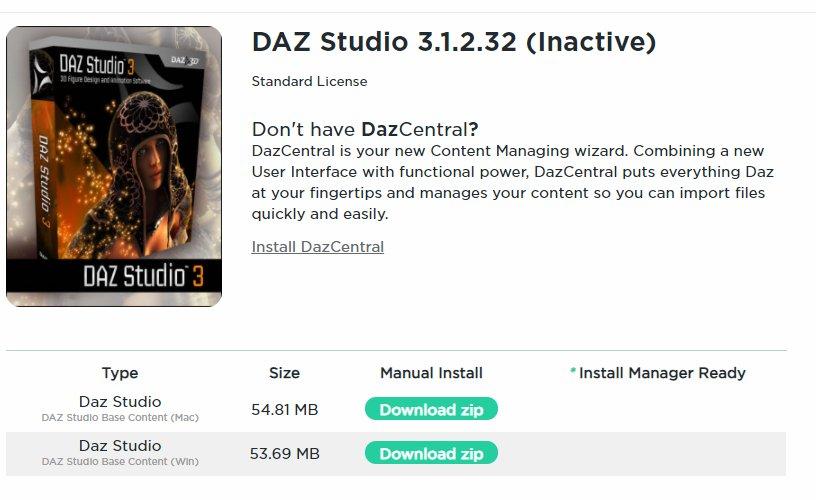
Rigging of V3 & V3 clothingThe download button has disappeared from the product page. The only thing available to download is the base content bundle in Win & Mac formats. Oh and lots of lovely advert blurb about 'Daz Central' to ignore. See for yourself:
Regards,
Richard
DAZ to UnrealHi
I have now unistalled DAZ to Unreal and installed DAZ Central. But when i click
on install it dosent ask me for the path (As in the tutorial) Instead it installs and
i have it in DAZ but no Plugin can be found in Unreal Egine 4. Is there a way
to manually correct the path to Unreal Egine 4 Folder?How can I download Daz Studio WITHOUT Daz Central?It is certainly possible – if you are using Windows, as Richard says. I do it because I have never used DIM or Central - I do everything manually in Daz!
So, I go to my Products Library and filter by ‘studio’, which then includes ‘Daz Studio 4.x’ in the resultant list. That gives you the Studio download page, which has all the files you probably originally downloaded.
I then just manually download the ‘Daz Studio Win 64 bit’ file, which at the moment is around 740MB. It doesn’t say which version you are actually getting, but I presume it is the latest stable release – I recently did this and ended up with version 4.12.1.118.
Hope this helps…
easily uninstalling products that were manually installedThe poster already said that he installs manually and doesn't use DIM, hence this solution is for people who do all their installs by hand because they don't want to use DAZ Connect/DIM/DAZ Central for whatever reason. So without some sort of manifest file, it is awfully hard to remember what assets let alone their paths are associated with a product to target for deletion
How can I download Daz Studio WITHOUT Daz Central?Are you using a Mac? If so there isn't currently a stand-alone installer for DS, there is for Windows. You do not have to use Daz Central, Install manager is still avaialble and being updated https://www.daz3d.com/install-manager-info
How can I download Daz Studio WITHOUT Daz Central?It seems that Daz will not let you download DS without downloading DC now. I tried DC and it screwed everything up for me so I just want to start fresh. But after uninstalling everything, I can't download the main app from the site, it asks me to sign up and if I am a member, the link takes me to a download page to DC. Is this really the only way now or am I just daft? I know it's a free program but I spent a lot of money on content, a lot.
[Released] ManFriday's Mesh Grabber [Commercial]I just purchased this and it shows downloaded in Daz Central, but not under the tools menu. What should I do?
I'm not familiar with Daz Central, though they say it shares code with DIM. In DIM, you have to Install as well. There is an option to install automatically, but if it's not checked, the file is only downloaded. I recommend checking to see if Daz Central has actually installed the product.
I just checked, and you can manually download Mesh Grabber from the Product Library. I also noticed it is listed for Windows 64-bit only. If your computer is a Mac, or older PC running a 32-bit version of Windows, Mesh Grabber will not work for you. If either is the case, contact Customer Service to return it and get a refund.
But if your computer is running a 64-bit version of Windows, try downloading the file by clicking on the Download Zip button and installing manually. That file is actually an executable, so once downloaded, just double-click to install.
[Released] ManFriday's Mesh Grabber [Commercial]
That didn't do anything. Is there a way to manually install? It feels like I've thrown money away at this pointI just purchased this and it shows downloaded in Daz Central, but not under the tools menu. What should I do?
Click Window - Workspace - Update and Merge Menus
Not a fan of the new product library layoutI wonder which part of the web it was solved in, then. Certainly not the bit I'm able to look at. A small mystery. There is still a lovely DAZ Central advert & zero useful information on the version of the pages I can see. This is with a Cloudfare update between now and FaerylWomyn's last post so it's hard to be convinced.
"There's Always Another Sale™" (Report sales issue here.)Also no mention of how many debut and/or still new releases we need to buy to trigger the discounts on the Fantasy and Mind Blowing category items. It just says "buy any Debut New or Still New items," and the buy-in quantities during the PA sale have routinely been high:

Also, is there really such a limited selection and no actual page to view them on? Just a slow scroll click-through that we can't filter or anything?
Also also: "pruchase"
Buy any normally means at least one. It should say how many if more are needed.
Then it should really say "buy any Debut New or Still New Item." Items, plural, implies more than one being necessary.
The daily vagueries and mistakes in both the ad copy and the site code aren't making this a very enjoyable sale. Not when we have to question what things mean (how many items do we need to buy), what actually qualifies for a discount (only DN items working, not the advertised SN), what that discount actually is (see: yesterday's cheeky ad change from the posted deal to a vastly worse one), and then wait hours for things to hopefully be functional.
This only seems to happen here.
It is correct in this instance as you can buy any number, one and up. Daz will normally indicate the number of items when more than one is required.
Also, please keep in mind, Daz is Central time zone. If the problems occur in the middle of the night or weekend, it may take longer to fix.
Switching storage drive from c:/ to d:/Step by step
Moving from one drive to another.
1. Setup a 'working' folder on the new drive, you can name it what ever works for you.(note: this isn't technically necessary, it's just for organization)
2. Goto C:\Users\user name\Documents\DAZ 3D\Studio and C:\Users\Public\documents\daz 3d\studio and select the My daz connect library, My library, My Daz3d Library, basically every folder therein.
3. Move the folders to the Working folder on the second drive.
4. In Daz studio, remap the folder locations via the CDM(Content Directory Manager), right click the Content Library Tab, see attached images.
5. Map each of the moved folders, nothing lower or higher in the hierarchy.
If you prefer, you can just move the files inside the individual folders from the C:\ drive, and just map the 'working' folder.
Note:DIM, Connect, or central, may not be able to remove files after this move. simply adding the new path in DIM should remove this problem, but it doesn't always.
Do not forget to change the drive paths in DIM, Connect, or Central if you use those install options.
--------------------------------------------------------------------------
As far as "tech people" suggestions you mention, that is such a load of hogwash.
The short version is that it doesn't matter where a program is installed, as long as the computer knows where it is.
For DS assets, it's the same, as long as the path to the asset is mapped in DS, it can be anywhere.
Note: There are some messed up assets that have absolute paths. These require being installed in a specific drive and folder, but this is a bad file and can be corrected with a minor bit of editing of the DUF files.
DazCentral won't install Daz studioI 'm having a similar problems. I haven't used Studio for a while so I deleted my installed version in order to update it. Seemingly I can now no longer download Studio without going through the annoying piece of Software called DAZ Central ( that claims to make everything easy !!!!!!) When I run DC and log in, it just sits there with the lttle blue circle going round and round - the longest I have left it running like this is 2 hours. Reinstalling, rebooting and restarting makes no difference. My disk activity light is on constantly, even after I close the DC window. I have to shut down a remaing DC element using Task Manager.
I can't understand why it won't just let me install the latest version of Studio first and take things from there ?
At Sea Vignette Install IssueNot the Seaside Walkway, the Sea Vignette. I can't
get the DS version to install in DIM or Daz Central.
Sorry! I didn't buy that although I considered it.
How do I use 'Epic Skydomes: Cloud Haven HDRI'How did you install? I used DIM and it's there for me. It's also supposed to be available through the ReadMe in the store, but the link is broken - here's the correct one:
I used Daz Central, for the first time, I was using DIM before.
Thanks for the link, I hope the answers to my other issues are somewhere in there.
CatalinaHow does one reinstrall all of the applications and content on a New Mac? When I tried to use Daz Central I got a prompt that it can't be installed because Apple can't check it for Malware.
Daz 3D is part of

Connect
DAZ Productions, Inc.
7533 S Center View Ct #4664
West Jordan, UT 84084Licensing Agreement | Terms of Service | Privacy Policy | EULA
© 2026 Daz Productions Inc. All Rights Reserved.