-
New DS Filament Render Engine
@SickleYeild That looks great! :D Shadows would be a really big help. I can't wait!
I was working on some skin shaders for Filament too, but since you're doing some already, I might skip it then. :)
Honestly I'd give it a month or so and then do it anyway. There were many skin shader updater/solutions for Iray and as near as I can tell all of them were successful (Fuseling's and my BSI, JM HumanShader, IDG Essentials, EcVh0's Iray Skin sets, Anagenesis, etc.). Every artist has a different "take" on this concept, with something different to offer, and yours is definitely as valid.
I would definitely pick up both! In Iray I use different shaders and settings depending on the lighting and character I'm working with, so having more options is always good. :D
New DS Filament Render EngineOK ... is it just me - or a bug.
I've installed the update, but every time i set up a animation scene and go to manipulate the timeline, the interface freezes up. That includes windows itself. I have to use ctrl+alt+del to even get the task manager up, then several trys to activate the Daz interface. After a few minutes of trial and error, everything becomes active again. But, touch the timeline again and the freeze starts all over again. This even effects older versions of DAZ that I still have installed. Only way around this has been to uninstall the update and reboot, then everything works as normal - but no Filament. of course. Tried this three times (uninstall/reinstall, etc.) - all same result.
It's weird that it affects older versions of Studio as well (installed in separate folders).
Can anyone confirm or reproduce?
I also have Octane installed - maybe a conflict somewhere?Running a 2060RTX 6GB (no memory problems with sample scenes I'm trying).
Thanks
AlanIt could be Octane, try disabling it through Help>About Installed Plug-ins and resart DS. If that doesn't help whata re your system specs?
you will need to browse to the dll and add.bak to the extension to disable it.
(or move it temporarily) I made a desktop shortcut to do this
Unchecking in Help>About Installed Plug-ins and then restarting DS doesn't work?
New DS Filament Render Engine@SickleYeild That looks great! :D Shadows would be a really big help. I can't wait!
I was working on some skin shaders for Filament too, but since you're doing some already, I might skip it then. :)
Honestly I'd give it a month or so and then do it anyway. There were many skin shader updater/solutions for Iray and as near as I can tell all of them were successful (Fuseling's and my BSI, JM HumanShader, IDG Essentials, EcVh0's Iray Skin sets, Anagenesis, etc.). Every artist has a different "take" on this concept, with something different to offer, and yours is definitely as valid.
New DS Filament Render Engine
iray cat animation took an hour and 10 mins
no idea now how long my filament one was but I had to really crank up the fur as well as having line tessalation

OK was only 27 minutes on Win10
I reckon Win 7 took longer
What cat fur is that? It looks a lot like my cat! My cat’s tail is fluffier though. Is that the Daz or Hivewire cat? IRay version looks great!
Housecat with the longfur preset maybe lengthened a tad
HW3D I don't have a strandbased preset and lousy at styling my own, sadly LAMH not useable in Filament
(doesn't need to be Dforce which is DAZ PA only anyway but a preset for us lousy stylers would be nice)
New DS Filament Render Engineiray cat animation took an hour and 10 mins
no idea now how long my filament one was but I had to really crank up the fur as well as having line tessalation
OK was only 27 minutes on Win10
I reckon Win 7 took longer
What cat fur is that? It looks a lot like my cat! My cat’s tail is fluffier though. Is that the Daz or Hivewire cat? IRay version looks great!
New DS Filament Render EngineOK ... is it just me - or a bug.
I've installed the update, but every time i set up a animation scene and go to manipulate the timeline, the interface freezes up. That includes windows itself. I have to use ctrl+alt+del to even get the task manager up, then several trys to activate the Daz interface. After a few minutes of trial and error, everything becomes active again. But, touch the timeline again and the freeze starts all over again. This even effects older versions of DAZ that I still have installed. Only way around this has been to uninstall the update and reboot, then everything works as normal - but no Filament. of course. Tried this three times (uninstall/reinstall, etc.) - all same result.
It's weird that it affects older versions of Studio as well (installed in separate folders).
Can anyone confirm or reproduce?
I also have Octane installed - maybe a conflict somewhere?Running a 2060RTX 6GB (no memory problems with sample scenes I'm trying).
Thanks
AlanIt could be Octane, try disabling it through Help>About Installed Plug-ins and resart DS. If that doesn't help whata re your system specs?
you will need to browse to the dll and add.bak to the extension to disable it.
(or move it temporarily) I made a desktop shortcut to do this
New DS Filament Render EngineOK ... is it just me - or a bug.
I've installed the update, but every time i set up a animation scene and go to manipulate the timeline, the interface freezes up. That includes windows itself. I have to use ctrl+alt+del to even get the task manager up, then several trys to activate the Daz interface. After a few minutes of trial and error, everything becomes active again. But, touch the timeline again and the freeze starts all over again. This even effects older versions of DAZ that I still have installed. Only way around this has been to uninstall the update and reboot, then everything works as normal - but no Filament. of course. Tried this three times (uninstall/reinstall, etc.) - all same result.
It's weird that it affects older versions of Studio as well (installed in separate folders).
Can anyone confirm or reproduce?
I also have Octane installed - maybe a conflict somewhere?Running a 2060RTX 6GB (no memory problems with sample scenes I'm trying).
Thanks
AlanIt could be Octane, try disabling it through Help>About Installed Plug-ins and resart DS. If that doesn't help whata re your system specs?
New DS Filament Render Enginegreat news Sickleyield
 hope it hits the store soon
unfortunately my -1Y scaled instance cheat for openGL floor shadows doesn't work in filament as they are still textured
 New DS Filament Render Engine
OK ... is it just me - or a bug.
I've installed the update, but every time i set up a animation scene and go to manipulate the timeline, the interface freezes up. That includes windows itself. I have to use ctrl+alt+del to even get the task manager up, then several trys to activate the Daz interface. After a few minutes of trial and error, everything becomes active again. But, touch the timeline again and the freeze starts all over again. This even effects older versions of DAZ that I still have installed. Only way around this has been to uninstall the update and reboot, then everything works as normal - but no Filament. of course. Tried this three times (uninstall/reinstall, etc.) - all same result.
It's weird that it affects older versions of Studio as well (installed in separate folders).
Can anyone confirm or reproduce?
I also have Octane installed - maybe a conflict somewhere?Running a 2060RTX 6GB (no memory problems with sample scenes I'm trying).
Thanks
AlanNew DS Filament Render Engine@SickleYeild That looks great! :D Shadows would be a really big help. I can't wait!
I was working on some skin shaders for Filament too, but since you're doing some already, I might skip it then. :)
New DS Filament Render Engine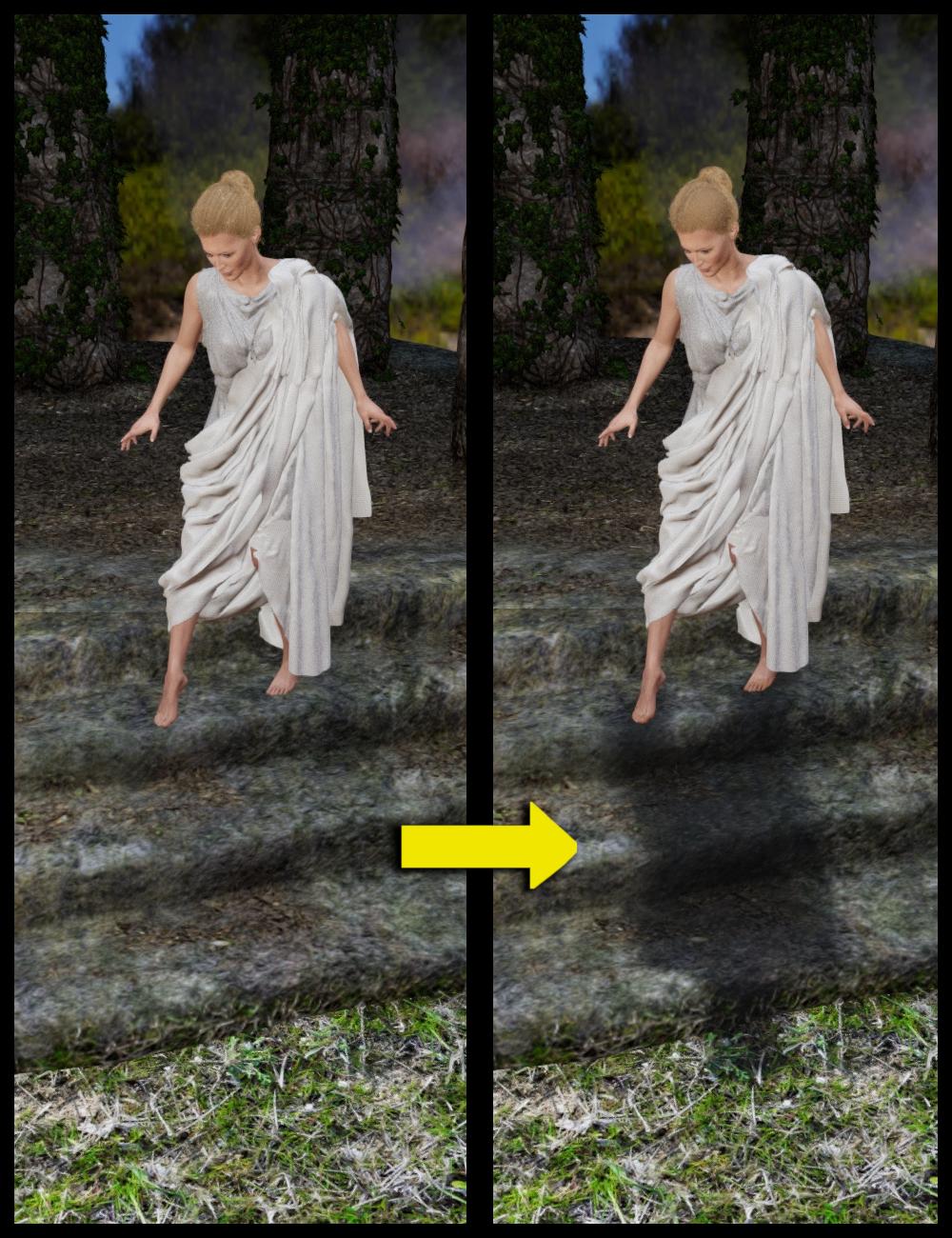
I have some additional tips.
Filament doesn't really do cast shadows, it does a sort of raytraced deep blurry thing around objects. In KA's renders you can see he's dealt with this by having the floor areas largely unlit. One excellent way to cope with this lack on Filament's part is to start from a palette of total darkness and, as he has also done, add just enough light that it dissipates some of the darkness but leaves the floor and some other areas dark enough to not make this lack apparent. KA is a genius at lighting, and we should all learn from his example.
I also have a product in testing for faking cast shadows by literally throwing a rigged shadow on the ground (shown)! This one is dForce rigged.
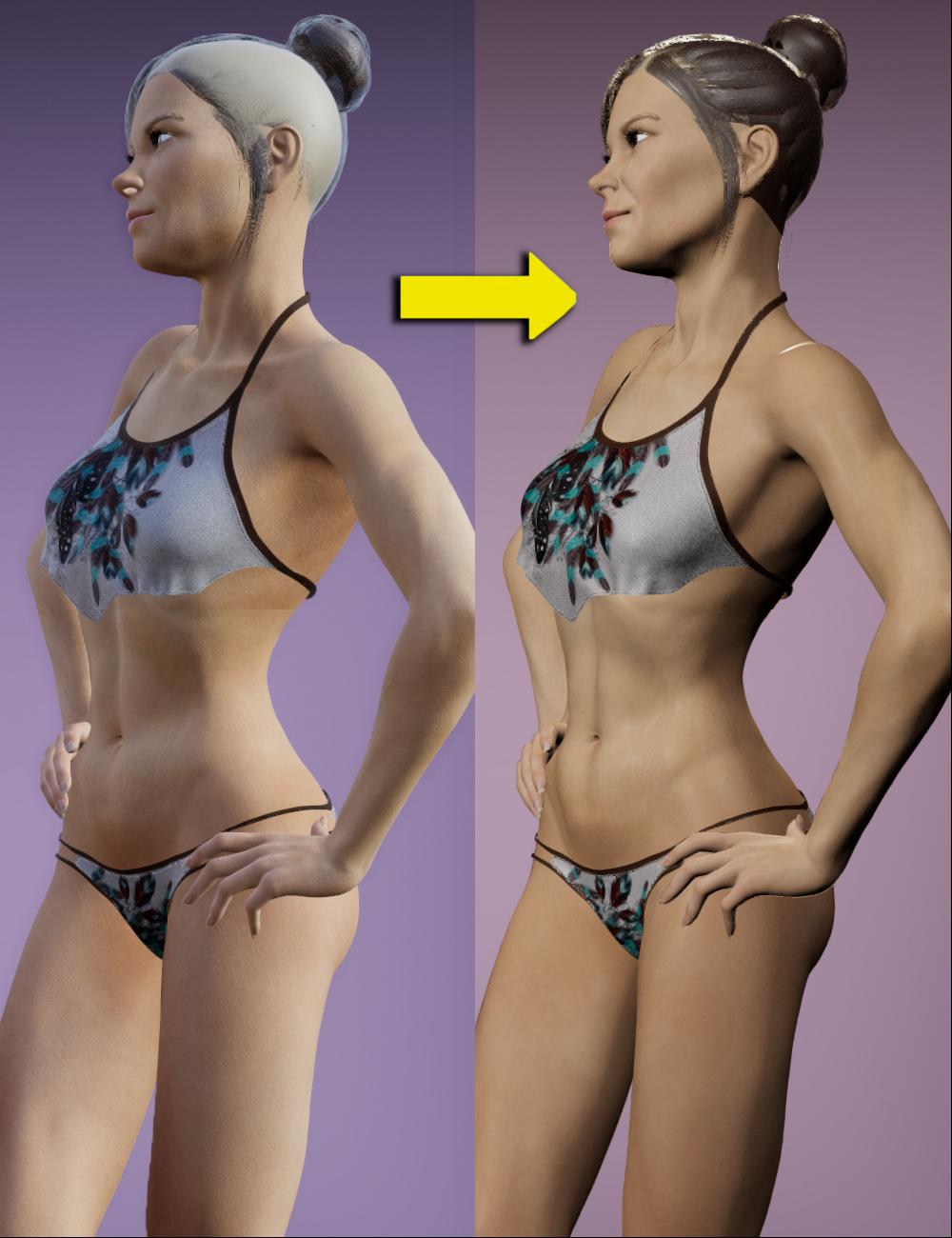
New DS Filament Render EngineDid someone say Shader Set for Skins?
Coming soon from Fuseling and me, Beautiful Skin Filament with bonus hair shaders and opaque caps (sometimes the cap layer of hairs doesn't natively show up)!
 New DS Filament Render Engine
Not to be too greedy but I'd love it if that (openGL based I guess) texture shaded mode in the viewport was expaned to be a renderer was made to do the opacities and SBH well enough to produuce a nice claymation sort of final render. I've tried the openGL Advanced selection hoping for a similar look at what I see in the texture shaded viewport but more refined in the the renderer drop-down menu but everytime I've tried to use it DAZ Studio locks up & I have to abort it.
If you choose Viewport as the Render Engine you will get whatever is active in the Viewport, with the same settings (except for Iray) though without non-rendering elements (such Gizmos and the mouse pointer). You can get strand-based hair to show using the settings for Tessellation and Preview Hairs
Oh! Now that makes sense. I was asking myself why they named ViewPort renderer such a name when it was Filament (not!)
New DS Filament Render EngineAh, so it was the normals that were making the skin look bad ;). At any rate, I don't see it replacing Iray any time soon :). Good exercise tho :D
Laurie
Ah, so it was the normals that were making the skin look bad ;). At any rate, I don't see it replacing Iray any time soon :). Good exercise tho :D
Laurie
That's a big improvement.
I have a feeling that Filament will be its own thing, rather than an Iray companion. Filament renders have a pretty distinctive look that works well for comics and animations, where volume and speed of renders are a priority. For stand-alone character renders, I don't see it replacing Iray.
@KindredArts Good news about emissives. For the sci-fi type renders Filament favours, they're a big deal, as well as for people who want to convert from Iray, generally.
I'm sure too and it'll be a boon for animators, especially if it keeps getting better :). Nothing wrong with having more choices, especially for rendering :)
Laurie
RTX 3090 - Who's with me?Well, if I do wind up buying a RTX 3080 20GB the total spend on my desktop I built last winter will reach near $2000. I cannot say it's smart for me to buy a nVidia video card with 8GB or 10GB knowing what I know about the iRay RAM usage of most of my scenes that I CPU render.
I'm going to look for the rest of 2020 though at rendering using Filament before I commit a $1000 to a video card as Filament style rendering is similar to what the game engines I use will be using anyway so I may as well get Filament looking good in DAZ Studio before exporting to a game engine.
(pst: ...but...I still want a high end video card though for the AI assisted help in DLSS upscaling (old public domain archives of toons and movies are tempting to cleanup & repost, also the same with old PD sound archives) and especially help with creating smooth animation, so Filament is still the relevant renderer I need but those other AI/DLSS functions in a high end nVidia GPU are needed even more than the iRay rendering capabilities with the interests of my hobby's needs taken into account.)
AIUTO...CHI CONOSCE L’ITALIANO? PARTE DODICIDai hai capito cosa intendo, ovvero che l'illuminazione in Iray è sì molto difficile, ma anche molto intuitiva, perché si comporta quasi come nel mondo reale!
Sia in 3Delight che in Filament non è invece immediata.
Sì ma infatti diamogli tempo: ce lo stanno facendo vedere solo perché era urgente aggiornare la Beta, rendendo possibile utilizzare la propria GPU a chi ha appena speso 1500€!
Magari l'avessero aggiornato come si deve, è tutto fracassato peggio di prima!
Nella foga di far "funzionare" IRay con le 3000 hanno sfondato tutto il resto... 4.12.0.86 per sempre, insomma.
Comunque mi piacerebbe mi spiegassi questa cosa del essere difficile da usare ma facile da usare.

Se poi per "immediata" intendi che devi usare almeno lo spot render, questo dipende dai limiti delle GPU. Al momento la preview OpenGL sulle schede recenti supporta solo 8 luci a causa delle GPU che hanno quel tipo di limite (e anche per scelta dei programmatori), ma con un numero pari o inferiore di luci nella scena e con il Per Pixel Shader attivo hai comunque una buona "previsione" di come saranno le luci sebbene priva di ombra in quanto vengono calcolate successivamente dal motore 3DLight.
Puoi anche disattivare alcune luci nella preview per ovviare al limite, luci che però saranno attive poi in fase di render. Per esempio, in un setup fotografico come usi tu di solito, non ti servono tutti i rim attivi, basta solo quello di riempimento.Il fatto che non ci siano preview delle ombre credo dipenda dal fatto che il motore di preview e di render sono separati, per questo motivo Iray può averle. Lento ma può.
Tuttavia ti sale il crimine quando vedi l'anteprima di Poser che supporta 16 luci con le ombre. Una preview bellissima per un software praticamente inutile. Non aggiornano l'interfaccia nè il sistema delle librerie da 15 anni almeno. (><;)oooo
Imago, non sono solo mie opinioni!
Se vedi il thread in cui se ne parla, lo staff di Daz ha detto le stesse e identiche cose: Filament non è un concorrente di Iray, ma un companion, per le attività, come animazioni, che richiedono un tempo di rendering veloce. Non è, però, nemmeno un lontano obiettivo che sia comparabile visualmente.
Inoltre, gli accorgimenti per migliorare la resa in Filament, così come in 3Delight, non sono immediati.
Iray, al contrario, è immediato perché la luce si comporta come nel mondo reale.
E sto parafrasando lo staff di Daz, non me ne volere.E' difficile avere buoni risultati, basti vedere la curva di apprendimento di chi inizia a usarlo. Ma una volta che ci prendi la mano è tutto più sensato.
Dici sempre che nei videogiochi il render è più veloce perché è più simulato: è, di nuovo, esattamente quello che hanno detto loro.
Non so la differenza, e sinceramente non mi interessa più di tanto. Fatto sta che se da domani continuassi i miei fumetti con un motore grafico diverso, o mi ci vorrebbero anni (se dovessi imparare Blender ecc., e trasferire/creare ogni asset che qui trovo già pronto), o più della metà delle persone mi mollerebbero, e quindi sarei costretto a mollare anch'io.Sinceramente, con gli upgrade hardware che prevedo di attuare nei prossimi mesi, anche il suo principale difetto, ovvero la lentezza, passerà decisamente in secondo piano.
Per quanto riguarda l'hardware costoso...pazienza! Ci sono i figli di papà che comprano le 3080 per fare n fps su Fortnite, io la compro per lavorare!Sto usando la Beta adesso (che è il 6% più veloce a renderizzare), e non ho riscontrato alcun problema.
Ho capito che odi Iray con tutto il cuore, e io non lo amo nè lo odio: semplicemente, per via dei mille motivi già spiegati, è ciò che uso ora, e che non prevedo di cambiare anytime soon.
Scusa ma non mi va di continuare a difendere un motore grafico da cui non guadagno nulla se lo usi o meno! xD
Sono contento che tu sia entusiasta della novità, e ne sono felice anch'io, anche se mi è meno utile (quasi inutile per me) di quanto mi aspettassi.
Mi sa che dobbiamo "agree to disagree"!Dunque, a me tocca usare Iray e non esiste alternativa vera (per me), come dimostra il fatto che lo usano praticamente TUTTI i colleghi. (BTW, dei 3 colleghi che ancora non usavano Iray, in questi mesi uno l'ha adottato permanentemente, uno in realtà lo usa solo che per il suo stile a me sembrava 3Delight, e l'ultimo continua con Poser perché ha avuto problemi personali con la Daz molti anni fa e li odia, anche se sa che è meglio).
Usa pure il motore che preferisci e che si confa meglio alle tue esigenze, no problem! :D
AIUTO...CHI CONOSCE L’ITALIANO? PARTE DODICIDai hai capito cosa intendo, ovvero che l'illuminazione in Iray è sì molto difficile, ma anche molto intuitiva, perché si comporta quasi come nel mondo reale!
Sia in 3Delight che in Filament non è invece immediata.
Sì ma infatti diamogli tempo: ce lo stanno facendo vedere solo perché era urgente aggiornare la Beta, rendendo possibile utilizzare la propria GPU a chi ha appena speso 1500€!
Magari l'avessero aggiornato come si deve, è tutto fracassato peggio di prima!
Nella foga di far "funzionare" IRay con le 3000 hanno sfondato tutto il resto... 4.12.0.86 per sempre, insomma.
Comunque mi piacerebbe mi spiegassi questa cosa del essere difficile da usare ma facile da usare.
Se poi per "immediata" intendi che devi usare almeno lo spot render, questo dipende dai limiti delle GPU. Al momento la preview OpenGL sulle schede recenti supporta solo 8 luci a causa delle GPU che hanno quel tipo di limite (e anche per scelta dei programmatori), ma con un numero pari o inferiore di luci nella scena e con il Per Pixel Shader attivo hai comunque una buona "previsione" di come saranno le luci sebbene priva di ombra in quanto vengono calcolate successivamente dal motore 3DLight.
Puoi anche disattivare alcune luci nella preview per ovviare al limite, luci che però saranno attive poi in fase di render. Per esempio, in un setup fotografico come usi tu di solito, non ti servono tutti i rim attivi, basta solo quello di riempimento.Il fatto che non ci siano preview delle ombre credo dipenda dal fatto che il motore di preview e di render sono separati, per questo motivo Iray può averle. Lento ma può.
Tuttavia ti sale il crimine quando vedi l'anteprima di Poser che supporta 16 luci con le ombre. Una preview bellissima per un software praticamente inutile. Non aggiornano l'interfaccia nè il sistema delle librerie da 15 anni almeno. (><;)oooo
Daz Studio Pro BETA - version 4.12.2.60! (*UPDATED*)Did anyone succeed in assigning a keyboard shortcut to the Filament Viewport Draw style?
Tried to assign Ctrl + 2 (Solid Bounding Box before) --> did not work for me.
Other custom assignments work though.
Dartanbeck's Journey - CG FilmmakingLooks like some interesting things coming to Daz Studio for animating with the new Filament Render engine introduced in the beta. It does really fast animation rendering. I'll have to look into seeing how I can transfer an animation I made in Daz Studio to Carrara so I can compare what they look like in each. I'd be interested to see what it would look like in Carrara vs rendered in Daz Studio with Filament, as well as test to see how the speed compares as well. I'm really just learning CG animation but so far it's pretty fun!
I love the ease I enjoy in Carrara with manipulating every aspect of the animations in the so-easy-to-use timeline.
So for getting motions from Daz Studio to Carrara, I use aniMate 2 (convert timeline to aniBlock) and use the aniBlock Importer for Carrara.
...but I also have more info in Animating and Hybrid aniMation
Thanks for telling me about Filament! Can't wait to try it!
Dartanbeck's Journey - CG FilmmakingLooks like some interesting things coming to Daz Studio for animating with the new Filament Render engine introduced in the beta. It does really fast animation rendering. I'll have to look into seeing how I can transfer an animation I made in Daz Studio to Carrara so I can compare what they look like in each. I'd be interested to see what it would look like in Carrara vs rendered in Daz Studio with Filament, as well as test to see how the speed compares as well. I'm really just learning CG animation but so far it's pretty fun!
Daz 3D is part of

Connect
DAZ Productions, Inc.
7533 S Center View Ct #4664
West Jordan, UT 84084Licensing Agreement | Terms of Service | Privacy Policy | EULA
© 2026 Daz Productions Inc. All Rights Reserved.













