-
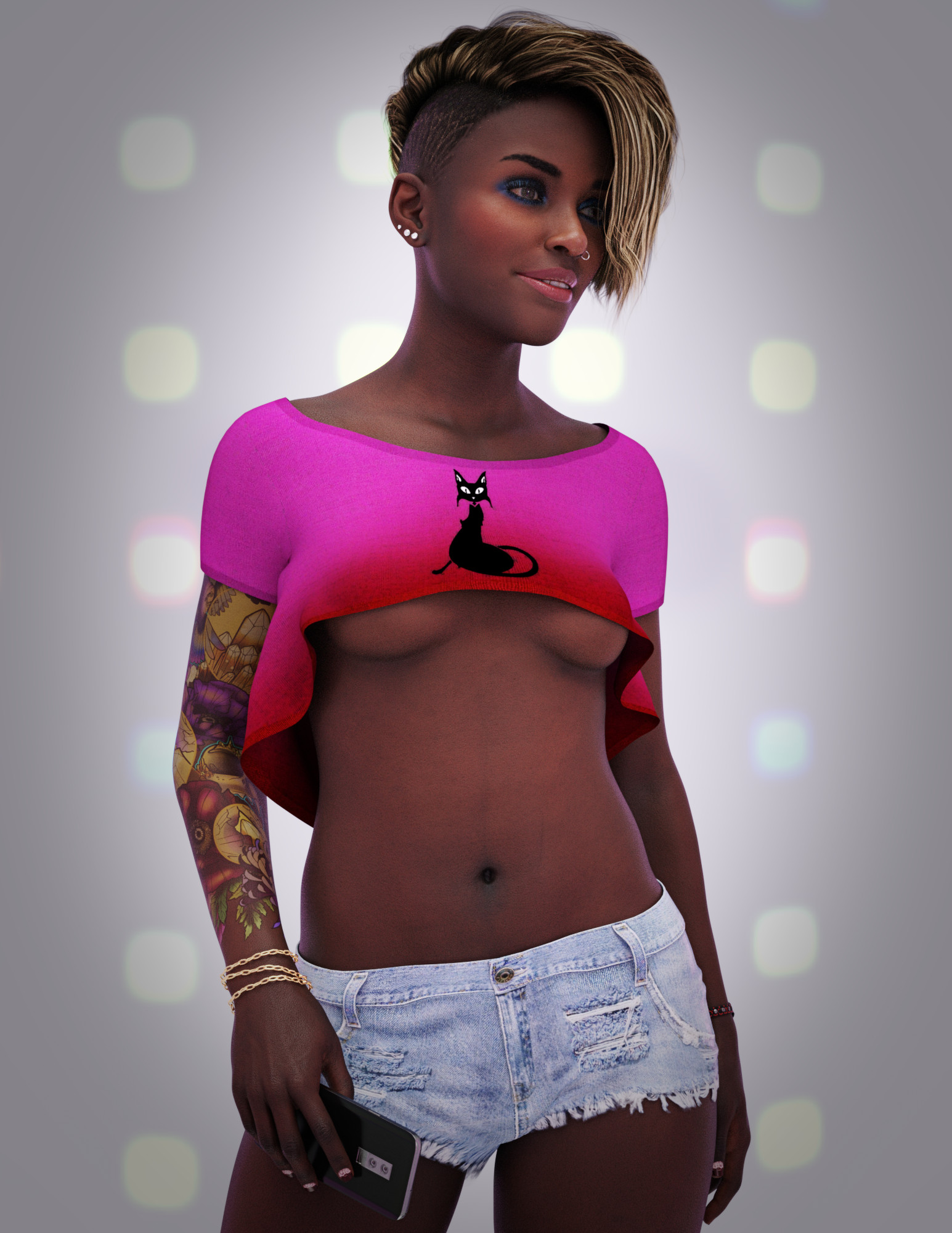
Jada 8.1 discussion - the rollerskating "undercover civilian" with bright clothing
The Blurst of Times said:
Used VIctoria 8.1's LIE tattoos, then rolled back the SSS map to Jada's original SSS maps (so the colors are less intense).
I think those tattoos look really good on her.
Jada 8.1 discussion - the rollerskating "undercover civilian" with bright clothingUsed VIctoria 8.1's LIE tattoos, then rolled back the SSS map to Jada's original SSS maps (so the colors are less intense).
 Anyone figure out how to get a sweet, but seductive smile with Victoria 8.1?
All these smile morphs make her face look bizarre.
I was wondering if any of you guys figured out how to get V8.1 to have a sweet, but sexy & seductive smile?
There's this ugly line that forms right inbetween the eye and the top part of the cheek when she smiles, it doesn't look good. Thank god for Zbrush, I can fix this with Zbrush, but that means I need to create a Zbrush morph patch for every expression.
[Released] Look At Me Pose Control [Commercial]vozolgant said:
Just to confirm, when using Look at me I 1 or II 2 with Genesis 8.1, do we need to disable Adjust Eyelids under option?
I seem to be getting a problem where Genesis 8.1F/Victoria 8.1F always ends up looking jsut below the camera, maybe it's my custom face. I'll do more tests. Anyone experiencing this?
If I remember correctly, for LAM I, you need to disable "Adjust Eyelids". For LAM II, it does it for you so you can leave it checked.
[Released] Look At Me Pose Control [Commercial]Just to confirm, when using Look at me I 1 or II 2 with Genesis 8.1, do we need to disable Adjust Eyelids under option?
I seem to be getting a problem where Genesis 8.1F/Victoria 8.1F always ends up looking jsut below the camera, maybe it's my custom face. I'll do more tests. Anyone experiencing this?
DAZ Studio 4 Installation Guide WindowsI was able to install everything through DIM offline ... but sadly nothing works. DS just crashes whenever I try to load anything into a scene. Even just basic figure like Victoria 8. I was able to get a prop to load but after a few minutes DS crashed again. This is really disappointing. I basically have now spent a lot of money on a very powerful machine that is useless to me.
I am really struggling to understand how no one else seems to be having problems with DAZ on Windows 10. What am I missing here?
Importing EmotiGuy to UnityI have also exported Victoria 8.1 via Daz To Unity bridge and got all BlendShapes, that I have choosen in Daz Studio.
Something is probably broken with FBX export.
If you have Poser, then it will probably work, because EmotiGuy is still in Poser format.
Poser has also export as FBX, as well.
Which outfit?I think that's Black Lotus, by Aery Soul (Aeon Soul), no longer available.
edit: I wanted to add, it was a Victoria 4 era item.
[Released] Gescon, CSG plugin for Daz Studio [commercial]Hylas said:
Do both objects need to be closed mesh?
I'm hoping I can use this to cut parts off hairs, eg when wearing a hat. Most hairs are not closed though, I think.
Yes, they need to be closed mesh because, by definition, CSG works with solids, so their geometry should be closed and bounded.
However, the plugin can accept with some open-mesh things. Notice the Toulouse Hair in the Victoria's statue in the first post. But the plugin solidified it.
Which character is this?She looks like Victoria 7 to me.
Romere requires Holt?vwrangler said:
There is that glitch where the required products section goes walkabout for a while -- I thought the store update was supposed to have fixed that, so it's probably just an oversight that he wasn't listed in required products.
It is unusual, these days, for a character that depends on a specific shape to be released that far after the shape, unless it's Michael or Victoria. I wonder if Romere has been hanging out in the vaults for a while.
Probably. The SKU is from Holt 8's bundles' time. I presume those numbers are awarded when the product gets the green light.
Romere requires Holt?There is that glitch where the required products section goes walkabout for a while -- I thought the store update was supposed to have fixed that, so it's probably just an oversight that he wasn't listed in required products.
It is unusual, these days, for a character that depends on a specific shape to be released that far after the shape, unless it's Michael or Victoria. I wonder if Romere has been hanging out in the vaults for a while.
XTransfer Module 1- Genesis 3 to Genesis 8 Morph Converter (Commercial)hello, I had a problem with Cathy HD, daz studio crashed during the operation, now I have dazstdio which crashes no matter what scene I load, it's problematic for me, I would like to go back, j admit not knowing what to do other than reinstall daz studio ... which would not suit me. Someone to help me?
I managed to convert Victoria 7, it crashed with Cathy. these are the only two operations carried out before the tragedy.
Shiny Lips / LipstickHow do you create very Shiny Lips / shiny Lipstick on Victoria 4 and Genesis 3 ?
[Closed] RRRRR - Coming Late Excuses - Render Contest!Totte Pull #9
#4337 Milena for Victoria 6 (19105)
#7080 Tithe Barn (17767)
#3964 Luminous Melody (11844)
#6895 The Magical Forest (58085)Random numbers generated May 6 2021 at 18:31:9 by psychicscience.org
Free educational resources for parapsychology and psychical research.How do I convert Genesis 8F characters to the new 8.1 shader?1. How do I convert Genesis 8F characters to the new 8.1 shader?
2. What extra textures do Genesis 8F characters need for the new 8.1 shader? An Occlusion map, correct? Anything else?
Let's say I wanted to convert Leisa 8 to 8.1's new skin shader. What steps do you forsee in that process? I'm about to dive into this, but was hoping someone else has already formed a list of what needs to be done, OR BETTER YET, something I can buy that does this entire process for me automatically?
Here's my current thought process:
- Load Victoria 8.1F
- Replace Head & Body Morphs with Leisa 8.
- Replace all of Victoria 8.1F textures with Leisa 8's textures, however there are some differences, and there's no occlusion map for Leisa 8 that I'm aware of. What else?Victoria 8.1F brows are too bushy. Is there brow fibermesh that looks like V7's supermodel brows?Masterstroke said:
Does it have to be a V7 eyebrow, or is a G3F eyebrow o.k. as well?
https://www.daz3d.com/catalogsearch/result/?q=fibermesh+eyebrowsG3F is fine as long as it looks similar in style to V7. V7 has that very sleek, model like eyebrows, as if it was done by a professional, that's what I'm looking for. Victoria 8.1's eyebrows have high technical quality, but look absolutely terrible with how bushy they are, it's not good.
I was forced to send CJ 8 Eyebrows Zbrush via GOZ, and had to sculpt the brows myself to match V7's style. I wasted 3 hours of time. I would've much rather just spend $25.00, and been done with it. *sigh*
I hope a content creator out there seizes this opportunity to make a Genesis 8 Eyebrow mesh that's totally morphable, and can be morphed into MODEL like eyebrows, in which its ends are higher, and can be made thinner. (Genesis 8 Female eyebrows don't look right IMO, or I could've used those.)
Hmmm, I wonder if I should make morphs for Genesis 8.1 Eyebrows and sell them as a content creator? Hmmm.
I've seen so many renders where everything looks amazing, but the eyebrows are complete and total fail, because there isn't a good eyebrow solution for Genesis 8 Female.
Genesis 8.1 F eyebrows are the best damn bushy eyebrows I've ever seen. They are INCREDIBLE in that regard. They are professional in the fact that they capture the very essence of BUSHY EYEBROWS. Hell, they might as well have just forced her to have a unibrow.
How to increase Victoria 8.1 eyelashes length?j cade said:
Cora Regina said:
j cade said:
Cora Regina said:
I'm not sure whether you actually can. In general to exceed a parameter, you would click on the gear next to the parameter that you want to change (in this case some variety of eyelash length), and select "Parameter Settings." In the popup, uncheck the box next to "Use Limits."
Victoria 8.1's lashes, or technically Genesis 8.1 Female's lashes (i.e. this would be an issue with any character built on 8.1), don't seem to work like that, though. It's weird. I gave it a try and even with the limits turned off and the length dials cranked to 1000%, nothing happens. I'd be interested to find out why, it's something I've never run into with lash attachments.
If you need lashes that can reach low Earth orbit, then in the meantime (or maybe forever if they really can't be adjusted), I would suggest Soto's very excellent Lash Utilities. Attached you'll find the G8F lashes fitted to Vicky 8.1, using the "Spoiled" material for fun. The first one has the length set to the natural limit of 100%. In the second, I disabled that and set it to 500%.
They could probably get you to Jupiter if you really wanted.
did you make sure the limits were off on the lashes themselves as well as the figure? the previous lashes may have only had the limits on the figure, but 8.1 has them on both the figure and lashes, so they'll need to be turned off in both locations.
Waaaaaait, what?! My lashes don't have that! I have the controls on the figure, but the lashes have zero controls on them at all apart from the usual transforms, mesh resolution, etc. They never have, and I've never really paid attention until now because I still use almost exclusively 8.0 instead of 8.1, and pretty much always load up either the Lash Utilities or the ones from Maia.

Well shoot, that explains a lot, then! Thanks for letting me know, I was probably gonna end up real frustrated down the line somewhere, lol. I had no idea the lashes were even supposed to have their own controls. Time to reinstall the Essentials package and see if that fixes things, I suppose.
you might just need to turn on "show hidden properties" I should have mentioned that as well, but I forgot because I never have it off
They were just straight up not there, I tend to keep that ticked as well. Tried the old "turn it off and back on again," still squat, but I reinstalled things and now they're showing up. Phew! Sometimes I have controls just... disappear, or the checkbox will get inverted (checking show properties hides them and unchecking it shows them), but restarting DS usually clears that up.
I do remember that my DS install was being even more weird than it usually is around the time that I was installing G8.1 in the first place. Whenever I build a new machine (damn crypto miners), I need to do a totally clean install and rebuild my library from the ground up, apart from manually bringing over stuff that I've saved out myself. Things have been a complete disaster ever since last year, when Connect commandered a whole bunch of stuff it shouldn't have been able to touch (and confused the hell out of tech support). Screwed everything up terribly and even though I'm not logged in via DS, I've had frequent and recurring problems with products getting taken over again even after being uninstalled, deleted, having all the Connect-related folders scrubbed, and reinstalled with DIM, plus having completely new stuff hijacked. Poor RSA had to make me a custom fixed interface for one of his products because the adjustable one was behaving so chaotically for me and only for me.
I've scoured the thing for viruses or malware and there's nothing, DS is the only thing that misbehaves. Installation problems and things blowing up after are pretty normal around here so IDK why I should be so surprised that something went wrong.
Thanks for clueing me in, however, it's very much appreciated! We are now operating on all thrusters, ready for launch in three... two... one...
How to increase Victoria 8.1 eyelashes length?Cora Regina said:
j cade said:
Cora Regina said:
I'm not sure whether you actually can. In general to exceed a parameter, you would click on the gear next to the parameter that you want to change (in this case some variety of eyelash length), and select "Parameter Settings." In the popup, uncheck the box next to "Use Limits."
Victoria 8.1's lashes, or technically Genesis 8.1 Female's lashes (i.e. this would be an issue with any character built on 8.1), don't seem to work like that, though. It's weird. I gave it a try and even with the limits turned off and the length dials cranked to 1000%, nothing happens. I'd be interested to find out why, it's something I've never run into with lash attachments.
If you need lashes that can reach low Earth orbit, then in the meantime (or maybe forever if they really can't be adjusted), I would suggest Soto's very excellent Lash Utilities. Attached you'll find the G8F lashes fitted to Vicky 8.1, using the "Spoiled" material for fun. The first one has the length set to the natural limit of 100%. In the second, I disabled that and set it to 500%.
They could probably get you to Jupiter if you really wanted.
did you make sure the limits were off on the lashes themselves as well as the figure? the previous lashes may have only had the limits on the figure, but 8.1 has them on both the figure and lashes, so they'll need to be turned off in both locations.
Waaaaaait, what?! My lashes don't have that! I have the controls on the figure, but the lashes have zero controls on them at all apart from the usual transforms, mesh resolution, etc. They never have, and I've never really paid attention until now because I still use almost exclusively 8.0 instead of 8.1, and pretty much always load up either the Lash Utilities or the ones from Maia.
Well shoot, that explains a lot, then! Thanks for letting me know, I was probably gonna end up real frustrated down the line somewhere, lol. I had no idea the lashes were even supposed to have their own controls. Time to reinstall the Essentials package and see if that fixes things, I suppose.
you might just need to turn on "show hidden properties" I should have mentioned that as well, but I forgot because I never have it off
How to increase Victoria 8.1 eyelashes length?j cade said:
Cora Regina said:
I'm not sure whether you actually can. In general to exceed a parameter, you would click on the gear next to the parameter that you want to change (in this case some variety of eyelash length), and select "Parameter Settings." In the popup, uncheck the box next to "Use Limits."
Victoria 8.1's lashes, or technically Genesis 8.1 Female's lashes (i.e. this would be an issue with any character built on 8.1), don't seem to work like that, though. It's weird. I gave it a try and even with the limits turned off and the length dials cranked to 1000%, nothing happens. I'd be interested to find out why, it's something I've never run into with lash attachments.
If you need lashes that can reach low Earth orbit, then in the meantime (or maybe forever if they really can't be adjusted), I would suggest Soto's very excellent Lash Utilities. Attached you'll find the G8F lashes fitted to Vicky 8.1, using the "Spoiled" material for fun. The first one has the length set to the natural limit of 100%. In the second, I disabled that and set it to 500%.
They could probably get you to Jupiter if you really wanted.
did you make sure the limits were off on the lashes themselves as well as the figure? the previous lashes may have only had the limits on the figure, but 8.1 has them on both the figure and lashes, so they'll need to be turned off in both locations.
Waaaaaait, what?! My lashes don't have that! I have the controls on the figure, but the lashes have zero controls on them at all apart from the usual transforms, mesh resolution, etc. They never have, and I've never really paid attention until now because I still use almost exclusively 8.0 instead of 8.1, and pretty much always load up either the Lash Utilities or the ones from Maia.
Well shoot, that explains a lot, then! Thanks for letting me know, I was probably gonna end up real frustrated down the line somewhere, lol. I had no idea the lashes were even supposed to have their own controls. Time to reinstall the Essentials package and see if that fixes things, I suppose.
Daz 3D is part of

Connect
DAZ Productions, Inc.
7533 S Center View Ct #4664
West Jordan, UT 84084Licensing Agreement | Terms of Service | Privacy Policy | EULA
© 2026 Daz Productions Inc. All Rights Reserved.