-
EULA Update & Editorial Licenses Coming to Daz
Valiska said:
Solar Dreamer said:
Thing that still confuses me about this is that shouldn't that caveat also apply to DAZ and their artists selling this EL content to begin with, since they're making money from it? That is, unless they have specific licensing agreements with the IP owners, I don't see how they can even be offering these for sale, EL or otherwise.
That caveat does apply.
They are taking a calculated risk.
If Daz decides they want to take this risk for themselves, that's up to them. But I at least want the ability to do what I can do on some other 3D sites: exclude/include certain licenses from search and browsing.
I've invested a lot of money in DAZ content. If they were to get sued by IP holders (for example Disney, who own Star Wars and R2D2 now), and the ruling did not go their way, I worry about whether we'd still have access to our content, and whether our licenses would remain valid if a judge ruled against DAZ and assigned the licensing rights to a 3rd party, or that DAZ assets be liquidated to pay for the settlement (which would then also raise the question of whether a new owner might change the licensing retroactively).
I hope I'm just worrying too much, but it would really suck for those of us who've invested a bit in DAZ content to lose access and / or usage rights to the content we've paid for all these years.
EULA Update & Editorial Licenses Coming to DazSolar Dreamer said:
Thing that still confuses me about this is that shouldn't that caveat also apply to DAZ and their artists selling this EL content to begin with, since they're making money from it? That is, unless they have specific licensing agreements with the IP owners, I don't see how they can even be offering these for sale, EL or otherwise.
That caveat does apply.
They are taking a calculated risk.
I'm guessing the calculation looks something like this:
- A trademark holder must defend a trademark or risk it becoming genericized, so we won't used the trademarked name. (But customers that don't recognize the property now can't search for the name to see what it is.)
- But the copyright holders are not bothering to exploit this minor market, so they also probably won't bother to sue us if we exploit it.
- But the uses the customers might put these items to will predictably potentially collide with the copyright holders' usage of it, so we'll put an editorial license on it. (One of several possible problems for customers: the actual fair usage rights carved out in U.S. law do not work out to "just don't charge money for it", no matter how readily people's expectations tend to go there.)
To make matters worse, the statute is not clear in every area, and a whole lot of what is, or isn't, accepted copyright practice is established by case law, not by reading the text of the unclear legislation.
Or -- worse still -- it's established by who can throw how much money around with the threat of a lawsuit.
If Daz decides they want to take this risk for themselves, that's up to them. But I at least want the ability to do what I can do on some other 3D sites: exclude/include certain licenses from search and browsing.
Afterthought: you can in practice see some intellectual property holders behaving aggressively across the board. Others ignore ordinary fanfiction, fan art, and the like -- up to the point where some amateurs get together and make something of semi-professional quality in the same media the IP holder usually works in.
You get to copyright the 'tangible' (used a little loosely these days to include electronic) particular expression of an idea, not the idea itself. (IP relating to protection of ideas is patent law, not copyright.)
If you go back far enough -- and here I am relying on a memory of a book that was old when now-old me was reading it as a teenager -- the fundamental idea of the bat-costumed secret antihero, or villain, is a mutation of the Victorian Gothic vampire, transformed into a penny dreadful character whose pseudonym was the Crimson Bat, not to be confused with later Crimson Bats and Red Bats from the comics. The original Crimson Bat is long out of copyright. In any event, DC does not own the fundamental concept, because you can't copyright an idea itself. They own the specific expression of the idea that's Bruce Wayne/Batman.
A List of Artists from Renderosity?Does anyone have a list of the artists who have joined Daz from Renderosity? Or is there a way to search for them? I'm sure they've brought lots of great new content but I'd rather not have to trawl the whole site to find it.
A Thread for Items with the "Editorial License"Solar Dreamer said:
Richard Haseltine said:
3Ddreamer said:
And I don't want to accidentally BUY EL items that I can't use commercially - so the tagging is at the wrong end. Needs to be on the store not after we have installed something.
It is on the store, in the space also used for the Interactive and 3D Printing licenses. It does require remembering to look, of course - I have not noticed an EL until seeing the forum post before now - but if this is important to you the information is readily available in a consistent location on the product page.
This isn't totally accurate. As long as DAZ has been around and I've shopped here, until very recently, everything sold on the store carried the standard license, and if you needed something ADDITIONAL to that, those licenses were available first as separate products covering specific vendors, and then as license add-ons on the product page of each item itself.
The Interactive License option has ben there for some years now, the 3D Printing for at least a couple I think. It's true that this is a new thing for those who do want to make commercial use of content but haven't been interested in the existing additonal licenses to look at, but using an existing spot to mark the license type is sensible and (at least in a full browser) accessible.
Having EL content in the same place as regular content changes the default assumption of all items carrying at minimum the standard license unless marked differently. When there were only a few Editorial items on the market, this mattered less, but now the onus is being put on customers to verify every item they're looking at if they want to make sure it carries at least a standard license.
This is something new, particularly due to the increasing frequency of heavily advertised new releases that fall under the Editorial license, despite being comparable in price to standard license items. Previously this wasn't the case.
It creates a lot more work, as well as confusion, for customers who previously were able to assume that all content on the DAZ store carried a standard license.
A Thread for Items with the "Editorial License"Richard Haseltine said:
3Ddreamer said:
And I don't want to accidentally BUY EL items that I can't use commercially - so the tagging is at the wrong end. Needs to be on the store not after we have installed something.
It is on the store, in the space also used for the Interactive and 3D Printing licenses. It does require remembering to look, of course - I have not noticed an EL until seeing the forum post before now - but if this is important to you the information is readily available in a consistent location on the product page.
This isn't totally accurate. As long as DAZ has been around and I've shopped here, until very recently, everything sold on the store carried the standard license, and if you needed something ADDITIONAL to that, those licenses were available first as separate products covering specific vendors, and then as license add-ons on the product page of each item itself.
Having EL content in the same place as regular content changes the default assumption of all items carrying at minimum the standard license unless marked differently. When there were only a few Editorial items on the market, this mattered less, but now the onus is being put on customers to verify every item they're looking at if they want to make sure it carries at least a standard license.
This is something new, particularly due to the increasing frequency of heavily advertised new releases that fall under the Editorial license, despite being comparable in price to standard license items. Previously this wasn't the case.
It creates a lot more work, as well as confusion, for customers who previously were able to assume that all content on the DAZ store carried a standard license.
A Thread for Items with the "Editorial License"3Ddreamer said:
And I don't want to accidentally BUY EL items that I can't use commercially - so the tagging is at the wrong end. Needs to be on the store not after we have installed something.
It is on the store, in the space also used for the Interactive and 3D Printing licenses. It does require remembering to look, of course - I have not noticed an EL until seeing the forum post before now - but if this is important to you the information is readily available in a consistent location on the product page.
WCIF these knife poses?May I suggest that the leg & torso pose in the top row of the second promo image where the character is walking could be obtained fairly quickly from using a freebie as the starting point - look at https://www.renderosity.com/freestuff/items/90538/poses-for-moussos-rain-81 bottom centre image. You'd only have to pose the arms, and the knife holding pose for the hand may be available in the set. If not, the hand can be set as part of my freebie set of the Pizza cutter here: https://www.daz3d.com/forums/discussion/comment/8789151/#Comment_8789151 Load the cutter, which poses the hand, then delete the cutter, and replace with the knife.
If you search rendo freebies for other of my pose sets, those of BBarbs, CRP and OneSix you may find other suitable starting points. For example the top left pose in my 'saucy sitting 07-12' pose set could be converted to the main promo 'sitting on bike' pose fairly easily as could centre top 'saucy sitting 19-23'. Even if the poses are for G8 and you're using G9 there are are enough pose transfer scripts (free and paid - I've even done a freebie one, here: https://www.daz3d.com/forums/discussion/598316/g8f-m-pose-transfer-to-g9/p1) to make that not a significant issue.
So, there are options.
Regards,
Richard
New Year, New Sales Thread: Report Issues Here "Reporting Only"Heatherlly tile sends back to homepage.
The artist also doesn't pop up in the artist search
22 mins past Daz midnight
There's Always Another Sale Thread -- Discussions Only Pt 3Charlie Judge said:
Heads Up: Check your DIM. I just opened my DIM and found a really nice coupon that expires today.
Thank you for sharing! I got a little nice something for myself thanks to you (including certain shaders I haven't pulled the trigger on in the morning).
And yes, I second keeping everyone informed, but forum users already seem to be excellent in that regard, informing of flash sales, unusual stacking, and so on.
UltraScenery - new(er) territory [Commercial]daveso said:
sidcarton1587 said:
Hello, not sure if this is the right forum for this but I had an issue running Daz Studio in headless mode in which the Ultrascenery dll failed to initialize. I have both Ultrascenery 2 and Ultrascenery XT installed (not the original US), and the error happens regardless of whether the plugins (for both) are enabled or disabled inside Studio itself.
The error in the log file reads:
2024-08-07 21:59:00.189 [VERBOSE] :: dzpowerpose.dll

2024-08-07 21:59:00.190 [VERBOSE] :: UltraScenery.dll

2024-08-07 21:59:01.000 [WARNING] :: UltraScenery.dll failed to load - Cannot load library C:\Program Files\DAZ 3D\DAZStudio4\plugins\UltraScenery\UltraScenery.dll: A dynamic link library (DLL) initialization routine failed.

My Studio setup is as follows:
2024-08-07 21:58:58.518 +++++++++++++++ DAZ Studio 4.22.0.16 starting +++++++++++++++++
2024-08-07 21:58:58.518 [INFO] :: Performing cleanup...
2024-08-07 21:58:58.519 [INFO] :: Release Cycle: General Release [50001]
2024-08-07 21:58:58.519 [INFO] :: Platform bits: 64
2024-08-07 21:58:58.519 [INFO] :: Qt Version: 4.8.7
2024-08-07 21:58:58.519 [INFO] :: OpenSubdiv Version: 3.0.0
2024-08-07 21:58:58.519 [INFO] :: Running on Windows 11, Build 22631, Professional
I assume this is because US requires some sort of graphics setup to initialize, and that's why the initlization fails. Just want to know one way or another, so I'm not trying to do something that isn't currently possible.
what is "headless" mode?
Did you install USC2 and XT using DIM? I'm sure someone else will chime in, but that 2nd one is important. USC will not run correctly if its not installed with DIM.
Headless in this context means running Studio from the command line using the -headless option. It is meant to execute a script silently without starting up the Studio user interface. I installed US2 and XT using DIM, and they both run just fine when I'm using them from the Studio user interface. If I try the script without the -headless option (i.e. allow the Studio user interface to start), then it initializes properly and executes the script. It's only with the -headless option that the plugin initilialization fails. I'm assuming that using -headless is causing some part of the graphics subsystem that US2 or XT relies on to not start, causing the plugin to fail during startup.
A Thread for Items with the "Editorial License"DAZ need to make a separate Editorial storefront and remove it from the standard storefront, or else make it VERY clear in search results that something is Editorial Only. My preference is the former.
There are a lot of us who don't want to run into trouble with existing IP in our art. Editorial licenses may not "prohibit" you from making and sharing art, but they certainly make it more difficult, as it means one more thing you need to keep track of when making regular, non-fan art.
I buy DAZ content primarily to facilitate making my own art, which yes, I'd like to eventually commericialize / make profit from. Editorial licensing to me just makes the whole DAZ storefront less appealing if I have to double check every item I'm looking at. It makes it much less likely I'll make more purchases or continue DAZ+ when it expires.
The way I see it, making a separate Editorial storefront would also have the positive effect of making it easier for people to find popular IP if they actually DO want to make fan-art, which means more $$$ for DAZ.
More needs to be done to differentiate editorial item labeling / categorizing from regular content.
Pictures in Posts in forums: CAN Do It (can't is resolved)SofaCitizen said:
ArtsyDragon said:
Hey guys (@Sofacitizen, @Felis).. I followed the instructions for a new post and the image shows up but it's not got a link to the image in the gallery, it just shows a bigger image of my picture. I rechecked the instructions and I can't figure out what I'm doing wrong. I thought it was to go to the image in the gallery so people can like or not the image.
Please tell me I'm missing something obvious.
Artsy
You're not doing anything wrong at all - Linking to the gallery page (so someone can see any text you have added and click the like button) was not covered in what I posted before. Sorry. So there would be an extra step to do that.
When you have added the direct image link and set the width to 800 - but before clicking OK you would need to do the following:
- Click the link tab in the image properties window
- Paste the URL to the gallery page (not the direct image) into the URL there.
- (Optional) Set the Target to "New Window (_blank)" so that when people click the link to your gallery it opens in a new tab rather than taking them away from the forum thread.
- Click OK
So, going back to the previous example the URL to post into the URL field on the Link tab would be: https://www.daz3d.com/gallery/user/5343505408851968#gallery=newest&page=1&sort=trending&image=522246

So, unfortunately, this is a little fiddly to do unless you have your gallery page open in a second tab/window in your browser.
Obviously, with your previous post you can edit it (using the cog icon), right click on the image and click the properties option to open the window and add the link to the Link tab.
Hopefully that makes sense.
It does. Thank you for settling that for me. I was afraid I was doing something wrong. Whew! :) You're the best. Thank you!
UltraScenery - new(er) territory [Commercial]sidcarton1587 said:
Hello, not sure if this is the right forum for this but I had an issue running Daz Studio in headless mode in which the Ultrascenery dll failed to initialize. I have both Ultrascenery 2 and Ultrascenery XT installed (not the original US), and the error happens regardless of whether the plugins (for both) are enabled or disabled inside Studio itself.
The error in the log file reads:
2024-08-07 21:59:00.189 [VERBOSE] :: dzpowerpose.dll

2024-08-07 21:59:00.190 [VERBOSE] :: UltraScenery.dll

2024-08-07 21:59:01.000 [WARNING] :: UltraScenery.dll failed to load - Cannot load library C:\Program Files\DAZ 3D\DAZStudio4\plugins\UltraScenery\UltraScenery.dll: A dynamic link library (DLL) initialization routine failed.

My Studio setup is as follows:
2024-08-07 21:58:58.518 +++++++++++++++ DAZ Studio 4.22.0.16 starting +++++++++++++++++
2024-08-07 21:58:58.518 [INFO] :: Performing cleanup...
2024-08-07 21:58:58.519 [INFO] :: Release Cycle: General Release [50001]
2024-08-07 21:58:58.519 [INFO] :: Platform bits: 64
2024-08-07 21:58:58.519 [INFO] :: Qt Version: 4.8.7
2024-08-07 21:58:58.519 [INFO] :: OpenSubdiv Version: 3.0.0
2024-08-07 21:58:58.519 [INFO] :: Running on Windows 11, Build 22631, Professional
I assume this is because US requires some sort of graphics setup to initialize, and that's why the initlization fails. Just want to know one way or another, so I'm not trying to do something that isn't currently possible.
what is "headless" mode?
Did you install USC2 and XT using DIM? I'm sure someone else will chime in, but that 2nd one is important. USC will not run correctly if its not installed with DIM.
Pictures in Posts in forums: CAN Do It (can't is resolved)ArtsyDragon said:
Hey guys (@Sofacitizen, @Felis).. I followed the instructions for a new post and the image shows up but it's not got a link to the image in the gallery, it just shows a bigger image of my picture. I rechecked the instructions and I can't figure out what I'm doing wrong. I thought it was to go to the image in the gallery so people can like or not the image.
Please tell me I'm missing something obvious.
Artsy
You're not doing anything wrong at all - Linking to the gallery page (so someone can see any text you have added and click the like button) was not covered in what I posted before. Sorry. So there would be an extra step to do that.
When you have added the direct image link and set the width to 800 - but before clicking OK you would need to do the following:
- Click the link tab in the image properties window
- Paste the URL to the gallery page (not the direct image) into the URL there.
- (Optional) Set the Target to "New Window (_blank)" so that when people click the link to your gallery it opens in a new tab rather than taking them away from the forum thread.
- Click OK
So, going back to the previous example the URL to post into the URL field on the Link tab would be: https://www.daz3d.com/gallery/user/5343505408851968#gallery=newest&page=1&sort=trending&image=522246
So, unfortunately, this is a little fiddly to do unless you have your gallery page open in a second tab/window in your browser.
Obviously, with your previous post you can edit it (using the cog icon), right click on the image and click the properties option to open the window and add the link to the Link tab.
Hopefully that makes sense.
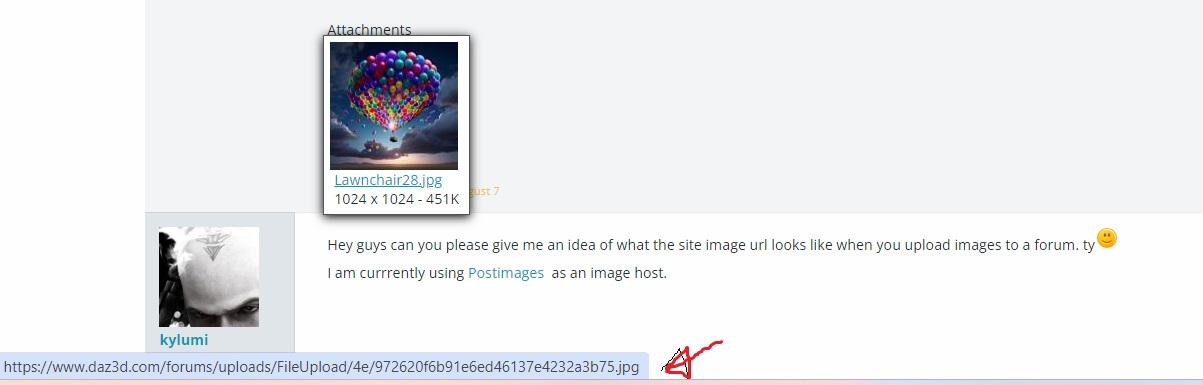
Show us your Daz AI Studio Imageskylumi said:
Hey guys can you please give me an idea of what the site image url looks like when you upload images to a forum. ty

I am currrently using Postimages as an image host.
Hover over the filename on the tiny thumbnail image and you'll see...
 Website Navigation Update/Testing 2023
SofaCitizen said:
MelanieL said:
SofaCitizen said:
If you are using Firefox then search your settings for Fonts and click the Advanced button. In there is a section where you can set the minimum font size. Other browsers should have a similar setting within their settings/preferences. Setting that to something like 16px (currently seems to be set to 14.2222px for comments in the forum) or more should help without having to zoom into every site.
Thanks, but as I noted in my second sentence: if I do that then the text on all the other sites I visit have annoyingly large letters. (Zoom in Chrome remembers what was selected so no need to zoom into every site)
Yes, that is why I suggested an alternative to zoom.
Zoom would be something like "Make every bit of text on every website 20% bigger" - that would do as you had mentioned and make even big text even bigger. What I suggested would be like "Make all text that is 'small' to be a set size but do not increase any text that is bigger". Maybe it still would not work for what you need but it is different to a plain zoom.
Ah! I didn't realise that option existed - when I opened Chrome settings I only saw the "Font Size" option which changed the larger text on other sites to even bigger too. I've just rootled around a bit more and spotted that "Customise fonts" has the parameter you refer to. I've now set minimum font size to be big enough and I'm much happier. Thank you!
 Normal maps for G8F
Some vendors have great normal maps.
I am monetary using normal maps by Tri-X, that I got from other sites
Sorry, pretty expensive, but some normal maps are even in 8k.
Check it out here first, and than search the other usual suspects.
Tri-X | Daz 3DUltraScenery - new(er) territory [Commercial]Hello, not sure if this is the right forum for this but I had an issue running Daz Studio in headless mode in which the Ultrascenery dll failed to initialize. I have both Ultrascenery 2 and Ultrascenery XT installed (not the original US), and the error happens regardless of whether the plugins (for both) are enabled or disabled inside Studio itself.
The error in the log file reads:
2024-08-07 21:59:00.189 [VERBOSE] :: dzpowerpose.dll

2024-08-07 21:59:00.190 [VERBOSE] :: UltraScenery.dll

2024-08-07 21:59:01.000 [WARNING] :: UltraScenery.dll failed to load - Cannot load library C:\Program Files\DAZ 3D\DAZStudio4\plugins\UltraScenery\UltraScenery.dll: A dynamic link library (DLL) initialization routine failed.

My Studio setup is as follows:
2024-08-07 21:58:58.518 +++++++++++++++ DAZ Studio 4.22.0.16 starting +++++++++++++++++
2024-08-07 21:58:58.518 [INFO] :: Performing cleanup...
2024-08-07 21:58:58.519 [INFO] :: Release Cycle: General Release [50001]
2024-08-07 21:58:58.519 [INFO] :: Platform bits: 64
2024-08-07 21:58:58.519 [INFO] :: Qt Version: 4.8.7
2024-08-07 21:58:58.519 [INFO] :: OpenSubdiv Version: 3.0.0
2024-08-07 21:58:58.519 [INFO] :: Running on Windows 11, Build 22631, Professional
I assume this is because US requires some sort of graphics setup to initialize, and that's why the initlization fails. Just want to know one way or another, so I'm not trying to do something that isn't currently possible.
Show us your Daz AI Studio ImagesHey guys can you please give me an idea of what the site image url looks like when you upload images to a forum. ty
I am currrently using Postimages as an image host.
AIUTO...CHI CONOSCE L’ITALIANO? PARTE QUATTORDICIDaz 3D is part of

Connect
DAZ Productions, Inc.
7533 S Center View Ct #4664
West Jordan, UT 84084Licensing Agreement | Terms of Service | Privacy Policy | EULA
© 2026 Daz Productions Inc. All Rights Reserved.