-
How to create pose from morph?
crosswind said:
Yep... as we've already said: a pure morph (shape) drives no joint rotation, so it obviously has nothing to do with Pose or Pose Preset. Anyway, you may dbl-check the Parameter Settings of the moprh, there's a sub-component tab, if there's nothing related to any Joints (Bones), it means it's a pure morph and cannot be baked to transforms.
I appreciate all the help. I will look into that. It's been many years since I've used DAZ, so there's been a bit of learning/re-learning curve involved in this whole process as well. Thank you for patience.
How to create pose from morph?Yep... as we've already said: a pure morph (shape) drives no joint rotation, so it obviously has nothing to do with Pose or Pose Preset. Anyway, you may dbl-check the Parameter Settings of the moprh, there's a sub-component tab, if there's nothing related to any Joints (Bones), it means it's a pure morph and cannot be baked to transforms.
How to create pose from morph?Richard Haseltine said:
coder.sb said:
Richard Haseltine said:
Is the morph actually chnaging the shape to the new pose, rather than applying a pose and a shape? If so then there isn't - as far as I am aware - a way to automatically split them. You would probably need to manually adjust the pose of a second, unmorphed figure to match the positions of the morph/shape.
Thank you for the reply, I believe the morph is only modifying the shape. The bones do change position slightly after applying, I noticed the values of the bones in the joint editor do change slightly after adjusting the rigging the to the new shape.
Adjusting the rigging is making sure that the centres of rotation are still in the right place rlative to the shape, it has nothing to do with capturing the pose created.
coder.sb said:
crosswind said:
A Pose Preset can only save Pose Control properties ( Modifier/Pose ) rather than any of morph properties ( Modifier/Shape ) ... so if the morph you're using is really a pure Shape, your steps won't work. You have to make a real pose according to what you get from that morph...
However, if it's a control property that can be Baked to Transforms, Pose Preset will certainly do then.
Thank you for replying, what's the process for Baking to Transforms?
Edit>Figure>Bake To Transforms, but it won't help you - it is a way to bake things like the Hand Grasp slider down to individual bends on the finger bones, it won't do anything with chnages in posture from a shape that isn't driving the bends of the figure.
Yeah, doesn't appear to be any way to do this in a quick or efficient manner. This is both baffling and incredibly frustrating having already wasted almost a full day on it. Seems like it should be such simple thing do. The figure has way too many bones to pose them all individually. I unfortunately don't have to days to move all of them around. I don't suppose there is a way to convert the morph into a driver somehow? I'm throwing out hail mary's at this point...
How to create pose from morph?coder.sb said:
Richard Haseltine said:
Is the morph actually chnaging the shape to the new pose, rather than applying a pose and a shape? If so then there isn't - as far as I am aware - a way to automatically split them. You would probably need to manually adjust the pose of a second, unmorphed figure to match the positions of the morph/shape.
Thank you for the reply, I believe the morph is only modifying the shape. The bones do change position slightly after applying, I noticed the values of the bones in the joint editor do change slightly after adjusting the rigging the to the new shape.
Adjusting the rigging is making sure that the centres of rotation are still in the right place rlative to the shape, it has nothing to do with capturing the pose created.
coder.sb said:
crosswind said:
A Pose Preset can only save Pose Control properties ( Modifier/Pose ) rather than any of morph properties ( Modifier/Shape ) ... so if the morph you're using is really a pure Shape, your steps won't work. You have to make a real pose according to what you get from that morph...
However, if it's a control property that can be Baked to Transforms, Pose Preset will certainly do then.
Thank you for replying, what's the process for Baking to Transforms?
Edit>Figure>Bake To Transforms, but it won't help you - it is a way to bake things like the Hand Grasp slider down to individual bends on the finger bones, it won't do anything with chnages in posture from a shape that isn't driving the bends of the figure.
How to create pose from morph?crosswind said:
A Pose Preset can only save Pose Control properties ( Modifier/Pose ) rather than any of morph properties ( Modifier/Shape ) ... so if the morph you're using is really a pure Shape, your steps won't work. You have to make a real pose according to what you get from that morph...
However, if it's a control property that can be Baked to Transforms, Pose Preset will certainly do then.
Thank you for replying, what's the process for Baking to Transforms?
How to create pose from morph?Richard Haseltine said:
Is the morph actually chnaging the shape to the new pose, rather than applying a pose and a shape? If so then there isn't - as far as I am aware - a way to automatically split them. You would probably need to manually adjust the pose of a second, unmorphed figure to match the positions of the morph/shape.
Thank you for the reply, I believe the morph is only modifying the shape. The bones do change position slightly after applying, I noticed the values of the bones in the joint editor do change slightly after adjusting the rigging the to the new shape.
How to create pose from morph?A Pose Preset can only save Pose Control properties ( Modifier/Pose ) rather than any of morph properties ( Modifier/Shape ) ... so if the morph you're using is really a pure Shape, your steps won't work. You have to make a real pose according to what you get from that morph...
However, if it's a control property that can be Baked to Transforms, Pose Preset will certainly do then.
How to create pose from morph?Is the morph actually chnaging the shape to the new pose, rather than applying a pose and a shape? If so then there isn't - as far as I am aware - a way to automatically split them. You would probably need to manually adjust the pose of a second, unmorphed figure to match the positions of the morph/shape.
How to create pose from morph?I have a morph for G8.1F that alters the shape and "pose" of the base figure. I would like to create a pose preset from this morph that can be applied to the base figure without changing its shape. What I've attempted so far is this:
1) applied the morph to the G8.1F base mesh
2) adjusted the rigging to the new shape
3) saved the the file as a pose preset
4) deleted the morphed figure and reimported the G8.1F base figure
5) applied the pose preset to the G8.1F base
Unfortunately after this last step, the pose of the base figure does not change. The bones all remain completely unchanged. Any guidance would be greatly appreciated.
Issues with ExpressionsMaking the G8 base expressions (and any expressions that are using them) work on G8.1 requires removing dummy/placeholder expressions that are installed to G8.1 morph folders - These dummy/placeholder expression files have no other function than to prevent the base G8 expressions from loading.
The dummy/placeholder files are located in;
...\Data\DAZ 3D\Genesis 8\Female 8_1\Morphs\Daz 3D\Base Pose Head\ (255 files, can be more if you have additional DAZ expression packs)
...\Data\DAZ 3D\Genesis 8\Female 8_1\Morphs\Daz 3D\Expressions\ (24 files, can be more if you have additional DAZ expression packs)
...\Data\DAZ 3D\Genesis 8\Male 8_1\Morphs\Daz 3D\Base Pose Head\ (255 files, can be more if you have additional DAZ expression packs)
...\Data\DAZ 3D\Genesis 8\Male 8_1\Morphs\Daz 3D\Expressions\ (24 files, can be more if you have additional DAZ expression packs)Please make sure you are removing the files from G8.1 morph folders and not G8 morph folders.
Note 1; If you are logging in to DS and letting DAZ Connect (within DS) to install/update your content, you may have these also in an other location that has "\Data\Cloud\" in it's path
Note 2; Do not remove any files from "FACS" or "FACSExpressions" foldersAdding New ShadersWhile I appreciate your reply and I'm sure it makes absolute sense to you, it is thouroughly confusing to me.
I don't understand "suitable target"
I don't understand "drag the file". What file? My new shader is not in Daz content Library?
What is "Daz Studio Formats"?
What "Catagory"? Where?
Why is "Smart Content" involved in this transfer?
Popup Dialog???
Metadata??? Huh? Why is this so complicated? All I want to do is add my new shaders to the existing Daz shaders directory???
When I have a texture to add to my library I simply1) Open the Content Library, then
2) "Browse to Folder" and
3) Drag the new texture from the original folder that it's in, to the Daz folder and
4) "Refresh" the Daz folder.
This process does not work with new "shaders" and Daz "Presets" tab.
When you drag and refresh as above Daz ignors the new additions.
What I need to know is what the "step by step" method is.
Is there a tutorial some place?Getting on the 9 train, or notdaveso said:
Unfortunately not very backward compaitble, another negative. I tried to use a beard product for G9 on G8 yesterday and it came in at his neck. G9M is a head shorter than g8.
This is how I fit clothes, hairs etc. across all generations.
Follow one of the tutorials out there for transferring characters between generations to transfer your character to the generation of the item you'd like to use. Or use ManFriday's converter.
Have both your original character and your transferred character in your scene.
Fit the clothes, hair etc. to the transferred character.
Hide the transferred character completely.
Unhide the item you want displayed on your original character.
Done.
If you want to get fancy, you can also do stuff to transfer the item and save it out as a preset for the original character generation. Steps vary, but hairs with a skullcap are particularly good for this.
And there are a few other tricks you can use the intermediate steps for if you manually transfer the character. (The converters tend to delete these when they're done).
Morph not working properlyIs the figure morphed? If so make sure that you enable Rreverse Deformations when importing the morph, otherwise it will "double up" the effect of the morphs already applied.
MimicMolly's Renders & WIPsMimicMolly said:
I have almost remade one of my OCs with G9, thanks to Wagner 9! Here is a comparison of a digitally-colorized sketch I did, and the G9/DAZ version. However, I am "missing" some components to make him more accurate:
- Round eyes morph. The DAZ version, even with the toon bits, has the eyes not round enough. (But a large majority of my drawn characters have round eyes.)
- The "Spock" eyebrows. My OC has straighter/flatter eyebrows that curve up a bit at the ends. None of the included G9 eyebrows fit this.
- Short curly hair with a volume morph. Bonus points if there is a Titian red version included. (I colored it too dark, but it was too light before.) I found this cosplay hair at Renderhub and recolored it to my liking, but it is a prop hair. AprilYSH's Portia Hair comes close too and was what I used before. It just didn't have the random little whisps like the cosplay hair.
- Adam's apple morph. I saw one in some package. One of the morphs to make his G9 preset was a feminine morph I transferred from G8F, so that reduced the size of his Adam's apple. So I need to dial it back up.
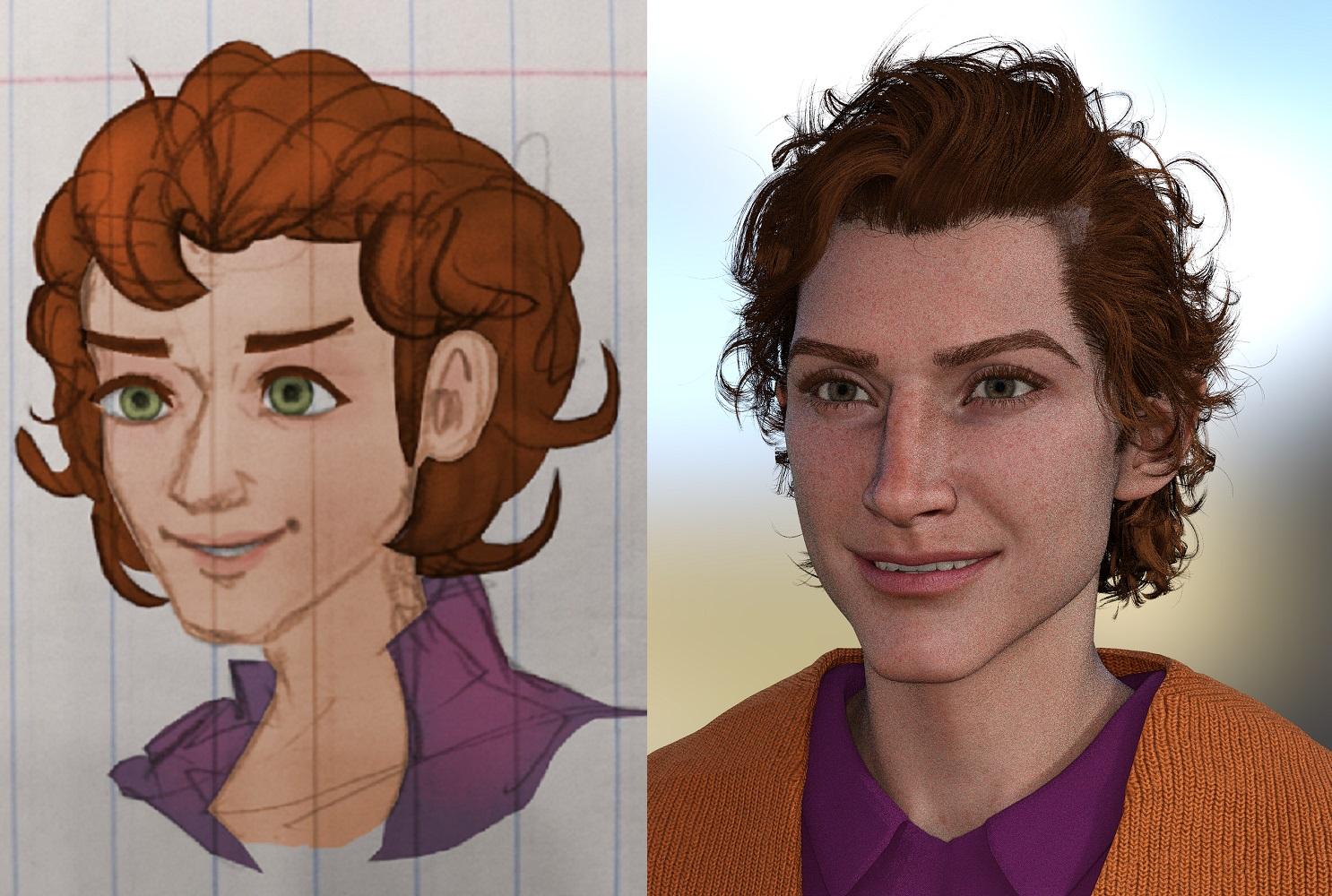
The eyes are probably the most important, since I plan to use this character preset for drawing than rendering.
I should probably do a comparison render with the previous G8.1M who used a mix of Ollie 8 and Torment 8.1, because this character is supposed to look like a "young jester." So he has a longish face with a long aquiline/Roman nose. I could never get the G8 version to look young like this G9 version.
Nice translation into DAZ
Morph not working properlyHi,
I am trying to add morphs to this skirt I made. The morph should be a "back out" but instead it is going up and tearing.
Any advice is appreicated:
V4 character, morphed in ZBrush using GOZ
cheerio lululee
Use G9 skin on G8Hi! I used the map transfer as shown in the tutorial, but there are black parts aoround the maps:
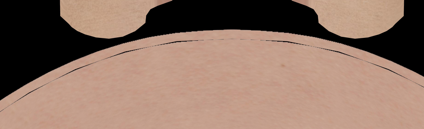
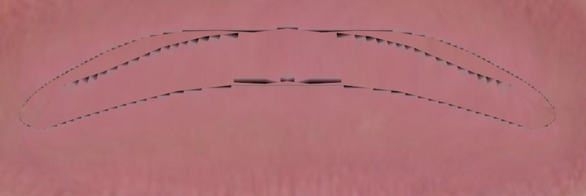
Furthermore, the parts above the head on the diffuse color map (I am not sure what is it, maybe ear parts, or maybe eye sockets?) are completly white on the transluency map, and don't appear on the mormal and dual lobe specular weight maps:
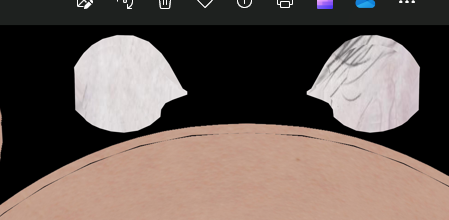
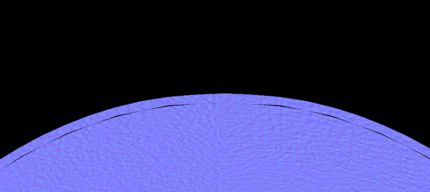

It's the first time that I use the map transfer, so maybe there is something I didn't understand... Could you help me, please?
Thank you in advance!
[Released] RSSY Character And Material Conversion Bundle Genesis 8 to Genesis 9 [Commercial]Hi there; I'm quite new to Daz, so I apologize in advance if I I've overlooked something somewhere. I bought the RSSY character converter bundle earlier this evening with the intent to port Cato (a Genesis 8M character) to Genesis 9. Whenever I try to convert him, he ends up...well, it's scary to say the least. He isn't saved in the cloud as far as I'm aware (he's saved in my Documents folder with my other custom characters inside the Genesis 9 folder the PDF instructions advised me to make), and I've tried going through each morph one at a time to try to fix the issue to no avail. I know I also had to buy the Genesis 8 Male Head/Body Morph items he required. Is this what's possibly causing the problem - and if so, is there anything I can do still - or have I overlooked something silly? His textures show up pretty perfectly, so that's a small victory, at least! Any and all help would be greatly appreciated (please just remember I'm a noob, so the more "dumbed down" any instructions are, the better)!
Thank in advance!
(Picture attached just for fun. XD)
[Released] Prop Minion [Commercial]silvioarturi_d26d1707cd said:
I purchased Prop Minion yesterday and I'm doing some test with it.
I noticed that when I try to move props from G8F to G2F, if I load a prop on (for instance) the 'Left Hand' bone of the G8F minion, it is correctly moved to the G2F figure.
But if the prop is loaded on 'Left Forearm Twist', Prop Minion does not seem to know what to do with it, and it ends discarded at the feet of the G2F figure.
Good catch. I am compiling a list of ones I need to fix like this, e.g., G9 has a left hand anchor that needs to transfer props to the left hand for other generations.
[Released] Character Converter from Genesis 3 Female to Genesis 8 Female(Now Conv JCMs) [Commercial]jdavison67 said:
At the end of the transfer I have three identical g8 base characters... its like the morphs never were applied...
The second image shows the character I was trying to copy
The one on the right... ( I whited out the textures )
The one on the left is the transfer result....which is just the base g8 clone basically...
JD
I am going to need to see the log, to see what the script detects and what it writes out. Also, what are the directories listed in the Daz Studio Formats section of the Content Directory Manager:
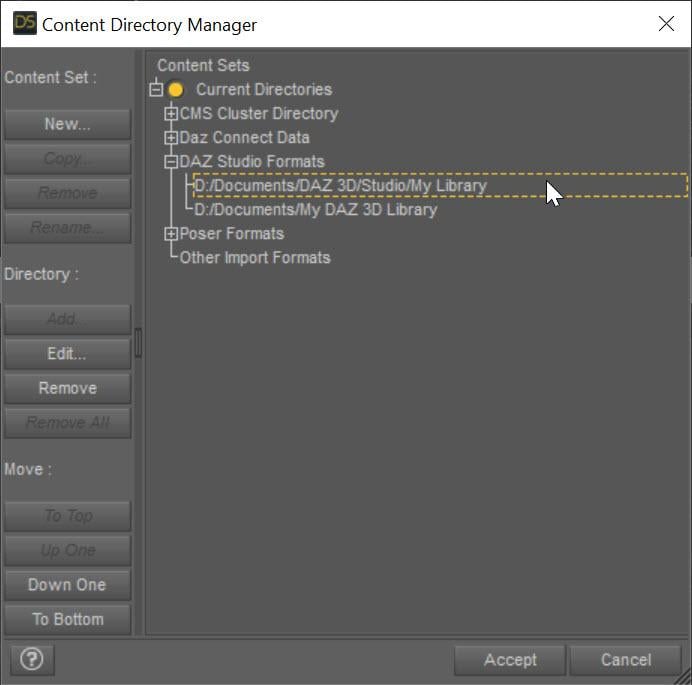 [Released] Character Converter from Genesis 3 Female to Genesis 8 Female(Now Conv JCMs) [Commercial]
At the end of the transfer I have three identical g8 base characters... its like the morphs never were applied...
The second image shows the character I was trying to copy
The one on the right... ( I whited out the textures )
The one on the left is the transfer result....which is just the base g8 clone basically...
JD
Daz 3D is part of

Connect
DAZ Productions, Inc.
7533 S Center View Ct #4664
West Jordan, UT 84084Licensing Agreement | Terms of Service | Privacy Policy | EULA
© 2026 Daz Productions Inc. All Rights Reserved.