-
ZDG random Daz Studio discoveries and questions.
You could hunt down these unwanted rotation values of the eyes in the Property Hirarchy pane and delete them from the original character morph - maybe its something in Rapha Head.
First select the character morph in the Parameters pane, right-click change to edit mode, then right-click the morph and select "Show in Property Hirarchy".
Next expand the Sub-Components and look if the character morph is split up in head and body. By the right-click menu can jump between the "Show in Property Hirarchy" and "Show in Paramenters" until you reach the head morph, where the "adjusted rigging" bone joint corrections are saved. Maybe you can find the Left Right Eye rotations with the Text search field. In common there should only be start- and edpoints and no rotations been saved I think.
Otherwise you could change to the Joint Editor pane and use right-click on viewport Edit>Adjust Rig to Shape. In the dialogue there is this bottom setting Adjust Orientation uncheck this. Then go to the Property Hirarchy pane with the selected character morph and delete all Sub-Components. Next you can right-click again in the Property Hirarchy and select ERC-Freeze to save the new Rig Adjustments to the character morph.
To save the changes to the library you could overwrite the original character morph with saving the morph asset in the original place I think.
[Released] Altern8 - Skin Shader System for Genesis 8 [Commercial]So, this is a character morph and texture from Michael 3, Levi who was previously sold at ArtCollab years ago, applied aging maps from ZeV0’s overlays, saved and converted for Genesis 8 Male. I used N.G.S Anagenessis 2 and Altern8
SY Clothing Morpher for Genesis 8 Female. Product Impressions (Updated)Ok, so ive had a chance to look into Sickleyield's new product SY Supermorpher for Genesis 8 Female, https://www.daz3d.com/sy-supermorpher-for-genesis-8-female , and im quite excited about the early results that im getting. I originally got this product because I was wondering what it could do with older generation clothing and current gen models. So heres what I came up with.
I wanted to start with a difficult figure so I chose Lady Alexandra 8, https://www.daz3d.com/alexandra-8 . I fitted her with the Delta Outfit for Genesis 3 Female(s), https://www.daz3d.com/delta-outfit-for-genesis-3-female-s .
I followed SY's instructions (

 ) and loaded a base G8F into the scene. Then I applied Alexandra 8's FBM from the shape tab. Im assuming that its necessary to load a figure this way because of the morph transfer process but im not certain. Then I loaded the Delta outfit to the model.
Demo_1 shows the Delta dress after being auto-fitted to Alexandra. Notice how the dress has undergone the typical mutilation that alot of older gen clothing goes through with autofit, particularly in the crotch region.
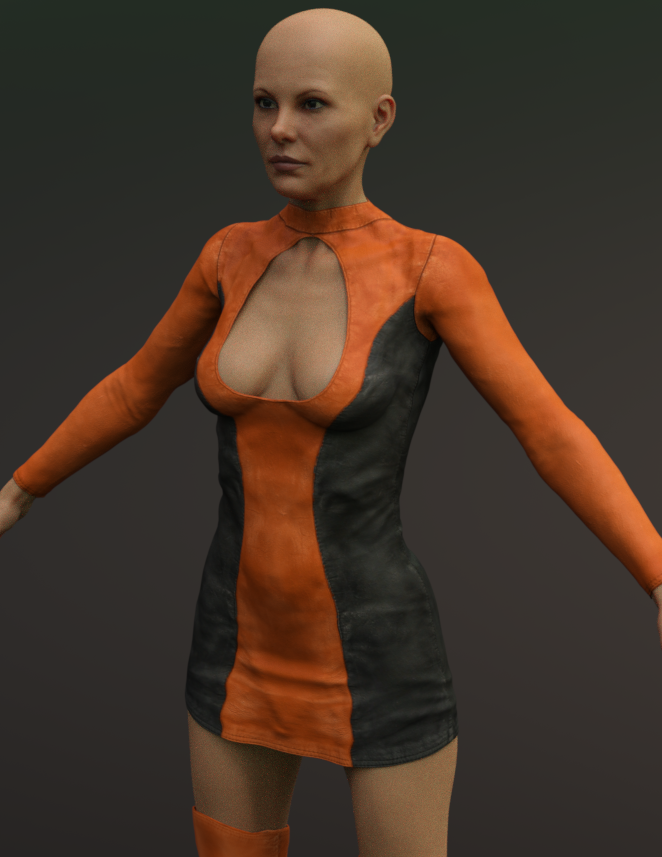
Demo_2 shows the Delta boots after autofit. They actually dont look too bad.
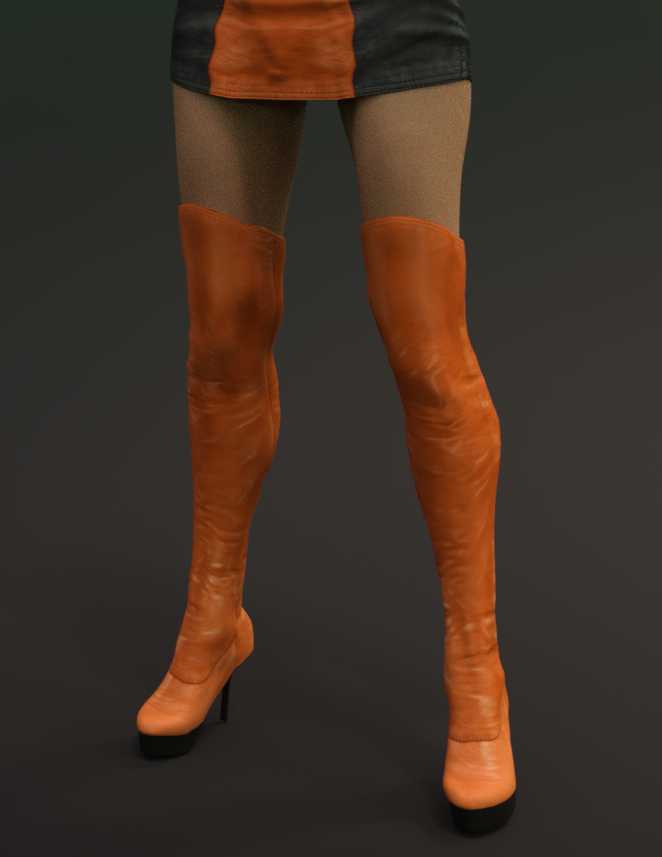
Demo_3 shows Alexandra wearing the SY Supermorpher dress. You apply the supermorpher dress directly to the figure.
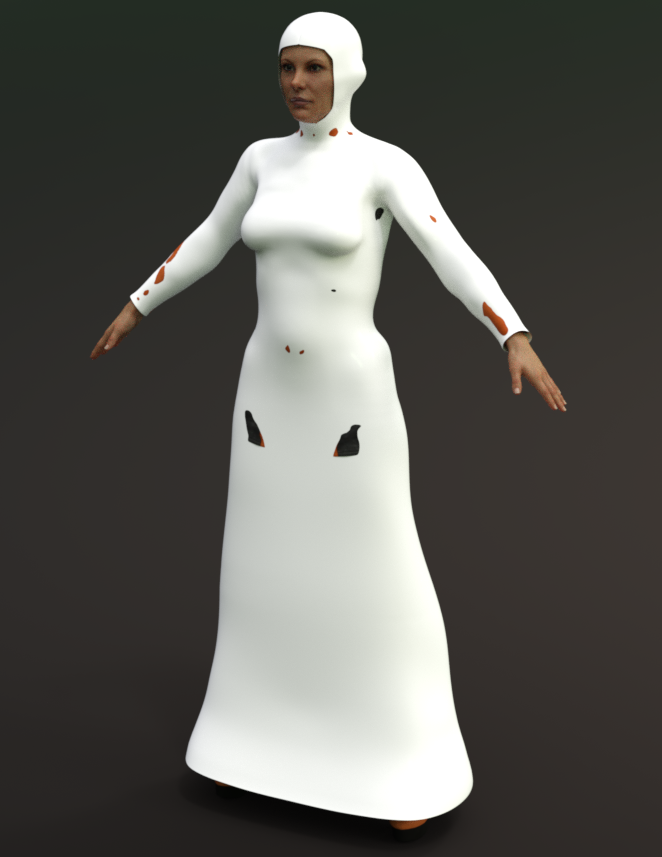
After you have applied the supermorpher dress or suit to the figure, you use the transfer utility tool, uncheck some options here, check some options there, its all explained in the manual, and press accept.
Demo_4 shows the Delta dress after the transfer utility does its thing. Please note that after the transfer was complete, there was some substantial clipping going on. Not a problem. All the corrective morphs from the supermorpher dress transfered into Delta dress and all of the clipping was easily fixed. I thought the results were excellent.
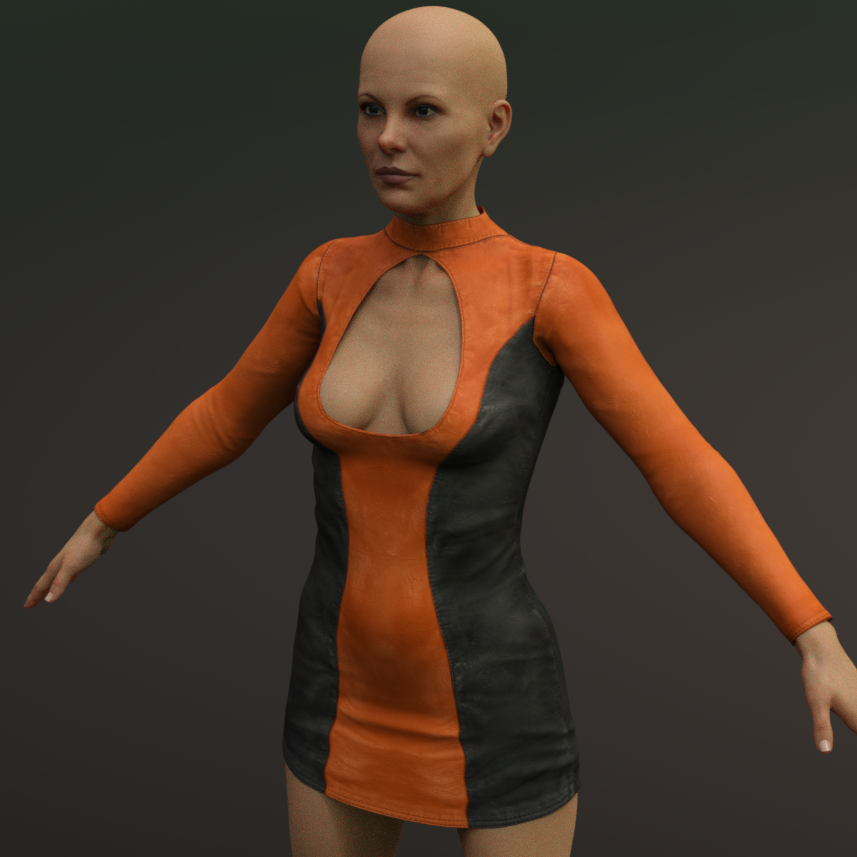
Demo_5 shows a repeat of the process for the boots. I used the SY supermorpher suit for this.
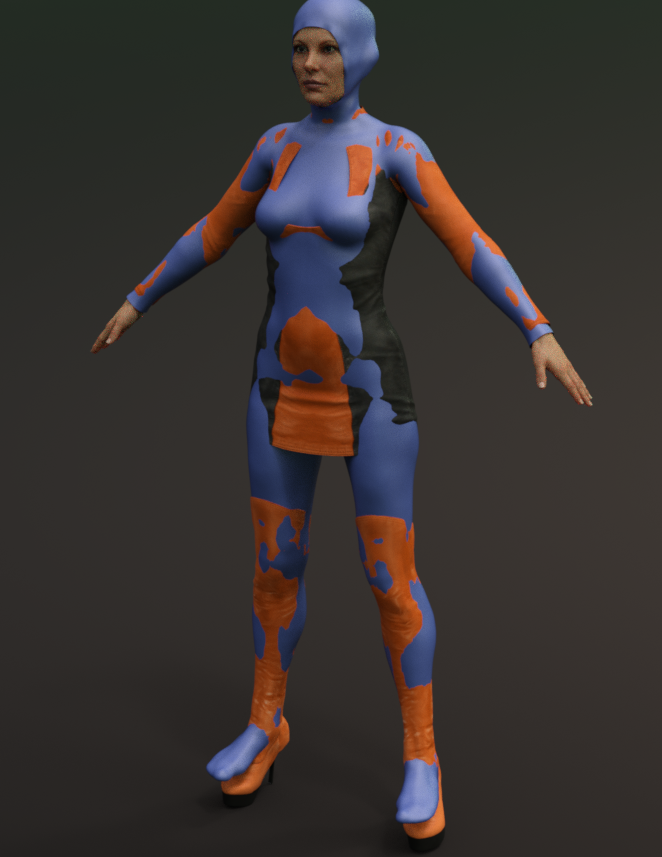
Demo_6, the reult.
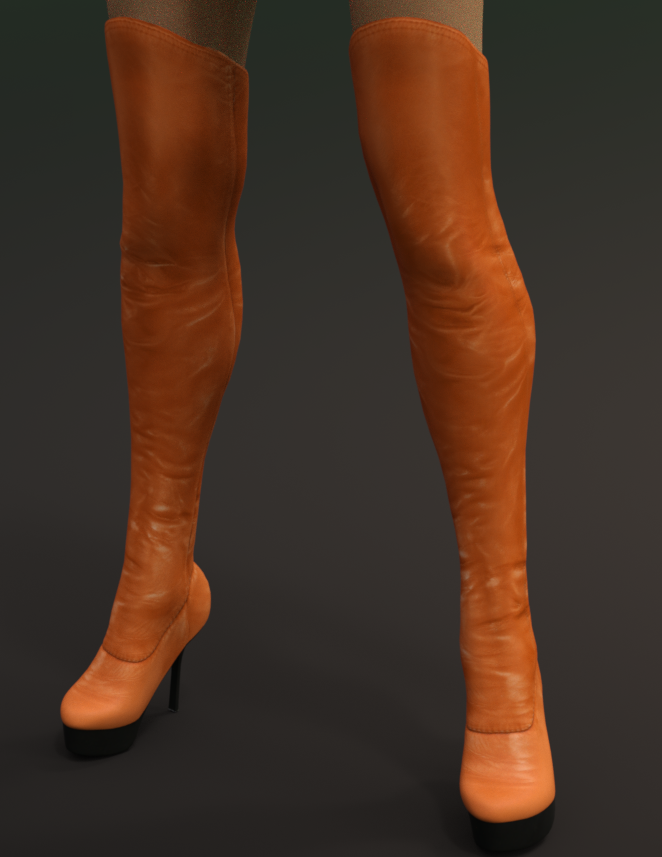
Demo_7, the finished outfit with pose. Please note that I also used SY Ultra Templates Genesis 8 Female(s), https://www.daz3d.com/sy-ultra-templates-genesis-8-female-s , with the dress.
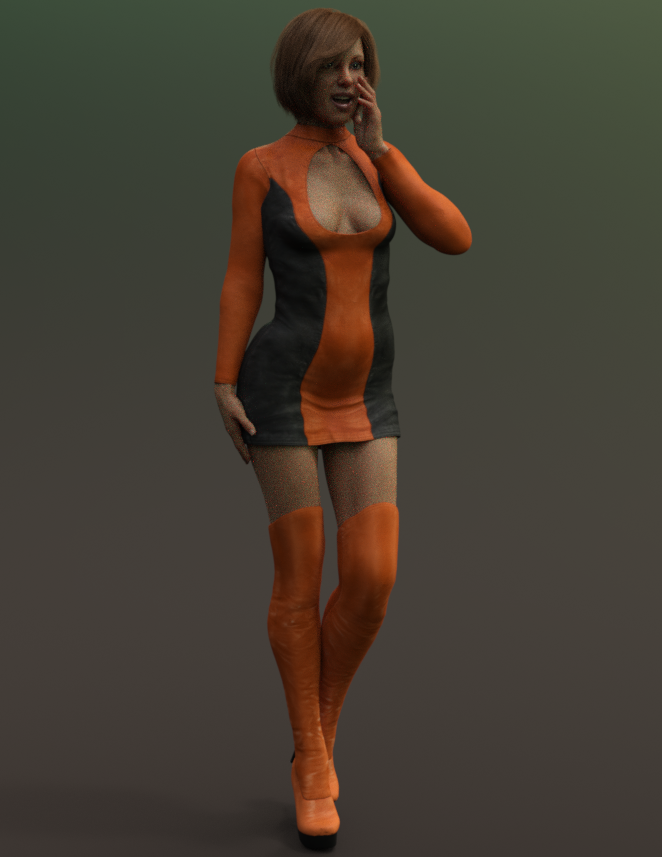
Next I am going to see what sort of results I get using the supermorphers on a goddess figure.
ZDG random Daz Studio discoveries and questions.yes, as I thought, a hell of a lot of work compared to just fixing eye orientation in a figure shaping dial.
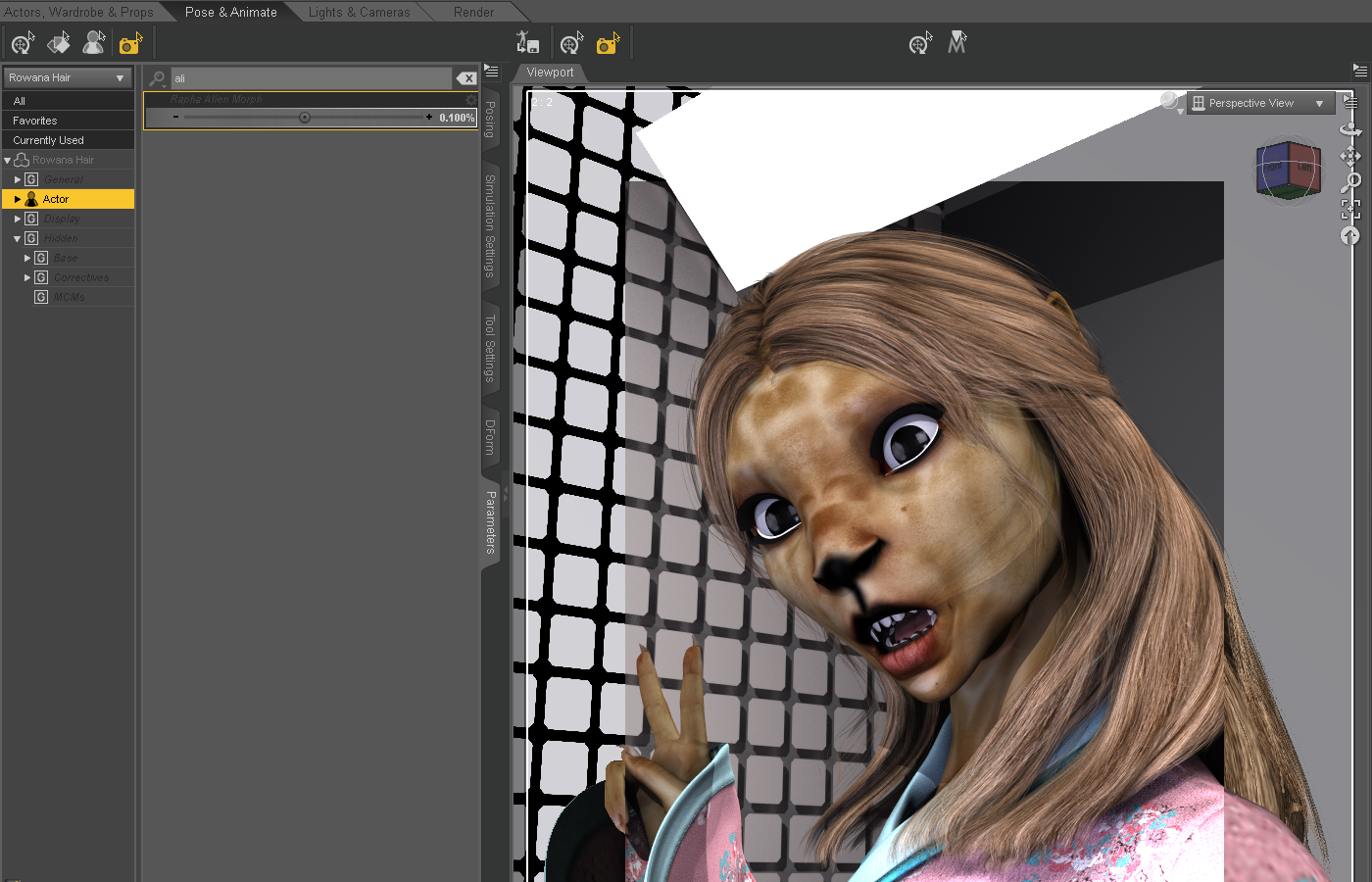
OK, so the one hairstyle sort of looks better with the Alien morph with the Alien dial reduced on the hair, however, now as an example, the hair is inside the figure cuz it is no longer following the shape of the figure. That was what I was first saying about an argument for making the ears separate, to begin with. Clearly, from the promos, Marcius never intended the alien figure to be used with hair. Again, the eyes on the Alien shaping dial, well, that really needs to be fixed, lol.
The eye orientation, I'm guessing is a simple find and remove the lines changing the bone orientations in the dial duf/dsf/whatever-file (rotations, not transits), or it is a checkbox somewhere in the ERC freeze window. Both sound like an easier fix for the PA that has the original stuff to do that with. And, only the PA that made the thing, can share that fix with everyone that purchased the product, lol.
And yes, very nice maps to work with in 3delight, thanks. Just a simple mask overlay in gimp to combine the Iray tattoo maps with the Diffuse maps, and wah-lah.
Hi, let me know in which circunstances you have the eye orientation problem, I tried to replicate, but for me everything is working fine, so plese give me more detail about. Thanks a lot.
Simple belt fix with Transfer Utility settings?I have created a belt for a G8 figure, and when I apply Transfer Utility and fit it to the figure the belt clings too tightly to the figure, making it appear under the clothing. I want it to appear above. Is there a simple setting for the transfer to set the distance of the cling effect, or do I need to get involved with all this weight mapping business to make this work?
First test on iMac ProYou can easily boot up MacOS from the external SSD drive.
We have done such upgrade on 2 iMacs at work, which only have had mechanical HDD and the other one, fusion drive with very small SSD part.
We have used external 512 GB Samsung SSD drive connected via USB 3. After such upgrade, both iMacs runs around 6 times faster.
One can easily transfer all programs, data and operating system with Migration Assistant on Mac.
Is it possible to add new morphs to Fibermesh hairs?Fibermesh hair is still polygons, so it should be morphable like any other model. Actually managing it to morph it might well be chlannging, given the nature of the geometry (lots of one polygon-wide strips usually) but there should not be an obstacle at the import/export stage (as long as you don't use tools which change the mesh).
Inject Morphs from eg M4 to M4 clothing within Carrara?For M4, V4 and similar, I use wardrobe wizard for similar workflow. I save the M4 or V4 char's shape as a FBM. I then reset wardrobe wizard so the M4 or V4 FBM is included in its morph list. Then the FBM can be copied to other clothing items for M4 or V4, or to new custom meshes for M4 or V4 that are being rigged using wadrobe wizard.
Cyclops for Genesis 8 Male. [Commecial]Yes, the lost eye is a morph, not a geograft this time. G8 no longer has holes behind the eyes, so that made it a bit easier to morph out, it still needed a bazillian JCM's to make the expressions work "decently"...(and I should note that I only made jcm's for the base expressions that come with G8M).
Manekineco....what the second line means is that if you try to add different morphs to the character, or apply different textures you will get some evidence of the morphed out eye reappearing.
Inject Morphs from eg M4 to M4 clothing within Carrara?I use Morphing Clothes to do this
bought it years ago before I owned DAZ 3 studio advanced which will also inject morphs using morph transfer
Nowadays in DS4 it is under edit transfer active morphs and one can save it now as a duf file instead of using the cr2 exporter as I used to or Collada.
I still use morphing clothes btw
Is it possible to add new morphs to Fibermesh hairs?I think deformers are great for tweaking fibermesh, have you tried that? You can spawn the deformer to create a new morph.
I know Genesis means beginning but...Weird. Genesis Starter Essentials lists "2012-08-16" as the release date, but, yeah, Victoria 5's page says she came out in 2011. I used the Daz3D Documentation center to research the release dates, and used links to cite the pages I referenced.
Of course, as a PA, I'm grateful to those who do support the new gen - it helps me to pay the bills. :) But I don't hold it against anyone who chooses not to.I was not, in any way, advocating a boycott. I don't want the PAs to lose sales - financial insecurity is terrifying and I don't wish it on anyone. What I meant was something along the lines of "If their release schedule proves as unsustainable as I suspect for too large a portion of their userbase, sales will drop and hopefully Daz will adapt before they and the PAs are hit hard financially." I've seen so many places, local and online, dry up and die that I worry about this stuff.
The more selfish part of my frustration comes from how close I came to wasting a ton of money on G3. I literally had the the tabs open for the basic morph packs and textures to make G3 useful for my needs when G8 was released. I'd like to continue buying clothing, hair, and accessories for figures from the PAs, but new figures aren't supported long enough (nor are they improved upon enough) to justify investing in a new figure.
But no one is forcing anyone to buy new content. [...] there's nothing twisting their arms saying that they HAVE to keep up with the latest gen.
That was more or less what I intended as my main point, though it may have gotten lost in the rant paragraph. :D I also made sure to suggest autofit clones for people who don't want to switch figures, but want to use G3's stuff (or G8's stuff on G3 - there's a clone for that). Autofit is VERY hit or miss though, but maybe dForce will help with that?
Any way to stop a pose from changing character measurements?That might depend on how you originally made your character 4' 10" tall. Did you use the Scale slider in the Parameters pane on the character root? Did you Scale individual bones in the Parameters pane? Did you use morphs, like the Height morph?
How do I save a Genesis (1) shaping preset?I have various morphs set at different percentages to make a unique character. I need to zero her to the basic genesis (because I like having a unisex one I use the Genesis model the most) and manually morph her ears to fit the character. She is going to be a comic cameo and her ears are rather unique. http://themonsterunderthebed.net/ the gray girl if youre interested. Anyhow, I've tried saving a character preset and a shape preset but haven't had much luck. I dont know what I am doing wrong, please help me.
Used items in Promo picturesIt would be awfully nice to
- get items used used for promos listed in the promo
- have one part of the forum designated to ask what items were used in a certain prom (instead of threads coming up in all the different parts of the forum, which surely makes getting an answer harder)
- have promos for new figures using - at least some - comparable pictures, using the same, very basic, items in the same, very basic, poses with the same, very basic, hair to make comparing different figures easier. Think of full body mugshots in front of a measure wall in inch and centimeters. I love to see all those fancy and artistically worthy pictures of new figures, but often they don't really show me the basic details that would make me buy a figure. And I don't mean noods here, but some detailed skin pictures would always be great. Textures of a figure are a vital reason to buy a figure for me.
first point - yes, it would be nice, but at this point they should just start posting basic clay renders for promos since apparently not having a list of whats used it driving some raving mad and that would be much easier for the PAs.
second point - the problem with that is that the bulk or traffic is in the commons and when questions like these have been posted in other forums, they don't get as many views and even less responses. In favor of that you get the users that have no idea on the items used, get tired of the same users asking over and over again, or users that don't care to see these types of threads.
third point - I couldn't agree more with the last part about how important the textures are, it's the hardest part to create when not using a MR and the one that often doesn't get shown thanks to DAZ nudity policy. It's also the main thing I buy a character addon for and why most of mine are bought at other stores where I can see the complete product. I recently saw a new character for G8 at the other store and was impressed with the face morph, only to view the other promos and see no nude ones, so I had to pass on that one. Makes no sense to me to spend all that time creating your character only to not show it off. If nudity is an issue for you, move on to creating props or clothing.
Iray help..The image is grainy because it still needs more iterations before it is complete. In your render settings, go to "progressive". You'll find Max Samples, Max Time and Rendering Convergence Ratio. Whichever of these three values is reached first, makes Studio automatically stop the render. So, 5000 iterations, OR 7000 second (2 hours) OR 95%. Check your render log which of these values was reached first, and set that higher. You can also do this without starting the render from scratch, as long as you don't close the render image. Just change the value and hit "resume". You can repeat that until you are happy with the quality.
As for the pants, that is called "poke through". It happens when the two meshes (skin and pants) intersect. It usually is visible in the preview, but when you have a HD figure and sometimes for other easons, you can't see it in the preview but only in the render.
You have three options to get rid of it (unless you want to pretend it's the latest fashion, like "Man, this designer pants cost me one thousand bucks!"
 ):
):- go into your Character's bone structure and click on the little eye in front of the offending bone section (hip and tights in your case).
- Select the pants, go to the parameter tab, chose Actor and check out if there's a morph that either lets you increase the butt and tight size, or "expand all".
- You can add a push modifier to the pants, or ifr it already has one, you can use the "smoothing" to cover her butt.
Thanx!!
I'm a little unsure how to check the render log??
Any formulas out there for where these sliders chould be set at as far as time?
Iray help..The image is grainy because it still needs more iterations before it is complete. In your render settings, go to "progressive". You'll find Max Samples, Max Time and Rendering Convergence Ratio. Whichever of these three values is reached first, makes Studio automatically stop the render. So, 5000 iterations, OR 7000 second (2 hours) OR 95%. Check your render log which of these values was reached first, and set that higher. You can also do this without starting the render from scratch, as long as you don't close the render image. Just change the value and hit "resume". You can repeat that until you are happy with the quality.
As for the pants, that is called "poke through". It happens when the two meshes (skin and pants) intersect. It usually is visible in the preview, but when you have a HD figure and sometimes for other easons, you can't see it in the preview but only in the render.
You have three options to get rid of it (unless you want to pretend it's the latest fashion, like "Man, this designer pants cost me one thousand bucks!"
):- go into your Character's bone structure and click on the little eye in front of the offending bone section (hip and tights in your case).
- Select the pants, go to the parameter tab, chose Actor and check out if there's a morph that either lets you increase the butt and tight size, or "expand all".
- You can add a push modifier to the pants, or ifr it already has one, you can use the "smoothing" to cover her butt.
Anatomical ElementsHonestly, It really is about time for DAZ to change their policy on this. This is no reason any more, you probably won't lose your PayPal license (they need the money) if they make toast an indepent product or maybe just part of the body morph pack.
edit: WSJ article on PayPal: https://www.wsj.com/articles/paypal-profit-rises-59-1517437185
Basic tutorial for transferring Genesis3 female morphs to Genesis8 femaleThere is still a lot of to Daz that I don't comprehend, and the terms and methodologies are still a bit foreign to me after several years (so my apologies if I'm missing the intent of this tutorial). I'm a bit lost here in terms of "Your morph/morphs will have transferred" and I need to locate them to dial them in.
I have two Genesis 2 figures (male and female) and both use their respective shaping/face morphs offered as a Daz Originals. My goal is to have these converted to Genesis 8, primarily, I just want the faces to be the same (or close as possible) on a Genesis 8 figure. Does your method achieve this or is it providing a different end goal?
After I followed the steps, and clicked Accept, it ran through a series of processes, and once finished, there wasn't any change. As far as searching for the morphs as you mentioned, there are dozens of controls I used to tweak the nose, eyes, etc, so I'm not sure about searching for them since the Genesis 8 has similar face morph controls.
Thanks, any help would be appreciated.
This transfers the morph dials, you will have to go through them and put them back to the same places as the dials on your genesis 3 figure.
A way around this is to save your character shape on Genesis 3 as a full character morph and transfer that over as a single dial.
You can find a simple tutorial on creating a morph dial here;
http://www.digi-dotz.com/index.php/free-poses/tutorials/daz-studio-tutorials/47-morph-in-daz-studio
Saving a morph for redistributionA Shaping preset for just a morph, Character preset includes materials (by default).
Daz 3D is part of

Connect
DAZ Productions, Inc.
7533 S Center View Ct #4664
West Jordan, UT 84084Licensing Agreement | Terms of Service | Privacy Policy | EULA
© 2026 Daz Productions Inc. All Rights Reserved.