-
New DS Filament Render Engine
OK. I wasn't uninterested, I was just wondering about how and why it was used. I do a lot of my renders in Iray preview mode myself. So in the tier of rendering options we have Iray (full), Iray preview, and below that in quality, Filament. Kind of lowering the bar IMHO.
It's good to have options, and a more stylized one isn't necessarily lowering the quality bar.
 Iray is actually too realistic for a lot of what I do, because I'm shooting for "looks like concept art" rather than "looks like a photo." I can already see some applications for compositing where I could do both an Iray and a Filament render of the same scene and mask out the bits where I want more or less detail. I sometimes do a similar thing with a mid-denoiser render and a very sharp render that I let finish.
 I could never wrap my head around 3DL and juggling materials, so I'm going to try to get into this early.
MEC4D's celebration ( with freebies ) [commercial]Filament Shaders are the proper PBR shaders especially Metallicity based shaders works and looks great , as it works based on reflections as everything around in the real world is shinny !
To make it easier , since we working with Specular based shaders for so long, in creating metals the Specular map become the Base color and the Glossiness map inverted become the Roughness , it is easy to set up in DS when converting old shaders maps to Metallicity shader
For Metal turn the Metallicity value to 1 , Plug specular color map to base color and plug Glossiness under roughness and using image layer option in DS invert it to negative and you good to go in a seconds
you should have a similar preview under Filament draw style and Iray as I did with my old 3DL helmet above as I was little early in time with PBR maps before Iray arrived so easy to convert.
For non metal surfaces always turn down the value of Metallicity to 0 and do the same as I mention above but in place of specular maps what are gray scaled for no metal surfaces plug the Diffuse maps under Base Color and invert the Glossiness maps to use under Roughness .
Good thing about it is that you don't even need to leave DS for that or have any Photoshop skills at all .
I am so happy about the Filament viewport , that was a great move , happy you guys finally can play with it too, it saves time and power and no more guessing where your environment directions are.
I was setting up many shaders blindly for hours without the need to run Iray for check , don't remember when it was so quiet at my workstation
of course it is not full Filament Engine so you don't have the full potential of it but great replacement for the ancient OpenGL
I wish there was reflection. from other objects in the scene and not just IBL light , but that would request you to run the graphic cards again so what's the point of a Draw style viewport ? we have Iray for that!
Personally I think it is great improvement so practice and get used to it
I am loving it on my old computer without a graphics card
SICK AND TIRED OF PREVIEW LOCK UPS!there's probably more than one cause, PCs are wildly different.
For me, previewing with iRay Photoreal and Textured is 100% stable.
iRay Interactive and Filament previews cause hangs frequently. somtimes for 20 seconds, sometimes forever. I have now learned to save often, when using Filament...
Daz Studio Pro BETA - version 4.12.2.60! (*UPDATED*)In 4.12.2.54, Filament PBR still showing magnified bump maps (they look like they are loaded in low resolution and then upscaled at least 4 times, looks awful on skin, most visible on torso).
New DS Filament Render EngineWell I just tried to download the beta and can not download it through DIM. I purchased the free beta yesterday and was going to download it this morning and no joy. I sent a ticket. I really want to check out the new Filament Render Engine.
You may need to check Public Builds filter in your Advanced Settings > Downloads.
That did it, thanks Sevrin
New DS Filament Render EngineWell I just tried to download the beta and can not download it through DIM. I purchased the free beta yesterday and was going to download it this morning and no joy. I sent a ticket. I really want to check out the new Filament Render Engine.
You may need to check Public Builds filter in your Advanced Settings > Downloads.
New DS Filament Render EngineWell I just tried to download the beta and can not download it through DIM. I purchased the free beta yesterday and was going to download it this morning and no joy. I sent a ticket. I really want to check out the new Filament Render Engine.
New DS Filament Render EngineI've read most of this thread but I'm still not sure of the purpose of Filament. It seems to be just another preview option that you're not going to render with anyway so why are people concerned about how good or bad it renders. A quick Iray preview will do that much better. Is it for people with low-spec systems where Iray preview is too slow for them? Or toon animators who don't need Iray?
some of us are very keen to render with it
Well, at the very least it's worth looking into. PBR is a decent half-way house between the ancient GL renderer and full-blown RT.
New DS Filament Render EngineOK. I wasn't uninterested, I was just wondering about how and why it was used. I do a lot of my renders in Iray preview mode myself. So in the tier of rendering options we have Iray (full), Iray preview, and below that in quality, Filament. Kind of lowering the bar IMHO.
yeah I am an iClone6 user too so used to lower expectations

I do animations and my computer can only render most things at least an hour a frame if it fits on my card
I do set very low settings and use denoiser and get 10 fps but it looks worse than Filament
OK here is an example
RedCrowInn rendered very low and 3fps and interpolated with DAINapp to 24fps
still took all day
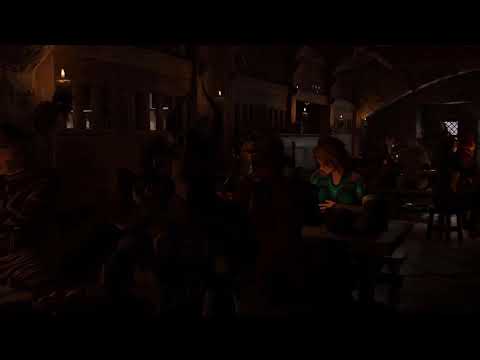
my Filament version that took about 10 hours (the scene in the middle, a tad fast but I might interpolate that with DAINapp too later)
 New DS Filament Render Engine
I've read most of this thread but I'm still not sure of the purpose of Filament. It seems to be just another preview option that you're not going to render with anyway so why are people concerned about how good or bad it renders. A quick Iray preview will do that much better. Is it for people with low-spec systems where Iray preview is too slow for them? Or toon animators who don't need Iray?
It's great for people who have a good story to tell, and aren't too fussed about having their scenes appear super realistic, or would prefer them not to look that way. Sometimes it's more important that all your scenes have a consistent look than that they look perfect. You can achieve that with Filament. It's still necessary to set up the scene properly, but once you do, you hit render and then move onto the next scene. It will be great for comics and visual novels as well as animations.
New DS Filament Render EngineOK. I wasn't uninterested, I was just wondering about how and why it was used. I do a lot of my renders in Iray preview mode myself. So in the tier of rendering options we have Iray (full), Iray preview, and below that in quality, Filament. Kind of lowering the bar IMHO.
New DS Filament Render EngineOK I have some things load transparent in Filament and none of the shaders I tried fixed it
so I created one from an imported obj
it is NOT DAZ default, maybe it is iray uber default but that didn't fix it, this does if you hold ctrl and ignore maps
maybe Richard or someone else shader savvy like 3Diva can puzzle out why this happens and what needs to be changed
New DS Filament Render EngineI've read most of this thread but I'm still not sure of the purpose of Filament. It seems to be just another preview option that you're not going to render with anyway so why are people concerned about how good or bad it renders. A quick Iray preview will do that much better. Is it for people with low-spec systems where Iray preview is too slow for them? Or toon animators who don't need Iray?
some of us are very keen to render with it
just because you are uninterested do not assume everyone else is
and yes some of us do not own high end hardware
New DS Filament Render EngineI've read most of this thread but I'm still not sure of the purpose of Filament. It seems to be just another preview option that you're not going to render with anyway so why are people concerned about how good or bad it renders. A quick Iray preview will do that much better. Is it for people with low-spec systems where Iray preview is too slow for them? Or toon animators who don't need Iray?
AIUTO...CHI CONOSCE L’ITALIANO? PARTE DODICISalve Ragazzi... e come si dice "chi non muore si rivede"!
a parte gli scherzi, sto passando un periodaccio.

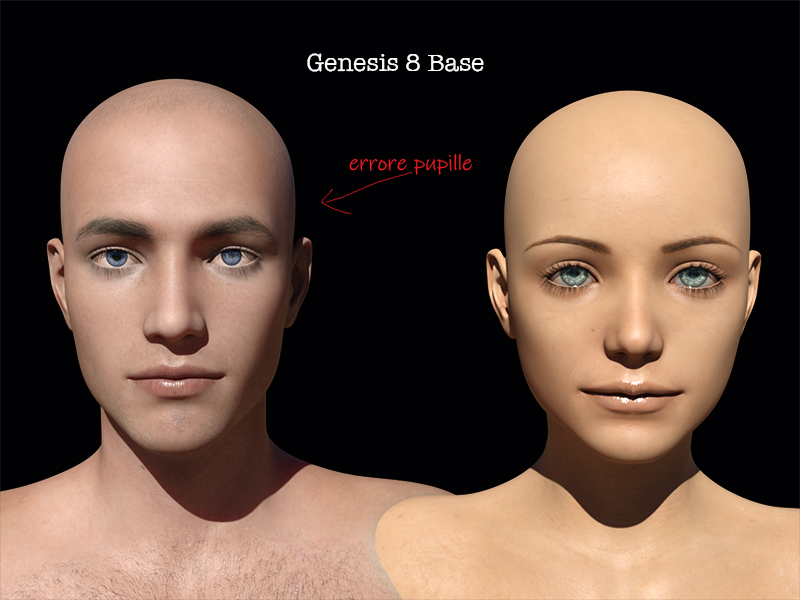
Ho un problema con la genesis 8 con le pupille del "male", non è la texture e non ci sono morph, ne sliders fuori posizione, vi posto qui sotto l'immagne così vi rendete conto e mi potete dire se vi è capitato pure a voi e se possibile risolverlo... Grazie
Ho letto che stanno introducando un nuovo motore di rendering "Filament".... sostiturà IRAY oppure Iray rimane nelle prossime versioni di Daz Studio???
P.S. @Muscleman Auguri!!! se è il Compleanno... che domani tocca a me

Si vede anche in preview, nel workspace? Se si vede solo nei render è colpa di uno shader fracassato (facilissimo con IRay), devi semplicemente rimpiazzarlo. Puoi farlo senza rinunciare alle textures scelte selezionando solo i materiali degli occhi e applicando il "Uber Material IRay" tenendo premuto CTRL e selezionando "Ignore".
Se invece si vede anche nel workspace potrebbe essere un morph "accavallato", comunissimo su G8. In questo caso, apri il tab Parameters e attiva "Show Hidden properties". Nella lista "Currently Used appariranno un pò di voci con il nome in grigio, cambia quei valori fino a quando non noti delle differenze nella pupilla. Una volta scoperto quale morph crea il problema, puoi semplicemente disinstallare il relativo prodotto o sono rinominare quello specifico morph in modo che DAZ Studio non lo "peschi" più dalla cartella.
Terza ipotesi, il personaggio è troppo lontano dal centro del mondo. Nella sua infinita fracassatura, IRay non è in grado di renderizzare correttamente certi shader quando si trovano ad una certa distanza dal punto 0,0,0. In tal caso sposta la scena fino a che IRay riesca a renderizzare quella specifica parte.
New DS Filament Render EngineThe ability to render any of the preview draw styles is really neat! I did a quick animation comparison of three of the draw styles. The first in the sequence is Cartoon Shaded, the second is Filament, and the last one is OpenGL:
AIUTO...CHI CONOSCE L’ITALIANO? PARTE DODICISalve Ragazzi... e come si dice "chi non muore si rivede"!
a parte gli scherzi, sto passando un periodaccio.
Ho un problema con la genesis 8 con le pupille del "male", non è la texture e non ci sono morph, ne sliders fuori posizione, vi posto qui sotto l'immagne così vi rendete conto e mi potete dire se vi è capitato pure a voi e se possibile risolverlo... Grazie
Ho letto che stanno introducando un nuovo motore di rendering "Filament".... sostiturà IRAY oppure Iray rimane nelle prossime versioni di Daz Studio???
P.S. @Muscleman Auguri!!! se è il Compleanno... che domani tocca a me
Una volta era capitato anche a me, ed era un personaggio che avevo installato!
Prova quindi a disinstallare uno per volta gli ultimi G8M che hai installato. Forse si chiama Renshaw?
MEC4D's celebration ( with freebies ) [commercial]oooooh yes we need Filament shaders

I am loving it on my old computer without a graphics card
Daz Studio Pro BETA - version 4.12.2.60! (*UPDATED*)My first observation on Filament draw mode: It's a very fast way to determine what materials are still using 3DL, as they don't show up correctly in this draw mode. Alternately, if you're trying to convert anything to 3DL materials for a 3Delight scene, Objects showing up nicely will show what you have left to change over to 3DL.
It's also a super fast draw mode. After about 10 minutes of tinkering, my impression is favorable.
First experience rendering a short movie clipTo piggyback on 3Divas comment- image series is also superior in that you can cancel render and you still have each frame it rendered up until that point. You can note the last fully rendered frame and pick off the render whenever you want. Image series is better in every way except that some very simple post work is required to make it play as a movie.
Yeah, like with what happened to me last night. I got about 2/3 of the way through the rendering of my animation when Daz Studio decided it wasn't going to render anymore. I can't recall what the error message said, but it essentially just decided it wasn't going to finish rendering the animation and I had to shut it down. But since I used Image Series, I can just pick up where I left off and starting from the last image Daz Studio rendered last night.
That was DS's way of telling you to get back to work on Filam8.

LOL That could be. I should probably wait until Filament comes out of beta though to do the heavy work on it, since things are likely to change from the beta to the official release.
Daz 3D is part of

Connect
DAZ Productions, Inc.
7533 S Center View Ct #4664
West Jordan, UT 84084Licensing Agreement | Terms of Service | Privacy Policy | EULA
© 2026 Daz Productions Inc. All Rights Reserved.