-
Welcome to the November 2012 Freebie Challenge!Dollygirl said:Lest We Forget - The Suffragist
It has been 92 years, 2 months and 17 days that we as American women have had the US Constitutional right to vote. In two days we as "citizens" of the United States will be asked to invoke that right once again. I hope that you will not waste such a precious gift as was given by these women. They never got to see the 19th Amendment ratified by all 48 states. That event did not occur until March 22, 1984 when Mississippi ratified the amendment 84 years later. It took these women 50 years just to get the amendment into Congress, in those days that was at least 2 generations working together to reach their goals. Pretty amazing when we start complaining about issues not getting resolved in less than 10 years. I know that we are more inclined to admire the people that have more dangerous jobs but the Suffragist should be as admired as the others. It is her tenacity, diligence, wiliness to face censure and physical danger that should make her one of our heroes. So don't forget to vote.
Thanks Rob for this challenge. I really enjoyed looking through old pictures and reading about the movement.
Freebies:
Background: Floor Niké:Art Corner by Nike. Bottom of page
Environment: Lighting InaneGlory's Simple Soft Lighting by InaneGlory.
Prop: Bunting Curtain N180511 by Peter White. Requires conversion to obj
Prop: Bunting Curtain 3 N220811 by Vyacheslav Dovalev. Requires conversion to obj
Prop: Bunting Curtain N180411 by Diana Shtok. Requires conversion to obj
Prop: Flag Free Morphing Flag Prop by mostdigitalcreations. 12th down
Prop: Flower Marigold by mambanegra. flower
Prop: Garland * Gothic Christmas Tree by Traveler. prop
Prop: Scroll * Morphing Scroll by Eric VanDycke.
Prop: Shield * Shield ecu 2 by sebastien. "
Prop: US Seal * OP Base IV by A. Gunsolley.
Shader: Metals * Ultimate Shader Pack for DAZ Studio by Georgehaze.
Victoria: Clothing: Boots * Taarna by Terrymcg.
Victoria: Clothing: Dress * Texture Challenge 11 by Sanbie.
Victoria: Clothing: Dress * Gothic for V4 part 1 by Arah.
Victoria: Clothing: Dress * Gothic for V4 part 2 by Arah.
Victoria: Clothing: Glasses Prae's Pince-Nez for her to peer through by Prae.
Victoria: Clothing: Hat * Plague Doctor - Michael 4 by DryJack. under kessiah at Renderosity
Victoria: Clothing: Sash * Sash for Posette by Nerd3D.
Victoria: Pose * V4 - A girl for all Seasons by just_last_knight.
Victoria: Texture and Morph * alta_V4Riho by alongtimeago.No Count:
Victoria and Morphs++
Prop: Ballet Victorian Valentine by Ness Period Reproductions. Ness has not fixed his site to accept anyone from DAZPaid For:
Victoria: Hair * Jade Hair by DAZ 3D, goldtassel.* - Registration to site is required.
Rendered in DAZ Studio Pro 4.5 Post work to fix a poke through and to add signature.
I must admit that, of all the takes on the theme I expected to see, I didn't expect this to be one of them...
As the host, I should refrain from offering commentary on any of the entries - especially the early ones. I don't want other people's creativity to be channeled by what they think I want to see (other than what I posted when I revealed the theme), after all. I must remember to comment on the entries after the winners are announced...
As for the freebies, your link for "Taarna" currently points to "Cosplay Costume 5 for V4." While I'd appreciate a fixed link, you have more than enough other free items to qualify.
ENTRY ACCEPTED
Welcome to the November 2012 Freebie Challenge!Lest We Forget - The Suffragist
It has been 92 years, 2 months and 17 days that we as American women have had the US Constitutional right to vote. In two days we as "citizens" of the United States will be asked to invoke that right once again. I hope that you will not waste such a precious gift as was given by these women. They never got to see the 19th Amendment ratified by all 48 states. That event did not occur until March 22, 1984 when Mississippi ratified the amendment 84 years later. It took these women 50 years just to get the amendment into Congress, in those days that was at least 2 generations working together to reach their goals. Pretty amazing when we start complaining about issues not getting resolved in less than 10 years. I know that we are more inclined to admire the people that have more dangerous jobs but the Suffragist should be as admired as the others. It is her tenacity, diligence, wiliness to face censure and physical danger that should make her one of our heroes. So don't forget to vote.
Thanks Rob for this challenge. I really enjoyed looking through old pictures and reading about the movement.
Freebies:
Background: Floor Niké:Art Corner by Nike. Bottom of page
Environment: Lighting InaneGlory's Simple Soft Lighting by InaneGlory.
Prop: Bunting Curtain N180511 by Peter White. Requires conversion to obj
Prop: Bunting Curtain 3 N220811 by Vyacheslav Dovalev. Requires conversion to obj
Prop: Bunting Curtain N180411 by Diana Shtok. Requires conversion to obj
Prop: Flag Free Morphing Flag Prop by mostdigitalcreations. 12th down
Prop: Flower Marigold by mambanegra. flower
Prop: Garland * Garland and Ornaments by Traveler.
Prop: Scroll * Morphing Scroll by Eric VanDycke.
Prop: Shield * Shield ecu 2 by sebastien. "
Prop: US Seal * OP Base IV by A. Gunsolley.
Shader: Metals * Ultimate Shader Pack for DAZ Studio by Georgehaze.
Victoria: Clothing: Boots * Cosplay Costumes 5 for V4 by Terrymcg.
Victoria: Clothing: Dress * Texture Challenge 11 by Sanbie.
Victoria: Clothing: Dress * Gothic for V4 part 1 by Arah.
Victoria: Clothing: Dress * Gothic for V4 part 2 by Arah.
Victoria: Clothing: Glasses Prae's Pince-Nez for her to peer through by Prae.
Victoria: Clothing: Hat * Plague Doctor - Michael 4 by DryJack. under kessiah at Renderosity
Victoria: Clothing: Sash * Sash for Posette by Nerd3D.
Victoria: Pose * V4 - A girl for all Seasons by just_last_knight.
Victoria: Texture and Morph * alta_V4Riho by alongtimeago.No Count:
Victoria and Morphs++
Prop: Ballet Victorian Valentine by Ness Period Reproductions. Ness has not fixed his site to accept anyone from DAZPaid For:
Victoria: Hair * Jade Hair by DAZ 3D, goldtassel.* - Registration to site is required.
Rendered in DAZ Studio Pro 4.5 Post work to fix a poke through and to add signature.
Fixed the garland link and changed the title for the boots link.
Very disappointed and confused with Hiro 5JohnDelaquiox said:I am a very disappointed with Hiro 5. For one its almost laterally just the head and body morph. What happened to all the great morphs we use to get? Now I don't want to see people start plugging Gen X for Genesis I know its there and I know what it does and I don't need or want it.Hiro 4 Morph for Michael 4 Brought to start
6 Anime Head Styles:
Hiro 4
American 1
American 2
Realistic
Stylized 1
Stylized 2
5 Anime Body Styles:
Hiro 4
Hiro Built
Hiro Realistic
Hiro StylizedPlus the look of Hiro 5 is just kind of blah. His nose is nice but has no nostrils. Also if you ask me the Base is severely over priced at 40.00 off sale when the Hiro 4 base was around 25 dollars and it brought more stuff. And this base is not like the Gen 3 or Gen 4 base morphs that let you use Hiro 3 and Hiro 4 clothing on Genesis. So why is so expensive? I don't see a 40.00 product. Also is MallenLane still going to put out Takashi? Is there even going to be an Aiko 5 and will she be treated the same way?
Hitomi is only 30.00 dollars, looks amazing and look at all the stuff she brings
• Hitomi 3D Anime Girl for Genesis
Hitomi Full Body Morph
Hitomi Head Morph
Hitomi Custom UV Set
Over 200 JCM and Corrective morphs
Hitomi texture map
4 Illustration style eyelash transparency options
3 Illustration style eye tone textures; 14 color tinting presets each
Custom Morphs
Hitomi Breasts Round, and Petite
Hitomi Realistic Nose
Hitomi Teeth Smoother
Hitomi Lower Face Cheeky, Narrow, and Smaller
Hitomi Eyes Taper Upper, and Lower
Hitomi Eyes Upper Angle Down
Hitomi Eyes Lower Angle Up
Ears Elf Anime and Classic, for Genesis and Hitomi
Eyes Size (corrective)
Voluptuous (corrective)
Anime Style Brow Conformer (.DSF)
Brows Wider
Brows Height Inner, Center, and Outer, Right/Left
Brows Thinner Inner and Outer, Right/Left
Brows Thicker Inner and Outer, Right/Left
'Soft' transparency map option
Hitomi Rings Poseable Hairstyle (.DSF)
Controls for posing
Right/Left Bangs Forward-Back, Side-Side, and Twirl
Right/Left Tails Forward-Back, Side-Side. and Twirl
Sweep Right/Left (front bangs)
Morphs for shaping:
Bangs Long
Bangs Large Right/Left
Puff Bangs
Tails Long
Tails Size
Hitomi Hairline Forward
Illustration style transparency texture option
'Fine' detail transparency texture option
Hitomi Lace Top and Bottom (.DSF)
Additional fits for
Aiko 4, and The Girl 4
Victoria 4, and Victoria 5
Basic Female
'Cotton Candy' light set used in many of the promos
Three speed presets: Draft, Medium, and Quality
Textures Include
10 Texture/Transparency/Specular Maps (1024x1024)
13 Texture/Transparency/Specular/Displacement Maps (2048x2048)
1 HDRI Tif Map (500x250)
DAZ Studio Material Presets (.DSA)Now look at what you get at 40.00 dollars with Hiro 5
• Hiro 5
Hiro 5 Body Shape
Hiro 5 Head Shape
Hiro 5 UV Set
Hiro 5 Character Preset (.DUF, .DSF and .CR2)
Anime Brows Male (.DUF, .DSF and .CR2)
30 Hiro 5 Poses (.DUF, .DSA and .PZ2)
Textures Include:
5 Texture and Specular Maps (2048 x 2048)
5 Texture, Transparency and Specular Maps (1024 x 1024)
Poser Material Presets (.MC6)
DAZ Studio Material Presets (.DUF and .DSA)
DAZ Studio Material Uber Surface Presets (.DUF and .DSA)
Poser Imported Material Presets (.MC6 and .DUF)Stephanie 5 is also around 40.00 but look at what you get with her.
• Stephanie 5
Stephanie 5 Full Body Shape
Stephanie 5 Curvy Additive Body Shape
Stephanie 5 Model Additive Body Shape
Stephanie 5 Head Shape
2 Alternative Head Shapes
Stephanie 5 Custom UV Set
Stephanie 5 Elite Texture: Michelle
Michelle All
6 Eye Material Options
2 Eye Reflection Options
4 Make-up Options
2 Eye Lash Options
8 Nail Material Options
Character Presets (.DSF)
Stephanie 5 Character Preset
Stephanie 5 Curvy Character Preset
Stephanie 5 Model Character Preset
27 Poses (.DSA)
5 Stephanie 5 Poses
4 Flat Footed Versions
5 Stephanie 5 Curvy Poses
4 Flat Footed Versions
5 Stephanie 5 Model Poses
4 Flat Footed Versions
Stephanie 5 Interjections Shaders
Universal Base
2 Tear Options
3 Diffuse Level Options
Full Michelle Preset
Textures Include:
33 Texture, Bump, Specular, and SubSurface Maps (4000 x 4000)
2 Texture and Bump Maps (2000 x 2000)
2 Transparency and Reflection Maps (1024 x 1024)
9 Texture and Bump Maps (1000 x 1000)
DAZ Studio Material Presets (.DSA)
DAZ Studio Shader Presets (.DSA)After the Launch of Hiro5 and my disappointment I can't say I am looking forward to any of the remaining Generation 5 morphs.
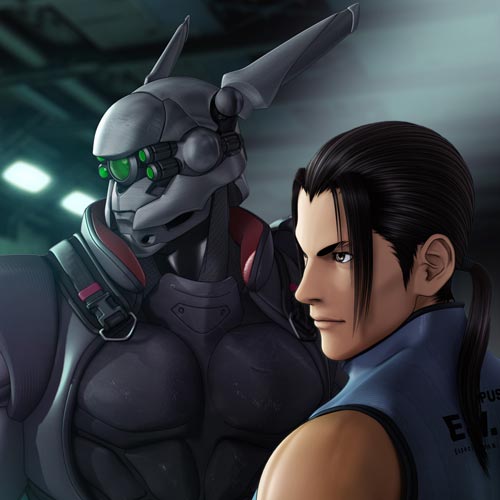
I wish we could have gotten or still get something more like this. These are some images from Appleseed Ex Machina and Vexille. I think they have an amazing look to them and something similar to that look would be awesome for Genesis.
http://www.shmellycat.com/wp-content/uploads/2010/07/Deunan.png
http://www.shmellycat.com/wp-content/uploads/2010/07/Tereus.png
http://ztoe.net/wp-content/uploads/2009/01/briareos-tereus.jpg
http://www.yukianimereviews.com/images/e531.jpg
http://img166.imageshack.us/img166/4584/hitomitx9.jpg
http://www.dvdbeaver.com/film2/DVDReviews35/a appleseed ex machine blu-ray/HF7Y0544.jpg
http://www.tvkon.com/images/anime/07/08/Appleseed-ExMachina_trailer2.flv/00000003.jpg
http://img186.imageshack.us/img186/583/83835651.jpg
http://myndir.laxdal.org/d/1022-2/Appleseed_Ex_Machina_6.jpg
http://assets.m80im.com/resources/appleseed/Appleseed16.jpg
http://assets.m80im.com/resources/appleseed/exmachina.htm
**** Four Stars for Quality Feedback
All constructive feedback to the product designer. I am glad you shared your insightful and detailed comments. The fact you identify specifics and offer an objective / comparative solution is precisely what is needed to see improvement. Its so much better than the drive by general complaint that's not backed up specific points & example. :coolsmile:Daz for games / DecimatorHi,
I am a bit puzzled by Decimator and the "Daz for game" bundle...
http://www.daz3d.com/shop/game-developer-kit-for-daz-studio/
Daz for game's cost is 149 Euroshttp://www.daz3d.com/shop/texture-atlas-for-daz-studio/
Texture atlas costs 0 euroshttp://www.daz3d.com/shop/fbx-plug-in-for-daz-studio/
FBX costs 0 euroshttp://www.daz3d.com/shop/decimator-for-daz-studio/
Decimator is 99 eurosSo bundle's cost is higher than unit price ?
Am I missing something or is it a mistake ?Also, is Decimator working fine with all figures ( Michael 4 / 5 , Victoria 4 / 5 , various Genesis monster...) ?
How much is it efficient compared to 3DSmax decimator equivalent ?Very disappointed and confused with Hiro 5I am a very disappointed with Hiro 5. For one its almost laterally just the head and body morph. What happened to all the great morphs we use to get? Now I don't want to see people start plugging Gen X for Genesis I know its there and I know what it does and I don't need or want it.
Hiro 4 Morph for Michael 4 Brought to start
6 Anime Head Styles:
Hiro 4
American 1
American 2
Realistic
Stylized 1
Stylized 2
5 Anime Body Styles:
Hiro 4
Hiro Built
Hiro Realistic
Hiro StylizedPlus the look of Hiro 5 is just kind of blah. His nose is nice but has no nostrils. Also if you ask me the Base is severely over priced at 40.00 off sale when the Hiro 4 base was around 25 dollars and it brought more stuff. And this base is not like the Gen 3 or Gen 4 base morphs that let you use Hiro 3 and Hiro 4 clothing on Genesis. So why is so expensive? I don't see a 40.00 product. Also is MallenLane still going to put out Takashi? Is there even going to be an Aiko 5 and will she be treated the same way?
Hitomi is only 30.00 dollars, looks amazing and look at all the stuff she brings
• Hitomi 3D Anime Girl for Genesis
Hitomi Full Body Morph
Hitomi Head Morph
Hitomi Custom UV Set
Over 200 JCM and Corrective morphs
Hitomi texture map
4 Illustration style eyelash transparency options
3 Illustration style eye tone textures; 14 color tinting presets each
Custom Morphs
Hitomi Breasts Round, and Petite
Hitomi Realistic Nose
Hitomi Teeth Smoother
Hitomi Lower Face Cheeky, Narrow, and Smaller
Hitomi Eyes Taper Upper, and Lower
Hitomi Eyes Upper Angle Down
Hitomi Eyes Lower Angle Up
Ears Elf Anime and Classic, for Genesis and Hitomi
Eyes Size (corrective)
Voluptuous (corrective)
Anime Style Brow Conformer (.DSF)
Brows Wider
Brows Height Inner, Center, and Outer, Right/Left
Brows Thinner Inner and Outer, Right/Left
Brows Thicker Inner and Outer, Right/Left
'Soft' transparency map option
Hitomi Rings Poseable Hairstyle (.DSF)
Controls for posing
Right/Left Bangs Forward-Back, Side-Side, and Twirl
Right/Left Tails Forward-Back, Side-Side. and Twirl
Sweep Right/Left (front bangs)
Morphs for shaping:
Bangs Long
Bangs Large Right/Left
Puff Bangs
Tails Long
Tails Size
Hitomi Hairline Forward
Illustration style transparency texture option
'Fine' detail transparency texture option
Hitomi Lace Top and Bottom (.DSF)
Additional fits for
Aiko 4, and The Girl 4
Victoria 4, and Victoria 5
Basic Female
'Cotton Candy' light set used in many of the promos
Three speed presets: Draft, Medium, and Quality
Textures Include
10 Texture/Transparency/Specular Maps (1024x1024)
13 Texture/Transparency/Specular/Displacement Maps (2048x2048)
1 HDRI Tif Map (500x250)
DAZ Studio Material Presets (.DSA)Now look at what you get at 40.00 dollars with Hiro 5
• Hiro 5
Hiro 5 Body Shape
Hiro 5 Head Shape
Hiro 5 UV Set
Hiro 5 Character Preset (.DUF, .DSF and .CR2)
Anime Brows Male (.DUF, .DSF and .CR2)
30 Hiro 5 Poses (.DUF, .DSA and .PZ2)
Textures Include:
5 Texture and Specular Maps (2048 x 2048)
5 Texture, Transparency and Specular Maps (1024 x 1024)
Poser Material Presets (.MC6)
DAZ Studio Material Presets (.DUF and .DSA)
DAZ Studio Material Uber Surface Presets (.DUF and .DSA)
Poser Imported Material Presets (.MC6 and .DUF)Stephanie 5 is also around 40.00 but look at what you get with her.
• Stephanie 5
Stephanie 5 Full Body Shape
Stephanie 5 Curvy Additive Body Shape
Stephanie 5 Model Additive Body Shape
Stephanie 5 Head Shape
2 Alternative Head Shapes
Stephanie 5 Custom UV Set
Stephanie 5 Elite Texture: Michelle
Michelle All
6 Eye Material Options
2 Eye Reflection Options
4 Make-up Options
2 Eye Lash Options
8 Nail Material Options
Character Presets (.DSF)
Stephanie 5 Character Preset
Stephanie 5 Curvy Character Preset
Stephanie 5 Model Character Preset
27 Poses (.DSA)
5 Stephanie 5 Poses
4 Flat Footed Versions
5 Stephanie 5 Curvy Poses
4 Flat Footed Versions
5 Stephanie 5 Model Poses
4 Flat Footed Versions
Stephanie 5 Interjections Shaders
Universal Base
2 Tear Options
3 Diffuse Level Options
Full Michelle Preset
Textures Include:
33 Texture, Bump, Specular, and SubSurface Maps (4000 x 4000)
2 Texture and Bump Maps (2000 x 2000)
2 Transparency and Reflection Maps (1024 x 1024)
9 Texture and Bump Maps (1000 x 1000)
DAZ Studio Material Presets (.DSA)
DAZ Studio Shader Presets (.DSA)After the Launch of Hiro5 and my disappointment I can't say I am looking forward to any of the remaining Generation 5 morphs.
I wish we could have gotten or still get something more like this. These are some images from Appleseed Ex Machina and Vexille. I think they have an amazing look to them and something similar to that look would be awesome for Genesis.
http://www.shmellycat.com/wp-content/uploads/2010/07/Deunan.png
http://www.shmellycat.com/wp-content/uploads/2010/07/Tereus.png
http://ztoe.net/wp-content/uploads/2009/01/briareos-tereus.jpg
http://www.yukianimereviews.com/images/e531.jpg
http://img166.imageshack.us/img166/4584/hitomitx9.jpg
http://www.dvdbeaver.com/film2/DVDReviews35/a appleseed ex machine blu-ray/HF7Y0544.jpg
http://www.tvkon.com/images/anime/07/08/Appleseed-ExMachina_trailer2.flv/00000003.jpg
http://img186.imageshack.us/img186/583/83835651.jpg
http://myndir.laxdal.org/d/1022-2/Appleseed_Ex_Machina_6.jpg
Poser's dynamic cloth and DAZ StudioIs there any way of making Poser's dynamic cloth usable, even if only to a limited extent, in Studio 4.5?
As an example I am thinking of the sleeves and overskirt in:
http://www.runtimedna.com/Angeloi-the-Outfit-for-Michael-4.html
Thanks.
Installation of Hiro 4 and Girl 4 in DAZ 4.5Hiro4 and Girl 4 are morphs for Michael 4 and Victoria 4. You must have M4 and V4 and you must install H4 and G4 to the same runtimes that M4 and V4 are respectively.
*CLOSED* RRRR Contest - $240 in GC prizes!!2nd pull (hopefully will go faster than the 1st)
Breaking the house - LA vol.6
Genesis Creature Creator Bundle
Michael 4 Base
Gothic NightsHmm, not too bad of a pull, M4 is a bit annoying since most of my content is Genesis, and having MFD stuff twice in a row is a bit rough, such is life.
Mimic.dmc Daz pleeeeeeeeze put those mimic configuration files back on site already!! edit, I am staDo you have Michael 4, and David as well?
EdNeed some render advice; Assassins Creed, DA, & Skyrim relatedIt isn't exact copy but it was largely inspired by Assassin Creed II (http://www.sharecg.com/v/47578/view/11/Poser/M4-Eagle-Cape)
This is for older figure (so it won't work with Michael 4 and most probably won't work with Genesis without some convertors) but it is very much like Altair's outfit from ACI (http://www.xurge3d.com/inc/sdetail/90/13990)
And this is more like Ezio from ACII for M4 (http://www.daz3d.com/shop/jack-of-hearts)I'm not sure which figures you'd use but there are some barbarian clothes (which might work for Skyrim theme)
There is a pretty big list
Skyrim-inspired helmets (http://www.sharecg.com/v/57024/View/11/Poser/Iron-Helmet) would work with some repositioning for many figures
For Dragon's Age... I'm not sure if you want fighters or mages but almost all fantasy catalog is useful there with careful mixing and matching. Just look at screenshots or promo art and try to create something like that
You can make dwarves or elves out of any generation 3+ figures
There is also that site that I suggest for good armor http://www.xurge3d.com/products
For female armor, if you use V4 or Genesis, I highly suggest Historical Armor by Arien and varios Valandar's armors for male figures (http://www.daz3d.com/shop/valandar)WELCOME TO THE 5TH ANNUAL MMHB !!!goldschopf said:WOW, all of the entries this month are amazing! I'm sure the judges are not looking forward to picking winners, as I'm sure it will be a difficult task.
I know it has been said already, but this month really has flown by! I almost thought I wouldn't get my render done in time, but it looks like i finished it just in time.It is titled "Nightmare in the Music Room"
...She slowly drifts into consciousness, realizing she must have fallen asleep after the music lesson ended. The sound of a strange, yet familiar melody can be heard playing on the harp. Is someone, or something, in the room? she tries to open her eyes, to call out, but finds that she can't move, her limbs are heavy. She feels pressure on her chest...I was inspired by the nightmare paintings of Henry Fuseli and the concept for this render slowly developed from there. I wanted to give the room indoor and outdoor elements. I felt like this would create a sightly surreal environment, sort of a dream-scape drifting back into reality. Initially I had a lot of trouble with this scene and had to start over at one point, but I'm pleased with the final look and feel if the image. The lighting proved to be a bit more difficult than I had expected, I think I ended up using three distant lights and four point lights on various settings. I love the look of dynamic cloth, but i'm still learning how to effectively use it. I think the dress in this render is what gave me the most trouble! I actually ended up using two dresses, one on the female figure, and one positioned beneath her, draped on the chez lounge to give the illusion of a fuller, better draped skirt.
Overall I really like how the scene turned out. It isn't perfect, nor does it look the way I had envisioned, but I learned a lot in the process and feel like I have grown from the experience.
Here are the freebies:
Waking Woman: Genesis Basic Female
V4 Charlotte skin texture - http://narehdawn.deviantart.com/gallery/28504315?loggedin=1#/d38ncdl * (download link is in the upper right beneath the "add to favorites" menu.)V4 Charlotte eyeshadows - http://narehdawn.deviantart.com/gallery/28504315?loggedin=1#/d38q879 * (download link is in the upper right beneath the "add to favorites" menu.)
V4 Upside-Down Hair - http://www.sharecg.com/v/15635/View/11/Poser/V4-Upside-Down-Hair *
Flared dress for genesis - http://www.optitex-dynamiccloth.com/FreebieDownload15.php (bottom, third from the left)
The "Monster": Genesis Basic Male
plague doctor masks - http://www.sharecg.com/v/57155/gallery/21/DAZ-Studio/Plague-Doctor---Michael-4 *Free Genesis Bodysuit - http://www.sharecg.com/v/65219/browse/21/DAZ-Studio/Free-Genesis-Bodysuit *
ultimate shader pack for Daz Studio (Used on the body suit) - http://www.sharecg.com/v/27568/material-and-shader/Ultimate-Shader-Pack-for-DAZ-Studio *
The Music Room:
the cloister building elements - http://www.erato-base.net/cloister.htmlred curtians - http://www.3dtrue.com/poser/20.html
green drape from the Vila Livingroom set - http://www.sharecg.com/v/46579/gallery/11/Poser/Vila-Livingroom *
Ivy prop - from the rock throne - http://www.freeposes.net/freebie-archives/134-free-props-poser-daz
Chez Lounge - http://www.most-digital-creations.com/free_poser_poses_textures_morphs_props_28.htm (sixth from the bottom)
celtic harp - http://www.skin2pix.com/html/freebies2.html (bottom of page)
This turned out really nice. A very unique pose on the girl. Dleelaw already checked all the links, so you are good. (Thanks for the help Dleelaw!) Judges are suppose to do that...lol. One of their jobs as a judge. I am still one judge short this year. That does surprize me because the MMHB is usually a big event. Kinda low key this year, but WOW!...some really nice entries this time. Gonna be tough.
ENTRY ACCEPTED
check your pm box for some nice entry gifts.
:-)
Get Genesis work with DAZ Skeleton the same way as Michael4 and Skeleton M4I just tryed to work with Genesis and DAZ Skeleton the same way as with with Michael 4 and Daz Skeleton M4
If i try to fit it to Genesis it will screw up , but maybe I did the wrong adjustments ?
Does anyobody has some tricks how to work with Genesis and Daz Skeleton together ..
So that the pose Genesis is doing the fitet Skeleton will do the same ..Also a Genesis Skeleton could be a awesome product as well !
greets Tobias
Michael 4 Power LoaderRight, if you turned the dialogue off at some point that will get itt o display and you can then set options and, if you want, tell it to display in future. If the Michael 4 thumbnail in the library has a scroll icon in the top left corner that's the option you need, if not then my previous post applies.
Just Because I Can. STUPID THREAD V for VictorySpyro said:You know, it is so hard to find a good shaved head for M4 or M5. I tried Klaus which looked amazing, but the guy has a damn crew cut!! I just want a shaved head man!
Hellboy Soto did one:
http://www.sharecg.com/v/62755/gallery/11/Poser/SOTOs-Shaved-Hair-for-Michael-4Michael 4 Power LoaderThere was a separate installer for the Power Loader script - you need to run that. Otherwise it sounds as if it's working, so no you didn't do anything wrong other than missing an optional component. If need be, reset your order for Michael 4 from your Itemised Order History to get the PwrLdr installer.
Michael 4 Power LoaderWhen I loadup my victoria 4 it asks me to choose to put the ++ morphs onto it using the powerloader, however when I loadup the Michael 4 I dont get that option, so I have to dig to find the ++ Morphs injection and click the button to apply it, Did I install the Michael 4 right?
WELCOME TO THE 5TH ANNUAL MMHB !!!WOW, all of the entries this month are amazing! I'm sure the judges are not looking forward to picking winners, as I'm sure it will be a difficult task.
I know it has been said already, but this month really has flown by! I almost thought I wouldn't get my render done in time, but it looks like i finished it just in time.It is titled "Nightmare in the Music Room"
...She slowly drifts into consciousness, realizing she must have fallen asleep after the music lesson ended. The sound of a strange, yet familiar melody can be heard playing on the harp. Is someone, or something, in the room? she tries to open her eyes, to call out, but finds that she can't move, her limbs are heavy. She feels pressure on her chest...I was inspired by the nightmare paintings of Henry Fuseli and the concept for this render slowly developed from there. I wanted to give the room indoor and outdoor elements. I felt like this would create a sightly surreal environment, sort of a dream-scape drifting back into reality. Initially I had a lot of trouble with this scene and had to start over at one point, but I'm pleased with the final look and feel if the image. The lighting proved to be a bit more difficult than I had expected, I think I ended up using three distant lights and four point lights on various settings. I love the look of dynamic cloth, but i'm still learning how to effectively use it. I think the dress in this render is what gave me the most trouble! I actually ended up using two dresses, one on the female figure, and one positioned beneath her, draped on the chez lounge to give the illusion of a fuller, better draped skirt.
Overall I really like how the scene turned out. It isn't perfect, nor does it look the way I had envisioned, but I learned a lot in the process and feel like I have grown from the experience.
Here are the freebies:
Waking Woman: Genesis Basic Female
V4 Charlotte skin texture - http://narehdawn.deviantart.com/gallery/28504315?loggedin=1#/d38ncdl * (download link is in the upper right beneath the "add to favorites" menu.)V4 Charlotte eyeshadows - http://narehdawn.deviantart.com/gallery/28504315?loggedin=1#/d38q879 * (download link is in the upper right beneath the "add to favorites" menu.)
V4 Upside-Down Hair - http://www.sharecg.com/v/15635/View/11/Poser/V4-Upside-Down-Hair *
Flared dress for genesis - http://www.optitex-dynamiccloth.com/FreebieDownload15.php (bottom, third from the left)
The "Monster": Genesis Basic Male
plague doctor masks - http://www.sharecg.com/v/57155/gallery/21/DAZ-Studio/Plague-Doctor---Michael-4 *Free Genesis Bodysuit - http://www.sharecg.com/v/65219/browse/21/DAZ-Studio/Free-Genesis-Bodysuit *
ultimate shader pack for Daz Studio (Used on the body suit) - http://www.sharecg.com/v/27568/material-and-shader/Ultimate-Shader-Pack-for-DAZ-Studio *
The Music Room:
the cloister building elements - http://www.erato-base.net/cloister.htmlred curtians - http://www.3dtrue.com/poser/20.html
green drape from the Vila Livingroom set - http://www.sharecg.com/v/46579/gallery/11/Poser/Vila-Livingroom *
Ivy prop - from the rock throne - http://www.freeposes.net/freebie-archives/134-free-props-poser-daz
Chez Lounge - http://www.most-digital-creations.com/free_poser_poses_textures_morphs_props_28.htm (sixth from the bottom)
celtic harp - http://www.skin2pix.com/html/freebies2.html (bottom of page)
V3 morphs and clothes in Genesis and V5?leonardis said:fixmypcmike said:leonardis said:You're right...I did have the iconic shape, but now I have another problem: I have a whole lot of V3 textures that I love using but Studio 4.5 DOESN'T have a V3 uv map option! A bit naughty of DAZ seeing as they must know many customers have spent shedloads of cash on V3 products from them yet can't make V3 body UV maps work in Genesis after already purchasing Gen X products. There is a UV set conversion tutorial but it doesn't work for me. How come DAZ provides UV sets by default for V4, Michael 4 etc but not for V3? If it they converted them for V4 then the software they used must surely be a simple few clicks away to do the same for V3. Oh well......Unfortunately, it just wasn't possible to do it directly, the Gen 3 UVs are laid out too differently.
Well thanks for the reply but wait a minute. Why has DAZ placed a tutorial specifically about converting UV maps for V3 (I believe the example given was the v3tov2 object file) when it doesn't work? When you say the Gen 3 UVs are laid out too differently, do you mean DAZ feels it can't be bothered to solve that problem despite the fact that hundreds, possibly thousands of your customers have purchased Genx , iconic shapes, genesis morphs plus all the the legacy v3 stuff and they can't get a simple body/face texture to map properly in Studio 4.5? Come on guys - it really is a limp excuse to say "laid out too differently". How long would it take for someone at Daz to spend a little effort making V3 UV maps so that hundreds of v3 addons (many from DAZ itself) will work in genesis/studio?
I believe there is a commercial product for converting v3 or other UV maps for use in studio format sold on this website. Are you saying this software doesn't work for v3 when it is advertised as being precisely that? If it does work, then without wishing to deprive the developer of his reward, why are you providing v4 and m4 UV maps but not V3 by default? My reasoning is that there are a factor of 4 or 5 times the number of texture products for v3 than there are for v4 and there must be a huge number of your customers who have V3 stuff lying around not being usable in Studio, yet you are happy to sell GenX products specifically designed for V3 conversion use.
I think it is reasonable to ask you please to solve the problem and provide your customers with a full range of UV maps, including V3. I have sent a support query ( I think my first in many years) to ask for the same. I respectfully ask that you consider that request as being entirely reasonable. Thanks.
As I understand it, UV switching can't change material zones -- all it can do is indicate which vertices on the object map to which points on a single map. To map the Gen 3 textures to Genesis would require one material zone to take bits from 2 different maps at different levels of resolution, which can't be done natively. I've been told that DAZ 3D tried to make it work, but couldn't. It may be that someone can figure out a way to do it, but currently the only way that's known to work is to use a texture converter like TC2 to create new maps.
How to import V3 UV into Studio 4.5?Addendum: Below you'll see exchanges in another thread about the lack of a V3 UV Set in Studio 4.5 or 4.00. Views welcome:
Me: " I have a whole lot of V3 textures that I love using but Studio 4.5 DOESN’T have a V3 uv map option! A bit naughty of DAZ seeing as they must know many customers have spent shedloads of cash on V3 products from them yet can’t make V3 body UV maps work in Genesis after already purchasing Gen X products. There is a UV set conversion tutorial but it doesn’t work for me. How come DAZ provides UV sets by default for V4, Michael 4 etc but not for V3? If it they converted them for V4 then the software they used must surely be a simple few clicks away to do the same for V3. Oh well…..."
DAZ admin reply: "Unfortunately, it just wasn’t possible to do it directly, the Gen 3 UVs are laid out too differently."
Me: "Well thanks for the reply but wait a minute. Why has DAZ placed a tutorial specifically about converting UV maps for V3 (I believe the example given was the v3tov2 object file) when it doesn’t work? When you say the Gen 3 UVs are laid out too differently, do you mean DAZ feels it can’t be bothered to solve that problem despite the fact that hundreds, possibly thousands of your customers have purchased Genx , iconic shapes, genesis morphs plus all the the legacy v3 stuff and they can’t get a simple body/face texture to map properly in Studio 4.5? Come on guys - it really is a limp excuse to say “laid out too differently”. How long would it take for someone at Daz to spend a little effort making V3 UV maps so that hundreds of v3 addons (many from DAZ itself) will work in genesis/studio?
I believe there is a commercial product for converting v3 or other UV maps for use in studio format sold on this website. Are you saying this software doesn’t work for v3 when it is advertised as being precisely that? If it does work, then without wishing to deprive the developer of his reward, why are you providing v4 and m4 UV maps but not V3 by default? My reasoning is that there are a factor of 4 or 5 times the number of texture products for v3 than there are for v4 and there must be a huge number of your customers who have V3 stuff lying around not being usable in Studio, yet you are happy to sell GenX products specifically designed for V3 conversion use.
I think it is reasonable to ask you please to solve the problem and provide your customers with a full range of UV maps, including V3. I have sent a support query ( I think my first in many years) to ask for the same. I respectfully ask that you consider that request as being entirely reasonable. Thanks."
BTW I am not a "new member"...just been a bit dormant for a while. Have been a DAZ customer for many years.
V3 morphs and clothes in Genesis and V5?fixmypcmike said:leonardis said:You're right...I did have the iconic shape, but now I have another problem: I have a whole lot of V3 textures that I love using but Studio 4.5 DOESN'T have a V3 uv map option! A bit naughty of DAZ seeing as they must know many customers have spent shedloads of cash on V3 products from them yet can't make V3 body UV maps work in Genesis after already purchasing Gen X products. There is a UV set conversion tutorial but it doesn't work for me. How come DAZ provides UV sets by default for V4, Michael 4 etc but not for V3? If it they converted them for V4 then the software they used must surely be a simple few clicks away to do the same for V3. Oh well......Unfortunately, it just wasn't possible to do it directly, the Gen 3 UVs are laid out too differently.
Well thanks for the reply but wait a minute. Why has DAZ placed a tutorial specifically about converting UV maps for V3 (I believe the example given was the v3tov2 object file) when it doesn't work? When you say the Gen 3 UVs are laid out too differently, do you mean DAZ feels it can't be bothered to solve that problem despite the fact that hundreds, possibly thousands of your customers have purchased Genx , iconic shapes, genesis morphs plus all the the legacy v3 stuff and they can't get a simple body/face texture to map properly in Studio 4.5? Come on guys - it really is a limp excuse to say "laid out too differently". How long would it take for someone at Daz to spend a little effort making V3 UV maps so that hundreds of v3 addons (many from DAZ itself) will work in genesis/studio?
I believe there is a commercial product for converting v3 or other UV maps for use in studio format sold on this website. Are you saying this software doesn't work for v3 when it is advertised as being precisely that? If it does work, then without wishing to deprive the developer of his reward, why are you providing v4 and m4 UV maps but not V3 by default? My reasoning is that there are a factor of 4 or 5 times the number of texture products for v3 than there are for v4 and there must be a huge number of your customers who have V3 stuff lying around not being usable in Studio, yet you are happy to sell GenX products specifically designed for V3 conversion use.
I think it is reasonable to ask you please to solve the problem and provide your customers with a full range of UV maps, including V3. I have sent a support query ( I think my first in many years) to ask for the same. I respectfully ask that you consider that request as being entirely reasonable. Thanks.
Daz 3D is part of

Connect
DAZ Productions, Inc.
7533 S Center View Ct #4664
West Jordan, UT 84084Licensing Agreement | Terms of Service | Privacy Policy | EULA
© 2026 Daz Productions Inc. All Rights Reserved.