-
How to mirror clothes?
[How to mirror clothes?] More specifically an armor piece.
I have dragonsborne armor for G3 and thanks to Sickleyield's method I managed to transfer it to G8 and it works flawlessly.
I'd like to take this further because the armor is assimetrical and I like the right side shape more.
I want to mirror/symmetry it to the other side.
I tried OBJ Export> Invert Possitive Direction (X) > Transfer Utility but the other shoulder got mishaped: https://imgur.com/a/60ZgF8H
I also tried duplicating the node and then doing -100% X Scale but it bends down for some reason: https://imgur.com/a/VKFdnit
Is there a way to do it?
Thanks in advance.
Shape Splitter - Divide, Combine and Save (The new version is already available. 1.2.1)[Commercial]Whoah. This looks really awesome. It looks like doing a really good Two-Face morph would be easy with this. But does it allow for more than just splitting morphs across different sides of the figure? For instance, I would love to know how to create a Popeye type morph with the big forearms and large chin as well as the mouth slanted off to one side. And I would love to know how to morph a chin all rippled or scarred similar to Thanos.
Really looking forward to seeing what people come up with using this product. Added it to my wishlist for now.
Photo-real characters. A different approach.Thanks, Mendoman! As for your render, my honest opinion is that your first priority should be adding some freckles or other imperfections to your skin and then adding a bit more bump. Right now, frankly, the skin looks too homogenous and flat. I do like the iris and lip textures, though!
Returning to my own work, here I have two renders. The first is Victoria 8 with just Cornea Bulge set to 1 and my textures/shaders applied. The second one is just like the first except that I added some subtle details to the morph around the eyes, nose, and mouth. Both are subdivided twice over. Thoughts?

 Mika 8
Can you do one of Teen Josie 7 next to Mika 8? I think Teen Josie 7 looks a lot like Mika 8.
Sure =)
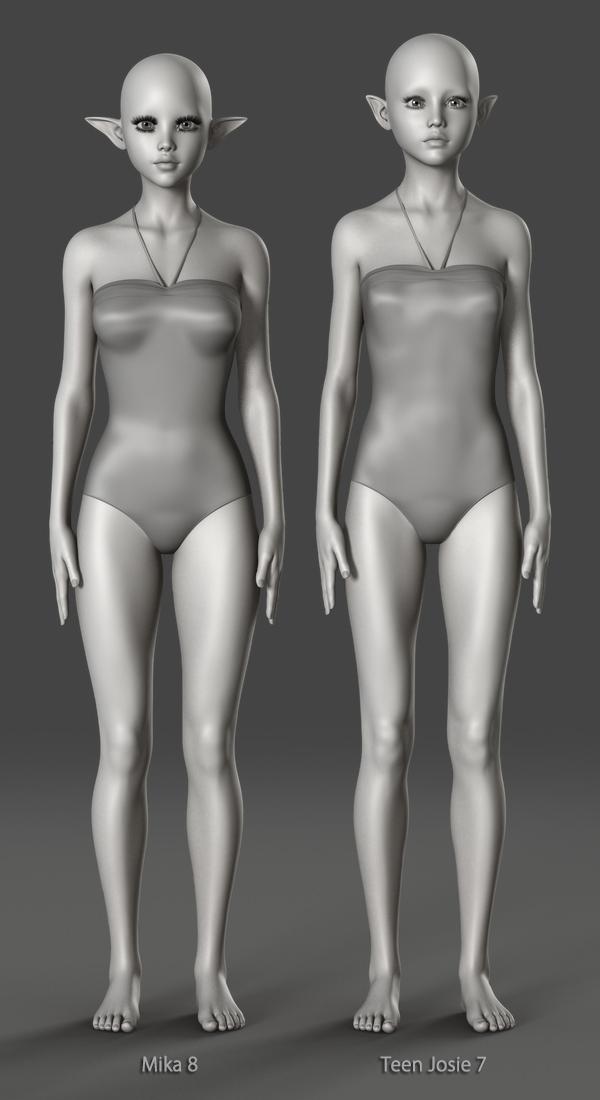

Thanks a bunch. Just as i suspected. Teen Josie 7 and Mika 8 as basically the same with small morph differences.
Still, immediately their faces look quite different to me. I've been morphing faces a lot and noticed that it doesn't take much face morphing, like just making the face a little bit longer, to make a character look like a completely different person (which is why it often can be very difficult to make a convincing look-alike). I guess that's why artists can continue to spew out apparently unique characters over and over again.
Likewise, different textures often look remarkably alike when applied to the same morph.
Star (and Stella) Jumping Vertically When PosedSO JUST HEARD FROM SUPPORT. Yep, almost two years later, here it is:
This is a known issue. Due to the way Star 2.0 is made, it's necessary to adjust the hip upwards when using the proportions morph, which does cause issues with the manipulator tools. Removing the connection between the two however, will break existing poses as well as general compatibility with other Genesis 3 poses.
And as discussed, they had already mentioned the Active Pose tool back in 2016.
One work around that wasn't mentioned in the thread is to use the Active Pose tool rather than one of the manipulator tools. Using the Active Pose tool seems to keep her grounded.
I got the same response today from Emmalee (In my experience with her, she's always been pretty great. She really goes out of her way to help and I've been impressed with her customer service skills). While it was disappointing that they couldn't fix the issue, knowing that there is a work around with the Active Pose tool is helpful. :)
Cryll character challenge or helpCryll had the ability to morph himself into any form he chose, so he was way ahead of his time in the 1960s.
Mika 8Can you do one of Teen Josie 7 next to Mika 8? I think Teen Josie 7 looks a lot like Mika 8.
Sure =)
Thanks a bunch. Just as i suspected. Teen Josie 7 and Mika 8 as basically the same with small morph differences.
I guess this makes a Teen Josie 7 for Teen Josie 8 product kinda pointless... not entirely, but...
Mika 8Can you do one of Teen Josie 7 next to Mika 8? I think Teen Josie 7 looks a lot like Mika 8.
Sure =)
Thanks a bunch. Just as i suspected. Teen Josie 7 and Mika 8 as basically the same with small morph differences.
Star (and Stella) Jumping Vertically When PosedSO JUST HEARD FROM SUPPORT. Yep, almost two years later, here it is:
This is a known issue. Due to the way Star 2.0 is made, it's necessary to adjust the hip upwards when using the proportions morph, which does cause issues with the manipulator tools. Removing the connection between the two however, will break existing poses as well as general compatibility with other Genesis 3 poses.
And as discussed, they had already mentioned the Active Pose tool back in 2016.
One work around that wasn't mentioned in the thread is to use the Active Pose tool rather than one of the manipulator tools. Using the Active Pose tool seems to keep her grounded.
Used items in Promo picturesOne thing I learned over the yaers of trying to support customers is that no matter how much you do, someone will always criticize you for not doing enough.
Yeah, but I'm sure you get a warm and fuzzy feeling every time someone thanks you for a product, and discussions related to your product. Negative feedback has it's place, some is useful while other negative feedback not so much, but unless you really suck at what you do, there's positive feedback too.
Oh, and again much thanks BadKittenCo for the G8F classic biker jacket and engineer boots!!!
- And I'd love to see G8M versions of these, as autofiting G8F on G8M isn't a perfect process, it mostly works in the meantime... If you are so inclined, of course!
Nemesis10
Your points are valid as well. Custom morphed characters, etc. using ZBrush or a bunch of dials, yeah that won't be useful to anyone unless you provide a step by step on how you got there, or the actual .duf (which has it's own issues), and I don't think most people here are suggesting that. A note that it's a custom morph (and leaving it at that) in your commercial product thread can't hurt though, Also, the readme can mention this as well if you want to cover all of your bases r.e. trying to be helpful.
In the interest in making sure your bases are covered, even when 'farming out' promo pics to for other artists to do that for you, well it's good to know the entymology of what they are using.in the promo pics they do for you as it relates to usage rights. It can really suck to be the target of a DMCA takedown, or similar such actions.
(not really related, but there is one particular vendor in Daz/Poser Land that I no longer support because he marketed a product that he didn't actually make, and the person who did make it lodged a complaint, resulting in the product being pulled from a store).
Depending on how you sort your Daz folders, it's much easier for you to determine ownership and associated usage rightrs on your own computer (there's always right click in Product Library/navigate to folder, followed up by checking readmes or googling the vendor & product) than to try to figure out such things on your 'contracted artist's computer' from your own computer.
And yeah, no sense teasing people with old, discontinued product links if they are no longer available. Again though, a mention in your commercial product thread r.e. such products being NLA could be helpful to others.
Anyways just splitting hairs. Again, not expecting EVERYTHING to be shared or listed, mainly use your best judgement and be helpful when you can is my suggestion. Some of your customers will apprecaite this..
Shape Splitter - Divide, Combine and Save (The new version is already available. 1.2.1)[Commercial]Question about the product: I've been trying to modify heads and faces to look like boxers do when they get punched: noses twisted, lips distorted, etc. It looks like this product will do it. Is that correct?
With weight maps you would possibly have distortion in certain parts like nose and mouth, and you could simulate the effect you want, but it will depend on the existing morphs you have. But the tool was designed only to divide morphs, not to create new morphs. But I was able to do it by increasing the scale and moving the selected, different morphs are created. (funny morphs).
Video weight maps
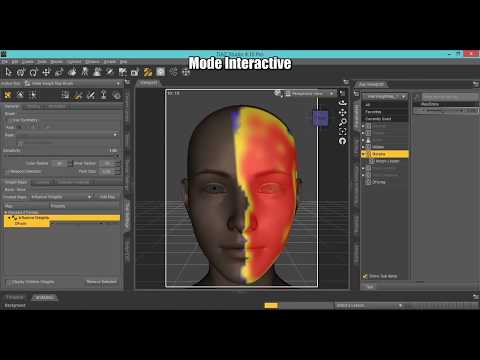
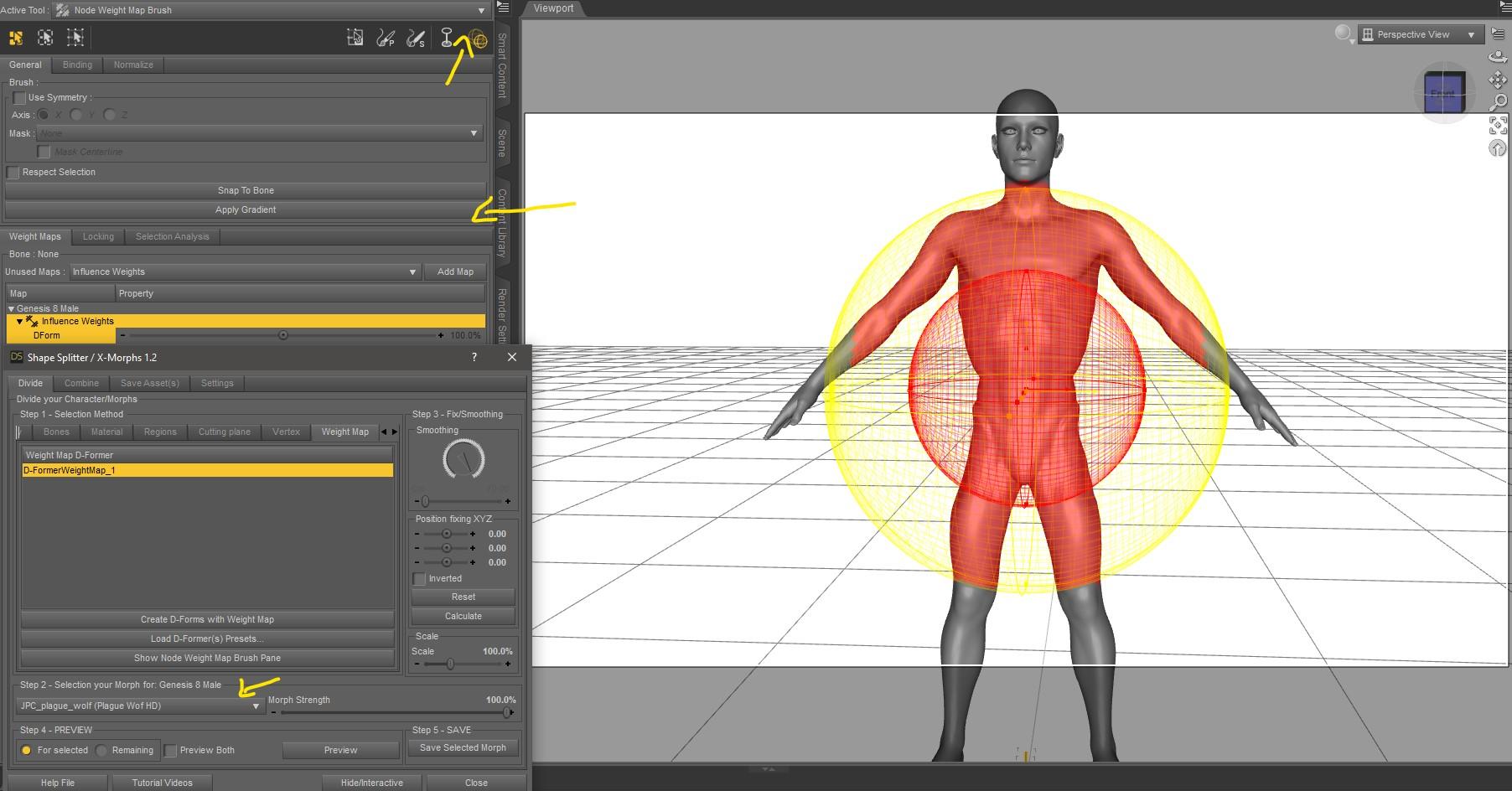
Another queston: When it says this product does not transfer morphs to other figures, does that mean if I do the morphing on a Genesis 3 figure, I cannot transfer it to a Genesis 8 figure? YES
Or, does it mean the morphing is only for that character, and I cannot transfer the morphing done on a Genesis 3 figure to another Genesis 3 figure? Does it mean that the morphing is only for a particualr character?
Saving the morph, as asset, every time you load your Genesis figure, your morphs will be available in the shaping or parameters tab (Actor/XMorphs).
Was it just me or....Was more wondering about g8m but g3m was also not something I had found before, have to take a look. Thanks Noah :)
Edit: Found him.. and ooohh, def gonna get him. Even if just for the skin, might have dialspin someone to use it on as I haven't quite gotten down to elarn how to transfer morhps lol (I have the thread bookmarked, jsuth aven't gotten time to learn)
Raj is one of my favorite characters, along with Shadowborn. Both by Redz for G3M, both totally awesome!
Shape Splitter - Divide, Combine and Save (The new version is already available. 1.2.1)[Commercial]Question about the product: I've been trying to modify heads and faces to look like boxers do when they get punched: noses twisted, lips distorted, etc. It looks like this product will do it. Is that correct?
Another queston: When it says this product does not transfer morphs to other figures, does that mean if I do the morphing on a Genesis 3 figure, I cannot transfer it to a Genesis 8 figure? Or, does it mean the morphing is only for that character, and I cannot transfer the morphing done on a Genesis 3 figure to another Genesis 3 figure? Does it mean that the morphing is only for a particualr character?
Was it just me or....If you own the DAZ Original Body Morphs for G8 there is a 'stocky' morph that works quite well although I think they call it something different than stocky, maybe husky or some other euphemism.
Novica & Forum Members Tips & Product Reviews Pt 10I went ahead and bought Jonah, even though I don't have Ollie. He's hella buff without Ollie, and his head morph at 100% is a bit odd. IMO he looks fine around 70%, and I do love the freckles on his skin. So, I'll keep him, and wishlist Ollie for later.
Since my laptop that can do Iray is currently occupied, here are a few simple 3DL renders of him. Do bear with me as i am absolute crap at 3DL, and this is my back up old-as-balls XP laptop so these renders will be small.
Head at 62%
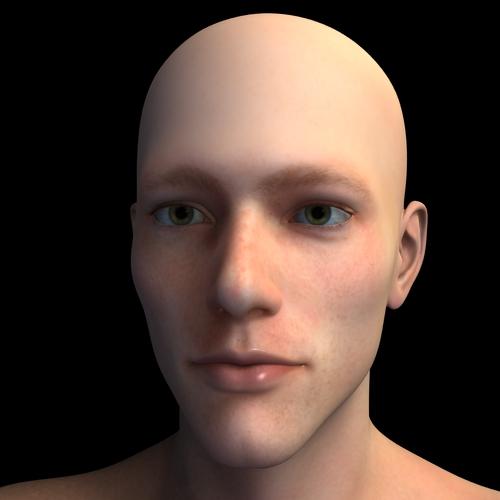
Head at 100%

Body/head 100%

So, not a bad character for $10. I can't wait to get him into Iray, and really make those freckles SHINE!
Thanks. I have Ollie but i noticed that I need a younger character in the same caricature style so I'll buy him too. Thanks a lot.
Photo-real characters. A different approach.JCade, I actually do have three different maps for the SSS, though they are procedurally generated versions of the same source JPG. There's a red-tinted, untinted (yellowish tan), and green-tinted layer. My triple-layered SSS shader is essentially a Poser adaptation of one or two Blender shaders that I thought gave excellent results. Trust me, it makes a world of difference! That's one thing I can say with great confidence! As for Diva's face details, I see one very deep crease along each lower eyelid, but that's not a universal human trait (the crease itself may be, but not the depth of it). Besides, are you telling me you don't see a similar crease in the latest render of my auburn-haired, hazel-eyed character? It may not be as deep, but it should definitely be visible.
Rashad, thanks for the in-depth feedback, and I'm glad you and I seem to agree on so much. I'm actually working with Genesis 8, though it was relatively easy to create a functional transgender-morphing version. If you're interested (and use Poser), I have a freebie on ShareCG that will do most of the work for you. My male and female characters all use the same skin and eye textures, with only masked features like facial or pubic hair differing between them. In fact, together with transgender morphing, those material parameter dials I talked about allow you to switch easily between sexes. The main one is a "Male" dial. At 0, it applies the female masks for eyebrows and body hair, and at 1, it applies the male masks. The facial stubble can be controlled with its own dial, so if you want a juvenile or otherwise smooth-faced male, you can do that. Body hair (i.e. pubic hair for both genders and armpit hair on males) can also be independently turned on or off.
I'll toy around with adding noise to my maps and see where it gets me. Actually painting details in Photoshop might not be a feasible option for me. I have a mild-to-moderate case of cerebral palsy, and one of the effects is significantly hindered dexterity. I'm not saying it's necessarily impossible, since I have had some success working with Poser's morph brush, but it will likely be much more laborious for me than someone with a more delicate hand would probably expect. Heck, even my characters' eyebrows, where I think the most improvement has been made, weren''t created by careful mouse strokes with my custom brush (which itself was a bit tricky to create). Instead, I drew a Path along what would become the middle of the eyebrows and used Photoshop's automatic Stroke function. Still, I think I'll at least try to paint some skin details if the easier tactics ultimately prove insufficient.
In any case, I'm certainly open to collaborating with you!
Yeah thats exactly what I didn't mean by actual custom maps. Unless you're painting in like veins by hand the old 3-layer method is pretty much deprecated. Don't take my word for it though, listen to the fine folks at Arnold about 2/3s of the way down:
When rendering skin, you should use a value like 1.0, 0.35, 0.2, indicating that red should scatter deepest and green and blue less. This would replace the three-layer workflow (deep, mid and shallow layers) for skin where you would make the deep layer red to indicate that deep should scatter with a larger radius. Setting scatter_radius.R to a larger value would correspond to that.
Same thing as the 3 layer, just way less overhead.
If you can't se the difference in level of details in the morphs I dont think I'm ever going to be able to explain it to you its not just has crease/doesn't have crease its how crisp the detail looks. I am a young an unlined person but not having crows feet doesn't mean that the corners of where my nostrils meet my cheeks is smooth, the geometries of your characters just look toony to me.
Was it just me or....Was more wondering about g8m but g3m was also not something I had found before, have to take a look. Thanks Noah :)
Edit: Found him.. and ooohh, def gonna get him. Even if just for the skin, might have dialspin someone to use it on as I haven't quite gotten down to elarn how to transfer morhps lol (I have the thread bookmarked, jsuth aven't gotten time to learn)
* Closed* RRRR - Error 404 Not Found! Render Contest1404 - Not Found
Bischof Trowller: You blathering fopdoodle! This the the Book of Extreme Unction.
Bruder Güggler: Pardons, a million pardons, your excellency. I could not locate the Rites of Baptism.
Frau Bauer : But we came for the exorcism, we did.
Urban Shabby Chic
Wyatt Hair for Genesis 2 Male
Summer Edition Josh
The Washroom
Fantasy Creature Creator HD Morph Pack for Genesis 3 Male
Balneae (I think I drew one too many ;)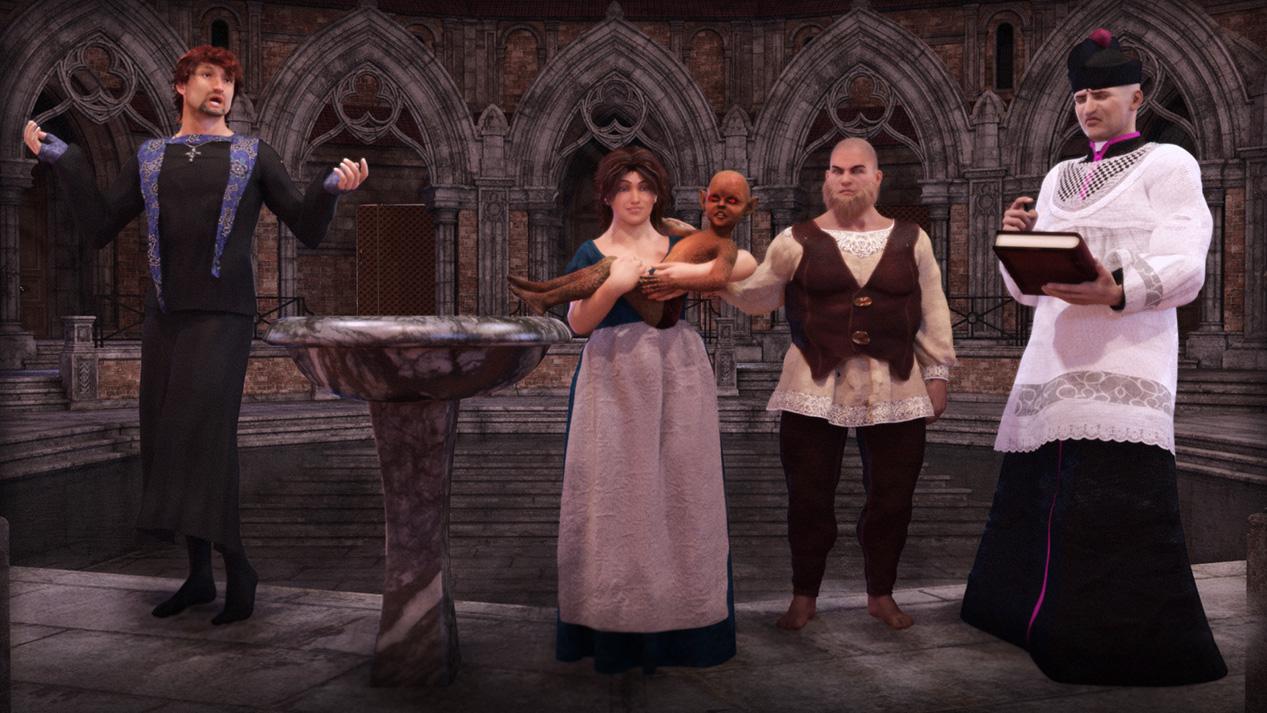 Was it just me or....
Thanks for starting this thread. It wasn't just you. The pattern Daz had established this generation was 2 females, then a male, or so I thought. But we have three females in a row, none of which I purchased (although buying the hairs from the Mika 8 Pro Bundle plus the additional hair is almost the same price as buying the Pro Bundle with the additional hair and one more item; so, I may just cave).
I'm still basing my male characters out of Genesis 3 because Ollie and Owen and Darius do not get me far enough away from the Michael/Lucas/Edward look for my goals, even with massive dial spinning using every morph pack available (unless I'm making a funny-looking [regular] guy, but it's hard to keep them looking real). Additionally, the male full head packs I've seen do not depart enough from the G8M Base's look to be useful.
But I have hopes that the 17th or 24th will bring us a non-stylized male without skin of wax.
Photo-real characters. A different approach.JCade, I actually do have three different maps for the SSS, though they are procedurally generated versions of the same source JPG. There's a red-tinted, untinted (yellowish tan), and green-tinted layer. My triple-layered SSS shader is essentially a Poser adaptation of one or two Blender shaders that I thought gave excellent results. Trust me, it makes a world of difference! That's one thing I can say with great confidence! As for Diva's face details, I see one very deep crease along each lower eyelid, but that's not a universal human trait (the crease itself may be, but not the depth of it). Besides, are you telling me you don't see a similar crease in the latest render of my auburn-haired, hazel-eyed character? It may not be as deep, but it should definitely be visible.
Rashad, thanks for the in-depth feedback, and I'm glad you and I seem to agree on so much. I'm actually working with Genesis 8, though it was relatively easy to create a functional transgender-morphing version. If you're interested (and use Poser), I have a freebie on ShareCG that will do most of the work for you. My male and female characters all use the same skin and eye textures, with only masked features like facial or pubic hair differing between them. In fact, together with transgender morphing, those material parameter dials I talked about allow you to switch easily between sexes. The main one is a "Male" dial. At 0, it applies the female masks for eyebrows and body hair, and at 1, it applies the male masks. The facial stubble can be controlled with its own dial, so if you want a juvenile or otherwise smooth-faced male, you can do that. Body hair (i.e. pubic hair for both genders and armpit hair on males) can also be independently turned on or off.
I'll toy around with adding noise to my maps and see where it gets me. Actually painting details in Photoshop might not be a feasible option for me. I have a mild-to-moderate case of cerebral palsy, and one of the effects is significantly hindered dexterity. I'm not saying it's necessarily impossible, since I have had some success working with Poser's morph brush, but it will likely be much more laborious for me than someone with a more delicate hand would probably expect. Heck, even my characters' eyebrows, where I think the most improvement has been made, weren''t created by careful mouse strokes with my custom brush (which itself was a bit tricky to create). Instead, I drew a Path along what would become the middle of the eyebrows and used Photoshop's automatic Stroke function. Still, I think I'll at least try to paint some skin details if the easier tactics ultimately prove insufficient.
In any case, I'm certainly open to collaborating with you!
Daz 3D is part of

Connect
DAZ Productions, Inc.
7533 S Center View Ct #4664
West Jordan, UT 84084Licensing Agreement | Terms of Service | Privacy Policy | EULA
© 2026 Daz Productions Inc. All Rights Reserved.