-
Shape Splitter - Divide, Combine and Save (The new version is already available. 1.2.1)[Commercial]
This product is amazing! There are characters where I'm like "Wow, I love that nose - I wish I just had that nose as a morph" or "Those are great legs, I wish I could just have those legs to dial into another character"...and now I CAN!!!
This is great!!! I love it!
Here's a character made with Penny 8's torso, Victoria 8's legs, Alexandra 8's nose, and P3D Riza's mouth:
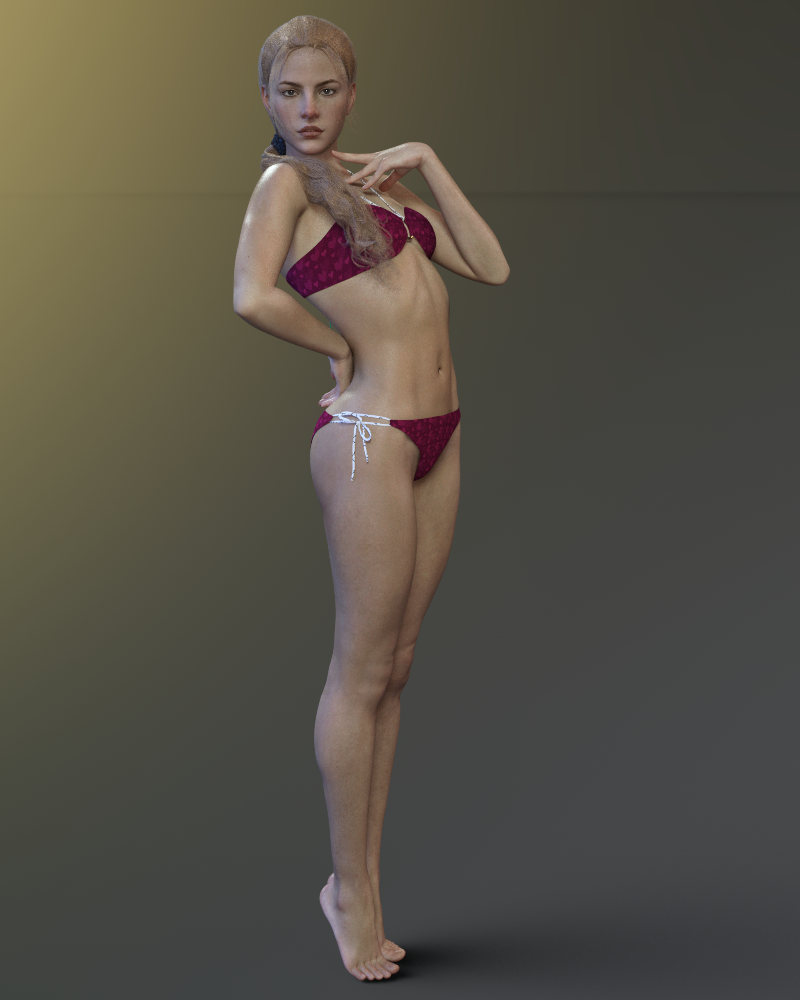
I absolutely love this product! I've been wanting something like this for a long time. :D
It seems intimidating at first, but if you follow the video on the product's store page step by step it's easy. :) And once you get your favorite characters "parts" saved as morphs you can use them on any character and in any combination you want. It's awesome!
I love this! Thank you!

I'm happy that you like the product.
Was it just me or....I haven't purchased any Daz Original pro bundle males except Ollie as a "character actor" and Edward because I didn't find any of the others aesthetically to my taste. But I did purchase some PA males and several morph packages so I can create my own. I'm not sure why people think that purchasing Daz Original base character bundles are the only way to go... There are tons of PA male characters and some nice morph packages. Originally there was only one base male, Michael (1,2,3,4) The whole point was to morph your own characters. I'm not sure why people don't want to use morphs anymore, it seems. Creating your own characters with morphs is fun and keeps your artwork original! I would like to see more/better male hair though. Especially some nice layered hair.
Josh Crockett Suggestion Page for Monster Characters!This one may be tricky as it's a rather extreme morph, but I'm in need of a G8M walrus person something like this:
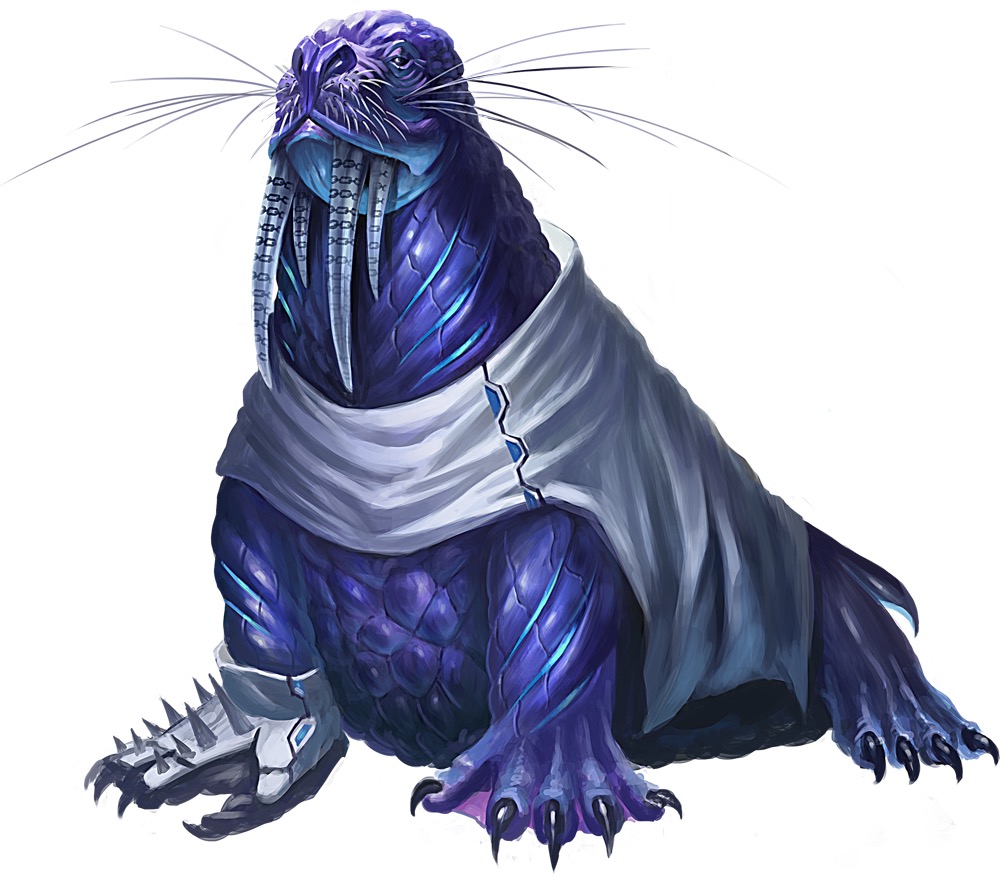
Have you ever seen the movie TUSK? It’s a very weird horror movie.
Josh Crockett Suggestion Page for Monster Characters!This one may be tricky as it's a rather extreme morph, but I'm in need of a G8M walrus person something like this:
Used items in Promo picturesMattymanx said:
As a customer and a vendor here, I can see both side of it. It is nice to have the list of what was used. Personally, since I sell here, I only want to use and promote products sold at Daz3D in my promos. But even then, I dont remember to include everything. Most often, lights, shaders & texture sets are forgotten as they are not as obivous as the models themselves. And because the female models I used are custom mixed morphs, I cannot list every character set that went into making the model as it would be far to lengthy and serve little purpose as they are blended together with no particular character morph standing out more than the rest.
Thank you for this reasonable post! I, too, am one of those that prefer products with promos listed, but I respect someone who tries their best, even if they miss a few. It happens. Customers appreciate people like you, versus someone who says, 'I don't list others' products in promos - deal with it'.
Shape Splitter - Divide, Combine and Save (The new version is already available. 1.2.1)[Commercial]I had a little reservation about how well it could possibly work... and after playing with it, that reservation is gone. It works remarkably well under extremes; I've been able to separate out the cyclops face from the rest of the morph. And considering the final figure is bigger, its head is higher up, and all sorts of extremes? I am REALLY impressed.
How do I convert wavefront OBJ files to genesis 2 female compatible clothing with autofit?Did you use the transfer utility to set the item to the figure? This will add the bones to the item which match the figure.
Morph SplitterI am very impressed.
Cyclops is a very elaborate morph, and was able to pull out the face (through materials) and work it nicely with a standard body. The XYZ adjustment is CRUCIAL for this sort of thing. Kudos!
Morph SplitterYou still have to use other utilities (GenX, scripts, etc) to transfer morphs between generations / sexes.
The key to this is that it allows you to select parts of whole morphs for separate use.
Morph SplitterSo, can you only switch morphs from the same generation to the same generation? Or can you put the head of a Genesis monster on G8? I'm confused.
Laurie
You can only use it inside a generation, so no transfer of morphs from M4 to G8M, or G1 to G3F. It also says so in the notes on the product page.
Saphirewild's Randomness RendersI rather like the black and white version of the car render. All three look good but for some reason, I'm drawn to the black and white.
As far as modelling goes, what I've discovered is that if you can find which program its easiest for you to figure out the interface and get started, if you work on that for a bit, the other programs become less...intimidating. The knowledge does transfer over very well. I personally find Carrara to be the easiest to model in so far.
Morph SplitterNo, it's a tool for taking a morph on a figure and splitting it down, so you can try separating head and body on a full body morph or adding asymmetry by applying half of a symmetrical morph. The new morphs are still on the original figure.
So, it lets you just mix and match with morphs based on the same generation (like morphs for Victoria 8 mixed with morphs from Edie 8 and so on)...okay, I understand. Thank you.
It's more than that; it lets you take part of a whole morph (such as just Ollie's nose instead of his whole head shape, as shown in the demo) and use it to create a new morph to apply to G8M.
It's very powerful in itself. In combination with other utilities (such as GenX) it can take over the whole world. Well, nearly enough. ;-)
Morph SplitterI almost passed over this one. At first glance and not having had my morning coffee it looked like some sort of creature morph package from the main promo icon.
Morph SplitterNo, it's a tool for taking a morph on a figure and splitting it down, so you can try separating head and body on a full body morph or adding asymmetry by applying half of a symmetrical morph. The new morphs are still on the original figure.
So, it lets you just mix and match with morphs based on the same generation (like morphs for Victoria 8 mixed with morphs from Edie 8 and so on)...okay, I understand. Thank you.
Morph SplitterSo let me understand something...is X-Morphs kind of a substitute for GenX in a way? You can use morphs from one character on another no matter the generation (and I'm speaking Genesis - Genesis 8), but with the added bonus of spliting the morph to make new ones?
No, it's a tool for taking a morph on a figure and splitting it down, so you can try separating head and body on a full body morph or adding asymmetry by applying half of a symmetrical morph. The new morphs are still on the original figure.
Star (and Stella) Jumping Vertically When PosedSO JUST HEARD FROM SUPPORT. Yep, almost two years later, here it is:
This is a known issue. Due to the way Star 2.0 is made, it's necessary to adjust the hip upwards when using the proportions morph, which does cause issues with the manipulator tools. Removing the connection between the two however, will break existing poses as well as general compatibility with other Genesis 3 poses.
And as discussed, they had already mentioned the Active Pose tool back in 2016.
One work around that wasn't mentioned in the thread is to use the Active Pose tool rather than one of the manipulator tools. Using the Active Pose tool seems to keep her grounded.
I got the same response today from Emmalee (In my experience with her, she's always been pretty great. She really goes out of her way to help and I've been impressed with her customer service skills). While it was disappointing that they couldn't fix the issue, knowing that there is a work around with the Active Pose tool is helpful. :)
Ok, I've got a noobish question: what is the Active Pose tool? I frequently see a similar vertical movement on a lot of different characters and would love to know a better workaround rather than just dealing with them dropping 6 inches to a foot everytime I adjust the pose, and moving them back where I want them once I'm done.
Morph SplitterSo let me understand something...is X-Morphs kind of a substitute for GenX in a way? You can use morphs from one character on another no matter the generation (and I'm speaking Genesis - Genesis 8), but with the added bonus of spliting the morph to make new ones?
Morph SplitterX-Morphs is an amazing product! I've been waiting for something like this for a long time!
Thank you so much CGI3DM for such an incredible product!
Here's a character made with X-Morphs - Penny 8's torso, Victoria 8's legs, Alexandra 8's nose, and P3D Riza's mouth:
I'd love to see what others come up with! If you use the product, please post your character creations! Weird, cute, sexy, bizaare - whatever you make - I want to see them all!
 Shape Splitter - Divide, Combine and Save (The new version is already available. 1.2.1)[Commercial]
This product is amazing! There are characters where I'm like "Wow, I love that nose - I wish I just had that nose as a morph" or "Those are great legs, I wish I could just have those legs to dial into another character"...and now I CAN!!!
This is great!!! I love it!
Here's a character made with Penny 8's torso, Victoria 8's legs, Alexandra 8's nose, and P3D Riza's mouth:
I absolutely love this product! I've been wanting something like this for a long time. :D
It seems intimidating at first, but if you follow the video on the product's store page step by step it's easy. :) And once you get your favorite characters "parts" saved as morphs you can use them on any character and in any combination you want. It's awesome!
I love this! Thank you!
How to mirror clothes?I made some progress but it could use a polish.
1) Do the Sickleyield thing.
2) Zero G8 Pose
3) Hide G8
4) Export the shoulder armor as OBJ with invert possitive direction (X)
4) Pose Genesis 8 back into G3 T-pose
5) Import the exported OBJ Mirrored armor
6) Transfer utility from G8 to imported OBJ mirrored armor.
Looks good in G8 default pose: https://imgur.com/a/kTsEhD5
Not so much when posing: https://imgur.com/a/el6lAVL
This time I need to mirror transfer weight maps.
I noticed there is some weight map symmetry option but in order to do that I'd need to somehow combine both the OBJ and the transfer rigged armor while the transfer rigged armor would retain its rigging.
Daz 3D is part of

Connect
DAZ Productions, Inc.
7533 S Center View Ct #4664
West Jordan, UT 84084Licensing Agreement | Terms of Service | Privacy Policy | EULA
© 2026 Daz Productions Inc. All Rights Reserved.