-
Coral 8.1 Discussion thread
Well, at first I was curious why she was released without promo pictures. Seemed like a bug.
But after seeing the actual promos, wow, they probably shouldn't have fixed this. Looks like Gen 4 era stuff. I can only hope this isn't due to the quality of the character.
Also unsure what her skin texture brings to the table that Victoria 8.1 doesn't already cover.
Quite a disappointing release, unless you were specifically looking for a mermaid character I would assume.
Age appropriate Daz Studio?
Can paint over the positions of genitals if this is a problem, like the painted on bikinis and briefs of Victoria and Michael 4.vagans said:I guess the main thing is whether you're ok with your child starting with mostly intact realistic naked forms initially.
Official Release of Carrara 8.5 **Update - 8.5.1.19**DZ_jared said:
After a lot of hard work, long nights, and even longer days by our development team we are happy to announce that Carrara 8.5 is available for purchase in the DAZ 3D store. We would like to thank all of our loyal Carrara customers for their patience and support with this project.
Carrara 8.5 Pro is priced at $285.00 for a limited time. Carrara 8.5 Standard is priced at $149.95.
Current owners of Carrara will receive a 50% discount on either product for a limited time. Platinum Club members get an additional 40% off, which means it's never been a better time to join the Platinum Club.
Carrara 8.5 Pro
Carrara 8.5 StandardIncluded in Carrara 8.5 Pro are the Michael 5 and Victoria 5 Pro Bundles and Carrara Shaders - over $250 worth of Genesis content.
Carrara 8.5 standard ships with the Michael 5 and Victoria 5 Starter Bundles and Carrara Shaders - over $140 worth of Genesis content.Here's a quick look at some of the new features:
Native DSON Importer means seamless integration of:
- TriAx™ Weight Mapped figures (Genesis, G2F, G2M)
- General Weight Mapped figures
- Legacy Parametric Figures (4th Generation and earlier)
- DSON presets
- Scenes
- Scene Subsets
- Wearable(s) Preset
- Character Preset
- Properties Preset
- Shaping Preset
- Pose Preset
- Hierarchical Material(s) Preset
- Material(s) Preset
- Shader Preset (preset must be for a Carrara shader)
- Camera(s) Preset
- Light(s) Preset
- Support for multiple UV sets (through Hierarchical Material(s) Presets and Material(s) Presets)Native AutoFit functionality means:
- Conversion of legacy parametric clothing to TriAx™ weigh mapped figures
- Automatic Morph Projection quickly gives you the fit you need for your figure's shape.
- Automatic Weight Map Projection allows AutoFit clothing to bend and pose smoothly with the figure.
- Morphs built into clothing are carried through the AutoFit process.Improved Sequencer, Keyframing and Animation Tools
- New keyboard shortcuts to:
- Play/Stop animation
- Advance the frame
- Preview a frame
- Key Frame Filters
- Sample – Creates a key at every frame of the animation.
- Smooth – Smooth out wild keys to get an even looking animation
- Reduce – Programatically determine which keys are unecessary and eliminate them.
- Graph Editor Box allows for fine tuning of animations
- Easily adjust timing
- Simple yet powerful manipulation of amplitude
- Scale, and translate key frames along the Graph Editor.
- Marquee selection of key frames for Graph Editor.Smart Content and CMS Integration
- Carrara can now access the CMS database; PostgreSQL or Valentina.
- New smart content pane allows users to browse smart content by:
- File
- Category
- Product
- File view provides selection based filtering so that the user only sees items compatible with the current instance tray selection.
- Double click and drag and drop loading are both supported in Smart Content Tab.Parameters Actions
- Zero, Memorize and Restore:
- Figure
- Figure Shape
- Figure Pose
- Selection
- Selection Shape
- Selection Pose
- Selection Tree
- Selection Tree Pose
- Selection Tree Shape
- Provides users with powerful tools to reset a pose, shape or both.
- Memorize and Restore allow user to take a snap shot of the model's current pose and/or shape and restore all or part of it.Improved Fit to Functionality
- Automatic projection and following of morphs for TriAx™ Figures
- No more relying on built in clothing morphs to fit clothing over a figure. Carrara automatically projects any morphs for a TriAx™ figure onto items conformed to the figure.Improved Viewport Avatars
- Spotlight, Sunlight, Moonlight, Tube Lights and Shape lights have all received a makeover and can easily be identified in the viewport.yay
8 year anniversary since the last Carrara update. .. seems like only yesterday

 Vanishing mouse cursor- soutions?
I brought this up a few years ago (six or seven, somewhere around then) about after complex calculations in figure body movement such as being in active pose and the mouse button sticks and grabs Victoria 8's left foot and drags it through her head to stick out her right ear- talking about putting your foot in your mouth- and the mouse arrow visibly disappears from the viewport, the panes, anywhere in the workspace, even though I can find its loation by mousing up or to one side til its location passes over a control link, such as the navigation cube or controls, or if I pass over the scene tab, highlights the assets and their dependents (i.e. figures and their limbs). I work with multiple figures in a scene and lose track of who is who in their position in the scene, which is always changes as you rotate the cam to a different angle. Back then I didn't seem to get much attention, and there were no solutions offered or told it was just a glitch in the matrix. . My best-case solution is to immediately undo the last function, Save by CNTRL+S, close Studio after saving, open Studio anew and reopen the scene. It is irritating because it breaks the continuity of workflow creativity- I may or may not remember just what I was about to move or adjust, It's like getting a phone call while reading a book, and you have to reorient yourself and find your place (while mentally cursing for not putting the phone to route automatically to voicemail). I'm curious if anyone else has other solutions (as this has happened on multiple computers running from Windows XP to 10 and everywhere in between over the last fifteen years, I CAN'T be the only one experiencing this). Thanks for any observations, workarounds or suggestions you may have.
Celebrity Look-a-Likes for 3D figures part 3chorse said:
elusiv_3763c6f5e0 said:
Actually don't know of any for Kate Moss. Although I'm sure at least a couple must exist.
I think Joss V4 for Kate Moss: https://www.daz3d.com/joss-v4
Can see that too!
Celebrity Look-a-Likes for 3D figures part 3elusiv_3763c6f5e0 said:
Actually don't know of any for Kate Moss. Although I'm sure at least a couple must exist.
I think Joss V4 for Kate Moss: https://www.daz3d.com/joss-v4
Celebrity Look-a-Likes for 3D figures part 3elusiv_3763c6f5e0 said:
RayDAnt said:
james said:
Hi Guys, I wonder if someone can help me at all!
I am looking for some celebrity look alike models for Daz 8, ideally based on the following celebs:
Obviously your milage may vary in terms of true likeness-ness, but:
- Kendal Jenner
- Naomi Campbell
- Cara Deleveigne
Actually don't know of any for Kate Moss. Although I'm sure at least a couple must exist.
Checks out imo.
@james_4028606 Also just realized I do know of at least one other potential Kate Moss: Mousso's Corin
Celebrity Look-a-Likes for 3D figures part 3RayDAnt said:
james said:
Hi Guys, I wonder if someone can help me at all!
I am looking for some celebrity look alike models for Daz 8, ideally based on the following celebs:
Obviously your milage may vary in terms of true likeness-ness, but:
- Kendal Jenner
- Naomi Campbell
- Cara Deleveigne
Actually don't know of any for Kate Moss. Although I'm sure at least a couple must exist.
Poser clothing to Daz StudioNorthOf45 said:
Clothes Converter 4.0 does not claim to create .duf files. The general rule is that if a product does not say it supports something, assume it does not. It is good for converting between Generation 3 (i.e., V3, M3) and Generation 4 (V4, M4, etc.) and many older Poser figures. Anyway, if you purchased it less than 30 days ago you can get a refund. Don't hesitate.
Strictly speaking, Studio creates native versions of Poser products when loading them, no need to convert them if using with the intended figure. It is done automatically and used internally. You can save them from Studio and they will retain this information if you re-use them.
There are other clothing converters from Riversoft Art and Sickleyield that will convert Millennium Generation 4 clothing to Genesis 8: RSSY Clothing Converter from Victoria 4 to Genesis 8 Female, RSSY Clothing Converter from Michael 4 to Genesis 8 Male. There are also version to convert to Genesis 3, and from Genesis 1, 2, 3 to Genesis 8. There are even several others to convert hair and props in their catalogs.
GenerationX2 and all add-ons will get you to Genesis 3, no more. There is a product to transfer from Genesis 3 to Genesis 8. XTransfer - Genesis 3 to Genesis 8 Converter.
There are probably some freebies out there to do some of these conversions. I cannot testify as to their quality, but it might be worth your while to investigate.
I am hopelessly forced to onvert from G2 and G3 to G8 by hand. My recommendation: pay if you can for a plug-in to do it.
Poser clothing to Daz StudioAs said above, but saying it in isolation lest it get lost. DS can read Poser-format fiels directly, there is no need to convert to .duf format for that. Beyond that, it depends which figure it is for - the paid converters may well do a better job but you can just load the Victoria 4/Michael 4 clothing onto Genesis and let AutoFit convert it, then fit the result to Genesis 8 and let AutoFit handle that.
Poser clothing to Daz StudioClothes Converter 4.0 does not claim to create .duf files. The general rule is that if a product does not say it supports something, assume it does not. It is good for converting between Generation 3 (i.e., V3, M3) and Generation 4 (V4, M4, etc.) and many older Poser figures. Anyway, if you purchased it less than 30 days ago you can get a refund. Don't hesitate.
Strictly speaking, Studio creates native versions of Poser products when loading them, no need to convert them if using with the intended figure. It is done automatically and used internally. You can save them from Studio and they will retain this information if you re-use them.
There are other clothing converters from Riversoft Art and Sickleyield that will convert Millennium Generation 4 clothing to Genesis 8: RSSY Clothing Converter from Victoria 4 to Genesis 8 Female, RSSY Clothing Converter from Michael 4 to Genesis 8 Male. There are also version to convert to Genesis 3, and from Genesis 1, 2, 3 to Genesis 8. There are even several others to convert hair and props in their catalogs.
GenerationX2 and all add-ons will get you to Genesis 3, no more. There is a product to transfer from Genesis 3 to Genesis 8. XTransfer - Genesis 3 to Genesis 8 Converter.
There are probably some freebies out there to do some of these conversions. I cannot testify as to their quality, but it might be worth your while to investigate.
Can this M4 outfit be converted to G8M?Cheetahka said:
NorthOf45 said:
You will first have to back up a step and get Ad Gladio, either for M4 or Genesis, as Ludus Sword Brotherhood is only a set of textures (albeit very nice textures) that can be used on either set.
I do have the Ad gladio for M4 Would it be a better quality transfer if I got the Ad Gladio for Genesis or does it not really matter?
I don't know of any commercial product that has Genesis clones for Geneis 8, so you would need to use the converter, or go through several steps over Genesis generations to get to Genesis 8. If you have the M4 clones, you can do it in one step.
All items are fairly close fitting, so Autofit actually does a good job if you have the Sickleyield's V4 and M4 Clones for Genesis 8. Alternatively, there is Riversoft/Sickleyield's RSSY Clothing Converter from Michael 4 to Genesis 8 Male (haven't tried that yet, too-oo many...)
Actually I bought these a while back and forgot I had them lol. Must have gotten them on sales a while back. I'm always looking for products that add more value and give life to older content as Genesis evolves.
Give it a whirl and see if it is to your liking. Your results may vary.
You will have more trouble converting the textures to Iray, though. The original uses omHumanSurface, and does not convert well on the fly. Converting to Iray (ctrl-click to apply Iray Uber and ignore textures) will change the shader, but many normals are inverted. That is quickly remedied with the Geometry Editor (in short, select polygons, Geometry Editing -> Flip Normal of Selected Polygons), but it is not always obvious which ones need it.
This is where you lost me It's a bit above my understanding. Control+ (left?) click what? I'm assuming I ray uber will be a menu choice? Geometry editor? what/where can I read up some on this process because I just don't understand what flip normal of selected poly...etc is all about. Your applying "Iray" to the texture?
To apply a shader, you just need to apply it (Enter, or double-click) to each surface (you must select them, or the whole item, in the Surfaces tab). Adding the CTRL key brings up the Load Options dialog when applying a shader (or just about any operation, the options vary). For shaders, the default action is to put new bitmaps in place, which could wipe out the textures you want to keep. So, use Selected Surfaces, and Ignore Images to keep the bitmaps. Studio will do its best to transfer the surface parameters to the Iray channels. There are also products (free and paid) to help with converting to Iray. Again, your results may vary.
Flipped normals, in this case, has nothing to do with the new company selling tutorials, it has to do with surface normals (the direction perpendicular to a surface, per polygon). For any given surface, you have two choices, which are in opposite directions. Not sure exactly how it is used by the various shaders, but for some of these surfaces, you see the opposite side using the Iray shader. With the Geometry Editor, you can select entire surfaces (for the selected item in the scene) from the list in Tool Settings and do all sorts of opertations, one of which is "Flip Normals of Selected Polygons" (right-click, under Geometry Editing). For some reason, the default direction ends up being upside down, so "flip it".
Here is a sample I made using M4 Clones and Autofit. Converted to Iray and a lot of flipped normals, metallicity, glossy roughness, and a lot of other adjustments. Lots of work there...
Flipped normals is that new company that has been showing up in sales lately with all the tutorial books? I'm assuming they have shader materials? Is that what your talking about?
No, that is just a coincidence. The base Iray shader is in Shader Presets -> Iray -> DAZ Uber (it's the first one !Iray Uber Base.duf).
Can this M4 outfit be converted to G8M?NorthOf45 said:
You will first have to back up a step and get Ad Gladio, either for M4 or Genesis, as Ludus Sword Brotherhood is only a set of textures (albeit very nice textures) that can be used on either set.
I do have the Ad gladio for M4 Would it be a better quality transfer if I got the Ad Gladio for Genesis or does it not really matter?
All items are fairly close fitting, so Autofit actually does a good job if you have the Sickleyield's V4 and M4 Clones for Genesis 8. Alternatively, there is Riversoft/Sickleyield's RSSY Clothing Converter from Michael 4 to Genesis 8 Male (haven't tried that yet, too-oo many...)
Actually I bought these a while back and forgot I had them lol. Must have gotten them on sales a while back. I'm always looking for products that add more value and give life to older content as Genesis evolves.
You will have more trouble converting the textures to Iray, though. The original uses omHumanSurface, and does not convert well on the fly. Converting to Iray (ctrl-click to apply Iray Uber and ignore textures) will change the shader, but many normals are inverted. That is quickly remedied with the Geometry Editor (in short, select polygons, Geometry Editing -> Flip Normal of Selected Polygons), but it is not always obvious which ones need it.
This is where you lost me It's a bit above my understanding. Control+ (left?) click what? I'm assuming I ray uber will be a menu choice? Geometry editor? what/where can I read up some on this process because I just don't understand what flip normal of selected poly...etc is all about. Your applying "Iray" to the texture?
Here is a sample I made using M4 Clones and Autofit. Converted to Iray and a lot of flipped normals, metallicity, glossy roughness, and a lot of other adjustments. Lots of work there...
Flipped normals is that new company that has been showing up in sales lately with all the tutorial books? I'm assuming they have shader materials? Is that what your talking about?
How to recreate the Victoria 8.1 from ZBrushCentral?thedonutbee said:
I see, but could a similar result also be achieved in daz studio?
https://www.daz3d.com/victoria-8-1
Daz Studio is not a modeler. To model you need a program such as Zbrush, a bunch of brushes, etc. for sculpting with, a significant amount of rigging knowledge as well as how to make figure morphs and join all those correctly too. Much more time efficient to simply purchase the model available ;-)
Also the HD morphs part cannot be done by anybody outside of the company and/or the PAs.
How to recreate the Victoria 8.1 from ZBrushCentral?Hello, firstly I'd want to compliment the creator of Victoria 8.1, She's amazingly good at what she's doing.
My Question is, how to recreate the original one that she created? https://www.zbrushcentral.com/t/victoria/395727
I noticed a few difference on the model when I use it, the brows are much thicker and less realistic (totally different from the one she made)
And also the eye lashes look much worse
Can this M4 outfit be converted to G8M?You will first have to back up a step and get Ad Gladio, either for M4 or Genesis, as Ludus Sword Brotherhood is only a set of textures (albeit very nice textures) that can be used on either set.
All items are fairly close fitting, so Autofit actually does a good job if you have the Sickleyield's V4 and M4 Clones for Genesis 8. Alternatively, there is Riversoft/Sickleyield's RSSY Clothing Converter from Michael 4 to Genesis 8 Male (haven't tried that yet, too-oo many...)
You will have more trouble converting the textures to Iray, though. The original uses omHumanSurface, and does not convert well on the fly. Converting to Iray (ctrl-click to apply Iray Uber and ignore textures) will change the shader, but many normals are inverted. That is quickly remedied with the Geometry Editor (in short, select polygons, Geometry Editing -> Flip Normal of Selected Polygons), but it is not always obvious which ones need it.
Here is a sample I made using M4 Clones and Autofit. Converted to Iray and a lot of flipped normals, metallicity, glossy roughness, and a lot of other adjustments. Lots of work there...
How to recreate the Victoria 8.1 from ZBrushCentral?Hello, firstly I'd want to compliment the creator of Victoria 8.1, She's amazingly good at what she's doing.
My Question is, how to recreate the original one that she created? https://www.zbrushcentral.com/t/victoria/395727
I noticed a few difference on the model when I use it, the brows are much thicker and less realistic (totally different from the one she made)
And also the eye lashes look much worse on the one in daz 3d??
How can I recreate that one that she made?
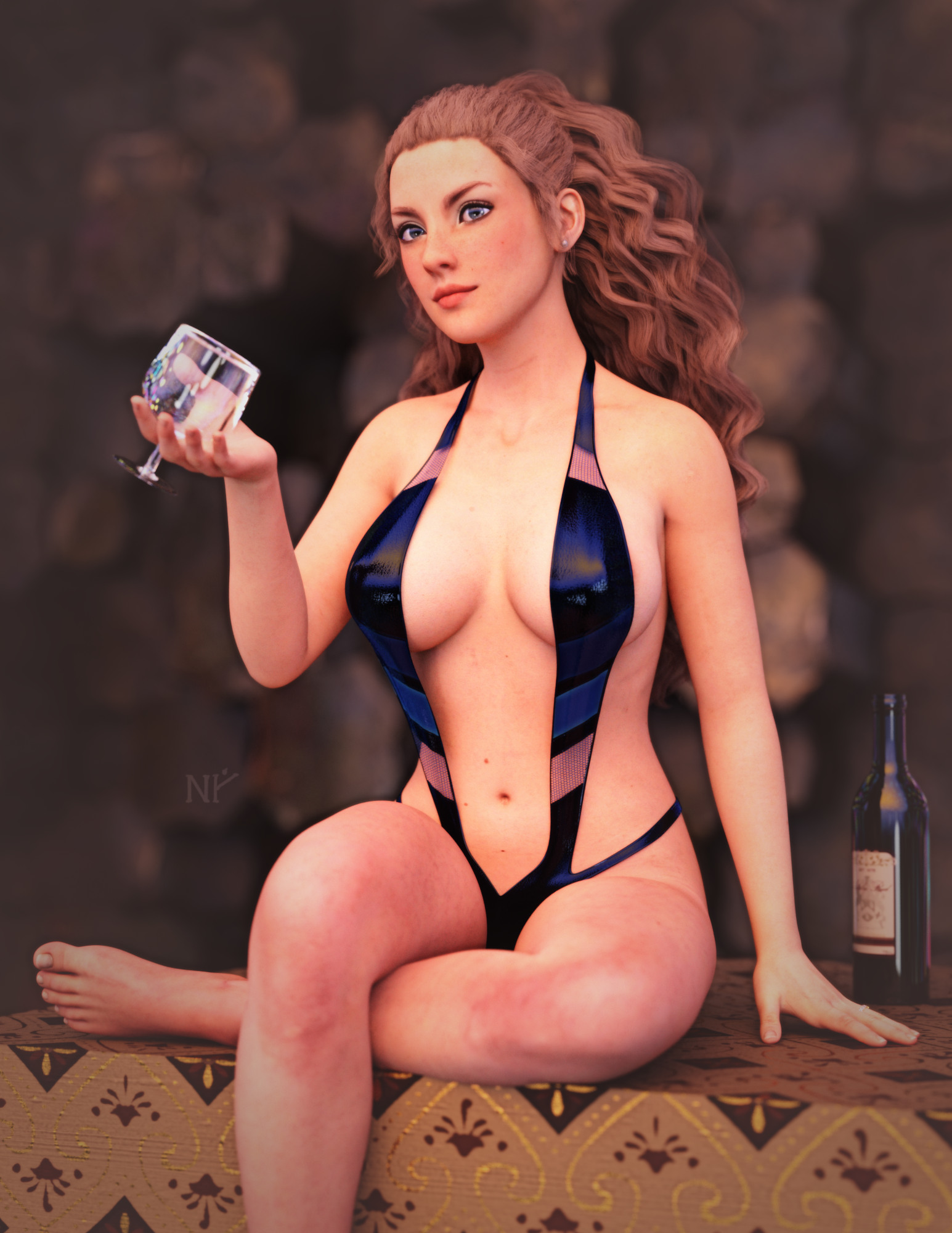
Show Us Your Iray Renders. Part VIIIWorking through a creative block... with swimsuits.
This is Genesis 3 (skin is Maddelirium's Lacie at Renderosity). I converted the textures to the new PBR skin shader using custom SSS maps, Detail maps and overall PBR settings from Victoria 8.1. I reduced the Detail weights to remove some of the scaly skin look... the microdetails were too much for my tastes.
 Searching for pants with heavy stiches on side
How did you convert it?
Maybe try something like this https://www.daz3d.com/rssy-clothing-converter-from-victoria-4-to-genesis-8-female
What the hell is Gordig doing now?DNVWASWBIS (or: Drawing Naked Victoria With a Sword While Bored in School)
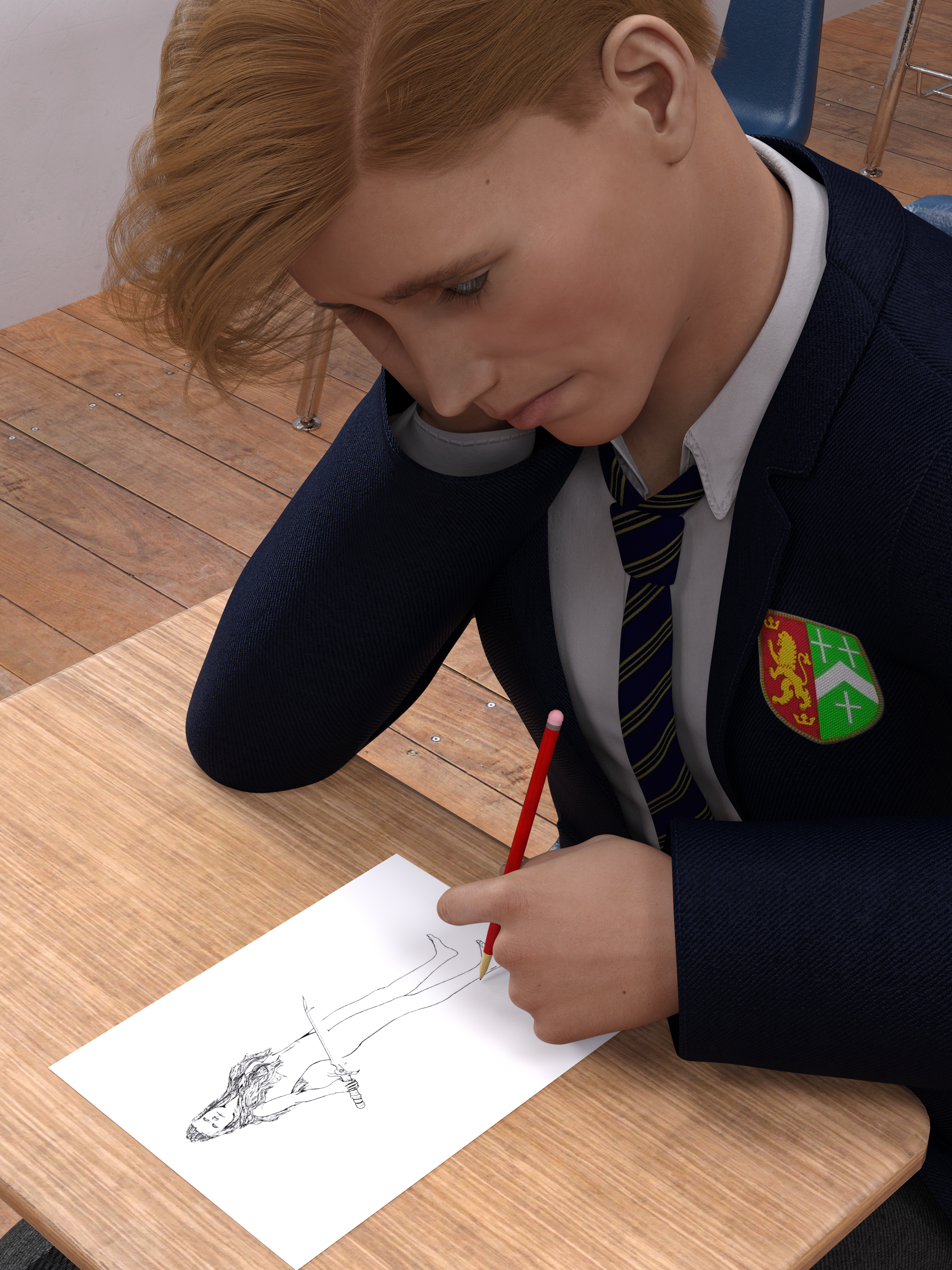
For Llola Lane's monthly challenge thread. July's theme was "paper", and I had this idea and started working on it before June was even over, but then I fell into a deep, dark pit of depression and did virtually nothing all July, so I rushed this out last night.
Daz 3D is part of

Connect
DAZ Productions, Inc.
7533 S Center View Ct #4664
West Jordan, UT 84084Licensing Agreement | Terms of Service | Privacy Policy | EULA
© 2026 Daz Productions Inc. All Rights Reserved.