-
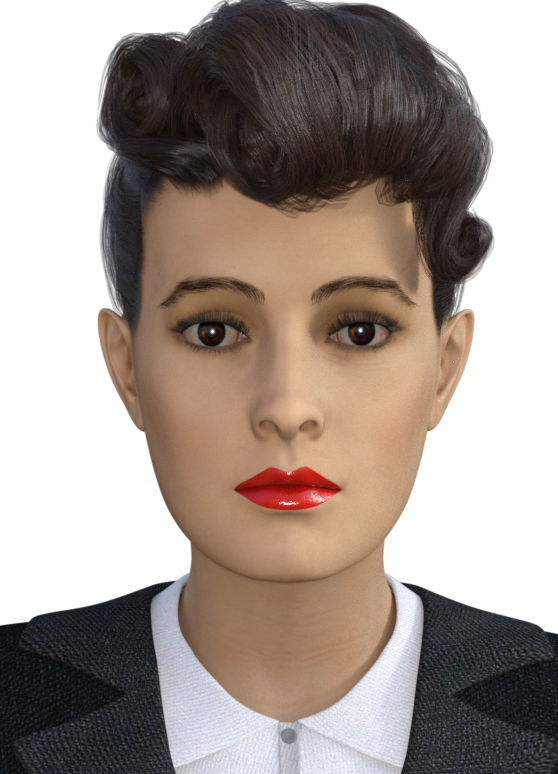
Anybody know what hair this is?
Thans for replying - it's one of the promotional shots from Victoria 8.1
I want to be able to install how I want.Thanks for your helpful comments, I may try DAZ Connect again I like to save downloaded or Purchased contents as sometime you can change their location and lose things if you have a downloaded zipped file you can see what should be there and extract the replacement file you need if lost. I will have to recheck all my contents when get time. I used DAZ connect to install then move files. Problem being I have a F: drive for DAZ contents and DAZ connect put things on my C: drive that is a SSD for Windows 10 OS only. I will have to sit down and sort my contents out as Smart content and Install does not show some of my stuff. Think they have made DAZ 4.15 hard to understand DAZ 4.12 was easy to manually install it was that Genesis 8.1 thing that confused me, I took me a while to get Genesis 8 to update. It was only when I loaded Victoria 8 I realised what was going on. What you say is making sense, Thanks.
Daz Connect Installations not appearing as Installed in Daz CentralRichard Haseltine said:
bike_angel said:
PerttiA said:
bike_angel said:
PerttiA said:
bike_angel said:
So this is also not a matter of wrong/different install directories. It seems Daz Central is not registering my Daz Connect installations at all.
-------------------------
What I want to know is why do Daz Studio installations (through Daz Connect) not synchronize with Daz Central and how can I make them synchronize?
It is because DAZ Connect uses installation paths which DAZ Central cannot see.
Thank you.
Is there any way that I or the developers can make Daz Central see the Daz Connect installation path?
Why are they separated in the first place?
That is a very good question, since quite a lot of problems surfacing here are related to DAZ Connect installing content to a location that no other installation method uses, it fails quite often and still has priority over all the other installation methods (DIM/DAZ Central/Manual installation)
1. DAZ Connect, as the name suggests can be used to connect to DAZ servers within DS
2. DAZ Connect uses installation path with \Cloud\ in it
3. Some years back DAZ tried to introduce encrypted contentI'm not connecting the obvious dots, but the reason for abandoning the traditional folder structure and placement of files can be read between the lines.
So it seems the content downloaded through Daz Connect is installed into an encrypted folder stored on my PC but which only Daz Connect can access by connecting to the Daz Cloud. And this encrypted folder is what is preventing Daz Central from accessing and seeing the contents installed, therefore not allowing Daz Central to know the status of Daz Studio contents installed via Daz Connect.
None of that is correct. The content is installed into /data/cloud/1_SKU/, where SKU is a unique identifier for each product - you can see it on the product page. The files are compressed but not, barring errors, encrypted. You do not need to be connecrtwed to Daz to use the content. Daz Central can't see the Connect instalaltion, and if there is a Connect isntalaltion DS will use that in preference to any other, but nothing is interferring with Daz Central itself. Daz Central simply doesn't have a way to know what is isntalled through Connect.
I always install morphs/sliders/add-ons using Daz Central because they can't be installed via Daz Connect. However, I install all my figures/props/environments/clothes using Daz Connect.
The only native Daz Studio content and tools that cannot be installed through Connect are plug-ins, and things that install like plug-ins (some older scripts and shaders that have to place files in the application folder) or content that needs access to other content in the same location (ExP morph expansions for Victoria 4, Michael 4 etc.). Some scripts will not work if installed through Connect, but that is down to the way the scipt is written.
Would you recommend that I install my figures/props/environments/clothes using Daz Central instead of Daz Connect? Are there any differences between these install methods for such products?
The big difference is Connect can see updates, when it goes on line, and can download just the updated files instead of the whole zip.
Thank you for explaining. It took a while, but you finally understood my question.
Daz Connect Installations not appearing as Installed in Daz Centralbike_angel said:
PerttiA said:
bike_angel said:
PerttiA said:
bike_angel said:
So this is also not a matter of wrong/different install directories. It seems Daz Central is not registering my Daz Connect installations at all.
-------------------------
What I want to know is why do Daz Studio installations (through Daz Connect) not synchronize with Daz Central and how can I make them synchronize?
It is because DAZ Connect uses installation paths which DAZ Central cannot see.
Thank you.
Is there any way that I or the developers can make Daz Central see the Daz Connect installation path?
Why are they separated in the first place?
That is a very good question, since quite a lot of problems surfacing here are related to DAZ Connect installing content to a location that no other installation method uses, it fails quite often and still has priority over all the other installation methods (DIM/DAZ Central/Manual installation)
1. DAZ Connect, as the name suggests can be used to connect to DAZ servers within DS
2. DAZ Connect uses installation path with \Cloud\ in it
3. Some years back DAZ tried to introduce encrypted contentI'm not connecting the obvious dots, but the reason for abandoning the traditional folder structure and placement of files can be read between the lines.
So it seems the content downloaded through Daz Connect is installed into an encrypted folder stored on my PC but which only Daz Connect can access by connecting to the Daz Cloud. And this encrypted folder is what is preventing Daz Central from accessing and seeing the contents installed, therefore not allowing Daz Central to know the status of Daz Studio contents installed via Daz Connect.
None of that is correct. The content is installed into /data/cloud/1_SKU/, where SKU is a unique identifier for each product - you can see it on the product page. The files are compressed but not, barring errors, encrypted. You do not need to be connecrtwed to Daz to use the content. Daz Central can't see the Connect instalaltion, and if there is a Connect isntalaltion DS will use that in preference to any other, but nothing is interferring with Daz Central itself. Daz Central simply doesn't have a way to know what is isntalled through Connect.
I always install morphs/sliders/add-ons using Daz Central because they can't be installed via Daz Connect. However, I install all my figures/props/environments/clothes using Daz Connect.
The only native Daz Studio content and tools that cannot be installed through Connect are plug-ins, and things that install like plug-ins (some older scripts and shaders that have to place files in the application folder) or content that needs access to other content in the same location (ExP morph expansions for Victoria 4, Michael 4 etc.). Some scripts will not work if installed through Connect, but that is down to the way the scipt is written.
Would you recommend that I install my figures/props/environments/clothes using Daz Central instead of Daz Connect? Are there any differences between these install methods for such products?
The big difference is Connect can see updates, when it goes on line, and can download just the updated files instead of the whole zip.
Laptops and Daz questionsI started with a laptop with no graphics card. It would render an image in about 10 hours (often overnight while I slept). I later got a laptop with an nvidia 960m ... a moderate card at the time and it could do the image in about an hour. Still later I got a laptop with an nvidia M6000 ... and it would do the image in under 10 minutes. It makes quite a difference ... but in the real world, the expense of the card must take consideration. Also ... make sure your laptop has good cooling fans if you do that.
EDIT: since people are mentioning how much memory certain things take: keep in mind if you work with all Michael and Victoria 4 level stuff you can have a lot of items in a scene with no problem. IF you move to Michael 8.1 with dforce clothing and hair ... well ... your laptop probably will just not be able to do it. The amount of additional memory taken by each new generation is significant.
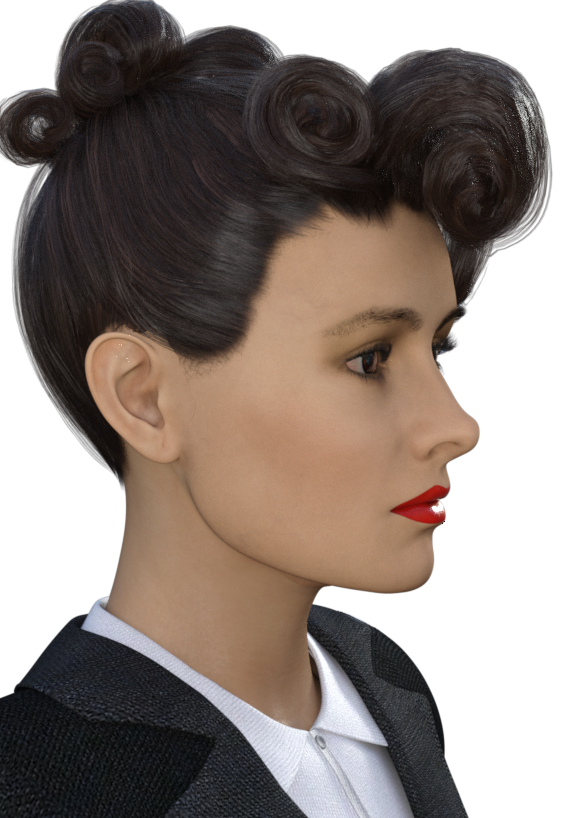
Lady Noir for G8.1F ("Blade Runner's" Rachael) head morph. Rockabilly Noir hairdo!This is the first time I am shaping and packaging from scratch a head morph for a Genesis character, so please forgive me any errors that I might have made. If something is wrong, just let me know and I will do my best to fix the problem. If something is unclear in the ReadMe.txt file, please don't hesitate to ask.
I would appreciate your help with potential blunders. As I said - this is new territory for me.
I did not include any texture maps, because I am pretty bad at making them. I believe you are better off using existing textures. In the images below I have used Victoria 7's for G3F face map that I somewhat modified - most notably I removed the eyebrows and replaced them with fibermesh ones and changed the eyeshadow and lip color in Photoshop.
For the promo images I also used the Yvette hair and the Business Suit for G3F.
This version of Lady Noir is not a continuation of my Lady Noir for V4 or the G3 convertion from V4. It is a brand new head morph created specifically for G8.1F.
Noncommercial use only.
Please let me know what you think!
Enjoy!
AOBB
 JUST TRYING TO KEEP UP!
cridgit said:
I feel your frustration and we've probably all felt that way one time or another. My pet peeve is the inconsistent and often incorrect way the PAs organize content and the fact that nobody checks it. If I'm not disciplined I spend more time reorganizing and fixing errors than making art.
If this is your hobby then try to stick to what you enjoy and try to ignore all the noise - that's often what other people enjoy for different reasons. There are people here still using Aiko 3 and Victoria 4, and there is still loads of content for those both. If you're comfortable with Genesis 2 and simulating and Iray then just use those and focus on your art :-)
...the first point is why I spent a good amount of time over the years developing my own custom library/runtime organisation. The fact there has never been a content naming standard established has been a real pain for many years particularly as your content collecion grows (and the also reason utilities like Smart Content and the CMS needed to be added in 4.0). Another frustration was the way the old runtime was organised with shaders/materials being routed in the Poses rather than Materials folder (made absolutely no sense) and everythign was separated (the set up adopted in 4.0 onwards for Daz products at least made a little more sense compared to the old Poser runtime structure). As long as textures are in the Runtime/Texture folder (under whatever name) and data ("geometry" for older products) also into their proper folders, it doesn't matter how rest of the library or runtime/library is organised.
Personally I dislike having to rely on a database that often breaks down or becomes corrupted to find what I need (it's also pretty useless for products I purchased at other sites along with freebies).
I've pretty much stopped at G3 as G8 was not early as significant an upgrade to justify the cost of retooling all over again. I do have some G8 assets but mainly the more "interesting" characters like Edie, Mabel, Floyd and Mr. Woo (all perfect for characters in my stories) as well as clothing that I've wanted to see for a long, long time.. I also have the scripts for converting both G8 characters and clothing to G3.
Oh and I still use Aiko3 as well. The later versions just were not as darling as they tried to make her look more "realistic".
Importing old Poser props to DAZ Studio - is it possible?Thank you for your deteailed explanation... You wrote a lot :-) Some things are now clear. I got to the point where I use clothes imported from Poser on Victoria 4 (in DAZ)... BUT the prop doesn't look like as it should Instead of armor I got something like a catsuit (problem with textures?) How can I fix it?
Babydoll 5576 errorPerttiA said:
joegerardi said:
zombietaggerung said:
If you mean this: https://www.daz3d.com/babydoll, considering it's age it likely has no meta data to be updated so DS throws a warning. I suppose if you installed it with DIM you could use that to uninstall it.
Not sure about that: I have products going all the way back to Victoria 2 that have Gigs of stored metadata over the years.
I think it more might be that Studio 4.x does't create metadata for anything that's older, but that's just a supposition.
DS doesn't create metadata for anything, it is included in the installation package and created by DAZ employees.
Metadata for a product is maybe 30 to 50 kilobytes per product, so it would take around 20 thousand products for the metadata to get up to one gigabyte.
Every morph for every character has its own metada. Too late tonight, but tomorrow I will postpics of the metadata info. It's stored in the "data" folder in Studio 3.
..Joe
Which Hair?Would someone be so kind as to tell me which hair this is in the main promo image?
https://www.daz3d.com/victoria-8-1
Thanks,
..Joe
Babydoll 5576 errorjoegerardi said:
zombietaggerung said:
If you mean this: https://www.daz3d.com/babydoll, considering it's age it likely has no meta data to be updated so DS throws a warning. I suppose if you installed it with DIM you could use that to uninstall it.
Not sure about that: I have products going all the way back to Victoria 2 that have Gigs of stored metadata over the years.
I think it more might be that Studio 4.x does't create metadata for anything that's older, but that's just a supposition.
DS doesn't create metadata for anything, it is included in the installation package and created by DAZ employees.
Metadata for a product is maybe 30 to 50 kilobytes per product, so it would take around 20 thousand products for the metadata to get up to one gigabyte.
Celebrity Look-a-Likes for 3D figures part 3magikhs said:
derezz119 said:
https://www.most-digital-creations.com/g3_g8_celebrity_series_88.htm
No idea who this is. Anyone know?
Victoria Justice, perhaps?
Looks closer to Victoria Justice than Vanessa Hudgens to my eyes.
Babydoll 5576 errorzombietaggerung said:
If you mean this: https://www.daz3d.com/babydoll, considering it's age it likely has no meta data to be updated so DS throws a warning. I suppose if you installed it with DIM you could use that to uninstall it.
Not sure about that: I have products going all the way back to Victoria 2 that have Gigs of stored metadata over the years.
I think it more might be that Studio 4.x does't create metadata for anything that's older, but that's just a supposition.
..Joe
Celebrity Look-a-Likes for 3D figures part 3derezz119 said:
https://www.most-digital-creations.com/g3_g8_celebrity_series_88.htm
No idea who this is. Anyone know?
Victoria Justice, perhaps?
Looking for a particular figureAhh. Thanks. Right, the hair is probably Voss Hair. The character doesn't jump out at me as one I instantly recognise. Looks a bit like Victoria 8, but with a different texture and morph. If the character appears in several places, probably a ready made one not generated by several graphic novel authors independently. I am sorry, but I don't recognise it. I feel I should. This is going to niggle.Is there a Freja 8.1 version?ioonrxoon said:
Sevrin said:
CHWT said:
ioonrxoon said:
Freja comes with both g8 and g8.1 versions, the one in the promos is probably the 8.1 version.
Really? From the product page I can't see it somehow.It's true, except for the part about it being true.
It's Freja applied to 8.1.
Maybe it was updated since you got it, bought the bundle 2 days ago with the Drago sale and I have both 8 and 8.1 duf files in there.
Yeah, it was updated with an 8.1 version shortly after the 8.1 base character and Victoria were released. One day I opened up my DIM and was surprised it was there.
ANIMATION CONVERTER V4 TO G1 FemaleHi,
I was also having the same problem. I loaded victoria 4.2 and genesis via smart content. I get the "victoria 4.2 is not loaded in the scene. Be sure you are working with the Base Victoria 4.2 figure." error.
What was happening is that a lower case v was being used for victoria 4.2's name. I was about to post here when I noticed the caps were different, so I post here just in case someone else has the same issue. The fix then is to capitalise the leading v so "victoria 4.2" is "Victoria 4.2"
Cheers.
Daz Original 8 Figures - Most Photorealistic Skin?I say Jada 8.1 and Victoria 8.1. There are others like Babina and etc. but for me those two are the most realistic base skins I have seen.
[Closed] RRRRR - Coming Late Excuses - Render Contest!Tag:Totte#9
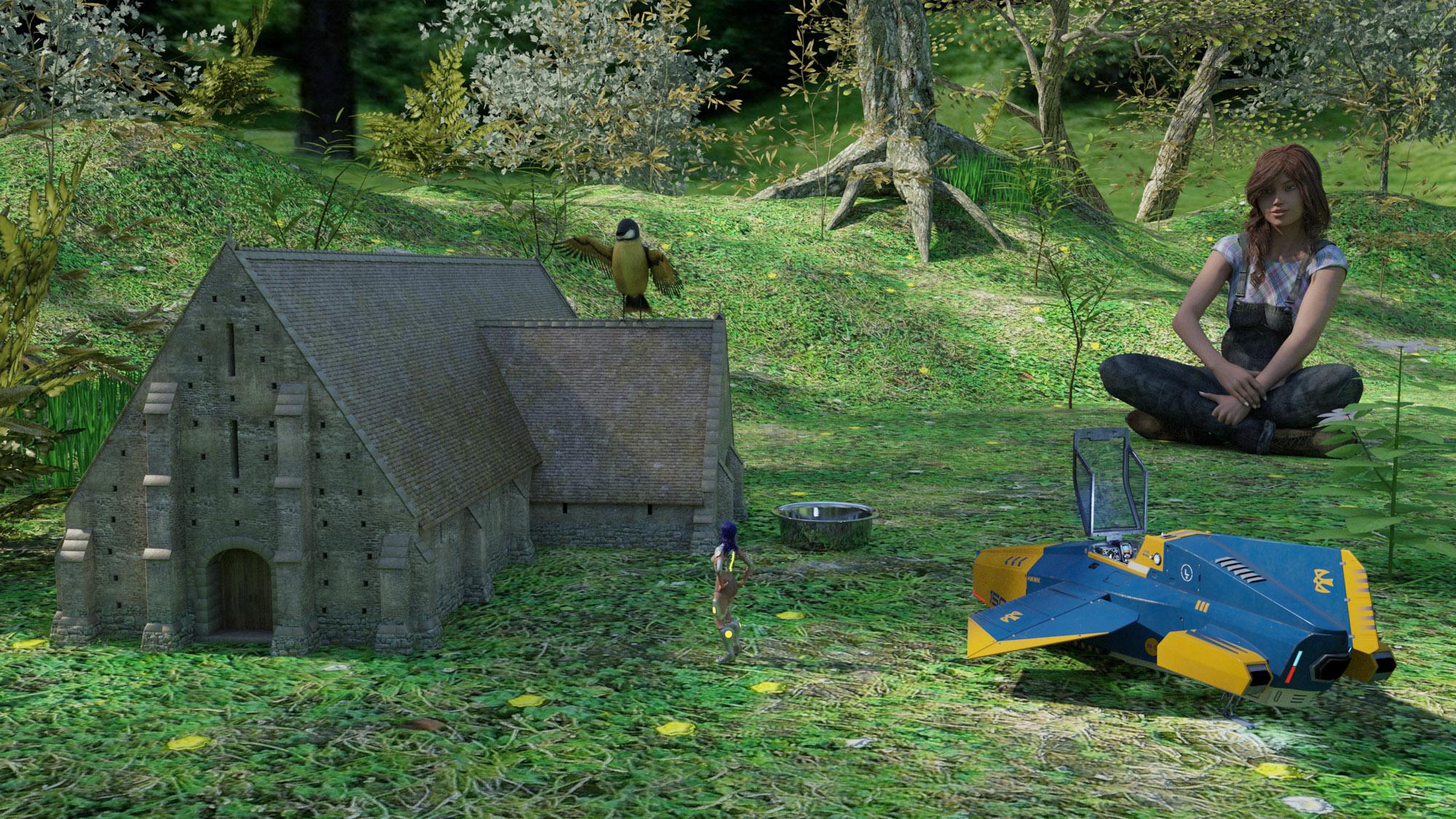
#4337 Milena for Victoria 6 (19105)
#7080 Tithe Barn (17767)
#3964 Luminous Melody (11844)
#6895 The Magical Forest (58085)Also used:
Susan Hair + CW Overall + Sitting Vicky Poses
V4 + Amy Elite Textures + SciFi Hunter + V4 Acasia
Aircraft Hawk
Songbird
Dog 8 AccessoriesShaders and scripts used:
RSSY 3Delight to Iray
JM Human Shaders
UHT2 Ultra SalonThe little forest birdhouse
Lucy was late for school, and when her teacher asked her why, she said that when she was checking the birds at the little birdhouse in the forest, a small alien spaceship landed and a girl with blue hair climbed out of it started to talk with one of the birds.
 Aurore not incompatible with New Anatomical Elements for V 8, Please help me to solve this problem.
Please don't post nude images. The anatomical element set is not from the Daz store, you may need to ask on the vendor's site. In general, anything for Victoria 8 should work with Genesis 8 Female. Genesis 8.1 Female may have issues with surface names or if the 8.1 character uses the new 8.1 UV set. Assuming you are using this Aurore https://www.daz3d.com/aurore-for-genesis-3-and-8-female that shouldn't be an issue, but if you are using a character preset to load the figure make sure it is the Genesis 8 version.
Daz 3D is part of

Connect
DAZ Productions, Inc.
7533 S Center View Ct #4664
West Jordan, UT 84084Licensing Agreement | Terms of Service | Privacy Policy | EULA
© 2026 Daz Productions Inc. All Rights Reserved.