-
About 3Delight
3DL is still a very valid render engine. Quite a few PAs still support 3DL, but many more don't. There is a huge back catalogue to explore but you may want to have a buying strategy where you only buy what you need at the time, instead of buying things because you might need them some day. That way, even if 3DL becomes unusable at some point, you'll not have too much cash. I use 3DL because I do't want photo-realism and, also, my old computer can't really cope with Iray but I do still use Iray products, using RSSY's converter and tweaking a few settings and get pretty good results. I have, but haven't seriously used, OSO's comic shaders for Iray, and that may be another option for you. And then there's Filament, a 'beta' installation of an NPR different render engine that people seem to be finding very fast, much less restrictive than Iray (it's not GPU dependent but with a few issues (as you would expect from a beta). I'd also mention IBL Master, which enables you to use Iray HDRIs in 3 DL.
MEC4D's celebration ( with freebies ) [commercial]Dana , Filament originally was created to work on android phone , it don't request super cards or computer , but Win64bit and last driver update for your card .
Wendy said it was working fine on her old computer
I use Maxwell cards and the last Nvidia driver works fine with Iray and the cards, how else I could render ?
You are missing all the fun with Filament PBR .. I go through all versions since 0.47 and did not experienced major issues or crashes , actually removed all general releases and use only Beta for more than 2 weeks already since Zbrush get confused where to send models and opening wrong version so I got rid of the other and not regretted it yet. I crashed only once with 2.51
Filament PBR viewport works only on 64bit Windows at this moment
...I'm still on the 4.12.0.47 beta which has been extremely stable, more so than the general release so haven't played around with this yet. Not sure about updating to ver 2.54 as the change log mentions that a newer Nvidia driver is required which doesn't show up in the list for my Maxwell cards on their site so I'm not sure if it is compatible.
I wonder if any of this stuff will work on my computer. Core2Duo, Nvidea 9500 GT, 8GB system RAM. Not even close to state of the art!
Dana
MEC4D's celebration ( with freebies ) [commercial]See here little test of Dielectric material (nonmetallic)
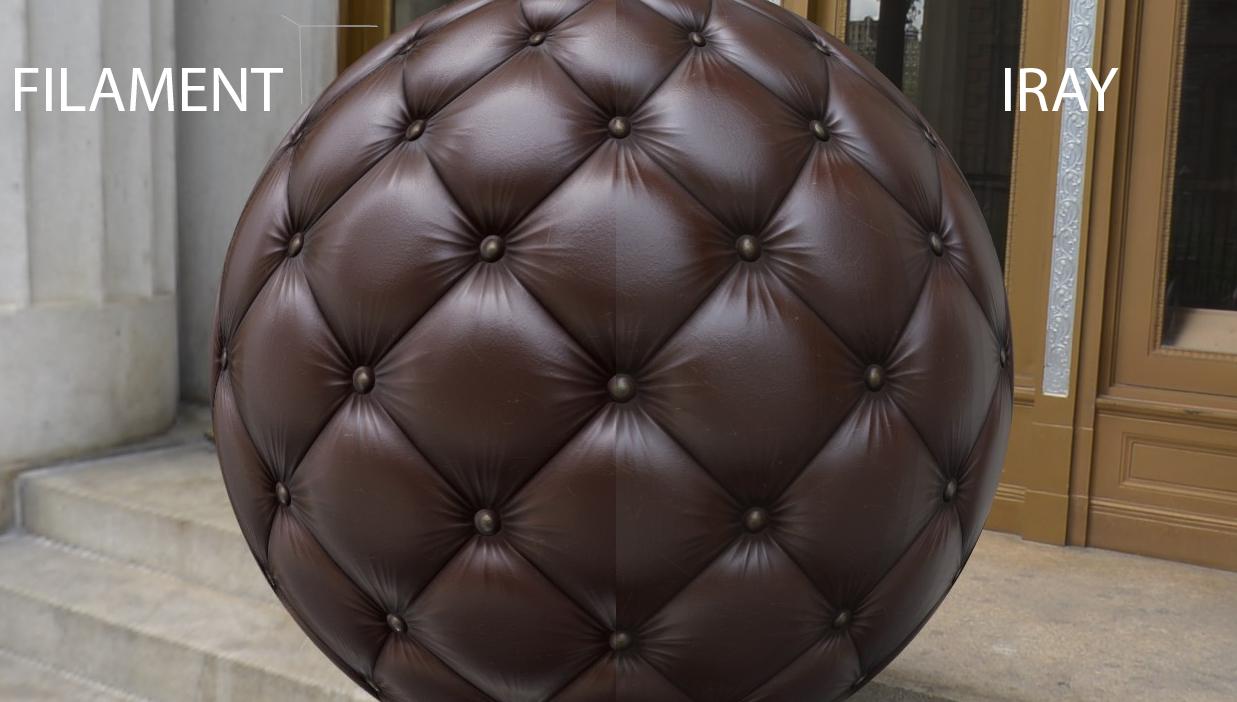
it looks the way it should ( not that is the best representation since the material is all painted for the test with world values), of course Filament viewport will not reflect materials from itself on the surface or other objects so there will be always a slightly difference but overall it is what I wanted to see
The whole concept of PBR in DS is to load your materials without the need of adjusting it for each different scene and lighting to look better
You got new tool, have fun with it
 MEC4D's celebration ( with freebies ) [commercial]
Well there is nothing negative about it , most negative comments are from people that have not even idea what it is and. how to work around it , expecting something that is not there .
I have no issues with Filament PBR as I tested it out a little early already before the release comparing my materials from other programs to make sure that it looks the same as my maps I create.
I found 3 ways around the Metallic shader in Iray to set it correctly for combinations of materials .
You see non metal materials have different amounts of reflections than Metals and since in Iray there are no way to put a values but just 0-1 it get complicated
None Metal surfaces have 2-4% at max reflectivity but no way to put RGBs or Float gray color values , the default setting of Glossy Weight at 0.33 and Reflection to 0.50 may works in most cases if you don't know the proper value but when using Metal and Nonmetal materials in one map it get little complicated and touching the reflective settings should not take place .
The preview of B are not accurate at all that why I used map to control it to get result C and it should be not this way, a true PBR should be achieved already with simple 2 maps , and it works great for Metals or Nonmetals only , but as always I find my ways
I just try to do my job easily and don't want to waste hours on something that is already done in preview hours if you know what I mean .
That why I love the Filament PBR, if it looks good in the viewport it should render even better with iray, as that is how it was created outside DS
another vote for the C texture.
nice to see some positive notes about filament...thank you. i've postponed downloading the new beta because most of what i've seen and read has been underwhelming.
:)
j
MEC4D's celebration ( with freebies ) [commercial]I use Maxwell cards and the last Nvidia driver works fine with Iray and the cards, how else I could render ?
You are missing all the fun with Filament PBR .. I go through all versions since 0.47 and did not experienced major issues or crashes , actually removed all general releases and use only Beta for more than 2 weeks already since Zbrush get confused where to send models and opening wrong version so I got rid of the other and not regretted it yet. I crashed only once with 2.51
Filament PBR viewport works only on 64bit Windows at this moment
...I'm still on the 4.12.0.47 beta which has been extremely stable, more so than the general release so haven't played around with this yet. Not sure about updating to ver 2.54 as the change log mentions that a newer Nvidia driver is required which doesn't show up in the list for my Maxwell cards on their site so I'm not sure if it is compatible.
I wonder if any of this stuff will work on my computer. Core2Duo, Nvidea 9500 GT, 8GB system RAM. Not even close to state of the art!
Dana
MEC4D's celebration ( with freebies ) [commercial]Thanks Simon !
A quick peek at the textures make me think C is the closest
Thanks Richard
C C Señorita! Looking really good honey!
Thanks , the point is that the Filament texture need to look accurate as the Original Material textures are also Filament just from another program
The c textures look best. Those filament textures are very encouraging.
MEC4D's celebration ( with freebies ) [commercial]another vote for the C texture.
nice to see some positive notes about filament...thank you. i've postponed downloading the new beta because most of what i've seen and read has been underwhelming.
:)
j
MEC4D's celebration ( with freebies ) [commercial]The c textures look best. Those filament textures are very encouraging.
AIUTO...CHI CONOSCE L’ITALIANO? PARTE DODICINon è sempre colpa di Iray, qualche volta anche i PA fanno casini! :P
IRay è molto bello, lo ammetto, ma è decisamente troppo inaffidabile e lento per delle produzioni "di massa". Ho speso parecchio tempo a studiarmelo perchè lo pensavo una buona alternativa.
Sinceramente spero che Filament venga sviluppato ancora un poco e venga affiancato a IRay e 3Delight, così anche noi possiamo avere la tripletta di motori come Blender e altri software e bullarci di poter scegliere.

Eh sì per le animazioni è lentissimo!
Per i fumetti si può fare, a costo di non voler creare più di 100/150 pagine al mese.
Almeno finché Nvidia non si decide a far arrivare sugli scaffali quelle benedette RTX 3000!!!
Ad ora ci sono solo su AK store (i modelli MSI, non mi vanno nè gli Zotac nè i PNY)...a 200€ più del MSRP, e con consegna da gennaio! :OAIUTO...CHI CONOSCE L’ITALIANO? PARTE DODICINon è sempre colpa di Iray, qualche volta anche i PA fanno casini! :P
IRay è molto bello, lo ammetto, ma è decisamente troppo inaffidabile e lento per delle produzioni "di massa". Ho speso parecchio tempo a studiarmelo perchè lo pensavo una buona alternativa.
Sinceramente spero che Filament venga sviluppato ancora un poco e venga affiancato a IRay e 3Delight, così anche noi possiamo avere la tripletta di motori come Blender e altri software e bullarci di poter scegliere.
New DS Filament Render EngineFilament sounds amazing for someone like me, who wants an NPR effect and wants to use Iray but has an old, low spec PC. Thank you to everyone who is experimenting, you're doing a great job helping to improve usage of what looks like a game changer for many of us.
MEC4D's celebration ( with freebies ) [commercial]I use Maxwell cards and the last Nvidia driver works fine with Iray and the cards, how else I could render ?
You are missing all the fun with Filament PBR .. I go through all versions since 0.47 and did not experienced major issues or crashes , actually removed all general releases and use only Beta for more than 2 weeks already since Zbrush get confused where to send models and opening wrong version so I got rid of the other and not regretted it yet. I crashed only once with 2.51
Filament PBR viewport works only on 64bit Windows at this moment
...I'm still on the 4.12.0.47 beta which has been extremely stable, more so than the general release so haven't played around with this yet. Not sure about updating to ver 2.54 as the change log mentions that a newer Nvidia driver is required which doesn't show up in the list for my Maxwell cards on their site so I'm not sure if it is compatible.
New DS Filament Render EngineDaz Studio appears to have a misaligned depth buffer, which is causing Filament to cull the shadow at an odd angle.
MEC4D's celebration ( with freebies ) [commercial]Thanks Wendy
Filament C+ and Iray C+ have the same material, but a good choice , I think the same
I just wanted to be sure , because it is hybrid material
A is Specular shader, B is Metallicity Shader and C is Metallicity shader + Glossy map from Specular shader to control proper the reflectance on oxidated parts vs metal parts, it should be not there since roughness maps should control this but Metallicity shader don't works correctly and it is very much visible when you use combination of surfaces like that.
Below pic of the original calibrated PBR and C+ from Iray that looks most accurate as no Specular or Metallicity shader looks proper even with a proper maps that looks correctly in any PBR engine outside DS , so I am not crazy here or splitting a hair in 2 , I just want to figure out the proper settings for combined materials so it works in any light situations in or outside DS .
I think Filament C+
MEC4D's celebration ( with freebies ) [commercial]I think Filament C+
New DS Filament Render EngineThank you to the people who clarified for me what Filament is all about. I can see its usefulness now.
New DS Filament Render EngineOK I have some things load transparent in Filament and none of the shaders I tried fixed it
so I created one from an imported obj
it is NOT DAZ default, maybe it is iray uber default but that didn't fix it, this does if you hold ctrl and ignore maps
it will look for the floor for Merlin's crypt if you don't hold ctrl
 as that is one of the things that loads transparent
maybe Richard or someone else shader savvy like 3Diva can puzzle out why this happens and what needs to be changed
I have no idea why it doesn't read transparency and trans maps correctly, unfortunately. I tried the shader you linked, but I still see skull showing through the hair. What kind of works is making the hair super dark. That almost gets rid of the transparency issue - almost. Of course, making everyone have super dark hair isn't really ideal, so hopefully, Daz will roll out a fix for the way Filament currently reads transparency and how it "sees" geometry with trans maps applied.
no that one fixes 3Delight and Poser shaders where the whole thing is transparent yet opacity is 100% and no map
Ohhh I see! Cool! :) Yeah, I've just been slapping a map in the opacity slot to overcome that issue. lol If that shader fixes that, awesome! I have a feeling that issue might be related to the same one as the hair transparency thing.
the Merlin Crypt one I exported and reimported the floor is one of those with a 3Delight shader mixed in an otherwise iray set which is how I realised what was happening
but applying iray uber doesn't fix it
New DS Filament Render EngineOK I have some things load transparent in Filament and none of the shaders I tried fixed it
so I created one from an imported obj
it is NOT DAZ default, maybe it is iray uber default but that didn't fix it, this does if you hold ctrl and ignore maps
it will look for the floor for Merlin's crypt if you don't hold ctrl
as that is one of the things that loads transparentmaybe Richard or someone else shader savvy like 3Diva can puzzle out why this happens and what needs to be changed
I have no idea why it doesn't read transparency and trans maps correctly, unfortunately. I tried the shader you linked, but I still see skull showing through the hair. What kind of works is making the hair super dark. That almost gets rid of the transparency issue - almost. Of course, making everyone have super dark hair isn't really ideal, so hopefully, Daz will roll out a fix for the way Filament currently reads transparency and how it "sees" geometry with trans maps applied.
no that one fixes 3Delight and Poser shaders where the whole thing is transparent yet opacity is 100% and no map
Ohhh I see! Cool! :) Yeah, I've just been slapping a map in the opacity slot to overcome that issue. lol If that shader fixes that, awesome! I have a feeling that issue might be related to the same one as the hair transparency thing.
New DS Filament Render EngineOK I have some things load transparent in Filament and none of the shaders I tried fixed it
so I created one from an imported obj
it is NOT DAZ default, maybe it is iray uber default but that didn't fix it, this does if you hold ctrl and ignore maps
it will look for the floor for Merlin's crypt if you don't hold ctrl
as that is one of the things that loads transparentmaybe Richard or someone else shader savvy like 3Diva can puzzle out why this happens and what needs to be changed
I have no idea why it doesn't read transparency and trans maps correctly, unfortunately. I tried the shader you linked, but I still see skull showing through the hair. What kind of works is making the hair super dark. That almost gets rid of the transparency issue - almost. Of course, making everyone have super dark hair isn't really ideal, so hopefully, Daz will roll out a fix for the way Filament currently reads transparency and how it "sees" geometry with trans maps applied.
no that one fixes 3Delight and Poser shaders where the whole thing is transparent yet opacity is 100% and no map
New DS Filament Render EngineOK I have some things load transparent in Filament and none of the shaders I tried fixed it
so I created one from an imported obj
it is NOT DAZ default, maybe it is iray uber default but that didn't fix it, this does if you hold ctrl and ignore maps
it will look for the floor for Merlin's crypt if you don't hold ctrl
as that is one of the things that loads transparentmaybe Richard or someone else shader savvy like 3Diva can puzzle out why this happens and what needs to be changed
I have no idea why it doesn't read transparency and trans maps correctly, unfortunately. I tried the shader you linked, but I still see skull showing through the hair. What kind of works is making the hair super dark. That almost gets rid of the transparency issue - almost. Of course, making everyone have super dark hair isn't really ideal, so hopefully, Daz will roll out a fix for the way Filament currently reads transparency and how it "sees" geometry with trans maps applied.
Daz 3D is part of

Connect
DAZ Productions, Inc.
7533 S Center View Ct #4664
West Jordan, UT 84084Licensing Agreement | Terms of Service | Privacy Policy | EULA
© 2026 Daz Productions Inc. All Rights Reserved.










