-
Mika 8
Can you do one of Teen Josie 7 next to Mika 8? I think Teen Josie 7 looks a lot like Mika 8.
Sure =)
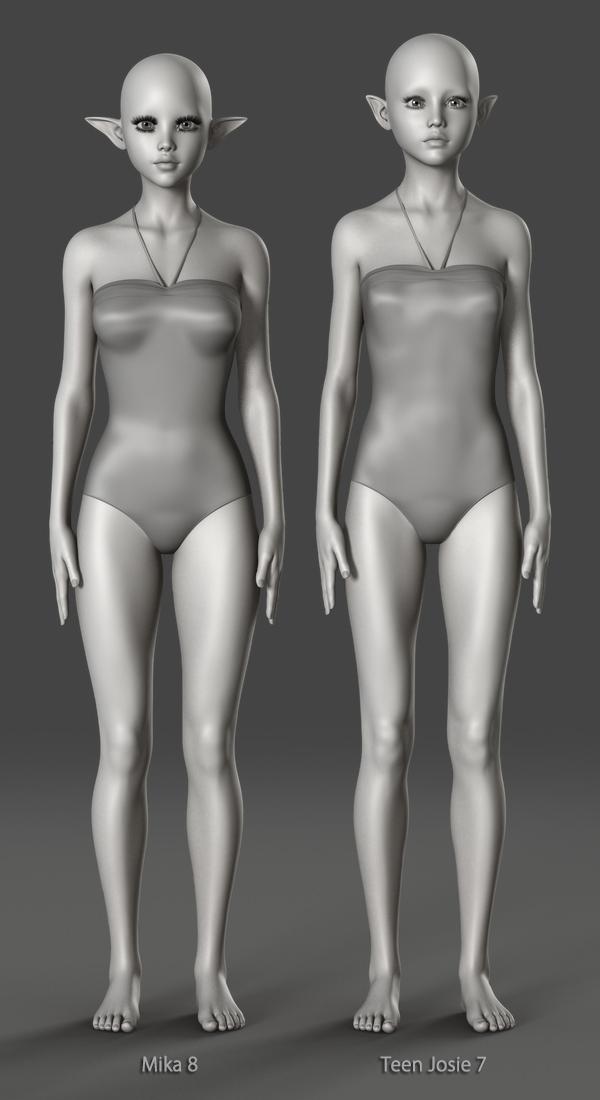

Thanks a bunch. Just as i suspected. Teen Josie 7 and Mika 8 as basically the same with small morph differences.
The majority of characters vary only in their morphs and textures... Surprising really!
True, but the difference between Mika 8 and Teen Josie 7 are so minor, the look almost the same.
There are similarities, I'll grant you, but they don't look almost the same to me. I'm nowhere near familiar with either to tell them apart when separate (well other than their eye size is an obvious give-away). I suppose the problem is that TJ8 (and earlier) looks stylised, as no teen has eyes so large; hell no child has eyes that large proportianally.
Morph Splitter...where is there import/export of HD morphs/any morphs with this product?.
The script can spawn a new morph from parts of morphs, and from combinations of morphs. The spawned morph can be saved. By the facilities already in Studio, it can be exported.
Oso3D has already showed us the Cyclops face morph separated out of a full body morph for G8 Male and applied to a female figure (G8F?).
https://www.daz3d.com/forums/discussion/comment/3610166/#Comment_3610166Edit: obviously this is for standard morphs, not HD.
Morph Splitterbut why can genX transfer HD morphs?
As diva said above, it can not. Indeed there is no product available here at all that allows you to export/manipulate/split/convert or do anything at all with HD morphs beyond dialling them in.
PAs may get access to tools to create HD morphs, but that is not the same as access to scripts allowing them to manipulate HD morphs from within Daz Studio.
Photo-real characters. A different approach.Yes, but still problem salthough not as exaggerated as your newest.
Thanks for the detailed response! Nice tip about the black-and-white! It actually does seem to help somewhat.
The above comment is a bit surprising (specifically the "not as exaggerated as your newest" part), since I'm pretty sure the morph hasn't changed since then.
In fact, I just switched to mesh view in Poser, exported the preview, and overlayed the mesh lines over both the old and new 30-degree unposed portrait renders. The former was copied from the thread I just linked to, and the latter came from the most recent re-render done to incorporate updated textures/shaders, which I know for sure uses the exact same morph as seen in my latest render of him in this thread.
The same mesh lines up perfectly on both. I had to do a bit of scaling and translation of the mesh overlay as a whole, but no warping whatsoever. The head shape stayed the same, with perhaps just some slight difference around the chin and brow.
So it seems that, at least to some extent, either my texturing or my camera angle (or maybe a combination of the two) may somehow be emphasizing the morph's flaws. That's my best guess, anyway.
Morph Splitterbut why can genX transfer HD morphs?
As far as I can tell, it can't.
Morph Splitterbut why can genX transfer HD morphs?
any utils to import a folder of poser hand poses to duf?does the pose converter in the DAZ freebies group do this (https://www.daz3d.com/forums/discussion/109961/pose-and-animation-conversion-for-multiple-generations-of-daz-figures)? Comments indicate that it is a quite useful and capable package. Not sure about direct Fc2 imports.
Could the GenX2 tool be used to generate a morph series from your hand-pose set - e.g. apply the Fc2/Pz2 set(s) to the orig char (v4?) and convert from there?)?
hope this helps,
--ms
GenX & GenX2 are morph based convertors while the V3 and V4 generation hand poses and, IIRC, the V3 face poses are primarily skeleton based,
hands would certainly be bone-based. true. so a pose converter like cridgit's or the one I mention above may actually serve the need, but there may be a V4-to-Genesis step that precedes that step?
something that might be relevant, is Zev0 or Draagonstorm (or both) had a "Pz2 to duf converter" that could do batch conversions of poses from the one format to the other (on the same character), then those dufs could be used by other conversion tools that require dufs (vs Pz2 files). The same vendor's V4 pose converter may have that same function as a side-effect. Try looking at the older zev0 V4/Genesis1 era products - maybe you can get something into your current world via a multi-step batch conversion workflow.
If you can't find the mentioned products, let me know, and I can try and find them.
cheers,
--ms
Used items in Promo picturesSomething that I've been doing ever since I started using Daz is to only use 'MY Daz 3D Library' for products I get directly from the Daz3D.com shop. I use 'My Library' for freebies I find elsewhere (or that are linked to from the freebies thread here), and I created a Renderosity Library folder for Renderosity products. This makes it a bit easier to track down the source.
So, short form, since I know that I only have Daz3D.com products in 'My Daz 3D Library', well I know I acquired it from the Daz3D shop.
Of course, if you've just been installing everything into the 'My Daz 3D Library' folder, then this won't be as obvious, but for people that are new to Daz, that may want to get their toes wet in product creation at some point, well this is a good reason to keep things separated (pre-planning).
If I ever start buying stuff from other vendors, no doubt I'll keep those separated into their own relevant 'source' folders as well. The downside, of course, is that I have stuff sorted over multiple 'master' folders, but for me that's an acceptable tradeoff There are ways you can use shortcuts, etc. to make those other products easier to find of course. This also helps if I ever have to go back and reinstall something (i.e. if it was in the 'My Daz 3D Library' folder, check the Daz install folder, etc.).
In the future I may carry this further, and break down freebies between 'commercial use allowed' and 'other stuff'. Currently I have a folder of stuff I haven't installed yet because it was personal use only or all rights reserved. To be honest, the stream of 'commercial uses OK' products from other sources has kept me more than busy already.
My point is that, if you keep the Daz store products separate from the other stuff, this can make identifying the Daz store stuff easier. And, as I pointed out before, the best time to determine a product's source is to right click on the thumbnail as you are adding it from Content Library, Smart Content, etc. and immediately 'navigate to folder'. This can give you some excellent clues as to who made it (PA's often use their vendor name as the folder name). This doesn't always work, but I'd say 75% of the time you can determine who made what fairly quickly. Also, by navigating to the folder, and the containing folders, the list of products, etc. can give you more clue.
Once you've added a product to a scene, then it's harder to figure this out, so it helps to get in the habit of taking notes as you are adding stuff, keeping an instance of notepad open to make notes as you work. That's my suggestion anyways.
As for the other stuff (from other stores), well you won't be listing those on your Daz product pages anyways. That being said, PAs that want to be particularly helpful could use their commercial products thread to mention such things: Example: I grabbed the Roxx Hair from Rendo. That should be enough info for most people to track it down.
And, as I pointed out before, if you aren't checking the usage rights for stuff bought elsewhere, well you ARE using it for a commercial use if you are using it in promos. Sure you can roll the dice, and odds are low that you'll get called out on it if you inadvertently use something that is restricted from such a use, but why take the chance at all?
It all comes down to being willing to take a little extra time so that you can pay it forward. And it may save you time down the road, if you are the type that answers questions about products used after the fact.
And if this is too much of a bother for you, well we've heard from those that think it's too much of a bother already.
I'm just pointing out suggestions for those that do take the time, r.e. how you can make this task easier. Yeah, it'll take longer than 3 seconds, but usually you can figure out the critical info in a minute or less if you make notes as you work. Then you can use Google later (when you are packaging your product for submission) to find the links. It's a much bigger pain to open your scene .duf after the fact and try to figure it out then, as it won't be immediately obvious precisely which folders things came from.
And if for some reason you can't find the associated product page when you go to looking for it later using Google, etc. (say the product was subsequently pulled from Daz store), well at least you tried. In these instances, a quick mention in your commercial product thread can't hurt. Who knows, maybe someone else will spot the page for you (if still being actively sold) if you missed it somehow.
And again, if some of the assets you are using are custom morph mixes and/or custom assets that aren't available for sale, just say so in your commercial products thread (i.e. include in your OP for the product thread: The character(s) used in my promo pic is a custom character that is not available for sale). It'll help in some cases, in those cases people will appreciate you letting them know, as you may have just saved them from a lot of fruitless Googling...
any utils to import a folder of poser hand poses to duf?does the pose converter in the DAZ freebies group do this (https://www.daz3d.com/forums/discussion/109961/pose-and-animation-conversion-for-multiple-generations-of-daz-figures)? Comments indicate that it is a quite useful and capable package. Not sure about direct Fc2 imports.
Could the GenX2 tool be used to generate a morph series from your hand-pose set - e.g. apply the Fc2/Pz2 set(s) to the orig char (v4?) and convert from there?)?
hope this helps,
--ms
GenX & GenX2 are morph based convertors while the V3 and V4 generation hand poses and, IIRC, the V3 face poses are primarily skeleton based,
Used items in Promo picturesUnfortunately I have to repeat my criticism of the seller and DAZ. It is very customer-unfriendly that as a customer you have to search the used articles of a promotional image in time-consuming research, only to find out that the article either no longer exists or is in another store or somewhere here at DAZ. Also the constant demands here in the forum which article that is annoying with the time and reduces the feel-good factor when shopping very. I have decided to stop buying products that do not clearly list what was used for the promotional images. The bottom line is that I save a lot of money every month.
Not listing the items used in promotional images has one result - DAZ and the Artists who make the content are making a LOT less money. I, too, get fed up with having to search the interent for content used in promos, or asking in hopes someone on some forum with know. Every artist who is creating an image already knows what each product is and where it's available, there is no time or effort involved in knowing. How long does it take, really, to copy and paste the name of a product onto a webpage - about 3 seconds. It's not like there are hundreds of products used in each image. If you think listing something avaliable on another site is going to stop someone from buying from the othere site - think again.
It takes significantly longer than three seconds.
1. We are required to list the Daz3d store link if we want something listed as a promo credit. That means we have to be able to find that item's product page in the store, not just write down its name.
2. We're hunting through an oft-enormous content library (PAs tend to own a lot of products) to find where the thing came from, and the name it has in the scene is often not the name of the product (e.g. it's called SYNC Dress when the store product page is called SickleYield Naughty Cat Dress). Going from "I have this hair among the 100 items in my scene" to "this is called the Butternose Hair and it's by the artist PurplePupper" is a bit of a leap sometimes.
I also don't list every item in every promo because some of them are from Renderosity and some of them are no longer in the store and some of them are ShareCG freebies and some of them are mixtures of 10 different faces from 10 different morph sets, and the format doesn't allow me to say "used Monique 10% and this FW character 5% and my own Faces of Asia nose 75%."
sy-victoria-4-and-michael-4-clones-for-genesis-8thanks ..is it possible to go to G1 first ..then work forward ..without using those tools?
i'm in the middle of a thousand day render or i would give it a twirl ... well, i guess i could try later ... i was mainly interested in the above ... which is on sale right now...
i did try some v4 clothes on g3 ..without any tools..and that was an exercise in futility ...plus i dont know all the ins and outs of doing it .. yet.You can autofit from generation to generation without any additional tools, as far as I know. Just save it as a "Wearable Preset" and then transfer it to the next generation, then save it as a Wearable Preset again, until you get it to the generation you want it on. Save it as a Wearable Preset the final time once it's on the generation you want to use it on (that way you don't have to go through the "leapfrog" process of transferring it to different generations again).
For instance, if you want an outfit that is made for V4 to be used on Genesis 3 the steps should be:
- Autofit the outfit to Genesis 1, save it as a Wearable Preset (Name it something you'll remember, like "Dancer Outfit on G1")
- Load that Wearable Preset onto Genesis 2, save it as a Wearable Preset again (again name it something you'll remember, like "Dancer Outfit on G2")
- Load THAT Wearable Preset to Genesis 3.
You can then save it as a Wearable Preset for the third time that way you can load it straight onto Genesis 3 in the future.
awesome..some work, but i will give it a go ... Thank you much.

Yeah, it is some work to do it the long way. :) I think that's why the "clones" are probably good sellers, people want the convenience of one step application - and the clones probably work better and make the outfits look better than the "leapfrog" autofit way. I'll have to test it out to see. ;)
sy-victoria-4-and-michael-4-clones-for-genesis-8thanks ..is it possible to go to G1 first ..then work forward ..without using those tools?
i'm in the middle of a thousand day render or i would give it a twirl ... well, i guess i could try later ... i was mainly interested in the above ... which is on sale right now...
i did try some v4 clothes on g3 ..without any tools..and that was an exercise in futility ...plus i dont know all the ins and outs of doing it .. yet.You can autofit from generation to generation without any additional tools, as far as I know. Just save it as a "Wearable Preset" and then transfer it to the next generation, then save it as a Wearable Preset again, until you get it to the generation you want it on. Save it as a Wearable Preset the final time once it's on the generation you want to use it on (that way you don't have to go through the "leapfrog" process of transferring it to different generations again).
For instance, if you want an outfit that is made for V4 to be used on Genesis 3 the steps should be:
- Autofit the outfit to Genesis 1, save it as a Wearable Preset (Name it something you'll remember, like "Dancer Outfit on G1")
- Load that Wearable Preset onto Genesis 2, save it as a Wearable Preset again (again name it something you'll remember, like "Dancer Outfit on G2")
- Load THAT Wearable Preset to Genesis 3.
You can then save it as a Wearable Preset for the third time that way you can load it straight onto Genesis 3 in the future.
awesome..some work, but i will give it a go ... Thank you much.
Mika 8Can you do one of Teen Josie 7 next to Mika 8? I think Teen Josie 7 looks a lot like Mika 8.
Sure =)
Thanks a bunch. Just as i suspected. Teen Josie 7 and Mika 8 as basically the same with small morph differences.
The majority of characters vary only in their morphs and textures... Surprising really!
True, but the difference between Mika 8 and Teen Josie 7 are so minor, the look almost the same.
sy-victoria-4-and-michael-4-clones-for-genesis-8thanks ..is it possible to go to G1 first ..then work forward ..without using those tools?
i'm in the middle of a thousand day render or i would give it a twirl ... well, i guess i could try later ... i was mainly interested in the above ... which is on sale right now...
i did try some v4 clothes on g3 ..without any tools..and that was an exercise in futility ...plus i dont know all the ins and outs of doing it .. yet.You can autofit from generation to generation without any additional tools, as far as I know. Just save it as a "Wearable Preset" and then transfer it to the next generation, then save it as a Wearable Preset again, until you get it to the generation you want it on. Save it as a Wearable Preset the final time once it's on the generation you want to use it on (that way you don't have to go through the "leapfrog" process of transferring it to different generations again).
For instance, if you want an outfit that is made for V4 to be used on Genesis 3 the steps should be:
- Autofit the outfit to Genesis 1, save it as a Wearable Preset (Name it something you'll remember, like "Dancer Outfit on G1")
- Load that Wearable Preset onto Genesis 2, save it as a Wearable Preset again (again name it something you'll remember, like "Dancer Outfit on G2")
- Load THAT Wearable Preset to Genesis 3.
You can then save it as a Wearable Preset for the third time that way you can load it straight onto Genesis 3 in the future.
Was it just me or....I'm a little baffled when people want only characters and feel put upon by the idea of customizing or mixing or dial spinning new characters.
Yes, it's just a hobby, but in most hobbies I know of, people put in ABSURD amounts of time tying their own flies, painting miniatures, practicing their swing, and so on.
So, uh, tinker?
I agree. in the 3d game communities I develop for the majority of DLC content is user made, even with lots of commercial options. I am not opposed to add characters at all, I like seeing them and own a couple, but there just seem to be a stigma in this community that if DAZ doesn't release it, then it doesn't exist.
As for the male vs female issue, I actually realized how limited the male market was over the past two nights myself. I have a commision project I am working on and the client wants to use a custom figure based off the G8 Ronen body morph. Once I had the character ready I needed some clothing and props and since my G8 male wardrobe is very lacking since I don't use male figures much, I went looking at all the stores and it was eye opening to say the least, LOL. Thank goodness for autofit
"Get Them While You Can!" If Not… Well… "There's Always Another Sale™"And long as we're here, this bridge looks awesome, but it doesn't seem made for any particular set...maybe that new gorge?
https://www.daz3d.com/the-lost-jungle-bridge
Anyone know what this is? Does it have a length morph to stretch across wider gaps?
Where did this come from? And the vendor, Corwin, only has this 1 product?
This is scratching my Indianna Jones/Tomb Raider bug, but I dunno.
You can make some impressive gorges with TerraDome 3 and its add-ons. Yes, this bridge will do nicely.
According to the file list in the wiki, it looks lile a simple prop with no morphs. I guess with only one product, it's hard to get any attention. I vaguely remember it, probably when it was released a few years ago.any utils to import a folder of poser hand poses to duf?does the pose converter in the DAZ freebies group do this (https://www.daz3d.com/forums/discussion/109961/pose-and-animation-conversion-for-multiple-generations-of-daz-figures)? Comments indicate that it is a quite useful and capable package. Not sure about direct Fc2 imports.
Could the GenX2 tool be used to generate a morph series from your hand-pose set - e.g. apply the Fc2/Pz2 set(s) to the orig char (v4?) and convert from there?)?
hope this helps,
--ms
Morph SplitterI'm having crazy fun with this product!
Here's one of my creations with it:

Morph Mixes:
X-Morphs -
- Eva 7's Torso 100%
- Izabella 7's Arms 100%
- Izabella 7's Torso 50%
- Lavinia Vampire's Hands 100%
- Lucille Zombie's Legs 65%
- Narkissa Vampire's Ears 100%
"Out of the box" morphs -
- Livia Vampire Head 100%
- Victoria 7's Head 50%
I was going to give the product a miss, but X-Morphs is now added to my wishlist. She's beautiful.
I've got an idea of what you have to do, but I won't totally understand it until I get the product (I'm not the brightest spark :P).
Imported Obj file needs bone rigprob borrowing a DAZ figures rigging using the transfer utility the simplest way with just studio
if you can afford it the sure fire way is FBX import into Poser 11pro save as a cr2 load in DAZ studio edit rigging weightmapped dualquartonian save as support asset
Morph SplitterDoes it work with HD morphs too?
No, it doesn't, according to the product page notes section...
That is the main thing that is keeping me from a purchase right now. I have become very invested in HD morphs and can't imagine not using them now since this addon doesn't support them, especially at this price point. The main reason I want this addon is for 3 characters I want to use that didn't come with seperate body and head morphs. All the other advertised uses really don't pertain to me and my workflow, so i am having a hard time justifying spending this much for my limited use, hmmmmmm...................
That's because Daz restricts import/export of HD morphs. Its not a failing of the product, its because of Daz policy.The product looks amazing. It does something I've been wanting to do for a long time.Have you created characters in Hexagon and saved them as a single morph by mistake? This saves the day. And the ability to isolate any (non HD) shape is beyond what I wanted. I would have been fairly happy just being able to separate heads and bodies, but you can isolate just a nose, or eyes, or legs, whatever. There are so many uses for this product.I agree completely! This product is SO GOOD and I'm pretty surprised it hasn't been as well received as I would have expected for such an amazing product! Hopefully, it's just a "slow starter" and people will catch on to what an outstanding product this is and all that it can do. :)
It is number 2 in the what's hot list (behind Mika 8 bundle) so it is doing pretty well already.
Oh is it!? That's great news! :D Thanks, Havos!
I keep forgetting that if I own a product already it doesn't show up in "what's hot". lol *blush*
Daz 3D is part of

Connect
DAZ Productions, Inc.
7533 S Center View Ct #4664
West Jordan, UT 84084Licensing Agreement | Terms of Service | Privacy Policy | EULA
© 2026 Daz Productions Inc. All Rights Reserved.