-
Shape Splitter - Divide, Combine and Save (The new version is already available. 1.2.1)[Commercial]
In the video, you use Ghastly Dog for the head. I can't find it to see if it is a stand alone model, or if it is a morph of a character.
I understand that G3 morphs and G8 morphs can't be mixed.
Can you, for example, put the head of the DAZ Big Cat on Genesis, G3 and / or G8?G3 to G8, eyelashes on wrong place, how to fix?OK I thought I had it figured out but no. I can load the character morph(s) onto a g8 figure, apply it, and everythings fine, eyelashes following morph. Save scene, close, reopen, eyelashes no longer following. What am I missing???
I am going to go back to square one and start over, completely from scratch and see if I cant get this working but if anyone has any input into what it is you suspect I am messing up Id very much appreciate some insight, thanks! I have to manually reload the morphs every time as a workaround -- zero figure, base, zero sub, delete morph, reload w morphloader, apply, works great, lashes and all, but have to redo this every time, obviously not going to work.
I know Genesis means beginning but...This is where my bafflement about hobbyist came from.
'You should learn how all this stuff works and tinker with it yourself, if you find this stuff lacking.'
"But I'm a hobbyist!"
Me: ''But that's exactly what hobbyists DO... ??''
I mean, if you don't want to or prefer to do other stuff or whatever, fine, but the hobbyist defense just doesn't seem tenable to me.
You are baffled because you are applying the widely understood
definition of "hobbyist" as used in the modern, western vernacular.It is my observation ,over the years, that this term IMHO, has been perverted by many, in both the Poser and Daz communities
to mean essentially:"Dont expect me to Know/learn any technical skills or do any actual work or labor or have my "art" subjected to any objective criticism..I am just a Hobbyist"
Frankly the canned, click load &render nature of Daz/Poser content has fomented this mentality to the point where I have read actual posts in this forum ,where people literally refuse to move a morph slider that dials back George HD to 70 percent
but instead demand that the Pro PA's create a whole new Character that is only 70 percent as Fat as the full george HD.(Released) Leviathan Suit for Genesis 8 (Commercial)Let me just give you my money now..... =-)
Question... are there adjustments for the male groin anatomical elements area.... does it respond to the bulge morph? It’s a bit small down there for my tastes and I know some of these suits you can’t adjust..... sorry to be indelicate

To be honest it was originally modeled for Genesis 3 Female then rejected that and I converted to Genesis 8 Female, saw post in one of the thread saying you wanted more male stuff so it was a quick conversion to the male. Did that over a weekend so it was a bit rushed and never really got around to those type of morphs but I'm sure one of the morph packs from SY or Zev0 will have something !.
sy-victoria-4-and-michael-4-clones-for-genesis-8LOL
FSMC doesn't like it because they only wanted to use it on skimpy clothing, and it was made for heavier coverage clothes. If you want to use it on bikinis, no, it's not going to work great, but it's great on long sleeves, pants and skirts (i.e. the things that are shown in the promos).
Mind you, Valzheimer does a great product, I'm not arguing with that.
I "don't like it" because it doesn't work as advertised. Maybe a change to the name of the product is in order since it only says "SY Victoria 4 and Michael 4 Clones for Genesis 8" which implies it works on all clothing, not just the types shown in the promos or specialized clothing items.
To add to this, the reason these clones do not fit the clothing well is because the shapes do not actually match V4 and M4. They are extremely distorted. This means they will only work for clothing where you don't care if it remains the same distance from the body in the fit as it was in the original. It also means they cannot be used to transfer morphs. This may work for some people. For the vast majority, a "clone" shape is understood to actually line up with the original figure.
Old Dog New TricksCame by to grab a link to your canvasses tutorial and to let you know I miss your renders.
awww, Thank you. I'm still rendering stuff but have been so busy with real life that I don't always have a lot of time to spend in the forums, although I'm still lurking. lol
When my daughter was 6 weeks pregnant her boyfriend passed away from a drug overdose. My daughter doesn't want to move back home but she also doesn't want to be alone so I spend a lot of time at her house...with no internet, just my cell phone data. :) Baby is now due in 3 weeks! Guess who the primary babysitter is once she goes back to work? Yea, I'm going to be busy for a while. :D
Here is what I am currently working on:
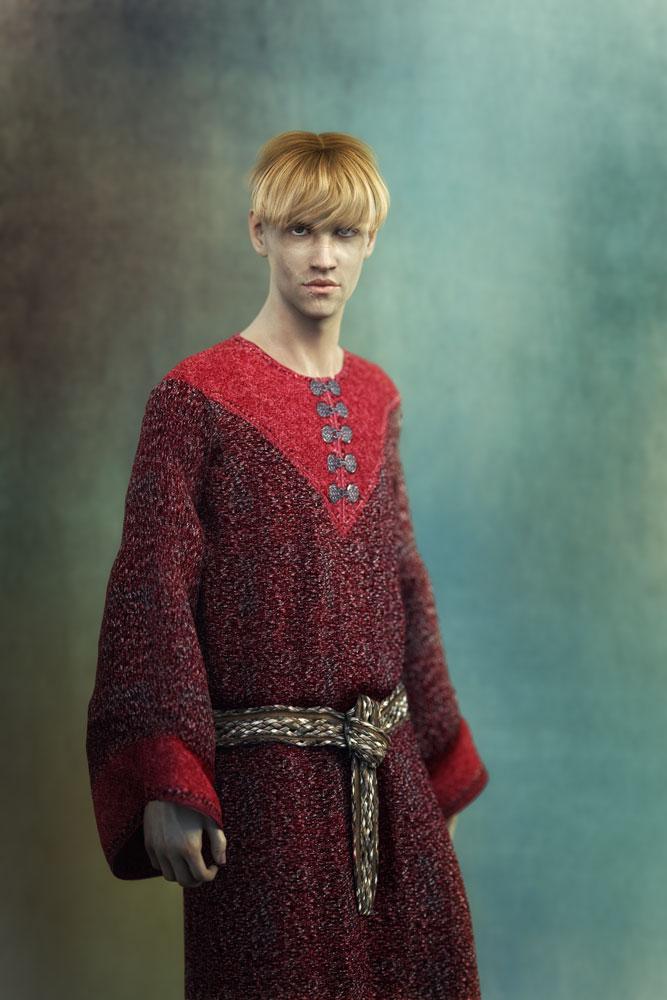
This character is for a book I am currently doing the cover for. When I use him I have to remember to set the whole scene up as a mirror to how I actually want it. His bad eye and scars around that eye need to be on his left side, but the skin and hd scars I am using only come on the right. I know I could flip the skin in photoshop, but I'm guessing there is no way to flip the morph, so I just flip in post. :)
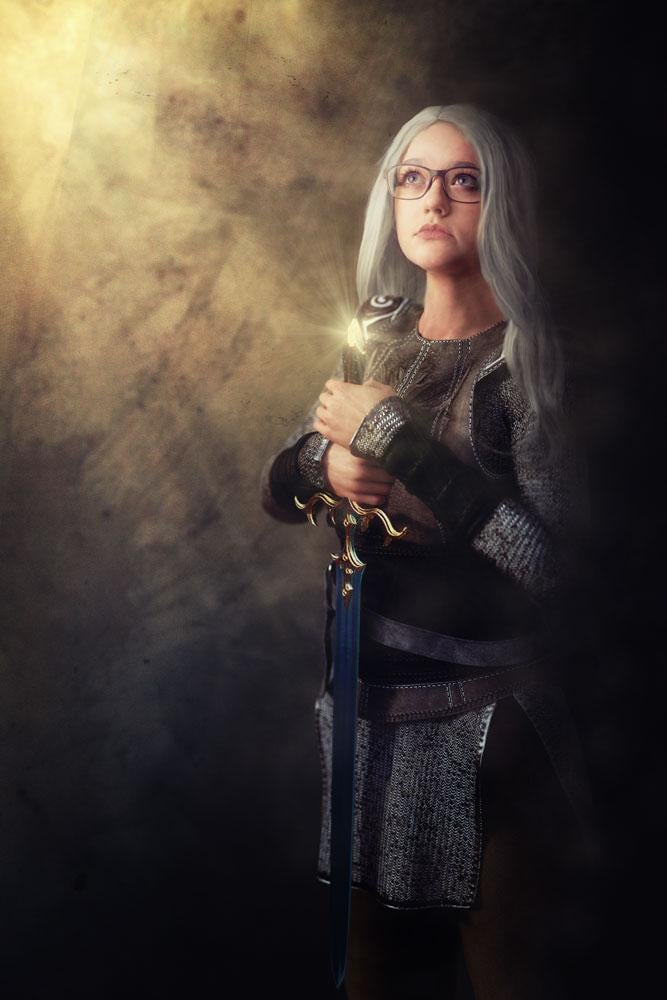
This one is now also for a book cover but started as an experament at putting a real human face on a 3D body, because 3D costumes are way cheeper then the real deal. :D (it also didn't start with her in glasses, but the autor asked if I could add them, and beings the model always wears them I told him we could do it. Also the model, my daughter, really, really wanted to be on a bookcover. lol
 (Released) Leviathan Suit for Genesis 8 (Commercial)
Let me just give you my money now..... =-)
Question... are there adjustments for the male groin anatomical elements area.... does it respond to the bulge morph? It’s a bit small down there for my tastes and I know some of these suits you can’t adjust..... sorry to be indelicate
GMS Props Freebies (updated 09-09-2019)Actually, after poking around in the included stuff in the gas station, I also had some interesting thoughts, particularly about the cigarrettes. BTW, that Llama brand of smokes had me laughing out loud for some reason. I can't figure out what brand if any that one is supposed to be an analog of, though the other two are pretty obvious. I just loved the shear off-the-wall-ness of a brand of smokes called Llama! LLAMA! LOL!!! :D :D
Anyway, looking at the fact you had cigarrettes got me to wondering. And bear in mind, I'm unlikely to be using anything like this in my own renders any time soon, simply because my stories typically involve people too young to smoke. That said, I found myself picturing a pack of smokes prop that could be opened, and the number of cigarrettes in there be removed to various levels of empty, with some of the ones now remaining be able to shift around in the pack, be pulled outward selectively, etc, etc. This could be an interesting project for you to work on at your liesure down the road, since I'm sure SOMEone would probably love having a prop like that, assuming someone else hasn't already made one like this. If one already has the gas station set, they could then apply the three made-up brand of cigarrettes' textures from there onto this prop, or you could include independent copies/versions of those in this pack, maybe ones devised to look better close up (i.e. the same design but with higher detail, or the rest of the sides filled out), while it could also include other made-up brands in the pack as well.
Yeah, mostly just brainstorming, but it sounded like an interesting idea so I figured I'd toss it at the wall and see if it sticks.
Edit: Actually, a little while after I posted this, it occured to me there IS a way I might wind up using something like this prop: Bubblegum cigarrettes! :D
(And yes, oddly, they still make those! I have a box of them on my to-get list at Amazon, just for old times sake.)
I'm glad you're enjoying the set. The Llama cigarettes were supposed to be an analogue of Camel. I figured, they're both bad tempered furry animals, it's pretty close. :D
TrekkieGrrrl actuall has a free morphing cigarette pack, I don't know what her UVs look like but you'd probably be able to retexture it to look like bubblegum cigarettes easily enough. You can find it here: http://trekkiegrrrl.dk/mpp1.htm. All the way at the bottom of the page.
if I ever figure out how to work the morph loader in Daz, I'll probably try something similar.
Morph SplitterBasically, you can totally use a HD morph... it just won't be HD after. ;)
Morph Splitterbut why can genX transfer HD morphs?
As far as I can tell, it can't.
But I transfered the HD morphs from G3M to G3F and as far I can tell the morphs are working. Not all, but theMichael 7 HD is one of the successfull transfered.
It may have transferred the base morph, but I doubt it transferred the HD part.
Morph Splitterbut why can genX transfer HD morphs?
As far as I can tell, it can't.
But I transfered the HD morphs from G3M to G3F and as far I can tell the morphs are working. Not all, but theMichael 7 HD is one of the successfull transfered.
Custom morph removal from base figure?Find the morph (most easily by looking under Currently Used in the Parametrs pane, click the gear icon, and open Parametre Settings. In the dialogue set the current and Default values to 0. File>Save As>Support Assets>Morph Asset, selecting just that property and otherwise keeping the settings unchanged (which should cause it to update the current file rather than creating a new one).
Morph SplitterPeter: Actually that's a G8M figure; I made a 'G8F shape' morph by using the G8F fitting clone that either comes with it or I bought (SY clone fits, maybe?), I forget.
I had originally attempted to do Cyclops + G8F shape, and the results were... very rugged. Doing it with Xmorph made for a much smoother look.
Photo-real characters. A different approach.Yes, but still problem salthough not as exaggerated as your newest.
Thanks for the detailed response! Nice tip about the black-and-white! It actually does seem to help somewhat.
The above comment is a bit surprising (specifically the "not as exaggerated as your newest" part), since I'm pretty sure the morph hasn't changed since then.
In fact, I just switched to mesh view in Poser, exported the preview, and overlayed the mesh lines over both the old and new 30-degree unposed portrait renders. The former was copied from the thread I just linked to, and the latter came from the most recent re-render done to incorporate updated textures/shaders, which I know for sure uses the exact same morph as seen in my latest render of him in this thread.
The same mesh lines up perfectly on both. I had to do a bit of scaling and translation of the mesh overlay as a whole, but no warping whatsoever. The head shape stayed the same, with perhaps just some slight difference around the chin and brow.
So it seems that, at least to some extent, either my texturing or my camera angle (or maybe a combination of the two) may somehow be emphasizing the morph's flaws. That's my best guess, anyway.
Well if I remember right, I made the same comment about the chin cleft last year being too big although I didn't recall that until now.
At any rate, you can see by looking at the attached B&W picture above you can make some improvement if you desire.
Mika 8Can you do one of Teen Josie 7 next to Mika 8? I think Teen Josie 7 looks a lot like Mika 8.
Sure =)
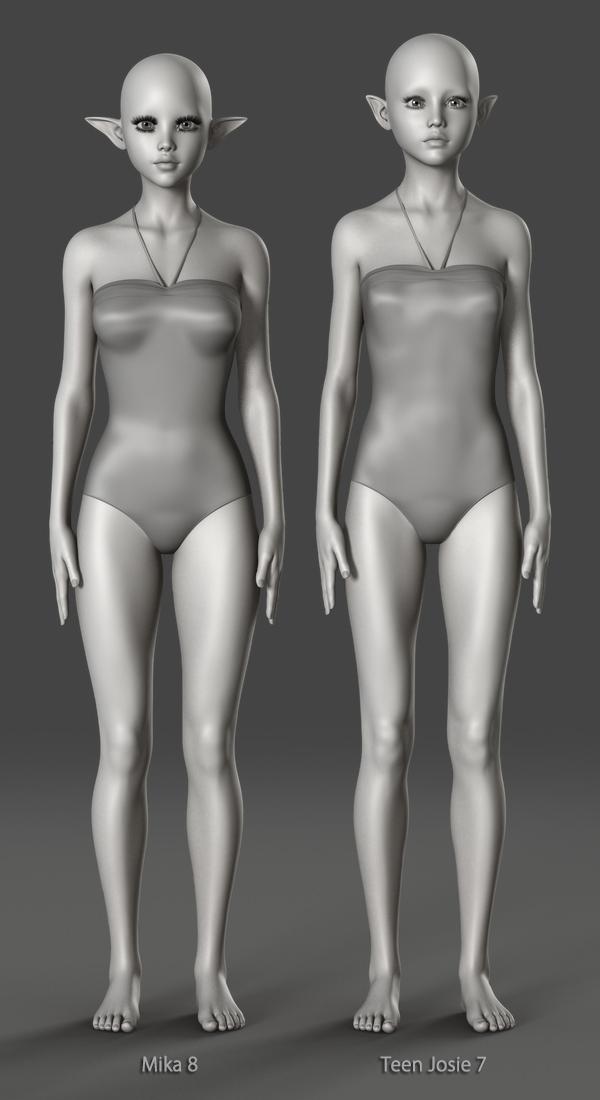

Thanks a bunch. Just as i suspected. Teen Josie 7 and Mika 8 as basically the same with small morph differences.
The majority of characters vary only in their morphs and textures... Surprising really!
True, but the difference between Mika 8 and Teen Josie 7 are so minor, the look almost the same.
There are similarities, I'll grant you, but they don't look almost the same to me. I'm nowhere near familiar with either to tell them apart when separate (well other than their eye size is an obvious give-away). I suppose the problem is that TJ8 (and earlier) looks stylised, as no teen has eyes so large; hell no child has eyes that large proportianally.
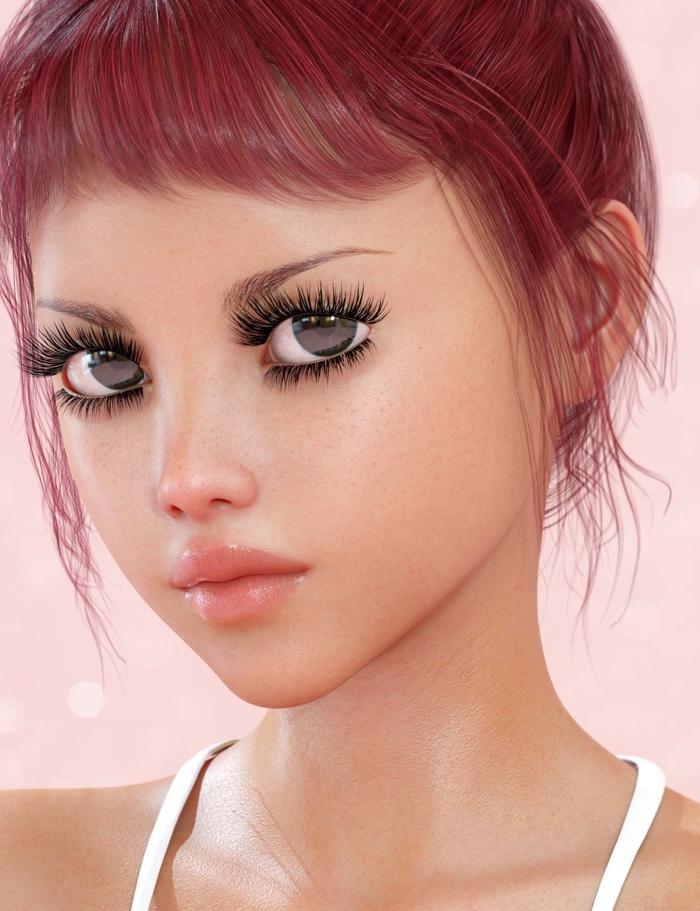
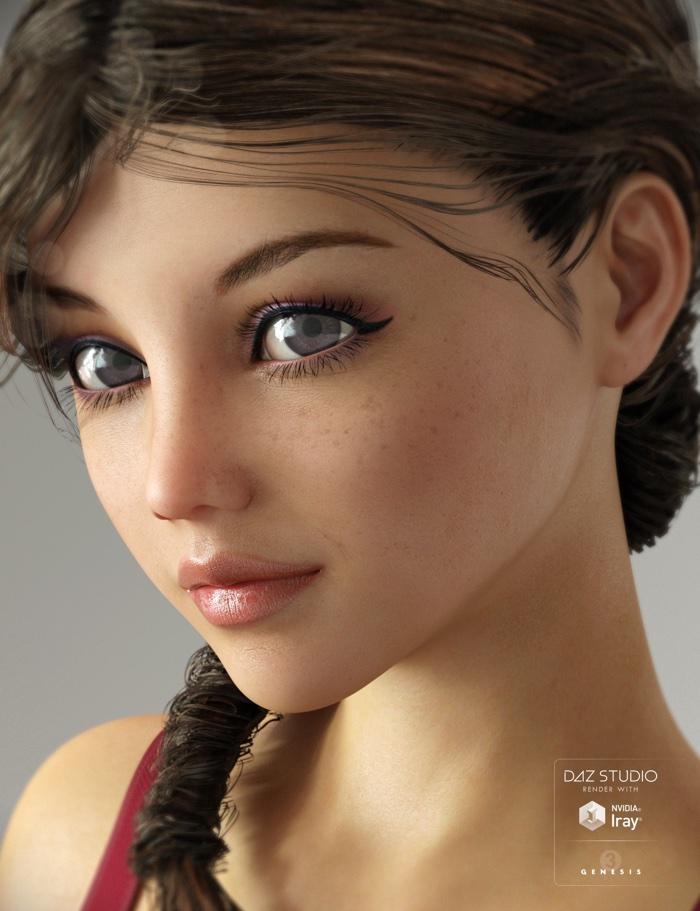
Their eyes looks almost identical. Maybe it's the huge eyelashes and makeup throwing you off with the Mika 8. I don't have the same angle for both of their faces, but this is the best I can do comparing faces and eyes. I superimpose their images.
 Custom morph removal from base figure?
In my tinkering to convert G3 to G8 I somehow attached one of the figures morphs to the G8 base figure, so it loads with every G8 figure, which wouldnt really be an issue because it comes in zeroed but it is breaking auto follow for the eyelashes, possibly because they are supposed to following another morph?
If anyone knows how to correct this and can walk me through a step by step morph removal I would greatly appreciate it as this is a showstopper. I was wondering if simply uninstalling and reinstalling G8 would fix it but I suspect not. Thanks in advance!
Superheroes Rebooted - Ready to Rrrrrender?Unfortunately I never heard back from Sixus1 on whether or not they will be selling their Mad Titan morph and outfit after it got pulled from Rendo awhile ago, so here is my shoddy attempt at kitbashing Thanos myself. Oh well.
Morph SplitterDoes it work with HD morphs too?
No, it doesn't, according to the product page notes section...
That is the main thing that is keeping me from a purchase right now. I have become very invested in HD morphs and can't imagine not using them now since this addon doesn't support them, especially at this price point. The main reason I want this addon is for 3 characters I want to use that didn't come with seperate body and head morphs. All the other advertised uses really don't pertain to me and my workflow, so i am having a hard time justifying spending this much for my limited use, hmmmmmm...................
That's because Daz restricts import/export of HD morphs. Its not a failing of the product, its because of Daz policy.The product looks amazing. It does something I've been wanting to do for a long time.Have you created characters in Hexagon and saved them as a single morph by mistake? This saves the day. And the ability to isolate any (non HD) shape is beyond what I wanted. I would have been fairly happy just being able to separate heads and bodies, but you can isolate just a nose, or eyes, or legs, whatever. There are so many uses for this product.I agree completely! This product is SO GOOD and I'm pretty surprised it hasn't been as well received as I would have expected for such an amazing product! Hopefully, it's just a "slow starter" and people will catch on to what an outstanding product this is and all that it can do. :)
It is number 2 in the what's hot list (behind Mika 8 bundle) so it is doing pretty well already.
Oh is it!? That's great news! :D Thanks, Havos!
I keep forgetting that if I own a product already it doesn't show up in "what's hot". lol *blush*
What if you log out?
...L-Log ...O-Out?
Blasphemy!
lol
Really though, I can just open up a window on one of my other browsers. :) But as I said, I just forgot that the products you already own don't show up in What's Hot. :)
Morph SplitterDoes it work with HD morphs too?
No, it doesn't, according to the product page notes section...
That is the main thing that is keeping me from a purchase right now. I have become very invested in HD morphs and can't imagine not using them now since this addon doesn't support them, especially at this price point. The main reason I want this addon is for 3 characters I want to use that didn't come with seperate body and head morphs. All the other advertised uses really don't pertain to me and my workflow, so i am having a hard time justifying spending this much for my limited use, hmmmmmm...................
That's because Daz restricts import/export of HD morphs. Its not a failing of the product, its because of Daz policy.The product looks amazing. It does something I've been wanting to do for a long time.Have you created characters in Hexagon and saved them as a single morph by mistake? This saves the day. And the ability to isolate any (non HD) shape is beyond what I wanted. I would have been fairly happy just being able to separate heads and bodies, but you can isolate just a nose, or eyes, or legs, whatever. There are so many uses for this product.I agree completely! This product is SO GOOD and I'm pretty surprised it hasn't been as well received as I would have expected for such an amazing product! Hopefully, it's just a "slow starter" and people will catch on to what an outstanding product this is and all that it can do. :)
It is number 2 in the what's hot list (behind Mika 8 bundle) so it is doing pretty well already.
Oh is it!? That's great news! :D Thanks, Havos!
I keep forgetting that if I own a product already it doesn't show up in "what's hot". lol *blush*
What if you log out?
Mika 8Can you do one of Teen Josie 7 next to Mika 8? I think Teen Josie 7 looks a lot like Mika 8.
Sure =)
Thanks a bunch. Just as i suspected. Teen Josie 7 and Mika 8 as basically the same with small morph differences.
The majority of characters vary only in their morphs and textures... Surprising really!
True, but the difference between Mika 8 and Teen Josie 7 are so minor, the look almost the same.
There are similarities, I'll grant you, but they don't look almost the same to me. I'm nowhere near familiar with either to tell them apart when separate (well other than their eye size is an obvious give-away). I suppose the problem is that TJ8 (and earlier) looks stylised, as no teen has eyes so large; hell no child has eyes that large proportianally.
Daz 3D is part of

Connect
DAZ Productions, Inc.
7533 S Center View Ct #4664
West Jordan, UT 84084Licensing Agreement | Terms of Service | Privacy Policy | EULA
© 2026 Daz Productions Inc. All Rights Reserved.