-
Transfer Utility Problem
This is what i did.
1st exported a base genesis female model to max. Then matched pose of my model to genesis model.
Then i imported my model in daz as obj file and used transfer utility tool. Which resulted in above.
After that i tried manually painting weights in weight map editor tool. I painted her full face red still her lower jaw doesnt seem to move with her head.
PhilW Hairs Discussion Threadlooks great as always!
is the length adjustable (shorten to shoulder length)?
Shorten, lengthen, straighten or add curls and frizz, put it behind the shoulders, yes it is all there!
Another instant buy. Thank you for your great hair products!
Is there also a morph for putting the hair behind the ears?And a morph to match the center pairing the center pairing of Morena Hair?
Not behind the ear - there are two different Behind the Shoulder morphs, one which rests on the shoulders, one which fully drapes behind. And you can do left and right separately too.
PhilW Hairs Discussion Threadlooks great as always!
is the length adjustable (shorten to shoulder length)?
Shorten, lengthen, straighten or add curls and frizz, put it behind the shoulders, yes it is all there!
Another instant buy. Thank you for your great hair products!
Is there also a morph for putting the hair behind the ears?And a morph to match the center pairing the center pairing of Morena Hair?
?? Philemo plugin dynamic hair to mesh ??Looks great, Phil. The plugin may be a good start, but your skills make the magic. Congrats to Philemo and yourself.
Don't know why I am only now seeing your previous question about the morphs. If I get a chance this weekend, I will do some tests unless you already have it sorted out.
Does anyone know (because I have tried and failed) if it is possible to export a morphed object as a new OBJ when you have set up the morphs yourself? For example with the hair above, let's say you have created several different morphs using the mthod that Diomede has outlined, each loaded from a separate OBJ. Now you put together a style by combining several of the morphs, and you want to create a single morph for that style. You SHOULD be able to export that shape, using the "Morphs and Skinning" option in the OBJ exporter, but it doesn't seem to work with your own morphed objects. Any advice welcomed!Thanks for the kind words. And yes, if you can find a way around this, I'd still be most interested.
?? Philemo plugin dynamic hair to mesh ??Looks great, Phil. The plugin may be a good start, but your skills make the magic. Congrats to Philemo and yourself.
Don't know why I am only now seeing your previous question about the morphs. If I get a chance this weekend, I will do some tests unless you already have it sorted out.
Does anyone know (because I have tried and failed) if it is possible to export a morphed object as a new OBJ when you have set up the morphs yourself? For example with the hair above, let's say you have created several different morphs using the mthod that Diomede has outlined, each loaded from a separate OBJ. Now you put together a style by combining several of the morphs, and you want to create a single morph for that style. You SHOULD be able to export that shape, using the "Morphs and Skinning" option in the OBJ exporter, but it doesn't seem to work with your own morphed objects. Any advice welcomed!Blacksmith3DI don't use Blender (on my definitely need to learn list), but do have Blacksmith. Probably the biggest advantage to BS3D is that it is designed to work with Poser/DAZ content with very little work on the part of the user. Blender is porbably more powerfull/flexible with what it can do, and with some of the commercial paint add-ons does some amazing things. What I like about BS3D is it is designed to do just what it does, and does it very well, and is very simple to learn compared to other avalable options. It also does very well with morph creation for genesis figures, including being able to import existing morphs, and creating your own individual dialable morphs within BS3D.
If you are unsure, download the demo and give it a test drive. There are several tutorial videos to get you up to speed quickly. That's what I did several years ago, and quickly realized that even though it wasn't as feature rich and expandable as some of the other options, it's focused tool set was perfect for what I needed (and it has features that the other options don't, that are geared toward a DAZ/Poser workflow).
Transfer Utility ProblemI must say for such a low resolution game character geometry the transfer already produced a pretty good result.
The stretching you see is to be expected in transfering meshes that differs much. The Weightmaps usualy have to be cleaned up lateron even with transfering to geometry that is very similar in terms of toplogy and shape.
You may also need to adjust the rigging to shape in the Joint Editor pane.
Transfer Utility ProblemIs this a new humanoid model? How close is its shape to the figure you rigged from? If it's distant you can't really expect the Transfer utility to help, if it's close you'd be better off using morphs and GeoGrafts to customise the original figure, which would also have the benefit that you could share or sell the modifications as a new add-on character.
Transfer Utility ProblemI used transfer utility to rig model. but there seems to be problem with her face and also some meshes inlegs seems to be streteched.
Can any1 tell me if there is a way to fix this
New Cat?IIRC there was a kitten morph made for the MilCat and posted on ShareCg. It was several years ago.
There are free LAMH preesets for the MilCat on AM's website. As well as for a number of the other older models. It goes a long way in making the cat look as good as possible.
I am pretty sure the one on sharecg is a preset, rather than a morph. The preset did a fair bit of scaling, plus used the morphs built into Mil Cat in order to create a kitten.
New Cat?They're OK but the fur not great. Hopefully the Cat 8 will have better fur & if that's the cast you likely won't see as good a fur made fo MilCats.
...I've had the mesh distort on what would be "normal" cat poses that are not even as extreme as the ones I posted at the beginning of this thread.
Wasn't all that thrilled by look of the Hivewire offering. Something about it just doesn't look "right" to me.
I've seen the Hivewire cat & dogs & like the milcat & mildog better.
Same here but why isn't there a kitten morph for the MilCat? My quick attempt here but I guess I made the eyes too big, it looks more like a toony Cheshire Cat LOL.
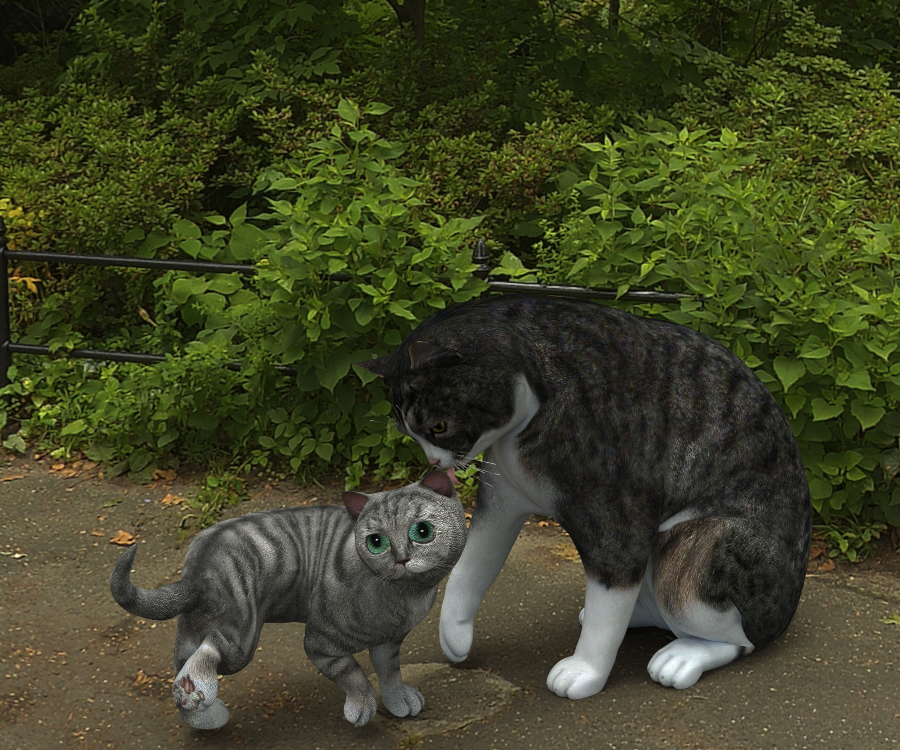
Oh, I love your attempt at a kitten. You should share it on shareCG or here.
New Cat?IIRC there was a kitten morph made for the MilCat and posted on ShareCg. It was several years ago.
There are free LAMH preesets for the MilCat on AM's website. As well as for a number of the other older models. It goes a long way in making the cat look as good as possible.
New Cat?They're OK but the fur not great. Hopefully the Cat 8 will have better fur & if that's the cast you likely won't see as good a fur made fo MilCats.
...I've had the mesh distort on what would be "normal" cat poses that are not even as extreme as the ones I posted at the beginning of this thread.
Wasn't all that thrilled by look of the Hivewire offering. Something about it just doesn't look "right" to me.
I've seen the Hivewire cat & dogs & like the milcat & mildog better.
Same here but why isn't there a kitten morph for the MilCat? My quick attempt here but I guess I made the eyes too big, it looks more like a toony Cheshire Cat LOL.
Help Using Transfer UtilityYes, but you have to do all the scaling, etc before the import. Basically, load G3F base. Import your shirt and don't do *anything* else.
Inspect to ensure the shirt fits the base G3F with default pose perfectly.
If it doesn't, keep working on the shirt outside of daz (or inside if you want to export as an entirely new object) until you can import it so that it fits default pose great when all you do is import.
Once you hit that point, run transfer utility and it should be a lot smoother.
Thanks,I will try this
GenX2 doesn't show up in Shape tabNo, that's the problem if we're talking about the same thing here. I follow the entire process through (and also made sure the M4 morphs were checked when converting) but then it doesn't show up anywhere. The newly created morph for Genesis doesn't show up in the morphs tab and not under shapes either. According to the tutorial, GenX2 supposedly should get it's own category there under "Actor" but there is nothing there, neither in Genesis' root nor the head.
Help Using Transfer UtilityYes, but you have to do all the scaling, etc before the import. Basically, load G3F base. Import your shirt and don't do *anything* else.
Inspect to ensure the shirt fits the base G3F with default pose perfectly.
If it doesn't, keep working on the shirt outside of daz (or inside if you want to export as an entirely new object) until you can import it so that it fits default pose great when all you do is import.
Once you hit that point, run transfer utility and it should be a lot smoother.
Morphing Genesis 3 character into Toon Generations 2?Even with the full figure selected, I am unable to make any changes towards the Toon Character :-(
Hmmm, well I did tell you something wrong earlier & that is you can morph the entire character with just a sub-bone selected because I just did that so sorry.
Anyway I don't know what is wrong with your DAZ as I see nothing wrong that you are doing.
Here is what happens when I do what you described what you are doing in my DAZ Studio:
Hmmm, DAZ Studio won't let me upload my example images of my Toon generations 2 test but I can tell you you seem to be missing part of your Toon Generations 2 product.
Missing icon you should have looks like attached images but it is the same Toon Generation boy but it says 'Toon Generations Adjust Age' with a blue background in addition to the icon you have there on your image that has a green background. You should verify you have downloaded and installed all the minimal needed product parts of Toon Generations 2.
Help Using Transfer UtilityI think you need to scale the imported obj mesh to be big enough not to touch any part of the DAZ 3D model you are using as the "from" model with the transfer utility.
Will try this too, although I did some variation of it without luck :(
Help Using Transfer UtilityFor me it works best when I use a base figure (no morphs applied). Is that figure base G8F or base G3F?
It is Victoria 7. I will definitely try with the base figure now to see if it works. Thanks!
I think you need to scale the imported obj mesh to be big enough not to touch any part of the DAZ 3D model you are using as the "from" model with the transfer utility.
Help Using Transfer UtilityI think you need to scale the imported obj mesh to be big enough not to touch any part of the DAZ 3D model you are using as the "from" model with the transfer utility.
Daz 3D is part of

Connect
DAZ Productions, Inc.
7533 S Center View Ct #4664
West Jordan, UT 84084Licensing Agreement | Terms of Service | Privacy Policy | EULA
© 2026 Daz Productions Inc. All Rights Reserved.