-
Anyone having this G3 Female Problem?
@Murgatroyd "The problem has nothing to do with the base shape. It's a morph with a non-zero default value, and the problem is contained entirely in that morph's file. My prefered way to solve it is to locate the offending morph file, open it in a text editor, and change the value to zero."
Not true when people have saved the morph over the base file. This is often the cause of the issue that the Op is dealing with.
So you mean the Genesis 3 female morph base was altered? I will have to check that out.
Will there be an Izabella 8?The textures are an easy transfer; they are default UVs.
Changing height sliders and other things for a Newbie1. Scale, and adjust the leg length/head size as needed - you may need the Body Morphs to get the leg length slider, though you may well be able to approximate by scaling the leg bones.
2. Generally Daz 3D means daz Studio when it comes to compatibility, most content will work in the current version.
3. Probably needs Hexagon, for custom morph creation, or one or more morph sets.
4. People use a wide range of tools - including Hexagon.
I am looking for the post about Fairy Outfit for Karyssa 8 and Genesis 8 Female(s)This render is one of the most beautiful I have ever
seen. There was a post about her but I cannot find
it.
i know the morph comes with the outfit.
However, I would like sweet make up and the very sweet pose with the beautiful hand pose.
Please help!!!
Novica & Forum Members Tips & Product Reviews Pt 11*Yeah, okay, if I wanted a truely complete collection of human-ish G3Ms, I would need to snag 1-2 Raiya characters, 3-ish DarwinsMishap characters, 2-3 FW characters (not all of them, but there are a couple that fill niches I don't have), one Vyusur character and some morph packs from Antfarm, SickleYield and maybe Thorne/Handspan.
One character I found I really liked was Ivan. He isn't handsome, and is rugged but has sag in face and real-life aging. (I guess I'm thinking about that due to the Floyd observation I just made.) I am looking up a render I did of him back in June 2016- I changed up his shoulders IIRC. Taking a peek at him now, I did save the scene file. I've got to run some errands (worked on Wilmap render 7am-10am) but may do Ivan later today.
MORPH MY FRIEND! SOLVED!I told you Richard. Solution was at the corner. This is the cause I used a different figure Shandra to try this procedure. I seen that before load Morph Loader Pro with the morphed cloth, the FBM has to be active, otherwise is not loaded well. Anyway, about this, I will follow the steps you wrote now, I think is the right way as you told.
Thanks for the advice.
 Anyone having this G3 Female Problem?
@Murgatroyd "The problem has nothing to do with the base shape. It's a morph with a non-zero default value, and the problem is contained entirely in that morph's file. My prefered way to solve it is to locate the offending morph file, open it in a text editor, and change the value to zero."
Not true when people have saved the morph over the base file. This is often the cause of the issue that the Op is dealing with.
Model hands massiveHand size looks correct, proportionnaly to the face at least (our deployed hands are about the size of our face).
For the "aged" looking, you could try to reduce the bump values or directly alted the texture to soften the folds.
Finally, to correct the finger's thickness (you main problem IMO), you may be able to find a morph somewhere, or create your own maybe ?
Alternatively, try exporting the base model with correctly morphed hands (maybe with a full body teen-child morph) in OBJ format, then loading it on your final character with morph loader pro, then activating the "attenuate by..." option to restrict the morph to the hands only (with the help of face groups).
Novica & Forum Members Tips & Product Reviews Pt 11It's easier for me to justify buying "character" types in G8, because I'm just going to transfer them back to G3, where I'm doing reasonably well for conventionally handsome men* but can always use something to quirk them up a bit. That being said, if I were actively collecting G8 content on its own merits rather than as supplements to G3 content, I would be bummed by the apparent lack of Polynesian and East Asian base characters, and the lack of any male younger than Edward and more macho than Lucas, Owen, and the rather mild-mannered Michael 8.
*Yeah, okay, if I wanted a truely complete collection of human-ish G3Ms, I would need to snag 1-2 Raiya characters, 3-ish DarwinsMishap characters, 2-3 FW characters (not all of them, but there are a couple that fill niches I don't have), one Vyusur character and some morph packs from Antfarm, SickleYield and maybe Thorne/Handspan.
Weight map import as image - could it ever happen?Yeah you basically need to pre-plan your every move to get anything done =)
As for implementation of my idea, I guess that it may be possible to write a plugin that could expand on the transfer utility capabilities. But coding in C is totally out of my area of expertise.
Who's the Best Avatar Creator?My forum profile picture is us (me and Todd) taken somewhere in Serbia ;) I've only changed it because people wanted to see humans behind the machine.
Usually everywhere I post art it's my girl Faith, by the name Faith Fawkes with one of my infamous first Octane renders (I do better these days) several years ago, with a kitty hat and a cigarette. She started pretty much as the digital projection of me back on Genesis first generation, by mixing Aiko5 and some morphs by the looks of pictures of myself until I learned how to morph in Blender and make my own textures, and later through Gen2 and Gen3 and nowadays Gen8 she shed off her Aiko base and became more of a "normal" look girl, somewhat different and less toony than her first iterations. She got the last name Fawkes by Guido/Guy Fawkes as my favorite line is always "You can call me V" since nobody in their sane mind can pronounce my name right (it's Verica, diminutive of the name Vera which translates to Faith). Most of my renders, unless strictly certain character themed, are just Faith doing things, usually contemporary themes and clothes, no nudes (ever) and she is always blonde. She's been my alias for over 4 years now and probably for the good chunk of forseeable future :)
As a balance Todd has a digital girl named Briana Baxter, adventurist and troublemaker, which was quiet a conversation starter when we first met as both girls by now became 3D personalities and take good lead in both of ours art. They're both even shown in my Fabric Factory main promo image here in the store although we rarely render each others girls, lol.


My favorite renders are ones where the expression really conveys something. I have to say that I love the expression on the one with the cigarette... I can almost hear here saying "Are you shitting me??"
Making a model look youngerYou could try by combining the character with other morphs. The base head and body morphs include a "young" morph, for example, or you could try with some of Zevo's Growing Up Morphs.
MORPH MY FRIEND! SOLVED!Glad MD worked for this, I wasn't sure.
If you use File>Save As>Support Assets>Figure Prop Asset any morphs already loaded will be saved at the same time (at least, as long as they are not marked as generated morphs - I would advise loading your custom morph before applying the shape to the base figure, so there's no generated morph to potentially confuse the issue). If you've already saved the clothing figure, File>Save As>Support Assets>Morph Asset will let you save any new morphs.
Anyone having this G3 Female Problem?Thanks all for the help. I will check that out. I don't see Kaitana a offending character. I think she is quite cute. Yet I for sure don't want her to invade all my G3 females though. lol! I will try to edit the morph file. awesome help my Daz people!
MORPH MY FRIEND! SOLVED!Hey Richard, I would still like to take advantage of your availability if possible. How can I save the new corrective morph dial? Same steps to save the FBM figure after imported in Morph Loader Pro or is different?
Thank you
MORPH MY FRIEND! SOLVED!Update.
Big success dear Richard. We won! I told you I'm stubborn! Thanks to your precious advices.
Going to explain the procedure to get the cloth fitted to Sheila.
Without remesh the cloth in the modeling applications.
I tried with a t-shirt I modeled with many folders on the side. No break, no n-Gons. Everything works well.Here I uploaded 2 demo pics made for my new character Shandra. Look the t-shirt following the body. Look that it fall down for gravity and bend over the tights without breaking polygons. Look at the smoothly folds on the back and side. Marvelous Dsigner and Daz Studio is my power! Ahr ahr!
How I got this.
Export from DS the G3F base with or without hi-res cause not affect the final result since the garment is exported only. After imported the G3F base in MD, start to modeling the cloth.
Then, quad avery single piece of the garment. After that export as obj the dress using the parameters: "single object, weld, thin and scale cm Daz Studio". Once this is done, the base G3F avatar is deleted and replaced with the FBM (custom character to conform the garment.
Fit again the garment to the FBM avatar (any modify will affect the morph so, for instance, you pick up the side of a t-shirt, when you will conform to your character you will see the t-shirt pulled because MD work in real time dynamics, this is one of the cause I love it.
At this point, export the modified cloth with the same export obj parameters as the base figure.
Now, go back to DS. Load the G3F base figure then import as obj the base cloth. Run the Transfer Utility and select in the pop up menu Source Scene Item "Genesis 3 Female" and in Target Scene Item the cloth to rig, and leaving all the parameters as they are check "Add smoothing Modifier" only. Press Accept and the cloth will be conformed perfectly, and now I move the slider of the FBM figure to load the morphed cloth.
Now importing in Morph Loader Pro the modified cloth, and select "Yes" in the "Reverse Deformation" option, then in the "Overwrite Existing" option select "Deltas Only" and press Accept. Will get the slider with the Delta of the morph cloth only and boom! You're done!converting non daz .obj clothingcarrara 8.5 is a modeling program.
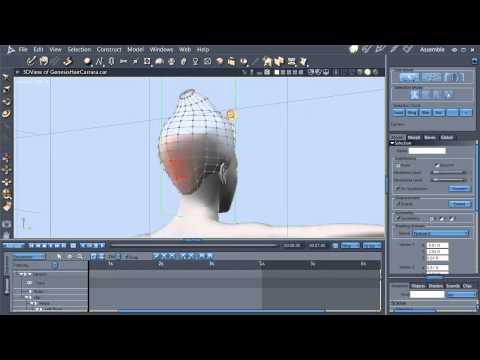
when you select a vert or group of verts, it gives you the arrows like you see in posing.
drag the verts or group of verts to wear you want them around the figure.found this tutt, from carrara to the ds transfer utility
 Anyone having this G3 Female Problem?
This appears to be a very very common issue in which other morphs get somehow saved to the base genesis morph.
I have the same issue with Genesis 3 Females. I had to hunt down all the morphs that where effecting it (in the parameters tab) and dial them all out to zero, then I made a shape morph with those morphs dialled out. So now every time I load G3F I use that shape morph to dial out the other morphs. I know there is another way to fix it, but I don't know how.
@Divamakeup "I know there is another way to fix it, but I don't know how."
I believe you should be able to dial the offending morph out then resave G3F base. I would be inclined to uninstall both the offending morph/character and G3F, the reinstall G3F base and go from there.
The problem has nothing to do with the base shape. It's a morph with a non-zero default value, and the problem is contained entirely in that morph's file. My prefered way to solve it is to locate the offending morph file, open it in a text editor, and change the value to zero.
+1 for text editor fixes.
sometimes the interface just doesnt have a way.
converting non daz .obj clothingYou will have to use the transfer utility to add the rigging to them and to get a great fit, you will probably have to edit the weight maps, not a fun task.
Anyone having this G3 Female Problem?This appears to be a very very common issue in which other morphs get somehow saved to the base genesis morph.
I have the same issue with Genesis 3 Females. I had to hunt down all the morphs that where effecting it (in the parameters tab) and dial them all out to zero, then I made a shape morph with those morphs dialled out. So now every time I load G3F I use that shape morph to dial out the other morphs. I know there is another way to fix it, but I don't know how.
@Divamakeup "I know there is another way to fix it, but I don't know how."
I believe you should be able to dial the offending morph out then resave G3F base. I would be inclined to uninstall both the offending morph/character and G3F, the reinstall G3F base and go from there.
The problem has nothing to do with the base shape. It's a morph with a non-zero default value, and the problem is contained entirely in that morph's file. My prefered way to solve it is to locate the offending morph file, open it in a text editor, and change the value to zero.
Daz 3D is part of

Connect
DAZ Productions, Inc.
7533 S Center View Ct #4664
West Jordan, UT 84084Licensing Agreement | Terms of Service | Privacy Policy | EULA
© 2026 Daz Productions Inc. All Rights Reserved.