-
more of 3 would be nice
Even though these morph tests appear like very good starts, a geograft cap might still be useful to hide the stub of the axed finger.
more of 3 would be niceTwo thumbs up, @Hiro Protagonist.
I was just gauging if there is interest in the 3-fingered folk.
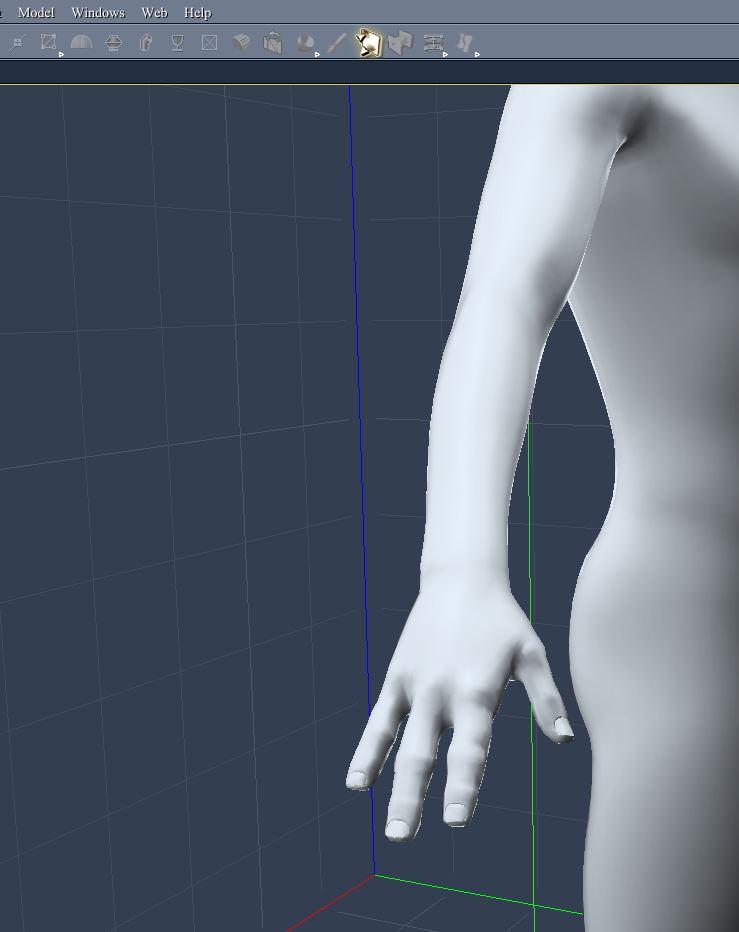
I am likely to make a 3-fingered morph (considering a couple of strategies to do so).
Here is a quick morph for Geness 8 Male (made in Carrara but that doesn't really matter). Like Hiro, this is just a test that I spent about 20 minutes on.
 Suggestions for cartoon figures needed
Biala recently released some Dwarf morphs for Genesis 8 and Genesis 3 over at Rendo. Biala's library is currently on sale too (until the 19th).
Looking over the products, there are a LOT of morph options. They might also be Halfling friendly as well as Dwarf friendly.
As for 'cartooning' them, I guess the question would be how well the morphs might 'play' with say some 3D Universe characters, well that'd come down to how comfortable you are with working with a wide cross section of morph sets.
3D Universe makes some really nice 'toon-ey' characters, so the 3DU library is definitely worth a look.
Anyways, lots of other good suggestions already in this thread, so it appears that you have a number of options.
DAZ3D with Marvelous designer (fitting problem with buttons)In gneral, you'd need to use a modelling application. However, depending on the application you might well lose (and have to rebuild) the UV mapping that tells the renderer how textures wrap around the mdoel, and you'd lose weight mapping and morphs (but could rebuild them, to an extent, via the Transfer Utility in DS) so it's no small undertaking.
which is there are no easy way and i need to fix whole thing with other program exporting and importing etc etc.
more of 3 would be niceI know one generation of DarioFish's creature morphs had a 3 finger morph
Edit - yep. the ones for Genesis. Didn't find that one in the Genesis 3 morphs, and I don't have any for Genesis 2
Novica & Forum Members Tips & Product Reviews Pt 11@isidorn I am afraid you're right
 I am not good with texture as you can see.
BUT everyone is welcome to draw new adorable eyes and beak to it and even morph it
 .Is there a market for some toony hair?
Look nice... But that crazy strand coming from behind and covering the ear is a bit... strange!

That is because my characters don't have ears, being anthropomorphic, as I said here
Note, my characters are anthromorphic, which means they don't have human ears. The market versions would include spaces for ears.
This is the newest example I have online about Alex and no ears. I like the Venom hair, don't get me wrong but it just isn't the character https://www.deviantart.com/insanexade/art/Alex-g1-742103552 The Daz version would have that point tucked into the skull to make room for the ears, yet also have a morph for no ears.
DAZ3D with Marvelous designer (fitting problem with buttons)In gneral, you'd need to use a modelling application. However, depending on the application you might well lose (and have to rebuild) the UV mapping that tells the renderer how textures wrap around the mdoel, and you'd lose weight mapping and morphs (but could rebuild them, to an extent, via the Transfer Utility in DS) so it's no small undertaking.
Fantasy Creature Creator HD Morph Pack for Genesis 8Need something Like this https://www.daz3d.com/fantasy-creature-creator-hd-morph-pack-for-genesis-3-female
Conform clothing to very small chestThis is a typical problem the projection of morphs (if there isn't a custom shape in the clothing) does not tend to work well for reduction. You could try selecting the clothing and applying a Smoothing Modifier (Edit>Figure>Geometry>Apply Smoothing Modifier), assuming one isn't already applied, and in the Mesh Smoothing group in the Editor tab or the Parameters pane set the Smoothing Type to Generic (instead of Base Shape matching). Applying a dForce modifier and draping might also help, assuming the clothing will work with dForce. SickleYield, Zev0, and others have products designed to help with this kind of situation though again the results will vary. If those all fail it's a matter of creating a custom morph - for example you could send the mesh over to hexagon, apply soem smoothing with its tools, and send back to DS as a new morph.
Best Programs to Make HairDepends on the type of hair you mean; traditional methods that Daz still uses (15 years now?), can be done in any modelling package; the best might be the one you're familiar with.
But you may mean fibremesh or some sort of strand based hair which Studio may not support.
Pick your favourite 3D package and look for tutorials on it.
OOT is (imo) the best at the hair popular in Studio, even theirs has issues; not their fault, but the fault of the type of product it is.
Zbrush fibermesh is probably the easiest to go, with the GOZ easy to transfer as well :)
Expensive of resources, especially for longer hair I expect?
Yep - the problem in a nutshell. Traditional ribbon based hair is so unrealistic but realistic looking fibre hair such as (the excellent) products from RedzStudio will slow posing in the viewport to an annoying degree because of the huge number of polygons added to the scene.
LOL, I have already used the Whiskers product on G3M (fibermesh beard), Redz Oh My Body Hair, Oh My Lashes and Oh My Brows, as well as some of (I think her) head hair and had narry a slowdown ;). I do have 16 gigs of ram on this machine and I suppose folks with less would have a harder time of it I guess.
As for hair, there are already many suggestions for fibermesh hair. And, you can even make hair in Hexagon. Valea used to have a good tutorial on how to make traditional transmapped hair in Hexagon on the PoserPro forums, but I don't know what ever became of it :( Was very good - she makes a shape and uvmaps it first BEFORE shaping it on the head.
Laurie
Yes, I'm aware that some users say that their posing doesn't slow with fibre hair but I'd really love to know how to avoid the sluggishness. I have 32 Gigs RAM and a decent i7 CPU and fibre hair kills my posing. Even with one character and one hairstyle. Judging by the other comments here and in other threads, I'm not the only one.
How do I remove smoothing {Fixed}Sorry I must have been missed that this is a hexagon discussion thread.

Hope you figure it out in Hexagon - otherwise if its not a morph you try to create you can redurce the polycount of a highres mesh in Blender with the Decimate Modifier set to Un-Subdivide with a even number of iterations. A setting of 2 iterations will "try" to reverse one level of subdivison on a highres mesh. You can see the faces count in the Modifier settings and if you change the Object Display settings to Wire & Draw all Edges you can see the modifier result on the mesh in object mode. This Un-Subdivide in Blender is a great feature and has helped me alot in the past.
Morphs from G3 to G8Is there currently a straightforward & reliable way to transfer morphs from g3 to g8? I haven't been following this thread.
That's what we're trying to accomplish with SingularBlues's script. We're really hoping everything's going well with him and his progress.
Best Programs to Make HairDepends on the type of hair you mean; traditional methods that Daz still uses (15 years now?), can be done in any modelling package; the best might be the one you're familiar with.
But you may mean fibremesh or some sort of strand based hair which Studio may not support.
Pick your favourite 3D package and look for tutorials on it.
OOT is (imo) the best at the hair popular in Studio, even theirs has issues; not their fault, but the fault of the type of product it is.
Zbrush fibermesh is probably the easiest to go, with the GOZ easy to transfer as well :)
Expensive of resources, especially for longer hair I expect?
Yep - the problem in a nutshell. Traditional ribbon based hair is so unrealistic but realistic looking fibre hair such as (the excellent) products from RedzStudio will slow posing in the viewport to an annoying degree because of the huge number of polygons added to the scene.
LOL, I have already used the Whiskers product on G3M (fibermesh beard), Redz Oh My Body Hair, Oh My Lashes and Oh My Brows, as well as some of (I think her) head hair and had narry a slowdown ;). I do have 16 gigs of ram on this machine and I suppose folks with less would have a harder time of it I guess.
As for hair, there are already many suggestions for fibermesh hair. And, you can even make hair in Hexagon. Valea used to have a good tutorial on how to make traditional transmapped hair in Hexagon on the PoserPro forums, but I don't know what ever became of it :( Was very good - she makes a shape and uvmaps it first BEFORE shaping it on the head.
Laurie
Suggestions for cartoon figures neededMorpheus for G3M (not to be confused with the M4 morph pack of the same name by Capces) has some nose and face shaping options that might be helpful. The overall figure proportions won't do anything for you.
FaceGen: Aspect Ratio 1 & Perfecting Faces in DazHi.
I've stopped using FaceGen for the moment because of a few things that I'm struggling with. But if I can get some answers, I can get back to it.
1. Aspect Ratio 1.
As you know Genesis 8 was added to the update of FaceGen. On the Genesis 8 Export tab it has this in the part where you assign colour maps:
Select the base color maps for each of the body parts below.
They must be in the G8 Base Male UV layout with aspect ratio 1A) What is aspect ratio 1?
B) How do you know if the map conforms to aspect ratio one?
I have tried saving maps for Genesis 8 in FaceGen. But I get a face/head map within a face/head map (I've attached an example).
2. Perfecting Faces in Daz.
So, I've been making the base for the faces in FaceGen, and them refining them with the morphs in Daz.
I'm not sure how to get this to make sense but, is there anyway I can over-write that morph that I created in FaceGen for the base, to include all of the morphs that I've used to refine it (so they're all unnder one head morph)?
Thank you for any help.
You can export the final version of the face as an obj, reload it as a morph using Morph Loader, and then save it as a morph asset. If you named it the same thing as the Facegen version, and used the same folder as the facegen version, you could thereby overwrite the original. Depending on what morph dials you were using to refine the Facegen results, you might not be permitted to share your morph dial as part of a free or paid item. (Dogz's 200 Morphs packs and Thorne's morph packs come with merchant resource permissions, but many other morph packages do not).
3D Art Freebie Challenge-July 2018-"Camping Blunders" -Main Thread OnlyDAZ 3D Art Freebie Challenge July 2018
"Camping Blunders""The Great Outdoors"
(But not so great if you are that thirsty and can't find any water!)Starring: Demarcus
The tale:You can hang up a tarp like Ray Mears, wear clothing like shorts and sandals as Cody Lundin does, or carry a high tech survival knife, but if you are out of water and not able to find any then you are in big trouble faster than the blink of an eye!
"Blue are the life-giving waters taken for granted..." © Copyright by Jimi Hendrix – Bold As Love (1967)
Demarcus saw that there was only half a bottle of water left, he had to go hiking again in search of some fresh water, he already suffered from a severe dehydration because he was already rationing his watersupply. If he can't find any water today he has to break up camp, but because it didn't rain in weeks or even months his chances are not that big...
Soundtrack:Jimi Hendrix – Bold As Love (1967)
https://vimeo.com/230228225
COUNTABLE FREEBIES: (Alphabetic order)#01! 3D Glasses by inLite studio
http://inlitestudio.com/3d/product/3d-glasses/ **#02! Beach Towel by Ildanach
https://www.daz3d.com/forums/discussion/206316/free-beach-towel-updated-with-morphs-and-materials
[Dropbox download link]#03! Blue Tit by AdamThwaites (Most-Digital-Creations)
https://www.most-digital-creations.com/blue_tit.htm#04! Commando Sweater G3M by grinch2901
https://sharecg.com/v/91665/view/21/DAZ-Studio/Commando-Sweater-G3M **#05! Demarcus for G8M by RenderGuyNY
http://www.sharecg.com/v/89285/gallery/21/DAZ-Studio/Demarcus-for-G8M-some-nudity **#06! Drinks by klausdbg
http://www.sharecg.com/v/74240/gallery/5/3D-Model/Summer-IV-Drinks **#07! Fiberhair Goatee Beard for Genesis 3 Male by RedzStudio
https://www.renderosity.com/mod/freestuff/fiberhair-goatee-beard-for-genesis-3-male/75957 **#08! Genesis 2 Female Short Skirt & Jumper by Wilmap's Digital Creations
https://www.wilmapsdigitalcreations.co.uk/view_product.php?id=217 **
[Skirt used]#09! Genesis 2 Male Beard 03 by Laticis Imagery
https://laticis.deviantart.com/art/Laticis-Imagery-FREE-Genesis-2-Male-Beard-03-521807046#10! Kitchen Utensils Pack by inLite studio
http://inlitestudio.com/3d/product/kitchen-appliance-pack/ **
[Small pan and wooden salad spoon used]#11! Labeled Whiskey Bottle by Area-50
http://www.sharecg.com/v/24358/gallery/11/Poser/Botles **
[Retextured]#12! MicCable Set by MDP
https://sites.google.com/site/mdp6gdl/ (item 12)
[Used as ropes]#13! Morph Expansion Pack for Wilmap's G2F Short Skirt by BlackFeather1973
http://www.sharecg.com/v/76461/gallery/21/DAZ-Studio/Morph-Expansion-Pack-for-Wilmaps-G2F-Short-Skirt **#14! Morphing Garden Style Stone by Mapps Graphics
http://www.freewebs.com/mapps/downloads4.htm (Last item)#15! Spy Gear-Set 4: Combat Knife + Sheath by francis_2000
http://www.sharecg.com/v/33389/gallery/5/3D-Model/Spy-Gear-Set-4-Combat-Knife-%2B-Sheath **#16! Raccoon by AdamThwaites (Most-Digital-Creations)
https://www.most-digital-creations.com/raccoon.htm#17! Rusty junk set 1 by DryJack
http://www.sharecg.com/v/53012/gallery/21/DAZ-Studio/Rusty-junk-set-1 **
[Cans used, retextured]#18! WWII Tent City by Tryphon
https://www.renderosity.com/mod/freestuff/wwii-tent-city/71967 **
NO-COUNT ITEMS:--- Tshirt and Sandals for CasualOutfit by Tab [Sandals used]
--- Backpack for G3F & G3M by Tab
++ DAZ Studio Iray HDR Outdoor Environments by Daz Originals, DimensionTheory
++ Surf's Up Outfit and Board by Sarsa [Surf's Up Hat and Shorts used, retextured]
PURCHASED/PAID FOR ITEMS: none
** Registration required
#x! Countable Items
--- No longer available
++ Free with DAZ Studio (or the Essentials)
$x. Purchased/Paid For Item
Rendered with DAZ Studio 4.10.0.123 (Iray)
Other free software used: GIMP v2.8.18 and Irfanview 4.41
Postwork, used the AltaLux Image Enhancement Filter (Effect) by Stefano Tommesani that comes with Irfanview and the Lens Flare effect in GIMP.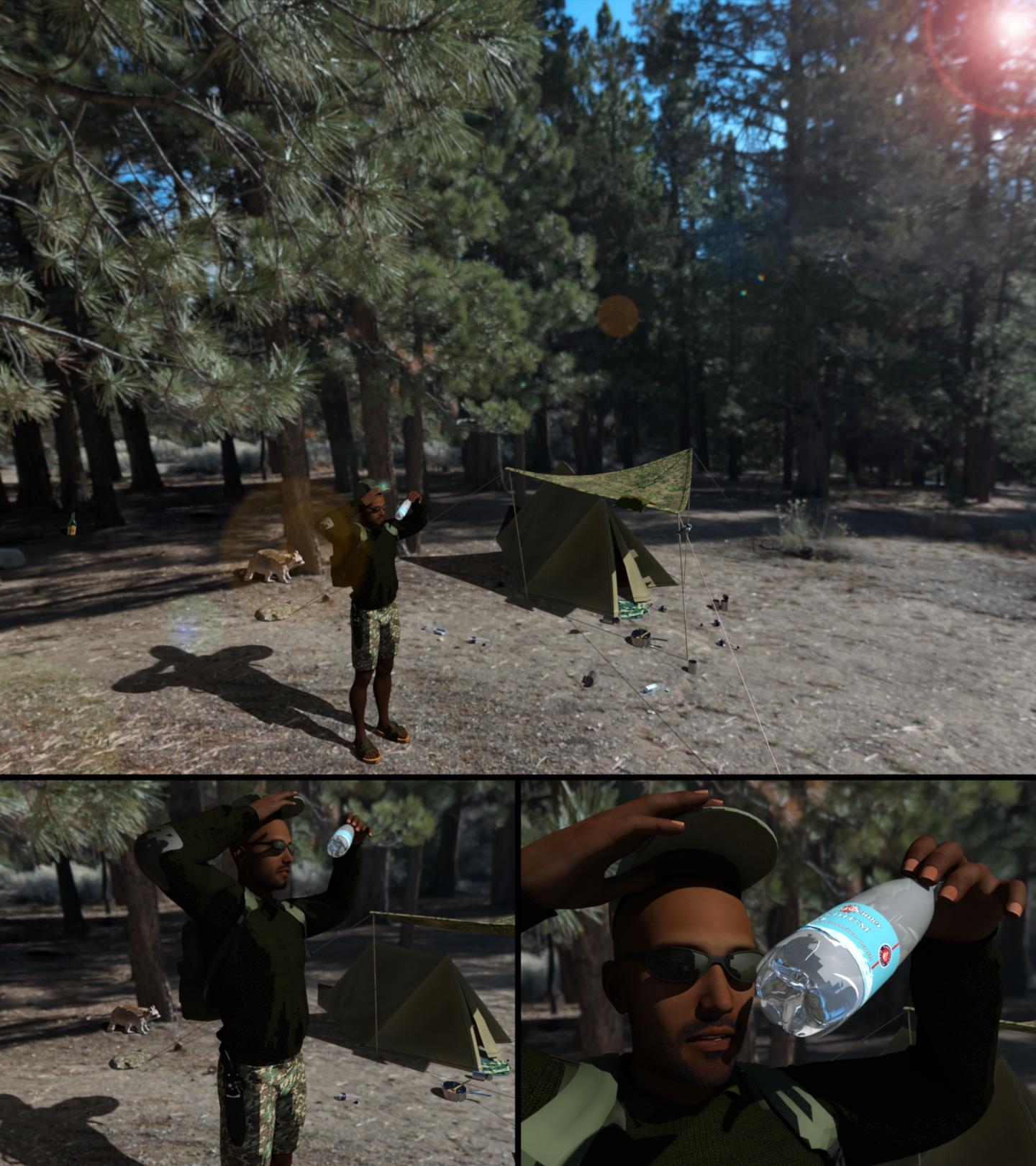
"The Great Outdoors"
Duck Pool Float - NOW UPDATEDI'll update it with a tail morph, make it a taller tail. Not sure why the texture would get messed up, it's all yellow except the eyes and the beak, and those are still in the right place so unless you moved polys out of the UV map they should still be yellow. Regardless I'll do an update.
Well, I chopped the figure in half, deleted the rear half, and then duplicated the front half and spun the second instance around 180 degrees and welded it together again. Yeah the UV wrap didn't like that...
My thought was, since the neck was already there, I could just whack off the head, and then bridge the hole in the top of the neck with a few faces/edges. It was a nice thought in theory anyways...
And I expanded the head 5% on the original figure (and hid the rest of the body) to 'hide' my head with the now messed up texture map on my WIP. Yeah it's yellow, but the beak and eyes weren't lining up.
Anyways, I saw your update in the other thread. Looking forward to seeing the final product!
What is the duck pool float used in the Floyd 8 promo image? -SOLVEDI had a request to add a tail morph. Did that, decided to add a swan neck morph too. Done. Then I needed some textures for a swan, then I figured with the swan neck but no tail it makes a passable flamingo so did a pink texture too. Gonna update the shared file in a bit, will notify you all here when that's done.
Suggestions for cartoon figures neededThe porportions of the Big D 7 Dwarves is really close to chibi territory. You might want to do a bit of checking on the methods used there. I've not dealt with chibis myself but my impression is that quite often the heads are added on separately, after making the original head invisible, and one is just careful with angles so the join isn't noticed.
The real issue would probably be getting the heads close to properly shaped and then scaling up (or scaling the bodies you intend to use down). Since those dwarves don't go about in skimpwear, you can probably keep the neck and hide the join area with the collar.
I'd be inclined to use Genesis (of whatever iteration) since it's a bit more morph-friendly to the end user than pre-Genesis figures were. Or at least in the absence of being able to dump them into an actual modeling program and bring them back out and import whatever morph you built there.
I'd be really hesitant to use a standalone figure from pretty much any source, since those are generally NOT morph-frindly. Nursoda's figures are great, but they generally only come with expression morphs (although Eepo has a male morph as well as the female base), and there is no 3rd-party morphing system that's available to modify them.
That said, if a 3rd party standalone actually looks like what you are aiming for, that's something else. But most standalones are take 'em or leave 'em.
Daz 3D is part of

Connect
DAZ Productions, Inc.
7533 S Center View Ct #4664
West Jordan, UT 84084Licensing Agreement | Terms of Service | Privacy Policy | EULA
© 2026 Daz Productions Inc. All Rights Reserved.