-
Sahel HD
Anyone else having an issue where Sahel moves down slightly anytime you use the Universal Tool to move a limb. It even happens to standard Genesis 8 figures if I apply any amount of Sahel to the figure. The amount the figure moves down is proportional to the percentage of Sahel the figure has. The problem doesn't seem to happen with anything other than the Universal Tool. Any thoughts?
Just tried and I also get this behavior. It seems to have to do with the translation of the hip bone. I was told by Daz at some point that this is the way to do it in order to get the feet on the ground by default, rather than to do it in the morph per se. But I've tried various other characters and none seem to have any hip bone translation. Slightly confused now.
Anyway, none of this should cause a jump when using the Universal Tool. Sounds more like a bug to me.
Celebrity Look-a-Likes for 3D figures Part 2Thanks for the kind comments. Both characters use the same process, sculpted in Mudbox from G8M. Textured with a combination of Mudbox and Substance Painter.
I have a traditional VFX background, but I'm looking to utilize Daz Studio to act as a base and build upon that for personal projects. Getting things out has been pretty sucessful; I've developed a (convoluted) process to get rigged G3M and G8M figures into Maya, including JCM and most importantly HD morphs. But getting things back into Daz Studio has been a pain.
I still have a lot to learn about how the software operates, so maybe one day I'll have something more to contribute. But here are a couple of small tips for anyone interested in creating your own characters:
- Reference is key, but sometimes it can be difficult to find multiple images of someone from different angles with consistant lighting. Check out movies/tv shows that the actor is in. For my projects, there are shots in both Mr. Robot and Harry Potter that feature the actor center frame as the camera rotates around them. Multiple Bluray / high resolution screenshots from those scenes gave great modelling reference for overall shape and proportion. Supplement this with high resolution editorial and press photos with finer detail reference.
- TexturingXYZ has great resources for sale for use in texturing and sculpting, with very reasonable prices for the quality you recieve. I also have a few alphas from Surface Mimic in my library, though I don't know how active the company still is.
- Asymetry can make or break a likeness - make sure to pay attention to both small details and large forms.That slightly droopy left brow, dry patch of skin or even the simple fact that everyones ears have some degree of asymetry can really make all the difference.
- Don't start from the generic G8M or G8F. Obviously this depends on your intented final output and the licencing restrictions that entials, but getting your overall forms in the same ballpark as your reference can really speed up scultping. Morph the character in Daz Studio to have a similar volume and proportions to your reference, and export that for sculpting instead. Something like FaceGen could be used here too. Refine the morph in your sculpting application of choice and then import back into Daz and reverse the deformations, or import as a single morph (again, dependent on licencing restrictions).
- In my view, the base morph resolution can't really capture the more nuanced details in a face, but that can be partially mitigated by sclupting high resolution details into your morph. Still import the base resolution model into Daz, but bake normal maps and displacement maps for use in IRAY from the high resolution model. If you utilise layers while sculpting your morph, you could seperate out the large form changes to your displacement map and high frequency details to a normal map to mitigate render speed penalties.
Anyway, don't want to get too off topic so that's enough rambling from me.
Cheers!
Thanks, awesome tips.
Land of Iron Orcs On Sale Now [Commercial]I was so inspired by the work my fellow PAs did on the Orc Morph created by Josh and the clothing/gear by Bad Kitteh that I created a environment he could stomp around in. 8 props stack up to create on environment and can be easily used individually for closer shots or kit bashing. Set comes in two seasons, Hell and Hell frozen over. Here are some pics while it runs throgh the testing over at DAZ.
Is it possible to get Genesis3/Victoria 7 HD-Addons onto Genesis 8/Victoria8?No, there's no way to transfer HD morphs.
Celebrity Look-a-Likes for 3D figures Part 2Thanks for the kind comments. Both characters use the same process, sculpted in Mudbox from G8M. Textured with a combination of Mudbox and Substance Painter.
I have a traditional VFX background, but I'm looking to utilize Daz Studio to act as a base and build upon that for personal projects. Getting things out has been pretty sucessful; I've developed a (convoluted) process to get rigged G3M and G8M figures into Maya, including JCM and most importantly HD morphs. But getting things back into Daz Studio has been a pain.
I still have a lot to learn about how the software operates, so maybe one day I'll have something more to contribute. But here are a couple of small tips for anyone interested in creating your own characters:
- Reference is key, but sometimes it can be difficult to find multiple images of someone from different angles with consistant lighting. Check out movies/tv shows that the actor is in. For my projects, there are shots in both Mr. Robot and Harry Potter that feature the actor center frame as the camera rotates around them. Multiple Bluray / high resolution screenshots from those scenes gave great modelling reference for overall shape and proportion. Supplement this with high resolution editorial and press photos with finer detail reference.
- TexturingXYZ has great resources for sale for use in texturing and sculpting, with very reasonable prices for the quality you recieve. I also have a few alphas from Surface Mimic in my library, though I don't know how active the company still is.
- Asymetry can make or break a likeness - make sure to pay attention to both small details and large forms.That slightly droopy left brow, dry patch of skin or even the simple fact that everyones ears have some degree of asymetry can really make all the difference.
- Don't start from the generic G8M or G8F. Obviously this depends on your intented final output and the licencing restrictions that entials, but getting your overall forms in the same ballpark as your reference can really speed up scultping. Morph the character in Daz Studio to have a similar volume and proportions to your reference, and export that for sculpting instead. Something like FaceGen could be used here too. Refine the morph in your sculpting application of choice and then import back into Daz and reverse the deformations, or import as a single morph (again, dependent on licencing restrictions).
- In my view, the base morph resolution can't really capture the more nuanced details in a face, but that can be partially mitigated by sclupting high resolution details into your morph. Still import the base resolution model into Daz, but bake normal maps and displacement maps for use in IRAY from the high resolution model. If you utilise layers while sculpting your morph, you could seperate out the large form changes to your displacement map and high frequency details to a normal map to mitigate render speed penalties.
Anyway, don't want to get too off topic so that's enough rambling from me.
Cheers!
SereneNight's Sci-fi FunI think you were looking for Toddlers...some time ago. Fireflightt at sharecg got some
http://www.sharecg.com/fyreflyght
..more
https://sharecg.com/v/87736/browse/21/DAZ-Studio/Baby-Tanner-Head-Morph
https://sharecg.com/v/87740/browse/21/DAZ-Studio/Baby-Tammy-Head-Morph
...and more
https://sharecg.com/v/86513/browse/21/DAZ-Studio/Genesis-Baby
more of 3 would be niceThe big problem with a morph is that OTHER morphs will cause problems. Geografts can also get a bit weird when used with morphs they weren't designed for, but you don't get weird inside out fingers sprouting.
Yeah, really good point. Besides the seeming disinterest among the mainstream of the Daz community, compatibility probably contributes to the lack of support for this particular style of animated figures. Of course, for a morph for my own use or to share as a freebie, I don't really have to worry about compatibility too much.
more of 3 would be niceThe big problem with a morph is that OTHER morphs will cause problems. Geografts can also get a bit weird when used with morphs they weren't designed for, but you don't get weird inside out fingers sprouting.
more of 3 would be niceI remember Dariofish making a 3-finger, 1-thumb morph for Genesis 1 that was released in Rendo as a freebie for a survey. Unfortunately, due to a crash way back when, I wasn't able to move it to my backups and cannot find it anywhere on that other site.
Blackeye anyone?For the texture side, you can try something called Wound Makeup Artist. You can find them in SimonWM's store, depending on which generaiton you need: https://www.daz3d.com/simonwm
No idea what might be available for the "swelled shut" side, though. That seems like it would need to be a morph of some sort, but I don't know where you can find it.
L'Adair's WIPs@IceDragonArt, Fisty commented on it in the MFD thread:
No, they do that if you model a mesh from scratch specifically for G8 as well, it's doing that because the weight maps and JCMs weren't fixed there, looks like straight up transfer utility.
My question is, why does the exact same issue show up on clothing that's not a refit of something older? As @Fisty pointed out, it will do the same with a new mesh, but why doesn't Daz/PC+ test for this problem? How does this even get past QA? Is it because the item doesn't claim to support any figure other than G8F? Even so, if this is just a matter of proper weight maps and JCMs, QA should be testing specifically for this. As a user, I shouldn't have to learn what the PAs know, just so I can use PC+ clothing items on more than the base figure.
Okay. Turns out I'm still "a bit" put out about this because I wasted a lot of time trying to use Breeze on a PA's character. I thought dForce would solve the problem, but it did not. Usually, time spent fighting with a product ends up being a learning experience. Not so with Breeze. The only thing I learned was to be very wary of PC+ clothing items.
Handling eyelashes at Head Morph for Genesis 8 FemaleThanks everybody! My head morph actually DOES take the eye lashes with it. :-)
I'm not sure what I did wrong.
I just tried it again by importing the morph again using the Morphloader Pro, and now it works.
Strange.
Handling eyelashes at Head Morph for Genesis 8 FemaleAlso make sure you have saved your head morph as a morph asset. If it hasn’t been saved, the autofollow for the eyelashes sometimes doesn’t work correctly.
What is the duck pool float used in the Floyd 8 promo image? -SOLVEDSome improvements. More flamingo like texture and wings morph.
SasukeI was just hoping to see some Ayumu blends. Thanks.
Thanks picked him up yesterday. Still can't figure out how to get over to Sasuke though since it is a third party morph. Truthfully I prefer the left look myself. I usually don't do the BESM look on my anime/manga males. I may give it another go after I finish these character references for my Kasumi character.
Handling eyelashes at Head Morph for Genesis 8 FemaleThe morph should be projected into the lashes, assuming it is set to AutoFollow (in the Parameter Settings dialogue).
Handling eyelashes at Head Morph for Genesis 8 FemaleHello!
I'm creating a new character for Genesis 8 Female.
I've applied my head morph. The head morph causes the eyes to be further apart from each other.
Of course the head morph doesn't handle the position of the eye lashes as the eye lashes are a separate object.
Could anybody tell me how I should do this?
Thank you very much!
Genesis 8 Female teeth fix!Hello Richard! (Haseltine) A simple question.
Sometimes happen that when I do my FBM in ZBrush and load in Morph Loader Pro, I find deformed teeth. I use the correction steps (clickc on the FBM heart to favorite and so on) and everything is ok. This for Genesis 3 Female.
Now I did it the same on Genesis 8 Female, and when I'm using the steps to fix teeth, the upper teeth go down over the lower teeth. And, curious thing, the character become a lil bit tall, so I need to rig the shape to the bones. In few words, when I fix the teeth, the shape become tall when I slide the FBM control, but teeth stay exactly at the base position and don't move to follow the FBM.
This because a different structure from G3F? What are the steps to fix teeth and rig?
Thanks!
 Suggestions for cartoon figures needed
There is a dwarf morph creation system for Gensis 2 male.
https://www.daz3d.com/dwarf-creator-for-genesis-2-male-s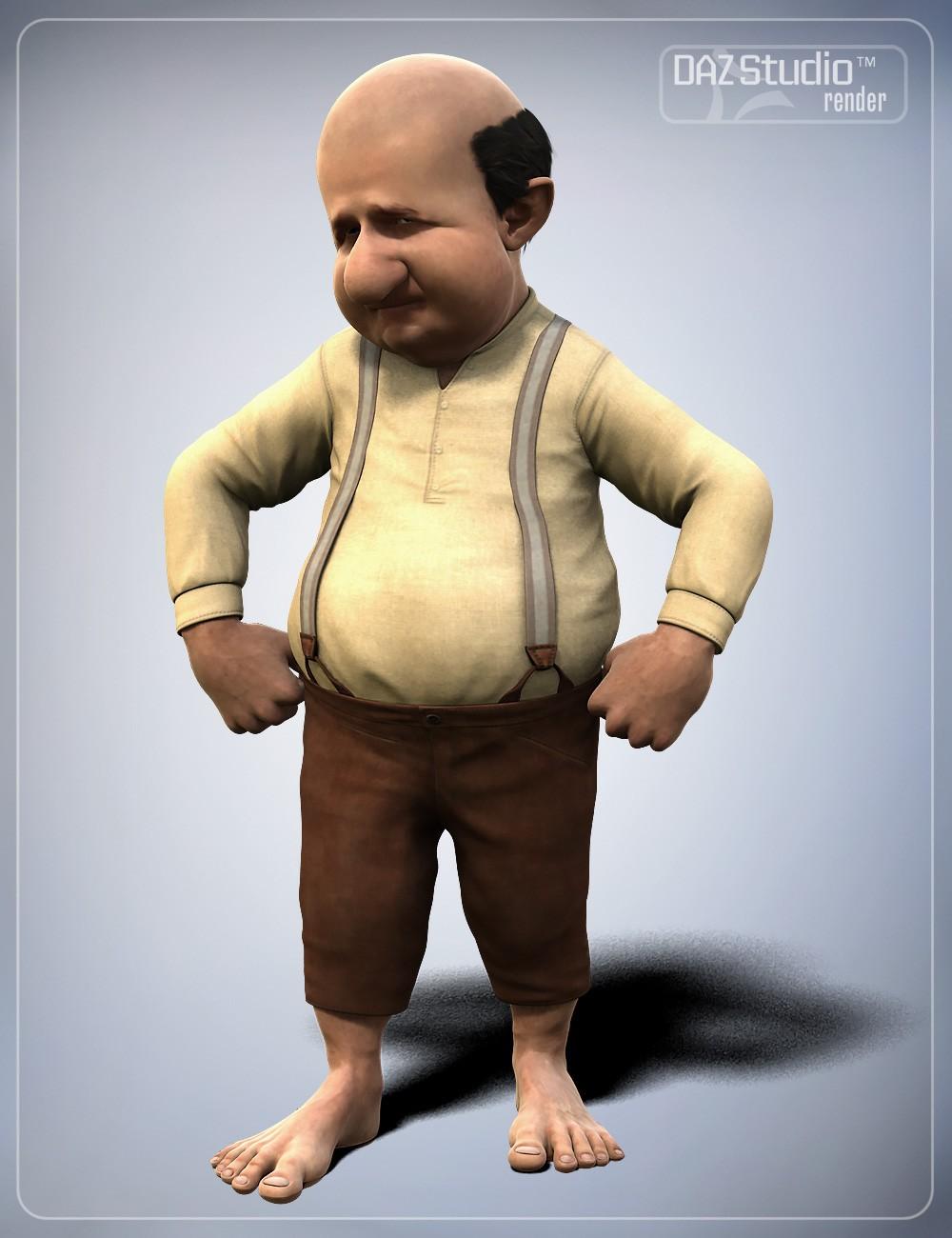
It would be so cool if Smay updated this for Genesis 8. It's still my favorite too.
Suggestions for cartoon figures neededThere is a dwarf morph creation system for Gensis 2 male.
https://www.daz3d.com/dwarf-creator-for-genesis-2-male-sDaz 3D is part of

Connect
DAZ Productions, Inc.
7533 S Center View Ct #4664
West Jordan, UT 84084Licensing Agreement | Terms of Service | Privacy Policy | EULA
© 2026 Daz Productions Inc. All Rights Reserved.