-
more of 3 would be nice
I have a fox girl I always drew with four fingers. I keep thinking of a blue elf with three fingers when I think of this thread. Would also need two toes morph for that blue elf.
I send object to Zbrush, make 0 changes, when I GOZ back, DAZ says the topology has changed?Actually, triangulating an n-gon should not affect the vertex count/order, just the way polygons are defined, so it should still be fine as a morph taarget. Deleting unused vertices would, obviously, be an issue.
New G8F figure pro pack comes with three free old packs again...There were some good ones like morph mixer, Shading Bundle and I13 bundles; but those were all suddenly pulled. Not much left of interest to me.

Same here. I have most of the pro bundles so don't need the starter bundles and have part of some of the other. The morph mixer is still showing on the running ad when you start. Also the 20% extra off the add on is only working on the 1st 3 you buy but the ad sounds like it's on all of them
New G8F figure pro pack comes with three free old packs again...There were some good ones like morph mixer, Shading Bundle and I13 bundles; but those were all suddenly pulled. Not much left of interest to me.
Hidden properties...I recall that clothing used to inherit the morphs of the parent figure...
The creator of the clothing item may have included a set of common full body morphs, the other smaler ones you talked about should get autogenerated on the fly, but only if the clothing/hair or in common called "conforming" item, is fitted to the genesis figure (not parented but thats maybe just the wrong word used) and also the morph has to be dialed on the conformer figure (genesis).
Also have a look at the Parameters pane not just the Shaping pane, there it makes no difference if the Property is defined as shape or pose. There is a special Property Group called "Currently Used" you should check that while the item is fitted to the figure. The "Currently Used" group dosn't always update you may have to select some other Property Group and come back to see changes what "autofollowing" Properties get listed there.
Can't recall exactly but I think I've once encountered an issue that I couldn't find the "autogenerated" morphs of the conforming item even in the Parameters pane untill I once unfit it - could also be that the currently used list didn't updated.
If you inspect the Parameters pane of the unfitted conforming item for the "autogenerated" morphs you will see they are no longer hidden.
There is some strange behaviour I've seen with these morphs that are set to "autofollow" in the properties settings lately, they only get hidden if you fit the item to the figure and if they follow the morph of the conformer figure I've had Properties that I couldn't change the values on the conforming item anymore. Thats maybe something that has been changed in the recent DazStudio version 4.10, but it could also caused by some ERC dependencies I did wrong - need to be confirmed by others.
New G8F figure pro pack comes with three free old packs again...1st one shown Morph Mixer doesn't show up free in cartMabel 8you don't need any add ons for G8 to use the base iconic figures. And most stuff for G3 autofits quite well to G8 (except maybe high heeled shoes)
I hadn't noticed! it's been a while since I got a pro bundle.
I am this close to pulling the trigger. I will probably never do a contemporary elderly woman image, but I have visions of old warriors and sci fi pilots dancing through my head right now. Also, I noticed the HD add on is actually included in the pro bundle which is a nice surprise.
I am so on the fence about this one.... on one hand... I really don't need an elderly lady. But on the other hand... Hagred is pretty awesome, and Halloween renders are coming soon.. so... ugh...
They've been doing that the last few characters and I LOVE it ;).
BTW, adore the curlers....lol.
Laurie
I think the HD is included with the base Mabel 8.
I love these older characters they are releasing for G8 but I have none of the necessary add-ons for G8 (various morph packs, skin shaders, clothing, etc.) so their usefulness is limited for me. I'll have to wait a few months for them to appear in bargain basement sales.
Yes, true - I have Edie 8 - but, as you say, I am limited to the base figure. I do enjoy tweaking morphs to create my own variations of these character. I have a few G3 figures but a library full of self-morphed characters for G3. I must say though that the clothing I have transferred to G8 for Edie has worked pretty well following SY's tutorial.
Having said all that I am mightily tempted to break the piggy bank this time.
Mabel 8I'm iffy on Mabel, she looks too simular to Eddie for me to get excited. But she does look like an interesting character. Her add-ons stand out better as wish list items than anything in her bundle. Chiyo for Mabel https://www.daz3d.com/chiyo-for-mabel-8 and P3D morpg pack https://www.daz3d.com/p3d-mabel-8-morph-package will these work without Mabel and on Eddie?
I do like one of her dresses https://www.daz3d.com/dforce-mabel-outfit-for-genesis-8-females
Mabel 8you don't need any add ons for G8 to use the base iconic figures. And most stuff for G3 autofits quite well to G8 (except maybe high heeled shoes)
I hadn't noticed! it's been a while since I got a pro bundle.
I am this close to pulling the trigger. I will probably never do a contemporary elderly woman image, but I have visions of old warriors and sci fi pilots dancing through my head right now. Also, I noticed the HD add on is actually included in the pro bundle which is a nice surprise.
I am so on the fence about this one.... on one hand... I really don't need an elderly lady. But on the other hand... Hagred is pretty awesome, and Halloween renders are coming soon.. so... ugh...
They've been doing that the last few characters and I LOVE it ;).
BTW, adore the curlers....lol.
Laurie
I think the HD is included with the base Mabel 8.
I love these older characters they are releasing for G8 but I have none of the necessary add-ons for G8 (various morph packs, skin shaders, clothing, etc.) so their usefulness is limited for me. I'll have to wait a few months for them to appear in bargain basement sales.
Mabel 8I hadn't noticed! it's been a while since I got a pro bundle.
I am this close to pulling the trigger. I will probably never do a contemporary elderly woman image, but I have visions of old warriors and sci fi pilots dancing through my head right now. Also, I noticed the HD add on is actually included in the pro bundle which is a nice surprise.
I am so on the fence about this one.... on one hand... I really don't need an elderly lady. But on the other hand... Hagred is pretty awesome, and Halloween renders are coming soon.. so... ugh...
They've been doing that the last few characters and I LOVE it ;).
BTW, adore the curlers....lol.
Laurie
I think the HD is included with the base Mabel 8.
I love these older characters they are releasing for G8 but I have none of the necessary add-ons for G8 (various morph packs, skin shaders, clothing, etc.) so their usefulness is limited for me. I'll have to wait a few months for them to appear in bargain basement sales.
What "sells" best when it's free?I've made so many bracelets I've started running out of ideas.. and I've made a ton of other jewelry, so have Matty and Esha..
Hi Fisty, I have your huge hoops freebie and your jewelry basics set for G3F and a bunch of your stuff for G2F like the Riva purse and jewels. I use all of them but a lot more often the G3F stuff since I can readily use it with G8F while the G2F is a little tougher with the exception of that Riva purse which I consider a personal favorite item that makes it into almost all renders I do of formal and semi-formal occasions. They are all great items. I also have a couple of shader sets for you, including at least old 3Delight one.
Personally, at this point after more than a decade at this I have lots of content and tools so I tend to buy morphs, shoes, characters (for the morphs), shader presets, accessories, and props/scenes in roughly that order of priority. Once I have a few more G8 characters, that one will plummet in priority. comprehensive morph packages like the ones by Zev0 are must have, I don't know how to make my own shoes, and shader presets are a lot easier to just buy than to make all those textures. Accessories I like because they tend to be intricate and look like they are time consuming and I prefer to just pay a talented artist for their time than try to replicate their skills. So as it happens a lot of my priority items line up with your product catalog, Fisty.
I'll always download a nice looking clothing freebie because ... free. But I wont necessarily use it (much). I'll also always download freebie accessories or shader sets and I will almost always use them constantly. And I also buy those types of items. For me they are the most useful things, free or otherwise.
A way to save just one body part as a morph?since then attenuate been added to morphloader
can use surface, Weight or DForm to isolate a part
The X-Morphs product can save just the head morph too, I believe.
yeah true but attenuation is free
A way to save just one body part as a morph?since then attenuate been added to morphloader
can use surface, Weight or DForm to isolate a part
The X-Morphs product can save just the head morph too, I believe.
A way to save just one body part as a morph?http://www.daz3d.com/forums/discussion/64071/export-only-part-of-a-morph
About halfway down thread, two videos embedded. Requires zbrush though. Since DAX Studio 4.9 I think there is capability in DAZ to do it direclty in the geometry editor. You have to add the figure or body parts or something to favorites first for some reason (in paramaters, click the little heart icon) and then select the vertices you want to remove morphs from, right click and pick something like "remove slected deltas" or something like that. Let me see if I can find a tutorial video.
EDIT: Found it: https://www.youtube.com/watch?v=9jQeF94aqZs Using this technique you can isolate whatever portion of the morph you want to keep and get rid of the rest.
SECOND EDIT: Another way is to mask the body part you want morphed so it only affects that part when you import from an OBJ using morph loader pro. You may need to dial up your morph, export as OBJ, set up your mask (by weight map or face group) and then re-import using this technique, overwriting the "bad" morph. https://www.youtube.com/watch?v=inPel_gbd4s
Thanks. Just saw your reply. Will try this.
Genesis 8 Female teeth fix!Yes is zeroed. The SMT button on I think is the answer, because I divided using Morph Target button and then going back using Create Difference. Anyway maybe do the artifact also if I modelliing in low resolution as I export from DS. I et you know!
 Carrara Challenge 41: The Super, Legendary, Epic Voting Results!
Entry #2
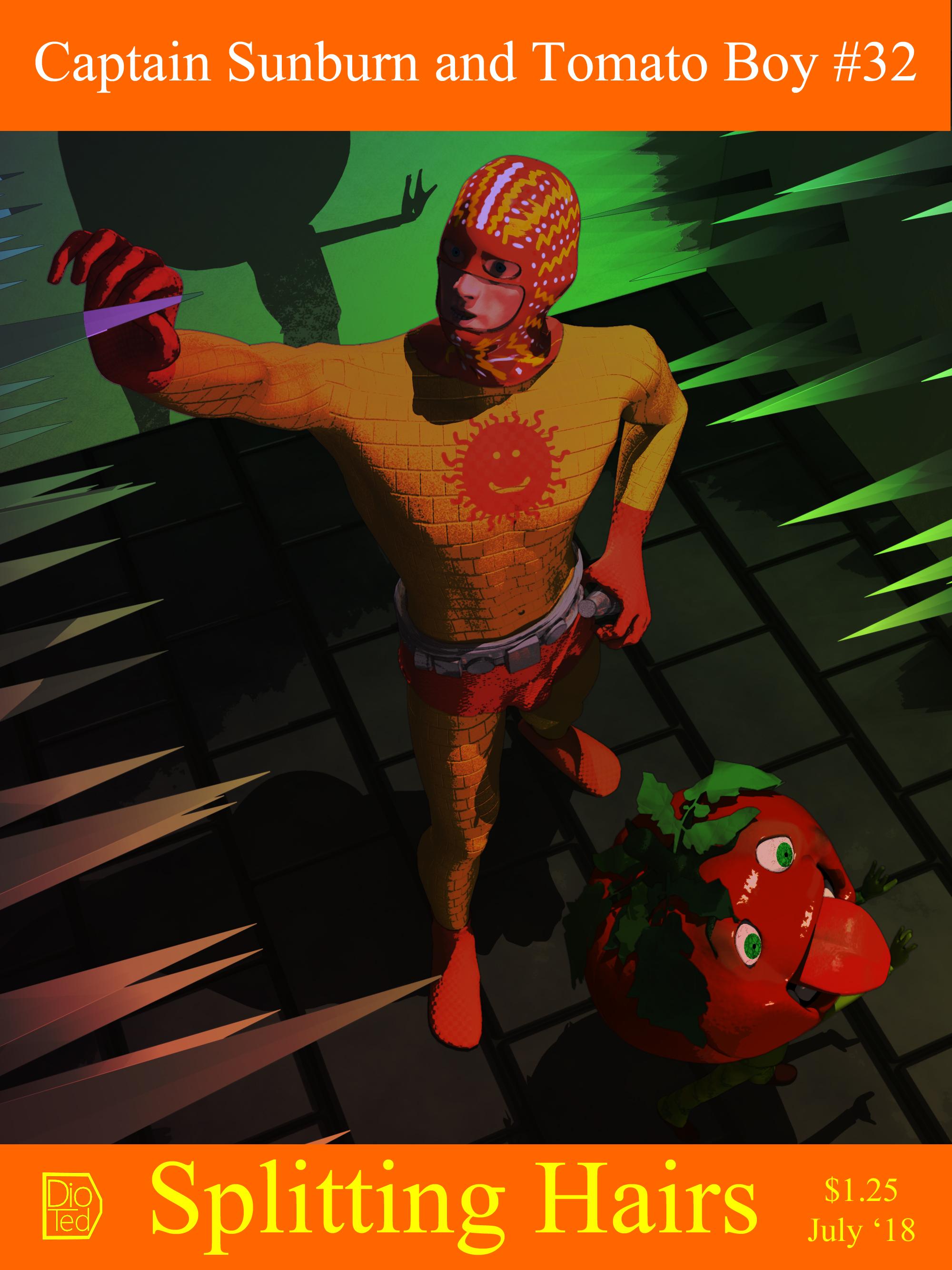
Title: Captain Sunburn and Tomato Boy, Splitting Hairs
Artist - Diomede (Ted Murphy)
WIP Links
https://www.daz3d.com/forums/discussion/comment/3794256/#Comment_3794256
https://www.daz3d.com/forums/discussion/comment/3781126/#Comment_3781126Challenge Requirements: Used hair in non-traditional way. I grew hair on the sides of the walls. I kept the hairs straight. In the hair modeler, I lengthened the hairs to 2.5 feet and increased the scale of the hairs. In the hair shader, I set root thickness to 100% and tip thickness to 1% to get the spikes.
Products Used: The head of Tomato Boy is a morph of the Carrara freebie given away as part of Carrara Challenge 33 by GK Dantas. All other figures and props modeled, textured, and rigged in Carrara. However, some were modeled for prior challenges. Captain Sunburn is a morph of my Brash Lonergan figure. Tomato boy's body is from a figure I made for the Carrara game challenge.
Notes - Used multpass rendering, a GMIC filter (comix color), and the Carrara native Toon Pro III filter (although toon effects reduced). The spikes are the hairs resulting from the volumetric primitive multipass. The depth pass and the post effect past were used to adjust colors. Text and compositing added in PSE.
 GENERAL FREEBIE REQUESTS Part 2
Thanks for posting the links to the mummy bandages.
Now, I'd like to ask, is there a free porcelain female doll I could download for free? Plus a clown makeup and wardrobe for G3M or M4?
There's some M4 terror-clown makeup styles on Mortum Vetus' site (http://www.mortemvetus.com/freestuff.php?type=1), and ShareCG has Joker makeup for both Mike3 and Viki4Male.
https://www.sharecg.com/v/27693/browse/6/Texture/Joker-Face-paint-V4
https://sharecg.com/v/27727/gallery/11/Poser/Joker-Morph
https://sharecg.com/v/27742/gallery/11/Poser/Joker-Morph-and-paint-M3-version
https://www.sharecg.com/v/44896/browse/11/Poser/M4-Standalone-Joker-Headmorph
Sahel HDAh actually if you look at Alexandra 8 (surely there are others too), the hip bone is being translated. Up in this case because the body is taller than normal. She has different head/body proportions, like lots of my own characters. At that point you can't really bake in the grounding of the feet into the morph if you also want separate head and body morphs, which is of course slightly ironic because Sahel doesn't have them
 but under normal circumstances, you can imagine that a main slider like Alexandra 8 dials in the separate head and body morph, while also needing to maintain the ability to dial them in or out on their own. If the character has proportions that require the feet to be grounded again, if that positon was in the morph itself, you would now see the head move down if you dial it in separately. That would make it unusable as a standalone morph. So we could move the character itself down, but that is not desired either because some poses inlcude translation and so that can get negated. The correct way to do it is by moving down the hip bone and then figure can be properly at 0,0,0 still.
Did that make any sense? Long story short I think this is correct procedure for creating characters and the actual problem is a bug in the Universal Tool that should be reported. In the meantime you could select the hip bone, copy its YTranslate value and then simply repaste that after you're done dragging around limbs.
Create conforming Clothes in CarraraFor the rigging I use daz studio's transfer utiliity.
I make the item in Carrara, export it in obj format, load it in studio and load the model, use the transfer utility (menu Edit/Figure) and then save the result as a scene subset in duf format and import it back in Carrara.
Sahel HDAnyone else having an issue where Sahel moves down slightly anytime you use the Universal Tool to move a limb. It even happens to standard Genesis 8 figures if I apply any amount of Sahel to the figure. The amount the figure moves down is proportional to the percentage of Sahel the figure has. The problem doesn't seem to happen with anything other than the Universal Tool. Any thoughts?
Just tried and I also get this behavior. It seems to have to do with the translation of the hip bone. I was told by Daz at some point that this is the way to do it in order to get the feet on the ground by default, rather than to do it in the morph per se. But I've tried various other characters and none seem to have any hip bone translation. Slightly confused now.
Anyway, none of this should cause a jump when using the Universal Tool. Sounds more like a bug to me.
Daz 3D is part of

Connect
DAZ Productions, Inc.
7533 S Center View Ct #4664
West Jordan, UT 84084Licensing Agreement | Terms of Service | Privacy Policy | EULA
© 2026 Daz Productions Inc. All Rights Reserved.