-
genesis how???
Minor correction. Although Genesis 1 & 2 load natively and the clothing for them loads and conforms natively, the geografts do not. For example, the Genesis 2 male minotaur will load and its morph can be adjusted, but the geograft tail and legs need to use a work around. I think people make the initial geograft invisibl by unchking visibility, load a second of thesame figure (say the tail), and then conform the second to the invisible figure, not the minotaur. I may be off a little on the specifics because I haven't used thos much. For standard human figures, Genesis 1&2 load and conform natively.
Genesis character head morphs made in Facegen as productsThis is the response from FaceGen Guru:
"Hello, and thanks for asking.Like Daz or Reallusion, FaceGen meshes and color maps are copyrighted and cannot be freely distributed.
This is to prevent obvious abuse, which happens frequently. Legitimate use cases:
1. Images rendered using FaceGen meshes & color maps are yours to do as you wish, per our license.
2. If you're only using FaceGen as a guideline, and you rebuild your own mesh topology and paint your own color map, you can distribute freely as this is not a copyright violation.
3. If you only need to distribute a FaceGen mesh (modified or otherwise) to a customer who will be rendering images, then as long as their organisation owns a copy of FaceGen Modeller, no problem.
4. If you need to distribute a FaceGen mesh to many people, for example as part of a software product, then you need to purchase our re-distribution license (via Modeller Enterprise).
Copyright issues to do with source photos are between you and the source photo copyright holder. If you remove the detail texture there should be no copyright claim since the image was not directly copied, merely compared.
Best wishes,"
As my workflow will be #2, I should be fine with that approach.
M Glant
OK, thanks previously FG stated that DAZ 3D morphs created with Facegen (which amounts to just the Facegen generated geometry) may be freely distributed but they must of rolled that back. Or maybe that intent was only as non-commercial freebies on ShareCG. I don't share any but I guess I should ask them to clarify that should I consider sharing a FG DAZ morph.
Mabel 8Not bad with Mabel Monique mix. But with regular skin, she doesn't look as old as Mabel

For something like that, it would probably work a little better to use Mabel's normal maps, rather than Monique or whatever texture that is. (Breezy, isn't it?) The details are baked into the normals in a way that emphasizes what the underlying morph is doing.
Thanks @vwrangler, I will try with the normals. And yes, that is Breezy
Linda Hair Export to unity does not appear to be workingDecrease the translucency is what it looks like you need to do & yes, different hair products from the DAZ Store are likely to need different adjustments to make them look good in Unity so you are right there is no single way to make hair look good.
Another thing you can do is buy a hair style from the Morph 3D Kiosk in the Unity Asset Store & see how it looks as Morph 3D is affiliated with DAZ 3D and the hair & other products sold in the kiosk are from the DAZ 3D store with Morph 3D adjustments for Unity.
Saddly none of those hairstyles fit what I was looking for here. Everything looks proper in unity except for that front fiew looks absolutlyawfull.
I don't have an option to turn down the translucency in unity so I am not sure what you are refering to.

No, I wasn't suggesting to replace the hair style you want to use but to see how they have set up the materials in one of those that you like and use those settings on your hair model.
And opaqueness is just synonym for transparency. I can see in your image 'bangs1', 'bangs2' materials listed and you should have such materials for the entire hair style. If you go look at those material individually you chould be see a texture included in the 'Metalness' slot of the material configuration and the slide next to it goes from 0 to 100 percent (but maybe as 0.0 - 1.0) to adjust the opaqueness of that individual hair material). Often the shader material configuration for a shader is shared between model pieces and so configuring bangs1 will configure bangs2 and the other hair the same way, sometimes, but not always.
Mabel 8Not bad with Mabel Monique mix. But with regular skin, she doesn't look as old as Mabel
For something like that, it would probably work a little better to use Mabel's normal maps, rather than Monique or whatever texture that is. (Breezy, isn't it?) The details are baked into the normals in a way that emphasizes what the underlying morph is doing.
Linda Hair Export to unity does not appear to be workingDecrease the translucency is what it looks like you need to do & yes, different hair products from the DAZ Store are likely to need different adjustments to make them look good in Unity so you are right there is no single way to make hair look good.
Another thing you can do is buy a hair style from the Morph 3D Kiosk in the Unity Asset Store & see how it looks as Morph 3D is affiliated with DAZ 3D and the hair & other products sold in the kiosk are from the DAZ 3D store with Morph 3D adjustments for Unity.
Saddly none of those hairstyles fit what I was looking for here. Everything looks proper in unity except for that front fiew looks absolutlyawfull.
I don't have an option to turn down the translucency in unity so I am not sure what you are refering to.
3D Art Freebie Challenge-July 2018-"Camping Blunders" -Main Thread OnlyDAZ 3D Art Freebie Challenge July 2018
"Camping Blunders""The Great Outdoors"
(But not so great if you are that thirsty and can't find any water!)Starring: Demarcus
The tale:You can hang up a tarp like Ray Mears, wear clothing like shorts and sandals as Cody Lundin does, or carry a high tech survival knife, but if you are out of water and not able to find any then you are in big trouble faster than the blink of an eye!
"Blue are the life-giving waters taken for granted..." © Copyright by Jimi Hendrix – Bold As Love (1967)
Demarcus saw that there was only half a bottle of water left, he had to go hiking again in search of some fresh water, he already suffered from a severe dehydration because he was already rationing his watersupply. If he can't find any water today he has to break up camp, but because it didn't rain in weeks or even months his chances are not that big...
Soundtrack:Jimi Hendrix – Bold As Love (1967)
https://vimeo.com/230228225
COUNTABLE FREEBIES: (Alphabetic order)#01! 3D Glasses by inLite studio
http://inlitestudio.com/3d/product/3d-glasses/ **#02! Beach Towel by Ildanach
https://www.daz3d.com/forums/discussion/206316/free-beach-towel-updated-with-morphs-and-materials
[Dropbox download link]#03! Blue Tit by AdamThwaites (Most-Digital-Creations)
https://www.most-digital-creations.com/blue_tit.htm#04! Commando Sweater G3M by grinch2901
https://sharecg.com/v/91665/view/21/DAZ-Studio/Commando-Sweater-G3M **#05! Demarcus for G8M by RenderGuyNY
http://www.sharecg.com/v/89285/gallery/21/DAZ-Studio/Demarcus-for-G8M-some-nudity **#06! Drinks by klausdbg
http://www.sharecg.com/v/74240/gallery/5/3D-Model/Summer-IV-Drinks **#07! Fiberhair Goatee Beard for Genesis 3 Male by RedzStudio
https://www.renderosity.com/mod/freestuff/fiberhair-goatee-beard-for-genesis-3-male/75957 **#08! Genesis 2 Female Short Skirt & Jumper by Wilmap's Digital Creations
https://www.wilmapsdigitalcreations.co.uk/view_product.php?id=217 **
[Skirt used]#09! Genesis 2 Male Beard 03 by Laticis Imagery
https://laticis.deviantart.com/art/Laticis-Imagery-FREE-Genesis-2-Male-Beard-03-521807046#10! Kitchen Utensils Pack by inLite studio
http://inlitestudio.com/3d/product/kitchen-appliance-pack/ **
[Small pan and wooden salad spoon used]#11! Labeled Whiskey Bottle by Area-50
http://www.sharecg.com/v/24358/gallery/11/Poser/Botles **
[Retextured]#12! MicCable Set by MDP
https://sites.google.com/site/mdp6gdl/ (item 12)
[Used as ropes]#13! Morph Expansion Pack for Wilmap's G2F Short Skirt by BlackFeather1973
http://www.sharecg.com/v/76461/gallery/21/DAZ-Studio/Morph-Expansion-Pack-for-Wilmaps-G2F-Short-Skirt **#14! Morphing Garden Style Stone by Mapps Graphics
http://www.freewebs.com/mapps/downloads4.htm (Last item)#15! Spy Gear-Set 4: Combat Knife + Sheath by francis_2000
http://www.sharecg.com/v/33389/gallery/5/3D-Model/Spy-Gear-Set-4-Combat-Knife-%2B-Sheath **#16! Raccoon by AdamThwaites (Most-Digital-Creations)
https://www.most-digital-creations.com/raccoon.htm#17! Rusty junk set 1 by DryJack
http://www.sharecg.com/v/53012/gallery/21/DAZ-Studio/Rusty-junk-set-1 **
[Cans used, retextured]#18! WWII Tent City by Tryphon
https://www.renderosity.com/mod/freestuff/wwii-tent-city/71967 **
NO-COUNT ITEMS:--- Tshirt and Sandals for CasualOutfit by Tab [Sandals used]
--- Backpack for G3F & G3M by Tab
++ DAZ Studio Iray HDR Outdoor Environments by Daz Originals, DimensionTheory
++ Surf's Up Outfit and Board by Sarsa [Surf's Up Hat and Shorts used, retextured]
PURCHASED/PAID FOR ITEMS: none
** Registration required
#x! Countable Items
--- No longer available
++ Free with DAZ Studio (or the Essentials)
$x. Purchased/Paid For Item
Rendered with DAZ Studio 4.10.0.123 (Iray)
Other free software used: GIMP v2.8.18 and Irfanview 4.41
Postwork, used the AltaLux Image Enhancement Filter (Effect) by Stefano Tommesani that comes with Irfanview and the Lens Flare effect in GIMP.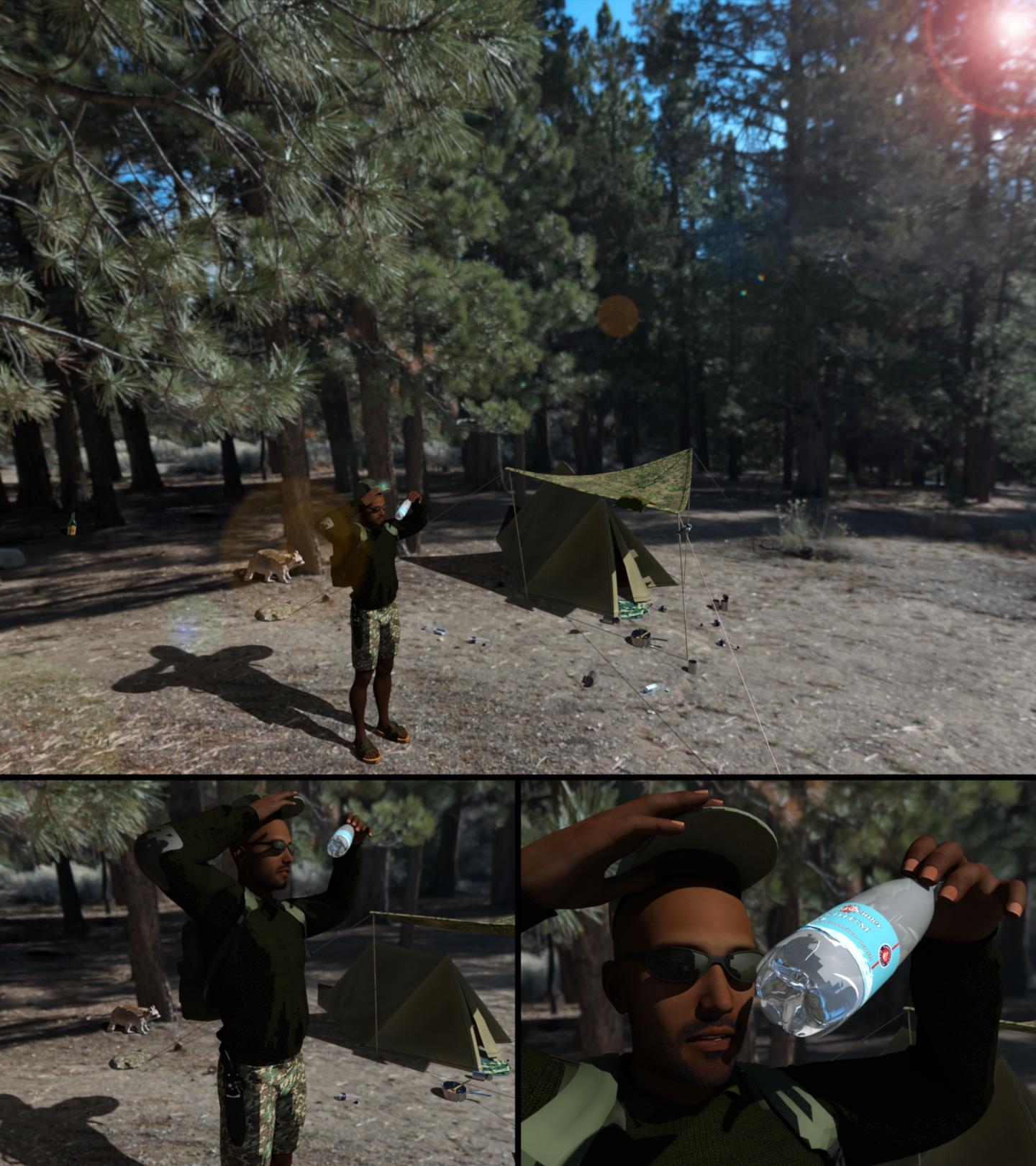
"The Great Outdoors"
All Links Check Out Plz Move To Entries Thread
AIUTO...CHI CONOSCE L’ITALIANO? PARTE UNDICIMa perchè. hai preso Mabel?
Una vecchietta come quella la posso ottenere abbastanza facilmente coi vari morph... E' fatta molto bene, ma Genesis8 è totalmente frantumato quindi non comprerò nulla per quella figura base.
Ora spero che Genesis9 abbia degli IK decenti o perlomeno non fracassati come sono ora...
E dire che gli basterebbe vedere come hanno fatto con Genesis1/2! Why doesn't all the joints bend the same way?
OK seems like you followed the guidlines for creating a Poser compatible figure with those segmented mesh.
Thats rather easy to update just import the new "welded" one piece mesh OBJ into the DS scene with your current figure. The imported object should now be in the same position and of the same scale like your figure. Then open the Transfer Utility and select only the Weight Map option to transfer the existing rigging. If you already created morphs also select the Morphs option but I wouldn't try to transfer the Face Groups or anything else.
Sweet! thanks. He is up to date, all weilded and everything else, including the locked joints. Now to make all the poses and put them in the top band. I just have to redo his shaft morph, which is super easy to do. (yes the Staff is a he)
Does this mean I can rig in Poser then translate it over to Daz? That might make it easier in the long run :P
Copy parts of a figure/character - just the head for instanceThere's a long thread on ways to transfer (non-HD) morphs between generations.
For splitting a (non-HD) morph down, you can use export/Moprh Loader pro with the Attenuate option set to aw eight map, or for a hard transition you can exclude vertices with the Geometry Editor tool, or you can use X-Morphs https://www.daz3d.com/x-morphs
Copy parts of a figure/character - just the head for instanceI was wondering if there is a way to copy just the face from a Genesis 3 morph (not the full character) to another Genesis 3 character? Reason I ask is because I want to use some African-American characters in my animated series that is currently in development, and I only need the faces and not the full figures.
Also, if I wanted to copy Genesis 3 Growing Up morphs to Genesis 8, how could I do that, if possible?
AIUTO...CHI CONOSCE L’ITALIANO? PARTE UNDICIAltro giorno, altro full body morph per una figura completamente rotta e inutilizzabile.
 Linda Hair Export to unity does not appear to be working
Decrease the translucency is what it looks like you need to do & yes, different hair products from the DAZ Store are likely to need different adjustments to make them look good in Unity so you are right there is no single way to make hair look good.
Another thing you can do is buy a hair style from the Morph 3D Kiosk in the Unity Asset Store & see how it looks as Morph 3D is affiliated with DAZ 3D and the hair & other products sold in the kiosk are from the DAZ 3D store with Morph 3D adjustments for Unity.
What's going on with G8F eyes?Anybody know what the heck is happening here? I load a default G8F and the eyes are pointing off to her right but all the dials are at zero. As far as I can recall I haven't had this issue before but I have been have problems getting the eyes to "Point At" correctly as of late.
Did you load any morphs in? That's not G8F's base shape. The base character getting corrupted with another character's morph is an issue that sometimes happens (it's happened to me twice - both times with G3F though).
Go through the Parameter's tab and slowly scroll to see if any other morphs are dialled in (if they are accidentally saved with the base G8F shapes they won't show up under "currently used").
Why doesn't all the joints bend the same way?OK seems like you followed the guidlines for creating a Poser compatible figure with those segmented mesh.
Thats rather easy to update just import the new "welded" one piece mesh OBJ into the DS scene with your current figure. The imported object should now be in the same position and of the same scale like your figure. Then open the Transfer Utility and select only the Weight Map option to transfer the existing rigging. If you already created morphs also select the Morphs option but I wouldn't try to transfer the Face Groups or anything else.
Why doesn't all the joints bend the same way?There are two things you can do:
1. rename the bones to include "left" and "right" in front of the labels - pose the joint on one side and use the Pose Symmetry shortcut Shift+Y - it will recognize the opposite joint by the prefix in the label
2. create yourself a Pose Control type of property like Richard suggested
Actualy it sounds more complicated than it is to create such Pose Controls like we see them with the genesis figures - have a look at the Arms Front-Back for example.
Just switch the Paramerters pane to Edit Mode right-click Create New Property - change Type to Pose thats all you dont have to change anything else there. Its common to use "pCtrl" as prefix in the name for those type of properties.
Now pose both joints like you want them then right-click the New Property and choose ERC-Freeze and make shure to select only those joint rotations if the ERC list includes other settings and values.
Save the Morph Asset to the library - done.
Mabel 8Really love Mabel, had to get her! I was disappointed in Eddie because she was too cartoonish (which, I know a lot of users enjoy) - Mabel is more realistic, and with the morph packages in Add-Ons - she's *very* versatile.
Try dialling in the cartoonish charas, ever so slightly, with more realistic charas for faces with more character.
Is it about high prices, or high quality?Daz 3d, my buddy told me about this and said "it's free". Free he said... I have sunk at least a couple grand shamelessly into some really amazing assets, but I wait and shop the sales and discounts. I grabbed most of my stuff deeply discounted so probably around 6K MSRP. I could not help myself, but I settled on buying things like Shaders, Prop Stuff outfits that had unique styles that I could use my shaders on. Definitely, the enhanced primitives and the create a room, character morph stuff and UV map sets when on sale. Then shopped scenes for props and things like that until I was feeling like I got my fair share.
The one thing I found really difficult was not shopping, but I shop without looking at price until I see that I have found things that look great, and then I move them to my wishlist and wait for them to be on sale because I can shop but I'm still a bit cheap. But, I do have a small business and an online presence and I am planning on expensing my purchases for business since it is in line with the products I have invested in and I will be using Daz renders for my website, and for creating renders for website artwork etc.
The other thing was finding decent props that did not belong to scene or set, so basically I worked like this... I wanted a piano. Saw a piano for 30USD, thought to myself its a nice piano. Waited... then a sale came along and there was a piano in a bedroom set, and it was beautiful and on sale for the whole set which had more great props for 1/3 the price of the single piano.
That is basically me I bought a wide variety on sale so I can make things with them and use shaders and primitives for things I don't have. I will pay if the price is right, but I have to wait for the sales, and I save loads of dough while spending more than I should ;s
Sakura 8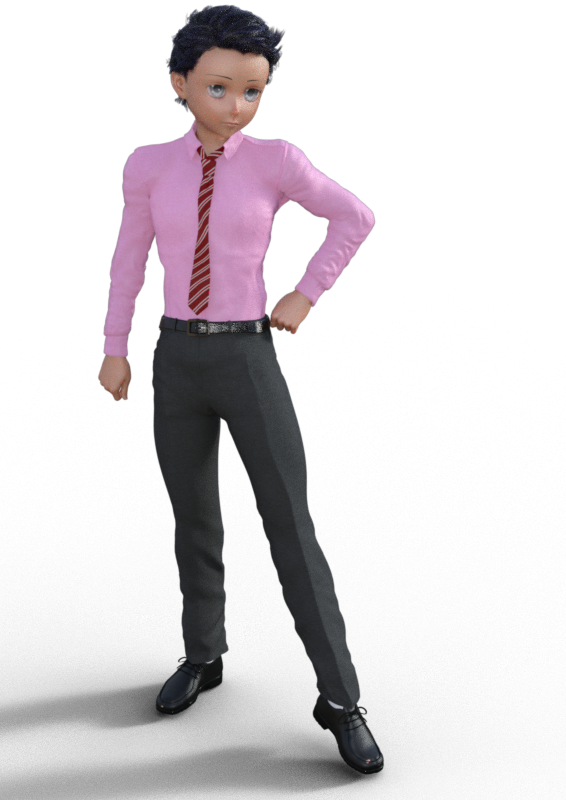
Daz just scored a first. They put a pro bundle that had absolutely nothing in the add ons or the bundles that I wanted.. Well actually they did when I logged in this morning but then deleted the ones I would have been willing to fork out funds for . Sorry for the rant. Back on topic. Ok got Ayumu to transfer over to Sakura/Sasuke.
Mabel 8Really love Mabel, had to get her! I was disappointed in Eddie because she was too cartoonish (which, I know a lot of users enjoy) - Mabel is more realistic, and with the morph packages in Add-Ons - she's *very* versatile.
Daz 3D is part of

Connect
DAZ Productions, Inc.
7533 S Center View Ct #4664
West Jordan, UT 84084Licensing Agreement | Terms of Service | Privacy Policy | EULA
© 2026 Daz Productions Inc. All Rights Reserved.