-
Help with fixing a geometry issue
mechw8 said:
felis said:
It looks like you have an Big Girl unupdated morph installed.
Go to paramaters, and in setting enable 'show hidden', and then with the character selected in the scene tab, in Parameters click 'Currently used'.
One of the shown morphs is the culprit.
The image I uploaded was a base G8 female with no morphs applied to it; It has this problem out of the box. If you load a base female or male into the scene, spread the leges and bend them at the thights, you will see the same result.
It does not matter that you load a base figure, you can still have some rogue morphs applied - Just follow the advice given
Help with fixing a geometry issuefelis said:
It looks like you have an Big Girl unupdated morph installed.
Go to paramaters, and in setting enable 'show hidden', and then with the character selected in the scene tab, in Parameters click 'Currently used'.
One of the shown morphs is the culprit.
The image I uploaded was a base G8 female with no morphs applied to it; It has this problem out of the box. If you load a base female or male into the scene, spread the leges and bend them at the thights, you will see the same result.
How Do I Make Character Models?Diomede said:
3) Simplest - Using Existing Morphs (and purchases) to Shape Character
Just in case you are looking for something simpler, the following video shows how to change a Daz figure shape with Daz's premade morphs. You don't have to make your own.
Good luck, and hope to see you around the forums.
..this is the process I use. It also helps to have various other content besides just characters, like merchant and morph resource kits as well as transfer and conversion utilities.
[Released] ManFriday’s Figure Converter for Genesis 9 [Commercial]Ok looks like it works now.
It creates the error message on my system when trying to convert the default G8 figure with the body in a clean state (only default morphs). The G8 figure requires a morph applied to the body/face for it to work. A morph on the eyes alone doesn't work.How to use hair on another character?This hair is from Poser and for M4. It's a sort of Parametric Prop which has no Prop Asset in data folder. If you want to save any morph asset on it in DS, you have to 1st of all save it as a Figure / Prop asset.
[Released] ManFriday’s Figure Converter for Genesis 9 [Commercial]No, I just add the default G8 female without any adjuments. G3 has the same issue for me. Only G8.1 works.
The conversion stops with a generated node in the scene having the name from the error message (tempg8...). My guess is it's supposed to contain at that point the temporary high-res morph for the conversion but doesn't. (it's not listed when searching for it)
Looks like someone else had the same issue on page 3 in this thread:the_untold said:
hi, this is what i get....even with a basic female 8 item.
Critical error...Could not convert figure: failed to find new morph “Temporary high-res morph” in node “tempg8-tgt-yguZacdG” figure after conversion; Morph Loader Pro returned
But the recommendations of renaming the figures or removing the default figure addons doesn't change it.
How to use hair on another character?Thank you very much! I don't see any Hair folder in My Library; do you thonk I should create one? Should I create it in the Figure folder or directly in My Library?
Sorry, I had never create asset before ressently, and never hair asset at all, I don't know how much the folder is important and what is the best one...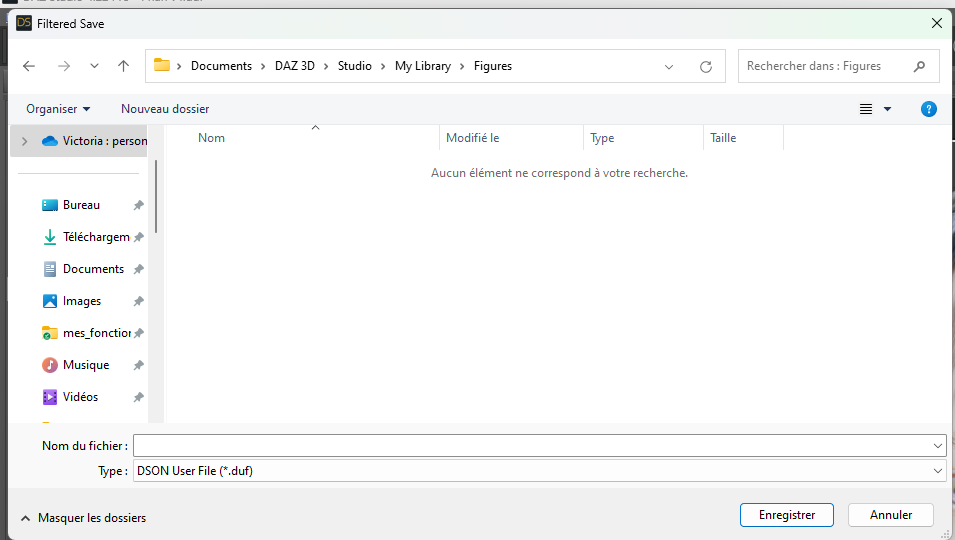
Furthermore, it's strange, I just reimported a new beach hair in the file, to be sure to use the original beach hair and not a conversion, and I tried again to do SaveAs -> Support Asset -> Morph Asset, just to see what would hapen, and I still get the same error message. Is it possible that the original beach hair was not a prop asset?

Thank you in advance for your answer!
[Released] ManFriday’s Figure Converter for Genesis 9 [Commercial]Is that morph name something you added to the base G8? It doesn't look like anything in the standard product. The words "Temporary" and "hi-res" look pretty suspicious.How to use hair on another character?Hi! Before to parent the hair to the head and save it as a wearable presset, I would like to create a slider to control the morphs I used: I dialed sevral morphs and would like to save the slider that I created, so I did Save As -> Support Asset -> Morph Aset with the hair selcted. But I get the following message:
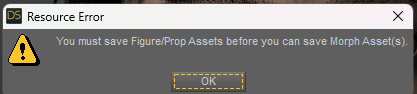
I don't understand because the Beach Hair already exists, it's already an asset, isn't it?
I just created the slider in the morph section of the parameter pane of the beach hair:
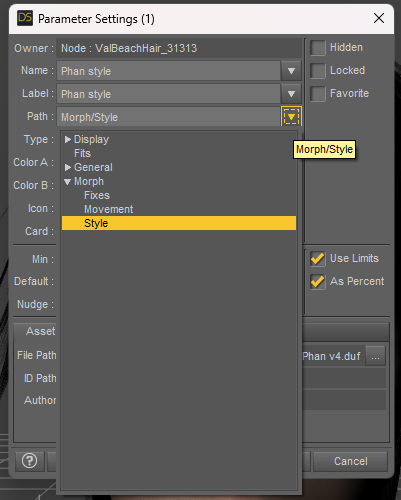
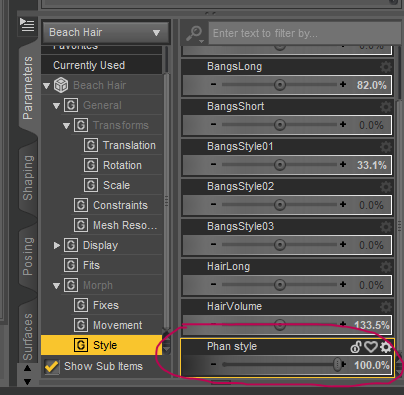
What am I supposed to do? I would like to save this morph before to parent the hair to the head, is it a mistake?
Thank you in advance for your help!
Let's appreciate/discuss today's new releases - more ongoinger threadrichardandtracy said:
Not a new product, I think, but one I've never seen before: The ruins here: https://www.daz3d.com/castle-in-ruins-for-daz-studio. Definitely an instant buy.
May be a transfer from another shop given the high SKU number (>100,000) and the sales text reference to DS4.9.
Regards,
Richard.
Great catch. I am a big fan of Vanishing Point assets for years and having iray version for Daz Studio is even better.
Help with fixing a geometry issueIt looks like you have an Big Girl unupdated morph installed.
Go to paramaters, and in setting enable 'show hidden', and then with the character selected in the scene tab, in Parameters click 'Currently used'.
One of the shown morphs is the culprit.
Let's appreciate/discuss today's new releases - more ongoinger threadNot a new product, I think, but one I've never seen before: The ruins here: https://www.daz3d.com/castle-in-ruins-for-daz-studio. Definitely an instant buy.
May be a transfer from another shop given the high SKU number (>100,000) and the sales text reference to DS4.9.
Regards,
Richard.
Let's appreciate/discuss today's new releases - more ongoinger threadbarbult said:
tsroemi said:
barbult said:
If you bought Cybertenko items, check them carefully. I bought the Retro Biker for G8M, which I used in the image above with Fabianas great new chains. The jacket has unwelded parts that separate and curve unnaturally and make holes in the garment, because of the smoothing that is applied by default when the item is loaded (screenshot). There is only one morph in the jacket (to fit over a thick T-shirt). There are no JCMs to help adjust to posing. I had a horrible time in Blender trying to make this thing look decent for my render. I don't believe this particular item is Daz ready at all. Of course there is no metadata, since it is imported from another store in a big batch of stuff. Buyer beware applies here.
Thanks, that's good to know. I still have some items of his in my wishlist at Rendo, stuff that nobody else seems to make (like accurate nuns' headwear from different orders and such). Will be extra careful with what I choose. Hope you still managed a good render in the end for all your troubles!
I bought it to discount other items in the cart, so I feel morally obligated to keep it. I've now spent most of a day welding the loose pieces in Blender, adjusting some weight mapping, and adding some JCMs to make it more usable for me. The texturing looks pretty nice, I think. This product makes me wonder what, if any, QA checking is done on these imported products, and what their standards are. Are the Rendo items you are interested in advertised as DS items?
I think they must be, since they're for G8. Will better check again though. I guess I won't mind that much if the clothes don't work all that well because I'm mostly after the headwear in each case, and these will probably not pose much of a problem. But these unwelded bits and pieces just shouldn't happen in general, that is just sloppy modelling.
Message in a bottle for xtrart-3d: Which model are you using?It looks to me the materials are from P3D Ursula HD for Genesis 9, the promo for X-Fashion Sport Fit for Genesis 9 also mentions her (see "Additional products used in promo images"-section). I think the morph might be a mix of Ursula and Vicky 9.
[Released] Character Converter from Genesis 3 Female to Genesis 8 Female(Now Conv JCMs) [Commercial]RiverSoft Art said:
jdavison67 said:
At the end of the transfer I have three identical g8 base characters... its like the morphs never were applied...
The second image shows the character I was trying to copy
The one on the right... ( I whited out the textures )
The one on the left is the transfer result....which is just the base g8 clone basically...
JD
I am going to need to see the log, to see what the script detects and what it writes out. Also, what are the directories listed in the Daz Studio Formats section of the Content Directory Manager:
I'll add that path and see if it helps for future attempts...
How to create eyelashes correctly?I can't make out what the images show.
But have you done transfer riiging to your eyelashes?
How to create eyelashes correctly?I have my long eyelashes and I connected them to Genesis Female 8
But I noticed that when I morph my face, my eyelashes always end up in the wrong place.
I also noticed that when I change the resolution of the model, the eyelashes fall off the edges

 METAHUMAN POSE
Check this similar thread: https://www.daz3d.com/forums/discussion/694761/how-to-create-pose-from-morph#latest
You've just imported the wrapped OBJ as a pure morph..., it cannot be converted to a Pose. You have to manually make a pose preset according to it...
Huge Opportunity for the Future of DAZ if they are bold enough to embrace it.if I could access my Daz content inside another program
@Gordig
You can already load Daz figure & prop content directly into Blender from your Daz content library via Diffeomorphic
(,excluding content dependent on third party PA plugins and of course true DAZ HD morph details)
The only way you are going to get Daz content in a delivery format that avoids Daz studio entirely, is in an intermediate format such as FBX etc or program native scene file formats such as .C4D or .blend etc.
Again these other formats would have to be economically more attractive (cheaper)than buying the content from the Daz store and using the FREE Daz bridges for C4D, Maya unity etc. or Diffeo (for blender)
which means undercutting the DAZ native content PA’s.Daz already tried selling Genesis figures in native Maya formats, years ago ,and it was promptly abandoned.
Ask yourself why

Every other major 3DCC community is aware of Daz studio and Genesis.
Daz does not have an industry awareness, visibility or import compatibility problem.it is the simpe matter of entrenched pipeline habits and the ecosystem comfort bubble mindsets of those other user bases.
They just Do not care about Daz content just as they largely do not care about Reallusion Iclone/CC4 content.
How to use hair on another character?No worry ~ the morphs will be reserved. Even if you rig it to the figure, you still can transfer morph targets from original hair Prop to the rigged hair figure.
Daz 3D is part of

Connect
DAZ Productions, Inc.
7533 S Center View Ct #4664
West Jordan, UT 84084Licensing Agreement | Terms of Service | Privacy Policy | EULA
© 2026 Daz Productions Inc. All Rights Reserved.