-
Filament tutorials/shaders/lights?
Here is some real time test render in Filament with all PBR values , no skin shaders or textures just proper color values for my Dwarf
no bad for a Draw Preview
However, we will need to make changes to the scene for the correct preview, which is clearly too much for normal day-to-day work.
Left - Filament / Right - Iray (and to be honest, I prefer the grainy, but more correct Iray-preview; and when working with a pose - Smooth Shaded OpenGL)
Therefore, it is not yet clear how Filament can replace OpenGL, if for a much more correct preview it is much easier for us to switch to "Iray-" or "Iray Interactive-preview". Perhaps it would be even easier in "Iray Realtime-preview", but we didn't see this mode (as you rightly noticed - for unknown reasons)
Filament tutorials/shaders/lights?Iray Real-Time renderer is an OpenGL render mode and it is not in Daz Studio as many other features that are missing in D|S for reason I have no idea
Filament is also not full render engine but just PBR Drawstyle mode , it is not in DS to make renders but to help settings scenes for Iray, view Environment maps set PBR shaders , so a lot of positive things compared to the ancient old OpenGL that was completely useless for this tasks .
The DS has Iray Realtime, although there is no access to it. Why can't just connect it instead of Filament, as a preview-render?
Filament in its current form is completely useless for me personally.Filament tutorials/shaders/lights?Here is some real time test render in Filament with all PBR values , no skin shaders or textures just proper color values for my Dwarf
no bad for a Draw Preview

 Filament tutorials/shaders/lights?
The DS has Iray Realtime, although there is no access to it. Why can't just connect it instead of Filament, as a preview-render?
Filament in its current form is completely useless for me personally.Filament tutorials/shaders/lights?You welcome , in this case the Filament name came from the metal filament in electric bulb that emits light .. Google came with this name as it is Google's child.
Of course hair is made from protein filament, and so are heat resistant synthetic filament hair fibers, we have here Filament Hair Salon lol
Don't expect full render engine of Filament in this beta, this version of Filament is only a Drawstyle so a lot of stuff don't going to work like in iray , you have only 1 distance light and 6 spot light that can produce shadows , the rest will not , if you like to setup your scenes with spot light it can be done with interesting results, but mostly for simple preview of Enviorment and PBR shaders before rendering in Iray
I agree with you regarding this year .. what a waste but on the other hand a lot of new exciting stuff in computer world that keeps me busy
I had decided it was time to take a peak and see what 'filament' is about before downloading the beta ... I was thinking such a word should be referring to a type of hair. Filament as in threads, you know. So now I know it doesn't. It's been a long week, golly, it's been a long year, anyhow I did get a good laugh picturing people getting instructions from any "lizard of the family Gekkonidae. They are small, carnivorous, mostly nocturnal animals with large eyes and adhesive toes enabling them to climb on vertical surfaces." {it's okay, I know it is also used as an alternative spelling for get-go}
Filament tutorials/shaders/lights?Thank you MEC4D for this beautiful page of information.
I had decided it was time to take a peak and see what 'filament' is about before downloading the beta ... I was thinking such a word should be referring to a type of hair. Filament as in threads, you know. So now I know it doesn't. It's been a long week, golly, it's been a long year, anyhow I did get a good laugh picturing people getting instructions from any "lizard of the family Gekkonidae. They are small, carnivorous, mostly nocturnal animals with large eyes and adhesive toes enabling them to climb on vertical surfaces." {it's okay, I know it is also used as an alternative spelling for get-go}
Filament tutorials/shaders/lights?Ok guys, here is the final cleared update for the Reflectance section for the Metallicity/Roughness Base Mix and its Standard function for Nonmetal materials.
The Glossy Layered Weight should be always on value 1 for PBR Nonmetal materials as I suspected from my early tests , and it was confirmed today.
Minimal values for Glossy Reflectivity 0.20 to Max 0.50 , materials like Gemstones use higher Glossy Reflectivity from 0.50 to 1.0 but better to use IOR for that for the full effect.
I made small card for the Reflectance , please forget about the Glossy Layered Weight values 0.33 , set it always to 1 for PBR materials for Filament and Iray .
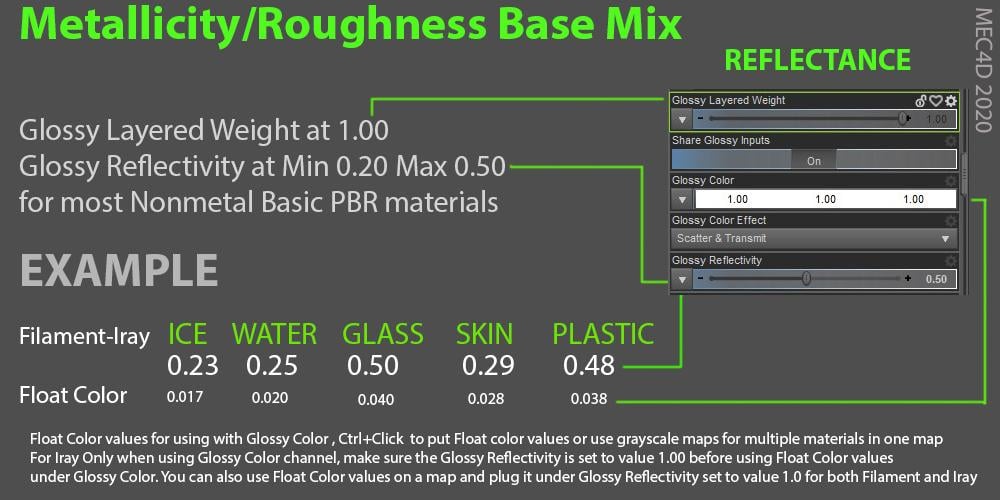
Remember that reflectance values looks great when your albedo colors and values are set proper , that is the system about for both Filament and Iray , no matter what kind of stuff you create photoreal or stylized , proper stuff will make your engine working efficiently and produce better images of any kind . Think here about Disney or Pixar toon style or whatever . There is not excuse for laziness
Filament tutorials/shaders/lights?Metallicity/Roughness Workflow .. Base Mix
Filament and Iray PBR is based on the microfacet theory, This mean that each surface have a micro planes like a little mirrors that reflect the light in direction based on its Normals.
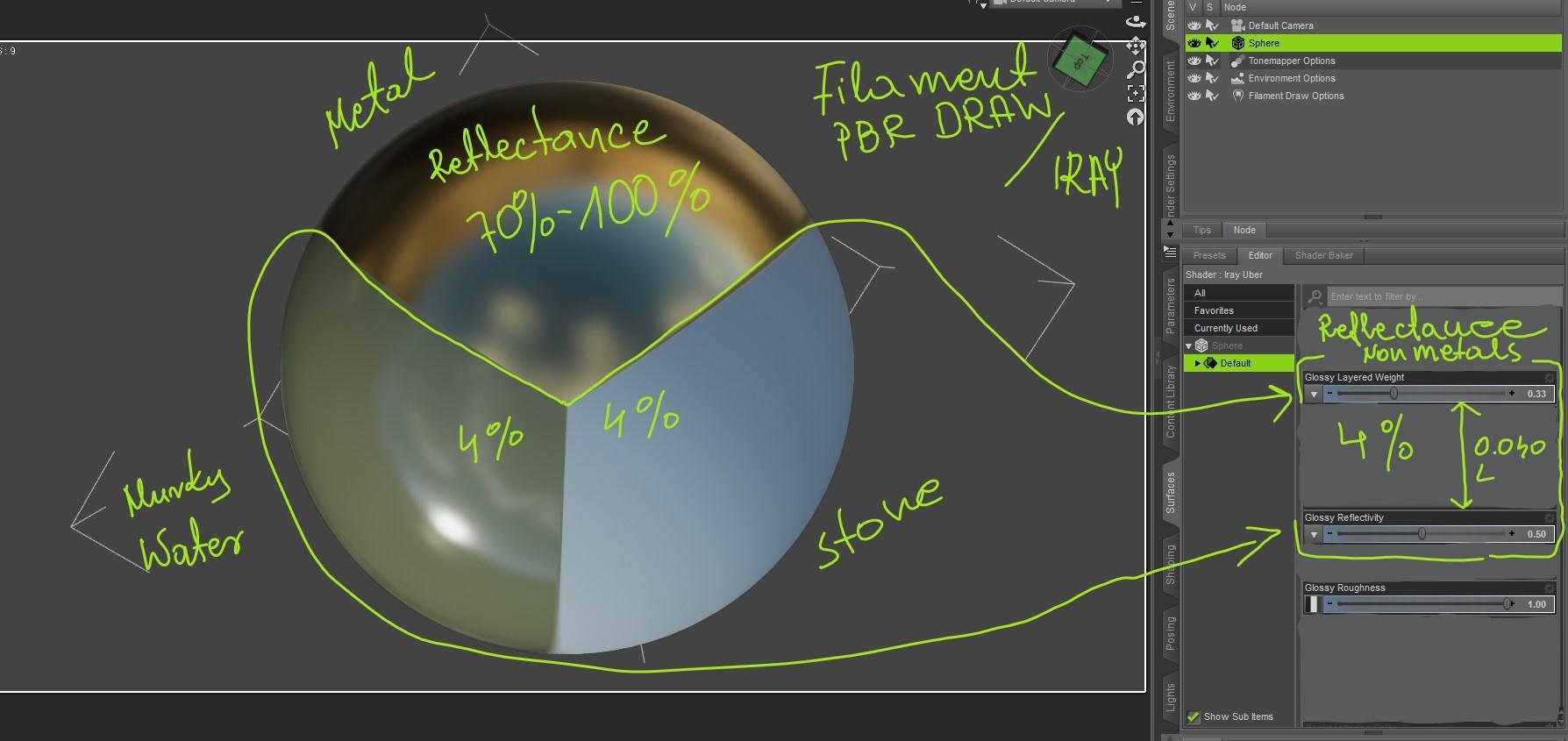
For Non-metals it is around 4% +/- and for Metals around 70-100% and controlled separately in DS
The reason why we see one object shiny and the other matte are the micro roughness of the surface, even if they have the same level of reflection , that why the glossy reflectance should be not touched or changed so everything works in harmony with the light in any conditions, the same goes for Unreal Game engine and others, there is no control over it at all and it is hard-coded , if people adjust it for own light situation and eye, it is total wrong and the complete concept of the engine landing in a trash resulting in a long rendering time and other issues, it is a chain of unfortunate events and waste of time and energy.
Here is an image that shows 3 different materials , 2 have 4% default (non-metal) the other 70%-100 Metal , you see how different both materials looks with the same reflection values and will render exactly the same in Iray and Filament . That is how it works in most all PBR based engines no matter it is Unreal /Unity Engine, Toolbag, Filament, Iray or Substance Painter , one system for all .
Now with Iray we have the additional option to define better the true PBR values like no other engines , especially for a different types of materials in one map
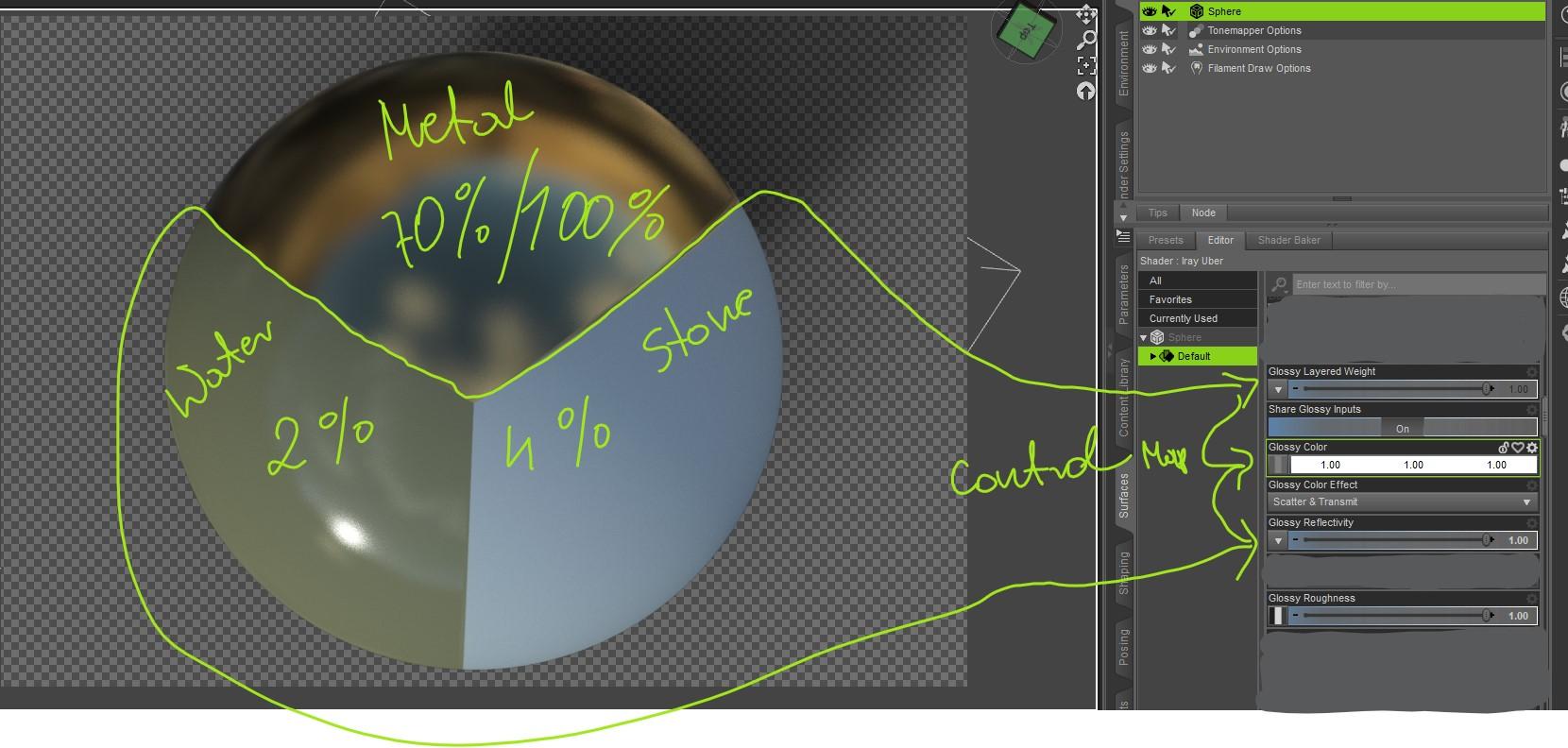
For example skin 3.5 % have higher reflectance value than the sweat on the face 2% , skin will appear brighter than the water and that is the key , at the right angle most all nonmetals have the same level of reflectance aka Fresnel at 90-100% , the difference only are the roughness of the surfaces . Diamond have 16% of reflectance 8 times more reflective than water , that why they say Diamonds will reflect light even in very dark light conditions , but you don't use it on a nail polish , teeth, eyes or water as many do, but back to the subject..
We can control it exactly using the Glossy Color input with a grayscale map with the proper reflectance values for each material , like in this case water 2% and Stone 4% , when using this method , it only will render in Iray, however you can still plug the grayscale map under Glossy Reflectivity and have very similar effect in both Filament and Iray , there is slightly difference but if you do it the Glossy Layered weight must be set back to 0.33 value to get the proper Reflectance values , Glossy Color is great as you can set the values in Float Color by pressing CTRL and click the Color , it will open a new window where you can put your Float Color values , it is very handy as sometimes you can find different metrics of the values, sometimes % and sometimes linear color . The image below is for Iray rendering for both Filament and Iray use the method I mentioned above
The difference in Reflectance values are not as dramatic for Nonmetals and most of people will not even notice 2% of the difference , but if you have love for details why not doing it right ! nothing looks better than reality.
Remember this section of Reflectance don't affect Metal materials , only Glossy Roughness affect the Metal surface
The Glossy reflectance option under the Metallicty workflow is FO (Fresnel Reflectance at Zero), when you set it to 0.00 it show exactly the Fresnel effect of 100% light reflection at grazing angels, it use values of 2-5% for Nonmetals minimal 0.20 max 0.50 value, Ice cube have the value of 0.178 so a little bellow the 2% (0.20 ) I wish the names under the shaders was more clear for everyone and less confusing with other shaders workflow, or at last loaded separately but it is what it is .. I still need to make one last test to determine if the Glossy Layered Weight need to be set exactly on 0.33 value as the gazing effect seems to be too dime compared to metal gazing effect and they both should be on the same level of brightness .
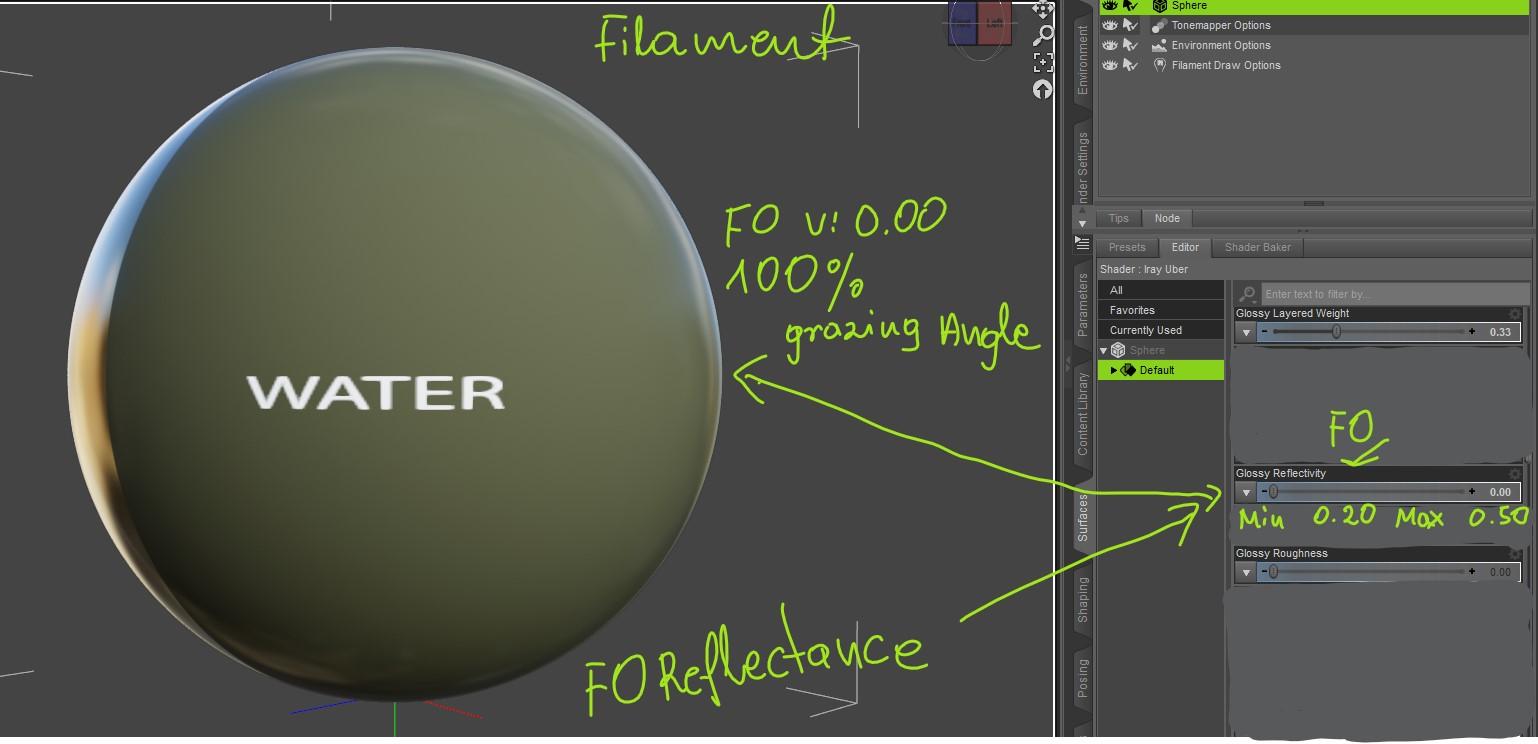
I think it is all about for the basic PBR material settings for Mefallicity/Roughness base mixer , as you see it is very simple shader if you know what portion of that do to your surfaces and how to handle it and have a great effect in both Filament and Iray .
If you have any specific question regarding the stuff above le me know
Filament tutorials/shaders/lights?We are talking about Metallicity Workflow , no Specular/Glossy workflow that are 2 different things and can get easy mixed up.
Metals use the Base Color as Specular-Color-Brightness channel once the Metallicity is turned at value 1 , Nonmetal use it as a diffuse/albedo once Metalicty is turned to 0.0, Nonmetals don't have any colors in reflections and the glossy value is most for all materials at 4% and already setup by default . So your fingernails and your skin will always have the same glare at an angle, even with nail polish , the only differences are the roughness so it appears more or less shiny . Things look more shiny because they are more smooth than other materials and not more glossy . People have a hard time to understand it with Metallicity workflow
you should leave the Glossy Layered Weight at 0.33 and Glossy Reflectivity at 0.50 , no colors no maps under this channel, not for Metals or for Nonmetals , you should adjust only Glossy roughness , The Glossy Color channel you see there should be ignored under Metallicity shader , unless you have situation where 2 types of Nonmetals materials are on one map and you know exactly the values , then you can use the Glossy Color channel to control proper the glossy values , but the real function of it is for REFLECTANCE .. and the maps should be used for nonmetals in grayscale for example water on a wooden floor ( water reflectance 2%,wood 4% )and works only in Iray . Metal materials don't use this section , their colors and brightness are controlled with the Base Color. (Specular-Color-Brightness)
Regarding BUMP and Normals , Bumps maps are like displacement maps just the details are finer , it goes only in one direction Green- UP so it is called height maps as are displacement , with the difference that displacement displace the 3d model in the object space but still only in one direction Green- UP
Normals works with 3 directions that why you see the 3 colors, each color represent the direction , Green is Up or Down , Red is Right or Left, and Blue is Front or Back where bump map goes only up, but Normals don't displace the 3D model, it bends only the light and create shadows on the surface creating an illusion of displacement for that reason it is used on low poly models to make it looks like a high resolution.
Then you have a Vector Displacement that is the Childlike of Displacement + Normals .. it displace the 3D model in 3 directions
The difference in Iray is that it create Global illumination , it reflects materials in materials and objects in objects , it bends differently the light and shadows than in Filament Draw Mode
Bump maps can be created from photos , but converting bump maps to normals is not really a good idea , bump maps have only one direction, normals need 3 directions so what you are getting is normal with the functionality of a bump map , same stuff different name .. The best Normals are created from a detailed Model , 3D scan, or displacement , to have really accurate Normal map from a photo, you need at last 60 photos of the object from all angles to extract the Normals , or you just convert it from a single photo and use it as a better version of a bump map, but as I mentioned before , the best results with Normals in Filament or overall are on a little bigger details and for the smaller use just bump maps.
That visual card is great! Really helps me sort out what I (and Filament) do and don't really understand.
If I may ask two things I'm not sure about:
1. I've read that non-metals always reflect white (untinted), only metals change the reflected color. You say metal reflection tint is controlled with 'Base Color'. Doesn't that mean glossy color should _always_ be white/grayscale?
2. bump vs. normals (yawn, I know). I've learned (from another engine) that bump and normal maps are basically two methods to describe the exact same thing (kinda like png and jpg are two methods to encode the same picture, with the same result). In some scenarios bumps automatically get converted to normals for performance reasons (if I have two bump values +1, +2 then I know the angle between them is 45 degrees). Then why is the result in iRay different, is it because the maps are usually created from different sources?
As always, thanks for your insights.
Filament tutorials/shaders/lights?That visual card is great! Really helps me sort out what I (and Filament) do and don't really understand.
If I may ask two things I'm not sure about:
1. I've read that non-metals always reflect white (untinted), only metals change the reflected color. You say metal reflection tint is controlled with 'Base Color'. Doesn't that mean glossy color should _always_ be white/grayscale?
2. bump vs. normals (yawn, I know). I've learned (from another engine) that bump and normal maps are basically two methods to describe the exact same thing (kinda like png and jpg are two methods to encode the same picture, with the same result). In some scenarios bumps automatically get converted to normals for performance reasons (if I have two bump values +1, +2 then I know the angle between them is 45 degrees). Then why is the result in iRay different, is it because the maps are usually created from different sources?
As always, thanks for your insights.
Daz Studio Pro BETA - version 4.12.2.60! (*UPDATED*)A few notes by my side:
- For every beta release, filament is getting brighter and brighter. Like a nuke dropped near the scene. :)
- Repeating: Filament is too transparent on surfaces with cutout opacity mapping available. It doesn't take mapping image into account (to a degree). It just makes the surface overly transparent.
- Filament is too sharp/bumpy.
- I don't know why, but every time I change exposure in draw settings when filament is the engine also changes the exposure in renders settings (for iray). I have to manually tune it back.
- I didn't know exactly how that happened, but I went crazy once that "tone mapping" section just didn't appear in draw settings for filament. I didn't know what made it disappear or what made it appear much later on (after restarting studio).
- I will wrong myself: "Copy-pasting tcb keyframes didn't corrupt animation and freeze daz studio anymore...". They still do. Randomly, but when it happens it is too late. The unsaved animation is gone. This will be a trouble if there are dforce animated data in your scene. Because, it is pain to save and wait 2-3 minutes (more or less depending on animation length) after every step to avoid losing data to freezing.
Also a workaround; My cpu fallback is off. In case you were able to render one frame but went out of memory somehow (due to low light etc), your cuda device decides to disable itself without reporting it. Go back to texture shaded mode. Then go to the iray advanced settings -> untick and re-enable your cuda device. Surprise! (No need to shut down and re-open everything). Works every time for me.
Victorian bedroom preloadthankyou Sevrin

it's not that I was lazy BTW I just disliked every way I moved the furniture
I was hoping the promo ones existed
also I will use Filament
New DS Filament Render EngineFilament's actually better than Iray, IMO, for certain stylizing: the following images were done of the same scene (2× G8 Male, in Sixus1's Retrospace Scanner outfit, in a TerraDome 3 landscape). The redder one is Iray, the streaky one is Filament. But for my purposes-- a SF cover that needed simplicity and a Pulp feel, I went with the Filament one, hands down.
In fact, the Filament look was an easy winner, and it took some wrangling with both the HDRI and the scene to get an Iray version of the look I wanted and had already achieved in Filament.(That's not to say Filament's perfect: it's a really good preview engine, but it doesn't do cast shadows at all (including interior shadows when your scene lighting is through a window) and absolutely hates transmapping.)
Cool examples.
Some folks have this idea that what was standing in the way of their being able to create interesting images is a lack of photorealism. Kind of like how people think their lives will become better when they hit the lottery. Filament is it's own thing and offers creators new options, and with some effort and creativity, it can be used to help tell a story. It won't all be "Art", but then neither is the so-called photoreal stuff.
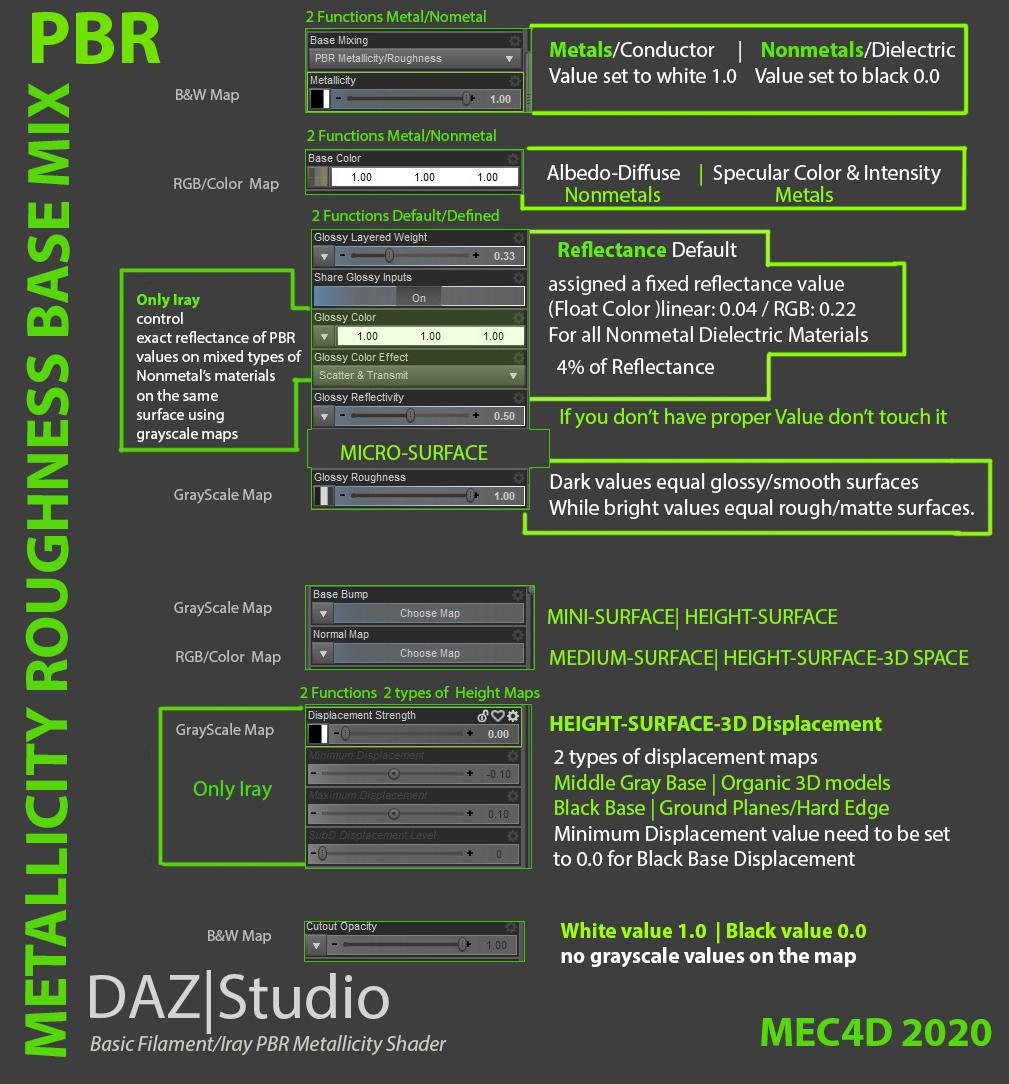
Filament tutorials/shaders/lights?@marble I created for you a set of info that will help you and others to set the proper shader not only for a Filament but also for Iray, it is a basic shader setting that works on most programs and game engines and Filament PBR as well. It is simple because Metallicity shader is the simplest of them all , it don't need a lot of resources to run proper and render fast in all light conditions , but the way it is presented it can easy to be mixed up with less good results
- Metallicity : ( it have 2 functions, when set on 1 it will produce Metal surface changing the function of Base Color into Specular Color and Intensity, when set to 0.00 it will change the property of the material to nonmetal and change the function of the Base Color to Albedo/Diffuse , works the same in Iray and Filament )
- Base Color : ( As mentioned above it have 2 function controlled by the values of Metallicity , once it become Specular and once an Albedo/Diffuse depends of the Metallicity value 0.0-1.0 , works the same in Iray and Filament
- REFLECTANCE : The part of Reflectance include the Glossy Layered Weight 0.33 , Glossy Reflectivity 0.50 , by default DAZ Studio have it set up at 4% for Nonmetal materials aka Dielectric materials, the settings should be not changed or any maps plugged into the values , works the same in Filament and Iray
- Glossy color/Glossy Effect : This setting don't affect Filament Draw Mode but can be used in Iray to define exactly the Reflectance value of your surfaces using grayscale map with PBR values , for example you have a sidewalk with parts where you see water accumulation , you can set the Glossy Layered Weight to value 1, Glossy Reflectivity to value 1 and use the Glossy Color to load an map that have the proper Reflectance values for Water and Stone, the difference between the water reflectance and stone are 2 % , where the water is 2% and the stone 4% , it is very low difference but effect can be very dramatical when used on a ground plane , this option only works when rendering with Iray , it does not works in Filament and will not in most game engines or PBR engines as workflow like that are not used with Metallness , however if. will give you the true and better PBR result . For the same reason Specular/Glossiness workflow is better as you are totally in control of everything . Glossy Color function should be used only with nonmetallic surfaces.
- Glossy Roughness is a micro surface channel , it allow you to make your objects smooth or matte even if you don't have bump maps or normal maps , like for example Used or Brushed metal vs mirror, it works the same way in Filament and Iray
- Bump Maps I don't think I need to go deep here with this , it works the same in Iray and Filament , it should be used for small surfaces , example skin bumps or wrinkle etc.. and a grayscale map
- Normal Map don't works exactly the same way as in Filament , Normal maps should NOT be used for a very fine details to works with Metallicity workflow, same for Games, how smaller the details how more fuzzy it will looks in real time rendering , looks better with a bigger objects and dimensions than smaller , and photo to normal conversion looks the worse , true Normal maps should be based on real 3D space of the 3D model, or at last extracted from a displacement maps for the best result.
- Displacement Maps , works only in Iray and as you many may know , it displace the 3D object in 3D Space , displacement maps saved as jpg or less than 32bit format tends to create jagged effects on the model, best are saved as her or exr 32bit grayscale
- Cutout Opacity works same way in Iray and Filament by using black and white alpha maps, this mean, black RGB-000 background for cutting out areas of your model and white RGB-255 for a visible part, maps should not have any gray tones or middle gray tones , only pure black and white colors for max performance , anything else can result in fuzziness, dark areas or clipping at the edges.
That are the basic for PBR Metallicity Shader Mix that works fine in Filament and Iray without huge hassle , all you need to have the proper Albedo/Diffuse maps for best easy result and fast rendering , don't use settings that are dimmed off in the shaders even if it change the look in the viewport , it will be not accurate and you may just make your material render extra longer as it really should , it is very easy to screw with one wrong move .
Remember objects can't be brighter than the light , avoid using. 255 RGB white color ( that's the color of the light ) on surfaces or RGB 000 pure black
No matter if you do stylized Art or Realistic use physically accurate values, if you do good it will always look good in any light conditions , as nothing looks better than reality , even in a cartoon style ! so why settle for less if you have everything in front of you ! Once you grab the basics the rest will be easy , no need for a super lecture or 100 of tutorials or manuals . Simple is beautiful ! you can thank me later !
Enjoy !
Below I make visual card for you to save for later in case you need to be remembered
adjust the materials or apply Filament-friendly shaders. So I am wondering when we might get some tutorials and products specifically set up for this new engine
RDNA2 - Any IRAY alternative?It's not an alternative, no, because Daz doesn't support it. And those benches you saw are probably with RT off not on, so there's that too. We're also second generation NVIDIA RT asic, whereas AMD's solution to this isn't to go down the asic route. They're repurposing compute shaders (I think). I suspect their RT performance will be well below NVIDIA's, at least this generation, even if an alternative renderer was available.
HOWEVER, I have hopes that Daz's Filament will continue to improve, perhaps adding DXR (or equivalent) capabilities, so we can get the best of both worlds.
Genesis 9 delayed until at least 2020. Will you be buying it?It's been 3 years since Michael 8 dropped. I'm starting to think the developers at DAZ3D have fizzled out.
Maybe they've pushed the software to its limit.
Maybe their software is being redesigned for something amazing.
Either way, their silence is deafening. They always used to feed us tidbits to keep us excited.
lol What now? "developers fizzled out"? Since the release of G8, we've gotten dForce cloth simulation, Strand-Based and dForce Hair, Filament, and other upgrades to Daz Studio. Just looking at the beta and public build release notes for each new Daz Studio update and see they're constantly working to try to improve rendering quality and overall Daz Studio performance and working with NVidia to update and improve things and generally bring more and more options to the users. Just because we haven't had "Genesis 9" doesn't mean the developers have fizzled out. And if one can infer anything from these threads is that people are much more interested in updates to Daz Studio and new features then they are just having a new figure. That's just my personal opinion though, so take it with a grain of salt. :)
New DS Filament Render EngineFilament's actually better than Iray, IMO, for certain stylizing: the following images were done of the same scene (2× G8 Male, in Sixus1's Retrospace Scanner outfit, in a TerraDome 3 landscape). The redder one is Iray, the streaky one is Filament. But for my purposes-- a SF cover that needed simplicity and a Pulp feel, I went with the Filament one, hands down.
In fact, the Filament look was an easy winner, and it took some wrangling with both the HDRI and the scene to get an Iray version of the look I wanted and had already achieved in Filament.(That's not to say Filament's perfect: it's a really good preview engine, but it doesn't do cast shadows at all (including interior shadows when your scene lighting is through a window) and absolutely hates transmapping.)
That looks great. And I agree, for the stylized look, that Filament render is the winner, imo.
And yeah, I do expect Filament will (probably) be getting better and I think they will put more work into it and improve it. It definitely needs work reading tans maps properly and shadows are finicky at best. It appears you can ONLY get a shadow by adding either a distant light or a spotlight (it doesn't seem to be able to create shadows at all if the light is an HDRI). And the shadows appear to be very low res - jaggy and pixelated along the edges. They also vary in intensity depending on where they land/what they land on. If you have several things in the scene and the shadow stretches across a few of them, the shadow will look really light or really dark on different objects which looks quite strange.
It does need work, and hopefully, it will be improved upon. But so far I'm REALLY enjoying it. For animations it's lightning-fast render speed is a big plus, for stylized looks, I think it would be great too. And as a preview draw style it's fantastic, imo. There is pretty much ZERO lag for most scenes I've tried it with. I've done scene comparisons with the draw styles, loading up large sets (like blocks of houses and heavy sprawling sets) and navigated around the sets with the different draw styles and it appears that as far as fluidity and ease of scene navigation goes the Filament draw style might be the best (in some scenes it ties with either cartoon shaded or smooth shaded as far as smoothness of navigation). But for the most part, it seems to handle even huge scenes pretty well - smoothly with minimal to no lag. It does well in heavy scenes in which most of the other draw styles are laggy or struggle with.
I think it's a really great addition to Daz Studio and I'm very much looking forward to seeing it's evolution as it improves, as we get shaders and other content specifically designed for it, and as the community and PAs create and experiment with it - it will be fun to see where it goes!
New DS Filament Render EngineFilament's actually better than Iray, IMO, for certain stylizing: the following images were done of the same scene (2× G8 Male, in Sixus1's Retrospace Scanner outfit, in a TerraDome 3 landscape). The redder one is Iray, the streaky one is Filament. But for my purposes-- a SF cover that needed simplicity and a Pulp feel, I went with the Filament one, hands down.
In fact, the Filament look was an easy winner, and it took some wrangling with both the HDRI and the scene to get an Iray version of the look I wanted and had already achieved in Filament.(That's not to say Filament's perfect: it's a really good preview engine, but it doesn't do cast shadows at all (including interior shadows when your scene lighting is through a window) and absolutely hates transmapping.)
Mystical Cave how to control lightingoh BTW Filament in the beta allows more lights
I have been adding piles of them
Filament tutorials/shaders/lights?I understand your needs but a light that passes through object is not a pretty graphic , a light that fall off weird way is not a pretty graphic, a skin that looks worse than 30 years ago is BAD , it is not made for making graphics it is a PBR DRAW mode for preview and that is all about at last in my book and can't argue on it or change my mind .
You good some good points as well and happy to see it ! that what it was made for, to help you speed up the settings and move forward.
Things like it is realistic or non realistic don't excist , it is bad or good , you can still make a cartoon style and use the proper values that the engine need to work with , it has own rules !
I am really not in a good moment to go into shaders conversations, Reflectivity play a huge role under Metallicity as you don't have only Metal materials but I guess you need to learn a little bit more about the basic of PBR so it will be easy for you to understand what is going on with Iray shaders , the names may not always be exactly the same but the functions are . You need Glossy Reflectivity for dielectric materials and yes there are no manuals explaining everything about it and doing trial and error put you nowhere closer to the truth , it is complicated and messed up and clumpy but it works , trust me it does
Transparent stuff set up using opacity is not a real physical property, it don't exist in a real world , Transparent stuff in real world use IOR or are translucent , the last will not works in Filament but other DO , it is only a partial engine and same for the skin , if it was a full engine you need as good card as for Iray so make no sense right ? why do we need another render engine that is slower than Iray right?
Lighting doesn't work since there is no global illumination so it is a light in a vacuum space far away from Earth , and it is what it is . What you think would look glass in a vacuum space ? with a 1 sun ? you will see just one reflection of the sun, small spot and nothing else . But if you did your homework, you could place an object behind it and see it better , of course not full renderer but at least something like a preview.
You wish to have stuff that sadly was not made to use with this draw mode and nobody can make it better, it is what it is , case closed !
and btw I am a girl and I find it very easy .. at last the parts that I am good at so I can speak about, did not wasted my 22 years in commercial 3D for nonsense but learned things with passion but mostly by the book , everything have its rules that helps you to achieve your goals , I share sometimes my stuff I learning from the past to help out others that are interested to learn something new but I am afraid there are no many here that want to know
I am glad that you found out couple of stuff that will help you in the routines with Filament , most of them are exactly made just for that , but if you want it to be better , you need to set up them by yourself and by the book ;) for the best result and close an eye for other things that are not worth talking about as it change nothing and there is no solution for that, I tested the possibilities a little time before you got your hands on it just to see if there is more , but there is not. Who knows maybe the future updates bring something new to it, I don't know, all depends of the DAZ programmers and their decision , but I see that most of the people here are not ready and many of them never will be .
Happy rendering !
@Mec4d: thanks, once more, for the deep dive. I've read it all twice and experimented some more. (Aren't you the guy who said 'bah it's all so easy who needs info'? :P )
With limited experience it's intransparent, I've spent much time trying to get a handle on the iray Uber shader, skimmed the MDL spec and other things, but nothing tells you, for example, what Glossy_layered_weight vs. Glossy_reflectivity is, how it interacts with the dual_lobe_* parameters and the top coat; all trial and error. And yeah, it doesn't combine with metallicity. Erh, of course not, never! (I tried it out, it doesn't. ah. ;).
Now there's a new bunch of rules how all that interacts with Filament. I don't have to know those details, but I prefer to.I see three user groups for Filament:
#1 better preview for iRay (most of us)
#2 just like the different, less realistic look (might convert some 3DL die-hards)
#3 would prefer iRay but won't pay the price (regular laptops, animators)I'm firmly #1. I care about
a) pretty. Seriously that's quite important to me, I look at this preview a lot and I prefer to see pretty graphics. Fil is a very big step forward over OGL.
b) close enough to iray so I can set up as much as possible in Filament (now works for me, for posing; hdri dome; rough shadows; basic lighting) which is great because it is so responsive.
For #2 and #3 I imagine that Fil in Daz will do nice things when a scene is created for it. Not Unreal nice but pleasant.Open issues right now (those can't be solved by the user, right)?
- hair with cutout opacity (flickers on and off)
- transparent stuff and skin does not give a similar preview currently.
- lights are harsh when you have no dome (every light is a point light to Fil -> hard shadows, high contrast bump maps).
- no emissives. Scenes based on that kind of light will be dark, you'll need an extra Fil light that you have to toggle off for iRay renders.
...and yah, it could be a bit more stable, I'm having more issues than usual. Might be fighting with the other engines over the VRam.
That's all I can think of. I'm quite happy now that I found the Fil Options node.
Daz 3D is part of

Connect
DAZ Productions, Inc.
7533 S Center View Ct #4664
West Jordan, UT 84084Licensing Agreement | Terms of Service | Privacy Policy | EULA
© 2026 Daz Productions Inc. All Rights Reserved.