-
Sakura 8
Ok, i'm kinda cheating here, as this isn't actually Sakura 8, but Sakura 8 was very important in getting this look.

Gallery link: https://www.daz3d.com/gallery/#images/621961/
This is Girl 8 using the Kaiko morph from Rarestone's new Girl 8 face morph pack. I wanted to see what she'd look like using Sakura 8's eyelashes and textures, and as you can see she pulls off the anime look incredibly well! The only problem is that Sakura 8's eyelashes go incredibly short when using other character morphs, so I had to push the eyelash length morphs above 100%.
The body pose and mouth shape are from Rarestone's Japanese Anime poses for Sakura 8 again. Turns out the facial expression morphs in that pack work really well with this version of Girl 8. Then of course we have 3DOutlaw's simple eyes to finish the look.
How to Use dForce: Creating a Blanket, Draping Clothes on Furniture, and Much More [Commercial]I have this exact problem: trying to do open/close on dforce items.
I followed above steps but cannot get it to work.
Difference is that I modelled the object in blender too. And then added a new object (the polygon to close the mesh).
Then importing it into Daz, first the clothing and then the 'locker'.
And then first transferred the clothing to Daz character, and next transferred 'locker' to clothing..But the result is that the 'locker' in the simulation drops down on its own independant of the clothing..
Looking at the clothing and the 'locker' prior to simulation in wireframe there is a perfect match on vertices.
After simulation and clear simulation there is a sligth gap for some vertices.But basically, the polygon does not stick the the clothing (mesh).
Any ideas why, and how to correct it?I don't know. Maybe you should use the transfer utility to rig the clothing to the character, save it as an asset, export it again and then create the locker polygon to match the vertices to the rigged re-exported clothing. That would be a process closer to using a piece of clothing from the Daz store.
How to turn imported items into custom clothing?no nose, welcome to the Daz forums! Which came first, the avatar or the username?

I don't know your level of experience with Blender or clothing creation, so it is hard to gauge what you need to know. You may very well know more about both than I do! SickleYield has some excellent tutorials on her Deviant Art blog. Try this one. It is part one of a many-part tutorial with much more detail than the overview I will try to provide here.
When creating clothing for a Daz Character, it is best to model that clothing around the BASE CHARACTER, not a scaled or morphed version of the character. You handle specific character shapes later by adding morphs to your your clothing. When you want to make clothing for a Daz character in Blender, I think it is easiest to start by exporting the Daz character to an OBJ file to use as a mannequin in Blender. Then you can create your clothes in the right location, the right size and the right shape. This is a brief overview of the steps involved:
- Start a new scene in Daz Studio.
- Load the BASE character for the generation and gender that you want to make clothes for. For example, Genesis 8 Basic Female, or Genesis 8 Female Dev Load, or Genesis 3 Male, etc., not Victoria 8 or Ivan 7, etc.)
- In the Parameters pane, make sure that the character's scale is 100%. Do not pose or move the character.
- Since you are going to make clothes and not character morphs, you don't have to worry about setting Mesh Resolution to Base, but you can if you wish, to make your file smaller.
- Select the character in the Daz Studio Scene pane and turn off the visibility to anything else in the Scene pane, including the parented eyelashes for the generation 8 models. Daz Studio will export everything that is visible and you want only your mannequin. If you forget and leave the eyelashes on, that is OK, because you are making clothing, not morphs.
- Select File/Export and export the model as an OBj file. Remember what conversion scale you chose in the export dialog, because you will need to import your clothing at the same scale later. I use Daz Studio scale, which is huge in Blender, but it works fine for me.
- Open Blender and import the OBJ that you exported from Daz Studio. The import settings are important and the Blender default settings are not what you need. I will attach a screenshot of the import and export settings I use.
- Now you should see your mannequin model in the Blender viewport. Don't modify the mannequin size, shape or position.
- Create your clothes to fit the mannequin.
- Export your clothes as a Wavefront OBJ file (don't export the mannequin with the clothes). Export settings are important, and default Blender settings are not what you need. Try the settings in my attached screenshot.
- Go back to Daz Studio and File/Import your clothing mesh. Select the same conversion scale that you used to export the mannequin.
- The clothing should appear in the viewport and should be sized and positioned on the model in Daz Studio just like they were in Blender when you created them.
- For simple rigging of the clothes, use the Transfer Utility. Specify your model (Genesis 8 Female, for example) as the Source and your imported clothing item as the Target.
- Save the clothing item: File/Save As.../Support Asset/Figure Prop Assets
This leaves out many important finalization steps, like adjusting weight maps, defining surface materials, creating JCMs and MCMs and other morphs. I hope it gives you enough of an idea of the process to take you next step forward.
RareStone's Face Morph Collection for The Girl 8You can do most of those without the this set except the teeth and some others I think if you own the Girl 8 & Rarestone's other set of G8F morphs. This set doesn't look so extreme actually but adds realistic style morphs to the unrealitic Girl 8 for more unrealistic Girl 8 character variability. I did essentially the same thing but by buying every Girl 8 character addon available so maybe you can save money with this morph set.
 Can morphs be transfered between Horse 2 and Centaur 7?
I tried to make myself a clone, discussed it quite a lot but nobody seemed ielse nterested in the topic at the time

Clothing clones are different than morph transfers.
Can morphs be transfered between Horse 2 and Centaur 7?The bigger issue for this sort of transfer is that where the horse body meets the human body would be totally messed up and there'd be no way to fix that without going into a modeller and altering things anyway.
RareStone's Face Morph Collection for The Girl 8I'm curious too. Would someone who already purchased the morph set try to toonify non girl characters and post a couple examples?
RareStone's Face Morph Collection for The Girl 8This version of her seems to be a pretty extremely morph, I would expect these to be fairly exaggerated to go along with that. I'm really happy to see these morphs come out, The Girl wound up being too extreme of a morph to be very useful for me,but I really like the way she looks in these promos, so hopefully they'll bring her back in line with what I'm looking forRareStone's Face Morph Collection for The Girl 8I have the Girl 8 and I have RareStone's Face Morphs Collection for Genesis 8 Female (https://www.daz3d.com/rarestone-s-face-morphs-collection-for-genesis-8-female)
What makes the new release different than using those and extreme amount of time playing with the dials?
Just curious, I love the promo images and have it in my cart; 300 more dial morphs has me wondering how many overlap.
DS fails to de-allocate GPU memoryCancelling the renders won't really help unless you close the associated render window(s).
The memory creep does happen on the beta as well for me. I canceled the first two renders early and the GPU memory was cleared down to 8% after the third it only went down to 14%. The difference between renders was camera changes and two morph changes before the third render. For this test, there didn't seem to be anything in the logs indicating a problem.
I still need to contact daz and try downgrading my driver.
Some basic questions re MorphsHi, I will chime in saying that I have shamelessly bought a tonne of morph sets and they all work together and I have not seen any that overlap something like parameter name. Although specific figure morphs like a character morph for say Lucas 8 will always look better on Lucas but will still work on another G8 figure.
You can blend any morph sets together to get some interesting new figure shapes and even creatures if you unlock limits in the parameters tab.
How to turn imported items into custom clothing?Here is a good free tutorial from one of the PA's, they also have more advanced tutorials (comprehensive) in the marketplace: http://www.digi-dotz.com/index.php/free-poses/tutorials/daz-studio-tutorials/26-basic-genesis-clothes-rigging-in-daz-studio-4-5
Thanks, only issue is that a good chunk of the shirt seems to dissaper when I use the transfer utility tool, any way to fix that?
SY 200 Free Morphs for Genesis 8Many thanks for these SickleYield, I found quite a few useful morphs that have not been available in any of the morph packs I've purchased. Much appreciated. ☺How Many Pages in Your Product Library?I'll pipe up here and say I use WD and have never had a failure, in 6 years. I would recommend the WD Passport (2TB) and the WD Easystore - 8TB one. My sons are video game programmers (talk about the importance of having good externals!) and they both have the same thing I do, and going on four years of extensive use and no failures. I won't use anything else but WD brand. I know there's bound to be "lemons" whatever brand people buy, but we've not had one yet. (We have seven WD's between the three of us.)
I only use WD too, but there are some bad ones in between. I think I'm close to having bought 50 over the years and failure rate has been about 15 % I think. Though some have died because of wear and age, of course. I've also had one with a lot of weak sectors which are very slow to read and write, so slow (like 2 MB/s) that I gave up on it.
I highly recommend HDSentinel Pro, it will keep a constant eye on your disks and warn you if there are any signs of malfunction or potential problems. It can also do different types of surface scan which will detect different problems, like weak sectors. I'd never have figured out what was wrong with that slow disk if I hadn't scanned it with this program. WDs own diagnostic tools said everything was OK (I generally don't trust them, e.g. they reported a disk was bad and should be replaced while it was just the SATA cable that was bad). I always do a surface scan of new disks before starting to use them to see if everything is OK.
The family licence (5 computers, lifetime license) is the best deal. Support is outstanding.
I even accidentally rolled my chair over an old WD and cracked it so the cover on top isn't flat, it is gaping open- and it still works like a charm!
I wouldn't trust such a disk - just small grain of dust getting in may cause a headcrash.
That data backup that was mentioned sounds like a great idea, but if it's a monthly fee, I would think putting that money into a second external (duplicating the downloads say, every couple weeks or once a month) would be more economical in the long run? Of course then you'd have to make sure you kept it up to date, but if you did your DIM downloads into a "Need to transfer" folder it would be easy. Just duplicate and transfer to the second external drive. And when you start getting a lot of content, I'm not sure if the cloud based backups are feasible if they charge by data amounts. I'm biased though, I don't trust the Cloud not to get hacked, and I don't like other companies being in charge of the security of my possessions.
For cloud backup I use CrashPlan Small Business (they no longer offer Home accounts). Unlimited backup for $10/month per device. It can encrypt your data before they leave your computer, using your own private key, so no one can get access to them no matter what happens. Their support is outstanding as well. Very professional company used by Samsung, SanDisk, Stanford and many other big organizations.
How to Use dForce: Creating a Blanket, Draping Clothes on Furniture, and Much More [Commercial]How I got dForce Dynamic Surface Add-On working with polygons
@Mada posted several dForce Dynamic Surface Add-On tips in this thread, and she also used the technique in her House Brownie Outfit I purchased that outfit, and it was a good example of what dForce Dynamic Surface Add-On polygons should look like and how they should be positioned. She used them to hold a shirt closed, at the button locations, as if the shirt were really buttoned. This is a summary of what I learned from her generous tips. There may be better ways. I used Blender, and I am NOT a Blender expert, so I might have made things harder than necessary. These steps assume some basic knowledge of exporting and importing OBJ files in Daz Studio, using a modeler like Blender, and using the Transfer Utility.
- Open the garment/object that you want to add the dForce Dynamic Surface Add-On to. In my case, I used the dForce Dynamic Surface Add-On to hold a shirt front closed, like Mada did in House Brownie.
- Change the Mesh Resolution of the object to Base and turn off Smoothing.
- Export the object as OBJ. I used the same export settings that I would use if creating morphs for the object.
- Import the OBJ in your modeler. I used Blender. I used the same import settings that I would use if morphing the object.
- In Blender, select the imported object, go to edit mode and vertex selection method.
- Select a vertex in one side of the shirt (e.g. the right side near the button).
- Shift-Select a vertex on the other side of the shirt (e.g. the left side of the shirt near the button hole).
- Shift-Select another vertex on the second side of the shirt (e.g. the left side of the shirt near the button hole).
- Shift-Select another vertex on the first side of the shirt (e.g. the right side near the button).
- Now you have four vertices of the shirt selected, two on one side of the shirt and two on the other side. Hit the F key to create a new polygon from these 4 vertices.
- Switch to face selection mode. Select ONLY the new polygon that you created.
- Hit Ctrl I to invert your selection. Now you have the entire garment selected and your new polygon is NOT selected.
- Delete all of the selected faces.
- Now you have only your new polygon left.
- Export that new polygon as an OBJ file. I used the same export settings I would use if exporting a modified mesh for morph creation.
- Return to Daz Studio and import the OBJ file containing your new polygon. I used the same import settings that I would use if importing a mesh for creating a morph (the same scale as used for exporting, etc.).
- Use the Transfer Utility to conform the new polygon to the original garment (Source: original garment, Target: new polygon object).
- With the polygon object selected in the Scene pane, Add dForce Modifier: Dynamic Surface Add-On (Edit/Geometry menu).
- If the original garment didn't already have dForce Dynamic Surface(s), add dForce Modifier: Dynamic Surface to it (Edit/Geometry menu).
- Return the Mesh Resolution to its original setting if you changed if from High Resolution to Base in step 2.
- Simulate and you should see that the new polygon dForce Dynamic Surface Add-On holds the two sides of the shirt together, because two vertices were on one side and two vertices are on the other side, preventing it from falling open at that location.
- Turn Smoothing on for the original garment if you wish.
I did this from memory. I hope I didn't forget any critical steps!
I have to try this now. Darn you. I hate it when things sound simple enough that I can no longer pretend I just don't understand them, lol.
I wish Studio's geometry editor could just merge polys or delete vertices. (I realize that doing so is probably a much bigger "software deal" than it sounds like it should be.) But it would be SO much easier than all that import/export business.
Is there a way to add Easy Pose to an older figure in DS ?Note that the selection trick only works because all the selected bones have the same names for the same bendy/twisty/rotate-y parameters. This will usually be OK on anything bought from the DAZ store, but I've seen items from other stores and more than a few freebies where this consistency is only almost 100%. Any misspelled parameter names (including mis-capitalisation) will cause extra morph dials to appear in the Parameter tab — and not always in the same place as the grouped dials. If you ever see one or two (or three...) bones not responding to this technique, that's probably what's wrong.
Who's Next to Join the G8 Family?Even after all these months, I really can't get my head around these G8 figures. They just don't seem to work as easily as the G3 ones do and if you try to morph anything it just seems to make something else look totally wrong.
How Many Pages in Your Product Library?I'll pipe up here and say I use WD and have never had a failure, in 6 years. I would recommend the WD Passport (2TB) and the WD Easystore - 8TB one. My sons are video game programmers (talk about the importance of having good externals!) and they both have the same thing I do, and going on four years of extensive use and no failures. I won't use anything else but WD brand. I know there's bound to be "lemons" whatever brand people buy, but we've not had one yet. (We have seven WD's between the three of us.)
I even accidentally rolled my chair over an old WD and cracked it so the cover on top isn't flat, it is gaping open- and it still works like a charm!
That data backup that was mentioned sounds like a great idea, but if it's a monthly fee, I would think putting that money into a second external (duplicating the downloads say, every couple weeks or once a month) would be more economical in the long run? Of course then you'd have to make sure you kept it up to date, but if you did your DIM downloads into a "Need to transfer" folder it would be easy. Just duplicate and transfer to the second external drive. And when you start getting a lot of content, I'm not sure if the cloud based backups are feasible if they charge by data amounts. I'm biased though, I don't trust the Cloud not to get hacked, and I don't like other companies being in charge of the security of my possessions.
And last- reminder to people- the store did indeed go down a couple years ago. People couldn't access their products. You need to download all your products. You paid for it, why on Earth wouldn't you have it in your possession? That boggles the mind.
2nd of nine lives Cat Girrrl render thread prrr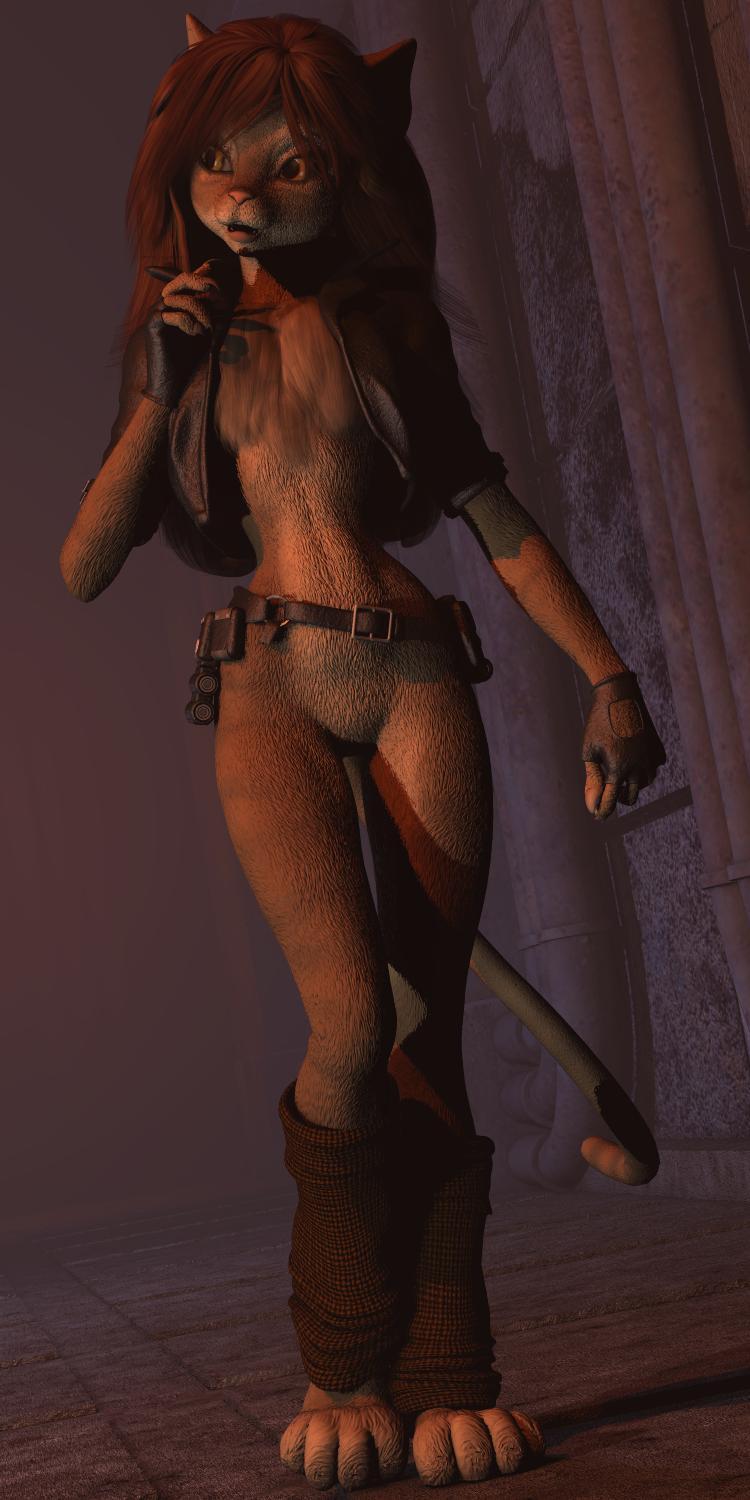
My ongoing challenge to make the digital version of K'tharr Rauthimas (a personal creation) ever closer to my conventionally illustrated version, as seen in this post...
https://www.daz3d.com/forums/discussion/comment/1750981/#Comment_1750981
The latest refinement, a "smart" prop based "pectoral ruff". When I first doodled the character in March 1985, I gave her a "ruff" that would (in theory) sidestep issues surrounding an "unclothed" character. I had made several attempts over the last ocuple of years, but none of my experiments looked right. Then, a bit over a month ago, I hiy upon a solution that worked for another cat-girl concept, Mzzkiti of "Freighter Tails" which also used Melody as the base figure. I saved the mesh after I had "parented" it to the figure which turned it into a "smart" prop. That meant that after I had selected a figure that had a "chest" body group and then load the ruff prop, it would automatically attach itself to the selected figure. As both were "Melody", it popped right into proper position. I didn't even have to use the "morph brush" to eliminate any "clipping" (poke through) with the jacket!
No doubt I can still find details I can tweak, but the ruff, or lack thereof, was the last major distinguishing difference between the polygonal and drawn versions.
Sincerely,
Bill
Can morphs be transfered between Horse 2 and Centaur 7?I can't remember how it works offhand, but I know there's a way to transfer morphs between different generations of genesis without using GenX or any other plugins. Would that work for Horse 2 to Centaur 7?
Daz 3D is part of

Connect
DAZ Productions, Inc.
7533 S Center View Ct #4664
West Jordan, UT 84084Licensing Agreement | Terms of Service | Privacy Policy | EULA
© 2026 Daz Productions Inc. All Rights Reserved.