-
Breena Dress Issue
Probably means there is a rigidity group stopping the morph from projecting into the skirt, you could use the Geometry Editor to check that (switch to vertex mode and look in the list of groups - both in the Tool Settings pane) and edit the group, or you could create a custom morph for the Sparkle shape.
How do you use your various Genesis generations?Genesis 1 - mostly redundant for me now, good for character morphs e.g. Anubis/Cat People
Genesis 2 - Occasional use for background characters, legacy scenes or where I want to use specific outfits that are a pain to convert to G3
Genesis 3 - Main usage
Genesis 8 - Skipped mostly. I have bought products when I think they are cool enough or dForce but they are all converted to Genesis 3 (I too was lucky enough to get SingularBlues script to transfer morphs)
Need help with fitting an old Michael 2-3 OoT Link costume on G3M figureTook a look at this. Here is what I encountered. Ignore the bit in the ReadMe about Objaction Mover. This is only for the Character morph for Michael 2, all the OBJ files needed for the clothes are there.
*When I talk about autofitting below I am using the Michael 3 clone from https://www.daz3d.com/wear-them-all-autofit-clones-expansion-for-genesis-3-male-s-and-genesis-3-female-s. The included ReadMe covers converting Props to Figures.
Here's what worked -
Hat - a Prop so can be parented to head and sized/moved to fit. Or, as I have done, converted it to a Figure, autofit and scaled. No morphs at all. To answer your question re making it flexible my thoughts are not without taking it into a modelling program.
Hair - Prop hair so can be parented to head and sized/moved to fit. Or, as I have done, converted it to a Figure, autofit and scaled. No morphs at all.
Strap - a Prop so can be parented to Chest and sized/moved to fit. Or, as in the picture, converted it to a Figure and autofit. No morphs at all. (Parenting maintains the shape better but will need manual adjusting for each pose otherwise shape distrorts when bending arms etc.).
Scabard and Sword are Props parented to the Strap and moved/rotated into place.
Hookshot - a Prop parented to the hand.
Shield (not shown) - as above just a Prop, parent and postion.
Boots - Individual Props parented to the shins. Feet and toes of G3M hidden.
Legs - as in the original product this is just a case of making the figure legs white. I just removed the diffuse texture from the legs surface in the surfaces tab.
What went OK -
Tunic - still a work in progress but so far autofiting doesn't work brilliantly. Most of the body of G3M is visible. Hiding various parts works until you get to the Chest Upper which doesn't work as it hides the chest which is visble in the 'V' of the tunic. I have used D-Formers on the chest of the tunic. I tried smoothing modifiers but they destroy the belt, which isn't a seperate item, nor is it a seperate material zone.
What didn't go so well -
Gloves - nothing I have tried so far has given me an acceptable result :(
Hope this helps
Copy/transfer clothing morphsHello,
I read somewhere that you can copy/transfer morphs from one clothing to another using transfer utility. Is it true?
If yes, since I don't know how to use the transfer utility, can someone describe it step by step please? I have 2 similar dresses, one with morphs and a second with no morphs and I want to transfer the morphs from the 1st dress to the 2nd one. I also want to do this with 2 undewears.
Can someone help me?
Thanks in advance.
Import as Genesis onlyIf the figure matched the overall sahpe of Genesis 2 you could also use the Transfer Utility to rig it - but then it would be for your own use only, you wouldn't be able to sell or share the model.
Import as Genesis onlyI don't think that would work.
You could export a G2 to Blender, do your changes there, and then create a character morph on reimport (given that you haven't changed the polygons themselves by deleting/adding some).
Xenogirl HD for Zelara 8 - how to change faceYou could possibly use some of the face shapes in this set of morphs.
https://www.daz3d.com/ej-alien-creator-morphs-for-genesis-8-female-s
There may be other alien morph shapes out there you can use, too. For the texture, I haven't seen them, but you can probably use the heal tool of GIMP or PS to copy and blend elements of the alien skin into the face texture.
There are quite a few critter morphs that can get you different shapes, depends on your idea of what a xeno-morph should look like.
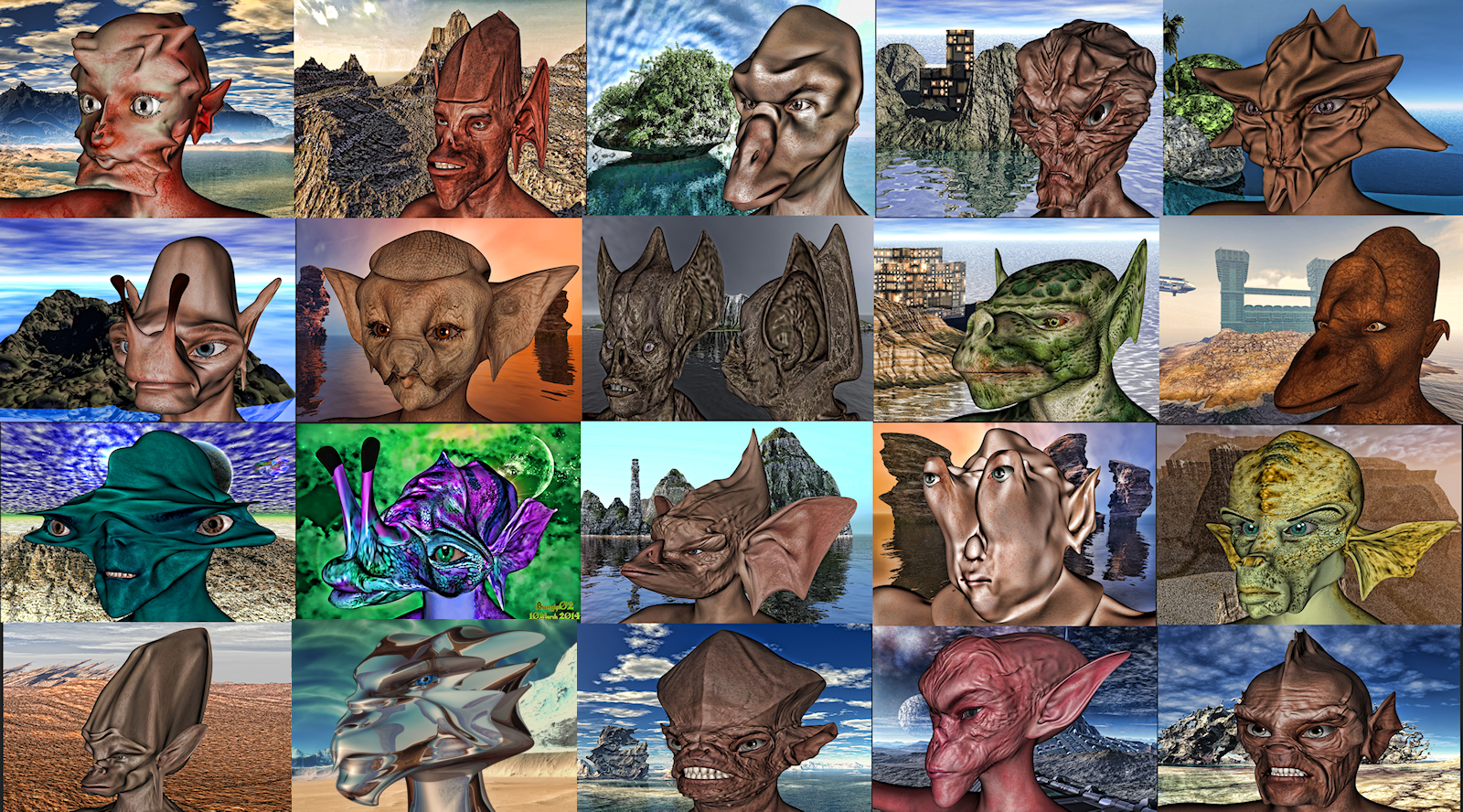
Some of the alien critters I have done over the years.
 Need help finding high res skin textures for Aiko 8 (or Aiko 7)
Aiko 8 is just a morph of the Genesis 8 Female any G8F V8 etc textures will work, the one you psted will work with the Aiko 8 morph.
Ohh i just posted the Selara picture because it was the first one i found that had the kind of skin quality i was looking for. I dont really want to use her face shape, skin tone or makeup. I was actually looking for something more Asian looking with lighter skin tone. I'm getting the Aiko 8 and Aiko 7 for Aiko 8 because i want to use that body shape as well. Its just a coincidence that i also happen to be looking for a head that is Asian in appearance.
I just wasnt sure if there were any characters for Aiko 8 that had skin details that were just as good or if it is a standard feature for all G8F.
You don't need to use the face shape or body shape thats the point any G8 skin will work on the A8 shape.
Look at some of Rarestones characters for example
https://www.daz3d.com/minami-hd-and-minami-hair-for-genesis-8-females
Is there a way to transfer only the morph of the V8 hands and feet on G8F?outrider42 sorry, I forgot to answer, but in these days I'm quite busy.
In any case, X-morphs costs a lot, and now I can't buy it.
I mean, I use Zbrush, I can create whatever morph I want, but in the case of hands and feet it's different. Hands and feet are very difficult. Even in the traditional art are the most difficult things to do, and spending forty dollars just to transfer the morphs of hands and feet it's exaggerated.
Ah, I almost forgot. I asked a friend about DeviantArt who shared his work using BJ Misumi's character to send me a picture of the feet. And yes, they are very realistic, but they are also very ugly.

Thanks for the advice, but I prefer to avoid.
Zelara 8i wish there was a way to get rid of the "human" face ...
The plan was to add a second morph for the face, however I ran into technical problems and time constraints. We're only given so much time to produce products for Daz figures.
Anyway, here's the proof that I tried to make it happen, unfortunately, it wasn't meant to be.
she's pretty cool Josh
i wish there was a way to get rid of the "human" face ...
The plan was to add a second morph for the face, however I ran into technical problems and time constraints. We're only given so much time to produce products for Daz figures.
Anyway, here's the proof that I tried to make it happen, unfortunately, it wasn't meant to be.
she's pretty cool Josh, had a basic play and used a no breast morph and a few creature face morphs works well
Is there an EASY was to create my own morph character?Thank you. Where do I download Morph Loader Pro from?
It's a free part of DAZ Studio
Yeah, I figured that out but the problem is that while I am able to create the morph, I am unable to pose the character -- see attached images above.
KamilyAnn for Zelara 8 [Commercial]the range of skin variations you've created for your kamilyann are without a doubt the premiere eyecatchers. and they're quite lovely.
but i really like your modeling. that was the dealmaker for me. she's got a not-your-average-daz-body and a *really* interesting face. lots of implicit personality.
i surely hope daz gives you access to the mysterious proprietary HD-morph-creation plugin (or whatever it is) soon. if they haven't already :)
anyway...thanks and congratulations, diva.
j
I did finally get access to the HD morph tool but I am still not sure how to do it. The creation of an HD character is quite different than a standard character and the steps for getting the HD morph into Daz is a bit complicated imo. It's something I do hope to learn how to do though. :)
Thank you so much for the comments on KamilyAnn! That made my day! :)
KamilyAnn for Zelara 8 [Commercial]If anyone is curious here's KamilyAnn's shape without the Zelara 8 morph (she using Karyssa 8's mats to show her shape with human skin).
 Need help finding high res skin textures for Aiko 8 (or Aiko 7)
Aiko 8 is just a morph of the Genesis 8 Female any G8F V8 etc textures will work, the one you psted will work with the Aiko 8 morph.
Ohh i just posted the Selara picture because it was the first one i found that had the kind of skin quality i was looking for. I dont really want to use her face shape, skin tone or makeup. I was actually looking for something more Asian looking with lighter skin tone. I'm getting the Aiko 8 and Aiko 7 for Aiko 8 because i want to use that body shape as well. Its just a coincidence that i also happen to be looking for a head that is Asian in appearance.
I just wasnt sure if there were any characters for Aiko 8 that had skin details that were just as good or if it is a standard feature for all G8F.
KamilyAnn for Zelara 8 [Commercial]the range of skin variations you've created for your kamilyann are without a doubt the premiere eyecatchers. and they're quite lovely.
but i really like your modeling. that was the dealmaker for me. she's got a not-your-average-daz-body and a *really* interesting face. lots of implicit personality.
i surely hope daz gives you access to the mysterious proprietary HD-morph-creation plugin (or whatever it is) soon. if they haven't already :)
anyway...thanks and congratulations, diva.
j
Is there an EASY was to create my own morph character?Thank you. Where do I download Morph Loader Pro from?
It's a free part of DAZ Studio
Zelara 8i wish there was a way to get rid of the "human" face ...
The plan was to add a second morph for the face, however I ran into technical problems and time constraints. We're only given so much time to produce products for Daz figures.
Anyway, here's the proof that I tried to make it happen, unfortunately, it wasn't meant to be.
That is so cool! Sorry it didn't make it in.
Zelara 8i wish there was a way to get rid of the "human" face ...
The plan was to add a second morph for the face, however I ran into technical problems and time constraints. We're only given so much time to produce products for Daz figures.
Anyway, here's the proof that I tried to make it happen, unfortunately, it wasn't meant to be.
Materials for Male Gen 8 ChildI'm having some fairly decent success with https://www.daz3d.com/fwsa-zander-hd-for-michael-8 - the no-brow, clean-cut version's doing pretty well, with some tinkering using Altern8 and the Growing Up morph kit from Zev0.
Is there an EASY was to create my own morph character?It's already a free part of Daz Studio! The icon looks like a flexing arm with an M on it.
I followed the tutorial (THANK YOU) and everything came out perfectly EXCEPT when I tried to pose him and then NOTHING worked (see attached file). I obviously did something wrong but I have no clue as to what it might be. Any ideas from anyone.
Daz 3D is part of

Connect
DAZ Productions, Inc.
7533 S Center View Ct #4664
West Jordan, UT 84084Licensing Agreement | Terms of Service | Privacy Policy | EULA
© 2026 Daz Productions Inc. All Rights Reserved.