-
New figure and material
yuyu.atem said:
Hello,
If I create a new figure, for exemple with MakeHuman or blender, without to create a material for this figure, what material will apprear on Daz? Will the figure haven't any material or wil it receive a default material from Daz?
Thank you in advance for your answer!
As the best practice, if you create new character with Blender, pls use Genesis X figure as the base for sculpting, then you import the character's morph back to DS. In this way, you'll have a fully-rigged new character and you may load texture maps from other character on it or create new materials..
As for MakeHuman character that you wanna bring into Daz, one of the good ways is to use Wrap3D/4D, i.e. use Genesis base figure to wrap MakeHuman figure and import back to DS.
There're quite a few tutorials on Daz3D channel of youtube, you may take a look first.
Can you import the actual Adobe Substance PBR into Daz[Can you import the actual Adobe Substance PBR into Daz] I know that if it's broken out in different layers like normals, bumps, etc I can. But just the PBR assets from Adobe Assets for like creating a road?
Thanks
Steve
New figure and materialIf you import an OBJ/FBX into Daz Studio then it will be untextured. You can obviously then apply any shader/material from your library to this for your own use.
Daz Install Manager (DIM) 1.4.1.87, Now Available! (*UPDATED*)barbult said:
memcneil70 said:
Found the new DIM when looking to see if I had installed something. I liked the video link to watch after I purchased my cart today and downloaded. Nice idea.
What video link? Where did you see that? What is the video about?
Sorry barbult, I haven't been on the forums most of the day. I took advantage of the sale yesterday and bought some M4 outfits and some old sets that needed metadata. So I have been busy on three computers setting them up properly and wore out my hands. Maybe if you uninstall something and reinstall it, (download a fresh file), the link to the YouTube video will come on? It is on Rembrandt lighting.
Mary
Fiber mesh brows and lashes - how tofelis said:
Richard Haseltine said:
Using the Strand based Hair tools in DS, or an external application that will export lines to OBJ. Brows and lashes require no special tricks.
How do you get an imported (line) obj to be accepted as strandbased hair?
Allegedly, Daz PA's are able to import polylines (or something to that effect) into Daz to be converted to SBH.
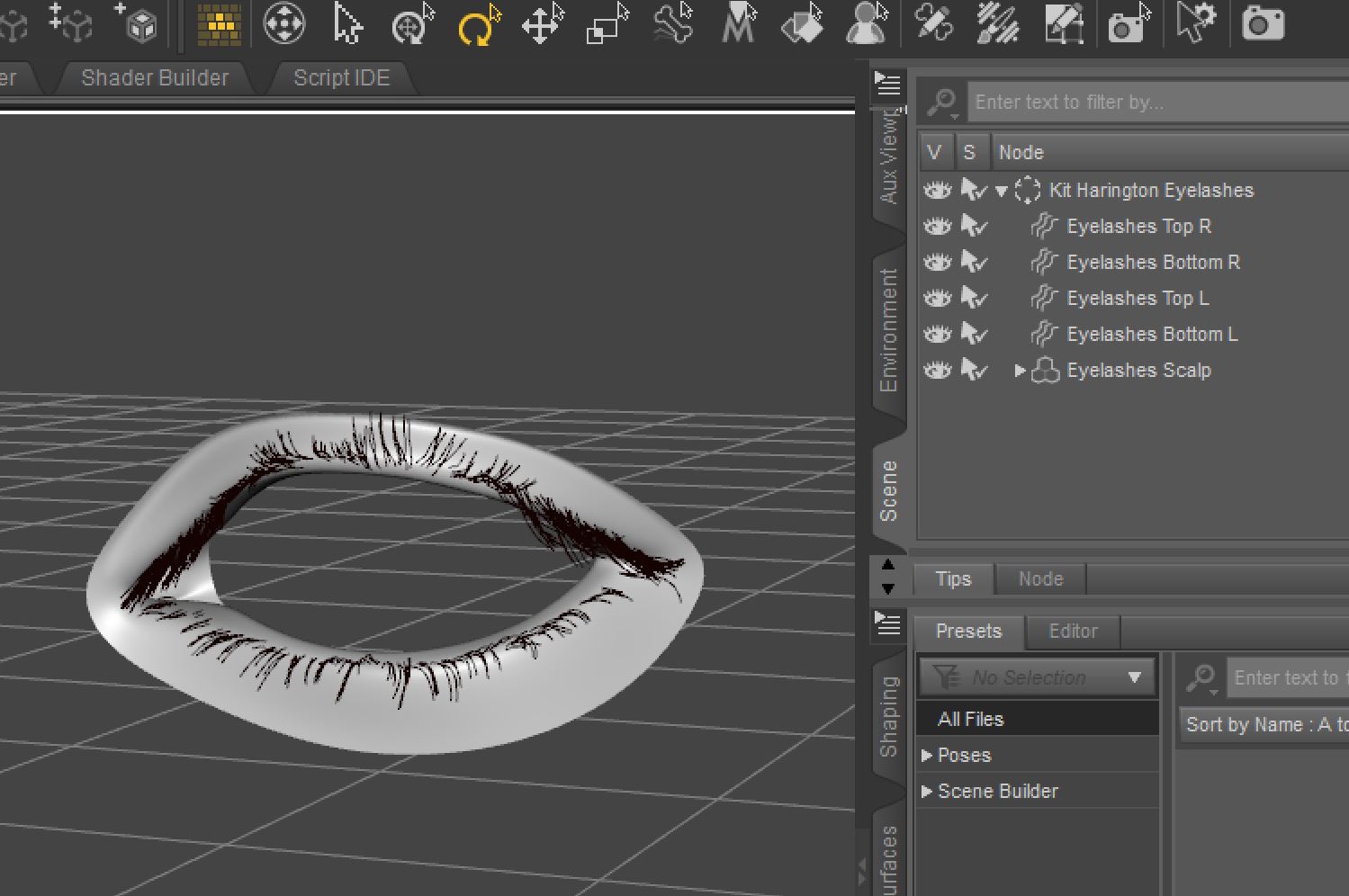
For normal users, to make eyelashes and eyebrows in SBH Editor, you can just create them as you would any other type of hair in SBH Editor.
Attached is an example of eyelashes I had created in SBH Editor. The SBH were made on a eyelash scalp that gets fitted to the Genesis 9 figure and then hidden.
 Can I create hair and clothes in blender and import them to Daz?
Thank you very much! So, if I understand well, I have first to import the figure for which I want to create the asset from Daz to Blender, then create the asset "around" the figure to be sure it corresponds to this figure, is it that?
What should happen if I create an asset "around" a figure on blender, and I try to apply to another figure? Is there a way to create an asset compatible with any figure?Thank you in advance!
Can I create hair and clothes in blender and import them to Daz?Yes - at a basic level make the model, ideally around the base figure shape, import it as OBJ (use the same preset for exporting the figure as an OBJ for Blender and reimporting the finished clothing/hair, that way everything will be scaled and oriented correctly), then use Edit>Figure>Transfer Utility with the original figuer as the Source and the imported OBJ as the Target. That will be very basic, but for clothing that is closde to the skin or short hair it may be good enough - in many cases, though, you will then need to adjust the weightmaps that control hoiw the model responds to bends and add morphs linked to the ebnds to improve the look. You could also just apply a dForce Modifiers to the imported clothing and use a simulation to drape it.
Can I create hair and clothes in blender and import them to Daz?Hello,
Is it possible to create assets like hair and clothes in blender, and import them into Daz to use the on a figure? If it's possible, could you telle me how I can do it, please?
How can I know if the asset I created wil be compatible with a figure?Thank you in advance!
Can I import a model from Daz3D into MakeHuman?been a while since I have used MH but AFAIK you can only import BVH motions not mesh. it's meant for making human meshes to export elsewhere.
I always added even clothing in other software like Blender or Carrara
Strand-based hair part: do I need a hair cap?Better show us a screenshot... but as a straight-forward suggest - :
- You better make a hair cap. You may refer to some SBH hair products. It's not difficult to make a scalp as it's just a geometry fitting on the head top with a Cutout Opacity map. Use a modeling software to make one, or adopt a scalp from a product and modify it to have a 'proper edge' aliging with your SBH. Import to DS and conform it to the figure with Transfer Utility. Finally make a proper Cutout Opacity map (or modify one) and asign to the scalp.
- There's no way to make a hair cap with SBH editor but you can use it to make a 'separate layer of hair' as the hair cap, with proper 'gradient length' and 'density', etc. That'll take some time... but the cons is : the more SBH layers you have in the veiwport, the more resource it'll consume and make your Viewport laggy when Preview PR Hairs...
general use of dazJustPlayNoName said:
Hello all,
I have not yet fully understood the concept of daz. It would be nice if someone could give me a link to an article or answers.
Does daz work like a lego set, where I have to buy several bundles to put something together?
Yes and no. Generally characters are sold as basically the naked figure with skin, eyebrows and eyelashes. Some may come with expressions for the face, most won't. Some may come with options for different ages of the same character (particularly Daz's own characters). Clothing, hairstyles, accessories and other character related items such as makeup, skin detail modifications such as freckles tend to be sold seperately. Morphs to change the body shape are also sold separately.
Sets, such as street scenes, buildings, landscapes, come complete as you see them. Same with vehicles, animals, etc. There are also tools for creating landscapes, scattering objects, optimising renders, you name it. Daz has it's own language (Daz Script) which isn't a million miles away from javascript if you're familiar with that but it's poorly documented.
If you can model in Blender you can make anything you're capable of, export to a format like .obj or .dae and import your creations. You can make whatever you want really. Making your own clothing is a long and complex topic; if you want to do it to a high standard it will take you some time to fully understand and master this aspect.
Are there any free bundles? I found some websites on google that offer free daz art. But is that legal? Or is it only allowed to buy from the original daz shop?You can buy whatever you want from wherever you want, import whatever you want from free sites. There are no restrictions. Be aware that products from stores that don't check and validate Daz content may not work as you might want them to without a lot of additional effort. Most are fine.
To what extent can I create a bundle myself? If I design a piece of clothing in blender. I have a static object, can I simply transfer this to daz? Daz has a lot of advantages, for example that the clothing adapts to the character, which my blender design wouldn't have automatically. Or do I need the right script for this, which I can apply to my work?
There isn't really any scripting as such involved. Studio will create that for you. However, there is a learning curve in understanding how clothing models are applied to figures. A quick Google search will show up many videos on YouTube that walk you through how to create clothing from scratch in Blender, Cinema 4D, Modo, Maya, Max, Zbrush, all the usual suspects. What most of us lack is the ability to create said clothing (!) so if you have this talent, you will be happy with Daz Studio.
There are bundles to buy in which you can morph the body. From a certain
repertoire, you can create your own character (at least in terms of shape) very freely?
So would it be enough to create a character with the right 3,4 bundles, similar to MakeHumans, and then transfer it to Blender and rig and create poses yourself?Daz Studio's main function is to create. pose and render custom figures. I don't see the point of exporting this out to Blender unless you want to use the real-time renderer. You can create poses yourself by manipulating every joint in a skeleton yourself. Pose sets are also available to buy but they will need adjusting if you morph the character away from the base.
So how much do I really have to buy to finally create my own individual characters? Or is this simply not intended for this and you are supposed to buy and adopt entire art parts from other artists?This one really is 'how long is a piece of string'. If you can create morphs yourself in Blender and import them into Daz (this too can be complex - many free tutorials available) you won't need to spend anything. If you can create hairstyles and clothing yourself, you won't need to buy anything. However, the Daz store often sells items ridiculously cheaply. Really, really cheap. Look every day - there will be something for a few dollars it would take you tens if not hundreds of hours to make yourself. So cheap that it would be pointless to spend a lot of hours making your own. If you want 'instant character' - you'll have to spend something. Pick your choices carefully and it won't be a lot.
This brings me to my last question, the legal use.
With all the bundles you can pay extra for licenses. If I buy the part, can I legally use the characters or objects in my game?
And if I don't buy the licenses but create my own character from a purchased bundle by bodymorphing and using my own material, for example. Can I then call it my art and use it legally free?Yes, it's your art with no additional licenses needed as long as you don't use the actual 3D model in something like Unity or Unreal and rig it there. You'll need the interactive license for that. That useage is still really, really cheap compared to what you'd pay for a quality character in the Unity Asset Store or the Unreal Store. If you render in 2D, it's yours, you can use it in whatever you like, including commercial applications or games. For example, you can create (and we have) a complete point-and-click adventure in 2D using Daz and homebrew assets, some animations and, sadly this is the bit that puts it beyond the realm of the average hobbyist renderer, an indepth knowledge of something like Unity or Unreal and C sharp or C++.
I run a small company of 5 people. We make interactive adventure/mystery games using Daz (and a couple of other tools) on the Android and IOS stores. We make enough to support all of us very comfortably. People think of it as a hobbyist's tool but if you put the effort in, you can get successful commercial results out of it. There are people who do book covers, illustrations for books, comics, visual novels, games, all sorts of artwork.
Daz Studio is not a toy or a throwaway 'amateur's' package. It can be used like that but it offers so, so, so much more if you're prepared to learn.
Hope this helps :)
Model's targetyuyu.atem said:
Ok, I understand, thank you very much!
So, when a new model is created, specific sliders are created too? How do they create?
Reshape the mesh in a modelling/sculpting applciation without chnaging the resolution or adding/removing parts, then use edit>Figure to launch one of the Morph Loaders (usually Pro) and import the new OBJ, using the same preset as the original OBJ export so thats cale/axes line up correctly, as a new morph, Using GoZ avoids the Export/Import dialogues. PAs making content for the store can bring in morphs that work on higher resolution versions of the model, for HD morphs, but that isn't available to the rest of us.
Painting Daz surfaces with ZBrushIf you export an OBJ and import that into ZBrush, with the mats as groups option, it will already have the surface groups you see in DS (which is clumpier than the ZBrush auto-grouping, and so less fiddly to work with).
Can I import a model from Daz3D into MakeHuman?Hello,
I would like to know if it's possible to import a model from Daz3D into the MakeHuman software (http://www.makehumancommunity.org/). If it's possible, could you tell me how to do, please?
Thank you in advance!
Moves by Maxon Genesis 8.1 Connect Facial Capture not workingHello!
I was hoping I coud get some help on this. I'm importing a DAZ character with the DazToC4D Bridge and I then want to connect the facial mocap from the moves by maxon app to my existing character. I used to be able to do this just fine but now when I import a character with the face morphs, it doesn't have a Morph controller group to link it to.
I tried a bunch of different combinations which somehow managed to move the head but not anything else. There is a pose morph in Genesis8_1Female.Shape that is functional so I'm not sure where the link isn't being made.
Hopefully I'm just being silly and it's an easily fixable thing.
The first image is how it used to look with the morph controller that had to go into morph controller and the second one is how my hierarchy gets imported with no morph controller with the plugin showing as well.Having to download content twice?What you see is because DAZ Connect still has the information (metadata) that it has downloaded.
Did you uncheck "Show Login Page" and "Automatically Login With Remembered Credentials" in DS Preferences -> Startup?
Logging in within DS is the last thing you want to do ever - Don't do it unless you want to use DAZ Connect inside DS as the primary method of installing content, in which case using DIM is a waste of time and disk space.
Selling Carrrara for further development?Dartanbeck said:
...
Even in its aged state Carrara is really something special!
Yup, I still enjoy animating in Carrara, pretty much second nature by now. But I am getting into DS because fo the great products available and the great Iray renders. (Even when I can import a DS product into Carrara, the renders are not near as good). So far just DS background images for Carrara animations, but maybe DS has improved the animation tools? I've kind of lost touch with that topic ...
Having to download content twice?I finally fixed it by resetting the database, logging in and reimporting my metadata. 99% of my stuff has been recovered.
I'm still looking at what's happened to the rest, but here's one problem.
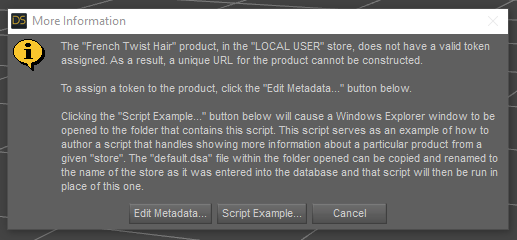
Although interestingly I can still load them into a scene.
OK, I spoke too soon. I still have those stragglers that are not available to me offline. It's only about a dozen items now, but still annoying!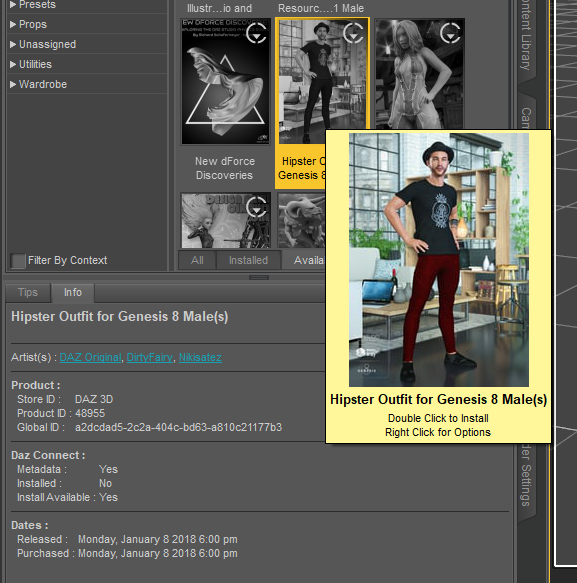 There's Always Another Sale Thread -- Discussions Only
ArtAngel said:
paulawp (marahzen) said:
Well, you get the triple tokens on anything. Unfortunately, there's just nothing across all of the banner ads that builds a worthwhile cart for me.
G2 & G3 DO 3 for 1.99 on now https://www.daz3d.com/ignite-your-creativity Or 30% extra off if add new item over $5.00. Can use coupon twice.
Catherine3678ab said:
Remember the joys of setting up a new computer ... having lost all the bookmarks!!! Does anybody have the link for that personalized 3 hour sale page? tia
If you still have your old PC you can still get your bookmarks to your new one. In case you can, here's how. On old PC. Launch browser. Go to Bookmark Manager, Click gear and choose Export Bookmarks. Save to an external drive so you can port to new PC. On new PC in Bookmark Manager select Import instead of export. Select the file you copied.
note: Backup & Restore can also work but I never use it because it replaces bookmarked favorites, whereas Import adds to any bookmarks you have. I often export and name file Exported-Bookmarks FF (xxxx-xx-xx) or Exported Bookmarks GC (xxxx-xx-xx) just in case I want something from the past. (useful for Wayback if needed).
Looks like .83 with 8 tokens and an item. I could actually use those Art Concrete Shaders which end up being $5.28 with the tokens.
There's Always Another Sale Thread -- Discussions Onlypaulawp (marahzen) said:
Well, you get the triple tokens on anything. Unfortunately, there's just nothing across all of the banner ads that builds a worthwhile cart for me.
G2 & G3 DO 3 for 1.99 on now https://www.daz3d.com/ignite-your-creativity Or 30% extra off if add new item over $5.00. Can use coupon twice.
Catherine3678ab said:
Remember the joys of setting up a new computer ... having lost all the bookmarks!!! Does anybody have the link for that personalized 3 hour sale page? tia
If you still have your old PC you can still get your bookmarks to your new one. In case you can, here's how. On old PC. Launch browser. Go to Bookmark Manager, Click gear and choose Export Bookmarks. Save to an external drive so you can port to new PC. On new PC in Bookmark Manager select Import instead of export. Select the file you copied.
note: Backup & Restore can also work but I never use it because it replaces bookmarked favorites, whereas Import adds to any bookmarks you have. I often export and name file Exported-Bookmarks FF (xxxx-xx-xx) or Exported Bookmarks GC (xxxx-xx-xx) just in case I want something from the past. (useful for Wayback if needed).
Daz 3D is part of

Connect
DAZ Productions, Inc.
7533 S Center View Ct #4664
West Jordan, UT 84084Licensing Agreement | Terms of Service | Privacy Policy | EULA
© 2026 Daz Productions Inc. All Rights Reserved.