-
New DS Filament Render Engine
Then don't expect diamond and gold when it's out of range.
The point, to me at least, was that if they already have an engine capable of real-timish previews why not optimize it further?
That's all. Wasn't expecting anything, really. Actually this Filament thing took me completely by surprise Daz Studio Pro BETA - version 4.15.0.30! (*UPDATED*)
Hi all, I have just updated to 4.14 (MacBook Pro 2015, downloaded the 64-bit version), but I can't seem to find the filament preview anywhrere... where is it? Thanks in advance for your help.
Filament is Official - Need Answers from DazSo now that Filament has made it to the release version of DS, some answers from Daz are in order, so that we don't waste time on promise that will never be fulfilled.
- What about hair?
- What about emissives?
- What about non-working sliders in Filament render settings, which will only confuse and frustrate users?
- Will transparency ever work like in Iray?
- Will HDRI resolution be fixed?
- Will there ever be translucency or SSS?
In short: what do we have to look forward to, and what don't we?
New DS Filament Render EngineIray is the nvidia thing, Daz can't do what they want with it.
Filament is a good starting point for a homemade engine, I hope Daz will be able to go further like the game engines soon.
Keep in mind Daz Studio is a free software, you can't request for an amazing feature without investing in the development.
Oh dear... Are you telling me I don't 'invest' enough on Daz, sir?
Modesty won't let me post my library and order pages but... Think of a really big, huge, number and then multiply it by 10...
When I see how much the Daz Originals are cheap and all the discounts, I would say the investment is very low.
If you purchased all the products at the full price, it would be a bigger difference.
Look at Renderosity , the prices are never lower than 50% off and Poser is expensive.
New DS Filament Render Engine+1, same on my end, thanks for sharing my view. :)
It's one of those things, isn't it?
I mean we finally get some pretty photorealistic results in Daz.
We learn how to use it, optimize our workflows to maximize our renders, and what do they do for the next step? Shift their attention to... Better previews?
Don't get me wrong, I'm not an ungrateful asshole who doesn't appreciate that there's people out there that can/will do wonderful things with Filament.
I'm just saying I really hoped we could have some trimmed render time in Iray. That's all.
Not even complaining that much.
For instance, this (see attach) took me 01h30m at 6750x6750px (post in Photoshop).
Wouldn't it be great to make the same thing but in like... 20 minutes?
Filament tutorials/shaders/lights?Darn. I thought we left glowing nostrils behind ages ago. I should check my archived runtimes for the props we used to parent to the head to plug the nostrils. Okay, no one throw anything at me. It's been a long night and looks to be an even longer morning. I don't have access to my own system and I can't leave the floor for a while so I'm going to ask what maybe a dumb question but I'm sleep deprived so bear with me. Filament does not seem to manage shadows very well. At least that's the general impression I'm getting. If that's the case can we use PWCatch? I know, it's an older product but it provided DS with shadow catching back when it needed. If there's a reason it won't work, just ignore me or tell me why. For all I know, it doesn't work in more current versions of DS. I'll be at my desk drinking another double hot chocolate with two triple espressos.New DS Filament Render EngineIray is the nvidia thing, Daz can't do what they want with it.
Filament is a good starting point for a homemade engine, I hope Daz will be able to go further like the game engines soon.
Keep in mind Daz Studio is a free software, you can't request for an amazing feature without investing in the development.
Oh dear... Are you telling me I don't 'invest' enough on Daz, sir?
Modesty won't let me post my library and order pages but... Think of a really big, huge, number and then multiply it by 10...New DS Filament Render EngineIray is the nvidia thing, Daz can't do what they want with it.
Filament is a good starting point for a homemade engine, I hope Daz will be able to go further like the game engines soon.
Keep in mind Daz Studio is a free software, you can't request for an amazing feature without investing money in the development.
New DS Filament Render EngineWhy not optimize Iray further?
Shouldn't they focus on getting their main render engine up to par in terms of speed? Octane comes to mind...
Iray is great. It just needs to be faster. That's all. Just faster.
Fast enough so people like me, who don't want to wait for animations, can finally start... animating.
Fast enough so we can produce more stories and less one-shot images.
That said: I really, really hope people can use Filament. I'm sure they'll make great content with it.
For me... Just doesn't seem like something I'll use. But, of course, the fact that it's not for me doesn't mean it isn't valuable!
ps: Please, Daz, please optmize Iray further.
All Daz3D lovers need a faster Photoreal render engine. Just that. Same, but faster.
+1, same on my end, thanks for sharing my view. :)
New DS Filament Render EngineWhy not optimize Iray further?
Shouldn't they focus on getting their main render engine up to par in terms of speed? Octane comes to mind...
Iray is great. It just needs to be faster. That's all. Just faster.
Fast enough so people like me, who don't want to wait for animations, can finally start... animating.
Fast enough so we can produce more stories and less one-shot images.
That said: I really, really hope people can use Filament. I'm sure they'll make great content with it.
For me... Just doesn't seem like something I'll use. But, of course, the fact that it's not for me doesn't mean it isn't valuable!
ps: Please, Nvidia / Daz, please optmize Iray further.
All Daz3D lovers need a faster Photoreal render engine. Just that. Same, but faster.
DAZ Studio viewport needs a major upgrade, right? How average does it look compared to real-time vidWait - did this just now happen already with the new "Filament" viewport?
I haven't tried it out but maybe we need to mark this thread as "Solved" !!!!
Apologies for the bump of a very old thread :O
AIUTO...CHI CONOSCE L’ITALIANO? PARTE DODICISì parlo di Filament e di tutte le novità: finalmente pelle accettabile, luci fatte bene ecc.
Raga finalmente sono riuscito a recuperare la mia 2070 Super e il mio monitor 4K...spettacolo!!!
Ho montato sia la 2070S che la 2060, e ora mi va a 10.5 iterazioni/s, che sono per 3 volte quello che ottenevo con la 2060 da sola, e soltanto il 13% in meno di una 3080!!!Tra l'altro, collegando i 2 monitor alla 2060, ho gli 8GB di VRAM della 2070S completamente liberi!
L'unica cosa fastidiosa è che il mio alimentatore da 1200W adesso accende la ventola, anche in idle :(
Mi piaceva avere il computer assolutamente silenzioso. Ho controllato le curve di tutte le ventole (case, CPU e GPU) e sono settate bene, quindi può essere solo l'alimentatore.New DS Filament Render EngineFilament looks like crap. I honestly don't understand why DAZ put time / resources into implementing this "solution" for real-time rendering. Unreal Engine is real-time and looks far, far better.
AIUTO...CHI CONOSCE L’ITALIANO? PARTE DODICIGente, nel caso vi fosse sfuggito: -20% sulle gift cards ai PC+!
Da quel che vedo, al momento tutto quello che è legato al PC+ è rotto, non funzionante, fuori servizio o impossibile accedervi.
 Evito ma grazie della segnalazione.
Inoltre sembra che per poter sfruttare ancora il PC+ si debba annullare l'iscrizione e ricomprarla, credo a causa del nuovo sistema di pagamenti che hanno implementato... Il mio scade a metà del prossimo mese, forse avranno risolto per allora, per cui aspetto.
Hai fatto bene. Ho preso una gift card e mi è arrivato un codice non funzionante. Devo contattare l'assistenza, uffa.
@Imago vorrei sapere cosa ne pensi di tutte queste nuove cose!!!
https://www.daz3d.com/dforce-sy-rigged-shadows-filament
Questo mi intristisce molto... Significa che nemmeno Filament può essere usato per le animazioni.

Ci avevo sperato...
Nel tutorial sul loro canale (è nascosto, ma c'è il link nella promo di Filament di oggi), fa vedere che se metti hidden parameters/value compaiono le ombre, senza quel prodotto.
Se nelle impostazioni passi le texture da performance a quality, questa volta la qualità migliora un bel po'.
Quali cose? I cambi allo store? Un gran pasticcio secondo me...
Quanto a Filament, mi era sfuggito, ora lo controllo, grazie!
in ogni caso, fanno un gran dire che la timeline è migliorata ma è ancora rotta come due mesi fa. A meno che non ne abbiano inserita una tutta nuova e io non la vedo.New DS Filament Render EngineIs it just me or did the new update improve the look of Filament by quite a bit? I got some really nice results this time, so either I'm getting much better at setting up lighting and skin settings for Filament or they really improved the results from Filament rendering.
Here are a couple of filament renders I just did with the new Daz Studio 4.14.
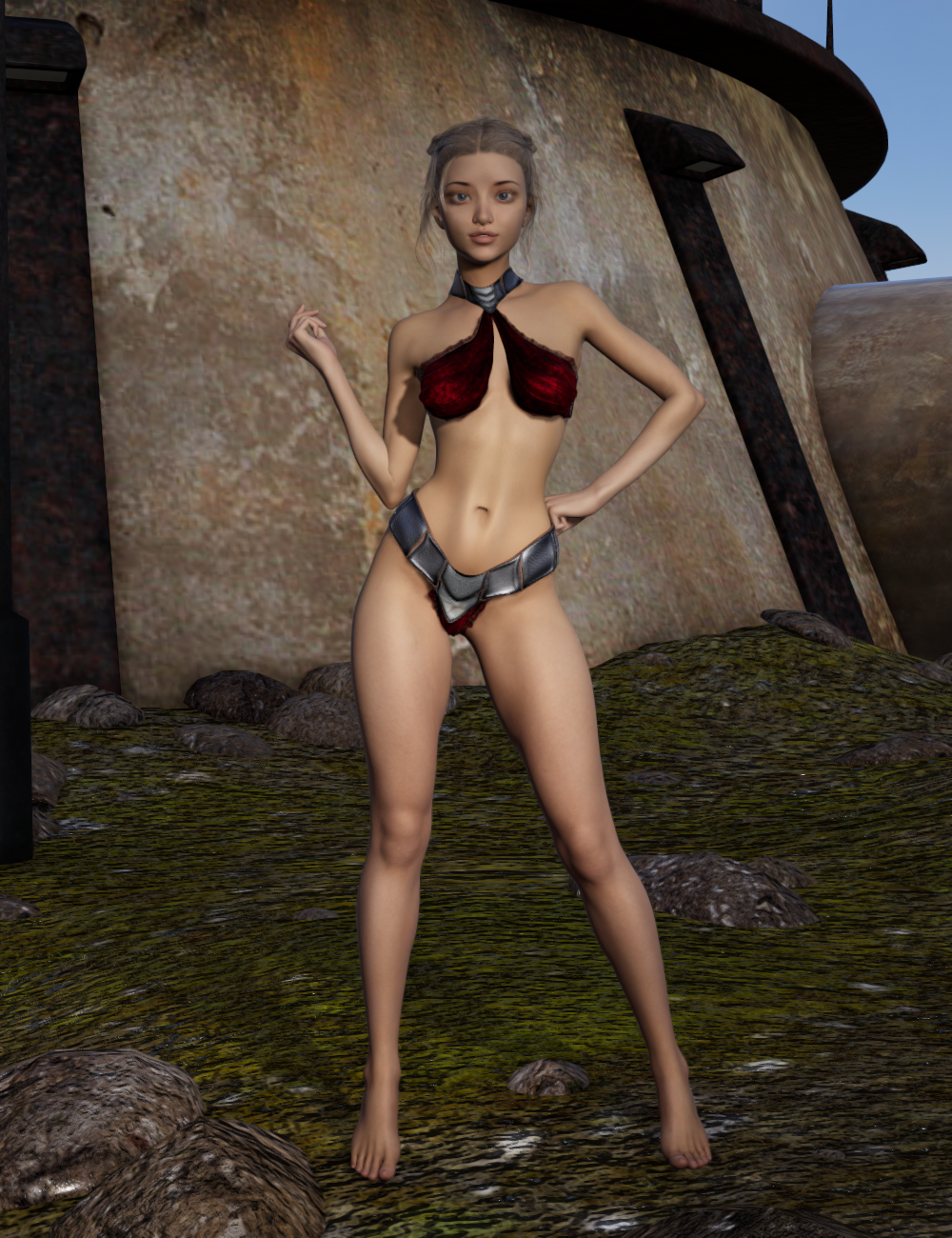
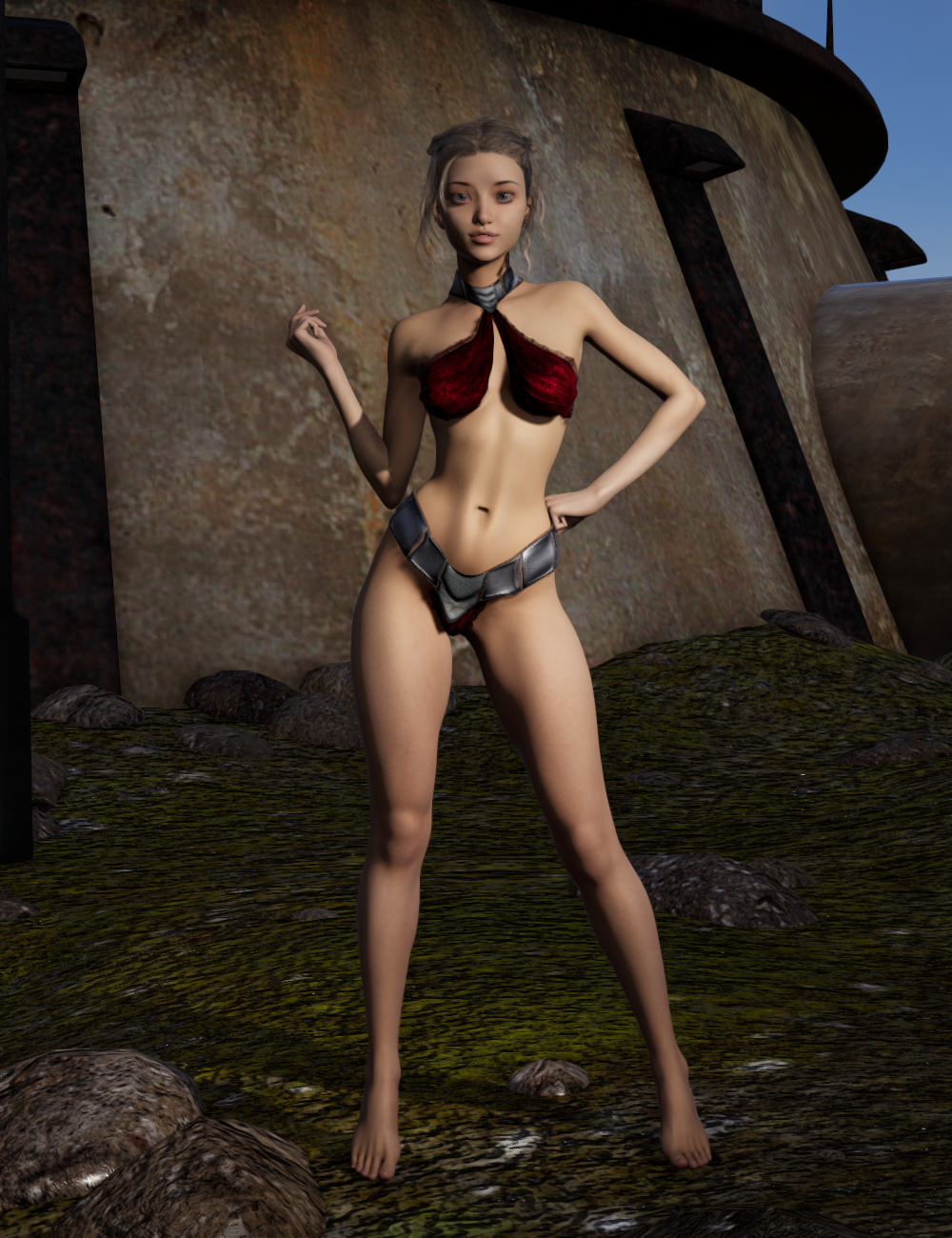
I also watched this video which probably helped quite a bit (Thank You, Kindred Arts for the walkthrough and great tips!).
 AIUTO...CHI CONOSCE L’ITALIANO? PARTE DODICI
Gente, nel caso vi fosse sfuggito: -20% sulle gift cards ai PC+!
Da quel che vedo, al momento tutto quello che è legato al PC+ è rotto, non funzionante, fuori servizio o impossibile accedervi.
Evito ma grazie della segnalazione.Inoltre sembra che per poter sfruttare ancora il PC+ si debba annullare l'iscrizione e ricomprarla, credo a causa del nuovo sistema di pagamenti che hanno implementato... Il mio scade a metà del prossimo mese, forse avranno risolto per allora, per cui aspetto.
Hai fatto bene. Ho preso una gift card e mi è arrivato un codice non funzionante. Devo contattare l'assistenza, uffa.
@Imago vorrei sapere cosa ne pensi di tutte queste nuove cose!!!
https://www.daz3d.com/dforce-sy-rigged-shadows-filament
Questo mi intristisce molto... Significa che nemmeno Filament può essere usato per le animazioni.
Ci avevo sperato...
Nel tutorial sul loro canale (è nascosto, ma c'è il link nella promo di Filament di oggi), fa vedere che se metti hidden parameters/value compaiono le ombre, senza quel prodotto.
Se nelle impostazioni passi le texture da performance a quality, questa volta la qualità migliora un bel po'.
Daz Studio Pro BETA - version 4.15.0.30! (*UPDATED*)Seems the problem with Daz not closing properly is now also in the official release, It is still in the task manager even after quitting, This also means that it will not save settings made,,, this needs to be fixed!
?? That issue has been around for a long time.
That said, first thing after installing this Beta, clicked exit program and it instantly cleared out of task manager. No delay. If have bunch of stuff in scenes it will take time to clear out. More stuff - the longer. Force-closing it (though not officially recommended) still holds changes like filament vs iray preview vs texture shaded and several other settings. Or it does on my PC setup.
If you are having issues for saving DS settings a workaround you could make make changes with an empty scene in background so no real amount of memory is used. Should close ASAP.
Seems like you cant even download it, everytime I hit that magical download button it takes me to my product library without it being there.
For comparison, my DIM DL & install was smooth and normal. Try DIM. And if you are trying with DIM, then you may want to check the thread in the commons for store issues. There's chat this evening about DIM DL's being an issue for some people still unfortunately.
AIUTO...CHI CONOSCE L’ITALIANO? PARTE DODICIhttps://www.daz3d.com/dforce-sy-rigged-shadows-filament
Questo mi intristisce molto... Significa che nemmeno Filament può essere usato per le animazioni.
Ci avevo sperato...
Daz Studio Pro 4.14 - Highlights4.14.0.8 (November 10, 2020)
- NVIDIA Iray
- Integrated Iray 2020.1.1 (334300.4226); see this thread for more detail
- REQUIRES: NVIDIA Driver 451.48 (or newer) on Windows; see NVIDIA Driver Downloads
- NVIDIA recommends installing Studio Drivers
- Adds support for Ampere GPUs (SM 8.0 / GA100)
- Support for SM 3.X/Kepler generation GPUs has been removed - due to CUDA 11
- Support for SM 5.0/"Small" Maxwell generation GPUs are marked as deprecated - matching CUDA 11
- REQUIRES: NVIDIA Driver 451.48 (or newer) on Windows; see NVIDIA Driver Downloads
- Section Objects (Plane)
- Now uses the newer Iray implementation
- Added support for Caps
- Behaves like an opaque surface that closes the hole(s) created by intersecting objects in the scene
- Enable/Disable via Render Settings (NVIDIA Iray) > Section Objects > Section Caps Enabled
- Control color via Render Settings (NVIDIA Iray) > Section Objects > Section Caps Color
- ...
- Integrated Iray 2020.1.1 (334300.4226); see this thread for more detail
- Real-Time Rendering
- Added a real-time physically based rendering option to the DrawStyle Options menu in viewports
- Filament (PBR) - Implements the Filament renderer as a DrawStyle
- Requires: Windows (currently), 64-bit, OpenGL > 4.1
- Shader/Material Support
- Automatic translation of specifically named properties in the Iray Uber (MDL) shader, or any MDL-based Shader Mixer Brick Material, for real-time display
- Non MDL-based shaders are supported through automatic conversion to the Iray Uber shader - e.g., DAZ Studio Default (RSL), etc.
- Translated property names:
- Base Mixing, Diffuse Overlay Color, Diffuse Overlay Weight Squared, Diffuse Overlay Weight, Dual Lobe Specular Ratio, Dual Lobe Specular Reflectivity, Dual Lobe Specular Weight, Glossiness, Glossy Anisotropy Rotations, Glossy Anisotropy, Anisotropy Rotations, Anisotropy, Glossy Layered Weight, Glossy Layer Weight, Glossy Reflectivity, Glossy Roughness, Glossy Specular, Metallic Weight, Reflectivity, Refraction Weight, Specular Lobe 1 Roughness, Specular Lobe 2 Roughness, Top Coat Glossiness, Top Coat Roughness, Top Coat Weight, Bump Strength, Cutout Opacity, Diffuse Color, Diffuse Strength, Horizontal Offset, Horizontal Tiles, Multiply Specular Through Opacity, Normal Map, Opacity Strength, Vertical Offset, Vertical Tiles
- PBR Masked Threshold
- Root Transmission Color, Tip Transmission Color, Hair Root Color, Hair Tip Color, Base Roughness, base_roughness, Highlight Weight, Highlight Roughness, highlight_roughness, separation, Highlight Seperation, Highlight Separation, Root to Tip Bias, Root To Tip Bias, Root to Tip Gain, Root To Tip Gain
- Bump Mode
- Automatic translation of specifically named properties in the Iray Uber (MDL) shader, or any MDL-based Shader Mixer Brick Material, for real-time display
- Shadow Support
- The first six (6) Spotlights
- Prioritized via Display > Rendering > Render Priority
- The first (1) Distant Light
- Prioritized via Display > Rendering > Render Priority
- To enable a given light's shadow, the value of Light > Shadow > Biased Render > Shadow Type must not be "None"
- The first six (6) Spotlights
- "Render" using this DrawStyle:
- Set the "Engine" option on the Render Settings pane to "Viewport"
- Set the active viewport DrawStyle set to "Filamanet (PBR)"
- ...
- Added a real-time physically based rendering option to the DrawStyle Options menu in viewports
- Singleton Option Nodes
- Environment Options
- Scenes that contain render settings will automatically cause this singleton node to be created/replaced
- Application of a Render Settings Preset will cause this singleton node to be created/replaced
- The first render performed with the NVIDIA Iray renderer will cause this singleton node to be created
- Create > New Environment Options Node... will cause this singleton node to be created/replaced
- Properties on this node are displayed in the Render Settings pane when the "Engine" option is set to "NVIDIA Iray", in the Draw Settings pane when the DrawStyle is set to "Filament (PBR)", and the Parameters pane when selected
- ...
- Tonemapper Options
- Scenes that contain render settings will automatically cause this singleton node to be created/replaced
- Application of a Render Settings Preset will cause this singleton node to be created/replaced
- The first render performed with the NVIDIA Iray renderer will cause this singleton node to be created
- Create > New Tonemapper Options Node... will cause this singleton node to be created/replaced
- Properties on this node are displayed in the Render Settings pane when the "Engine" option is set to "NVIDIA Iray", in the Draw Settings pane when the DrawStyle is set to "Filament (PBR)", and the Parameters pane when selected
- ...
- Filament Draw Options
- Create > New Filament Draw Options Node... will cause this singleton node to be created/replaced
- Properties on this node are displayed in the Parameters pane when selected
- ...
- Environment Options
- Animation
- Addressed an issue where modifier animation data (e.g., morph, dForm, bulge, legacy joint bending, legacy rigging properties, etc) were omitted when saving a scene
- Timeline Pane
- Addressed issues relating to display of keyframes for Other (O), Alias (A) and Hidden (H) property types
- ...
- aniMate 2/Lite Pane
- Made improvements to efficiency and stability
- Addressed an issue where the playrange of the scene was being modified even when the pane was not visible or in use
- ...
- Shader Mixer
- ...
- ...
- General Interface
- Relabeled the OpenGL related entries in the "Engine:" selector on the Render Settings pane
- "Basic OpenGL" is now labeled "Viewport"
- "Intermediate OpenGL" is now labeled "Multi-pass OpenGL"
- The introduction of DrawStyles that are not necessarily OpenGL based (e.g., "Filament (PBR)"), but can be used to perform a "render"' prompted this change
- Updated default layout files
- Recommend clicking the Window > Workspace > Update and Merge Menus action
- Relabeled the OpenGL related entries in the "Engine:" selector on the Render Settings pane
- Logging
- Extended logging of application starting/closing processes - additional information to help identify/isolate which parts of starting/closing the application are having the greatest impact
- Scripting API
- Made additions in various areas; see the Change Log for more detail
- Fixed bugs and/or made improvements in various areas; see the Change Log for details
Reality LuxrenderIt seems you need to configure Reality for your hardware. Read & follow the setup instructions in the Reality PDF you received with it's purchase. Reality is not near so straight forward to use with DAZ Studio as 3DL, iRay, or Filament are.
Here is a thread that gives strong hints at the cause of the problem:
Daz 3D is part of

Connect
DAZ Productions, Inc.
7533 S Center View Ct #4664
West Jordan, UT 84084Licensing Agreement | Terms of Service | Privacy Policy | EULA
© 2026 Daz Productions Inc. All Rights Reserved.