-
Head Injury Bandage?
I don't have these, but would expect them to autofit reasonably well: https://www.daz3d.com/bandage-bundle-for-victoria-4
Worth looking out for the next time there's a good sale on V4 stuff.
Noska 8.1Cybersox said:
sid said:
She only comes with painted on brows, no hair or attachments. There is a no-brow option and I've used Tasha's eyebrows for these test renders. I think the fine hairs belong to Victoria.Yeah, it's become increasingly annoying how many of the advertised "special features" of the recent DAZ figure lines are failing to come as standard issue even on DAZ's own in-house products. Coupled with how unflattering the promotional images have become, and the increasing inclusion of old products and completely unrelated items in the bundles, and it really gives the impression that, behind the scenes, everything is getting very slap-dash and thrown together.
Unrelated is obviously a matter of taste, but the increasing inclusion of older items in the bundles is certainly not true that I can see.
Noska 8.1sid said:
She only comes with painted on brows, no hair or attachments. There is a no-brow option and I've used Tasha's eyebrows for these test renders. I think the fine hairs belong to Victoria.Yeah, it's become increasingly annoying how many of the advertised "special features" of the recent DAZ figure lines are failing to come as standard issue even on DAZ's own in-house products. Coupled with how unflattering the promotional images have become, and the increasing inclusion of old products and completely unrelated items in the bundles, and it really gives the impression that, behind the scenes, everything is getting very slap-dash and thrown together.
How to best organize my library starting from scratch?I use multiple runtimes in DS personally. I have about 20 on average, and hook and unhook them as necessary (I keep content sets so it's quick). You can install directly to these libraries from DIM as well. The setup takes a little bit, but it's worth it. I have separate runtimes for Base Genesis, Base Figures (Victoria, Michael, Aiko, etc), Characters (I actually have about 5 runtimes for characters), My Products (stuff I've made in my Daz store), Hair, Clothes, Environments, Props, Lights, etc, etc, etc. Freebies from other places get their own library as well as products bought elsewhere. I also make very liberal use of link files.
Noska 8.1Skipped over Alex Capital, but picked up Noska. There's some colours in her skin I really like, and the sculpt of the legs and torso was interesting.
Not enjoying the arm sculpt, particularly the forearm anatomy that has a pancakey kind of flatness I'm having trouble posing. I might just need to play around a bit more. With the eyes the lacrimal area and tear line seem a little flimsy but it is not bothering me enough that I would return her.

She only comes with painted on brows, no hair or attachments. There is a no-brow option and I've used Tasha's eyebrows for these test renders. I think the fine hairs belong to Victoria.


Heavy makeup.

With Kayo and some new toys.

With Jinx
AIUTO...CHI CONOSCE L’ITALIANO? PARTE TREDICIImago said:
Silvhe said
Ho alcuni orologi da polso che risalgono all'era di Victoria 4 che uso tranquillamente anche con G8 proprio con questo metodo, è vero che c'è da lavorarci un po' ma i rusultati sono ottimi
Non dirmi che fai il fitting ogni volta.

Puoi farlo una volta sola e usarlo instantaneamente su qualsiasi personaggio, ti basta caricare G8 a zero nella scena, posizionare e ridimensionare l'orologio nel modo corretto, nascondere G8 e poi esportare l'orologio come OBJ, poi lo reimporti e con il Transfer Utility crei il nuovo prop. Lo salvi nella libreria e sei felice.
Interessante metodo, lo devo provare
XTransfer Module 1- Genesis 3 to Genesis 8 Morph Converter (Commercial)Zev0 said:
And you sure you have version 1.3 of the product?
I do have version 1.3. I tried uninstalling and reinstalling xtransfer with DIM. I still get the same result. I noticed the transfer process can complete with G3 female based morphs, but the G8 female morph is distorted. I still get the resource error message at 85%, but I can click OK and the processs completes.
G3 morphs that are Victoria 7 based tend to get a resource error message that freezes the transfer at 85% and I can't complete the process. The G8 morph under this situation is more distorted than the above situation.
AIUTO...CHI CONOSCE L’ITALIANO? PARTE TREDICISilvhe said
Ho alcuni orologi da polso che risalgono all'era di Victoria 4 che uso tranquillamente anche con G8 proprio con questo metodo, è vero che c'è da lavorarci un po' ma i rusultati sono ottimi
Non dirmi che fai il fitting ogni volta.
Puoi farlo una volta sola e usarlo instantaneamente su qualsiasi personaggio, ti basta caricare G8 a zero nella scena, posizionare e ridimensionare l'orologio nel modo corretto, nascondere G8 e poi esportare l'orologio come OBJ, poi lo reimporti e con il Transfer Utility crei il nuovo prop. Lo salvi nella libreria e sei felice.AIUTO...CHI CONOSCE L’ITALIANO? PARTE TREDICIAnfy said:
Una domanda semplice semplice, così "qualcuno" si chiederà che programma uso (scherzo, eh!
 ): quando carico, che so, un accessorio di vestiario - diciamo un nastrino al collo - su una figura (G8F) e poi lo voglio muovere indipendentemente, non me lo fa fare anche dopo che l'ho "unparented" dalla figura base: mi compare invece un (accennato) parallelepipedo nella viewport e si muove quello, ma non l'accessorio stesso.
Non so se mi sono spiegato: ma cosa mai debbo fare?
Grazie!!!
Non dipende dal parent quanto se è "fittato" alla figura (se è attivo il "fit to"),se non togli il fit non lo sposti. In questi casi in genere non applico il fit, apparento la cosa all'elemento anatomico cui deve essere attaccato e poi lo sposto come mi pare. Ho alcuni orologi da polso che risalgono all'era di Victoria 4 che uso tranquillamente anche con G8 proprio con questo metodo, è vero che c'è da lavorarci un po' ma i rusultati sono ottimi
Edit: ti aveva già risposto Kainjy
 PBR to Original Uber converter? But discovered you can use PBR in 4.14 beta!
Same lighting Victoria 8.1 skin out of the box. I don't know if I'm crazy but to me the 4.14 beta renders look better than the 4.15 renders that all look too dry and like plaster! The eyelashes and eyebrows look awful, but that's another story... Anyway so glad I found I can render PBR skin in 4.14 beta, crash free and I think looking better than 4.15.Second one has quick mild postwork.
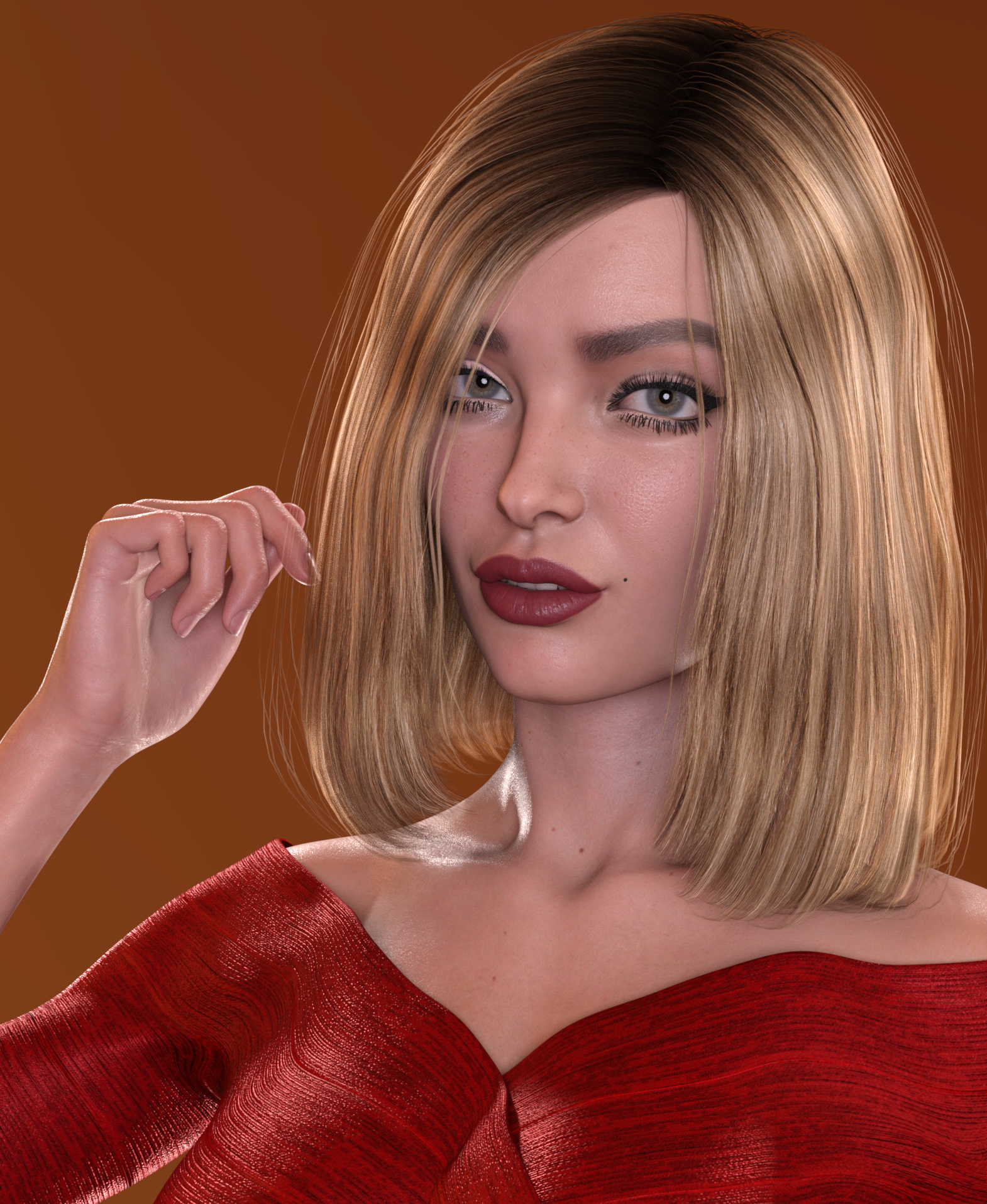
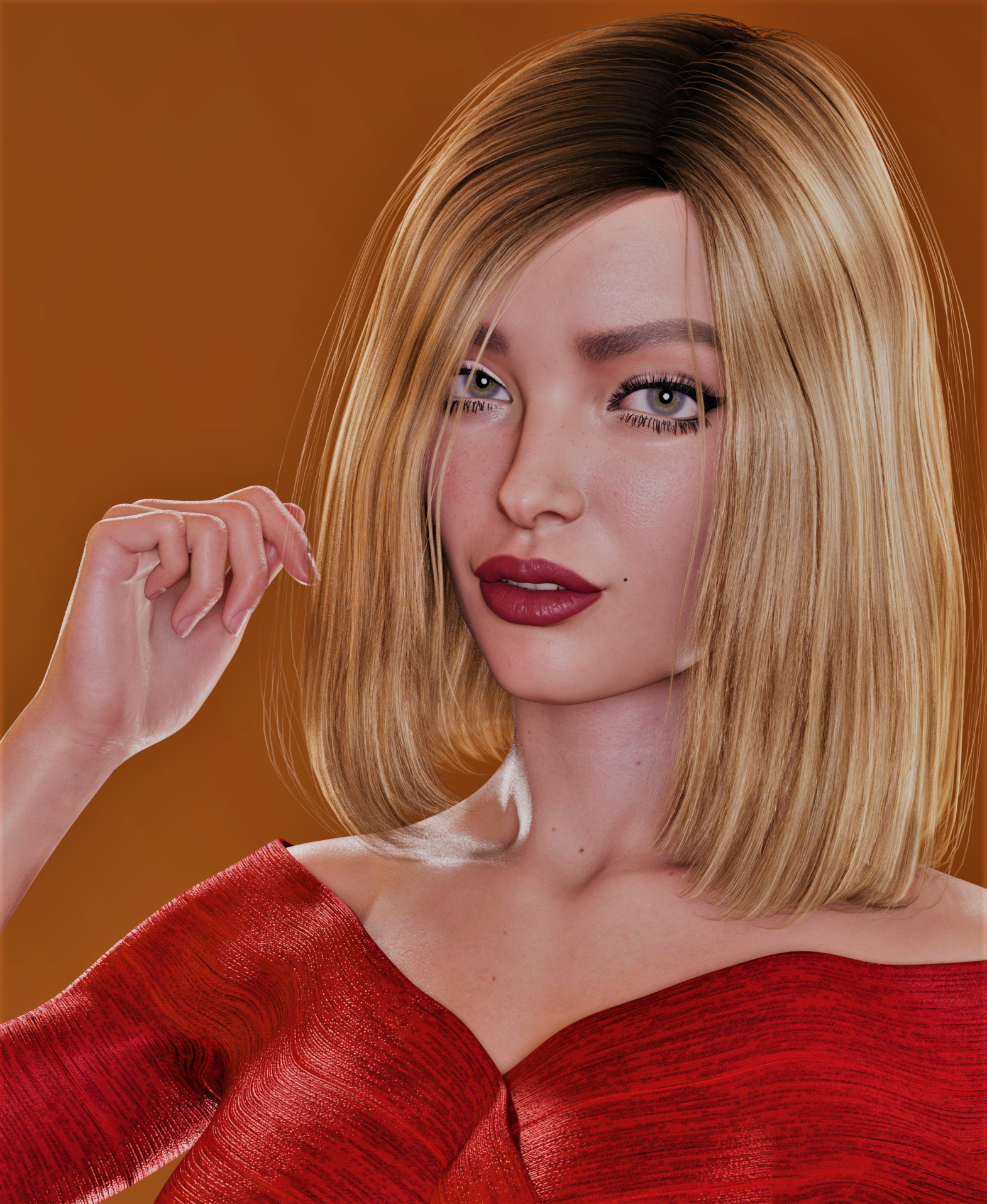 PBR to Original Uber converter? But discovered you can use PBR in 4.14 beta!
The Uber shader and the PBRSkin shader are both PBR shaders and they both use PBR textures. Claiming one of them is PBR and one isn't just causes unnecessary confusion.
You can apply the Uber shader to Victoria 8.1 all you want. You just need to swap the texture maps. The PBRSkin shader uses a roughness map instead of a specular map, and it has a different kind of bump mapping. But the roughness map is just grayscale information, so you can plug it into the specular and bump slots and just tweak the values and contrast until it looks right. Just have a G8 figure with skin you like handy and copy over all of the relevant settings.
PBR to Original Uber converter? But discovered you can use PBR in 4.14 beta!Wonderland said:
FSMCDesigns said:
You can use G8 textures on G8.1 without any converter. G8.1 has the UVs of G8 built in. Now getting the G8.1 figure to work outside of 4.15 might be the bigger issue.
But if I want to use Victoria 8.1’s textures with the Uber shader, how do I do that? You mean G8.1 won’t work at all in 4.14?
You can use Vicky 8.1's textures with the Uber Shader -

It took me quite a bit of tweaking with the shaders to get it looking right (and to me, she actually looks better with the uber shader). The dual-lobe settings required the most tweaking, and I had to invert one of the maps to get it working right. I've tried with other 8.1 skins and have had varying degrees of luck. There is no one master formula to convert them...it just takes experimentation.
XTransfer Module 1- Genesis 3 to Genesis 8 Morph Converter (Commercial)Zev0 said:
Did you retry the morph? What morph is this so I can try on my side.
I've retried the morphs. Either Genesis 3 female or victoria 7 based don't work for me. The base Victoria 7 morph even doesn't transfer correctly.
PBR to Original Uber converter? But discovered you can use PBR in 4.14 beta!FSMCDesigns said:
You can use G8 textures on G8.1 without any converter. G8.1 has the UVs of G8 built in. Now getting the G8.1 figure to work outside of 4.15 might be the bigger issue.
But if I want to use Victoria 8.1’s textures with the Uber shader, how do I do that? You mean G8.1 won’t work at all in 4.14?
What is the name of this old G8F character?According to what it says in the bottom left of the image you posted, her name is "Nicole / Victoria 8."
However, while I found a few Nicoles for G8F, both here and at Rendo, none of them look (to me) like the girl in the picture. Maybe she's no longer available?
You could try contacting outoftouch directly at rendo from here: https://www.renderosity.com/rr/mod/bcs/vendor/outoftouch , though if they live up to their pen name they may not answer...
Import file problems?frank0314 said:
That's no different than an outfit saying "Required Products: Victoria 8.1" to use the clothing.
The outfit would still be a complete item with geometry, not quite the same.
Now the geometry that is supposed to be modified for the Shepard is missing with the missing Dog 8
Off Topic Thread #2Earthquake in Victoria Australia, just stuff damaged AFAIK
 DE Heidi - Two Figures?
Richard,
I see the additional information provided. However, i still dont quiet understand what it implies? Is this of those "X for Y" scenerios. For example, "Debby for Victoria 8". Is there some Dark Elf figure, and Heidi works with that too or something?I think, that is what it means :) I dont know. I am still very much on the learning side of things, he he :P
Weird Bug with custom Victoria 8 model.I have such a strange issue that I can't find anywhere else on the forum. Basically I am in texture shaded in the normal viewport , things are working great for like 5 seconds then my model with freak out , I am not touching anything when it does it. Here is what it looks like:
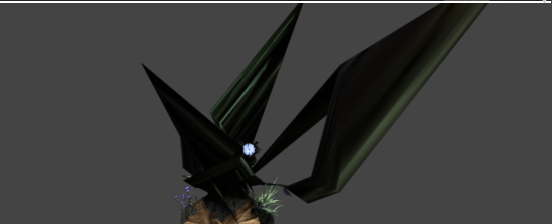
I tried restarting, Moving her to a different scene, Updating my graphics drivers, Removing parts from her. What makes things weirder is the fact if I move the model the artifacts will dissapear but then I have like 5 seconds before it comes back. It will show up messed up in a render too when it happens. any help would be appreciated. Many thanks!
Ultimate PBRSkin Manager (Commercial) ** 2 additional utility scripts available here **I think the best thing you could do if you don't know anything about skin shading in Daz Studio is to start from an existing texture/shader set, then replace existing maps by your own maps, then use PBRSkin manager to tweak and optimize the skin properties to your need.
For instance, (in order to start with coherent settings) load Victoria 8.1 material on your figure(***), and replace, using the Surfaces Editor Tab, all the base color, translucency color, specular lobe roughness, AO weight (if you have one), and normal maps (if you have them too) by your own maps. If you have bump maps, you must place them in the "Base Bump" property, then the choice is up to you to keep Detail Normal Map and Detail Specular Roughness Mult (since you already have a bump map, these might be redundant).
(***) Please note that if you already have your figure with your own maps on it in Daz Studio, you can also load ONLY the material properties of Victoria 8.1, without loading V8.1 maps, by CRTL + double clicking on Victoria material.
Once the texture maps are placed and the material is using the same other properties (same values, not same images) as V8.1 for instance, launch PBRSkin Manager and begin to tweak your values by themes, depending on what you want to work on (skin tone, translucency, gloss and details), you'll easily see if you go in the right direction or not since the display is interactive if you start with NVIDIA Iray as the viewport style.
Daz 3D is part of

Connect
DAZ Productions, Inc.
7533 S Center View Ct #4664
West Jordan, UT 84084Licensing Agreement | Terms of Service | Privacy Policy | EULA
© 2026 Daz Productions Inc. All Rights Reserved.