-
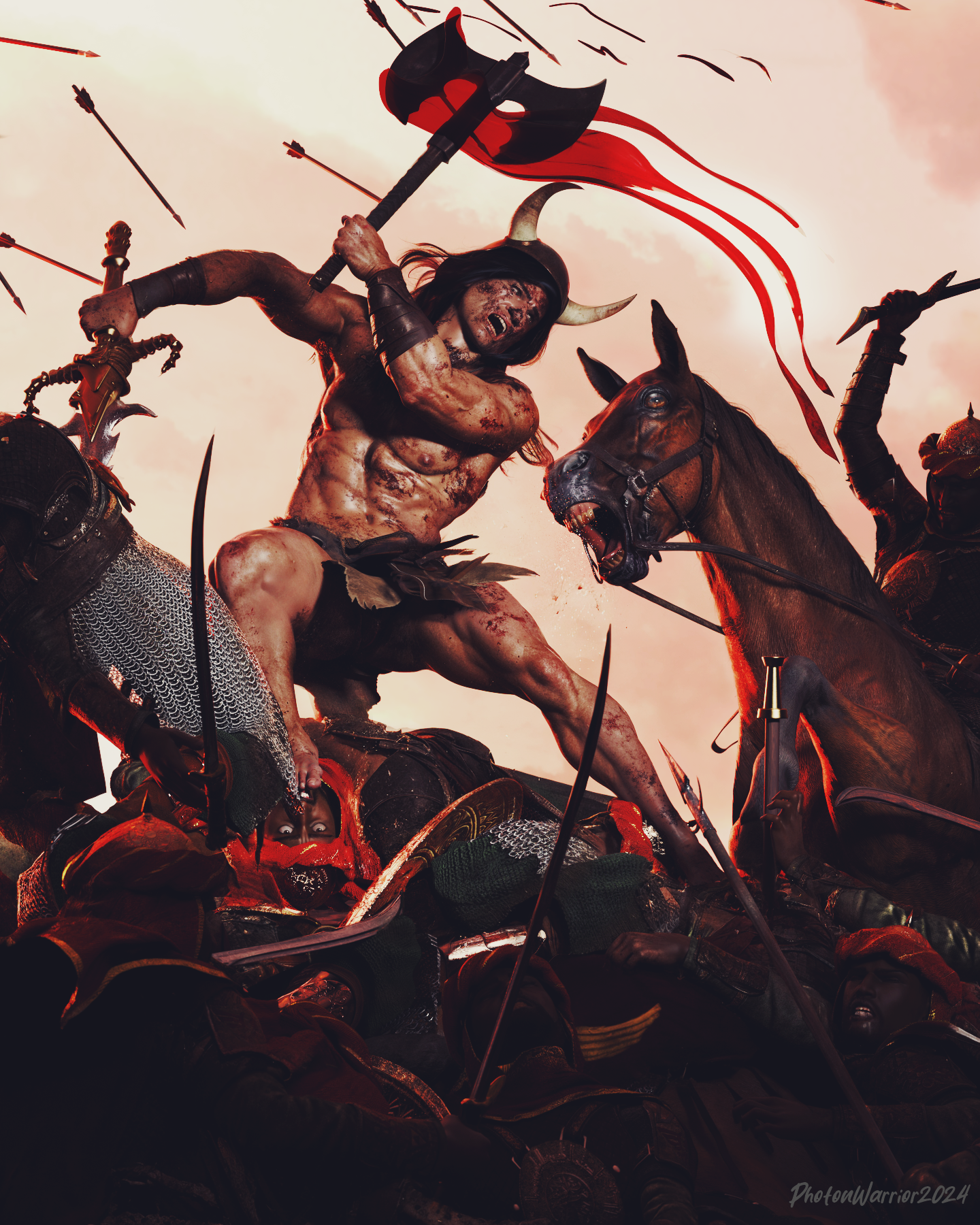
Epic Battle Render Contest (This Weekend!)
Main character is G9 using Liam HD as base mixed with Swole and some other face morph tweaks. I still prefer UBER shaders for skin so skin textures are still Liam but the shader is a conversion back to the older one. Gave him geoshell M3D's bloody skins, which is amazing, TYVM for that. New custom normal maps. Blender pre work to fix stuff like reins and armour and blood effects and clothing. Post work in photoshop using some action filters to take out the Daz fake looking CGI specular and add more harsh contrast and skin tones. 85mm lens from https://www.daz3d.com/ig-photographers-toolbox-35mm-cameras always my main goto for best cameras.
 What do you do with cloth in extreme position of pJCM?
I use the move tool in Modo to fix the mesh, grabbing the polygons and moving them into place. If I use the smoothing modifier I will set it to not collide against the figure because it can cause unexpected issues and make it even harder to fix in a modeler (when the mesh is squished between the body and the arm it can really get distorted) and also with rolled edges/trims pushing through the outside of the cloth because its closer to the figure and pushed a different amount as the mesh further away from the figure.
If you find it challenging to do the full morph in one go, you can do them incrementally... - bend the arm half way, fix that, import the morph, dial it up and pose the arm to the full bend, then export with the morph active. Delete the halfway morph from the clothing. Fix the morph on the full bend and import :)
G8 Eyes Move In Opposite Direction Of PosePlease see attached pics. The eyes are supposed to be looking left of the figure according to the pose in the first image, but, as shown in the second pic: they are looking to the character's right. Up and down is similarly reversed. I cannot find anything on why this is and Gogle searches come up fruitless. I cannot be the only person running into this issue. Any suggestions would be appreciated. Chracteris G8 with a V4 converted face morph (Jane from RenaPD, I think.) Used Transfer for face shape conversion.
Morph with GeograftTry having some more understanding from this thread firstly ... https://www.daz3d.com/forums/discussion/627141/creating-morph-for-the-figure-and-geo-graft-together
- DS cannot "guess" a delta but only get it (data of vertex position change) from OBJ file
- The principle of making morphs on Base figure or geo-graft per se is explained in the above threadMarahzen's Musings on Creating Characters (and other matters)So here, at long last, is an image correlated to an actual scene in my story WIP.

As I mentioned earlier this thread, I've done almost no art related to the story since the first few weeks that I started using Daz. And sadly, I've done very little writing on the book in that time. I took this detour into art to create inspirational images intended for no one but myself, for a series of books that no one else will ever read, and somehow got sidetracked into buying the entirety of the Daz store.
So I did something today that I've never done before. I signed up for a writing session, which turned out to be a bunch of us working on our own during a Zoom session on whatever aspect of our current book that we wanted. Some people were writing, some were outlining. Once in a while we'd meet in the Zoom session for a quick chat. I ended up writing about 1,100 words on a new scene which I had some rough ideas for but hadn't done any work on yet.
I wasn't really sure what to expect so yesterday, I created this simple image representing the basic idea I had in mind for this scene I planned to write. This scene isn't really an accurate portrayal of the setting I ended up describing, but the base content - Mira, seen in earlier incarnations in images above, plots mischief with my main character while surveying paintings for sale. I've just realized that in all of this thread, I've never actually said much about my story or its characters, and I don't know if I meant to explore the story itself, or stick mainly with character creation in this thread. But either way, she has a lot of names. Mira here knows her as Khara; the boys in the outdoorsy/horse images knew her as Tai. Mira is planning to get a splash of attention in buying this painting, while Khara has something much darker in mind in going along with the game.
In terms of character creation, there's no huge changes in my process since my last comments on this thread. Both of these characters are created from the stock G9 figure, to which I applied the Face Transfer 2 shape saved for each of these characters, then some amount of Face Transfer Shapes to fix the profile. Both of these characters have tiny bits of random G9 female character shapes, which I have multiple "random shape" generators to do. I do that not to make my character look like some other commercial character, but just in small doses - like 5-10% - just to break up the "FT2-ness" that is somewhat inherent in most FT2 shapes. (I used 3D Universe's version here: Character Mixer Version 2 for Genesis 8 and 9 | Daz 3D) After that, I've applied the materials of G9 characters that I thought had good underpinnings for the real textures of these two characters, then replaced the base color mat files with the FT2-derived textures.
Here's a closer look at the characters as I created them in this scene:

 Morph with Geograft
Hi, wenn I create and load morphs for a geografted figure with morphloader pro, the vertices in the base figure that are hidden do not receive any delta value. Is there any way to make the system "guess" a delta for these? It turns out that the adjust rigging function in joint editor doesnt work well anymore in this case.
So in case of gegrafting replacement legs which hides large part of the original ones, what is the correct workflow to make morphs for this combination?
Thanks.
How remove watermark from DAZ face transfer----SOLVEDscouseaphrenia_c6c3d26832 said:
Richard Haseltine said:
The original is for Gensis 8.1, Face Transfer 2 is for Genesis 9 - they do not overlap (and the original does not get the enhanced features of 2, even when both are installed).
So how do I remove the watermark in FT2? There was no mention of needing a required product to use it?
The watermark is removed by having a license for the tool (Face Transfer for Gensis 8.1, Face Transfer 2 fro Gensis 9) - a license for Face Transfer has no effect on being able to save a Genesis 9 transfer and vice versa.
AOBB's Classic Hollywood Stars G9 mega bundle. 19 head morphs. No materials nor textures.Elliandra said:
So I haven't been in a render mood in a long time but was playing around with AOBB's Audrey Hepburn morph over the weekend and came up with this.

Nicely done.
How remove watermark from DAZ face transfer----SOLVEDRichard Haseltine said:
The original is for Gensis 8.1, Face Transfer 2 is for Genesis 9 - they do not overlap (and the original does not get the enhanced features of 2, even when both are installed).
So how do I remove the watermark in FT2? There was no mention of needing a required product to use it?
How remove watermark from DAZ face transfer----SOLVEDThe original is for Gensis 8.1, Face Transfer 2 is for Genesis 9 - they do not overlap (and the original does not get the enhanced features of 2, even when both are installed).
How remove watermark from DAZ face transfer----SOLVEDSo you need to buy face transfer unlimited as well as face transfer 2? (Which I have just bought.)
AOBB's Classic Hollywood Stars G9 mega bundle. 19 head morphs. No materials nor textures.So I haven't been in a render mood in a long time but was playing around with AOBB's Audrey Hepburn morph over the weekend and came up with this.
Dforce simulation starting from a morphed garmentIt works! To help anyone else, here is the full process :
- do the first simulation and stay at the last frame
- unfit the garment
- select base resolution
- export as .obj
- refit to the character and make sure garment is still selected.
- launch morph loader pro
- choose primary root under "filter object" and leave the other settings. Accept.
- Set the morph you created to 100% in the parameters tab.
- Simulate the second animation from the former last frame.
Dforce simulation starting from a morphed garmentlinoge8888 said:
How to ? I export the .obj with base resolution, import it back as a morph with morph loader pro, launch a new simulation from 100 (as expected, it autofits back the garment) but applying the morph on frame 100 doesn't fit the character at all.
you need to unfit it and export it at frame 100, the drape will likely look weird as not A posed but once fitted at that pose should look OK
I do this for seated morphs all the time and in addition use the attenuate feature to restrict it to skirts etc
Dforce simulation starting from a morphed garmentHow to ? I export the .obj with base resolution, import it back as a morph with morph loader pro, launch a new simulation from 100 (as expected, it autofits back the garment) but applying the morph on frame 100 doesn't fit the character at all.
Dforce simulation starting from a morphed garmentYou can't start a new simulation from the last frame. *)
You have to add frames to the timeline, do your changes in those frames, and start simulation from frame 0.
*) You can export your clothing and import as a morph and use that as starting position of a new simulation.
Limited Time Freebies Discussion ThreadG3 has a lot to recommend it. Not least is its compatibility with and easy transfer to g8, if desired
November 2024 - Daz 3D New User Challenge - Materials and next level KitbashingBrian&Alicia said:
edit: i'll try to get the wet look too. can't promise it'll look good. but, i'll do what i can with postwork. otherwise, i don't have the right wet texture overlays for that look in daz. one of these days i'll invest in a drawing tablet, and fix most of my editing issues.I haven't put much into editing or creating texture maps, I've modified some and created some details, but seeing the image with the frosty look of clothes, with what I've learned it seems feasible to me. As they are more or less large areas of the surface of the clothing, the texture map is easier to create and place on the UV map, than when making a very specific detail in a very specific area, which I suppose with a graphic palette and practice with it is common. In addition, there is the iray decal node, I have not used it to make any image nor have I tried it much, but there is a tutorial on that and being a static image that does not have to follow any morph or movement with deformation perhaps it can be useful and I think that with the work you have already done,If you have the clothing frost in an image file on a separate layer you can apply it directly to the Iray Decal Node shader, without having to make a new texture map focused on the UVs.
Using the clothing frost map, it's relatively simple, without having to use a palette, make the transparency, zoom in to make a Bump, the humidity map that maybe can be to give it a little bit of a dark tone around the frost, and put it in some shader channel, like the diffuse overlay or the other way around the map with some wet touch on the diffuse and frost on the overlay, That thing about the channels for me still has some mysteries.Best Budget CPU and Motherboard for RTX 4090 in DAZ Studio?Pretty much any cpu will do for daz studio as it doesn't use multithreading, so the difference with a powerful cpu is minimal. As for handling the 4090 same, any cpu will do. A fast cpu is needed for real-time rendering as games, but iray doesn't require that, the time it takes to render is slower by far than what it takes to transfer the scene.
Daz Studio BETA - version 4.23.0.4! (*UPDATED*)ChangelingChick said:
Richard Haseltine said:
ChangelingChick said:
crosswind said:
DoctorJellybean said:
crosswind said:
UV Set is not saved in the Material Preset of a geoshell, as well as in Hierarchical Material Preset. There's no such issue with Figures / Props.
Edit: Besides 4.23 GR / PB, same issue happens in 4.22.0.16 ...
Could you please provide steps you took so I can try and replicate. Thank you.
As what I showed in mypost, the first screenshot. Can you see that ?
Load a geoshell on a G8F, choose a UV Set on a Surface, save a material preset with the surface and UV Set selected. Thanks!
Geoshells don't inherently have any UV's. They get them from the figure they're attached to. The best way to do that would be to set up the materials on the figure, then save them out from that and apply them to the geoshell (or edit the file).
GeoShells still have thje UV sets available, and those can be set independently from the base.
Available, yes, but not as part of themselves. That data is on the base. Geoshells are dynamic and created from the base when they're made, so the data from the base is there, but they don't have UV's of their own. You can see this demonstrated by saving one as a new figure/prop asset. You'll notice there are no UV (or morph) definitions saved with it. The same geoshell that would cover a primitive cube would cover a G8F. Whatever the active UV is on the base is what the Geoshell will come in with. You could do a postload script to change the UV after it's loaded though probably.
Thanks! Yes, I know UV map is made and saved on Genesis figure and then adopted by a geo-shell. But what I'm talking about is Material Preset...
I was making different UVs for a single geoshell to make it as a "modular shell garment" so as to have diffrent Styles / Materials, then I would set up Material Presets to change Styles and Materials on the shell. So the UV Set need to be changed by loading a Material Preset on the shell. And I think it's a very common demand... but Material Preset failed to save the value in UV Set slot.
Well, since there's the option of saving Geometry > UV Maps > UV Set in Material Preset Save Options dialogue, I thought it could've and should've got the job done. I've sent a ticket and the Daz guy reproduced the issue and thought it's a bug as well. And I believe it'll be easy to fix it ~~
BTW, standard Post Load script cannot do the job...because it also has to load a Material or Property Preset to change UV Set but they'd both fail... so I have to specifically write one ~~ If a Material Preset can easily get it done, I won't have to do so...
Daz 3D is part of

Connect
DAZ Productions, Inc.
7533 S Center View Ct #4664
West Jordan, UT 84084Licensing Agreement | Terms of Service | Privacy Policy | EULA
© 2026 Daz Productions Inc. All Rights Reserved.