-
CARRARA CHALLENGE #63: There be Dragons..... WIP
ed3D said:
UnifiedBrain said:
Yes, those DIM prompts are confusing to me as well.
Probably better to install the product manually. It has two main folders - Presets and Scenes - which can be merged into the Carrara program folders with the same names..
When that is done, you still need to go to your Carrara browser window and add the PhilW folder to your scenes menu.
~.~ And Thanx very much _ manuall install > instatlled right in _ just need to see this " the individual buildings bit " and how its' done +
+ and the First Renders -
Glad you got it sorted !!! Nightime Dragon flame attack by chance ?
CARRARA CHALLENGE #63: There be Dragons..... WIPUnifiedBrain said:
Part 3 - Haute Couture in Lizardland

What did you expect, alligator purses and snakeskin boots?
 These are civilized lizards, not cannibals.
The character is a kitbash of V4, Dragon Folk, and a second skin product (retextured) from Rendo. The tail ornament is a modifier applied to a Carrara primitive.
The runway bulbs are a Carrara basic object, rezoned with different shaders, and topped with a bulb using a light sphere effect (thanks to Wendy for the suggestion).
Carrara text is such a blessing! There is probably not a single Carrara tool that I value more.
No postwork.
Looking great, captures a magazine cover very nicely !!!
CARRARA CHALLENGE #63: There be Dragons..... WIPKhoe said:
Bunyip02 said:
Khoe said:
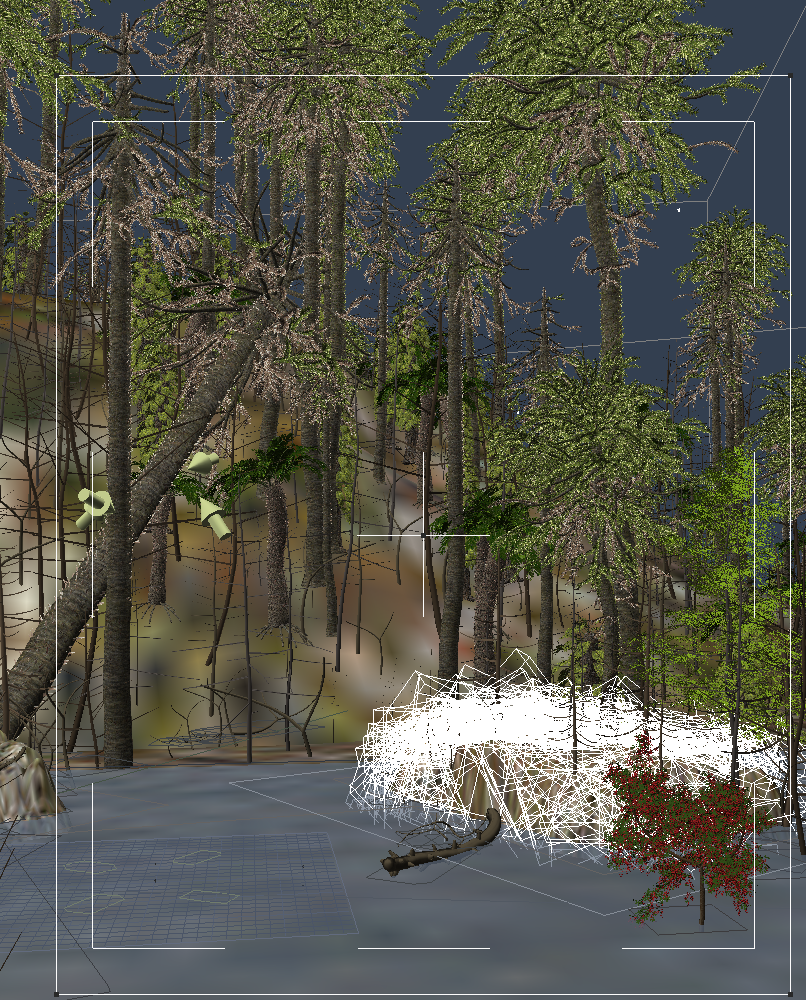 next step more Plants and Atmo
Scene is filling up very well !!! Are you using Carrara vegetation or other ?
I use a lot of plants from Carrara here are only the trees which have thorns on the trunk from the Daz Packet Prehistoric Plants. Carrara's plant editor is great once you get the hang of it. :). the supplied trees have to be adjusted first because they are much too small (3-5 years old, so let them grow. Trunk thicker and longer and more branches then adjust the size of the leaves.)
I normally use Howie Farke's or TangoAlpha's trees, sometimes play with Carrara's plant editor.
Has anyone made a movie with DAZ3d?WendyLuvsCatz said:
I just went with using DAZ content
the stuff I shared was 90% rendered in iClone, some Carrara and Twinmotion... and a bit of UE4 too
I almost exclusively used DAZ mesh as iC6 I import FBX not port to Character Creator like iC7 users can
Rosa used DAZ content in Blender AFAIK as well as DAZ studio
Definetely would love to see who else used the content. :
CARRARA CHALLENGE #63: There be Dragons..... WIPUnifiedBrain said:
Part 3 - Haute Couture in Lizardland
What did you expect, alligator purses and snakeskin boots?
These are civilized lizards, not cannibals.The character is a kitbash of V4, Dragon Folk, and a second skin product (retextured) from Rendo. The tail ornament is a modifier applied to a Carrara primitive.
The runway bulbs are a Carrara basic object, rezoned with different shaders, and topped with a bulb using a light sphere effect (thanks to Wendy for the suggestion).
Carrara text is such a blessing! There is probably not a single Carrara tool that I value more.
No postwork.
> very well done here +
CARRARA CHALLENGE #63: There be Dragons..... WIPUnifiedBrain said:
Yes, those DIM prompts are confusing to me as well.
Probably better to install the product manually. It has two main folders - Presets and Scenes - which can be merged into the Carrara program folders with the same names..
When that is done, you still need to go to your Carrara browser window and add the PhilW folder to your scenes menu.
~.~ And Thanx very much _ manuall install > instatlled right in _ just need to see this " the individual buildings bit " and how its' done +
+ and the First Renders -
CARRARA CHALLENGE #63: There be Dragons..... WIPPart 3 - Haute Couture in Lizardland
What did you expect, alligator purses and snakeskin boots?
These are civilized lizards, not cannibals.The character is a kitbash of V4, Dragon Folk, and a second skin product (retextured) from Rendo. The tail ornament is a modifier applied to a Carrara primitive.
The runway bulbs are a Carrara basic object, rezoned with different shaders, and topped with a bulb using a light sphere effect (thanks to Wendy for the suggestion).
Carrara text is such a blessing! There is probably not a single Carrara tool that I value more.
No postwork.
CARRARA CHALLENGE #63: There be Dragons..... WIPYes, those DIM prompts are confusing to me as well.
Probably better to install the product manually. It has two main folders - Presets and Scenes - which can be merged into the Carrara program folders with the same names..
When that is done, you still need to go to your Carrara browser window and add the PhilW folder to your scenes menu.
CARRARA CHALLENGE #63: There be Dragons..... WIPCentral Business District for Carrara
And this does'nt install gives an error _ Thanx
CARRARA CHALLENGE #63: There be Dragons..... WIPBunyip02 said:
Khoe said:
next step more Plants and AtmoScene is filling up very well !!! Are you using Carrara vegetation or other ?
I use a lot of plants from Carrara here are only the trees which have thorns on the trunk from the Daz Packet Prehistoric Plants. Carrara's plant editor is great once you get the hang of it. :). the supplied trees have to be adjusted first because they are much too small (3-5 years old, so let them grow. Trunk thicker and longer and more branches then adjust the size of the leaves.)
CARRARA CHALLENGE #63: There be Dragons..... WIPKhoe said:
next step more Plants and AtmoScene is filling up very well !!! Are you using Carrara vegetation or other ?
Iray render look in Carrara? or no way3drendero said:
Yes it is, here are some example Carrara renders that had the "Iray look" years before Iray was released for DS: https://www.daz3d.com/dynamic-edge-hair https://www.daz3d.com/dynamic-venus-hair Needs a good lighting setup. Here is something to buy/wishlist; https://www.daz3d.com/carrara-portrait-studio https://www.daz3d.com/animation-in-carrara-video-tutorials
Yes, that's exactly the style, but what exactly was set there. I think it has something to do with the light and then the dender setting. Or something was done differently with the material. but what?
Has anyone made a movie with DAZ3d?I just went with using DAZ content
the stuff I shared was 90% rendered in iClone, some Carrara and Twinmotion... and a bit of UE4 too
I almost exclusively used DAZ mesh as iC6 I import FBX not port to Character Creator like iC7 users can
Rosa used DAZ content in Blender AFAIK as well as DAZ studio
CARRARA CHALLENGE #63: There be Dragons..... WIPBunyip02 said:
ed3D said:
So , how does "one" have all these Plants like bushes , flowrs , grass and such _ where these from ??
- have'nt seen any extras sets in Shop , like there is for Bryce example : Xfrog Packs
or have just over-look them - Thanx
As has been said, vegetation from the Carrara made scenes is very useful. I exported my Bryce Xfrog packs as obj and imported them into Carrara. I also had a number of Xfrog freebies that I imported into Carrara.
Do a search for Plants in the DAZ3D shop :- https://www.daz3d.com/catalogsearch/result/?q=plants
Poser plants, some of the offerings at Rendo ain't cheap, I usually buy when there's a sale on.
Lisas_Botanicals - Rendo
Flink - Rendo
ShaaraMuse3D - Rendo - has environment sets that include vegetation
Dinoraul - RendoThere are also a number of plant programs, one I used was ngPlant - http://ngplant.org/
I loaded the extras from Models, exported as obj and imported into Carrara
_ Thanx Very Much _ have the Bryce Xfrog packs ( all 3 )
& just took that Xfrog freebies , where an Example/Trial/Demo kind of thing -
Did an search for Plants in the DAZ3D shop, But only looked for Carrara& has reminded , to look Also for D-Studio ; so , i did : ( have some & some that are iRays )
the only plant programs have looked at are Bryce , Carrara & e-on Vue ( have'nt used any Plants Only ones ) does'nt seem lik anyways_ seems lik there was a coupl of Blender add-ons , but did'nt really look at them too much +
Is It Possible to Change Name of Layer in Layer List Shader?Diomede said:
@SileneUK - wow, that is a great looking environment. Thanks for the tips and the screenshots. You are way ahead of me. Love how you mix in plant varieties on each own's replicator. Sometimes, I do something similar by duplicating terrains and then using the 3D paint tool to create the replicator placement shaders.
@RUUDL - wow,I had no idea there was a check box to eliminate the 'none' channels. Will be using that a lot going forward. Thanks.
@Headwax - thanks for the comment. I need to revisit some of EvilProducers freebies. He did wonders with procedural textures. I am currently limited to my laptop so do not have access to many of the texture resources I've accumulated over the years. My animation project is almost entirely procedural shaders thus far. I should be back to my main PC before the new deadline,so may get a chance to update shaders.
Ted, I am not clever enough to use the 3D paint tool. I just bugger it up no matter what I try to use it for. Even though Dart had posted some very explicit instructions a few years back. So I make maps in PS instead.
But....deconstruction is my best Carrara friend if there isn't a 'tut for that!' Love the tickbox option.
 SileneHow the heck do you download this software?!
Horo said:
Bryce, like Carrara and Hexagon cannot be installed with Studio tools like DIM etc.
Use the link MelanieL posted above. There is also a link to this PDF that ought answer all questions - if you miss the PDF, here it is: https://horo.ch/docs/mine/pdf/BryceContent_v4.pdfBy the way, Daz 3D was informed many times, already by Chohole, that non-Studio programs cannot use Studio tools.
I have installed Bryce through Install Manager, as far as I recall.
How the heck do you download this software?!Bryce, like Carrara and Hexagon cannot be installed with Studio tools like DIM etc.
Use the link MelanieL posted above. There is also a link to this PDF that ought answer all questions - if you miss the PDF, here it is: https://horo.ch/docs/mine/pdf/BryceContent_v4.pdfBy the way, Daz 3D was informed many times, already by Chohole, that non-Studio programs cannot use Studio tools.
Is It Possible to Change Name of Layer in Layer List Shader?RuudL said:
There is an option to filter out the channels that are set to 'none' It's at the top of shader pane.


I've been using Carrara since version 1 and I never noticed that check box before. Thanks for pointing it out!
Is It Possible to Change Name of Layer in Layer List Shader?RuudL said:
There is an option to filter out the channels that are set to 'none' It's at the top of shader pane.
I've been using Carrara since version 1 and I never noticed that check box before. Thanks for pointing it out!
Iray render look in Carrara? or no wayYes it is, here are some example Carrara renders that had the "Iray look" years before Iray was released for DS: https://www.daz3d.com/dynamic-edge-hair https://www.daz3d.com/dynamic-venus-hair Needs a good lighting setup. Here is something to buy/wishlist; https://www.daz3d.com/carrara-portrait-studio https://www.daz3d.com/animation-in-carrara-video-tutorialsDaz 3D is part of

Connect
DAZ Productions, Inc.
7533 S Center View Ct #4664
West Jordan, UT 84084Licensing Agreement | Terms of Service | Privacy Policy | EULA
© 2026 Daz Productions Inc. All Rights Reserved.