-
Inks Tattoos and 8.1
vijayasimhabr said:
I have been shopping around for some tattoos and inks. However, seems like majority of available products in that category are 8 only. Very few 8.1 options. I found exactly one, as of now. I am slowly beginning to understand the 8 -> 8.1 compatability of products. Most of them work excepts things on the face, I believe.
So, just wish to confirm if all those 8.0 tattoos would work on 8.1? Except for the face inks and face tattoos, I assume.
The tattoos for 8.0 don't necessarily work on the body/head of 8.1 in the way that you expect. Because Studio understands that 8.1 body/head = 8.0 Torso, it will frequently duplicate tattoos on both surfaces. Then what happens is that it depends on the placement of the tattoo whether or not the duplicate can be seen. For example, I've seen big back tattoos do one of two things: either they split, so that the bulk of a large tattoo is on the back, and part of it is on the head, or if it's small enough, it will appear in both places. Chest tattoos, depending on size and placement, may do the same thing, so you could wind up with a tattoo on the chest and have a split/duplicate that appears on the face. So they do work, just not necessarily the way you expect them to. I have a swimsuit image in my dA gallery that shows what can happen.
Also, a general curiosity. Why are there so little tattos for 8.1? did the vendors stop vending inks for 8.1? Or, 8.0 works for 8.1 (I assume), and they simply havent updated their store descriptions?Well, 8.1 is only a few months old. Also, tattoos made for the arms and legs do still work exactly as expected, so depending on the individual resource, they may simply not need to make 8.1 specifc sets for that.
what did the bridge to hexagon do?The Hexagon Bridge allows us to send items to Hexagon from Daz Studio, and back again. Likewise we can send models we make in Hexagon to Daz Studio, and then back again if we want.
Part of the huge magic of this is that, if we send a piece of clothing to Hexagon, we can change it as much as we want and, upon sending it back to Daz Studio, a dialog will launch asking if we want to make a morph slider for the change we've just made.
This is how I would add 'full body' morph target possibilities to clothing and hair for use in Carrara.
Aside from Victoria 4, who is unlocked by default, if we try to make new morphs in Carrara, we have to model each body parts separately, which can be nearly impossible - definitely improbable.
So I would open the item in Daz Studio, send it to Hexagon and make the tiniest change, and name the new morph something that I want to make a morph for in Carrara, and assign it to a new Morph Category of the figure, making it a Full Body morph zone.
So now back in Carrara, I can load that new version, and just make all the new morphs I want without selecting the head separatley from the neck zone, chest, abdomen, etc.,
That's how I made the older Rosie 4 hair from Angelina Hair. I made a bunch of morphs onto the original hair, then loaded in four times into Carrara, each changed quite significantly from the original, in order to make that long, thick curly hair that it was.
Original Angelina Hair
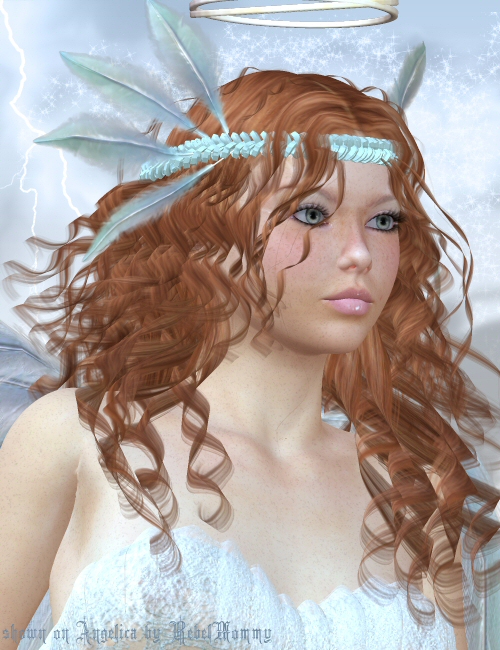
Rosie 4 Hair
 Iray vs LuxCore: "Heads to Heads" Blind Comparison
danielbui78 said:
marble said:
Ok - so tell us already. :)Hehe, sorry for keeping everyone in suspense! Here is the reveal....
Set 1:
- A is LuxCore (via yaluxplug Daz To LuxCore plugin)
- B is Iray
Set 2:
- A is Iray
- B is LuxCore (via yaluxplug Daz To LuxCore plugin)
As was pointed out, some of the things present in the Iray reference that was not in the LuxCore image were:
- sharper contrast with brighter highlights and darker shadows,
- more detailed eye reflections,
- subtle shadows in the jaw line and other angled edges,
- less SSS strength.
And here are a few addiional things that some people might have missed:
- the background images are exactly the same, pixel for pixel, in Set 1 - image A and Set 2 - image B, and vice versa for Set 1-B and Set 2-A.
- The Iray backgrounds have bright areas that are so bright that they lose detail when compared to the LuxCore backgrounds.
- In the Iray images, the shadows around the ears are a little darker than would be expected based on the brightness of the background IBL lighting and intensity of the light bouncing off the highlighted skin.
- Victoria 8.1's eyelashes, eyebrows and lips in the Iray renders have extra specular highlights not seen in the LuxCore renders.
- The far, curved edge of Victoria 8.1's cornea/irises are much darker in the Iray renders than in the LuxCore renders.
- In Set 1 - Image A (LuxCore), the specular highlights on Twosret's face seem unatural, strongly textured and reflecting back up rather than diffusing into the skin, while in Set 1 - Image B (Iray) the specular highlights on Twosret's face seem like they are hitting a relatively flat surface and naturally diffusing deeper into skin.
In my opinion, the brighter hightlights and darker shadows in the Iray renders are due to an additional non-linear tonemapping step that is not implemented by the yaluxplug plugin yet: “burn highlights” and “crush shadows”. Readers familiar with photoshop post-processing are probably well aware of these operations. However, the one advantage you can get from using Iray to do those steps is that they are done while the image is still in its internal HDR 32bits-per-pixel format. So there is no loss of image detail.
I think the subtle shadows on the jaw line and on surfaces that are at sharp angles to the camera are created by the TopCoat rendering phase. When viewed directly on, you don’t notice this TopCoat layer because it is so thin, but at an angle, you start seeing the TopCoat layer, especially on Victoria 8.1, as subtle shadows. This is also not implemented in yaluxplug yet.
Glossy Anisotropy, Refractions and Dual Lobe Specular rendering are other areas that need more work in the yaluxplug plugin.
As for most of the other differences, yaluxplug is not yet fully tuned so that the Iray parameters are converted to the proper LuxCore parameters to produce an identical visual result. I need to go back and tweak the roughness values, bump map strengths, SSS strengths, and specular strengths.
I’ll conclude my ramblings with these final thoughts: In my opinion, Iray and LuxCore are both really good physically based renderers. Both are capable of making very good renders, whether you think that means images with high contrast lighting or a wide range of color and luminance details. The brush is only good as the artist who wields it.
Two final renders for you:
- The first is a custom Iray render with "burn shadows" turned down to zero. IMHO, this makes the image look more visually appealing -- it adds greater range and depth of detail in the shadows while retaining the dramatic strong lighting.
- The second custom render was done by manually adding/modifying about 6 lines in the native LuxCore scene files that are outputted by the yaluxplug plugin. I tweaked the Cornea roughness and transparency to get better eye reflections. I also added 4 lines to generate the missing non-linear tonemapping stage to increase brightness and burn in the highlights. Bumpmapping strength was adjusted down in Twosret's face and up in her lips. A few other things that can't be easily done by modifying a few lines are: TopCoat rendering, adjusting SSS strength for all materials, tweaking the dual lobe specular rendering mask. In the future, I'll incorporate all these tweaks into yaluxplug so that the renders look more appealing without additional user involvement.
Thanks again for everyone's involvement and participation!
Looks awesome. Would be great to see the LuxCore look like that particular iRay render.
Iray vs LuxCore: "Heads to Heads" Blind Comparisonmarble said:
Ok - so tell us already. :)Hehe, sorry for keeping everyone in suspense! Here is the reveal....
Set 1:
- A is LuxCore (via yaluxplug Daz To LuxCore plugin)
- B is Iray
Set 2:
- A is Iray
- B is LuxCore (via yaluxplug Daz To LuxCore plugin)
As was pointed out, some of the things present in the Iray reference that was not in the LuxCore image were:
- sharper contrast with brighter highlights and darker shadows,
- more detailed eye reflections,
- subtle shadows in the jaw line and other angled edges,
- less SSS strength.
And here are a few addiional things that some people might have missed:
- the background images are exactly the same, pixel for pixel, in Set 1 - image A and Set 2 - image B, and vice versa for Set 1-B and Set 2-A.
- The Iray backgrounds have bright areas that are so bright that they lose detail when compared to the LuxCore backgrounds.
- In the Iray images, the shadows around the ears are a little darker than would be expected based on the brightness of the background IBL lighting and intensity of the light bouncing off the highlighted skin.
- Victoria 8.1's eyelashes, eyebrows and lips in the Iray renders have extra specular highlights not seen in the LuxCore renders.
- The far, curved edge of Victoria 8.1's cornea/irises are much darker in the Iray renders than in the LuxCore renders.
- In Set 1 - Image A (LuxCore), the specular highlights on Twosret's face seem unatural, strongly textured and reflecting back up rather than diffusing into the skin, while in Set 1 - Image B (Iray) the specular highlights on Twosret's face seem like they are hitting a relatively flat surface and naturally diffusing deeper into skin.
In my opinion, the brighter hightlights and darker shadows in the Iray renders are due to an additional non-linear tonemapping step that is not implemented by the yaluxplug plugin yet: “burn highlights” and “crush shadows”. Readers familiar with photoshop post-processing are probably well aware of these operations. However, the one advantage you can get from using Iray to do those steps is that they are done while the image is still in its internal HDR 32bits-per-pixel format. So there is no loss of image detail.
I think the subtle shadows on the jaw line and on surfaces that are at sharp angles to the camera are created by the TopCoat rendering phase. When viewed directly on, you don’t notice this TopCoat layer because it is so thin, but at an angle, you start seeing the TopCoat layer, especially on Victoria 8.1, as subtle shadows. This is also not implemented in yaluxplug yet.
Glossy Anisotropy, Refractions and Dual Lobe Specular rendering are other areas that need more work in the yaluxplug plugin.
As for most of the other differences, yaluxplug is not yet fully tuned so that the Iray parameters are converted to the proper LuxCore parameters to produce an identical visual result. I need to go back and tweak the roughness values, bump map strengths, SSS strengths, and specular strengths.
I’ll conclude my ramblings with these final thoughts: In my opinion, Iray and LuxCore are both really good physically based renderers. Both are capable of making very good renders, whether you think that means images with high contrast lighting or a wide range of color and luminance details. The brush is only good as the artist who wields it.
Two final renders for you:
- The first is a custom Iray render with "burn shadows" turned down to zero. IMHO, this makes the image look more visually appealing -- it adds greater range and depth of detail in the shadows while retaining the dramatic strong lighting.
- The second custom render was done by manually adding/modifying about 6 lines in the native LuxCore scene files that are outputted by the yaluxplug plugin. I tweaked the Cornea roughness and transparency to get better eye reflections. I also added 4 lines to generate the missing non-linear tonemapping stage to increase brightness and burn in the highlights. Bumpmapping strength was adjusted down in Twosret's face and up in her lips. A few other things that can't be easily done by modifying a few lines are: TopCoat rendering, adjusting SSS strength for all materials, tweaking the dual lobe specular rendering mask. In the future, I'll incorporate all these tweaks into yaluxplug so that the renders look more appealing without additional user involvement.
Thanks again for everyone's involvement and participation!
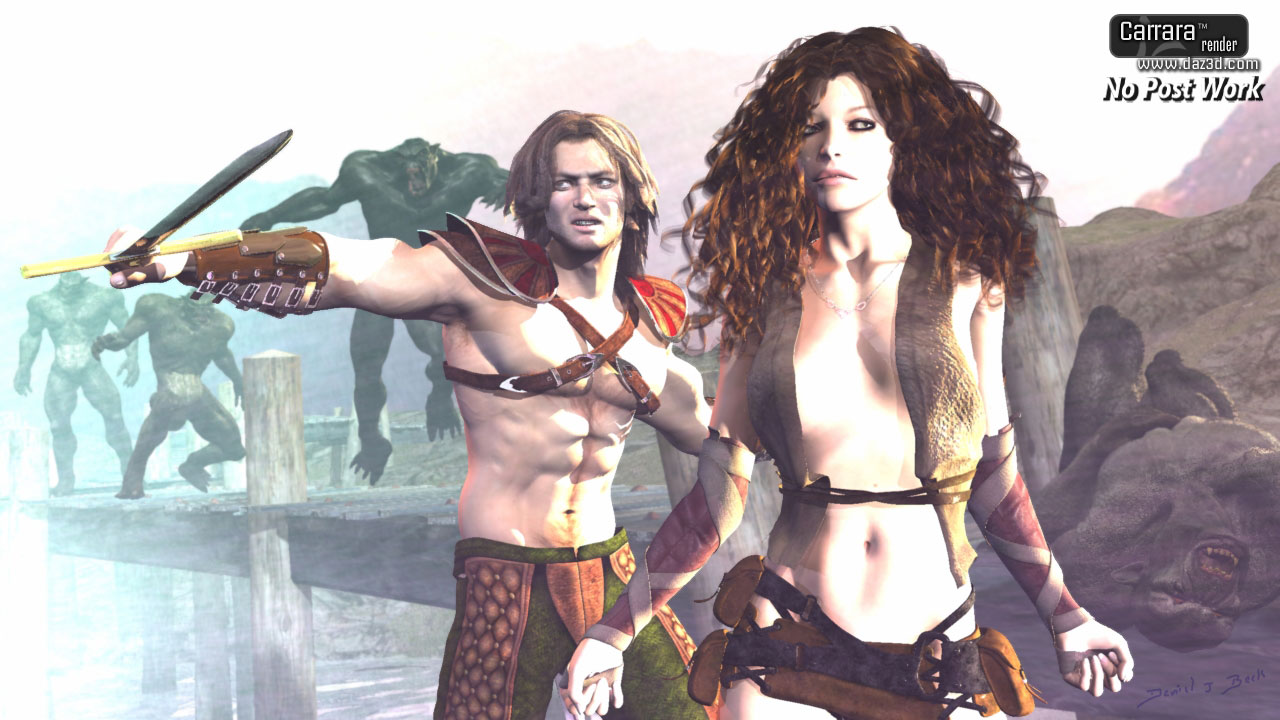
Any idea what the name of this chracter model is ?She looks like Victoria 8 to me, slightly mixed with other shapes.
DELETEDid you not get the memo about only needing Victoria and a sword? LOL
Edit: Well, I guess if you are seriously blocked you could splurge and grab yourself a nice temple or two along with some jungle scenery. (JK, I couldn't resist.)
Jonesing for JinxI'm hoping Jinx Jones drops tonight because I need another skin to stand beside Jacqueline 8.1's, but Victoria's too pink, Brooke's too Brooke, Jada's too dark, Catty's too mature, and the rest of the 8.1 female skins don't look like they're on the same level. If Jinx Jones is white to caramel-coloured and has the same PBR implementation as the forementioned females, I'll have what I need.
Anticipation...
Pose set observationMost of the poses that come in bundles or in PC club are not sexy. I think most poses here are not sexy ENOUGH. I do cheesecake or fashion model type stuff, (not porn,) and I find the poses here too boring and always tweak them to make them sexier or more interesting, And it’s not just sex appeal, it’s details. Boring hands, feet, awkward positioning... Everything has to be tweaked a lot no matter what. ThoseThings and Rarestone have some interesting poses to start as bases, but most pose sets I just find dull and unrealistic even as cheesecake or supposedly sexy.., I wish they would look at Victoria Secret catalogs, current fashion magazines or celebrity poses instead of old poses from the 1950’s.
Celebrity Look-a-Likes for 3D figures part 3Fielran said:
FWSA Robert HD for Michael 7 looks like a younger James Marster - Spike from BtVS.
FWSA Liam HD for Michael 7 is David Boreanaz - Angel.
I think FWSA Livia HD for Victoria 7 is Juliet Landau - Drusilla, although I'm not sure the likeness is as good as the other two.
Huh... I don´t see any of that.
Celebrity Look-a-Likes for 3D figures part 3FWSA Robert HD for Michael 7 looks like a younger James Marster - Spike from BtVS.
FWSA Liam HD for Michael 7 is David Boreanaz - Angel.
I think FWSA Livia HD for Victoria 7 is Juliet Landau - Drusilla, although I'm not sure the likeness is as good as the other two.
TattoosIf the tattoo doesn't have to cross body parts, you could always open the torso or limbs skin jpegs for Victoria or Michael (or any other skin textures) in Photoshop or Gimp or whatever and play with it there... It takes some working with it to get it right, and once arranged and sized right, to get that "in skin" look, it's good to use the eraser on half strength. While working on it, save as a Tiff or png, since jpeg is a lossy format and degrades if you save it over and over. You can also use this to add scars.
Where to find this model?This old image posted on renderosity years ago. They said it was Victoria 4 but I cannot find the one that looks like this. Is there a link to it? Thanks!
https://www.renderosity.com/rr/mod/forumpro/?thread_id=2894943&#msg4233322
AIUTO...CHI CONOSCE L’ITALIANO? PARTE TREDICIPremetto che non ho il prodotto per cui non so esattamente cosa fare.. ma cerco di darti qualche dritta
- Hai controlalto se ti appare nello Smart Content come prodotto ?
- Hai controllato se è un plugin ed è attivo ? Vai in alto HELP-->ABOUT INSTALLED PLUGINS e vedi se compare e se c'è la spina deve essere verde, se è un altro colore vedi cosa ti richiede - a volte potrebbe volere un seriale che lo trovi nella tua pagina di acquisti.
- Sai come funziona ? Se ti si attiva in automatico o devi fare qualcosa di manuale te ?
- L'hai letto il pdf allegato al prodotto ? lo trovi online anche qui: http://docs.daz3d.com/lib/exe/fetch.php/public/read_me/index/22547/22547_wear-them-all-user-guide.pdf
Da quello che ho capito quando provi ad applicare un vestito di Michael 4 (o V4) su un G3 l'Autofit dovrebbe ora avere l'opzione per indicare che il vestito proviene da un M4/V4
EDIT: quale hai comprato ? Ce ne sono 3 sullo store:
- https://www.daz3d.com/wear-them-all-autofitting-clones-and-clothing-smoothers-for-genesis-3-male-s funziona solo su G3 maschi e ti adatta vestiti G1/G2F/M4/V4
- https://www.daz3d.com/wear-them-all-autofitting-clones-and-clothing-smoothers-for-genesis-3-female-s come sopra ma solo su femmine G3
- https://www.daz3d.com/wear-them-all-autofit-clones-expansion-for-genesis-3-male-s-and-genesis-3-female-s funziona su maschi e femmine G3 ma ti fa adattare solo Michael e Victoria 3 (no 4!.. per M4/V4 ci vogliono gli altri prodotti sopra) insieme a Hiro3, David3, ecc...
Have to ask as new here and learningRichard Haseltine said:
The anatomical elements for a given figure and sex are included in most of the old Pro Bundles for named adult characters (like Victoria 8 and Michael 8) and in most of the new themed bundles for adult characters (like the Zale 8.1 Sea King Bundle or Coral 8.1 sand Between Your Toes Bundle). There are also third-party sets available from other stores, such as Renderotica, though you do need to be careful that you are looking at full products rather than morph sets.
first thank you for prompt response;
When i buy those pro bundles is there one for 8.1.. also can they be used to all other female gen8 models or they ONLY apply to for example Vicotria 8 model... Also for third party i guess it cant say its a morph correct?
Have to ask as new here and learningThe anatomical elements for a given figure and sex are included in most of the old Pro Bundles for named adult characters (like Victoria 8 and Michael 8) and in most of the new themed bundles for adult characters (like the Zale 8.1 Sea King Bundle or Coral 8.1 sand Between Your Toes Bundle). There are also third-party sets available from other stores, such as Renderotica, though you do need to be careful that you are looking at full products rather than morph sets.
Iray vs LuxCore: "Heads to Heads" Blind ComparisonBoth images are 20 minute renders using the exact same scene file, HDRI lighting, models, morphs, textures and shader settings. Can you spot the differences? Which one is the Iray Reference? Which one do you prefer? Comment and discuss below. Thanks.
The LuxCore image was produced using the latest alpha version of the open-source Daz to LuxCore Render plugin and custom version of LuxCore Render v2.5. My goal is to reach 100% visual parity with Iray, then focus on the strengths of LuxCore: free network rendering, pre-tonemapper 32bit HDR image output, offline rendering with resume, real-time 32bit HDR light-group adjustments, OpenCL support, non-Nvidia GPU support, etc.
Links:
- yaluxplug thread: https://www.daz3d.com/forums/discussion/499531/open-source-release-daz-render-plugin-framework-with-yet-another-lux-plugin#latest
- yaluxplug github: https://github.com/danielbui78/yaluxplug/tree/experimental-4
- custom luxcore github: https://github.com/danielbui78/LuxCore/tree/experimental
Models: Twosret 8 HD, Victoria 8.1
EDIT: Images re-uploaded with labels.
In Search of This Female CharacterI think Sabby Shania is close (https://www.renderosity.com/rr/mod/bcs/shania-for-victoria-7-and-genesis-3/115544/). Though to my eye the character face looks a bit 'sharper' than pure Sabby, possibly FWSA (https://www.renderosity.com/rr/mod/bcs/fwsa-makena-for-victoria-7-and-genesis-3/121172/ ? Maybe.. dunno. Not convinced.) The extreme 'sharp' end of character shapes is 'Noosha; https://www.renderosity.com/rr/mod/bcs/fwsa-noosha-for-genesis-3-female/120967/, and I do think the character is part way on that spectrum from pure Sabby to 100% Noosha. Getting to G8F is easy with RiverSoft Art's morph transfer - I've a nice G8F 'version of Noosha'.
Regards,
Richard.
Who might have a list of all the DAZ Originals child style clothingHmmm, OK so I want to use the Red Riding Hood for Maddie | Daz 3D and it say it is compatible for Millennium Kids - Preschoolers.
So then when I do all that autofit business which character do I start with? With Victoria 4? And in the Autofit Dialogue which character as the "Original" for I chose? Millienium Kids - Preschools and Kids 4+ have never been an option that I remember seeing in those autofit dialogues.
I have bought everything regarding Autofit help, including all the "Wear Them All" modules. Also have installed Catherine's autofit dummies for G8F / G8M
I do have all the Millenium Kids & Babies & all the Kids 4++ and almost all the various clothing products (PC+ prices and sales will do that
 ) but have never used them so I need to figure out how to get this autofit working in the right sequence. Kids 4+ is much easier if I remember right because those Kids 4+ items autofit without extra products to buy directly to the Genesis base character.AI enhancement of Iray renders for more photorealism
martin.schulz said:
Hi everyone,
I´m relative new to Daz and I´m really impressed of the possibilities und usability of this software.
I´m looking for a very high grade of realism in my renderings, because I would like to combine 3D enviroments and 3D models with real models from photoshootings.After practising Iray lighting a bit, most of my Iray 3D enviroments look acceptable now and it works combining them with real photos in Photoshop with some post production. What doesn´t work for me is combining a 3D model like Victoria 8 with a real model from a photoshooting. Most body parts of a 3D model can look very realistic, but my main problem is the face.
Is there any software that is able to add more photorealism to renders of 3D models using AI for example?
If there's such a thing, then Daz Studio wouldn't be fun anymore...
Who might have a list of all the DAZ Originals child style clothingGood luck. The original kids and teens weren't really named other than preschool boy etc; these ones loosely match up to the original Victoria's and Michael's. My historic downloads show first naming occuring under MillenniumKidsYoungTeens (Luke and Laura), MillenniumKidsPreschoolers (Matt and Maddie), and MillenniumBaby30 (no name). After that, names appears to linked to morphs. Insofar as matching clothing goes, I don't personally have a comprehensive list so can't help you there. I usually just look for "clues" in the product pages or links.
Daz 3D is part of

Connect
DAZ Productions, Inc.
7533 S Center View Ct #4664
West Jordan, UT 84084Licensing Agreement | Terms of Service | Privacy Policy | EULA
© 2026 Daz Productions Inc. All Rights Reserved.