-
New DS Filament Render Engine
I'm not understanding something very basic: If you want to use Filament for the viewport, but render in Iray, how do you adjust the environment and tone mapping so it looks OK in the viewport and still renders correctly in Iray? Are there viewport controls for those environment and tone mapping that are independent of the Iray render settings for environment and tone mapping?
My understanding is it will not match, especially the lighting and shadows.
TonemappingThey're now added to a node you can find in scene tab.
You can create that node before rendering using Create > New Environment Options Node
No, I don't want to use Filament.
Iray Preview PC Reboot?Ok - so it seems to be consistent now. The reboot happens whenever I go into IRay preview mode - usually within seconds if not immediately. That suggests hardware to me - faults that harden usually point to hardware. I'll have to try to get away with withe Filament ot IRay spot render because it is not yet crashing while using IRay in render mode.
[EDIT] I seem to be able to get away with using the IRay Spot Render tool so there's a workaround so long at the fault doesn't migrate away from the IRay preview mode. I've set the Max Samples low (200) so that I don't have to wait too long.
Is this a blank scene or a saved scene?
I recently had with beta DS 4.12.2.60 saved scene that reboot when I turned it to filament. The filename was longer in length than I nromally use. Pulled up a previous save with a long name, but not as long and it did not have that issue.
New DS Filament Render EngineI'm not understanding something very basic: If you want to use Filament for the viewport, but render in Iray, how do you adjust the environment and tone mapping so it looks OK in the viewport and still renders correctly in Iray? Are there viewport controls for those environment and tone mapping that are independent of the Iray render settings for environment and tone mapping?
there are 3 scene add ons on "create" and adjust on Parameters, no Render Settings, when it must be set on Viewport.
 New DS Filament Render Engine
I'm not understanding something very basic: If you want to use Filament for the viewport, but render in Iray, how do you adjust the environment and tone mapping so it looks OK in the viewport and still renders correctly in Iray? Are there viewport controls for those environment and tone mapping that are independent of the Iray render settings for environment and tone mapping?
New DS Filament Render EngineI think the confusion of filament is because there is not yet an uber filament material
for now, playing with iray parameters on surface tab does the math.
New DS Filament Render EngineI'm very excited about filament, but my heart just sank when I saw the filament products. No! I would have to buy products to make the products I own look right? Will new characters/environments etc. come with filament-compatible textures etc., or worse, will they be special add-ons? Cha-ching!No, you don't NEED to buy any products to make products you own "look right". It's just like the other render engine options (Iray and 3DL) you can buy Iray and 3DL lights, shaders, etc to make things look nice in those render engines, but you can also make your own lights and shaders in Iray and 3DL. Same with Filament.
Daz Studio 4.14 Pro, General Release!What kind of hardware does Filament require? Anything more powerful that what Iray takes?
Requires Windows (currently), 64-bit, OpenGL > 4.1
Thank you, it was hard to figure this out. I have a Mac, and it wasn't clear at first why I couldn't find it in the dropdown. It might be helpful if this was noted on the announcement pages. Is there a sense of when Mac support might be added?
It is in the highlights thread.
Novica & Forum Members Tips & Product Reviews Pt 13Did anyone check out the price in the cart for the Everyday Motion bundle? I had checked out the animations and laughed, and thought why not? Tried putting it in my cart, with other new items and it went from $22.44 to $10.60! And a free Christmas pack as well. Now, I have to figure out how to use them. I have never attempted any of the animation products, even though I own them.
Just curious, what did you buy? I am not really impressed with filament and also tend to hold off when Daz does an updated version. I think I completely skipped 11 and only gave in to updating to 12 because of the new furry animal products that I wasn't able to use. Having so little time to invest in learning new features, I hate installing an update and finding out, what I knew worked and how to make it happen, is somehow changed. Although, I will have to buckle down and spend more time reading in the forums to find if the animation changes are worth downloading the update.
New DS Filament Render EngineI'm very excited about filament, but my heart just sank when I saw the filament products. No! I would have to buy products to make the products I own look right? Will new characters/environments etc. come with filament-compatible textures etc., or worse, will they be special add-ons? Cha-ching!New DS Filament Render EngineNot sure if I did this right. BUT messing with the Tonemapper options gave me this result! Not bad. I have it set to iRAY render engine but perhaps with the three added nodes it switches over somehow to the Filament engine? Not sure, still confused about all this!
You have to have it set to Filament on the viewport and then on the Render Settings tab, set it from Iray to "Viewport". Then when you hit render it's an instant Filament render.
Thank you. That helped! It is lightening fast for sure. Not horrible and certainly not worse, if better, than 3Delight!
Daz Studio 4.14 Pro, General Release!..OK so O gather that FIlament is primarly best for animations. As I don't bother with animating are there any other advantages to updating?
The filament preview is pretty much as fast as texture preview but a lot closer to the Iray render. Lighting seems to mismatch still; there are mismatches I haven't worked out what they are yet, but overall appearance particularly with expressions is a lot better.
That's cool! I mostly use the preview to confirm positioning of my lights so that would help a lot.
It would help me a lot if Daz, or anyone, (@Richard Haseltine?) could explain which of the light sources work in filament:
- Daz lights (definately seem to work).
- Environments; Sun-Sky (seems to work), HDRI (not sure about this)
- Emissive surfaces (always a bit weird because they are calibrated to EV0; 100 lumens needs to be 819200 lumens when tone mapping at EV13 with Iray).
I also noticed that someone commented about an "ISO" parameter needing to be set to "0.56" in filament to get the lights to match, IRC that was specific to HDRIs.
Normally when lighting a scene I turn off tone mapping and get the lights right one by one, then I turn the tone mapping back on and set the EV to 0. This really shouldn't work - the image should come out too flat because of the viewer correction required by such low light levels but Daz/Iray don't seem to do any viewer corrections when tone mapping.
New DS Filament Render EngineNow if this Filament is only being used for preview mode then why are they selling materials and converters for it?
Because it's there as an OPTION IF someone would want to use it for rendering (such as animators).
This is what I see.
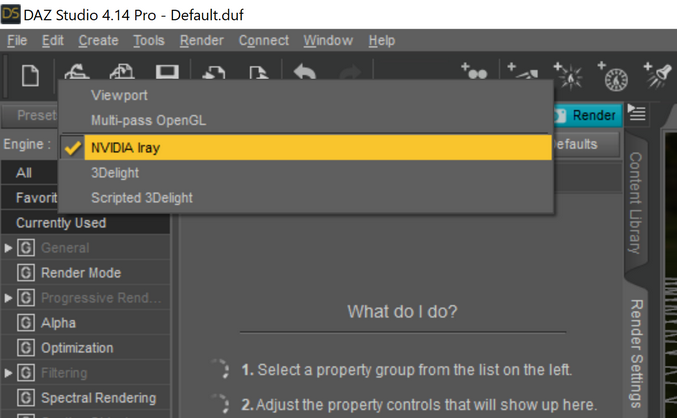
Select Viewport. Sorry, if you are asking why have that there at all then people have used OpenGL (especially for animations), Filament is in most repsects a step or steps up from that.
New DS Filament Render EngineNow if this Filament is only being used for preview mode then why are they selling materials and converters for it?
Because it's there as an OPTION IF someone would want to use it for rendering (such as animators).
This is what I see.
Viewport
New DS Filament Render EngineNow if this Filament is only being used for preview mode then why are they selling materials and converters for it?
Because it's there as an OPTION IF someone would want to use it for rendering (such as animators).
This is what I see.
are yoo a thread killer?why are people so fond of starting their own thread on the same topic covered by existing threads?
I saw it in droves with the store glitches
now Filament
and not enuff threads about casseroles
Is Daz Studio (as we know it) Heading South?...well, having read numerous threads about DAZ central issues, the implementation of Filament excluding Mac users, products now being made for Filament which is a viewport option, (seriously... can we please have some new shaders for Open GL too and maybe some outfits, pretty please

 ), quality control going downhill, if not non-existant already, the store that has been a complete mess for years and will continue to be despite attempts of "fixing" it, and lastly...help support now trying to convince me that the Iray Uber shader infact is an RSL shader, so the fact that a product's MDL shader presets now are just copied over and renamed RSL materials and put in a 3Delight materials folder is totally fine because they actually render (kind of) in 3DL, I'm inclined to believe that DAZ is actually heading south...New DS Filament Render Engine
von Hobo said:
Wow! Really loving this Filament PBR Viewport preview. It's lighting fast!
Nice job DAZ!
Leonides02 said: It'd be useful if it actually matched the Iray lighting.
Try this Render Throttle product for a faster Iray Viewport preview. I rely on it heavily. But I will be using the Filament view for all my work leading up to the final Iray preview and render.
Daz Studio 4.14 Pro, General Release!What kind of hardware does Filament require? Anything more powerful that what Iray takes?
Requires Windows (currently), 64-bit, OpenGL > 4.1
Thank you, it was hard to figure this out. I have a Mac, and it wasn't clear at first why I couldn't find it in the dropdown. It might be helpful if this was noted on the announcement pages. Is there a sense of when Mac support might be added?
New DS Filament Render Engine+1, same on my end, thanks for sharing my view. :)
It's one of those things, isn't it?
I mean we finally get some pretty photorealistic results in Daz.
We learn how to use it, optimize our workflows to maximize our renders, and what do they do for the next step? Shift their attention to... Better previews?
Don't get me wrong, I'm not an ungrateful asshole who doesn't appreciate that there's people out there that can/will do wonderful things with Filament.
I'm just saying I really hoped we could have some trimmed render time in Iray. That's all.
Not even complaining that much.
For instance, this (see attach) took me 01h30m at 6750x6750px (post in Photoshop).
Wouldn't it be great to make the same thing but in like... 20 minutes?
Well I can see you must have an 20X0 or 30X0 RTX GPU already to render a scene with that resolution and that much refraction, reflection, and opacity in an hour & a half.
You might try reducing the render resolution to FHD or 2K and then using DLSS to upscale to your desired final resolution.
What DAZ 3D could help with that is add a configurable automatic post-processing step to scale our render(s) (renders as it might be an animation) from the rendered resolution to the scaled resolution using DLSS if the GPU supports it. Now that should be comparitively easy for DAZ 3D to implement.
You can already add a post process step using http://docs.daz3d.com/doku.php/public/software/dazstudio/4/referenceguide/scripting/api_reference/samples/rendering/render_post_process/start
Daz 3D is part of

Connect
DAZ Productions, Inc.
7533 S Center View Ct #4664
West Jordan, UT 84084Licensing Agreement | Terms of Service | Privacy Policy | EULA
© 2026 Daz Productions Inc. All Rights Reserved.