-
Is it possible to convert a morph for G8 female into a morph for G8 male?
Hi, thank you very much for your answer!

crosswind said:
There're already around 60 vertex groups ( aka Face Groups in DS) on G8 . If you import obj into Blender with vertex groups, you'll see them. For sculpting purpose, sometimes you may need them, with Masking for instance. But for the partial vertex groups as you mentioned, I don't think you really need them though you can create them.
Ah yes, indeed, I can see them, I don't know why I didn't find them the last time...
Well, I tried to use the shrinkwrap modifier to the head vertex group only, and I could obtain just one artifact, on the eyes:
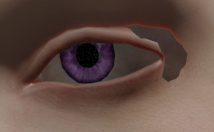
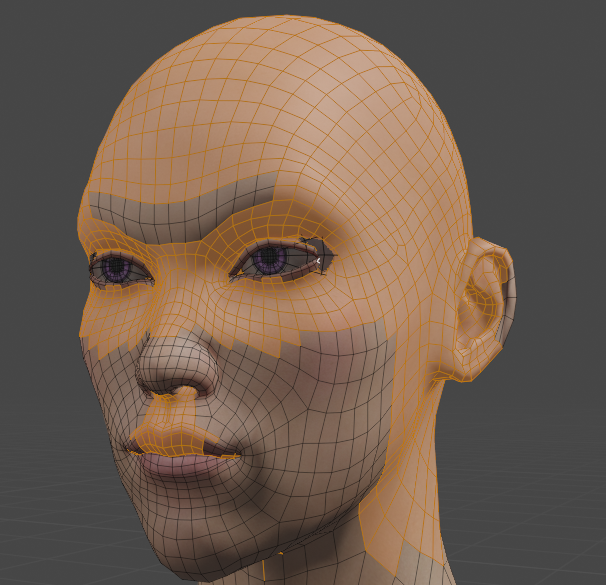
I would like to try to modify the head group "composition" to see if I couldn't fix it if I remove some vertex close to the eyes from this group. But I would prefer not modify the oroginal head group, because I could need it for something else, so I selected all the vertices in this group, I created a new group I called "Headv2", and I tried to use the shrinkwrap to this new group. It should contain exactly the same vertices as the "head" group, since I created it from it, but in fact, when I use the shrinkwrap modifier, I don't obtain the same thing by using the "head" group and the "Headv2" group.
Here is what I obtain with the "head" group:
And here is what I obtain with the "Headv2" group:
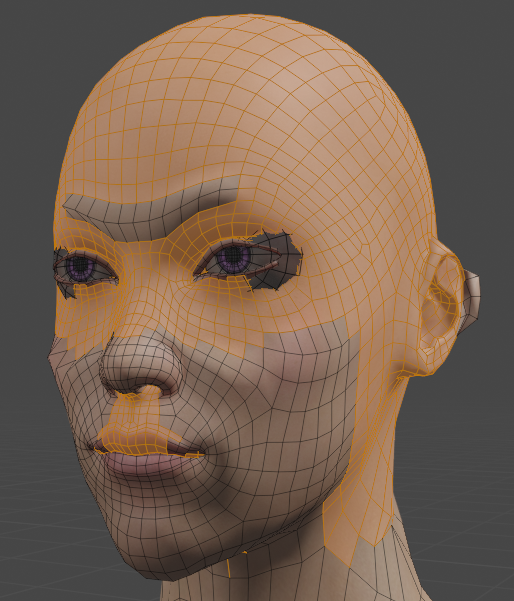
It's quite different; especially on the ears and eyes, there is a big problem...
I used these settings for the shrinkwrap modifier:
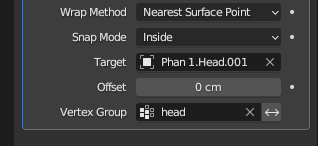
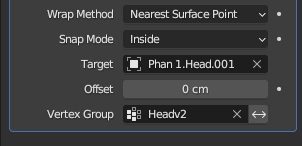
Do you know why I obtain these differences whereas I just "copy" the "head" group to create the "Headv2" group? I don't understand if it's a Blender issue or DS issue (I am using the DD Keita for Yuzuru 8 character (https://www.daz3d.com/dd-keita-for-yuzuru-8) and I imported him by the Daz to Blender Bridge, after some modificatins in Daz so as he becomes as close as possible to my MH character).
Thank you in advance for your help!
[Solved] How to set asset type in "Content Library"crosswind said:
Richard Haseltine said:
crosswind said:
Richard Haseltine said:
You could also use the ruight-click menus in DS to cut and paste the file to its new location, which will update the metadata.
No, it won't... and the item record will be deleted in database.
Hmm, true - and the same with copy/paste. It used to work, I hadn't tested it this time but I have on previous occasions when the question has been asked.
I vaguely had the memory as well that it used to work but it fails now. Maybe we submit a ticket?
Please do.
[Solved] How to set asset type in "Content Library"Richard Haseltine said:
crosswind said:
Richard Haseltine said:
You could also use the ruight-click menus in DS to cut and paste the file to its new location, which will update the metadata.
No, it won't... and the item record will be deleted in database.
Hmm, true - and the same with copy/paste. It used to work, I hadn't tested it this time but I have on previous occasions when the question has been asked.
I vaguely had the memory as well that it used to work but it fails now. Maybe we submit a ticket?
[Solved] How to set asset type in "Content Library"crosswind said:
Richard Haseltine said:
You could also use the ruight-click menus in DS to cut and paste the file to its new location, which will update the metadata.
No, it won't... and the item record will be deleted in database.
Hmm, true - and the same with copy/paste. It used to work, I hadn't tested it this time but I have on previous occasions when the question has been asked.
[Solved] How to set asset type in "Content Library"rames44 said:
However, if I move that .duf file and its corresponding .duf.png file to a different folder, the annotation that shows what type of asset it is goes away.
How do I get that back? I thought maybe that was the function of "Categorize..." but it doesn't seem to work.
As others have said: this is because it's metadata that defines the 'type' of a physical file, move the file and the metadata becomes obsolete.
But since you already mentioned categorize... why not use the smart contents pane to sort out your items? When set up right smart contents can be a lot easier & quicker to access than the content library is. And it's simple: all that's required for an item to pop up in your smart contents pane is having a file type assigned (the already mentioned metadata) as well as a category. Assigning a category basically determines where the entry will pop up within your smart contents.
And it's a lot easier to "move" items around in there: just right click and use "Categorize". Find the right location (or create a new one!) and you're all set. The best part is that you won't risk disrupting anything.
This is why I always rely on both content panes: smart & library side by side because using both of them can give you the best overall access.
Just for the record (and because I'm in the mood)... adding a 3rd party asset to 'smart contents' can be as easy as this:
- Find the asset within your content library pane; doesn't matter if this is located within a Daz Studio or Poser library format.
- Check that you see the asset (and can also drag it into your viewport (remember to keep alt pressed for more control!))...
- If things work as intended righ click on the folder name and select "Edit metadata...".
- Find the item in the now shown list, click on it to select it, then click the "menu button" behind "Type" (see the middle of the screen, left side). This should be pretty self explaining: Actor for figures, Follower (need to expand) for hair and clothing, Preset (also needs expanding) for material presets and Prop for... yah: props ;)
- When done click "Accept" at the bottom to leave this window.
- Now you should see a small "marker" appear on the file; this is proof that you assigned metadata to it.
- Next step: right click on the file, then use "Categorize". Find an appropriate place within your category list.
And that's it... if you follow these steps then your item will easily show up within smart contents where you can move things around as much as you like.
Maybe food for thought?
[Released] Pose Details [Commercial]Submitted update today:
- Added support for Genesis 9
- Added support for Daz Horse 3
- Added support for Daz Horse 2 (except for Lower Half scripts as there is no hip bone used in those scripts)
- Refactored to NOT require entries in the NameConversion table. This allows conversion files to be added WITHOUT requiring an update to RSPoseDetailsConstants.dsa
- Replaced BuildBones function from RS2021HelperFunctions.dsa as it would end up adding abdomen bone twice, messing up the count at the end of the Pose Details function.
- Copied Improved BuildBodyPartBones function (overrides version in RS2021HelperFunctions with the version from RSZeroFunctions.dsa) that also uses GenesisGeneration function and InitBodyParts2023 function, handles toes better
- Used improved GenesisGeneration function over old FigureGeneration function
- Added InitBodyParts2023 function. It is improved over InitBodyParts2023 from Bone Minion in that it can take a node and look for metadata that was included by IncludeConvertersMetadata function
- Used improved IncludeFile
- Added GetConversionName function
- Fixed "NULL pointer passed to DzScene::removeNode()" warning. When script did not recognize a figure, it would not create the camera but would still try to remove it from the scene
[Solved] How to set asset type in "Content Library"Richard Haseltine said:
You could also use the ruight-click menus in DS to cut and paste the file to its new location, which will update the metadata.
No, it won't... and the item record will be deleted in database.
[Solved] How to set asset type in "Content Library"You could also use the ruight-click menus in DS to cut and paste the file to its new location, which will update the metadata.
[Solved] How to set asset type in "Content Library"I use an example in here... saved a Subset of a BallCap. Pls check the attached screenshot 1 and 2 to understand the mechanics behind the issue.
If you use File Browser to move the duf / png files to another folder, the cms record in screenshot 2 will remain. When you move the files back to the original Subset folder, the icon in the corner will be back. But if you use 'Cut' and 'Paste' function in Content Library to 'move' it, the cms record will be deleted. You may follow northof45's way to edit folder's metadata and reassign a content type for the item you moved.
I'm tempted to by the FSL Pro Series Architectural ElementsWell I know you can export daz items as either obj or fbx and can do so with the uv coordinates and texture information and you should be able to import that to Poser, though you will have to manually add the textures and adjust settings once imported. Pretty sure you can't bring the settings over. That's the extent of what I know.
[Solved] How to set asset type in "Content Library"Moving the files breaks the link to the metadata. You need to go to the new folder in Content Library, right-click and "Edit Metadata..." There you can specify Asset Type and add / remove / change any Categories, Compatibilities, and Compatibility Bases.
The older generation: Victoria 2/3, Michael 2/3 and their children rendersI have been using the PA sale to get the remaining Glamerous Vicky stuff I haven't got at a price I can at last afford.
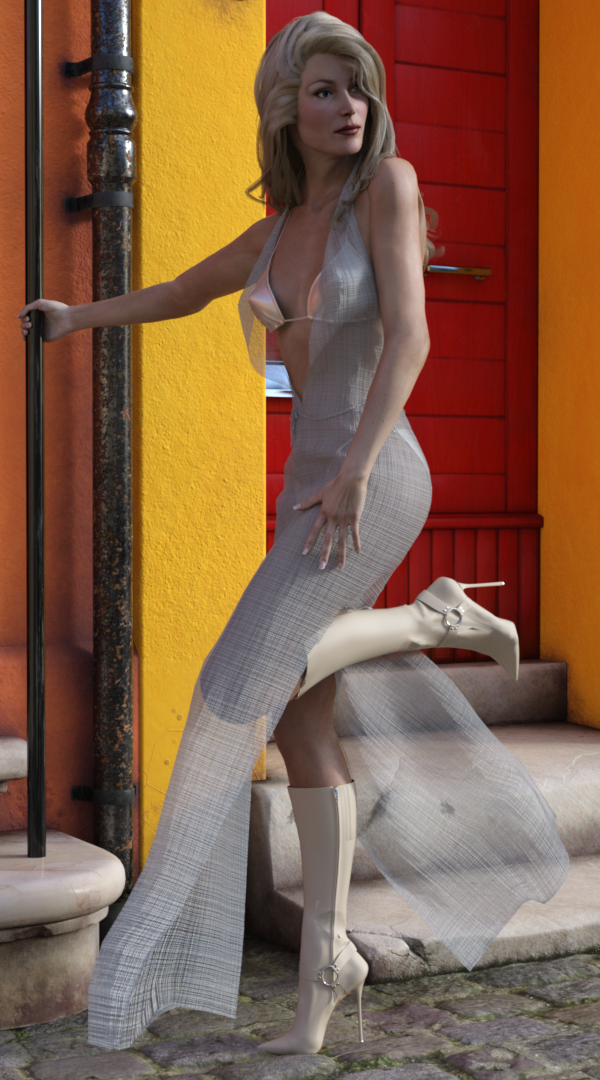
I've been trying to use Poser Dynamic fabric. It was quite hard to get it to work. In the end I had to convert GV3 to Triax Weight mapping, export the dress as an obj, import, make into a figure & transfer the rigging before then simulating from the default pose. Due to the size of the facets around the neck it exploded every time I tried until I realised scaling the character to 500% would give the required clearances. It was a lot more long winded than I had expected. However.. The result doesn't look much like I have resurrected a 20yo character.
Regards,
Richard
[Released] RSSY Clothing Converter from Generation 4 to Genesis 3 [Commercial]miladyderyni_173d399f47 said:
RiverSoftArt said:
miladyderyni_173d399f47 said:
Thanks for getting back to me. I know when I was trying out the converter, my D/S was having trouble seeing metadata at first. I had to re-install the Post GRE SQL (or whatever it is called) via DIM a couple times before the converter worked. No telling how long metadata has been bad as I seldom if ever use Smart Content.
Is there a way to restore uncorrupted metadata? Besides using all my hobby time for days to uninstall/reinstall everything.
In case it matters for anything I am using either D/S 4.11 or 4.12. Yeah, I know I am
SO behind the times...
There is definitely a way to do it. I have not done it myself, but I have seen posts from people that have. It involves exporting user data and re-importing the metadata. I would search in the forums.
Thank you, I would have searched already but I wasn't sure what keywords to try
You're welcome. Good luck!
High Fidelity Detail Morphs?crosswind said:
Richard Haseltine said:
crosswind said:
Deep12000 said:
crosswind said:
No matter the details come from (muscles, bones, tendon, vasculature, etc.), they'll be shown by morphs and textures that can enhance them. Yes, that's the case as you mentioned, HD morphs could be only made by PAs with a MultiResolution plugin, which can export and import the figure with High Resolution level. Users can only use Base Resolution Level. All other so-called 'HD morphs' make by some users are all fake and have various problems. So normally users just buy some packages with HD morphs.
But it doesn't mean you cannot create such morphs by yourself with Base Resolution, as long as you can use some tricks, eg.g a bit heavier sculpting + careful smoothing and refinement, as what I just roughly did in SS down below....
I was afraid of that... I'm not the best at sculpting. I guess this is another reason why I should get better. Are you aware of any published products labelled as "merchant resources" that include these sort of morphs?
AFAIK, nope... I haven't seen any other 'big morph package' products (more than 200 partial body morphs) in which there're similar HD morphs you mentioned, and is marked as 'merchant resources' at the same time, except for some products from Zev0 and bitwelder.
BTW, in general, 'merchant resource' means that you can use the product to create your own resources (shapes, morphs, textures, etc.) for commercial purpose. If you only use products for buiding your scenes and rendering, you don't need any merchant resources, as Richard mentioned.
That is, for creating new productas that will be sold = or more rarely given away - as content. If you are selling only the final image then the basic license will cover you, with a few specific exceptions (the old Anne Marie Goddard Digitial Clone for Victoria 3, for example).
Right ~~ Fortunately what were before V4 are not in 'my world'

I only work with G8
High Fidelity Detail Morphs?Richard Haseltine said:
crosswind said:
Deep12000 said:
crosswind said:
No matter the details come from (muscles, bones, tendon, vasculature, etc.), they'll be shown by morphs and textures that can enhance them. Yes, that's the case as you mentioned, HD morphs could be only made by PAs with a MultiResolution plugin, which can export and import the figure with High Resolution level. Users can only use Base Resolution Level. All other so-called 'HD morphs' make by some users are all fake and have various problems. So normally users just buy some packages with HD morphs.
But it doesn't mean you cannot create such morphs by yourself with Base Resolution, as long as you can use some tricks, eg.g a bit heavier sculpting + careful smoothing and refinement, as what I just roughly did in SS down below....
I was afraid of that... I'm not the best at sculpting. I guess this is another reason why I should get better. Are you aware of any published products labelled as "merchant resources" that include these sort of morphs?
AFAIK, nope... I haven't seen any other 'big morph package' products (more than 200 partial body morphs) in which there're similar HD morphs you mentioned, and is marked as 'merchant resources' at the same time, except for some products from Zev0 and bitwelder.
BTW, in general, 'merchant resource' means that you can use the product to create your own resources (shapes, morphs, textures, etc.) for commercial purpose. If you only use products for buiding your scenes and rendering, you don't need any merchant resources, as Richard mentioned.
That is, for creating new productas that will be sold = or more rarely given away - as content. If you are selling only the final image then the basic license will cover you, with a few specific exceptions (the old Anne Marie Goddard Digitial Clone for Victoria 3, for example).
Right ~~ Fortunately what were before V4 are not in 'my world'
How to use Mirror in Morp Loader?Mirroring options are built on the symmetry of an object, three options for each axis: 1 Swap + 2 ways replication. Swap just means exchange: L > R and R > L.
Although human being's body is not 100% symmetrical in the real world, Genesis figure in Daz is symmetrical on midsagittal plane, i.e. X axis. So if you wanna use Mirroring function on Genesis (as well as Vx), you can only use the options of 'X axis'.
As for your case, let's take G9 'Thighs Side-Side' as an example, after you fixed and updated the cbs 'body_cbs_thigh_z90p_l' on Left Thigh, you wanna use the fixed morph to update 'body_cbs_thigh_z90n_r' on Right Thigh, two ways as below:
- Use replicate: keep G9's current pose (Left Thigh Side-Side 90), dial Right Thigh Side-Side to -90, import the fixed morph 'body_cbs_thigh_z90p_l' with Morph Loader Pro, change Name to 'body_cbs_thigh_z90n_r', Reverse + Delta, choose 'X : + to - (Left to Right)' from Morph Mirroring dropdown list
- Use swap: reset G9's pose (Left Thigh Side-Side to 0), dial Right Thigh Side-Side to -90, use the step above but choose 'X: Swap'PS: Mirroring could be also used on fixing fbm/bs, pjcm/cbs, etc on a Wearable, as long as the Wearable is fully symmetrical on X. Well, sometimes if you use Symmetry in Blender to fix both sides but just wanna update one side, better use Attenuate in Morph Loader Pro rather than Mirroring.
High Fidelity Detail Morphs?crosswind said:
Deep12000 said:
crosswind said:
No matter the details come from (muscles, bones, tendon, vasculature, etc.), they'll be shown by morphs and textures that can enhance them. Yes, that's the case as you mentioned, HD morphs could be only made by PAs with a MultiResolution plugin, which can export and import the figure with High Resolution level. Users can only use Base Resolution Level. All other so-called 'HD morphs' make by some users are all fake and have various problems. So normally users just buy some packages with HD morphs.
But it doesn't mean you cannot create such morphs by yourself with Base Resolution, as long as you can use some tricks, eg.g a bit heavier sculpting + careful smoothing and refinement, as what I just roughly did in SS down below....
I was afraid of that... I'm not the best at sculpting. I guess this is another reason why I should get better. Are you aware of any published products labelled as "merchant resources" that include these sort of morphs?
AFAIK, nope... I haven't seen any other 'big morph package' products (more than 200 partial body morphs) in which there're similar HD morphs you mentioned, and is marked as 'merchant resources' at the same time, except for some products from Zev0 and bitwelder.
BTW, in general, 'merchant resource' means that you can use the product to create your own resources (shapes, morphs, textures, etc.) for commercial purpose. If you only use products for buiding your scenes and rendering, you don't need any merchant resources, as Richard mentioned.
That is, for creating new productas that will be sold = or more rarely given away - as content. If you are selling only the final image then the basic license will cover you, with a few specific exceptions (the old Anne Marie Goddard Digitial Clone for Victoria 3, for example).
High Fidelity Detail Morphs?Deep12000 said:
crosswind said:
No matter the details come from (muscles, bones, tendon, vasculature, etc.), they'll be shown by morphs and textures that can enhance them. Yes, that's the case as you mentioned, HD morphs could be only made by PAs with a MultiResolution plugin, which can export and import the figure with High Resolution level. Users can only use Base Resolution Level. All other so-called 'HD morphs' make by some users are all fake and have various problems. So normally users just buy some packages with HD morphs.
But it doesn't mean you cannot create such morphs by yourself with Base Resolution, as long as you can use some tricks, eg.g a bit heavier sculpting + careful smoothing and refinement, as what I just roughly did in SS down below....
I was afraid of that... I'm not the best at sculpting. I guess this is another reason why I should get better. Are you aware of any published products labelled as "merchant resources" that include these sort of morphs?
AFAIK, nope... I haven't seen any other 'big morph package' products (more than 200 partial body morphs) in which there're similar HD morphs you mentioned, and is marked as 'merchant resources' at the same time, except for some products from Zev0 and bitwelder.
BTW, in general, 'merchant resource' means that you can use the product to create your own resources (shapes, morphs, textures, etc.) for commercial purpose. If you only use products for buiding your scenes and rendering, you don't need any merchant resources, as Richard mentioned.
[Released] RSSY Clothing Converter from Generation 4 to Genesis 3 [Commercial]RiverSoftArt said:
miladyderyni_173d399f47 said:
Thanks for getting back to me. I know when I was trying out the converter, my D/S was having trouble seeing metadata at first. I had to re-install the Post GRE SQL (or whatever it is called) via DIM a couple times before the converter worked. No telling how long metadata has been bad as I seldom if ever use Smart Content.
Is there a way to restore uncorrupted metadata? Besides using all my hobby time for days to uninstall/reinstall everything.
In case it matters for anything I am using either D/S 4.11 or 4.12. Yeah, I know I am
SO behind the times...
There is definitely a way to do it. I have not done it myself, but I have seen posts from people that have. It involves exporting user data and re-importing the metadata. I would search in the forums.
Thank you, I would have searched already but I wasn't sure what keywords to try
Use external stuff in Daz StudioIf the naming isn't clear, and there is no readme to guide you, I'm afraid it is a matter of trial and error. With luck the item/surface names and texture names will give at least some clue. If you can import the models into the like of Blender, and have it pick up the materials, then that would certainly act as a guide.
Daz 3D is part of

Connect
DAZ Productions, Inc.
7533 S Center View Ct #4664
West Jordan, UT 84084Licensing Agreement | Terms of Service | Privacy Policy | EULA
© 2026 Daz Productions Inc. All Rights Reserved.










