-
Ice Dragon Art A Glimpse Into My World
Thank you so much everyone! I appreciate it more than you will ever know. Hoping to slowly start back into things. I do have a rather urgent question lol. The new Daz Central? How does that work with having a separate drive? And I far prefer to organize my own content. Can I still do that?
Hey, girl! It's good to see you. I just installed Daz Central to see what it does and how it works. So far from what I can see, you can still do what you normally do with regards to installing content. I use Daz Connect and can still use that. Apparently, you can still use DIM and it shouldn't mess with any of your categories. It makes it easier to install pluggins if one is using Connect because Connect can't do that. From what I understand, those still using DIM can still use DIM for installing and sorting where things get put. As long as the file links are all sorted properly, Daz Central should be able to find things.
It looks like the easiest way to install the upgrade to Daz Studio 4.14 which is why I went ahead and installed it. The only thing I use DIM for is to install plugins and to download the zipfiles for permanent storage. I'm one of the few who likes the eas of Connect. However, permanently storage of my products offline is always best with the zipfiles through DIM. I haven't found an easy way to download the Connect files in one large pass like one can with DIM.
You might find that you like DIM better and will stick with it. From my understanding, the Daz Central is geared toward new users who are uncomfortable with how DIM works. For the moment, DIM is still accessible. I don't know if that will change in the future or not.
Ice Dragon Art A Glimpse Into My WorldThank you so much everyone! I appreciate it more than you will ever know. Hoping to slowly start back into things. I do have a rather urgent question lol. The new Daz Central? How does that work with having a separate drive? And I far prefer to organize my own content. Can I still do that?
Daz Studio and LinuxHeya. I'm currently trying to setup a fresh installation of DAZ, but I'm stuck because of DazCentral, which won't let me log in and therefore I cannot download DazStudio at all.
I'm using wine-staging 5.21 and installed vcrun2019 and corefonts only so far.I get the same issue with Daz Central lately. I've been meaning to report it.
If you login to the DAZ site and go to 'MY ACCOUNT' and Product Library and search for 'Studio' you can still download a manual install copy of the installer. I've always used that by preference.
The older DIM installer still works (no login issues there I've noted),
You could try changing your login password (on the DAZ site, it's under My Account), see if that clears the DAZ Central issue.
In the past I was still able to use the DIM, but as of now, I cannot download it anymore, as it seemed to be served through DazCentral only - for whomever that makes any sense. :(
Is there any special trick to get DazCentral to work or can I install DazStudio without it somehow? The alternative would be to get back to my old 4.10 installation, but I'd really like to see what has changed meanwhile and if it is feasible to get back at DAZ again. I'm especially interested in the new Octane renderengine, as I hope it finally will get me gpu rendering on my AMD card.
Thank you very much!Edit:
Okay, I found an installable version of DIM, I was looking at the wrong package in my Product Library. Let's see how it goes...Edit2:
NVM. Octane also only supports NVIDIA. Thought it would support AMD as well by now. Last chance would be the Blender Bridge...Yep, Octane is Nvidia only (still - doesn't seem the best strategy when it comes to Daz Studio - Octane for Studio because it had massively better renders than 3Delight, you'd often see at least one promo or two in Octane for products, since iray, not as obvious - might be an attractive alternative for more users with a non-nvidia graphic base).
I know at least one Linux Daz user whose mostly usung Blender Cycles recently. Results are getting better and better too.
!! Store Issues - Known Problems - Please Read !!Yep. It would really be a lot better to have the actual description on the page instead of as a drop down However, for me having the order nmber and date as a clickable link is big step forward. If I had to chose between having the order with a drop down description and not having the order with the description directly on the product page, I would chose having the order number and date with the drop down description. But I don't see why we can't have both the order number and the description directly on the library product page.
I believe it was in Not a fan of the new product library layout thread where I said I wouldn't mind if the information was in a drop-down as long as it was there.
Here's the thing about the Description: for a lot of products, it's a short paragraph or two, (if there is a meaningful description—a conversation for a different thread.) But the 8 Pro Bundles all include the same umpteen paragraphs about how superior Genesis 8 is, requiring we scroll down, and down, and down, to get to the thumbnails of the products included in the bundle. Some products include an embedded video, which previously wasn't on the Product Library page, but is included now. Also requiring one to scroll a ways to reach the download links.
I think the hide/unhide arrows are a decent compromise.
The information is loaded when the page loads, the same as it would if it weren't hidden. You don't have to wait for it to be loaded when you click on an arrow. I think it would be a simple matter for Daz to code the page for the Description to be in a visible state. Then if you wanted to get to the links below, it woud be quicker than scrolling to click on the arrow to hide it.
I'd also like to see one added with promo image thumbnails. This would be especially useful for products that are inactive.
I have a theory, based on experience with CSS, though admittedly not recent. I believe the containers for the content that allows the hide/unhide functionality to work will not wrap around the image. If so, the Description must start below the image. That leaves a lot of nothing to the right of the product image.
I do, however, believe there is a far better use for that empty space than the bit about Daz Central. Daz has moved the Daz Connect buttons below the download links. I believe copy and link for Daz Central should be down there as well. Then in the white space below the "View Product Page" link and "Product Sku: XXXXX", Daz could include the "Install Types:" While they might be the same for most products, there are the occasional products, (scripts, for example,) that won't work if installed with Daz Connect and need to be installed with DIM, (Daz Central?) or manually. While that is information we would usually overlook, it would come in handy occasionally.
I'd also like to see the SKU link to the Readme page. Daz might find that problematic as bundles don't get Readmes. (They should, if only to list included products and link to those product Readmes.)
Seriously, even if you're new and use Daz Central, once it's installed, you don't need a link to it on every one of your product pages. At least the Daz Connect buttons serve a real purpose, for anyone wanting to use connect with computer that stays offline.
I find the current iteration of the Product Library pages to be an improvement over the version that showed up during the store changeover, but I think there are more things Daz can do, programmatically, that can make it better than it was before they started changing it in the first place.
Download link DAZStudio?Something I noticed the other day is that trying to download software from the DAZ site is ... a journey.
I wanted to download Carrara Pro the other day so I could test it on a different machine. I eventually found the download link in my library, but it was a 'dim:' link. So I needed to go find DIM to install that. That wasn't obvious either; I had to search through the forums (bear in mind that I knew what DIM was and where I might expect to find it). Half the links I clicked just failed with enigmatic errors; the only one that worked -- labelled "DAZ Install Manager" -- took me to a page where I could download DAZ Central instead. I forget where I eventually found DIM, but it took me a while.
That was Carrara. Now let's look at DAZ Studio. The website has a nice "Download DAZ Studio" link, but it takes you to the DAZ Central page again, with lots of copy extolling the virtues of DAZ Central and nothing about DAZ Studio at all. As a long-term DAZ user, I know that DAZ Central is DAZ's new installer (and that DAZ is apparently pushing it in preference to DIM, which has been erased from the history books, Stalin-fashion), and that it's the way to get DAZ Studio onto your computer. But would a newbie user be able to figure out that they need to install DAZ Central first and that then, by some mysterious process, they'll be able to install DAZ Studio? There's certainly nothing on the page that would tell them that.
DAZ might want to do a little experiment: get some absolute novices who've never used the site before and tell them to install DAZ Studio on their computers (or Carrara, or Bryce). No hints, no hand-holding. My guess is that they're going to struggle.
Good post. I too had issues finding the link to download DAZ Studio.
Download link DAZStudio?Something I noticed the other day is that trying to download software from the DAZ site is ... a journey.
I wanted to download Carrara Pro the other day so I could test it on a different machine. I eventually found the download link in my library, but it was a 'dim:' link. So I needed to go find DIM to install that. That wasn't obvious either; I had to search through the forums (bear in mind that I knew what DIM was and where I might expect to find it). Half the links I clicked just failed with enigmatic errors; the only one that worked -- labelled "DAZ Install Manager" -- took me to a page where I could download DAZ Central instead. I forget where I eventually found DIM, but it took me a while.
That was Carrara. Now let's look at DAZ Studio. The website has a nice "Download DAZ Studio" link, but it takes you to the DAZ Central page again, with lots of copy extolling the virtues of DAZ Central and nothing about DAZ Studio at all. As a long-term DAZ user, I know that DAZ Central is DAZ's new installer (and that DAZ is apparently pushing it in preference to DIM, which has been erased from the history books, Stalin-fashion), and that it's the way to get DAZ Studio onto your computer. But would a newbie user be able to figure out that they need to install DAZ Central first and that then, by some mysterious process, they'll be able to install DAZ Studio? There's certainly nothing on the page that would tell them that.
DAZ might want to do a little experiment: get some absolute novices who've never used the site before and tell them to install DAZ Studio on their computers (or Carrara, or Bryce). No hints, no hand-holding. My guess is that they're going to struggle.
!! Store Issues - Known Problems - Please Read !!The new Product Library is terrible and I still will not be using DAZ Central. Why is DAZ so determined to sacrifice library functionality in favor of advertising that mess?
I am still waiting after two and a half weeks to have multiple orders of items restored to my Product Library, items that DAZ received money for but refuses to restore my access to. It's a known problem impacting many paying customers since the changeover, and yet we're still out both our cash and our purchases with no obvious progress having been made on fixng things. HOW IS THIS AT ALL ACCEPTABLE?? What are they hoping for, that we'll forget and pay for those items a second time?
I have heard nothing for almost a week from sales about a product where I was charged nearly four times what I should have been due to DAZ's mistake/a site error. No acknowledgement of the ticket, no resolution, not a peep from a human being. This clear pattern of avoidant behavior on their part is extremely concerning. Yes, support departments are busy but easy tickets should be acknowledged and cleared quickly to unclutter things and allow focus on the difficult problems, not ignored for a week. All I asked for was a partial refund to store credit and provided all the evidence necessary to facilitate that.
!! Store Issues - Known Problems - Please Read !!Check out the new, new improved Product Library pages. Order No. (with timestamp) and Product page links, SKU, collapsible Description and What's Included sections. And, bundles are now itemized, and items in a bundle show which one...

That DAZ Central ad is back, though, and no ReadMe link. Clicking the (smallish) image gives an Oops!, but what did that do before? I can't even remember...
IT SUCKS. Hiding the description in a dropdown? And focusing on Daz Central AGAIN????? We should NOT have to click on the description to read it. COME ON. I am furious about this. When I click through my product library I do NOT need to be clicking AGAIN on each one to read what the MAIN INFORMATION is.
I agree, and it's so easy to accidentally click on the DAZ Central download link. I don't want that. I'm happy with my Install Manager. And I could barely see those dropdowns with the product description and what's included.
The completely gratuitous complaint threadif Wales or NSW dont let me in, i'll prolly retire to Florida. the Venice area. lived there in 84. my rent was 360 a month.
feeling weird. you ever wake up and cant tell if you slept 2 hours or 24 hours?
If you enjoy beaches & rivers, consider Melbourne. Central east coast of Florida. A modern, moderate sized city on the mainland, along the west side of the 1+ mile wide Indian River Lagoon. Beautiful modern bridges over to the the barrier island and the beautiful sandy Atlantic beaches and ocean on the east coast. Downtown Melbourne (and Eau Gallie area) is quaint old Florida, lots of retirement housing in the area. Major airport, high tech industries, beautiful campus & botonical garden of Florida Institute of Technology (my alma mater). Melbourne is listed #8 in this list of most affordable places to retire in Florida. https://www.55places.com/blog/the-10-most-affordable-places-to-retire-in-florida
Images of Melbourne:
Images of FIT gardens: (the first 35 images)
Edited: Apologies, some of the images of the city of Melbourne in the list above are NOT Melbourne, Florida. Melbourne has a few tall buildings but is NOT the mega city depicted in some of the images. Also, some of the images are from Cocoa Beach and other cities in the area. "Google Images" needs to refine it's algorithm.
 The new "improved" Product Library
Add in the issue of orders mixed up for multiple days, or products that won't open to a product page. If I didn't make a copy of my Shopping Cart for each order, I would be so ... I had finally figured out the old sort order, was by SKU, old to new, within purchase date. Now, it is a flipping mess. Apparently we have got the order number, purchase date/time, and sku back. But I still have to resist the urge to click on the DazCentral install, rather than the 'View Product Page' as DazCentral is prominent.
This is what I am seeing on my top item from two days ago:
Mobile Catering Truck Collection
Order: #DA20-1115-07A0-E849-CD41 – 2020-11-15 9:21:16 AM
- Standard License
View Product Page
Product Sku: 74179Don't have DazCentral?
Description. (This opens up, but closes)
What's Included. (This opens up, but closes)
Dear Daz, I tried your DazCentral. It destroyed my file structure. Took days to fix things back up. Please remove all references to DazCentral to the furthest edges of hell, or to the Free Items section and add big warning signs with a disclaimer.
The Chronicles of Damon FinnDamon and Oovo decide to go to the office of the construction company that built the museum to try to find some blue prints. They finally find the level and building and when they enter there as an Ughnought foreman shouting orders to Ughnoughs, in Ugnaught, neigher Damon, nor Oovo understand anything except he is upset and wants stuff done, speaking the intergalactic language of Management by Fear. The place is messy and quite dirty. There is a protocol droid of the type D3-Lom in the building, and when Damon calls for the foreman the Droid replies that Sof doesn’t speak common language. Damon says that they represent a client that has bought a property built by this company and that they need to look at drawings as it will be rebuilt to a bar and they want to avoid doing something stupid like cutting a water pipe or electric supply line. The Protocol droid translates and the reply is that drawings are not centrally stored but are on individual disks in the central archive room.
Oovo excuses herself and says she must have eaten some bad sausage and needs to urgently visit the restrooms, if possible. Damon continues to talk to the foreman while Oovo tries to locate a safe spot to jack in, but she just can’t find any good spot. They excuse themselves and thank the foreman for his time and leave, and plan to return later, after closing. Meanwhile, Baaros is done with the upgrades and decides to go and look for his old comrade in arms. Oovo has a secret video camera rigged in the hangar space, and accidentally records Baaros dancing shirtless to space metal.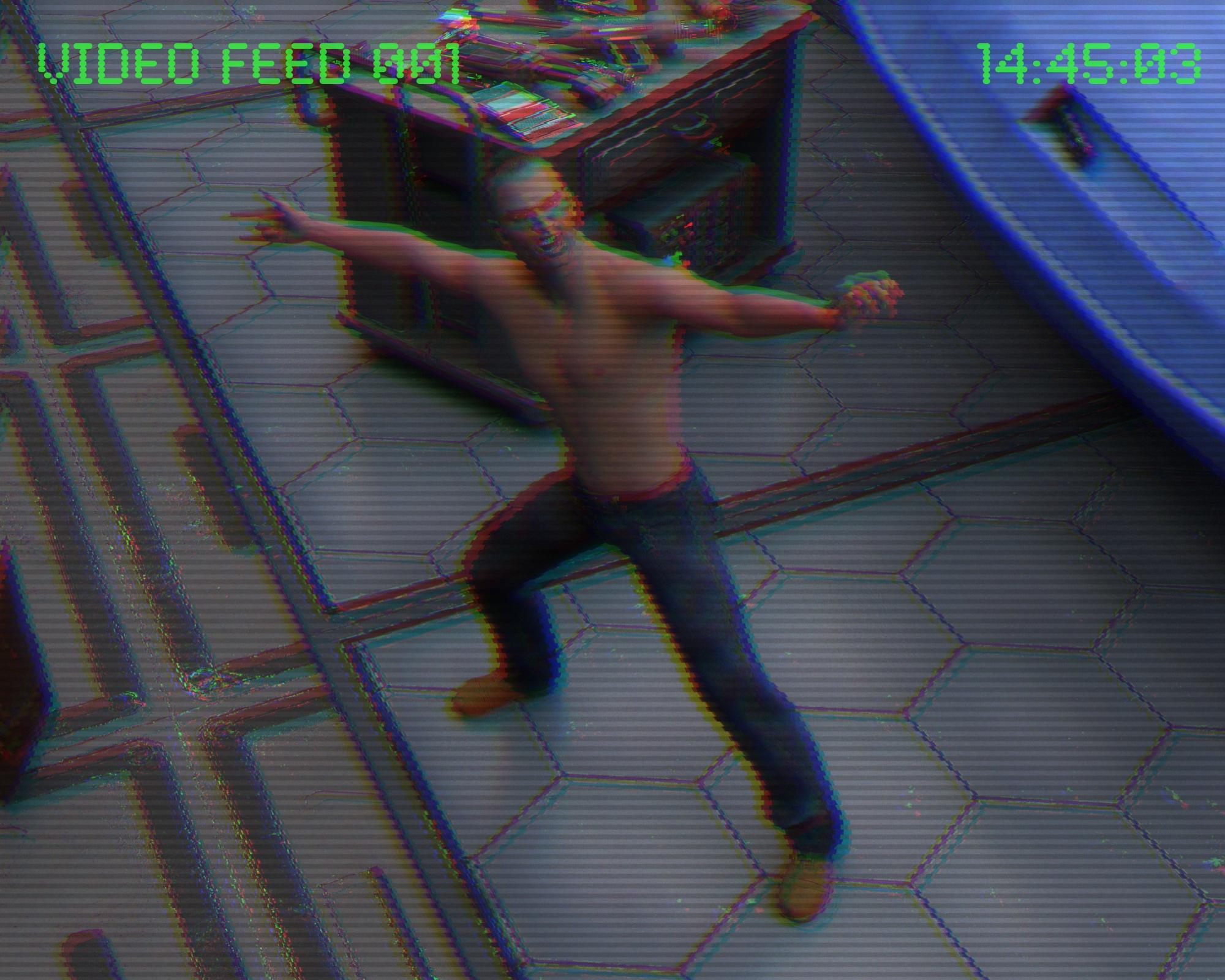
Baaros visits his old friend and comrade in arms, Haken Senreiko, and he is overwhelmed to see Baaros. -”Baaros! It was so long ago! How did you find me? I got a shit job but it pays well.” Baaros suggests they go for a drink and his friend recommends 124 ½ Cantina. It’s inside a service tunnel between two levels. They have very cheap Uoghought spit, the cheapest booze in town. They make their way to the bar, it takes time and is difficult to find, and when they finally get there, the place is crowded. It’s really hidden, and the ceiling is low, you need to watch your head while standing up.!! Store Issues - Known Problems - Please Read !!Check out the new, new improved Product Library pages. Order No. (with timestamp) and Product page links, SKU, collapsible Description and What's Included sections. And, bundles are now itemized, and items in a bundle show which one...
That DAZ Central ad is back, though, and no ReadMe link. Clicking the (smallish) image gives an Oops!, but what did that do before? I can't even remember...
IT SUCKS. Hiding the description in a dropdown? And focusing on Daz Central AGAIN????? We should NOT have to click on the description to read it. COME ON. I am furious about this. When I click through my product library I do NOT need to be clicking AGAIN on each one to read what the MAIN INFORMATION is.
Yep. It would really be a lot better to have the actual description on the page instead of as a drop down However, for me having the order nmber and date as a clickable link is big step forward. If I had to chose between having the order with a drop down description and not having the order with the description directly on the product page, I would chose having the order number and date with the drop down description. But I don't see why we can't have both the order number and the description directly on the library product page.
G8F wont show up in viewport. HELP!!! Eye icon is stuck closed!!!!!!I uninstalled everything I found inside smart content tab, it hasnt helped the issue with G8F though. as for instal programs, I use Daz Central most of the time but have used install manager a couple times in the past.
Uninstalled how?
!! Store Issues - Known Problems - Please Read !!Check out the new, new improved Product Library pages. Order No. (with timestamp) and Product page links, SKU, collapsible Description and What's Included sections. And, bundles are now itemized, and items in a bundle show which one...
That DAZ Central ad is back, though, and no ReadMe link. Clicking the (smallish) image gives an Oops!, but what did that do before? I can't even remember...
IT SUCKS. Hiding the description in a dropdown? And focusing on Daz Central AGAIN????? We should NOT have to click on the description to read it. COME ON. I am furious about this. When I click through my product library I do NOT need to be clicking AGAIN on each one to read what the MAIN INFORMATION is.
What if you were clicking through your library just to find out how to install DazCentral?
Almost 100 Broken Products: Updates and New Purchases not workingI wonder if most people are like me - when something receives bad press upon initial release, it takes ages for me to decide to use it. I think there was, and continues to be, problems with Smat Content and DIM and the Content Library work for me, so I don't change.
I can't imagine ever using Central!
Daz Studio 4.14 Pro, General Release!DAZ seems very determined that we install Central - if, as we have been told, it's targeted at newbies who are overwhelmed by DIM or by -heaven forbid- installing from a zip file, why shove it in everybody's face like this to the exclusion of any other download or install method?
It's designed to be the most new/novice PC user friendly. Therefore it is the one pushed most heavily towards new/novice PC users.
Except that it's pushed at everybody, to the almost exclusion of anything else. Anyone who knows how to find the Product Library and download from there doesn't need DAZ Central shoved in their face.
If there is now a way for a new, but computer-savvy user to download Studio without using Central (not every 'new' user needs crutches) it is so well hidden that I haven't been able to spot it. Right now, I'd hesitate to recommend Studio to anyone, because of the exclusionary focus on DAZ Central for installation and content management.
You can find download links for the general release in your product library. The links are hidden in the Description section. Expand the little triangle and scroll scroll scroll.
You can also install it with DIM, of course. That is the highly recommended way. Be sure Daz Studio is not running when you update it.*I* know that, but how is a new user going to find out? But I suppose anyone who buys something from elsewhere and discovers that Central doesn't work for that will either have to find out or give up.
I only use DIM to install Beta versions, and for downloading updates (Studio and products). Manual install all the way.
The new "improved" Product LibraryI hate the change they did to the Product Library, HIDING the descripton of the product and focusing on Daz Central AGAIN. We were told they would put the description back and they did, but COULDN'T LEAVE IT ALONE. What is WRONG with you Daz?????? Let's have thousands of people have to click, click, click every time they go through their library, to read a description.
All too often, the ones doing the coding are too young to know how to K.I.S.S
All too often coders are not also customers. If a person doesn't use a site, they might ba really comfortable eliminating a feature because they don't understand why any given function might be useful...kind of like our transit system board which makes the decisions on bus and tram service. None of them actually use the system. After all the options are weighed, they seem to always choose the worst one.
Daz Studio 4.14 Pro, General Release!DAZ seems very determined that we install Central - if, as we have been told, it's targeted at newbies who are overwhelmed by DIM or by -heaven forbid- installing from a zip file, why shove it in everybody's face like this to the exclusion of any other download or install method?
It's designed to be the most new/novice PC user friendly. Therefore it is the one pushed most heavily towards new/novice PC users.
Except that it's pushed at everybody, to the almost exclusion of anything else. Anyone who knows how to find the Product Library and download from there doesn't need DAZ Central shoved in their face.
If there is now a way for a new, but computer-savvy user to download Studio without using Central (not every 'new' user needs crutches) it is so well hidden that I haven't been able to spot it. Right now, I'd hesitate to recommend Studio to anyone, because of the exclusionary focus on DAZ Central for installation and content management.
You can find download links for the general release in your product library. The links are hidden in the Description section. Expand the little triangle and scroll scroll scroll.
You can also install it with DIM, of course. That is the highly recommended way. Be sure Daz Studio is not running when you update it.The Chronicles of Damon FinnArin decided to dig into the history of the Jewel of Yavin, and try to get some information about the bidders as information so far had been close to nothing. In the meantime, Oovo hacks around to get some understanding of the job that has to be done. She finds several important things. You need a really competent slicer to distract Lowbot, as Lowbot is constantly surveilling all transactions in real time. You need to crack encryptions, and there are alarm systems installed at the museum. Oovo decided that he needed to insert a spike somewhere central, to create a system overload. She also needed to steal some encryption stuff and an access card, to be able to access the encryptions of the final transaction that needs to be rerouted. The only way to access the banking network is via a Banking Droid, they will need to kidnap and hack a Banking Droid.
Doctor Tyhm has been shopping for some different medical and chemical substances and goes into one of the side rooms to experiment. Suddenly a soft explosion-like sound is heard, and the door to the room where Doctor Tyhm went in, opens. Green smoke comes from the room and Doctor Thym comes out coughing, saying: – “I will need some more time to mix this laxative cocktail, I think I did something wrong.”
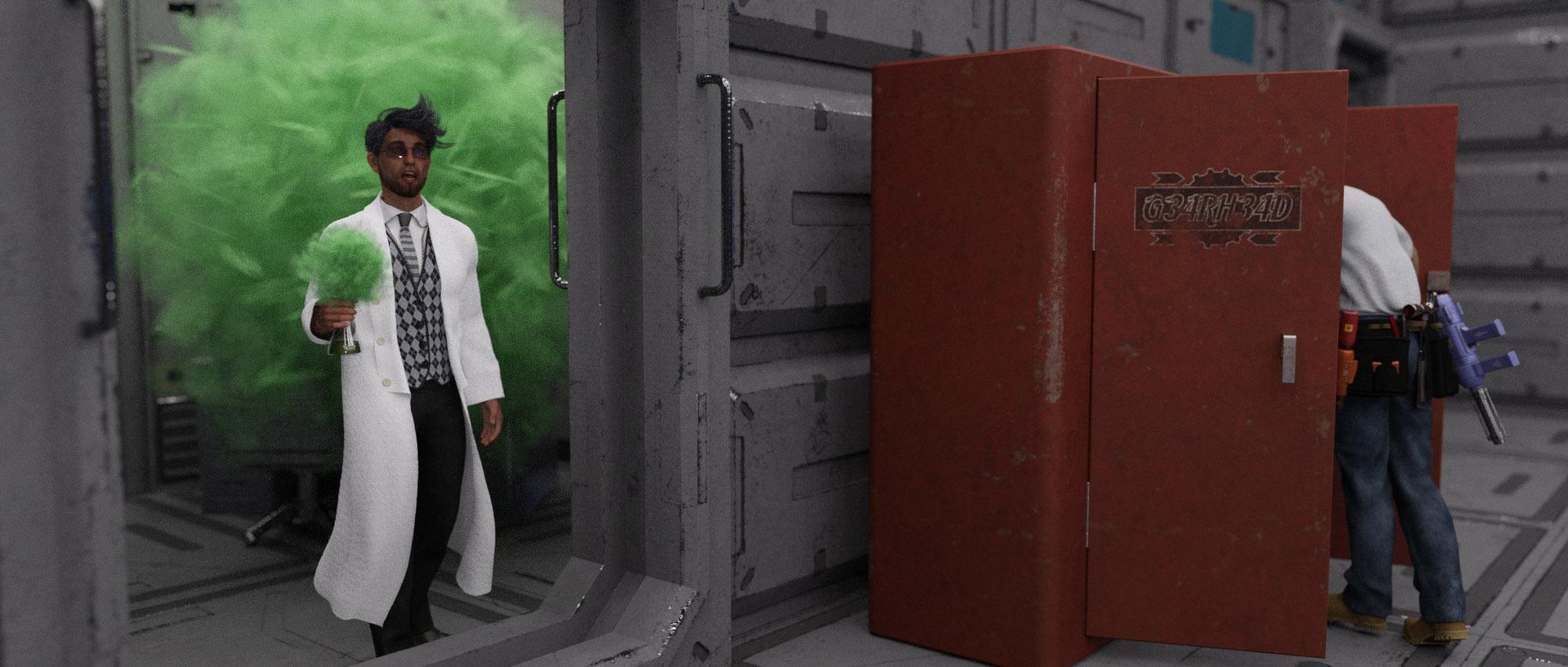
Damom tries to find out where the museum guards will hang out when they are not on duty. He finds out that they are hanging out in a really cheap bar in Port Town, but doesn’t find out exactly where it is located. Arin realises that he does know one of the bidders, Shreya Ordassa, professor at the university of Samsara, but just as Professor Ordassa. Evening turns to night and the group keeps a watch scheme to avoid any nightly events.
Early in the morning, Oovo starts to build her spike. A few hours later, after breakfast, Arin talks a tour to the Museum to do some research and recon. He learns a lot about the history of Bespin and the Cloud City. There are cameras everywhere except in the restroom area. Arin also learns more about the Jewel of Yavin, some from non official sources. The Jewel of Yavin can be used to power light sabres, and the value of it before the rise of the empire was about one million credits. Now, it has to be traded outside the reach of the Empire, so the price will be much lower.
Baaros starts to install several upgrades on the cloud car. He starts with an improved Repulser Lift. Damon helps out just to get a better understanding of how a cloud car works. Then Baaros decided to upgrade the firepower, and Damon’s help was not needed as Baaros came up with an extraordinary great solution.When Arin comes back, Oovo asks him about guards at the museum, and Arin estimated them to be about a half dozen. Doctor Thym asks Damon about how much they have spent already preparing this job, and Damon replies somewhere between 8 and 9 thousand credits. Arin and Doctor Thym decide to go to Arend Shen to discuss the payment now when they know a little more. Doctor Thym starts off by saying: –”You get the Jewel, 2/7 of the money and you get to restore your honor. We do the planning, execute the actual plan and take all the risks. So far, the expenses we have had are almost 20 thousand credits. We want to establish a long business relationship with you and we agree that the injustice your family has suffered is very serious. It’s not always a clean job, you sometimes need to crack a few eggs to make an omelette.”
Doctor Thym succeeds with this almost impossible negotiation, and Arend Shen agrees to add another 20k credits to their share. He also asks his secretary to arrange a crypto card access card for bank transfers and give it to Arin.
The new "improved" Product Library
All too often coders are not also customers. If a person doesn't use a site, they might ba really comfortable eliminating a feature because they don't understand why any given function might be usefulI hate the change they did to the Product Library, HIDING the descripton of the product and focusing on Daz Central AGAIN. We were told they would put the description back and they did, but COULDN'T LEAVE IT ALONE. What is WRONG with you Daz?????? Let's have thousands of people have to click, click, click every time they go through their library, to read a description.
All too often, the ones doing the coding are too young to know how to K.I.S.S
Daz 3D is part of

Connect
DAZ Productions, Inc.
7533 S Center View Ct #4664
West Jordan, UT 84084Licensing Agreement | Terms of Service | Privacy Policy | EULA
© 2026 Daz Productions Inc. All Rights Reserved.