-
Content won't install (IM, Connect Offline, manual download tried)
Power Pose gives you a dialogue which allows you to choose which morph sets to load, and reads the morphs in. Without it you have to run the Create ExP files to set up the files that load the morph slots, and then you have to inject the actual morph data for each set you wish to use with the supplied poses.
I think those are executable installers, hence the different OS specifications - they are bigger because they need the isntaller code as well as the data while the DIM version is just the data.
Breath Morphs Genesis 3 and 8Try the Chest Depth Morph; it's located by Chest Width.
Thank you nicstt, good suggestion! Unfortunately I think it affects the breasts a little too much on female models.
Q about SyckleYield tutorlal Converting G3 to G8 (shoes part)SyckleYield tutorial about Convert Clothing G3 to G8, G8 to G3 in the high heeled shoes part says "Before you perform the transfer step, pose the shoes to match the target figure (arms down for G8, arms up for G3)" So the question is - I have high heeled sandals for G3 which I would like to be able to use for G8 too; but the problem is the sandals are a pair and are moved as a pair while the distance between G3 feet is less then the distance between G8 feet. So how I can pose them to match the G8 feet?
Edit:
Problem with the posing solved; so only the second question remained
2. And this brings the next question - When I select the G8 figure, no matter if I use or *not use* a foot fix morph, and load the G3 sandals in the beginning while the autofit popup is active, the sandals fit perfectly. But when the autofit process ends they end as it is seen on the screens. If I cancel the autofit or load the sandals with no figure selected they simply remain between the feet of G8 figure.
Is there a way to use the autofit w/o the after-auto-fit-distortion?
Breath Morphs Genesis 3 and 8Try the Chest Depth Morph; it's located by Chest Width.
Content won't install (IM, Connect Offline, manual download tried)Yes, there can be only one Connect directory - but if you set a previous connect diectory as a regular Daz studio content diectory the content will still load. The Connect diectory is the oen isntalled to, and that does need to be unique at any given time.
The fourth generation daz figuers, and others using the ExP system, cannot at this tiem be isntalled via Connect. You need to isntall the base figure (Victoria 4 or Michael 4 as the case may be) and all ExP add-ons (such as Aiko 4 or the Victoria 4 head and body moprhs) to the same content directory, and if you don't use the PowerLoader script (which gives a dialogue on loading) you need to run the /Runtime/Libraries/!DAZ/CreateExPFiles-v4 file for your system to add the new morphs. Clothing, hair and so on isn't subject to this requirement (unless it includes a morph for the base figure too).
Yesterday was Victoria 4's 12th Birthday...I, and I don't think anyone else, is bashing what can be done with the character; it's a case of why bother? Folks make their own choices for their own reasons.
I just can't recommend anyone bother if they're new to the scene.
There are some great textures available on V4 characters; I transfer them over; I don't bother with morphs, just tweak the ones I have to get the look - cause then I have the so much better posing.
L'Adair's WIPsWell, here are the results of my time in Hexagon: a morph for the backpack. Poses with extreme bends can really mess up conforming clothing and such. First is the backpack fit to the character in a kneeling pose:

I don't have any screenshots of the failed attempt, (the one that crashed Hexagon.) I do have a couple of interim screenshots, with the cargo pack hanging off of the main backpack. (An interesting tid bit I read yesterday: each cargo pack carried, among other things, half a tent.)


The image on the left is the morph applied before the morph for the shirt; The image on the right is the same morph on the backpack with a dForce created morph on the shirt.
And finally, the final morph, which moved the cargo pack into the backpack. Apparently, if the website I visited is correct, the men preferred to forego the extra pack and used a raincoat instead.

After I finished this morph, I used dForce to smoosh the shirt under the strap. While I was at it, I draped the sleeves and softened the folds on the back of the shirt. (I used the timeline and 30 frames. At frame 0, the morph dial was 0, at frame 20, the morph dial was at 100.)
I should also mention, the backpack is from Luthbel's World War II U.S. Uniform HD for G8M
Transferring morphs from a SD figure to a subdivided HD figureI exported a hand into Hexagon and subdivided it twice (through smoothing) and then imported it back into Daz3D. I then transferred bones, etc. from the original to the new hd hand and I can use it fine, but there's various artefacts that I'm wondering if there's an easy fix for. See the attached pictures for the exact issues I'm having (the original SD hand is on the left, the hd hand is on the right. The first pic just shows the hand with fingers moved, the other one with a hand thickness morph applied).
Yesterday was Victoria 4's 12th Birthday...This makes V4 a good choice for people stuck with weak machines.
......they are much higher poly and look better FBX exported too
The original genesis one is a better choice for lesser capable hardware
if you use the free texture reduction script to downsize the ridiculous
4K textures typically found on every clothing item as well as the figures.
One can easily populate a scene with several G1 models at ZERO subD level
for background people.( and of course there is the optional Decimator plugin)And G1will have better JCM's in extreme poses and be able to wear all of V4 Skins
and clothing By default, thus why would one need to even load V4Except out of some myopic sense of nostalgia
Also, for us animators, G1 can,by default use everyV4/M4 compatible BVH & animated pose files(Pz2)
And save them as G3/G8 compatible Duf's with no need for plugins or
external retargeting programs like $$$Iclone$$$ or Autodesk Motionbuilder( see details here)
https://www.daz3d.com/forums/discussion/comment/3675321/Do you want The Duke for a cowboy shot?
You need M4. The cast of Star Trek?
You need Generation 4.
Why????
Assuming you have high quality front & side photo references
and knowledge of the programs usageWhy would John wayne or Deforest kelley not work with Facegen
& genesis???Obviously to each their own
However being a Daz content creator myself as well as an animator
in the Sci fi genre, who has been enabled by the transfer utility.I personally find Zero utility in using a V4/M4 Figure for any of my work.
Importing files with rigging.Almost every 3D program that is capable of doing rigging has its own system for doing so and it is one of the least portable functions between applications. Various "universal" transfer formats have been devised, such as FBX or Collada, but results can be hit or miss. If you have a rigged model that you wish to import, you could try exporting it in FBX format, then importing into DAZ. If that doesn't work, you are pretty much going to need to re-rig the model in DAZ Studio using the native rigging system.
Headshop 11 QuestionsHere's one that those who watch(ed) the TV show "Merline" will recognize. The model/actor is attached. I auto generated the morph and textures, and made not changes whatsoever. The front view is really good, but if I was seriously trying for accuracy I'd use morph sliders to fix the jaw. The side view is not accurate, particularly as to the actor's nose, but it still generally looks like him.
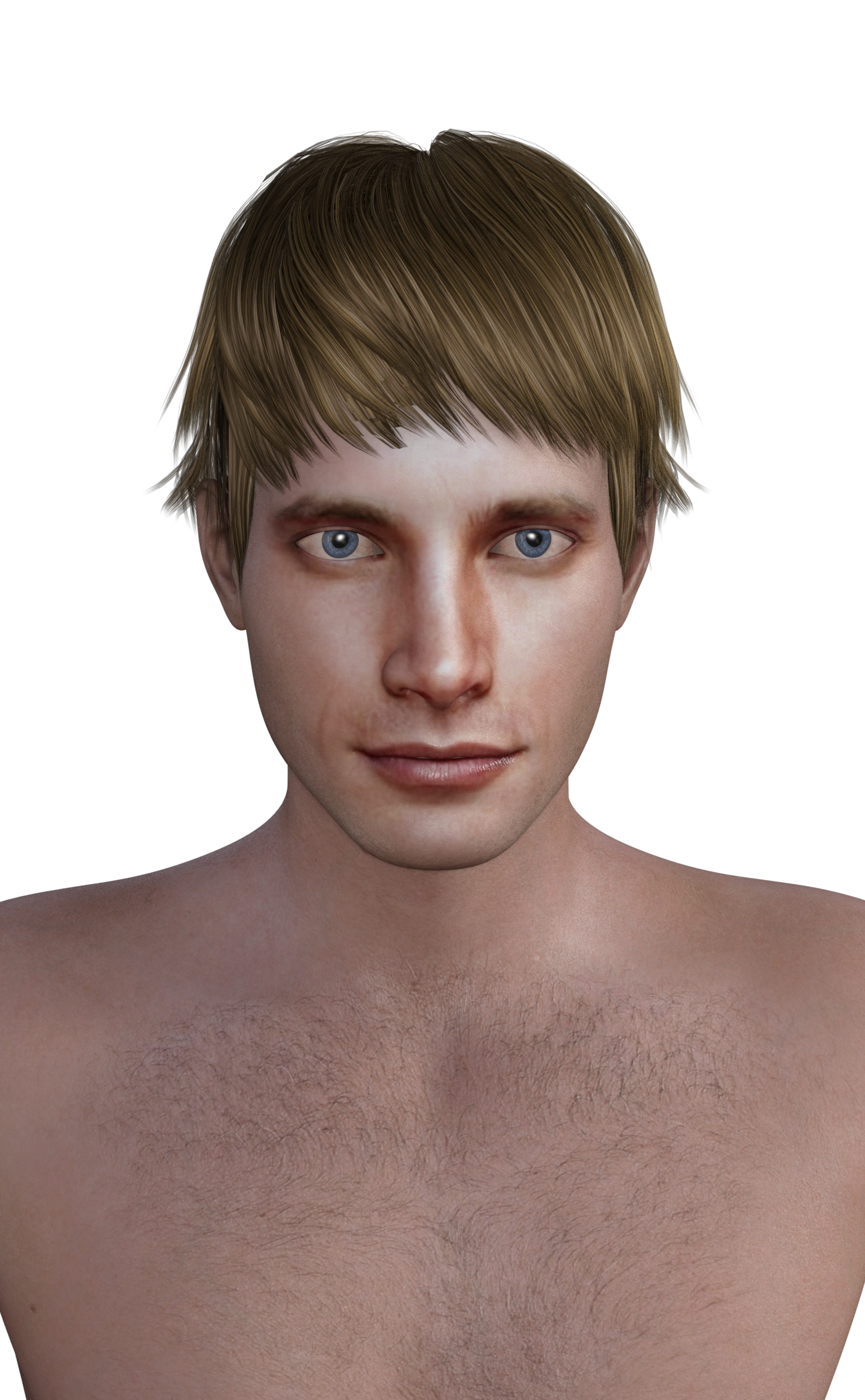
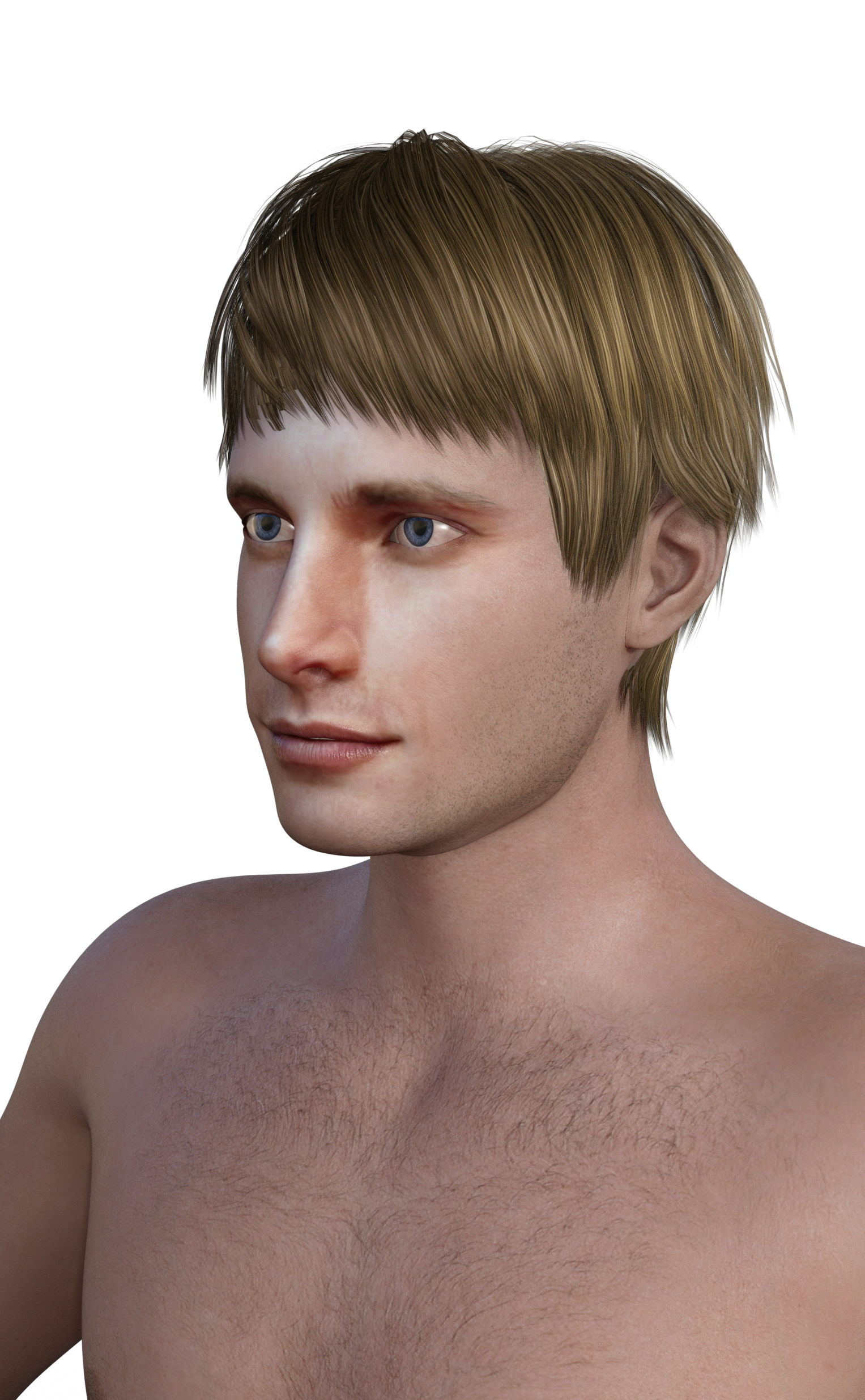
Here, I used Altern8 to change the skin shadings, and then I also added an expression.
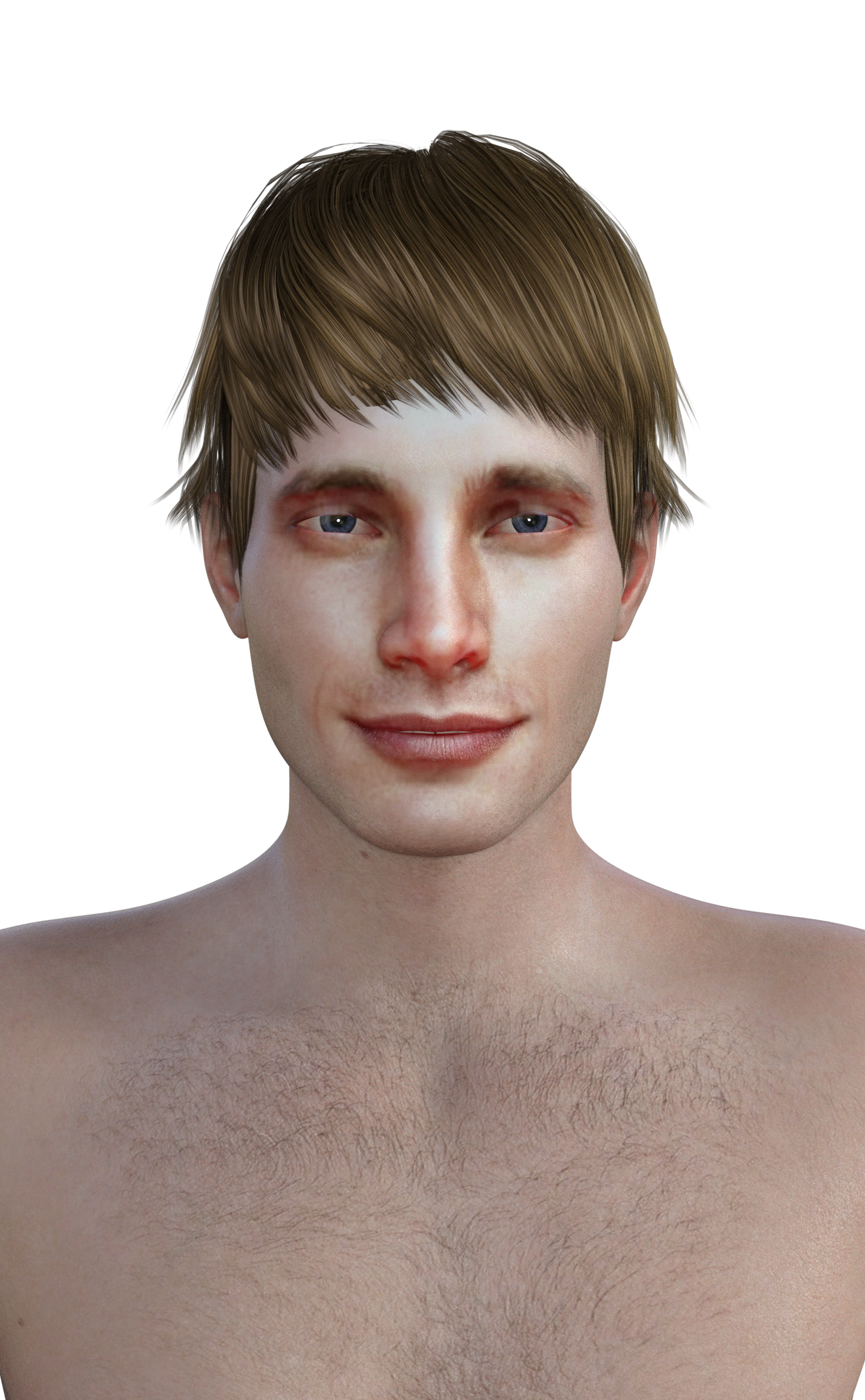
Not bad for not having done any adjusting.
I never heard of that actor but it does favor him. I think it reminds my more of the guy that plays Ducky that was in The Man from U.N.C.L.E. but maybe that's because the hi-res details in the 60s TV show and the textures you used here are similar in the amount of details.
Celebrity Look-a-Likes for 3D figures Part 2RY Kian is definitely Adam Driver. The figure can even be rendered with the scar as Kylo Ren (on the opposite side of the face, though). I wish Raiya would do a Daisy Ridley look-alike.
Best Regards,
Learstang
Same.I'm still amazed no one has done a decent Daisy Ridley. Would buy fast.
I'm presuming you don't like the look of SW Rey or SW Rey Resistance for G3F (or V4) at FoRender? (Different clothes and hair in the two sets, but both include a Rey head morph and materials and textures.)
Yeah, there's likeness for sure but it's nowhere near as accurate as something like Sangriart would do. Also, the cheeks are very weird, too sunken and with these weird ripple lines. It's like a charicature in my opinion.
Making a character look like a freshly made zombieAnother approach is to dial in your character of choice (in this case Tchanun), add in a little bit of a zombie morph (in this case Markus), create a geometry shell, apply zombie mats to it, set the cutout opacity to something less than 1:

By dialing in more zombie morph and increasing the cutout opacity for all mat zones of the geometry shell you can control the amount of rot. Hope this helps.
- Greg
Clever! I never wouldve thought about applying zombie mats at low opacity to a shell.
Essentials to buy when first startingAs Barbult has mentioned, I'd recommend starting with G8 Female Head Morphs and see how far it gets you, before getting either of the morph products you link to.
There's also G8 Female Body Morphs.dForce Multi Dress System for G8 is specifically for Genesis 8, but it requires you to figure out dForce first. It's not that easy, but it's worth looking into.
I also find The Power Pump quite versatile, but I don't know how relevant that is in a fantasy setting.
Thank you for the info, all.
So it looks like it is best to start out with an offical Daz Studio face / head and body morph packages?
That Power Pump looks great! I didn't even think of shoes at this point, but I could definitely see that as being useful.
As for a dress designing program, do you have a regular (non- dForce) recommendation I can start out with?
Also I would like to get something versitile for the hair. Any recommendations there? I will say that I prefer short hair over long hair.
I am mostly into fantasy type characters such as faries and warrior women.
Thank you all so far for the help.
Geo
Making a character look like a freshly made zombieAnother approach is to dial in your character of choice (in this case Tchanun), add in a little bit of a zombie morph (in this case Markus), create a geometry shell, apply zombie mats to it, set the cutout opacity to something less than 1:
By dialing in more zombie morph and increasing the cutout opacity for all mat zones of the geometry shell you can control the amount of rot. Hope this helps.
- Greg
Making a character look like a freshly made zombieJust having some bloodied skin, a bit of zombie morph, a mindless expression, and a typical pose should get you there.
https://www.daz3d.com/ultimate-blood-n-dirt-for-genesis-3-female-s
 Making a character look like a freshly made zombie
I don't think I have any zombies in my inventory.
But my suggetsion would be to dial in a zombie morph but with a human skin, maybe with the zombie skin as overlay.
Question re Frivolous Forties & Required Products GenerallyThanks for your reply again, Chohole. Re the Frivolous Forties, to me it wasn't obvious that the outfit (and add-ons) would work properly on the G2F as the product page states that V6 is a "Required Product". Also just recently someone asked a similar question, though I forget about which product, and the answer given was that the product would work without the Required Product, but it wouldn't work properly or exactly the same. I think someone wrote that tweaking would be required or something similar.That is what I was getting at when I said that characters are different. I remember the question and answer you are talking about (or another one just like it) and in that case the answer is that the Character morph will work directly on the relevant base Genesis figure, but won't look the same as if it was applied to the V6 or whatever the character name was.
Clothing is much more forgiving.
Strangeness with older Work File (WF)There seems to be an issue with AutoFollow breaking after saving and reloading for morphs that are embedded in the scene, as opposed to being saved as morph assets.
D-force clothing w/o D-force?.However --some-- d-force cloths might be more limited, like lacking sitting morphs for instance. As I recall most product descriptions should give you more of a clue.
Waht will happen if I apply the transfer utility to such clothing?
If the clothing is already rigged either nothing or you may end up with worse weight mapping and bone set up. If it isn't already rigged then it may well be an item that won't work as a regular fitted item, so the transfer utility will not be terribly useful.
Daz 3D is part of

Connect
DAZ Productions, Inc.
7533 S Center View Ct #4664
West Jordan, UT 84084Licensing Agreement | Terms of Service | Privacy Policy | EULA
© 2026 Daz Productions Inc. All Rights Reserved.