-
Getting on the 9 train, or not
Mm. I don't think most of the voiced complaints about what's wrong with G9's base male shape catch the whole of the problem. It isn't limited to an under-the-paps w.
- Jaw and nose is sufficiently masculine.
- Adam's apple is present but not marked. OK for a base.
- Neck, seen from the quarter, has masculine thickness but a bit of feminine-suggesting 'swanning' curves, owing both to the angle of the neck and the contour of the sternocleidomastoideus.
- Paps are rounded and, moreover, protrude at the center. A muscular man can show quite a bit of mass in the pectorals, but the bulk of that muscle mass is not so centered in its half of the chest. That is not how the pectoral muscle builds.
- A man with pectorals as thick as that also has obvious stress-built deltoids. G9's deltoids are insignificant in mass as well as in definition.
- A man with pectorals as thick as that should show more defined muscle in other places generally, most particularly the arms and neck (see above about swanning and the sternocleidomastoideus). But the muscles generally are not very defined. Most of G9 looks like he has more generally dispersed subcutaneous fat, not muscle. A little too rounded. A little too estrogenous.
- The base textures of G9 go even farther than G8 in failing to show secondary sex differences in coloring.
The end result is that G9M lands in the Uncanny Valley of Unlikely Human Individuals, at least to certain eyes. He both must be a muscular man, based on some parts, seen from some angles, and cannot be a muscular man, based on other parts, or seen from other angles. -- Not everyone is going to be able to describe this in detail, even if something hits them as off about it.
Sure, it's quite possible for a skilled artist to shift any of this. How not? The points move. The texture is repaintable.
The questions are:
- Do I have the artistic skill to know exactly what's wrong and where to make corrections?
- Do I have the skill in my modelling program to accomplish this at all?
- ... in an amount of time that's worth it to me?
The answers for me:
- Possibly, if you give me long enough to examine it.
- Ask me again next year.
- Probably not.
It's still not obvious to me that it's impossible to start with an epicene base figure, publish it, and get sufficiently convincing male and female models from it. (Harry the Hivewire Horse, after all, is sculpted from Dawn 1.) That is not my problem. My problem is that I am not convinced by this model from the neck to the diaphragm, particularly not the male version; and that I am not confident in my ability to correct that in a reasonable time; and that when I am so confident, I might not be in the market for somebody else's base figure.
So ... I have bought a couple of Genesis 9 female models whose faces I particularly like. I won't swear not to pick up a couple more -- even G9 men, if someone else produces a male face I really want to render. But I don't want to spend a lot of money to start with a base model I might have to adjust quite as much as this. Nor am I fond of the absurd combination of graphically expensive high resolution and the reported inability of mere mortals to make a nipple morph, in the unlikely event I decided to render a novel G9 male model in swimming trunks. That's ... just not incentive for a large collection of model purchases.
The published artists' creations diverge from the base models to varying degrees. With some, the base model is usually guessable. With others, I usually recognize the artist's individual style, rather than the underlying model. Naturally, it helps more if I like the base model in the former case.
Getting on the 9 train, or notRichard Haseltine said:
xyer0 said:
UncannyValet said:
xyer0 said:
The G9 moobs are a very real phenomenon that haven't been morphed away yet.
Whichever vendor spends 5 seconds in blender is set to make a fortune on this product i guess
That looks right. Now, hopefully there are no projected artifacts of the phantom under-moobs when clothed with a man's shirt.
Projecting morphs into clothes is always going to be tricky as it is based on how much the underlying mesh has changed - this is one of the reasons that the breast morphs may project badly, if there is no specific projection morph to address the issue, as the sternum area doesn't geenrally change so that part of the clothing gets left behind when an enlarge/shrink morph pushes the breasts in/out. The issue you see with clothes is probably the same thing - some areas chnage more than others and so the clothing shows oddities.
Thank you, Richard, for the nuts and bolts. The lack of adequate projection morphs may be another reason the design choice of a dedicated underboob crease has been problematic for some users and is consequently blamed for their issues. Some G8 issues (twisty forearms) were never solved, while several others were addressed with 8.1. There don't appear to be as many PAs working on G9 morphs as worked on G8, but perhaps that will change.
Getting on the 9 train, or notxyer0 said:
UncannyValet said:
xyer0 said:
The G9 moobs are a very real phenomenon that haven't been morphed away yet.
Whichever vendor spends 5 seconds in blender is set to make a fortune on this product i guess

That looks right. Now, hopefully there are no projected artifacts of the phantom under-moobs when clothed with a man's shirt.
Projecting morphs into clothes is always going to be tricky as it is based on how much the underlying mesh has changed - this is one of the reasons that the breast morphs may project badly, if there is no specific projection morph to address the issue, as the sternum area doesn't geenrally change so that part of the clothing gets left behind when an enlarge/shrink morph pushes the breasts in/out. The issue you see with clothes is probably the same thing - some areas chnage more than others and so the clothing shows oddities.
Getting on the 9 train, or notI didn't reply to RawArt's post, because it wasn't addressed to me.
I made an effort to use wording to make it clear my opinion was just that, an opinion, and tried to describe to the best of my ability where I couldn't get past the appearance of part of the model with the tools available.
I don't think G9 "should" be anything, and it's offensive to have that pinned on me when I clearly have stated otherwise.
I'm just trying to describe what I want to be able to achieve, and haven't been able despite the numerous products and characters for G9 I have purchased. There's nothing else for me to buy to do what I am trying to do.
If someone doesn't get that or understand, that's fine. But don't dismiss me, tell I shouldn't want it to begin with or that I'm being too picky. It's my money and my art. I'm not settling for something just because other people don't care.
I've been working in this stuff since Michael 3. I've always bought the various morph sets and characters, putting money in PA's pockets, dial spinning until I hit on something I like. Maybe that time is done for me. Maybe it's time for me to either walk away or learn how to sculpt and model on my own. And if I do that, that less reason for me to spend money here, too. I doubt that's something Daz wants to encourage in their customer base.
Getting on the 9 train, or notSerene Night said:
UncannyValet said:
Serene Night said:
Perhaps what is needed is a genesis 9 base male mesh with some updates to the chest, shoulders, hands, arm and feet so that those who want to make figures that are male presenting without struggling with the unisex architecture?
From my perspective, I do spend a fair amount of time trying to make genesis 9 look less female. That is not something I had to do with genesis 8.
I actually like genesis 9. I use it often. But it is more difficult for me to use for this reason. And yes I know you can port figures over and yes this is my opinion alone.
Im not one to rigidly defend something, let alone G9 which i have no personal attachment to, but i do sense some critiques of G9 are these kind of vague experiential critiques like above. Perhaps we can entertain the possibility that the morph library we are using for G9 males is the issue, which is a vendor problem, and not an issue with underlying unisex architecture itself. To me, there seems to be a lot of jumping to implausible conclusions about G9 architecture.
This feels patronizing and rude to me.
I appreciate the struggle is probably very real, and from the perspective of an end user G9 might effectively have all these issues, but the basis for that being inherent to G9 itself and not the G9 library of assets seems quite spurious. Im not discounting peoples' experiences with G9, Im saying their diagnosis for why they experience that is not something i can buy into.
I mean, you have vendors like Rawart saying it doesn't make any sense, and I am inclined to agree with that. Ive never seen anything to the contrary.
Do I Have This Correct? Something New I Am Doing With Property Hierarchy / ERC Freezing Stuff.Alright this all looks like it has resolved the issues I faced. I actually needed to make x2 CTRL properties. I have the side to side only morph subtracting from the bend property that is set as the 2nd stage sub component that is in my bend joints CTRL property. Everything appears to be okay currently. I'll chime in if I see other issues but so far, no matter how I dial the rotations on the joints, everything is deforming correctly. Thank you both very much.
Getting on the 9 train, or notMatt_Castle said:
Sure, there's an argument to be had about the compromises necessary to achieve that, but we should at least agree that it's a desirable feature.
Hopefully, Daz will continue to iterate on the concept, improving on the points that people don't like instead of getting back to two different figures because it's very convenient to be able to easily use anything regardless of the gender without jumping through the various hoops on fire placed between the two genders in previous generations: just load them and voila.
Like you said in another message, a piece of clothes not perfectly taylored for one gender is better than no piece of clothing, and plenty are working great on any character, regardless of their gender.
Serene Night said:
I would bet I own the majority of the male adult Genesis 9 content in the store and other places and only some female characters. Male content is more often to include anatomical morphs and maps than vice versa. In fact, I went through my female non-daz store content and there are zero chest adjustments or anatomical elements for male characters outside of DAZ or twin type characters. The same can not be said for male presenting figures. I'm not saying there is a huge amount but it exists. Some PAs' do this more often than others.
I was not questionning your library size, I was asking if you have characters in mind because I'm not seeing such a strong difference between the two genders that it would warrant your initial phrasing, with no quantifier for masculine characters and a rather strong one for feminine ones.
I would love it if women's textures had morphs for the chest. It would make my life so much easier. Doing the nipples the way Genesis 9 did, is not a great improvement from my perspective. I'd really like to be able to use all Genesis 9 skins on all figures and be able to remove the shirts, without the textures in the area of men's nipples looking odd. I am less concerned really about elements, since I don't do full-frontal nudity and there are products available for those adjustments.
You'll be happy to discover that they are actually products that can change the UV maps of the chest to move the nipples textures inside Daz Studio and one seems to do what you need (ITF Dev Kit 2). I don't have any of them, so I can't comment on how good or bad the final result looks but you can ask @MimicMolly here:
https://www.daz3d.com/forums/discussion/656161/
Gator said:
For the cross-gender clothing support you also need to keep in mind at least today, there really aren't that many unisex outfits in the real world. Even in 2024, our children go to a school that requires uniforms and they are different for the sexes. Even something basic like a polo shirt, they are cut significantly different and fit differently between the sexes. Sure, you can morph it, but you generally morph the crap out of it and wind up compression/stretching issues I mentioned in that post. Same for the US military ACU, while similar the differences are beyond morphs.
They are plenty of clothes who are the same between genders (morphology difference asside) like a basic pair of jeans, a T-shirt, etc.
Others are designed with how as a society we think each gender should dress, but that's an ever moving target and art & fashion are not exactly the last places where that target is twisted like a pretzel.
Various work clothes are usually also very similar between genders because most works have the same requirements for anyone, regardless of their gender. Sure, difference in morphology should and will be taken into account in the way a piece of clothing will be cut, but that's what full body morphs (or whatever they are called, the body_bs_body sliders on clothes worn by Genesis 9) are mimicking in Daz Studio. And it's not like each gender have one body type to start with: you'll find a lot of variation among one gender too.
As for the ACU, the alternate version seems mostly about difference in morphology and while created with women in mind, in the end, they decided it can be issued to men too if it fitted their body better than the ACU:
"They were initially designed for female Soldiers, but we were told if we [found] male Soldiers [who were better fitted in these] than the ACUs, then we can issue it to them as well," Whitworth said. "It's more about the fit and the body type."
The 'formal' uniform also seems to be moving toward a more neutral version instead of the pants for men, skirts for women:
Will there be a difference between the men's and women's uniform?
An all-female Army Uniform Board determined that aside from some very minor fit type differences, the issue male and female AGSU are essentially the same. Female Soldiers will, however, have additional skirt and shoe choices as optional items.
https://www.army.mil/uniforms/#faqs-bar
In the end, I'm not sure US military uniforms is really a great argument to defend getting back to a one base per gender world… or army uniforms in general, considering they are documented cases of women enlisting in various armies around the world long before they were allowed to (so essentially wearing male uniform, which many still had/have to do long after women started to be allowed to serve, see this testimony by @memcneil70 who had to do it when she served in the US military).
Do I Have This Correct? Something New I Am Doing With Property Hierarchy / ERC Freezing Stuff.Richard Haseltine said:
ERC Freeze is a basic tool - it links one controller to one or more subcomponents using addition with a scalar to ensure that when ther controller has its currenmmt value the sub-components have their current values. Optionally it can add a single attentuator, which will multiply by the selected property (so you can use it to set up your basic bend correction that is triggered only when both the bend and your morph, as the attentuator, are in effect). Abything beyond that level of complexity will require working in the Property Hierarchy - whether you go there straight off or do an ERC Freeze first is a matter of convenience, workfloww, and possibly the actual types of links needed.
Thank you, Richard. As you can see, I've never setup something this complex so the ERC Freeze was just a workflow thing I was used to at the moment, I didn't even understand fully quite what it was until after I made this post lol (thought I knew but, nope lol). Anyway, as you can imagine, there isn't very many if any tutorials out there for something like this. I know just enough to make me feel like I know what I may end up doing and then I get myself into trouble ha. Looks like Crosswind may have some resources for me below. Thanks again, Richard, I hope everything goes well for you on your Holidays.
crosswind said:
You may want to set up Multi-Dimensional controllers ... check these threads:
https://www.daz3d.com/forums/discussion/656526/how-to-make-erc-for-pjcm-under-multiple-conditions
https://www.daz3d.com/forums/discussion/651706/too-many-morphs-or-should-i-just-give-up-on-this/p1
To make pJCMs / cbs work, you don't need ERC Freezing but just setting up ERC links in Property Hierarchy.
Thank you for the resources, Crosswind. I've already looked through them a bit and I'm going to look at this video by Mada as I haven't seen it yet. Since I made this post, I figured out a few things but obviously, I still haven't successfully completed what I set out to do. I'll see if I can explain it better but after seeing your information from the resources, I can see my approach is flawed and need to use a CTRLMD since the controller for the joint itself cannot be a 1st stage and 2nd stage as the new property would be able to do being floating point and not a degree value (at least if I am understanding that right).
So here is a quick breakdown of the thought process here.
Thigh Bend Joint = having the bend morph as a sub componenet 1st stage.
Thigh Bend Morph = having the bend joint as it's controller 1st stage. The character morph I made is on the 2nd stage here as multiply so this morph will only trigger if this character morph is dialed in.
Thigh Side To Side Joint = Everything from above with the Bend.
Then we approach the complex part which is a corrective morph I created using the Bend Morph and not the Side to Side morph. In this scenerio, if someone were to dial in bend while side to side is also active I would like for the side to side only morph to subtract from to overall shape as the user dials in the bend or the side to side. That last part being where it gets really complex as I would like it to be as below.
User dials in Side To Side first then Bend or if they do it vise versa. Either way I would like to end as the same result.I think where the main hitch is here is due to the CTRLMD dial not being created yet as this will need to be set as 2nd stage multipy on one of the properties from what I understand as well as be a 1st stage controller.
I did figure out that putting side to side only as a subtract on the side to side + bend morph will blend the two morphs as something like "Bend" is dialed in but can not wrap my head around how something like that would be done as well for the side to side joint.
So, lots of reading to do. I really appricaite the resources and I hope I can figure this out lol.
I hope your Holidays go great for you, Crosswind.
HeadShop QuestionsI think you're better off with Face Transfer.
[Released] Anilip3 [Commercial]What does this error means:
"The figure control with name 'VSMMouthL' could not be found. Check your configuration."
and how to fix it?
According to https://www.daz3d.com/anilip3-figures-pack
Daz Horse 2 should work with Anilip 3.
I have used https://www.daz3d.com/da-clydesdale-for-daz-horse-2
and it created an animation, but I could not transfer a voice to it. Getting on the 9 train, or not
And yet....
I don't do barechested renders; so, I have no dog in this fight, but I definitely see what the G9-has-moobs-mob is talking about. The G9 moobs are a very real phenomenon that haven't been morphed away yet. I've seen a couple of morphs that purported to fix the moobs which, upon closer inspection, didn't really do the job. It's obviously a design tradeoff decision made when G9 was created that hasn't yet been remedied by any available morph package(s) or combination. However, when Genesis 2 Male had defined pecs that were never remedied by morphs, I don't remember anyone trying to convince those who complained about it that they weren't there.
Questions: Nail length and hair movementvincentblackwood said:
Hello, wanted to ask about two things I cannot really find or figure out:
1. How can I reset the nail length back to default if it's not anything under Parameters causing it? It seems some nail models apply both the colour *and* length, and I can't get rid of the latter (other than Undo, but not an option if this was applied a while ago). I tried to disable the limits for "Nails length", but below the default -30% (which still looks like a fresh manicure and out of place on a character intended to be a soldier) they just become distorted and creepy.
This is really a product, rather than Daz Studio, issue - it may be that the nail length is part of the base character shape, for example. You could make your own morph if the standard one doesn't work, using dForms or an external modeller (or Geoemtry Sculptor/Mesh Grabber if you have one of those).
2. Is there a way to add some hair movement if the hair model itself doesn't have any morphs? I could swear some poses do that by some magic, but cannot find any way to do that - other than the "Hidden" sliders which also become weird above subtle changes.
Depends on the hair - again, dForms (robbaly with weight maps), Mesh Grabber, or a modelling application could create new morphs. Some hair might work with dForce. Strand Based hair offers limited options if it won't simulate.
For reference, this is about G8F.
Thanks in advance for any help!
HeadShop QuestionsThe line of HeadShop products has seemlingly exploded in the last few years. There are 2023, 2024, and 2025 versions. Some are titled "HeadShop" and others "HeadShop Pro" or "HeadShop LT".
Normally that would be great news! More things! And it probably is good news. The trouble for me is that even after reading the various product descriptions I can't tell one from the other. There seems to be a lot of overlap. But different products come witrh different prices and come on sale at different times, so I have no idea when to pull the trigger and what to buy.
I own Face Transfer and Face Transfer Shapes (I work mostly with Genesis 8), and I've been looking for a HeadShop product that is essentially the same as that, but I've become lost in the maze of options.
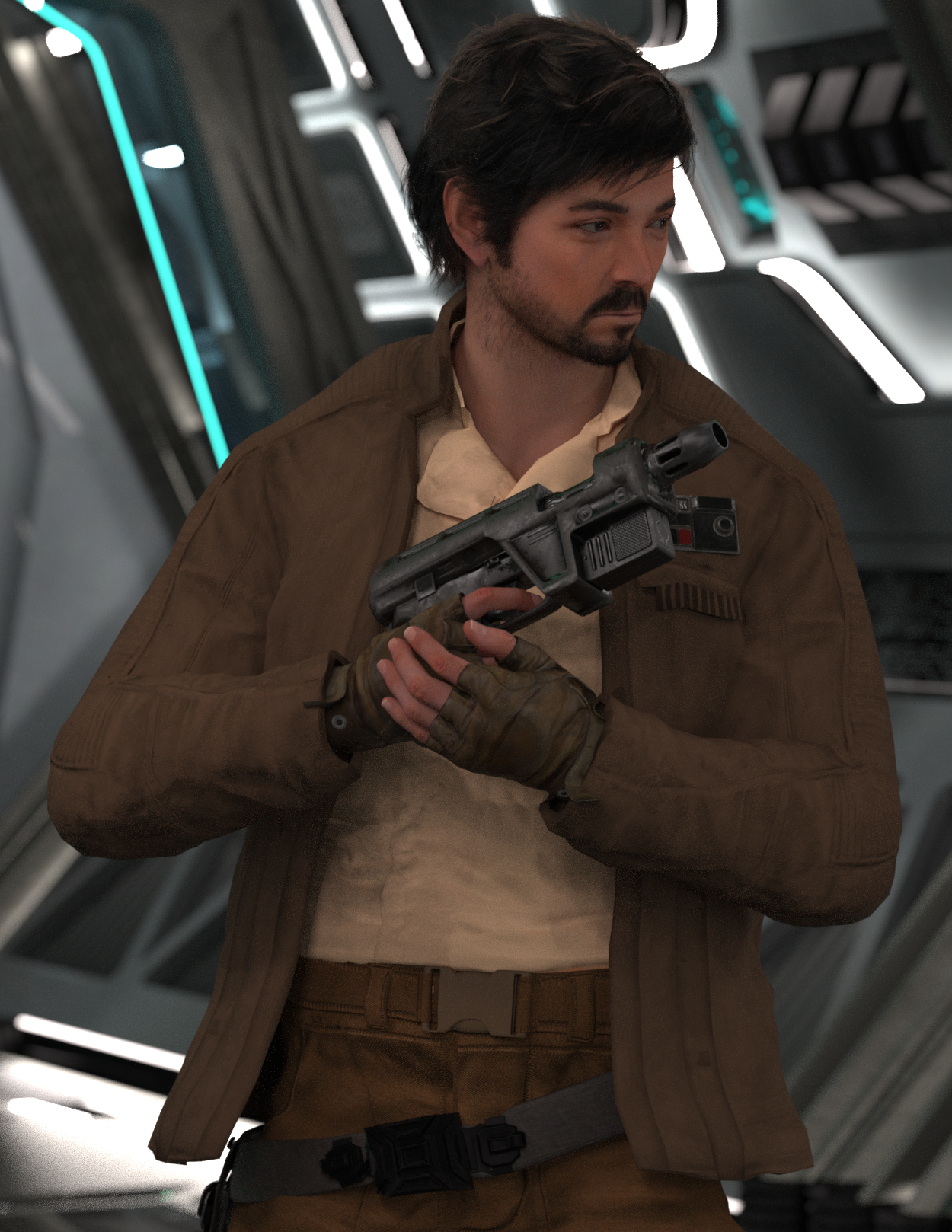
Star Wars Renders 2013 +A stolen moment between rebels. Pretty happy with the progress on converting Cassian to G9 using magnus1781's Diego Luna G8M head morph & G3M texture files.
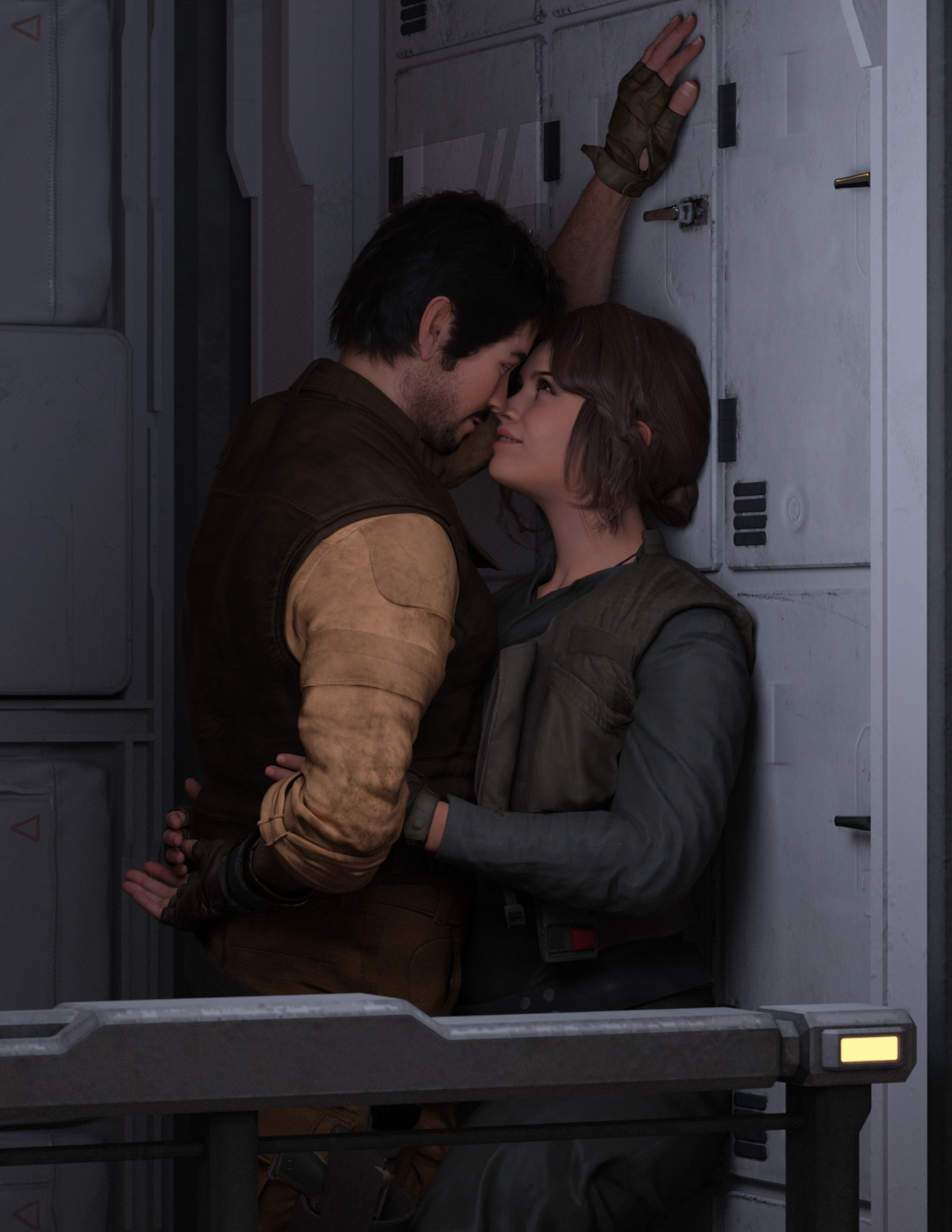
Cassian Andor [G9]
 Getting on the 9 train, or not
This thread is so confusing
If people have specific ideas of how a chest shape "should" look to them, then it is simply that they need a morph to get the look they want, and that can be made with any of a number of the shaping dials available. They could even save that shape as a preset they can add to other characters if they want them to have that look.
All genesis figures from any generation are all very flexible that way. There really should not be any hold up to any generation of figure due to personal proference of body shapes.
Getting on the 9 train, or notTimbales said:
UncannyValet said:
Timbales said:
For me, it's the torso mesh.
to sides, under, and between is denser than the rest of the torso. It's also shaped to give a contour to the breasts. I feel those two things combined gives an overly defined contour that can't be dialed away when a male-presenting shape is applied. It can give a 'fall-off' or chiseled effect with some characters.
I've bought several products and used free shapes people have shared with no luck getting it to go away.
Hmm, I really dont think it would be an intractable problem to make a simple flat chested morph. That seems like a very remedial level task for anyone who can sculpt things.
My speculation as a non-modeler - I don't think it can be addressed without making the overal mesh of the whole breast area a consistent size.
It's more sculpting than "modelling", depending how one defines such things. Anyways, I think the mesh density and topology flow arent going to be a bottleneck in sculpting povided the mesh is dense enough. With HD morphs, there is no limit to what you can sculpt, really.
I definitely think the base mesh is dense enough to make a flat chested morph. The topology flow could be a problem with respect to how the shape is bending during posing, but that can be fixed with corrective blenshapes.Or a geografted chest without the rounded W shape so densely defined. One was made for a female shape. I reached out the vendor to see if they would make a male version I could purchase, they declined.
That feels unnecessary.
I may come back to this thread with further evidence supporting my claims if I can be bothered.Don't feel you have to if it's not something that interests or inspires you.It wouldnt be a significant exertion of effort to be fair.
There are two workflows that character creators would use to make morphs, one being just moving the base mesh vertices around in sculpting software (either base res or subdivided) and other method being wrapping the genesis 9 base mesh to an object that was freely sculpted. With the second method, it's hard to imagine that you couldnt wrap the genesis 9 mesh, which claims to have 2x higher polygon density, to any g8 mesh (nipples and navel notwithstanding).
If completely smoothing out the pectoral shapes, I suspect (but would need to confirm) that such a shape might need blendshapes to correct crease when the spine bones bend forward.Getting on the 9 train, or not
Don't feel you have to if it's not something that interests or inspires you.UncannyValet said:Timbales said:
For me, it's the torso mesh.
to sides, under, and between is denser than the rest of the torso. It's also shaped to give a contour to the breasts. I feel those two things combined gives an overly defined contour that can't be dialed away when a male-presenting shape is applied. It can give a 'fall-off' or chiseled effect with some characters.
I've bought several products and used free shapes people have shared with no luck getting it to go away.
Hmm, I really dont think it would be an intractable problem to make a simple flat chested morph. That seems like a very remedial level task for anyone who can sculpt things.
My speculation as a non-modeler - I don't think it can be addressed without making the overal mesh of the whole breast area a consistent size.
It's more sculpting than "modelling", depending how one defines such things. Anyways, I think the mesh density and topology flow arent going to be a bottleneck in sculpting povided the mesh is dense enough. With HD morphs, there is no limit to what you can sculpt, really.
I definitely think the base mesh is dense enough to make a flat chested morph. The topology flow could be a problem with respect to how the shape is bending during posing, but that can be fixed with corrective blenshapes.Or a geografted chest without the rounded W shape so densely defined. One was made for a female shape. I reached out the vendor to see if they would make a male version I could purchase, they declined.
That feels unnecessary.
I may come back to this thread with further evidence supporting my claims if I can be bothered.Getting on the 9 train, or notTimbales said:
For me, it's the torso mesh.
to sides, under, and between is denser than the rest of the torso. It's also shaped to give a contour to the breasts. I feel those two things combined gives an overly defined contour that can't be dialed away when a male-presenting shape is applied. It can give a 'fall-off' or chiseled effect with some characters.
I've bought several products and used free shapes people have shared with no luck getting it to go away.
Hmm, I really dont think it would be an intractable problem to make a simple flat chested morph. That seems like a very remedial level task for anyone who can sculpt things.
My speculation as a non-modeler - I don't think it can be addressed without making the overal mesh of the whole breast area a consistent size.
It's more sculpting than "modelling", depending how one defines such things. Anyways, I think the mesh density and topology flow arent going to be a bottleneck in sculpting povided the mesh is dense enough. With HD morphs, there is no limit to what you can sculpt, really.
I definitely think the base mesh is dense enough to make a flat chested morph. The topology flow could be a problem with respect to how the shape is bending during posing, but that can be fixed with corrective blenshapes.Or a geografted chest without the rounded W shape so densely defined. One was made for a female shape. I reached out the vendor to see if they would make a male version I could purchase, they declined.
That feels unnecessary.
I may come back to this thread with further evidence supporting my claims if I can be bothered.How to custom morph a body that has already a graf?Morph Loader Pro - Load Morph for:
You have to apply the same geograft to the figure before loading the morph.
Getting on the 9 train, or notMatt_Castle said:
Sure, things could be done better about G9, but I think the things that G9 has tried to do are good ideas in principle.
My personal problem with G9 is a purely financial one. Having to buy a lot of stuff *again* that I already paid for before to use G3/8 (where at least some if not most was compatible) is beyond my financial means for a pure hobby. And as G3/8 are working good enough, the need to jump on the G9 train for me (!) is zero. Up to now I have seen not many G9 products that I would really NEED, except maybe be for a few characters, which still rather are in the "nice to have" category and make me wish for a G9->G8 figure transfer product.
So yes, the idea behind G9 is a good one, in principle and for many customers, but it's also easy to live without G9. And I am sure that DAZ can live without the little money I usually spent here.
Daz 3D is part of

Connect
DAZ Productions, Inc.
7533 S Center View Ct #4664
West Jordan, UT 84084Licensing Agreement | Terms of Service | Privacy Policy | EULA
© 2026 Daz Productions Inc. All Rights Reserved.