-
Where are the highly detailed, muscular HD-Addons for Genesis 8 female? Like Ophelia 7's HD-Addon?
to see larger version click link to my gallery and the magnifying glass
this is a seperate hd morph that comes as part of the Zelera 8 HD morph
Zelara 8 Alien Hd
https://www.daz3d.com/gallery/#images/669731
 Rigging issue
It's like a invisible barrier cutting into the mesh of the figure.
Issue:
Now I get what is wrong, you are using a way too smale scle for the Halo 5 Male techsuit. You must have imported it in the wrong scaling compared to a default Genesis figure. You can also see it by the Floor grid the distance to the next grid line seems very far away behind the figure. The distance from one grid line to the next is 1 Meter. I guess your Halo 5 Male techsuit figure is currently about 10 cm high like a plastic toy figure. Thasts why you get all kinds of issues by zooming and such and the controlls acting too sensitive. The "invisible barrier cutting into the mesh" is actualy called the clipping distance of the Persepective view. You don't have this in the Orthographic views. The clipping distance tells the view to hide geometry that is too close to the Persepective or Camera view. Even on regular scale this clipping distance sometimes seems too big but you can't control it there is no setting for it. On Cameras you can change the Frame With and the clipping distance will become less noticable.
Solution:
Also load in a Geneisis figure into the scene, scale the Halo 5 Male techsuit up with the general scaling transformation in Parameters pane until its about the same size of the Genesis Figure. Next hide everything but the techsuit and export this mesh as OBJ keep an eye on the export Scale should be Daz Default Scale 100% (1 unit = 1 cm). But instead of starting over to rig this new mesh you could try the following. Open the Morph Loader Pro and load the exported OBJ mesh with the native Daz scaling as a morph and dial it up on the current figure. Next go to the Joint Editor and choose Adjust Rigging to Shape this should fix the current rig representing the propper scale. Then go to the Joint Editor Tool Settings pane and Memorize Figure Rigging. Next go to Edit > Figure > Geometry > Update Geometry and choose the exported OBJ. Again choose the Daz Default Scale 100% (1 unit = 1 cm) now everything the rig and the mesh is fixed to the propper Daz scaling. You can still use the morph you created as a "reverse shape" by dialing it downt to -100% and you get the toy figure scaling from before if that was what you intended to do.
?? Merchant Resources: Identification, Collection, Installation ??I don't mind paying for an upgrade license across generations. But, I think that if you've bought the product for previous generation(s), you should be paying a heavily discounted upgrade price to just have the same morph or skin set applied to the new generation. And, I don't think that terms should change retroactively...meaning, if I have an open use for a product for G3F, then buy the G8F upgrade, the artist offering the MR shouldn't change the terms from one generation to the next.
Oddly enough, is someone were to make a good open use, skin set that allows use for freebies (most say only for commercial character creation), they'd probably sell a lot. It'd be nice to have a go to freebie skin set.
I agree that a good set of MR license standards would be good. However, I agree with Wil that some products lend themselves more to open use, while others are generation specific. It's not a single solution. But, standards for each category could be set.
As to the OP...I apologize for not really addressing the issue of organizing MRs. Since there is no standard tag, it really falls to us end users to go through our product database and do the organizing one at a time. This is something that I really need to do as well.
Fit Control for Genesis 3 MaleIf look like this seems trousers became smaller and he became invisible man

Can you screenshot how fit clothes without apply morph and sequence of morph you apply?
Where is Ophelia 8?The HD add on is a morph so showing on an untextured figure gives a better look at it than on a textured figure.
Gen X2 installation issues!!Again, sorry to necro a thread, but I only see V4 and Genesis as source, even though I have Gen X2 and the add-on for G2. I'd really like to transfer some G2 morphs to G1. I've read through several threads, tried Gen X2 at the Daz connect folder, etc., but nothing works.
export ALL morphs with "Morph Export Rules" to C4D..!?and how must be the "naming" inside "morph export rules" for this aging morphs..?
creating clothing in BlenderThank you for the explanation. Unfortunately, the dress doesn't follow the movements of my figure (see the image). I imported the dress with the right scale and location. Then I used the transfer utility and finally I saved the dress as a figure/prop asset. Am I missing a step?
export ALL morphs with "Morph Export Rules" to C4D..!?hi there,
i know that i can export existing "head"-morphs with "morph export rules" with definition "head" and "export.
is it possible to export ALL existing Morphs with "morph export rules"..?
for example: if i buy "Aging Morphs for Genesis 8 Male", can i export this Morphs to C4D..?
thank you, Lars
Novica & Forum Members Tips & Product Reviews Pt 11I just connect my iPhone to my USB port on my laptop & then copy/paste my entire iPhone photo directory to my laptop; then I delete the pictures from my iPhone.
The problem with that was I have so many photos, it just sat there spinning and spinning. After ten minutes, still hadn't started loading. With the Simple Transfer, it was blindingly fast. :) So yep, I did try that USB route first.
ADORABLE frog!!!!
Novica & Forum Members Tips & Product Reviews Pt 11I'm getting there :)
Hit a snag, the images are AWFUL going from the iphone to the PC. And they don't support/offer InstaPic anymore. So had to do an hour of research, and hit the jackpot. If you want a SUPER good phone to computer app, Simple Transfer Pro is fantastic. SO fast, easy, and NO COMPRESSION. You literally open it on your phone, type in the URL given, and within a short period of time (mine was lickety split due to the Titan, like a minute for 13,000 photos on my phone) your images appear. You select the ones you want (or all) and it was blazing fast in transfer.
I would get the Pro version so you have unlimited transfers. I can't remember if it was 3.99 or 4.99 but dirt cheap IMO. Hope this helps. More Finnigan videos on the way. The second one was done this morning (with a bit grainy video in it, before I found the SImple Transfer Pro. It's good enough, I'm not re-doing it.)
@rgcincy Thanks, it's Camtasia. Had about 14 tracks going to get all the transitions. Haven't used it in 6 years so am a bit rusty. Here's the second Finn video, where he arrives home.
I just connect my iPhone to my USB port on my laptop & then copy/paste my entire iPhone photo directory to my laptop; then I delete the pictures from my iPhone.
Sorry to hear about your toe & foot. I broke one of my my collar bones once wrestling in high school and I had to where a harness for six weeks. Oddly it didn't hurt and I only knew it was broken when I had no control of my right arm. Dummy that I was I still tried to keep wrestling with my left arm.
 Novica & Forum Members Tips & Product Reviews Pt 11
I'm getting there :)
Hit a snag, the images are AWFUL going from the iphone to the PC. And they don't support/offer InstaPic anymore. So had to do an hour of research, and hit the jackpot. If you want a SUPER good phone to computer app, Simple Transfer Pro is fantastic. SO fast, easy, and NO COMPRESSION. You literally open it on your phone, type in the URL given, and within a short period of time (mine was lickety split due to the Titan, like a minute for 13,000 photos on my phone) your images appear. You select the ones you want (or all) and it was blazing fast in transfer.
I would get the Pro version so you have unlimited transfers. I can't remember if it was 3.99 or 4.99 but dirt cheap IMO. Hope this helps. More Finnigan videos on the way. The second one was done this morning (with a bit grainy video in it, before I found the SImple Transfer Pro. It's good enough, I'm not re-doing it.)
@rgcincy Thanks, it's Camtasia. Had about 14 tracks going to get all the transitions. Haven't used it in 6 years so am a bit rusty. Here's the second Finn video, where he arrives home.
Rigging issueI wonder what you are doing there in the screenshot, it seems it is not a default genesis figure but you are working on a Bodysuit.
Before you do anything wrong here are some advices:
Your correct its not a default genesis figure. It's actually the Halo 5 Male techsuit. I do have the rigged suits for Blender, although they were never properly weight mapped. So I decided to give it a shot here in daz studio. Unforturnatly I'm unable to move on to weight mapping here in daz because the bones haven't been aligned yet. Also, I have male and female techsuits that were done by kaotbliss here on the forums. Those were made by using the transfer utility function. Problem with that is setting up armors becomes tedious when using the transferred utility suits. Proportions just aren't the same as the default model that I'm trying to rig.
All things The Witcher...I played Witcher 1 but I want to replay it and do it differently. I didn't like Yaevinn of the the Scoia'tael and sided with Siegfried of the order. I thought Siegfried was nice and Yaevinn was a looser. Well, I don't want to spoil it for anyone but that choice caused something horrible to happened to White Rayla. I'm going to play again and whip the snot out of the Order. I bought Witcher 2 and still haven't opened the package. You carry story and experience and items over into 2 with you right? I worked more on Adda tonight, a little on the morph and blocked out the dress. Give me a chance, I'm on track to have her by the weekend minus the textures. If you want to see my modeling skills I'm showing some work on the last page of the superheroes rebooted thread. I could really use a texture artist. I might release the models untextured and you all could just use shaders.Rigging issueYou should be able to pan even in Orthoraphic views like Left, Right, Front... the thing you can't do in there is orbit.
I wonder what you are doing there in the screenshot, it seems it is not a default genesis figure but you are working on a Bodysuit.
Before you do anything wrong here are some advices:
model the clothing to match the base shape of the figure, to fit clothing mesh on figures use the Transfer Utility, in the Joint editor there is also a command Transfer Rigging (Figure Space) both the Figure then holding Ctrl and the Clothing have to be selected in that order to transfer the joint possitions.
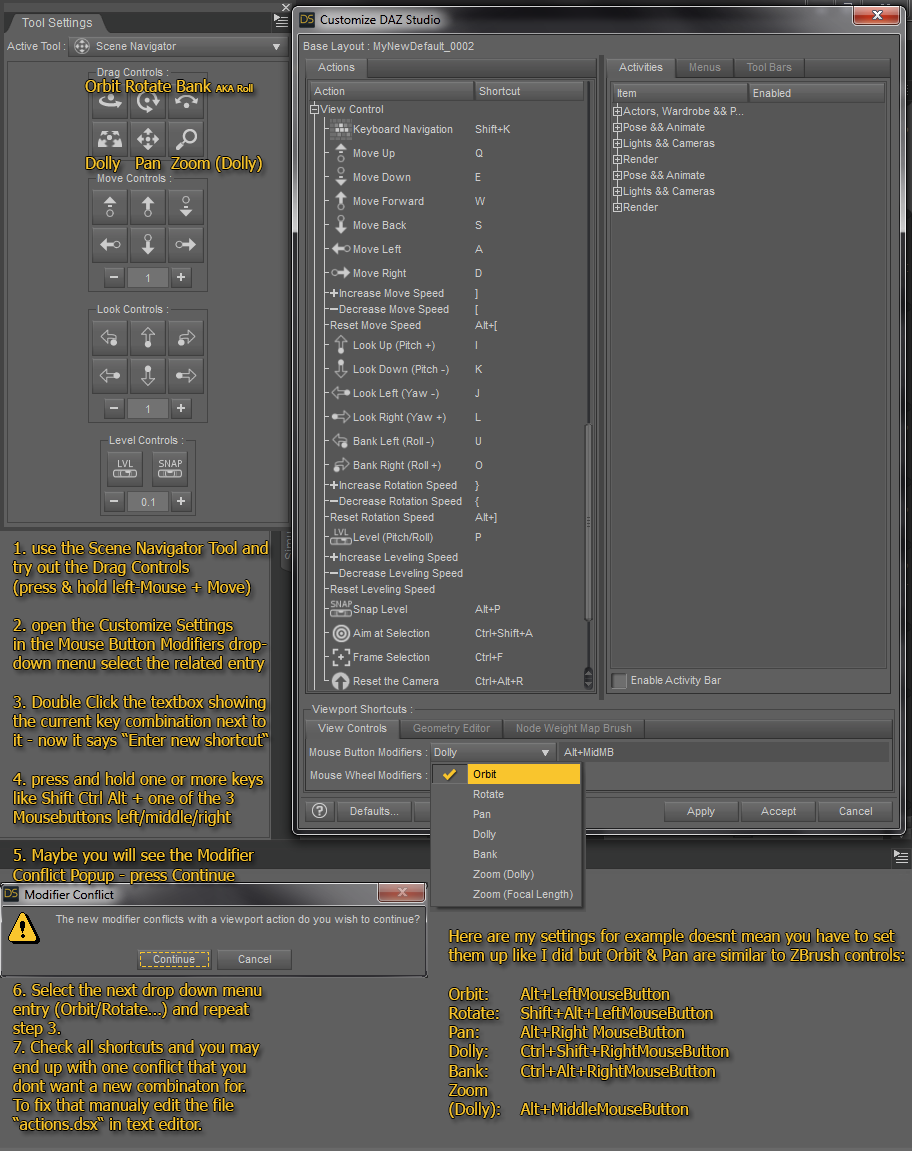
Over the years I became an expert for the Daz Studio Viewport navigation controlls. If you like to know more about how to customize Daz Studio have a look at my thread.
How to Customize Daz Studio - to speed up Workflow!? [WIP]
Viewport Navigation Guide + My custom Mouse Button Modifiers
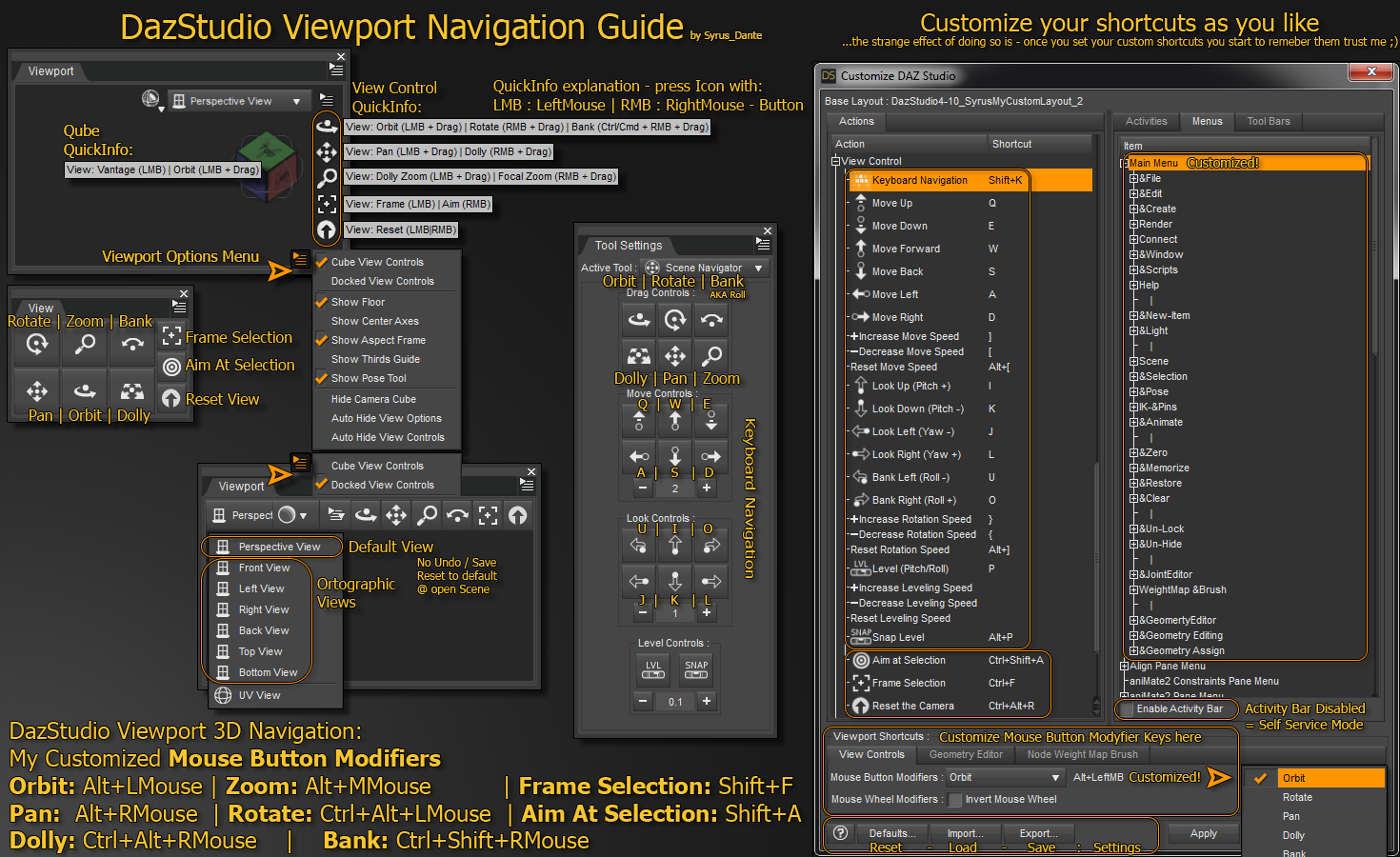
Changing Mouse Button Modifiers (open Windows > Workspace > Customize)
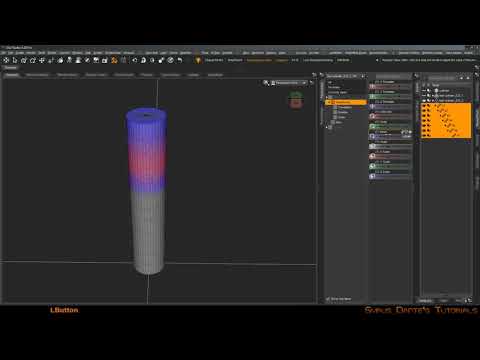
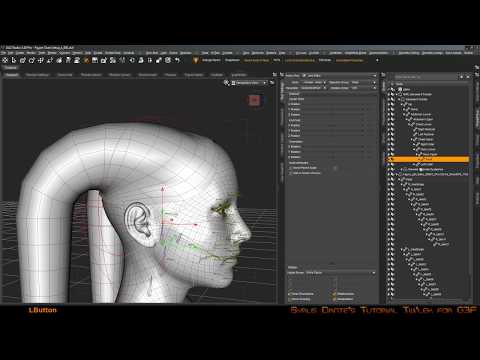
I also did some youtube videos about rigging. Maybe those can help you, even though those don't count as tutorials.
DazStudio Rigging a Cylinder
DazStudio Twi'lek for G8F 01 Editing ZarconDeeGrissom's Version
 Where is Ophelia 8?
From what I've heard, I don't think that HD morphs can be transferred between generations of figures. You could try transferring Ophelia 7's morph to G8 and use another character's HD add-on for the musculature and details. The Gia 8 HD add-on might work for you if you're looking for some muscle tone and little details like veins and natural wrinkles. Or just take a look at Gia 8 herself and see if she'd be useful for you.
The problem with the Genesis 8 HD-Addon advertisements is that they don't show any detail with a proper IRAY render. It's just a white texture. So there's no way of knowing how detailed the HD addon texture is until you buy it and apply it, it sucks.
It looks like the Genesis 3 HD-Addon's have a lot more detail and work put into them.
creating clothing in BlenderThe Transfer Utility works with the model as imported, it ignores any adjustments to the parameters inside DS, so you need to fix the OBJ so that it loads correctly placed - then it should work.
Celebrity Look-a-Likes for 3D figures Part 2Im looking for options for Gal Gadot morph in G8F or V4
any suggestions?
And also CS04 at https://www.most-digital-creations.com/poser_daz_studio_characters.htm
V4 Hair to Genesis FiguresYou essentially have three ways of fitting V4 hairs to newer figures:
1. Autofit
This is the quickest and simplest way. Apply your hair to the figure of your choice, and follow the instructions in the dialog. Tell Daz the item was made for V4 and that it's a hair (long or short as appropriate). The advantage of this method is that it's quick and simple, the disadvantage is that it doesn't always work well. In particular, if the hair has custom bones to control braids, bangs, etc. they'll be lost during the autofit process. Note also that you may need to buy clone products to allow movement direct between generations.
2. Transfer Utility
Similar to autofit, but you can get it to preserve any custom bones if you follow this tutorial by Sickleyield. The end result can still look a bit off though.
3. Parenting
If you don't like the results of the other two methods, you can simply parent the hair to the head. This saves you from the mangling that autofitting/transferring that hair can cause, but you have to manually scale the scalp to fit the head (a trick for this is to make all surfaces except the skullcap 0% opacity while you do the fitting). It also means the hair could collide with the shoulders as you move the head - you'll have to deal with that manually too.
Note that some older hair products are props rather than figures, so you'll have to parent them instead of autofitting them. Another thing to note about old hairs is that sometimes the morphs to move and adjust them can be found under the Neck bone instead of simply under the figure's root node.
If you're going to be rendering in Iray, there are several hair retexturing products in the Daz store and elsewhere that you may find useful. Personally, I use the one OOT sells at Rendo.
It all seems like a lot of hassle, but stick with it - there are a lot of really great hair products out there that you can still use effectively with just a little effort (and for very little cash!)
Rigging to Genesis 3 CharactersThat is morph projection - the shape of the figure chnages and DS chnages the fitted item to keep the same relationship to the new shape as it has to the base. You probably want to apply Rigidity to the whole of each metal piece (which will stop it changing shape, so you may need to add some custom morphs to spae it out or pull it in) or in yoru modeller create a custom morph for each shape you want to use the item with.
Rigidity
- Activate the Geometry Editor tool
- in the Tool Settings pane use the Vertex mode button, or right-click>Selection Type>Vertex
- Select the vertices of oen metal piece - if they have their own surfaces you can probably just click the + next to that Surface group in Tool Settings, or select ne vertex and press ctrl * to seelct all connected
- right-click>Geometry Assignment>Create Rigidity Group from Selected
- repeat for the other piece
Custom morph
- Find the morph you want to support, click the gear icon on its slider and open parameetrs Settings, then copy the name (not the label). Make sure it's the actual morph (e.g. Victoria 7 Body) rather than a controller
- Export the morphed figure
- In your modeller move the bits of your model so they are placed to fit the new shape as you want - only move, don't add or remove anything
- Export just your model in its new shape, and give the file the name you copied from the morph
- In DS reset the figure shape
- Select your figure, go to Edit>Figure Clear generated Morphs
- Use Morph Loader Pro or Advanced to seelct and load the morph OBJ - make sure the import options preset matches the one you used for importing the base OBJ
You should now have a custom morph which applies automatically, and without distorting, when the base figure is morphed
Daz 3D is part of

Connect
DAZ Productions, Inc.
7533 S Center View Ct #4664
West Jordan, UT 84084Licensing Agreement | Terms of Service | Privacy Policy | EULA
© 2026 Daz Productions Inc. All Rights Reserved.