-
[Updated] Chimpanzee for Genesis 8 Male [Commercial]
Got the chimpanzee - only character I've bought for G8M. Thank you and Merry Christmas. Any chance for an orangutan morph in the future? I have Ape World 2, but it's a bit lacking in realistic proportions.
Yes there is also an orangutan work in progress and other monkeys/apes too...
[Updated] Chimpanzee for Genesis 8 Male [Commercial]Got the chimpanzee - only character I've bought for G8M. Thank you and Merry Christmas. Any chance for an orangutan morph in the future? I have Ape World 2, but it's a bit lacking in realistic proportions.
Genesis(1,2,3,8) clothes on V4 and M4.There's no direct way to do it in DS as V4/M4 figures and earlier don't support autofit.
Well, I suppose you could use a figure with a V4 shape morph to morph the mesh to fit V4, then export the morphed clothes as obj, then use the figure setup tools in DS to rig the figure to V4 using parametric rigging, but that would be quite complicated. And from memory you'd have to group it like V4 and separate the various groups in a modelling program before rigging...
If you're willing to use an external program, Evilinnocence's Crossdresser program can convert items from Genesis 1 to various figures including generation 4 figures (the program itself is free, you only have to buy the XD license for the target figures, and they're quite cheap). You need to export the clothes from DS as cr2 first, using cr2 exporter (included in DS). XD doesn't support G2M/F or later figures, but if you have autofit clones to "go back" from G2+ to G1 you can try autofitting clothes for newer figures back to G1, then using XD on the G1 version to go back to V4/M4.
No guarantee on the quality of the result though....
I do the first step ie morph the figurewearing it to the V4 or M4 clone, not shape, (feet are posed streched down and some other differences) then under edit rigging convert the clothes to props
can then convert V4 or M4 to weightmapping and use transfer utility then save clothes as a support asset
it will then in DS fit V4 or M4 not converted to weightmapping too
but only in DAZ studio not Poser
Genesis(1,2,3,8) clothes on V4 and M4.There's no direct way to do it in DS as V4/M4 figures and earlier don't support autofit.
Well, I suppose you could use a figure with a V4 shape morph to morph the mesh to fit V4, then export the morphed clothes as obj, then use the figure setup tools in DS to rig the figure to V4 using parametric rigging, but that would be quite complicated. And from memory you'd have to group it like V4 and separate the various groups in a modelling program before rigging...
If you're willing to use an external program, Evilinnocence's Crossdresser program can convert items from Genesis 1 to various figures including generation 4 figures (the program itself is free, you only have to buy the XD license for the target figures, and they're quite cheap). You need to export the clothes from DS as cr2 first, using cr2 exporter (included in DS). XD doesn't support G2M/F or later figures, but if you have autofit clones to "go back" from G2+ to G1 you can try autofitting clothes for newer figures back to G1, then using XD on the G1 version to go back to V4/M4.
No guarantee on the quality of the result though....
RenderGuyNY's Freebies (latest freebie updated 5-24-20)This set contains a new figure, Diana, for the Genesis 8 Male base. The set contains 12 eye options, five makeup options, seven nail options (both finger and toe), along with a few other fun features. She also comes with a unique skirt and sweater option that are glitzed up for the holidays in sequins. As a female figure for G8M, the Diana for G8M morph can be used with other G8M materials, attachments, and clothes. Diana is here to put the "T" in LGBT. Merry Christmas!!!
https://sharecg.com/v/92884/browse/21/DAZ-Studio/Diana-for-G8M
Follow me on Facebook at: http://www.facebook.com/RenderGuyNY


 CryptoCreaturesDarkseal made a chupacabra morph and texture for the old poser 8 dog... though it might not be exactly what youre looking for: https://www.daz3d.com/chupacabrap8dog(Released) 3D Water Props [Commercial]
I wound up pulling in a water prop from another bathroom set that had a similar-shaped old-style bathtub. With a biit of rotation and size axis adjustements, I got it to mostly fit, but the curved ends didn't quite match the curves of the tub I was using it with.
It suggests an idea you might consider for in a future water-prop pack: Make a water prop that is straight-sided along the length, but has rounded ends, then have morphs where you can adjust individually how far the curved ends extend, and maybe also a morph that makes the sides bulge out a little or a lot, going from flat to curved-edges, perhaps shifting the position of the curveyness to the left or the right along each of those edges. Maybe also a way to make one end or the other of the whole thing narrower than the other.
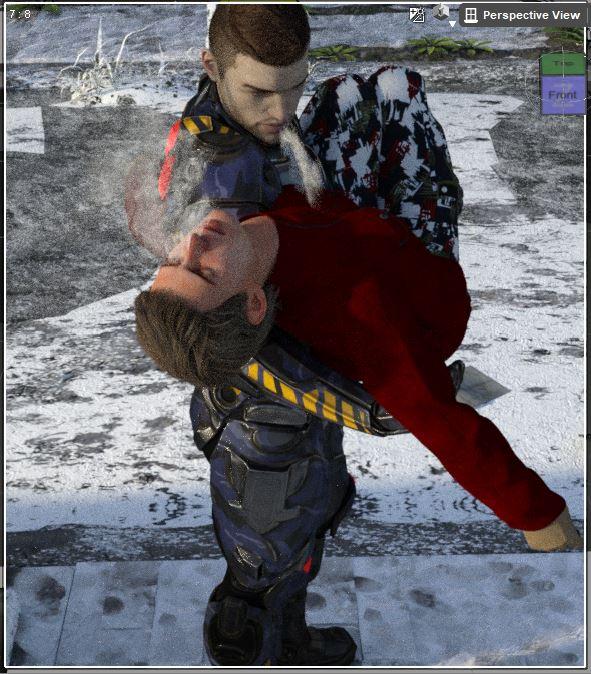
SereneNight's Sci-Fi Fun Thread 2Okay, here is one little prop I really like. It's a steamy breath prop. If you click on your character the breath prop automatically parents to the characters head in the direct center. This will look weird head on (like in this screenie) but there are morphs to rotate it around. I think it is best used from the profile view since its a plane.. As you can see I used it on Owen and this injured civilian, but just showed you the wierdness so you understand it is flat.
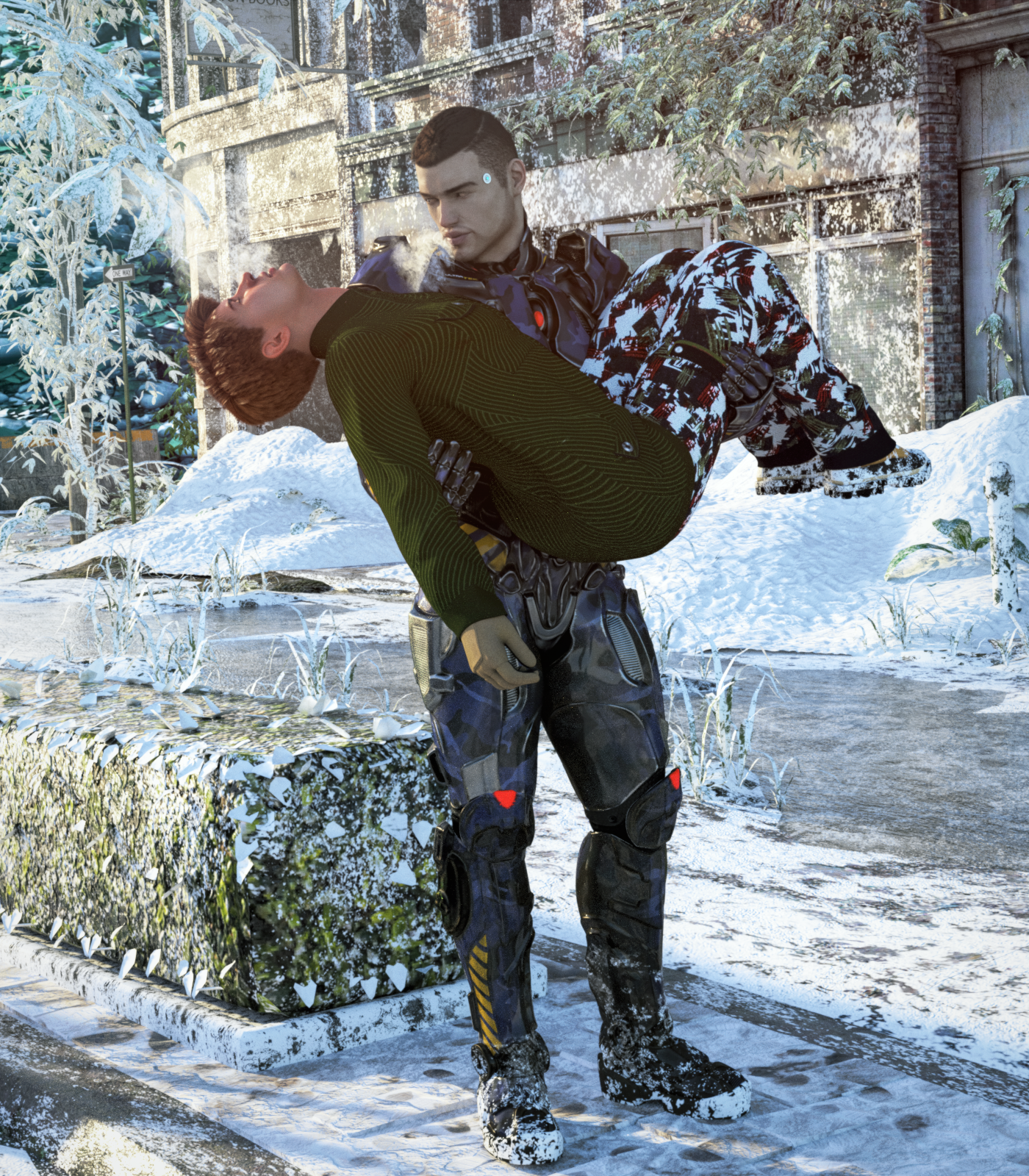
In this image, I rendered the character so the breath prop looked more natural. I also added 3 snow drifts, and used the morph so each one was different. For Owen and the injured civliian I put snow on the boots using overlays. Because I felt the snow texture looked a touch 'samey' I Recommend doing another render of the body part, and erasing some of the snow texture away with an frost brush eraser so it looks less samey.
 Anyone doing any Christmas related renders?
Merry Christmas this is Aiko 3.0 with kioki morph
Welcome to Hatsune Miku Anime Manga Cafe ☕Genesis 3 Male bad joint bends on computerI've been having this problem with Genesis 3 males on a computer that's got me stumped. It renders fine on one system with an Intel CPU. On the AMD CPU (Threadripper), the joints are all bad. They're bigger, like perhaps the JCMs aren't loading.
They have all the same DAZ content. The Intel system drive got corrupted & I had to install Windows and everything. From the AMD system, I exported what was installed to a CSV, then used that list to install everything. Should be the same save a few smart content items, but I'm at least 99% sure none of what I had is for G3M. Before the blowup, I had the same results. After the blowup, still the same - rebuilt Intel rig renders well, AMD rig does not. Another difference, my Daz content is installed on the C: drive of the Intel system. On the AMD, most is on the D: drive.
I had a similar with G3F, that seemed to be from incomplete morph directories on one drive (C:). I moved all the morphs over to D:, that seemed to cure it. I think it helped once here with G3M, but most of the time it doesn't. I also tried wiping the entire "data\DAZ 3D\Genesis 3\Male" directory from the AMD system, and copying the files and dirs from the Intel system over to it. That didn't work.
I looked at the logs, removed the timestamps and compared the text files. Can't find any reason in the log why it's happening. Another forum thread pointed to a problem with Skinchangers. I confirmed I don't have that.
https://www.daz3d.com/forums/discussion/204961/my-genesis-3-males-are-having-weird-shoulder-issues
If you look at the pics, the right AMD the shoulders are bigger, and right elbow is more pointed. It looks really wrong without a shirt.
Help? I'm stumped.
Genesis 8 eye lashes do not follow face morph (updated/solved)Hope someone read this.
Have similar problem, transfering from g3 to g8 thorugh exporting to obj and transfering morph trhough "transfer utility" dial it and then adjust rig to shape. Bones look right on Genesis 8. Putting the morph and lashes to "autofollow" but lashes geometry won't move. Checked Lashes bones and they are on the right spot, it's just the eyelash itself who doesn't asjut to figure shape.
FG 70's dForce Outfit for Genesis 8 Female- Hair?Looks like an OOT hair possibly; pretty sure I have it, so will look.
Edit:
Am thinking this one: https://www.daz3d.com/cathy-hair-and-oot-hairblending-2-0
It is easy to use on G8; either buy the new release that transfers hiars if you have a lot you want to transfer; or for individual ones, change the scene identification.
Shape Rigger Plus(Commercial)If the morph is rigged with this, even if it has rigging, it will automatically remove duplicate ID issues if resaved. The script makes sure it eliminates those as well. So basically if a morph has duplicate id issues, just re-rig it via the script, save it and the issue is gone.
Wait wait, this can fix the dreaded duplicate ID issue?!?!

The feature by itself is totally worth it.
Is the transfer utility enough?If you make something really tight for your first outfit, like a bathing suit, the transfer utility will generally do a good job without extra morphs etc. Particularly if you leave the thighs and shoulders bare (bendy areas have more problems). And you can tell MD to make quads instead of tris in the surface properties of your cloth.
Shape Rigger Plus(Commercial)This doesnt't change jcm requirements if a morph needs it.Ah, I was hoping it would cut down on the amount of JCMs need for extra thin or extra large characters. I'm going to grab it though as it looks like it's a HUGE time saver for anyone who makes morphs. The planned updated changes also look to be a great addition. Thanks for generously adding changes and updating the product to include those suggestions, that's really nice of you!
I'm looking forward to using this product - thank you for making it a Merchant Resource!
 Shape Rigger Plus(Commercial)
I just tried this product with Genesis 3. I zeroed Mouth Realisim HD and Navel. Imported my morph Body, saved it out with your script, repeated with the head. Closed and reopened DS to test, loaded up the body morph, and the navel was gone, loaded up the head, Mouth Realisim HD not there. I selected (Curently Used) then hit the undo button twice and the Navel and Mouth Realisim HD returned. :S Your product is great, I'm keeping this! Just need to figure out what to do about the Genesis 3 morphs Navel and Mouth Realisim HD those two morphs are a headache for me to work with >_< been nothing but trouble for me
Product for body posing for Genesis 2 Female?Hello!
I know that there's the Body Morphs products which change the shape of the Genesis 2 Female body.
But that's not what I want. I also don't need static poses.
Instead, I'm looking for a product that would offer more "expression" like for example the "Genesis 2 Female: Arms Front-Back" slider (CTRLArmsFrntBck.dsf).
What should this type of "morph" be called? A posing slider?
Also, could somebody suggest a product that would offer me more of these "morphs"?
Thank you very much!
Shape Rigger Plus(Commercial)Yes, I have also purchased it.
Is there any possibility to take some character, not rigged or rigged not for Genesis 1,2,3,8
and make a character for Genesis 8 out of it with Morph Rigger Plus?
If so, how? Step by step explanation would be great.
!! Carrara Challenge 44 - Any Element, Not Just the 5th WIP ThreadGreat work from everyone so far - some very inspiring stuff!
I've got an idea for this one and meant to work on it today, until my mom's computer "freaked out" and I had to go do tech support. Turns out the motherboard was bad - or at least that's the most likely issue after about two hours of Google search led troubleshooting and fix attempts. Since it was just a cheap email-and-solitaire desktop and about eight years old I went out and bought her a new one and spent the day tranferring all her files from dropbox (sooo glad I set that up for her, so I didn't have to figure out how to get her files off the old computer which just keeps restarting every few seconds), installing updates and software, etc. Fun.

So, hopefully tomorrow I can get something started .

Well, at least you were able to avoid catastrophic file loss. My mom uses hers for pretty much the same limited set of functions. We are trying to transfer her to a tablet. There seems to be more hassle from updates/outdates/virus/installation etc. on her desktop.
Looking forward to your project. Still lots and lots of time.
Daz 3D is part of

Connect
DAZ Productions, Inc.
7533 S Center View Ct #4664
West Jordan, UT 84084Licensing Agreement | Terms of Service | Privacy Policy | EULA
© 2026 Daz Productions Inc. All Rights Reserved.