-
Weird looking Anatomical Elements morph on character (Dracarys G8F)
You are probably seeing a projection of the body shape into the Anatomical Elements which is not working with the morph applied directly to the Anatomical Elements (if that is what you are doing). Not all shapes mix well in general.
So what can I do to change that?
The SAV model is made for V4 and genesis 1, the golden palace figure is made for GF3 and GF8, so that might be a cause of the problem.
Now there is a Dracarys for GF8 by Sangriart though
Sry, my mistake. I edited that in my post above.
I am using the Sangriart Model.
Btw why got my links deleted? How am I supposed to show the problem without a image?
Cheers, Nalfy
[Released] RSSY Clothing Converter from Genesis to Genesis 8 Male [Commercial]I'm having a little trouble with the Genesis to G8M converter ( I have no problem with the G2M and G3M converters). I get an error response "No clothing deteted". I get the same error whether I choose "Add Files..." or "Add Directory". Below are the lines of the log file, but it isn't limited to this particular product, no Genesis pieces work.
Thank you for any help you could provide.
11:19:15 GMT-0800 (Pacific Standard Time): Adding DirectoryE:/Documents/DAZ 3D/Studio/My Library/People/Genesis/Clothing/DZ Clothings/DZ CowlNeck
11:19:15 GMT-0800 (Pacific Standard Time): SKIPPING "scene" file: E:/Documents/DAZ 3D/Studio/My Library/People/Genesis/Clothing/DZ Clothings/DZ CowlNeck/CowlNeckLS.dsf
11:19:15 GMT-0800 (Pacific Standard Time): SKIPPING "scene" file: E:/Documents/DAZ 3D/Studio/My Library/People/Genesis/Clothing/DZ Clothings/DZ CowlNeck/CowlNeckQS.dsf
11:19:15 GMT-0800 (Pacific Standard Time): SKIPPING "scene" file: E:/Documents/DAZ 3D/Studio/My Library/People/Genesis/Clothing/DZ Clothings/DZ CowlNeck/CowlNeckSL.dsf
Thank you all for your input, it helped a great deal.
The Genesis to Gen8 Converter is working nicely for me now with some very old Genesis Clothing. This is what I've learned so far...
1. As RiverSoftArt mentioned I had to uncheck "Options/File Overwrite Condition/Check Conent Type When Adding Files" box
2. Under the conversion Tab I had to use "Add Files...", -- "Add Directory..." would not work for me.
3. For both .duf or .dsf files, I had to hightlight them and press the "Change Conformer" button that was in the lower-ight hand side of the page (I used the Bodysuit conformer for everything). This would fill out the "Conversion Clothing" column in the "Clothing Item Files" list. That column must be filled in.
4. For .duf files I could then press the Execute button at the bottom of the page. -- for the .dsf files I had to press the "Force Convert Item(s)" button.
5. Conversions proceeded as expected with excellent results after that.
So far by following these steps I've converting everthing I can find, no matter how old they are.
When using these converters (which I love) I always have the vanilla Genesis 8 Male figure alone in the scene. The Genesis clothes convert a little loose with him, (I haven't yet put any of the clothes on my custom models), but there a couple of morphs that are included with the conversion (under Actor), Converter Morph and Tighten All. These along with mesh smoothing takes care of all the looseness.
Thanks again for all the helpful recommendations.
You are welcome! Thanks for sharing and I am glad you have it working for everything. Here are some extra comments:
2. Yes, the Check Content Type is for the "Add Files..." button (this is mentioned in the hint and manual)
3. The script would not fill in the conformer by itself? Strange, I will have to look into that
To make sure that we could handle as many clothing items as possible, the clothing can be a little loose. Using the Tighten All morph (and all of the other morphs), you can tweak a clothing item to your heart's content. Remember you can also save (overwrite) that clothing item with the morphs set to the way you like so that it will load with the morphs set from now on.
Is there a way to tell which base figure a character goes with?If it's a specific morph the character needs like Zelara or Eva I don't see a way to know..
All things The Witcher...A 1st quick loading and rendering test..... her highness is not amused


A bit of an extreme pose; no adjustments done to the outfit to correct for this. Texture used for 'Adda' is from Arabella 7
Looks great! Hope you enjoy! If anyone else wants this send me a private message and I'll get you a copy. THis will not be sold or put on ShareCG. I never could get the hand pose to work right, dont know why? The boot/feet pose worked great for me though. Her morph, I made her scaled down so she is five feet tall like the reference. I noticed when loading some full body poses from other content creators sets she would expand back up to 100% scale, I think this is something to do with the data in the saved pose files, not something on my end? Don't know though. Another thing I should have done was add in a smoothing modifier to the boots and skirt. It's easy to do on your own though, I would tell the boots to colie with Genesis 3 and the skirt to collide with the boots. The smoothing on the skirt will fix wierd squar distortions on leg movemnts between the thighs. The smoothing modifier on the boots will fix any pokethroughs, when the leg is bent she's getting a pokethrough on the leg calf muscle; screen shot of smoothing modifier added to the boots. I love the full body pose you chose, it's great! It also looks like you found the hair morphs and played with them too, I added several.
Lips, eyes, nose sudden all increased in size.That sounds like somehow you have overwritten the original presets for those characters so that they are using the 'Cartoonized' for G8F/G8M's morphs applied to them but that's very unlikely. I have only ever had to installed the 'Default Resources' when I have new or reinstalled DAZ Studio.
Are you sure it's not just the focal length of your camera? Not that i can think why that would be persistent across scenes, but if the value were suddenly lower it would tend to produce the effect you describe.
This is basically what happened to all of my females. Males are unaffected.
Yeah, it looks like a 'Cartoonized for Genesis 8 Females' head morph or a similar product has been partially applied and saved over the old preset; replacing the old preset.
Select the Model that has too big facial features & then in the Parameters tab select 'Currently Used' it will show you which morphs are applied.
Okay so this is really weird. 1 of the character head (lets call it Head X) was at 100%. Though it did not show up in Parameters or Shaping's "Currently Used". Searching for it will display it at 100% for Head X. Though I have no idea why it applied to every female character across every scene. Additionally, I did NOT set any character to have that Head X @100%. It showed up under Shaping>Currently Used but not Parameters>Currently Used. And this was only after I did a Right Click on Parameter>Zero>Zero Figure Shape.
Finally, when I create any new female character (lets call it Head Y), Head Y is set at 100% like normal but Head X is also set at 100%! The only way I can think of to aleviate this issue is to remove that character completely. So I don't have to redo every scene and every new female character by having to set Head X to 0%.
Weird looking Anatomical Elements morph on character (Dracarys G8F)You are probably seeing a projection of the body shape into the Anatomical Elements which is not working with the morph applied directly to the Anatomical Elements (if that is what you are doing). Not all shapes mix well in general.
Lips, eyes, nose sudden all increased in size.That sounds like somehow you have overwritten the original presets for those characters so that they are using the 'Cartoonized' for G8F/G8M's morphs applied to them but that's very unlikely. I have only ever had to installed the 'Default Resources' when I have new or reinstalled DAZ Studio.
Are you sure it's not just the focal length of your camera? Not that i can think why that would be persistent across scenes, but if the value were suddenly lower it would tend to produce the effect you describe.
This is basically what happened to all of my females. Males are unaffected.
Yeah, it looks like a 'Cartoonized for Genesis 8 Females' head morph or a similar product has been partially applied and saved over the old preset; replacing the old preset.
Select the Model that has too big facial features & then in the Parameters tab select 'Currently Used' it will show you which morphs are applied.
[Released] RSSY Clothing Converter from Genesis to Genesis 8 Male [Commercial]I'm having a little trouble with the Genesis to G8M converter ( I have no problem with the G2M and G3M converters). I get an error response "No clothing deteted". I get the same error whether I choose "Add Files..." or "Add Directory". Below are the lines of the log file, but it isn't limited to this particular product, no Genesis pieces work.
Thank you for any help you could provide.
11:19:15 GMT-0800 (Pacific Standard Time): Adding DirectoryE:/Documents/DAZ 3D/Studio/My Library/People/Genesis/Clothing/DZ Clothings/DZ CowlNeck
11:19:15 GMT-0800 (Pacific Standard Time): SKIPPING "scene" file: E:/Documents/DAZ 3D/Studio/My Library/People/Genesis/Clothing/DZ Clothings/DZ CowlNeck/CowlNeckLS.dsf
11:19:15 GMT-0800 (Pacific Standard Time): SKIPPING "scene" file: E:/Documents/DAZ 3D/Studio/My Library/People/Genesis/Clothing/DZ Clothings/DZ CowlNeck/CowlNeckQS.dsf
11:19:15 GMT-0800 (Pacific Standard Time): SKIPPING "scene" file: E:/Documents/DAZ 3D/Studio/My Library/People/Genesis/Clothing/DZ Clothings/DZ CowlNeck/CowlNeckSL.dsf
Thank you all for your input, it helped a great deal.
The Genesis to Gen8 Converter is working nicely for me now with some very old Genesis Clothing. This is what I've learned so far...
1. As RiverSoftArt mentioned I had to uncheck "Options/File Overwrite Condition/Check Conent Type When Adding Files" box
2. Under the conversion Tab I had to use "Add Files...", -- "Add Directory..." would not work for me.
3. For both .duf or .dsf files, I had to hightlight them and press the "Change Conformer" button that was in the lower-ight hand side of the page (I used the Bodysuit conformer for everything). This would fill out the "Conversion Clothing" column in the "Clothing Item Files" list. That column must be filled in.
4. For .duf files I could then press the Execute button at the bottom of the page. -- for the .dsf files I had to press the "Force Convert Item(s)" button.
5. Conversions proceeded as expected with excellent results after that.
So far by following these steps I've converting everthing I can find, no matter how old they are.
When using these converters (which I love) I always have the vanilla Genesis 8 Male figure alone in the scene. The Genesis clothes convert a little loose with him, (I haven't yet put any of the clothes on my custom models), but there a couple of morphs that are included with the conversion (under Actor), Converter Morph and Tighten All. These along with mesh smoothing takes care of all the looseness.
Thanks again for all the helpful recommendations.
Genesis 3 Male bad joint bends on computerWhat you should probably do is look at the "Shaping" tab for both figures, click on the "Currently Used" item, and toggle on "Show Hidden Properties." This would let you do a item-by-item comparison of all the morphs being used for that figure. One possibility is that you're missing a morph on the second system (i.e. maybe a JCM of some sort) that's causing the shape to come out different, or else that the second system has an extra morph that's being triggered.
Weird looking Anatomical Elements morph on character (Dracarys G8F)So I just got the Dracarys Model from Sangriart on renderosity and I'm using Golden Palace for the genital morph.
But somehow, the genital looks very weird on the character in comparison to the original Genesis 8 Female.
What can I do to change it, so it looks more like the Genesis 8 ones?
Links and images removed
Products Converted from Studio to PoserM601
Good Conversion
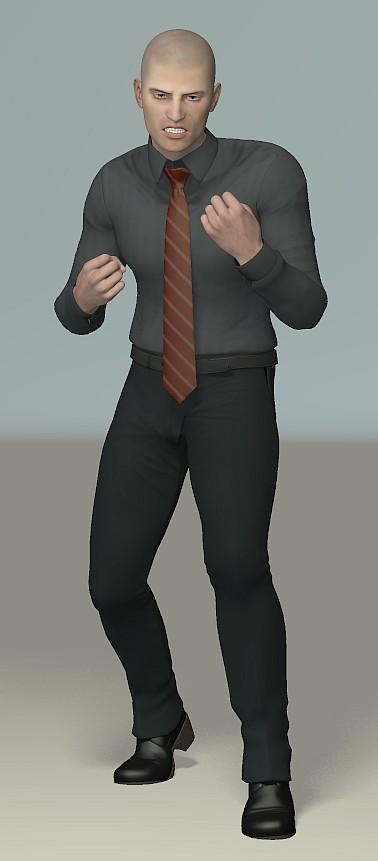
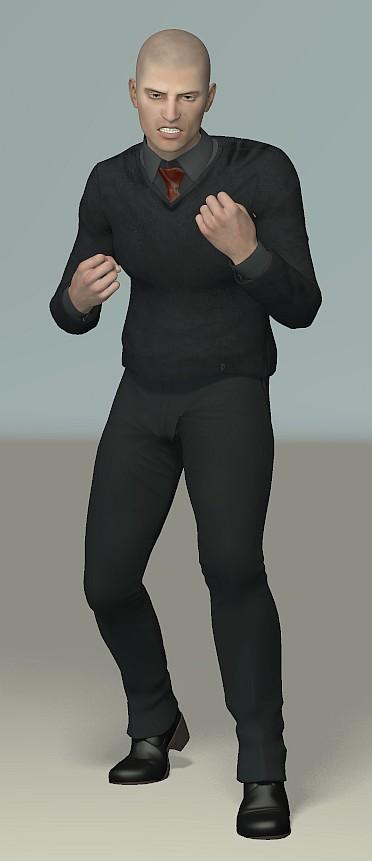
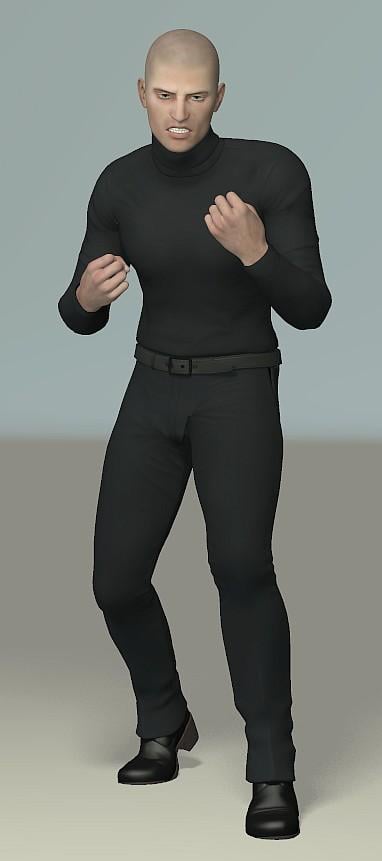
This is another one that I had to convert without adding the morphs first as I had the already mentioned problems. However, it gave me no further troubles. I've added the M6 morph here and had to use the Fit Control morphs to get rid of some poke through - there's still a little showing on the V Neck and I had to use the morph brush on the neck of the Turtle Neck. It's a good, sharp looking outfit, so I'm looking forward to working with it.
 Aeon Soul 20.50 Cyberpunk clothes for G3M dforce issues
- Transfer Utility to convert the OBJ into wearable (Source: the figure, Target: OBJ)
- Add Smoothing Modifier
- Add dForce Modifier: Dynamic Surface
Welcome to Hatsune Miku Anime Manga Cafe ☕Model Links
The following are the models I use.
Aiko 3.0 https://www.daz3d.com/aiko-3-0-morphs-and-maps
Mizuho https://web.archive.org/web/20150906222713/http://homepage1.nifty.com/garbagesoft/chr_download.html
Aiko Guy: https://www.renderosity.com/mod/bcs/?ViewProduct=33463 probably need to contact creator as Character is no longer avail.
Kioki (main Morph used) https://www.daz3d.com/kioki
Any questions of the clothings feel free to ask.
well I seen you have found the right hair for Tifa and others,any tip on where I can find FF Shiva hair?
Welcome to Hatsune Miku Anime Manga Cafe ☕Model Links
The following are the models I use.
Aiko 3.0 https://www.daz3d.com/aiko-3-0-morphs-and-maps
Mizuho https://web.archive.org/web/20150906222713/http://homepage1.nifty.com/garbagesoft/chr_download.html
Aiko Guy: https://www.renderosity.com/mod/bcs/?ViewProduct=33463 probably need to contact creator as Character is no longer avail.
Kioki (main Morph used) https://www.daz3d.com/kioki
Any questions of the clothings feel free to ask.
Is Daz Studio working better with Intel than with AMD CPU's?For example the Intel Core i9 Extreme Edition i9-9980XE! It has 18 cores with "just" 3,0 Ghz base clock for around 2.500 €. But Daz Studio would work even slower with it!!! Really???
No, because of turbo clocks under low thread workloads . It might go up to 4.5 under a single thread
Also , clock speed is only partly responsible. When you are loading a big scene , sometimes you are transfer limited and the bottle neck is your hard drive or ssd .
And clock speed does not indicate the same thing between architechural generations , because of "instructions per clock" . In short, a 3Ghz CPU from 5 years ago will be slower than a 3Ghz from a recent generation at 3Ghz with the same core count
[Updated] Chimpanzee for Genesis 8 Male [Commercial]Got the chimpanzee - only character I've bought for G8M. Thank you and Merry Christmas. Any chance for an orangutan morph in the future? I have Ape World 2, but it's a bit lacking in realistic proportions.
Yes there is also an orangutan work in progress and other monkeys/apes too...
This is great news. Could definitely use more apes and monkeys. Thank you very much.
[Updated] Chimpanzee for Genesis 8 Male [Commercial]Got the chimpanzee - only character I've bought for G8M. Thank you and Merry Christmas. Any chance for an orangutan morph in the future? I have Ape World 2, but it's a bit lacking in realistic proportions.
Yes there is also an orangutan work in progress and other monkeys/apes too...
[Updated] Chimpanzee for Genesis 8 Male [Commercial]Got the chimpanzee - only character I've bought for G8M. Thank you and Merry Christmas. Any chance for an orangutan morph in the future? I have Ape World 2, but it's a bit lacking in realistic proportions.
Genesis(1,2,3,8) clothes on V4 and M4.There's no direct way to do it in DS as V4/M4 figures and earlier don't support autofit.
Well, I suppose you could use a figure with a V4 shape morph to morph the mesh to fit V4, then export the morphed clothes as obj, then use the figure setup tools in DS to rig the figure to V4 using parametric rigging, but that would be quite complicated. And from memory you'd have to group it like V4 and separate the various groups in a modelling program before rigging...
If you're willing to use an external program, Evilinnocence's Crossdresser program can convert items from Genesis 1 to various figures including generation 4 figures (the program itself is free, you only have to buy the XD license for the target figures, and they're quite cheap). You need to export the clothes from DS as cr2 first, using cr2 exporter (included in DS). XD doesn't support G2M/F or later figures, but if you have autofit clones to "go back" from G2+ to G1 you can try autofitting clothes for newer figures back to G1, then using XD on the G1 version to go back to V4/M4.
No guarantee on the quality of the result though....
I do the first step ie morph the figurewearing it to the V4 or M4 clone, not shape, (feet are posed streched down and some other differences) then under edit rigging convert the clothes to props
can then convert V4 or M4 to weightmapping and use transfer utility then save clothes as a support asset
it will then in DS fit V4 or M4 not converted to weightmapping too
but only in DAZ studio not Poser
Genesis(1,2,3,8) clothes on V4 and M4.There's no direct way to do it in DS as V4/M4 figures and earlier don't support autofit.
Well, I suppose you could use a figure with a V4 shape morph to morph the mesh to fit V4, then export the morphed clothes as obj, then use the figure setup tools in DS to rig the figure to V4 using parametric rigging, but that would be quite complicated. And from memory you'd have to group it like V4 and separate the various groups in a modelling program before rigging...
If you're willing to use an external program, Evilinnocence's Crossdresser program can convert items from Genesis 1 to various figures including generation 4 figures (the program itself is free, you only have to buy the XD license for the target figures, and they're quite cheap). You need to export the clothes from DS as cr2 first, using cr2 exporter (included in DS). XD doesn't support G2M/F or later figures, but if you have autofit clones to "go back" from G2+ to G1 you can try autofitting clothes for newer figures back to G1, then using XD on the G1 version to go back to V4/M4.
No guarantee on the quality of the result though....
Daz 3D is part of

Connect
DAZ Productions, Inc.
7533 S Center View Ct #4664
West Jordan, UT 84084Licensing Agreement | Terms of Service | Privacy Policy | EULA
© 2026 Daz Productions Inc. All Rights Reserved.