-
New DS Filament Render Engine
I dunno what the big deal is. If you want to use it, do. If you don't, don't. You still have everything you had before. I'm sure it'll improve over time.
Laurie
What could be the deal here?!
Paying money again for some materials, just to make something look right in a new "engine" may be a point (...not to mention new texture packs for the new hot filament shape, character whatever...)
Losing time (again) because of the lack of references, tutorials and so on (biggest community = biggest possibility to SOLVE problems we run into and if you ask me, Blender is the way to go...)
Losing maybe even ressources to the real problems many different features have, that should be solved (...the bridges are also new but still not there yet and they are a real improvement, when they work)
I mean they could have maybe cleaned up the library, writing a script that tells us if we have all our content, fixing missing texture paths, improving rendertimes, by adding a free feature for "best rendering results", because it is possible to render faster and if this is possible, even the iray viewport can be improved by a lot. They also could have changed the database structure, adding features like "Environment, Cars, Motorcycles, Kitchens, Roofs, Socks... whatever...) The library like it is, is a mess. And it seems materials for clothes, hairs, whatever can be here and there... nobody cares it seems. Setting up a scene could be so much faster, just by reorganizing everything there is. I mean i have nothing against vendors, that have their small link in the product, but why does daz allows to have items all over the place with nearly NO real system to it?!
There is so much that could be improved in the program, that it's even hard to tell where to start...
If i look at Blender: The crowd works for them, creating addons, materials, features and so on... If something is used really often and is helpful, they add it to their standart and push further with nearly every update there was in the past. Evee can now render real time alike photorealism and it does not make to much of a difference to render then again with cycles. There are differences yes, but you can rely on the fact that if it looks good in evee, it will work in cycles even better, just by tweaking some little things for the shaders.The complexity is also a big point here. It's still far from easy to create skins, arrange a scene, setup lights, rendering settings and so on... In blender you learn one time how things work and you can be sure of the fact that will not change in years! Also on the SHB changes broke the shaders of the hair in general. I cannot use the materials - one click - like i set them up a while ago... Things like that is like messing with the user. Do it to often and the user will say: "You know what, i transfer the model, environment and so on and use my shaders of my faforite render engine, because there everything works properly scince day one!"
And animation and posing is not worth the pain... Sorry but that would only be the case if daz would have features like "no wrong bending", free partial animation sets and so on. So to speak: Features that nobody has an would make it easier to do realistic animations, without breaking a sweat. If daz would have realized a few years ago, that animating features like a closing hand, a bending arm, a scratching on the head, would be powerful it would have been a lot more crowded here, since it was hard to transfer the animations into another program. Right now even that is possible. But now it's way to late, since nearly every bigger 3D editing program has them already in a good quality and even realistic ones are totally free to get and easy to transfer.
So in the end, Daz is still slower when it comes to rendering - even if they know how to improve it for sure - but they don't share it for free, same with the shaders, lights, camera settings, same with the poses, same with scripts and so on... just the wrong way to go, when nearly everyone arround them rushes into open source. Everyone should think of content creating more in a manner of "time saving". Someone build a pirate, someone a dog, someone a unicorn, dragon... whatever. That's what someone pays for, not for some textures, some shaders, some scripts... because everything is already out there and most things are out there for free too. You cannot even tell the difference anymore, this much content is out there. But who needs 500 wood textures, shaders... who needs 100 - similar - hands, that close to a fist, winks, smiles?! Right, nobody. But our whole texture, pose, shader or material database is full of those similiar things. What do you think is the reason the library is so extreme big?! Because it's a mess... And everyone claims to have "the wood texture...", creates a folder for themselves ... yeah slightly changed, often not even noticable but still probably from somewhere else.
I mean look at the hairs... just take a look at the textures of the hairs... do you notice something?! A few blurry lines all over again and again and again... mostly only black and white. Why do we need hundreds of them, if 10 would be enough?! And you wonder why a scene gets too big... i tell you, no wonder if you use 20 different hair textures in 2-4K and could not even tell the real difference, when you would just choose to take one of these blurried line textures on all the hairs... same goes with wood, metal, glas, fabrics of any kind...
Daz would be amazing if they would realize what they are really doing wrong! And would become faster on it's own in the process...Good points, but fixing all this would probably require that they start all over from scratch, plus reduce their income so much that they can't afford it. So it's sort of a catch 22 I think.
UltraScenery [Commercial]Is this compatible with the Filament renderer? I tried it yesterday and the trees all rendered as the instance preview.
New DS Filament Render EngineI dunno what the big deal is. If you want to use it, do. If you don't, don't. You still have everything you had before. I'm sure it'll improve over time.
Laurie
What could be the deal here?!
Paying money again for some materials, just to make something look right in a new "engine" may be a point (...not to mention new texture packs for the new hot filament shape, character whatever...)
Losing time (again) because of the lack of references, tutorials and so on (biggest community = biggest possibility to SOLVE problems we run into and if you ask me, Blender is the way to go...)
Losing maybe even ressources to the real problems many different features have, that should be solved (...the bridges are also new but still not there yet and they are a real improvement, when they work)
I mean they could have maybe cleaned up the library, writing a script that tells us if we have all our content, fixing missing texture paths, improving rendertimes, by adding a free feature for "best rendering results", because it is possible to render faster and if this is possible, even the iray viewport can be improved by a lot. They also could have changed the database structure, adding features like "Environment, Cars, Motorcycles, Kitchens, Roofs, Socks... whatever...) The library like it is, is a mess. And it seems materials for clothes, hairs, whatever can be here and there... nobody cares it seems. Setting up a scene could be so much faster, just by reorganizing everything there is. I mean i have nothing against vendors, that have their small link in the product, but why does daz allows to have items all over the place with nearly NO real system to it?!
There is so much that could be improved in the program, that it's even hard to tell where to start...
If i look at Blender: The crowd works for them, creating addons, materials, features and so on... If something is used really often and is helpful, they add it to their standart and push further with nearly every update there was in the past. Evee can now render real time alike photorealism and it does not make to much of a difference to render then again with cycles. There are differences yes, but you can rely on the fact that if it looks good in evee, it will work in cycles even better, just by tweaking some little things for the shaders.The complexity is also a big point here. It's still far from easy to create skins, arrange a scene, setup lights, rendering settings and so on... In blender you learn one time how things work and you can be sure of the fact that will not change in years! Also on the SHB changes broke the shaders of the hair in general. I cannot use the materials - one click - like i set them up a while ago... Things like that is like messing with the user. Do it to often and the user will say: "You know what, i transfer the model, environment and so on and use my shaders of my faforite render engine, because there everything works properly scince day one!"
And animation and posing is not worth the pain... Sorry but that would only be the case if daz would have features like "no wrong bending", free partial animation sets and so on. So to speak: Features that nobody has an would make it easier to do realistic animations, without breaking a sweat. If daz would have realized a few years ago, that animating features like a closing hand, a bending arm, a scratching on the head, would be powerful it would have been a lot more crowded here, since it was hard to transfer the animations into another program. Right now even that is possible. But now it's way to late, since nearly every bigger 3D editing program has them already in a good quality and even realistic ones are totally free to get and easy to transfer.
So in the end, Daz is still slower when it comes to rendering - even if they know how to improve it for sure - but they don't share it for free, same with the shaders, lights, camera settings, same with the poses, same with scripts and so on... just the wrong way to go, when nearly everyone arround them rushes into open source. Everyone should think of content creating more in a manner of "time saving". Someone build a pirate, someone a dog, someone a unicorn, dragon... whatever. That's what someone pays for, not for some textures, some shaders, some scripts... because everything is already out there and most things are out there for free too. You cannot even tell the difference anymore, this much content is out there. But who needs 500 wood textures, shaders... who needs 100 - similar - hands, that close to a fist, winks, smiles?! Right, nobody. But our whole texture, pose, shader or material database is full of those similiar things. What do you think is the reason the library is so extreme big?! Because it's a mess... And everyone claims to have "the wood texture...", creates a folder for themselves ... yeah slightly changed, often not even noticable but still probably from somewhere else.
I mean look at the hairs... just take a look at the textures of the hairs... do you notice something?! A few blurry lines all over again and again and again... mostly only black and white. Why do we need hundreds of them, if 10 would be enough?! And you wonder why a scene gets too big... i tell you, no wonder if you use 20 different hair textures in 2-4K and could not even tell the real difference, when you would just choose to take one of these blurried line textures on all the hairs... same goes with wood, metal, glas, fabrics of any kind...
Daz would be amazing if they would realize what they are really doing wrong! And would become faster on it's own in the process...New DS Filament Render EngineSo, my review of Filament. I was excited at the thought of another renderer, and spent about 4 hours trying out a variety of scenes and comparing them with Iray. I have a 2080Ti and get fast Iray previews, so it was easy to swap back and forward and I covered a fair bit of ground.
1. I like the figure renders. It is in no way photoreal but there is a painterly quality to them that appeals to me.
2. Figures in wide-view scenes often look rubbish. You have this decent figure rendered in a scene with no shadows and the effect is unreal and jarring. It looks like a scene from a game a few generations back.3. It is largely useless for setting up lighting. I tried a character in "Hypostyle Hallway" and the lack of ambient or HDRI shadows meant a huge difference between Filament and Iray. Surfaces react to light, but don't cast shadows on other surfaces, so a character can look fine in Filament and be in deep shadow in Iray.
4. Individual lights can cast shadows. The option for this is squirreled away in the light parameters. Obviously switching on ray-traced shadows for every light sets you back on the road towards IRay.
5. The discrepancy in overall perceived illumination between Filament and Iray is avoidable and irritating. So a typical Iray outdoor setting in tone is 13.00, while the same scene in Filament is 15-16.
6. Opacity is flaky.
7. It can crash my system. I ultrascattered some grassy tufts, switched to Filament, and Studio divebombed into the dirt. Studio is normally one of the most reliable programs I have used.
Many of the deficiencies in Filament are not fixable. It is fast because it doesn't do slow stuff. Duh. From my reading it is a Google one-man-band 10% time side project, and while that doesn't invalidate it at all, it suggests the longer term direction may be unclear (I can cite examples of many open source projects where divergence rather than convergence is the trend).
So, I can see it useful when used with animated figures in a "green screen" context. When used with more complete scenes it may look limited compared with cutting-edge game engines. I have no prejudice against anyone using it, but for the time being, I will stick to Iray and use postwork if I want a painterly effect. Herein ends my opinion :-)
AIUTO...CHI CONOSCE L’ITALIANO? PARTE DODICILenio, a te le ombre in Filament sono complete? A me le taglia in base all'angolo della telecamera e se allontano troppo gli oggetti dal centro del mondo le ombre nemmeno vengono proiettate... Ma le posso vedere se guardo glo iggetti da una telecamera vicina al centro del mondo.

Te lo domando per capire se si tratta di una stranezza dovuta alla mia GPU, nonostante supporti appieno OpenGL 4.6 e la VRAM sia praticamente vuota.
New DS Filament Render Enginechanges that do not demand more expensive hardware are always good as far as I am concerned.
hopefully the Mac implementation and possibly even native Linux D|S can be also done.
for me rendering stuff is just fun and an escape and a means in itself, my way of exploring nice sets and trying on virtual clothes, I am not trying to impress anyone and believe me I get put in my place told how I am of a simple mind by many, especially on youtube, hence the comment earlier about Filament making D|S look bad is a moot point as I already have done so in spades
 not intentionally as I actually use lots of different softwares, its the journey not the destination, Filament is just like riding a motorcycle instead of hobbling with a walking stick around my purchased 3D sets!
if we all have to showcase DAZ studio just shoot me now and all the others not up to the task
 New DS Filament Render Engine
I don't now if anyone else already reported this, but the shadows in Filament seems to not work properly for me.
They get partly "cut" by the camera angle, like in the video I linked, and also if I move the props too much distant form world's center, the shadows doesn't even appear. However, I can see the shadows of far objects if I use a camera next to the world's center. It's a bit complicated to explain...
In more crowded scenes, with more elements, the shadows gets suddenly and totally blocked if I orient the distant lights "overhead", it's like something big goes in front of the light source.
I tried all the options with no results, in all the pissible panes and tabs, even in the DAZ Studio's viewport options (f2 button). I don't know if it's an hardware issue, since the VRAM is pretty empty and my GPU fully supports OpenGL 4.6.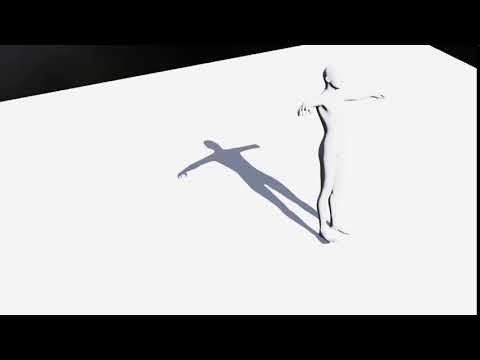 New DS Filament Render Engine
I love to see Vulkan support myself, although if they implement the full Filament spec, that's not bad either. The only thing is that Filament is made by Google, and they have a tendency to drop support for their products unexpectedly and when not performing.
Your worries are over then because Filament is just the PBR renderer as the frontend.
The backend is:
- OpenGL 4.1+ for Linux, macOS and Windows
- OpenGL ES 3.0+ for Android and iOS
- Metal for macOS and iOS
- Vulkan 1.0 for Android, Linux, macOS, and Windows
- WebGL 2.0 for all platforms
So technically DAZ Studio could be written to render directly to a webpage in your browser using WebGL or be ported to anyone of the operating systems above (sans 3DL and iRay support). Not bad because changes are very good than Filament will only improve and the future hardware that runs it faster and more capable. Pretty sweet deal really if you're DAZ 3D or as DAZ 3D customer.
Filament seam issueI am experiencing an issue with UV seams with the new filament engine. Otherwise, having good success with it.
It is worse with the mesh zoomed out, seams to be worse with HD meshes, and worse at certain angles. The lines/seams are not present consistently from one mesh/figure/character to the next. I have tried removing the normal and bump maps from the materials surfaces without resolution. The seams are not consistent from one render engine to the next either (iray vs 3dlight vs open GL vs filament). Havn't seen as much with my G3 as with the G8 characters.
Daz Studio 4.14 on linux testHello! John here! so .. i'm using linux with the playonlinux emulator (with lastest version of wine) and i just install without any configuration .. i downloaded the new version of daz ... and to my surprise-- it works! ... just for a small detail .. after a few minutes Daz studio freezes ... I know it's because of the opengl .. but it would be useful for linux users inside the render setting tab (editor), that the engine filament has its own render button as iray, separated from the viewport ... because in the sub menu there is not that option, there is only the viewport ... I tried to render in a new window and it works ... but I quit activated filament in the viewport everything freezes ... it would be very useful to render without activating the viewport
I understand that it is already done and that it is difficult .. but if you could give me the option of not activating the viewport and making a render in a new window with the filament engine it would be great ....!New DS Filament Render EngineI think this is the end for linux users .. in my case I tried it and it seems to work for a while but then daz studio freezes ... this is my relationship with daz studio .... the only way to continue using the software is disabling the render filament option ... I just hope that the developers don't change the viewport .. or it will be my end ..
New DS Filament Render EngineOf course it's my opinion. What else would it be? You are free to have (and voice) yours, and so am I.
It probably be alot more "fun" around here in the forums if we all wrote "we need" to introduce our individual opinons. Proverbial Kitchens can never be hot enough. /maybe bit sarcasm?

On another note am excited about Filament for designing/preparing/testing animations. For me, rendering the final product will still be Iray. Idea of moving all my content to Blender and losing so many great in-house DS features is just too onerous ATM. So filament is a big plus for me. Thanks Daz.
 Filament
Hi, When in PBR Filament/Viewport i have to select the parameter settings in each individual setting to uncheck Hide, is there a way to have them all set to unchecked when i open it?
thanks
pete
How do I use filament?there is a big thread
https://www.daz3d.com/forums/discussion/442982/new-ds-filament-render-engine#latestNew DS Filament Render EngineHi,
there is mentioned and shown that filament render is very fast - in seconds.
What is regarding the new filament products athmosphere, fire , light pro? Some pics looks really nice.
How much time lasts rendering with these products?
& How much time lasts setting up the items / presets within these products? I mean if you have a scene built without this product elements the time it takes to setup product items/presets that it looks like in product pics.
I mean especially if using this products to come to such pics lasts seconds, minutes or hours.
AIUTO...CHI CONOSCE L’ITALIANO? PARTE DODICIcioeSalve spero qualcuno possa aiutarmi ...ho installato headshop 11 per mac, tutto ok...ma volevo sapere come si fa ad uniformare i colori del viso col resto del corpo. voglio dire il risultato non è così esaltante...vorrei eliminare l effetto mascheraCredo che quella sia la texture presa drettamente dalla foto, devi usare una skin del character che stai usando
cioè devo mantenere la skin originale del character mi stai dicendo? per esempio se uso genesi 3 female dovrei mantenere quella skin?Io usavo una versione ottaugenario dello stesso, e con l'unico character che creai all'epoca, usai una skin di base. In pratica creai un character con un morph per V4, da una foto di mia moglie, però la foto naturalmente non combaciava con l resto della texture, e usai una skin per V4. Non l'avessi mai fatto, mia moglie inizio a provarsi tutti i vestiti di V4 che avevo, trane naturalmente quelli troppo eccessivi.
E magari ti ha chiesto di comprarle nel mondo reale uno dei modelli DAZ per andare al cinema!
 Mi immaguiono già a entrare in una boutique e domandare "Vorrei Blinded by the Light per V4, insieme agli UniMesh Fit per mia moglie. Ah, e non dimentichi la Interactive License, non si sa mai..."
Parlando di "casa nostra", assolutamente impensabile fare acquisti i questi giorni... Perderò anche queste offerte.
 Ci sono un paio di nuove uscite per Filament e alcuni plugin che meritano, peccato!Iray Preview PC Reboot?
Marble has been pretty clear this issue is not triggered when not in Iray preview mode. It only happens with Iray preview and talks about using DS in other modes without issue. So not sure how it can be a generic hardware issue. Iray Render is also very hard on memory and sudden ramp up of power use. This works fine for him. When I did have problems it was usually adding an Iray render on top of Iray preview that caused PC failure.
Probably totally unrelated. But I found a product, Dreamlights Instant Grass, that triggers an automatic reboot when I switch to filament preview style. Ticket is filed for that. Point is my hardware is fine, but it hits some kind of exception and just shuts off. Instant grass is supposedly just textured geometry and no instances.
Marble you may want to consider going through the draw style options? and tweaking them to see if there is a diff?
Your experience is interesting. I wish I could say that a certain product is in the scene every time but I can't. I did look at the draw style options and tried changing a few but I have no clue about what most of them do. From what I could see, most of the preview settings match those in the IRay render settings. It might be one of them but I have used IRay for years and this has only started happening in recent weeks. I updated to 4.14 today but it made no difference. It was happening in 4.12 (the last beta) but not before that.
Iray Preview PC Reboot?Marble has been pretty clear this issue is not triggered when not in Iray preview mode. It only happens with Iray preview and talks about using DS in other modes without issue. So not sure how it can be a generic hardware issue. Iray Render is also very hard on memory and sudden ramp up of power use. This works fine for him. When I did have problems it was usually adding an Iray render on top of Iray preview that caused PC failure.
Probably totally unrelated. But I found a product, Dreamlights Instant Grass, that triggers an automatic reboot when I switch to filament preview style. Ticket is filed for that. Point is my hardware is fine, but it hits some kind of exception and just shuts off. Instant grass is supposedly just textured geometry and no instances.
Marble you may want to consider going through the draw style options? and tweaking them to see if there is a diff?
How do I use filament?No, I'm on PC.
I just upgraded to 4.14 using DIM.
Everything is working fine. Iray still fine, etc. My graphics drivers up to date.
But there is no "Filament" to select in Engine.
I don't get it. Where is it?
How do I use filament?Stupid question probably. But how?
I updated to 4.14. But it's not in the "engine" select drop down at all.
Daz 3D is part of

Connect
DAZ Productions, Inc.
7533 S Center View Ct #4664
West Jordan, UT 84084Licensing Agreement | Terms of Service | Privacy Policy | EULA
© 2026 Daz Productions Inc. All Rights Reserved.