-
Shape Splitter - Divide, Combine and Save (The new version is already available. 1.2.1)[Commercial]
I'm sorry you had that problem.
It seems that it is a bug, in your installation of Daz Studio.
But even if you can not search the field, is it possible to select any morph from the list?To solve your problem you would have to reinstall DAZ Studio. You could also create a support ticket.
https://www.daz3d.com/help/help-contact-usAnd as a last option, you can also return the product.
And I'm sorry that you had the problem with X-Morphs.
Thanks for getting back. I've been busy with other things so not had a chance to look at it.
DAZ 4.10 Pro - Missing parametersYou presumably have soem morph packages installed on the other machine.
Rigging dress for G8F in non-default poseYou can do this, by using the Bake Rotations command (Edit>Figure>Rigging as I recall), then rotate the arms on the dress down to the default position and Bake Rotations on that. It does make adding the JCMs a little trickier though (and you do need to make sur those are zeroed before doing the transfer).
Christian 8I know. That's why I always end up buying the base characters, especially the ones that have features that are unique. I really like his hooded eyes, too, and the tattoo on his back is gorgeous. And I usually apply Altern 8, which I love, although these are just default.
Whenever I look at buying a character these days I ask myself 'apart from the morph what else do they bring to the table?' I tell myself I'm buying materials most of the time. I was surprised when I did some comparison tests on some of my characters, I put them all in the same pose and same materials. They all looked either like twins or or brothers. So I did more tests and used different materials on the same character in exactly the same lighting and pose. They looked very different in some cases. As you say shape is only a part of the character. It's a pitty there isn't more and better hair products for the guys as that makes a huge difference to the character.
Rigidity groups and keeping hard surfaces hard... not working!Sorry to necro this thread, but I have a related issue. I have a complicated harness that has many rigid parts to it. My initial solution was to give each rigid part its own bone parented to parts of the body, then they could be weight mapped to stay rigid. Would it be better to separate out all that geometry and make a rigid follow node for each part (8 to 10 different pieces)? And then would a wearable preset export out to a Poser cr2, or would I lose all the rigidity info?
Part of the reason I am asking is because Transfer Utility seems to be broken in DS 4.10. Previously I imported the harness object to DS, used transfer utility with Merge Hierarchies checked, and my extra bones were preserved. Now, they are wiped out whether that option is checked or not.
EXPORTING GENESIS 8 ANIMATED CHARACTER TO C4DHello everybody, I am trying to find a solution that works to export a G8 animated character (poses and morphs) into C4DR19. I already tried to export in different formats like fbx and collada without success. Exporting a g8 without animation is pretty easy and everything is working perfectly. The problem is when the characters are animated. It happen also with G3 characters. Once in C4D the characters are completely deformed and some parts are out of the skeleton The face morphs are deforming completely the shape. I can see that all the morphs and pose are imported but it's like they are completely freaking out the character and there is no way to fix it. I have been following many threads and tutorial but I am still stock. I was thinking about buying the Alembic exporter from Daz but if I have to be honest I am pretty scared. I already bought a lot of stuff on Daz but the assistance on exporting process is not guaranteed. Plus I can't really find anything that proves that the Alembic exporter workflow is working perfectly on morph and poses. It would be very helpful to have a tip from the developers too on this issue. I think Daz is a powerful tool but if we are not able to switch between softwares it's just a loss of money and time for people like me that have this kind of workflow. If someone has experienced this issue or could give some tips to this issue would be very nice.
Thanks
S.
DaztoC4dNow, as DaztoMaya was made, I really would love to see DaztoC4D. I tried the route via animate 2 and Riptide Pro in Cinema 4D, but got constant crashes in Cinema 4D R15 and R18.
I also know a lot of C4D users that would love to find a reliable and easy way to use the Daz assets in Cinema 4D. Such a plugin would really come in handy.Hello, it seems that still Daz Studio is not developing nothing for C4D users. With Riptide Pro you can only export the AniMate2 animation from Daz and not other kind of animation packages or custom animation. Of course you have to buy this AniMate2 and you need to buy Riptide Pro but still it seems that if you want to export face expressions or morphs you can't do it. I was thinking about the Alembic format, of course you need to buy it from Daz Studio and of course nobody can tell you if it will work on face expression or morph. If I am wrong or missing something would be great to have your feedback. You can find many ways to export only few things but still your are missing something. Personally, if I can't get the face expression it's almost useless to have a Daz model playing few poses. A model that has a frozen face but the body is moving is something cheap or usefull for a videogame it's not something realistic. What do you think?
AIUTO...CHI CONOSCE L’ITALIANO? PARTE UNDICISembra che tu abbia aggiunto o rimosso dei poligoni oppure hai "rotto" delle parti separando dei vertici.
Riprova utilizzando solo strumenti che spostino gli elementi. Non conosco ZBrush, per cui posso dirti solo questo!
Allora, in questi giorni sono stato molto impegnato e potevo mettere mano a Daz e Zbrush solo a tarda notte prima di andare a letto o nei brevi ritagli di tempo a mia disposizione, ma alla fine ho risolto il problema. E comunque, no, non ho fatto nulla di tutto ciò che hai detto. Ho provato anche solo a mandare la figura a Zbrush e rimandarla a Daz senza toccare nulla, e tutto quel ne ottenevo era un normale modello statico sotto forma di duplicato. Impossibile trasferire i morph e qualunque altra cosa. Ho letto sui forum, guardato video, letto guide e quant'altro e nulla, ma poi ho pensato... c'è Poser! Quella roba assurda, allucinante e brutta come poche altre cose io abbia mai visto, forse può essermi di aiuto, così riesumo Poser Pro 2014, carico la figura la figura e la mando a Zbrush. Problema risolto. Una volta salvato il file (prima però bisogna andare sulle impostazioni di Poser, Edit, General Preferences, Miscellaneous tab e spuntare la casella Use External Binary Morph Targets, che altrimenti su Daz carica solo la figura originale e non i morph creati con Zbrush).
Qui il risultato preliminare ma quasi definitivo. Ho creato una figura realistica e scientificamente corretta, a differenza dell'originale. Ci sono alcune cose da ritoccare, come la posizione degli arti, ma quello lo faccio in Daz.

Poi avrei dei problemi col fatto che io modello la figura in HD ed invece tornato su Poser è a definizione piuttosto bassa, e mi piacerebbe avere una figura in alta definizione. Ma mi sa che qui mi tocca chiedere fuori da questa discussione...
Looking for specific hair stylesOne wet hair that may work is https://www.renderosity.com/mod/bcs/actual-wet-hair-genesis-3-female/120611/ which comes with long bangs, but if you can work with transparency maps, you could make the bangs shorter (or just use the provided morph to turn the bangs off).
Twindrill Hair?The closest I could find is this https://www.daz3d.com/josie-tails-hair-for-genesis-2-female-s
You beat me to it!
Josie Tails hair can easily be made to fit G3/8, and has lots of movment morphs, including 'Upside down'. However, the tails can not be scaled up independantly of the rest of the hair. BUT... you can change the parameter of the 'Bounce' morph from the standard -21.0 to say -100 and that helps with size, and if that makes the tails look sparse, you could add a second hair to bulk it out.
Christian 8Like I always do, I spent a few hours trying to morph Edward 8 into Christian to see if I could live without Christian. And, as usual, it's close and I could probably have lived with my morph character. But it's the broken nose that got me. So I picked up Christian and then compared him to my morph. Maybe they're brothers, cousins, who knows. But not twins. Christian on the left, Edward-morph on the right, each in their own textures.
That is impressive!
Cartoons - how are you doing?I snagged toon Larry. A nice "annoying neighbor" type toon, imo. The first one his Larry out of the box. The other two are mixed with other characters and using morph sliders. The nose is difficult to change, but perhaps I didn't try long enough. I think he adds some good toon genes to the gene pool. I'm hoping his eyebrows can be used on other toons as good male toon brows are hard to find.


I consider but haven't yet mainly because it was only mixable with the Morpheus morphs (if the Morpheus morphs were transferred to Genesis 8)
Christian 8Like I always do, I spent a few hours trying to morph Edward 8 into Christian to see if I could live without Christian. And, as usual, it's close and I could probably have lived with my morph character. But it's the broken nose that got me. So I picked up Christian and then compared him to my morph. Maybe they're brothers, cousins, who knows. But not twins. Christian on the left, Edward-morph on the right, each in their own textures.
Wow, good eye! You did manage to get really close with the shape! I think Christian's textures are awesome though, and it's not easy to find skin textures that look that good, imo. I think people focus a bit too much on shape alone and forget that it's the entire package of shape, normal and bump maps, texture maps, JCMs, MCMs, (and in Christian's case even fibermesh brows), etc that make the whole of the character. I'm surprised how much people just focus on the shape when that's just one part of what really makes a character.
I usually apply Altern 8, which I love, although these are just default.
hahah That made my day!
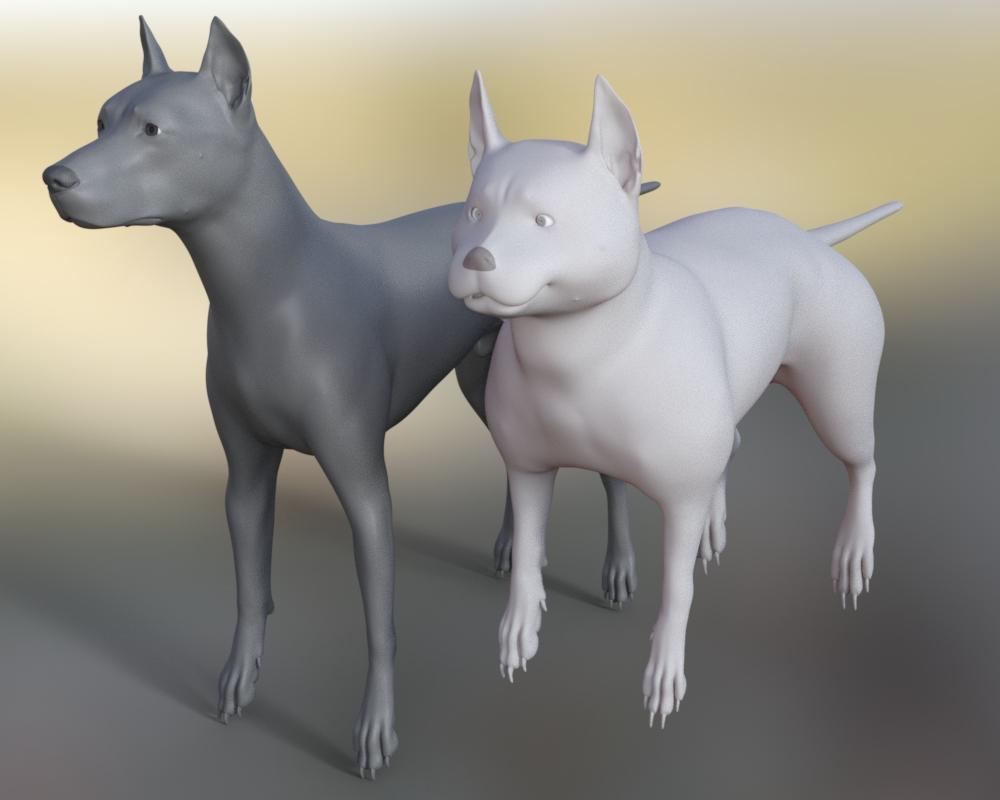
 Thank you!How do I reset the eyes and mouth of a morph I'm making?
I'm working on a DAZ Dog 8 morph in Sculptris. I keep going back and forth between Sculptris and DS. And I know the eyes and mouth are horribly distorted and I want to zero them out, move them to the right place before continuing. Then repeat as needed. Is there a way to isolate specific areas to zero out parts of the morph?
 Limousine Prince Showcar Iray Morph Problem
Hello,
I was wondering if anyone here is having a problem with the morphs in this addon not working?
The sliders are present but nothing works.
https://www.daz3d.com/limousine-prince-showcar-iray
Thanks,
Christian 8Like I always do, I spent a few hours trying to morph Edward 8 into Christian to see if I could live without Christian. And, as usual, it's close and I could probably have lived with my morph character. But it's the broken nose that got me. So I picked up Christian and then compared him to my morph. Maybe they're brothers, cousins, who knows. But not twins. Christian on the left, Edward-morph on the right, each in their own textures.
Wow, good eye! You did manage to get really close with the shape! I think Christian's textures are awesome though, and it's not easy to find skin textures that look that good, imo. I think people focus a bit too much on shape alone and forget that it's the entire package of shape, normal and bump maps, texture maps, JCMs, MCMs, (and in Christian's case even fibermesh brows), etc that make the whole of the character. I'm surprised how much people just focus on the shape when that's just one part of what really makes a character.
I know. That's why I always end up buying the base characters, especially the ones that have features that are unique. I really like his hooded eyes, too, and the tattoo on his back is gorgeous. And I usually apply Altern 8, which I love, although these are just default.
Gen 8 Vertices/Geometry prob upper teethIt's probably some other shape, or the correction morph for another shape, but that doesn't help to narrow it down. You could check the Currently Used group in the Parameetrs pane with Show Hidden Properties enabled in the option menu (the lined button in the top corner, or right-click the tab).
Christian 8Like I always do, I spent a few hours trying to morph Edward 8 into Christian to see if I could live without Christian. And, as usual, it's close and I could probably have lived with my morph character. But it's the broken nose that got me. So I picked up Christian and then compared him to my morph. Maybe they're brothers, cousins, who knows. But not twins. Christian on the left, Edward-morph on the right, each in their own textures.
Wow, good eye! You did manage to get really close with the shape! I think Christian's textures are awesome though, and it's not easy to find skin textures that look that good, imo. I think people focus a bit too much on shape alone and forget that it's the entire package of shape, normal and bump maps, texture maps, JCMs, MCMs, (and in Christian's case even fibermesh brows), etc that make the whole of the character. I'm surprised how much people just focus on the shape when that's just one part of what really makes a character.
Figure metrics questionYou need to go to the Configuration tab, then for the measurements you want to adjust you select a node (generally but not always the figure itself) and a property on that node (e.g. a morph that adjusts the relevant area), then you can check that measurement and enter your target value in the main tab.
Need Assistance Locating A FileThanks, Melanie. I was hoping that my vague recollection of that mystery utility I referred to was the answer, but it turns out that it isn't. Just in case anyone is wondering, I did track down what I had been thinking about - it turns out that it was free, but only part of a larger set and for G3F, by albiejee over at rendo. I already have three other solutions for this for G3F in my content library, so it was a dead end in regards to what I needed. The thread that you linked does give some food for thought, including some ideas that I was already toying with. Maybe a collision object that will deform the mesh, then save the results as a preset or morph. Since it is a legacy rigged item, I may be better off pulling it into Poser first and working there. I'll come up with something. Thanks, everyone.
Daz 3D is part of

Connect
DAZ Productions, Inc.
7533 S Center View Ct #4664
West Jordan, UT 84084Licensing Agreement | Terms of Service | Privacy Policy | EULA
© 2026 Daz Productions Inc. All Rights Reserved.