-
Import clothes in DS
First I would fix the Geometry issues then run the Transfer Utility with the new mesh and finaly you could edit the Weight Maps.
The terminology in the 3D geometry can differ from real world we call it "welded" or "connected" - for real world clothing you would call it "sewed together".
The patches that this clothing is made of seems to get ripped appart slightly at the seams if the Daz Studio SubD (subdivision of the geometry mesh) is applied.
I have no idea if or how you could prevent that with marvelous designer. The clothing could look perfectly fine in the original shape but the geometry mesh seems to consist of various parts that are not connected.
There are geometry editors like Blender or Hexagon where you can fix this making it a single connected mesh.
In Hexagon the function is called "Average Weld" I guess and in Blender it is called "Remove Dublicates" in both programs you need to select the geometry first.
Blender example
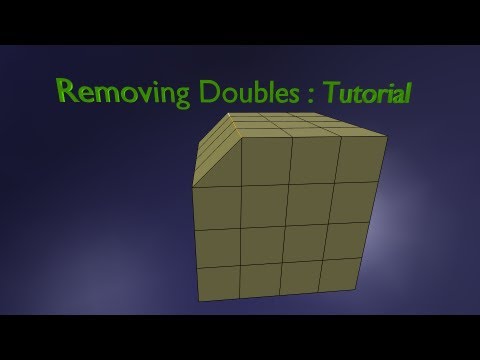
Hexagon: Average Weld Vertex Modeling [Documentation Center]
To work on the Weight Map select the clothing then the joint - its the pectorals bone I guess.
Pose the figure until you see the deformation. Then choose the Node Weight Map Brush tool from the tools pallet and open the Tool Settings pane.
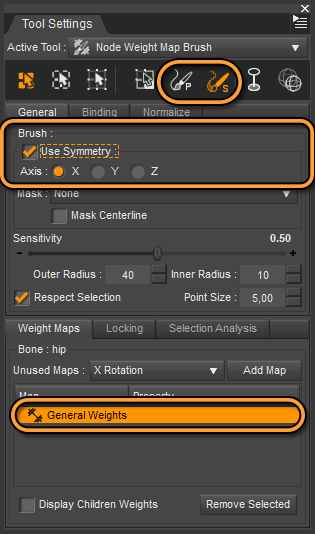
The pane should look like this screenshot below: select the Map at the bottom, choose the Smooth Brush at the top and activate Symmetry. Also notice the Respect Selection checkmark in the middle to paint only on what you have slected with the Geomerty Editor tool for example. Then paint on the clothing below the pectorals there should be a smooth transition between the red and the blue color currently there is some jagging edge. If the figure is posed you will immediately see the difference it makes with a smoothed weight map.
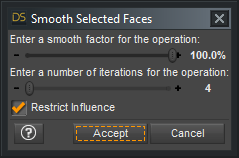
Alternativly you could select some part of the geometry, right-click the viewport and choose Weight Editing > Smooth Selected.
 Sydney 8
Got her, including the HD add-on. Thinking about returning her immediately. When you dial out the Sydney body the G8F base shows a folding-out wrinkle below her breasts.
I don't believe anyone addressed this definitively yet, so I brought both Sydney and Sydney HD into DS and dialed out just the body morph on each. The wrinkle crease below the breasts is only there when you remove the body morph, but leave the HD body morph.
I won't return her because of it, but it's a shame the wrinkle crease is there. I've been known to use a different body on a figure while still using the HD morph. However, with clothing covering the chest, it might not cause an issue. On the other hand, the added detail around the base of her large breasts adds realism to the skin. After half a century, the skin that's pulled by the weight of the mammary glands has it's own set of lines and wrinkles, something I've not seen in a 3D figure before.
I didn't do any rendering as it's well past my bedtime, but I wanted to reassure anyone wondering about this issue, that it isn't a problem with the base morph.
Normal maps can also add such detail; not got the character so cant check.
In this case, I also dialed out the HD morph and the wrinkle crease went away. However, I didn't render either one, so I can't yet say how the normal maps affect them.
Make hands independent.ob should be .obj. For transfer utility you can do Scene tab, four-line icon menu, Assets, Transfer Utility.
A bit of help with EVERYTHINGHi guys, I've recently entered into wonderful world of 3D animation with Daz Studio. I was using poser a couple of years ago, but I used it for simple characters, nothing complex. Hovewer, with Daz, I've decided to give it a try and try to create some really nice scenes. I have a lot of content, downloaded from other sites. My first problem is that a lot of items just have an exclamation (!) mark next to them saying that the file doesn't exist. I know that all files are there because I installed all the packages manually. I am storing my content on external HDD atm, until I get my rendering PC.
Second problem: content, modifications, clothes etc. I want to create a basic child figure, I have a collection of GrowingUp packs, morph kits etc. I can somehow apply the body shape, but not the head. Any ideas how to fix that? Clothes seem to be working just fine, it's just those sliders for modifying a shape of something. I will write more detailed packets which cause me trouble tomorrow.
Third problem: SKIN. I bought skin creator for G3F and G8F to use on my characters (even male ones, you can apparently use a trick to apply it on) but can't find it anywhere.
Fourth problem: My first rendered image was TINY. like, 10x10 pixels tiny. I am using MB Pro 2014 until I get my PC.
Thank you for all the answers in advancem
DazStudioAmateur
Clothing exported from Zbrush deforms with transfer utilitySmoothing Modifier
I guess the holes you see come from the Smoothing Modifier that is by default added to the clothing after the Transfer Utility process. See the Post Transfer Options at the bottom of the Transfer Utility dialog, its checked by default and can help alot to fit clothing but the defult settings are not always appropriated.
For a beginner the name Smoothing Modifier can be missleading and in your case it does the opposite because it not just smoothes the mesh to make it less bumpy but also has some sort of collision detection for better cloth fitting.
This works like a so called shrikwrap effect where the Smoothing Modifier tries to push the base shape clothing mesh around to keep it above the figure skin.
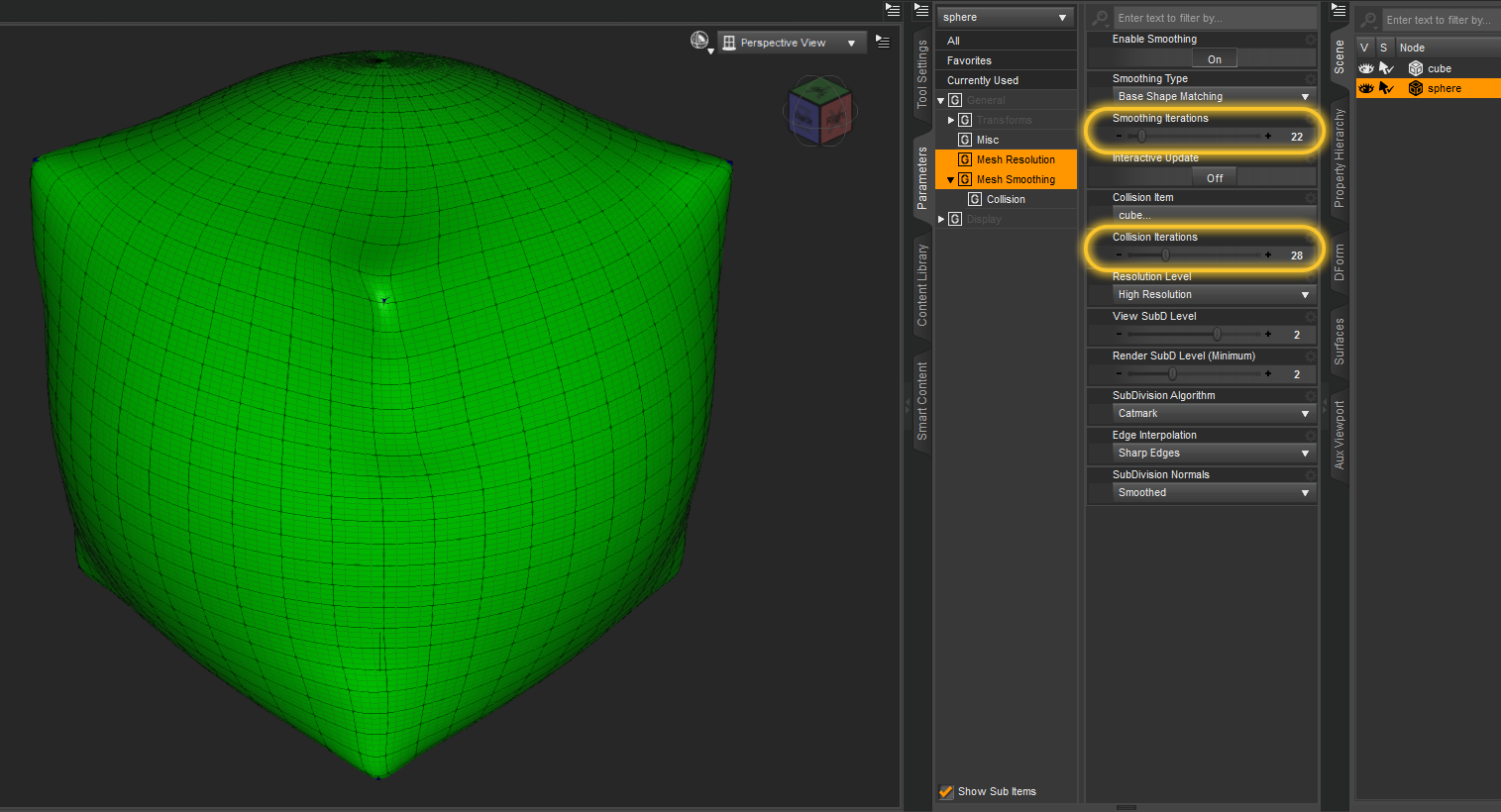
Have a look at the Parameters pane and the settings under Mesh Smoothing where you can find the Smoothing and Collision Itterations turn those setting up, especialy the collision needs a higher value to get rid of the current issue with the holes where some polygons simply didn't get pushed above the skin.
In lack of a better screenshot here I have one example that was meant to demonstrate the relation of the Mesh Resolution (SubD) setting with the Mesh Smoothing.
Example fit a SubD sphere over a cube
GoZ and creating morphs
For creating morphs with ZBrush and GoZ I guess everytime you send the mesh to ZBrush the any current applied morph shape of the clothing is added to the morph.
By sending the mesh back to Daz Studio the morph gets applied on top of the current shape maybe this is the case why you got deformations and the issues with the Transfer Utility.
Have a look at the Parameters pane and see if there are morphs listed under Currently Used or previously created ZBrush morphs.
Installed Morph Products Not Showing In Shaping TabHi, I recently purchased the Ethnicity for Genesis bundle https://www.daz3d.com/ethnicity-for-genesis-bundle and installed it using the DIM (see attachments). However when opening DS and adding a Genesis 2 Male, the morphs do not appear in the shaping tab (I tried all the other Genesis characters too). I then tried installing the files manually through the My Daz Studio Library folder (see attachments), without any success. I have also tried going to "Content Database Maintenance" and "Re-Import Metadata", however the product does not appear on that list (see attachments).
This is the first time I have had to post on forums for anything like this, it would be great if I could get some help.
Thanks
Sydney 8Got her, including the HD add-on. Thinking about returning her immediately. When you dial out the Sydney body the G8F base shows a folding-out wrinkle below her breasts.
I don't believe anyone addressed this definitively yet, so I brought both Sydney and Sydney HD into DS and dialed out just the body morph on each. The wrinkle below the breasts is only there when you remove the body morph, but leave the HD body morph.
I won't return her because of it, but it's a shame the wrinkle is there. I've been known to use a different body on a figure while still using the HD morph. However, with clothing covering the chest, it might not cause an issue. On the other hand, the added detail around the base of her large breasts adds realism to the skin. After half a century, the skin that's pulled by the weight of the mammary glands has it's own set of lines and wrinkles, something I've not seen in a 3D figure before.
I didn't do any rendering as it's well past my bedtime, but I wanted to reassure anyone wondering about this issue, that it isn't a problem with the base morph.
Normal maps can also add such detail; not got the character so cant check.
Does anyone know how to create this female body type with morphs?OK i just decided to eyeball it using your pictures. Here is an Aiko 7 figure with the model width reduced, torso shortened, legs lengthened and hips and waist shape adjusted to better match your pics. With better reference pictures or info i'm sure you can get it to look very close to what you want it to look like.

Hello, this looks very close to the model from the picture I posted! Could you teach me how to do this or share with me this morph? I'm, still a begginer with Daz.
Well the base products are these which i linked earlier. Aiko 7's body shape is closer to the one in your pic. Aiko 8 could work but you would need to do a bit more tweaking with body morph kits to get it to look like the one in your pics. Aiko 7 is for Genesis 3 and it is in the first link below. Aiko 8 is for Genesis 8 and that one is the second link below. Now if you want Aiko 7's appearance on Genesis 8 then you would need to get the second AND third link.
https://www.daz3d.com/aiko-7-for-aiko-8
To adjust their shape you would need something like these. There are lots of other products out there you can use to change shapes but i prefer Zev0's shape shift morph kits.
Make hands independentYou could use the Geometry Editor to select all of the mesh save one hand (use the + buttons in the Tool Settings pane), right-click>Geometry Visibility>Hide Selection, right-click>Geometry Editing>Delete Hidden, export as OB, Import (using the same preset) and use the transfer utility to rig - butt hat would be hollow, if you want to cap the wrist you'd need to take the exported OBJ into some kind of modeller.
Okay so I'm at "export as OB". I see an .obj export option, but not OB. Is this correct, or am I missing something? Also, where is the "transfer utility to rig" option? The back of the hands can be hollow, that's alright. Thanks again!
Does anyone know how to create this female body type with morphs?OK i just decided to eyeball it using your pictures. Here is an Aiko 7 figure with the model width reduced, torso shortened, legs lengthened and hips and waist shape adjusted to better match your pics. With better reference pictures or info i'm sure you can get it to look very close to what you want it to look like.
Hello, this looks very close to the model from the picture I posted! Could you teach me how to do this or share with me this morph? I'm, still a begginer with Daz.
Princess Leia OutfitI think the problem is that there's just not that much interest in Star Wars models. Most of what is available is decades old, made back in the days of Poser 4 and Generation 3 and 4. Very few new items have appeared, and what has is stil based on Generation 4 or is a conversion of an older item to the current platforms.
There hasn't been a new Vader set, or a new X-Wing, or new morphs of the different characters (regardless of trilogy/era) in years. You would think here'd have been at last ONE morph of Daisy Ridley as Rey released since Force Awakens, right? Adam Driver as Kylo Ren? Nope. We've seen Ren's mask/robes, we'e seen the new Stormtroopers, even BB-8. Nothing of the new X-Wing design, the new Millenium Falcon, none of the characters, new or old. There just doesn't seem to be any interest.
There are clothes and characters quite obviously inspired by recent Star Wars movies available at Renderosity.
I have the one that looks like Rey's outfit from the TFA. What others have you found?
Princess Leia OutfitI think the problem is that there's just not that much interest in Star Wars models. Most of what is available is decades old, made back in the days of Poser 4 and Generation 3 and 4. Very few new items have appeared, and what has is stil based on Generation 4 or is a conversion of an older item to the current platforms.
There hasn't been a new Vader set, or a new X-Wing, or new morphs of the different characters (regardless of trilogy/era) in years. You would think here'd have been at last ONE morph of Daisy Ridley as Rey released since Force Awakens, right? Adam Driver as Kylo Ren? Nope. We've seen Ren's mask/robes, we'e seen the new Stormtroopers, even BB-8. Nothing of the new X-Wing design, the new Millenium Falcon, none of the characters, new or old. There just doesn't seem to be any interest.
There are clothes and characters quite obviously inspired by recent Star Wars movies available at Renderosity.
Princess Leia OutfitI think the problem is that there's just not that much interest in Star Wars models. Most of what is available is decades old, made back in the days of Poser 4 and Generation 3 and 4. Very few new items have appeared, and what has is stil based on Generation 4 or is a conversion of an older item to the current platforms.
There hasn't been a new Vader set, or a new X-Wing, or new morphs of the different characters (regardless of trilogy/era) in years. You would think here'd have been at last ONE morph of Daisy Ridley as Rey released since Force Awakens, right? Adam Driver as Kylo Ren? Nope. We've seen Ren's mask/robes, we'e seen the new Stormtroopers, even BB-8. Nothing of the new X-Wing design, the new Millenium Falcon, none of the characters, new or old. There just doesn't seem to be any interest.
I think there is an interest among users. I'm one of them.
Import clothes in DSDid you hand paint that or just use the Transfer Utility map?
Make hands independentYou could use the Geometry Editor to select all of the mesh save one hand (use the + buttons in the Tool Settings pane), right-click>Geometry Visibility>Hide Selection, right-click>Geometry Editing>Delete Hidden, export as OB, Import (using the same preset) and use the transfer utility to rig - butt hat would be hollow, if you want to cap the wrist you'd need to take the exported OBJ into some kind of modeller.
Sydney 8I'd like to mention that the pose Sydney is using is from the Carefree Poses and Expressions for Sydney 8 and Genesis 8 Female pose set which is in both the Pro and Starter bundles kinda got a bad feeling my render is going to get deleted from my gallery with a threatening letter even though this pose is in this pose set and in the bundles as I've lost others for far less like Aiko jumping in the air and her skirt up a little - yes she was fully clothed nothing revealing just could see her underwear anyways here is my first render of the girls from the Sydney 8 Pro oh and Sydney with her hd morph
https://www.daz3d.com/gallery/#images/723246
Melinda, Sydney And Alabama
 Sydney 8
Got her, including the HD add-on. Thinking about returning her immediately. When you dial out the Sydney body the G8F base shows a folding-out wrinkle below her breasts.
I don't believe anyone addressed this definitively yet, so I brought both Sydney and Sydney HD into DS and dialed out just the body morph on each. The wrinkle below the breasts is only there when you remove the body morph, but leave the HD body morph.
I won't return her because of it, but it's a shame the wrinkle is there. I've been known to use a different body on a figure while still using the HD morph. However, with clothing covering the chest, it might not cause an issue. On the other hand, the added detail around the base of her large breasts adds realism to the skin. After half a century, the skin that's pulled by the weight of the mammary glands has it's own set of lines and wrinkles, something I've not seen in a 3D figure before.
I didn't do any rendering as it's well past my bedtime, but I wanted to reassure anyone wondering about this issue, that it isn't a problem with the base morph.
Thank you, @L'Adair, for following up. I am now scrambling under the cushions of my couch for more coins. It is much too early in the year to bust my Daz budget, but...
Sydney 8Got her, including the HD add-on. Thinking about returning her immediately. When you dial out the Sydney body the G8F base shows a folding-out wrinkle below her breasts.
I don't believe anyone addressed this definitively yet, so I brought both Sydney and Sydney HD into DS and dialed out just the body morph on each. The wrinkle crease below the breasts is only there when you remove the body morph, but leave the HD body morph.
I won't return her because of it, but it's a shame the wrinkle crease is there. I've been known to use a different body on a figure while still using the HD morph. However, with clothing covering the chest, it might not cause an issue. On the other hand, the added detail around the base of her large breasts adds realism to the skin. After half a century, the skin that's pulled by the weight of the mammary glands has it's own set of lines and wrinkles, something I've not seen in a 3D figure before.
I didn't do any rendering as it's well past my bedtime, but I wanted to reassure anyone wondering about this issue, that it isn't a problem with the base morph.
Edited to clarify the wrinkle we've been discussing is a crease in the mesh.
Import clothes in DSI made a jacket with marvelous designer and tryed to import it in daz. I used transfer utility but when i changed pose of figure clothes gets broken in chest area. I'm noob and just wached few tutorials. In none of those this problem appears. I have a guess that it has something to do with weight maps, but not sure as there almost no tutorials about them. Can anyone nudge me in right direction?
Celebrity Look-a-Likes for 3D figures Part 2Also, as was mentioned in another thread ,there is a hairstyle that looks like Farrah Fawcett:
https://www.daz3d.com/angel-spring-hair
If there is a face morph based on Farrah Fawcett, that celebrity will be another addition to the list.
Daz 3D is part of

Connect
DAZ Productions, Inc.
7533 S Center View Ct #4664
West Jordan, UT 84084Licensing Agreement | Terms of Service | Privacy Policy | EULA
© 2026 Daz Productions Inc. All Rights Reserved.