-
Sydney 8
but the HD is made for Sydney... does that mean it will work on any other character correctly? I know there were some HD compnents from other characters that did not work 100% either ... I had asked about this in another thread and was told it should work but not always. I figured that is becasue its not made for other characters really. it would be nice if they all did, but then why would we buy any other? yesah, amybe for diversity, but unless doing closeup stuff, most of the time its not realll pertenent anyway.
All HD morphs work on the base figure, although the end results may not be to your liking since it was designed to work with the figure morph and textures of the figure it was designed for. I add the Alexandria and Victoria HD morphs all the time to other characters to add more detail.
Sydney 8As many of us like to use the face of one character with the body shape of another, it's important to know about this in advance. I think it would be great if there were a separate morph to dial this out, kind of like the Nose smaller morphs for Ollie and Edie, so the HD morph could be used with other body shapes,
I've gone back to my earlier posts and changed wrinkle to crease, for clarity.
but the HD is made for Sydney... does that mean it will work on any other character correctly? I know there were some HD compnents from other characters that did not work 100% either ... I had asked about this in another thread and was told it should work but not always. I figured that is becasue its not made for other characters really. it would be nice if they all did, but then why would we buy any other? yesah, amybe for diversity, but unless doing closeup stuff, most of the time its not realll pertenent anyway.
Sydney 8There is an unnatural flat area on both breasts, looking more like she is pressed slightly up against a flat surface. In this render, (where the artist even comments on the "breast sculpt,") it is minimized by the camera angle, but in this render, it is really obvious thanks to the high contrast between her arm and the red dress. Try as I might, none of the morph sets I have, (including one from Zev0!) could fix the problem.I believe this is something that should be fixed.
The flat spot isn't centered over the areola and nipple, either. It's toward the inside. Adding depth to the aerola will not correct the problem. The upper part of the breast swells a bit, as if the breast is being squished slightly, (again, as if it's pushing up against a flat surface,) then the flat area, and below that rounded. I know of no bra that will do that, (nor would I buy one that did!)
Agreed. Ive been using two additional morph packs (also including Zev0's) in addition to the Daz morphs to try and fix her breast issue. Im still not happy with the results.
Sydney 8Ah, hmm, thanks for pointing out the issue with the breasts. No chance that looks a bit more normal in render with normal maps and what not? It does look like they are pressed up against something, like you said... I do like her face.No. They render flat, too. I love everything else about her. It's a shame the HD morph has the crease problem around the breast, as well. One solution would be to use Sydney and dial out the body shape and keep the HD morph for the details in the skin. But with the crease under the breasts, that will be limited to situations where the area under the breasts is fully covered. No bikinis! lol
Sydney 8Got her, including the HD add-on. Thinking about returning her immediately. When you dial out the Sydney body the G8F base shows a folding-out wrinkle below her breasts.
I don't believe anyone addressed this definitively yet, so I brought both Sydney and Sydney HD into DS and dialed out just the body morph on each. The wrinkle below the breasts is only there when you remove the body morph, but leave the HD body morph.
I won't return her because of it, but it's a shame the wrinkle is there. I've been known to use a different body on a figure while still using the HD morph. However, with clothing covering the chest, it might not cause an issue. On the other hand, the added detail around the base of her large breasts adds realism to the skin. After half a century, the skin that's pulled by the weight of the mammary glands has it's own set of lines and wrinkles, something I've not seen in a 3D figure before.
I didn't do any rendering as it's well past my bedtime, but I wanted to reassure anyone wondering about this issue, that it isn't a problem with the base morph.
Normal maps can also add such detail; not got the character so cant check.
In this case, I also dialed out the HD morph and the wrinkle went away. However, I didn't render either one, so I can't yet say how the normal maps affect them.
A small section of Olympia 8 Normal map; as you can see, that detail at the base of the breast will cause creasing. As, what appears to be, an uncompressed tiff, it will have lots of detail too.
@nicstt, I think there is a misunderstanding based on the use of the word "wrinkle". Sydney is an older gal and she has lots of wrinkles, which I love. However the issue with the breasts if one tries to use the HD morph with the G8F Base Female is a crease in the mesh. Here is an image I put together in Photoshop from saving viewport draws that should show you exactly what I mean. Normal Maps are off. I have not tried the HD on any other figure/character morph.

As many of us like to use the face of one character with the body shape of another, it's important to know about this in advance. I think it would be great if there were a separate morph to dial this out, kind of like the Nose smaller morphs for Ollie and Edie, so the HD morph could be used with other body shapes,
I've gone back to my earlier posts and changed wrinkle to crease, for clarity.
Import clothes in DSJust a question to make shure: you started with the base shape of the figure and there are currently no morphs dialed up on the figure right?
Yea. Also i dont know how to do morphs yet.
Just a question to make shure: you started with the base shape of the figure and there are currently no morphs dialed up on the figure right?
Otherwise I still guess the weight maps are interfering somhow below the chest, you may have painted to much in on some of the bones.
Well i didnt painted anything myself (except that add some to one breast). Everything is from transfer utility template.
Select some nearby bones and have a look at the other maps and smooth them also. For example the Abdomen bones there are a few down the spine also having influence up to the belly and chest.
With Weight Editing > Smooth Selected its even possible to smooth all maps of the selected bones in the Scene pane at once.
Ok, done all bones. All smooth. Didnt do anything... Its frustrating. Pics of weight maps of all related bones down there ...
I would first use the Geometry Editor select the chest form the Face Group list, then select all bones of the chest and abdomen in the Scene pane and right-click the viewport for Weight Editing > Smooth Selected.
Turn up the second slider in the dialog for itteration and have a look if it fixes the maps by smoothing them evenly.
I could not do that, if i select geometry editor, i dont see weight editing, only geometry editing. Last picture.
PS: I can't realy tell it by the low resolution in your screenshots but there are some white stripes on the left and the right down the front touch fastener. I wonder if they are intentional extra material or if this is still a gap with unconnected parts. Could make sense to let one side unconnected if you want to add opening morphs but I would make shure both sides overlaping.
It is my first clothes so white stripes should not be there, my bad. There is material underneath that i didnt hide properly. I was thinking to make additional morph for one side to disconnect.
Sydney 8Got her, including the HD add-on. Thinking about returning her immediately. When you dial out the Sydney body the G8F base shows a folding-out wrinkle below her breasts.
I don't believe anyone addressed this definitively yet, so I brought both Sydney and Sydney HD into DS and dialed out just the body morph on each. The wrinkle below the breasts is only there when you remove the body morph, but leave the HD body morph.
I won't return her because of it, but it's a shame the wrinkle is there. I've been known to use a different body on a figure while still using the HD morph. However, with clothing covering the chest, it might not cause an issue. On the other hand, the added detail around the base of her large breasts adds realism to the skin. After half a century, the skin that's pulled by the weight of the mammary glands has it's own set of lines and wrinkles, something I've not seen in a 3D figure before.
I didn't do any rendering as it's well past my bedtime, but I wanted to reassure anyone wondering about this issue, that it isn't a problem with the base morph.
Normal maps can also add such detail; not got the character so cant check.
In this case, I also dialed out the HD morph and the wrinkle went away. However, I didn't render either one, so I can't yet say how the normal maps affect them.
A small section of Olympia 8 Normal map; as you can see, that detail at the base of the breast will cause creasing. As, what appears to be, an uncompressed tiff, it will have lots of detail too.
James 8 for Christian ProblemI went ahead and downloaded him, and he still hasn't been fixed.
I did notice in his readme file list that he's supposed to have a main/controller slider (CTRLJames.duf), and I didn't see it when I either did a search for "James" or looked at the Currently Used section. (Although I didnt check to see if it was hidden; have to try that.) It would be fairly simple to fix if he had that controller -- all you'd need to do would be to slide it back to zero and save the changed morph file. Without it, the question is whether or not any of the other sliders are handled independently, or if they're all controlled by the separate head and body sliders, which I didn't check. (Although, thinking on it, they must be controlled by the separate sliders, because otherwise simply reinstalling the Head and Body Morphs and Starter Essentials would get rid of the problem, and it doesn't.)
In-Depth Tutorial for squeezing the best of 3Delight?Hmm, if you use the UE2 with awe, don't!
 That's the point of using pathtracing, you get global illumination for "free", just like with IRay. The aweSurface automagically creates the effect, and shadow samples are specified per surface (Irradiance samples at the bottom of the surface tab, default is 128). For best performance use the included awe PT area light shader for emissives! (That's what the included awe lights use). As mentioned, awe is highly optimized for using that. What you can use as GI is the awe environment sphere, which has the awe environmental shader applied to it. That's a simple emissive shader, makes it possible to use any jpeg, png or .hdr as global illumination (HDRI lighting). You can freely combine awe emissives with HDRIs, even use several env. spheres if you wish to. Turn off visibility if you wish to make a sphere invisible to the camera (camera on/off toggle button at the bottom of the surface pane).
Ok, back to your question:) Not sure what they mean, do they go away if you delete the UE2? If not, post your question in one of the threads I linked to, and I'm sure wowie or Mustakettu85 will explain what's happening;)
Just pointing this out one more time: for best performance, use only awe PT area lights and/or awe environmental shader to light your scene. You can use all the DS standard lights, just enable raytraced shadows, but optimization will be lost, rendertimes will roughly double.
Edit: Ok, saw your post in the awe commercial thread:)
Okay, I promise, this is my last set of questions regarding the awe shader :D (besides, in my previous question I was referring to the freebie - I didn't get the commercial product yet)
But now let's say I got the commercial product, and I have a scene consisting of:
- a Figure
- some props and furnishings
- a backdrop or general landscape model
1) Do I have to do anything before the initial render? Like converting all surfaces to awe or something like that? Or just select the appropriate script from "scripted 3Delight" panel and just hit render?
You have to apply aweSurface to everything in your scene, and probably make adjustments to stuff before you are ready to render.
Figures: As mentioned, the awe commercial kit comes with scripts to convert figures (M4/V4, Genesis, Genesis2F/M, Genesis 3F/M and Genesis 8F/M, + a skin settings preset for generic figures. So you simply select your G8F, apply the G8 base character preset by double clicking the script.
Props and stuff: You need to apply aweSurface by selecting the prop and the surface(s) and double clicking the base awe shader. Or one of the included presets. There are presets for dull, rough, glossy, reflective, fabric, metal(gold, silver etc)glass, hair (3 presets) and a few other materials. So concrete would be rough or dull, a mirror would be chrome, water would be glass (you need to change refraction value from 1.5 to 1.33 for physically plausible), well you get the picture? So you will need to go through every surface and adjust things. All presets are starting points, many things work by just selecting the proper preset, many won't.
Environments: Same as props, no presets for plants as of now, I usually start with the glossy preset, then add translucency and SSS (Sub Surface Scattering) where needed;) For things like neon signs and light bulbs you can apply either the awe environmental shader or the awe PT area light, to make them emissive/glowing.
So...as I said, awe is no one click solution, you have to make your own presets as you go along. Eventually someone will start making presets for products and more awe shader presets, but this is the current situation.
2) So what your saying is, I don't have to use ANY global illumination if I don't want to?
Say you have an enclosed (indoor) environment, you can just light it with the awe emissive lights and/or DS standard spots, the light will bounce around and create indirect light, so no need to add an environmental sphere, as its light won't be seen anyway, unless you have windows or openings, of course. For outdoor scenes I would recommend using the environmental sphere as a skydome that actually emits light, creating physically accurate GI, but you don't have to use it, you can create a sun from a primitive plane with awe area light applied to it, or from one of the included awe lights.
And, when using the enviromental sphere - what types of .jpg's and .png's are you referring to, are there any free ones on the internet just to download and apply to the sphere? How does this change the overall look comparing to "no GI" at all when using awe?
A 3DL skydome usually loads with a diffuse texture in jpg format. You can load one into your awe scene (if you own one), plop the skydome texture into the awe environment sphere diffuse color slot and then delete the sky dome. It will work quite well, but nothing beats a high dynamic range (.hdr or HDRI) image. There are numerous HDRI products in the store and many sets come with included HDRIs, they can all be used to light your scenes using the env. sphere. Google free HDRI, there are many good ones out there. Start with HDRI Haven, they are generally of very good quality;) Create a folder and save them there, makes it easy to browse to that folder from within DS to load them into the env. sphere.
Generally, for the most realistic result, use HDRI lighting for your outdoor scenes, definitely the easiest route to go IMO.
3) Let's say I want to use the "Skin" preset from the commercial product on a e.g. Victoria 8 model. Does this override all textures, or just the shaders?
The preset just applies awe Surface with basic skin settings, all maps will transfer.
Will I see any improvement out of the box?
Probably, very much depending on the lighting of course. But to be honest, I don't use wowie's settings out of the box, they may work for you, I tend to always change certain things like diffuse strength, specular strength and SSS settings. And every texture is unique, that's what the sliders are for, you need to adjust things

The reason why I'm asking so many questions is because I've read the manual for the commercial product and it seems really complicated to me.
Well that's because...it is=) CG in general, not a walk in the park
The thing is, I don't have much time do dig in the topic of making my own lights, shaders etc so I'm looking to pay for an universal and versatile solution. Maybye I should stick with what I know now, and just buy some noob-friendly light packs from the DAZ store instead (for global illumination and such)? :)
Not necessarily a bad idea;) Look into IBL-master, it works both with all the regular 3DL shaders AND aweSurface. Nice GI and easy to use, same HDRIs can be used, and it also makes working with Iray easier. If you need really fast rendering, the AoA lights are hard to beat. Oh, IBL master needs true HDRI, won't look good with jpegs.
As you said yourself, this is a complex matter, be patient and just...make stuff, run into trouble and ask for help...that's what I do.
Pirate Ship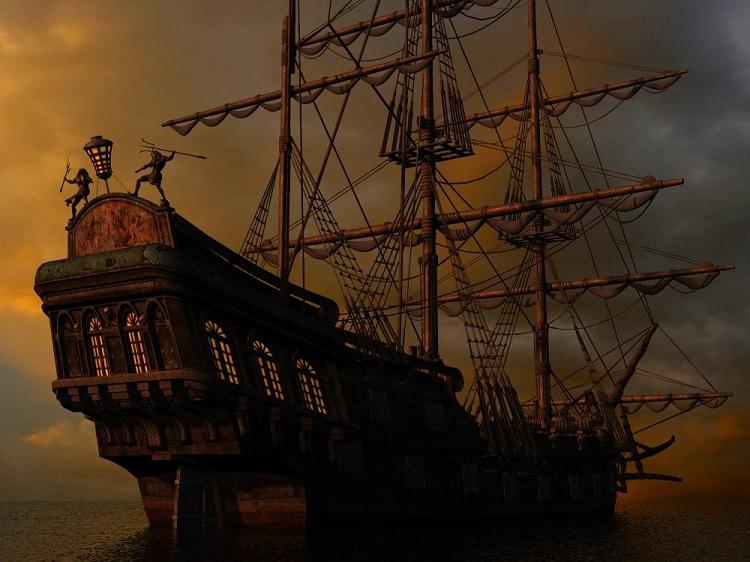
Here's LukeA's Pirate Ship 2 from Renderosity. It offers nearly everything one would want short of a captain and crew. The sials can be furled or open, hanging limp or catching the wind using simple morph controls, no need to fight with "dynamics".
Sincerely,
Bill
No autofit prompt for wrong figure's outfit (Genesis 1, resolved)Hello, 3DU's Sadie for Genesis 1 included a Sadie clone for Genesis, so that G1 can wear old Sadie clothes. So I had the idea to try to reverse this and make a G1 clone for a converted version of the original Sadie. I loaded original Sadie, converted to TriAx, and converted the same mesh into an outfit (export .obj, import .obj, transfer utility to make an outfit). Then I tried to fit this outfit to Genesis 1, expecting an autofit prompt from which I could select Sadie as the originally intended figure. However, there is no prompt. Instead, my Sadie mesh is elevated a bit and kind of mirrors the G1 pose, but it has not obtained the G1 bones. (It still has the Sadie bones obtained from the Transfer Utility.)
Any idea what are the prerequisites for getting an autofit prompt?
Now as I was typing this I figured out that I could use the Transfer Utility to fit the mesh directly to Genesis by telling it to reverse the Sadie clone shape from the mesh. So, my converted Sadie now has a Genesis 1 clone. Confirmed to work by using Transfer Utility to put G1 outfits on converted Sadie. But still, I have the same issue here, that I don't receive an autofit prompt when fitting Genesis 1 clothes to converted Sadie. The Transfer utility method is a lot more clicks than autofit!
Thanks. (Pic included for no reason)
any news on the hd plugin?? :Dany news on the hd plugin?? :D
looking at the subd lvl3 hd morph for daz horse 2
As I didn't want to redo immadiatly what was lost (tedious and boring for me ;-) ), I moved instead on the next item on my list. I will restart the HD plugin afterwards. Sorry for your waiting.
Troglodyte for G8M [commercial]Troglodyte for G8M
https://www.daz3d.com/troglodyte-for-genesis-8-male
Prehistory comes alive again as this brute of a man comes out of his cave to hunt for food or a wife or any other adventures you can imagine. The caveman life is a tough one, where only the strong survive, and this troglodyte is the top of the food chain in his world. Whether his world is ancient prehistory or some post apocalyptic start-over for humanity, this guy is ready for anything.
The set comes complete with custom crafted High Definition Morphs, and Highly detailed Textures for the utmost realism.
- Product Includes
- One Troglodyte Character Preset
- One Troglodyte Full Body HD Morph
- One Troglodyte Shaping Preset
- One Troglodyte Full Body Material Preset including anatomical elements
- Six Face Material Presets
- FourEye Material Presets
- Includes both Iray and 3Delight Material Presets


 Does anyone know how to create this female body type with morphs?
This doesn't really respond to my question and instead you only throw me some links. I really wanted an easy answer instead of forcing me to buy several other products. I specified that I'm a begginer so this means I don't know much about human anatomy and that I am unable to do it on my own but thank you anyway.
You dont need to know about human anatomy. What you do need are good reference pictures of the character you are trying to copy. Then what you do is you move sliders back and forth until your body looks like the shape you want it to. The body parts arent written in Latin or in medical Jargon. If something says it adjusts the hip width then move the slider and watch what part of the hip moves. I cant do anything with those 3 that you posted except maybe make something that *kinda* looks like that character. If you want a Daz model to look exactly like a character you are trying to copy then you need forward, rear and side orthographic reference pictures which the ones you posted are not. The pics that you posted are off angle and they are in perspective view.
This is what a front Ortho or Orthographic view looks like and its what i use when i'm trying to copy one shape onto another
https://i.imgur.com/UuDdMst.jpg
This is a Perspective view and even though your pics are at weird angles they are still in Perspective view.
https://i.imgur.com/wlgskso.jpg
Also i cant load up an Aiko 7 figure on my computer, change the shape with my morph kits and email you the save file. Because if you dont have the same products i had when i made the figure then when you load up the save file all you will get is a default G3F shape. I could export the file as an FBX and email that to you. But 1) i dont believe the Daz TOS allows it 2) since you say you are new you probably wouldnt know what to do with an .FBX file and 3) i would still need good reference pictures like i mentioned above otherwise i would just end up eyeballing the whole thing using the 3 pictures as reference.
Does anyone know how to create this female body type with morphs?And also, using the shape shift products is pretty easy. Once they've been installed you will have extra options. Load up a figure, select the figure in the scene tab, click on the shaping tab, then click on a body region you want to adjust and you will see sliders like the ones in the pic below. See on the left the hip options? just to mess around i changed the Hip Width 1, 2 and 3 to 100% to make them waaaaaay bigger and you can see how it changed the model in the window.

This doesn't really respond to my question and instead you only throw me some links. I really wanted an easy answer instead of forcing me to buy several other products. I specified that I'm a begginer so this means I don't know much about human anatomy and that I am unable to do it on my own but thank you anyway.
I'm not quite sure how they could have done more to help, the links are to the morphs packs used and the values to dial are in the screen shot. glossedfsm can't send you the morphs they didn't create them, you will need to purchase morph packs, then you just dial in values that get the shape you want; or learn how to create morphs yourself in a modelling program.
Import clothes in DSDid you hand paint that or just use the Transfer Utility map?
Utility then paint.
First I would fix the Geometry issues then run the Transfer Utility with the new mesh and finaly you could edit the Weight Maps.
The terminology in the 3D geometry can differ from real world we call it "welded" or "connected" - for real world clothing you would call it "sewed together".
The patches that this clothing is made of seems to get ripped appart slightly at the seams if the Daz Studio SubD (subdivision of the geometry mesh) is applied.
I have no idea if or how you could prevent that with marvelous designer. The clothing could look perfectly fine in the original shape but the geometry mesh seems to consist of various parts that are not connected.
There are geometry editors like Blender or Hexagon where you can fix this making it a single connected mesh.
In Hexagon the function is called "Average Weld" I guess and in Blender it is called "Remove Dublicates" in both programs you need to select the geometry first.
Ok. I removed duplicates in blender (~2k removed) and imported again in DS.
Used transfer utility with dress knee-length without smoothing modifier and used smoothed brush. There is no edges on map but there almost no changes in clothing.
suggestions for Genesis 9How about way fewer base models, and a lot more characters for a handful of base models? Like pre-Genesis 8. That's one of the 2 main reasons I have not moved to G8.
There are only two base models: Genesis 8 female and Genesis 8 male and every DO character is just a morph of those. So, technically they're already doing what you just asked for ;).
Laurie
Importing 3D Objects From The Web?Thanks for the replies above, truly and sincerely.
Gotta report though, every file I download from every source doesn't load in DAZ properly. There's always some kind of problem, this is missing that is missing, something or another, and never any explanation of how to install this stuff.
I realize that nobody gets this and so I should probably stop saying it, but until there is a reliable data transfer standard for 3D files, the 3D realm will remain an amateur hour joke.
The Things Which Could Be Worse Need Cats To Make Them Better Complaint Thread...'plaint::
Why is it that all the social service offices where I live have been moved from the inner neighbourhoods to the far flung burbs?
After I lost my job in 2013 I discovered they closed the Worksource office we had downtown (about a 15 min bike ride) and I had to go way out to the eastern burbs (more than three times the distance and over an hour bus ride away) to deal with the Unemployment bureau as well as mandatory job search counseling and workshops. Likewise the service I was referred to for getting assistance on utility bills (winter is expensive as I only have electric heat) was moved from downtown (I could normally have walked there) to the far southeast burbs where I have to take three buses (about an hour and a half each way) to get there. I could just take the LRT and a single bus but it means having to wait by the Greyhound station (fairly seedy) and then transfer to one of the worst bus routes in the city which is always crowded (even on Sundays) for a very long ride.
Never understood why Greyhound bus stations in big cities seem to always be in the seediest areas.
Sydney 8Huh. I think this is interesting…

LOL
Okay. For those of you who do not like her makeup, you'll be happy to know it's all Diffuse Overlay. So are her eyebrows. The black eyeliner you see in a "no-makeup" view isn't eyeliner at all. It's the base of the eyelashes. Her lashes are extremely thick, and the default load is 100% Curl and Length. Just setting these to 0% makes a big difference. But if you don't like the thick lashes, try swapping Sydney's lash trans map with one from another G8 character.
She loads a bit too shiny, imo, and her lips are even shinier, giving the illusion of lipstick. She also loads with the highest of her three translucency settings. If you aren't into the dark tan look, apply the lowest setting. After I was happy with the skin, I copied the Face material settings, (in the Surfaces->Editor,) and pasted them onto the lips to get a more natural, less glossy look.
I have no problem with tweaking the material zones to my liking, or creating my own makeup options, swapping eyelash trans maps, etc. And I really love the HD Add-on and the way it transforms her skin into that of a mature woman. But I hate, HATE, her breasts.
There is an unnatural flat area on both breasts, looking more like she is pressed slightly up against a flat surface. In this render, (where the artist even comments on the "breast sculpt,") it is minimized by the camera angle, but in this render, it is really obvious thanks to the high contrast between her arm and the red dress. Try as I might, none of the morph sets I have, (including one from Zev0!) could fix the problem.
I believe this is something that should be fixed.
The flat spot isn't centered over the areola and nipple, either. It's toward the inside. Adding depth to the aerola will not correct the problem. The upper part of the breast swells a bit, as if the breast is being squished slightly, (again, as if it's pushing up against a flat surface,) then the flat area, and below that rounded. I know of no bra that will do that, (nor would I buy one that did!)
Here are some wire shaded viewport draws also showing the issue.


In spite of the problem with the breasts, I'll be keeping Sydney 8. I seldom use makeup on my gals, so the included "Mimi" makeups aren't an issue; The no-brow base material is perfect for the many fiber mesh brow products I have; Her skin is wonderful, and lends itself well to even lower translucency settings than those included; And I can reduce the size of the breasts with one of several morphs I have, (though the flat spot remains.) I've yet to try the characters based on her, but I have high hopes, especially for Mousso's Alabama!
Daz 3D is part of

Connect
DAZ Productions, Inc.
7533 S Center View Ct #4664
West Jordan, UT 84084Licensing Agreement | Terms of Service | Privacy Policy | EULA
© 2026 Daz Productions Inc. All Rights Reserved.