-
Black Is Beautiful II
The Blurst of Times said:
Here's a Genesis 8 figure... NOT.
This one also is Genesis 2!
Just because it's older doesn't mean you can't work with them.I noticed the props that I used were set up for both Genesis 2 and Genesis 3 in the product decriptions.
So why not go with some Genesis 2?IMO, one of the best base figures of the G2M era is Darius 6. If I use Genesis 2, Darius 6 is usually one of the first that I think of.
He is also, IMO, the best of all the Dariuses (Darii?). Darius 7 and Darius 8 just aren't as good as the Genesis 2 version.
I usually have to rearrange his face because Darius 6 is so distinctive, it takes me out of the fiction when I see him. Same goes for Victoria 6/7/8 and the Michaels.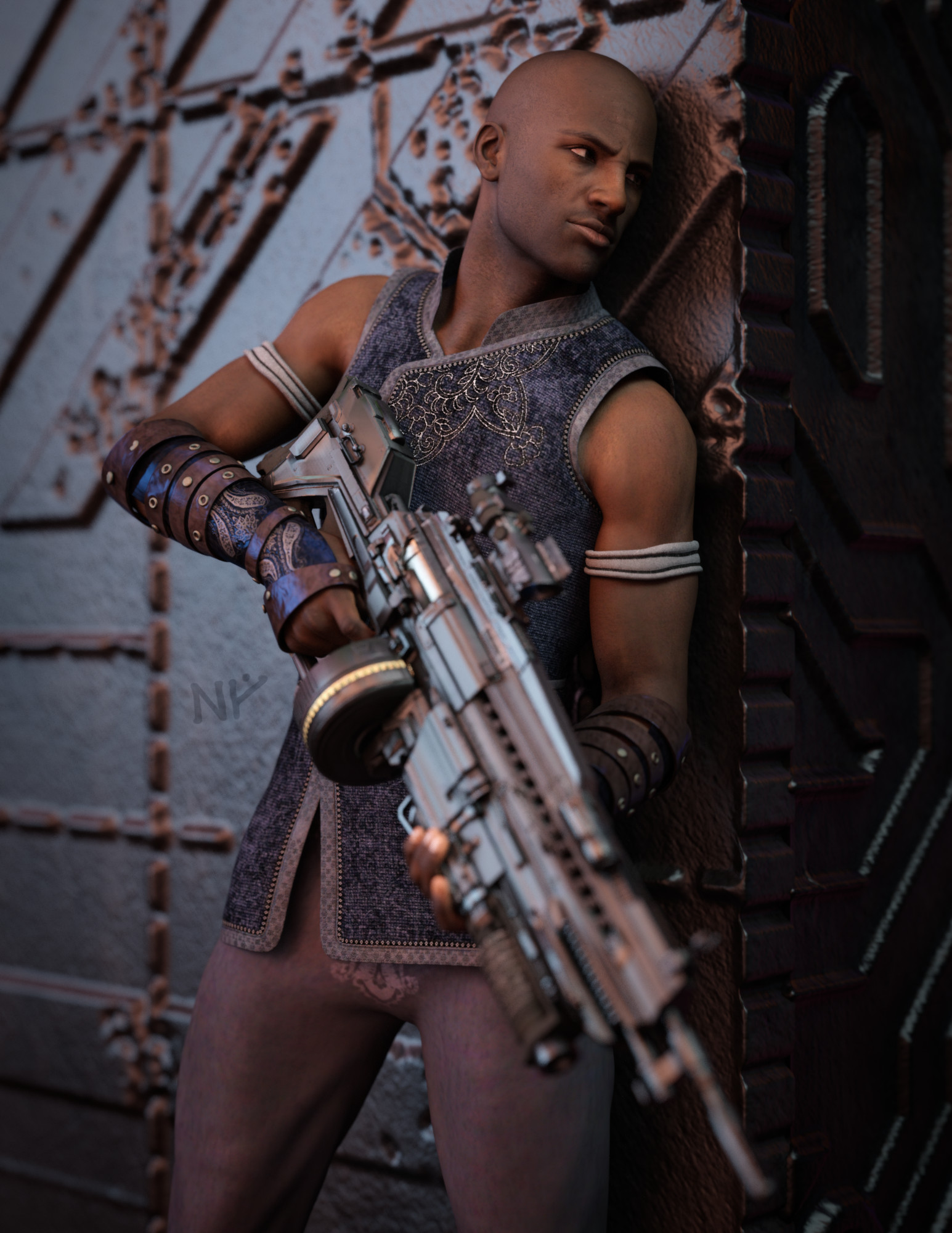
Very nice!
 Black Is Beautiful II
Here's a Genesis 8 figure... NOT.
This one also is Genesis 2!
Just because it's older doesn't mean you can't work with them.I noticed the props that I used were set up for both Genesis 2 and Genesis 3 in the product decriptions.
So why not go with some Genesis 2?IMO, one of the best base figures of the G2M era is Darius 6. If I use Genesis 2, Darius 6 is usually one of the first that I think of.
He is also, IMO, the best of all the Dariuses (Darii?). Darius 7 and Darius 8 just aren't as good as the Genesis 2 version.
I usually have to rearrange his face because Darius 6 is so distinctive, it takes me out of the fiction when I see him. Same goes for Victoria 6/7/8 and the Michaels.Looking for ModelMoved to Product Suggestions as it is not a Daz Studio question.
Which model? I see it listing Victoria 8.1, Jada 8.1, and Bonnie 8.1 used - each has textures as well as morphs.
Scene subset won't display when loadedStill a newbie here with Daz Studio, although I have have been working with it for several years (Victoria 4, years ago!). I think the scene subset doesn't include the complete character, which I thought it did. I did a little digging online and it looks like the character is a download/purchase under a different name than the product I purchased. Anyway I think that's the Daz Studio problem. It's trying to load data that isn't in the PC.
Why Does The Texture Shaded View Of Corsen Look Like This?I bought Corsen from the FastGrab sale section today. The character is based on Victoria 8, and I think the PA did some awesome work in creating her.
The character renders beautifully, but in Texture Shaded view she looks as she does in the attached image. The reason I ask about this is I find the Texture Shaded view of her very difficult to work with. Is there anything I can do to make the texture shaded view of her easier to work with? It looks like a bad comic book and I find it difficult to see basic contours. Maybe it's just something new to get used to with this particular character.
Can We Get An Audience ?margrave said:
Fauvist said:
So we need an ultra-low resolution texture and hair solution. You can use Victoria 3 skin textures on Genesis 8 using one of the UV conversion products - right?
See my earlier comment about exporting to Blender. It has everything you need.
You can also do everything you described in that post inside Daz Studio itself, if you have the correct add-ons, ie scene optimizer and decimator. That saves you the hassle of using two apps.
Can We Get An Audience ?Fauvist said:
So we need an ultra-low resolution texture and hair solution. You can use Victoria 3 skin textures on Genesis 8 using one of the UV conversion products - right?
See my earlier comment about exporting to Blender. It has everything you need.
Can We Get An Audience ?Fauvist said:
margrave said:
Fauvist said:
1 Victoria 4.2 figure scatter instanced to 318 figures. WHAT is the lowest polygon human figure? Male and female?
Genesis 8 has the lowest polycount at 16k, but it's meaningless since 1.6 million polygons is nothing for a modern renderer. The main bottlenecks are texture size, hair polycount, and Daz's ridiculously slow property hierarchy system.
So we need an ultra-low resolution texture and hair solution. You can use Victoria 3 skin textures on Genesis 8 using one of the UV conversion products - right?
You could do this, however it would be far easier to reduce the existing Genesis 3/8 textures to 1K, or even 512, and then strip out the bump/normal/displacement maps. In theory the figures created could share a handful of texures, and you could use translucence or other settings to make the skins look different.
Can We Get An Audience ?margrave said:
Fauvist said:
1 Victoria 4.2 figure scatter instanced to 318 figures. WHAT is the lowest polygon human figure? Male and female?
Genesis 8 has the lowest polycount at 16k, but it's meaningless since 1.6 million polygons is nothing for a modern renderer. The main bottlenecks are texture size, hair polycount, and Daz's ridiculously slow property hierarchy system.
So we need an ultra-low resolution texture and hair solution. You can use Victoria 3 skin textures on Genesis 8 using one of the UV conversion products - right?
Can We Get An Audience ?Fauvist said:
1 Victoria 4.2 figure scatter instanced to 318 figures. WHAT is the lowest polygon human figure? Male and female?
Genesis 8 has the lowest polycount at 16k, but it's meaningless since 1.6 million polygons is nothing for a modern renderer. The main bottlenecks are texture size, hair polycount, and Daz's ridiculously slow property hierarchy system.
Can We Get An Audience ?Fauvist said:
1 Victoria 4.2 figure scatter instanced to 318 figures. WHAT is the lowest polygon human figure? Male and female?
Loretta and Lorenzo LoREZ would probably work here, espacially as they have various LoREZ clothing to add variation iothout too much strain on the system.
Can We Get An Audience ?1 Victoria 4.2 figure scatter instanced to 318 figures. WHAT is the lowest polygon human figure? Male and female?
Should I return this asset?RoseSaxton said:
It doesn't say what version of Genesis it's compatible with in the description. Is "Victoria 1" the clue I missed?
Alas, yes.
Should I return this asset?margrave said:
Richard Haseltine said:
It's for Victoria 1/2 and Stephanie by the description. I'm not sure how practical converting it would be - perhaps cross Dresser would convert it to Victoria 4, the AutoFit to Genesis, then AutoFit that to the desired final figure.
I'm curious why it has a 28000 SKU, which is well after Genesis 3 came out.
I would guess that that's when Daz acquired RDNA's catalog.
Should I return this asset?Richard Haseltine said:
It's for Victoria 1/2 and Stephanie by the description. I'm not sure how practical converting it would be - perhaps cross Dresser would convert it to Victoria 4, the AutoFit to Genesis, then AutoFit that to the desired final figure.
I'm curious why it has a 28000 SKU, which is well after Genesis 3 came out.
Should I return this asset?margrave said:
Yeah, looks like that's an extremely ancient, pre-Genesis outfit that somehow lost its compatibility metadata. If you want to get it working, you'd need to do a lot of manual work, including updating the materials for Iray.
It's for Victoria 1/2 and Stephanie by the description. I'm not sure how practical converting it would be - perhaps cross Dresser would convert it to Victoria 4, the AutoFit to Genesis, then AutoFit that to the desired final figure.
Should I return this asset?I purchased this RDNA Victoria Bone Armor 1 and did the best I could with "fit to Freja 8 HD" and while it's oddly freaky and sexy, it's not working.
https://www.daz3d.com/rdna-victoria-bone-armor-1
Can I fit these pieces to this character or is it not worth the effort?
Is there a version of female bone armor that is for Gen 8?
It doesn't say what version of Genesis it's compatible with in the description. Is "Victoria 1" the clue I missed?
Is Genesis 8.1 an HD figure out of the box?margrave said:
Genesis 3 & 8 Face Controls | Daz 3D
solarview said:
Is there an HD / extra skin detailing and surfacing for the Genesis Base Female and Male? Or does that only come with Character add-ons, such as Victoria?
I ask because I'm doing side by side rendering here with Genesis Base Female, and Then Victoria 8 / HD, and Eva 8 / HD, and the Genesis base definitely has less skin pores, creases, etc., than do Victoria and Eva. So wondering can you actually get that extra surface detailing with just the Gensis Base Figures.
Every single figure is the store comes with its own set of skin materials.
(...mostly. Some PAs recycle their skins for multiple figures.)
Generally, each figures has its own unique skin, which can be as large and as detailed as the PA wants to make it. The default Genesis 8 skins are alright, but Daz3D is a business. They don't give away the top shelf stuff for free. G8F is an appetizer to familiarize you with the program so you spend more money.
 Thanks, Margrae Is Genesis 8.1 an HD figure out of the box?
Genesis 3 & 8 Face Controls | Daz 3D
solarview said:
Is there an HD / extra skin detailing and surfacing for the Genesis Base Female and Male? Or does that only come with Character add-ons, such as Victoria?
I ask because I'm doing side by side rendering here with Genesis Base Female, and Then Victoria 8 / HD, and Eva 8 / HD, and the Genesis base definitely has less skin pores, creases, etc., than do Victoria and Eva. So wondering can you actually get that extra surface detailing with just the Gensis Base Figures.
Every single figure is the store comes with its own set of skin materials.
(...mostly. Some PAs recycle their skins for multiple figures.)
Generally, each figures has its own unique skin, which can be as large and as detailed as the PA wants to make it. The default Genesis 8 skins are alright, but Daz3D is a business. They don't give away the top shelf stuff for free. G8F is an appetizer to familiarize you with the program so you spend more money.
Is Genesis 8.1 an HD figure out of the box?So, to follow up...
Is there an HD / extra skin detailing and surfacing for the Genesis Base Female and Male? Or does that only come with Character add-ons, such as Victoria?
I ask because I'm doing side by side rendering here with Genesis Base Female, and Then Victoria 8 / HD, and Eva 8 / HD, and the Genesis base definitely has less skin pores, creases, etc., than do Victoria and Eva. So wondering can you actually get that extra surface detailing with just the Gensis Base Figures.
Daz 3D is part of

Connect
DAZ Productions, Inc.
7533 S Center View Ct #4664
West Jordan, UT 84084Licensing Agreement | Terms of Service | Privacy Policy | EULA
© 2026 Daz Productions Inc. All Rights Reserved.