-
New DS Filament Render Engine
I don't now if anyone else already reported this, but the shadows in Filament seems to not work properly for me.
They get partly "cut" by the camera angle, like in the video I linked, and also if I move the props too much distant form world's center, the shadows doesn't even appear. However, I can see the shadows of far objects if I use a camera next to the world's center. It's a bit complicated to explain...
In more crowded scenes, with more elements, the shadows gets suddenly and totally blocked if I orient the distant lights "overhead", it's like something big goes in front of the light source.
I tried all the options with no results, in all the pissible panes and tabs, even in the DAZ Studio's viewport options (f2 button). I don't know if it's an hardware issue, since the VRAM is pretty empty and my GPU fully supports OpenGL 4.6.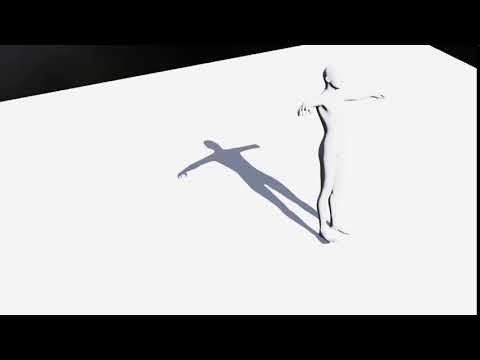
So... I'm the only one having this issue?

I'm asking because I need to find if it's GPU related or if I do something wrong.
AIUTO...CHI CONOSCE L’ITALIANO? PARTE DODICIImago, ma per usare Filament, devo inserire i nodi di rendering nella scena, ho visto di sfuggita il tutorial, ma non l'ho ancora provato.
Un altra cosa, ho trovato questo sito che vende arte virtuale (sic), e c'è questo signore che vende questo video:
Maxstealth's Collection | Rare Digital Art | MakersPlace
Guaradatelo e ditemi se non riconoscete qualcosa.
Lo hanno fatto con quei cosi strani che hai sul tuo sito?
 New DS Filament Render Engine
I'm very happy to have it. I won't be doing my final renders in Filament, but it does help with specific things that were clunky before. For example, it really helps with getting HDRI domes rotated the way you want.
And if I had a low end machine, I would be ecstatic. It would at least let me play where before I could not. I do think it is better for situations that don't involve closeups.
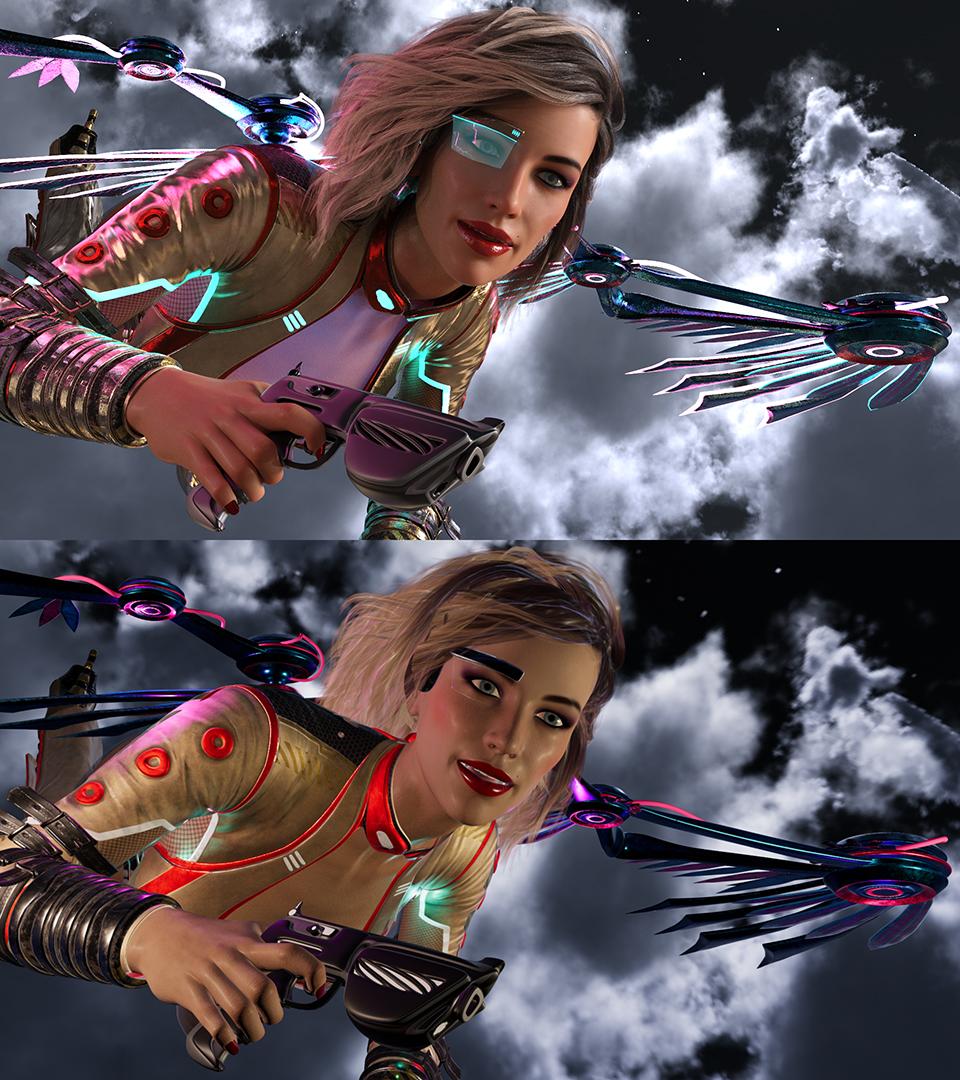
Here is a comparison render I did between the two. I did add some lights trying to get back some of the effect lost with the lack of emissives. I could have done even better by adding more lights than I did (I added 6 or so).
I much prefer the Iray version, but then again, it took 100s of times longer to render.
 New DS Filament Render Engine
Just wanted to provide a data point as I am mostly an animator using DAZ.
Filament is a huge boon for us and having a fast engine with shadows is big. I believe if you start off your project with a good sense of the look you want, you will know what engine to use.
Hopefully once DAZ adds softer shadows and resolves the issue where there are no shadows from point lights, it'll be even better. It would be AWESOME if there was an Iray to Filament shader converter so we can obtain WYSIWYG parity but starting off in the render of choice in the beginning should be good enough.
New DS Filament Render EngineI am not sure i correctly understand what the Filament render means .Ok i have tested it in preview but i prefer iray texture rendering But what is the link between Filament render on preview diaplay and final rendering when i click on render in menu ? And i just see this product '' SF Beautiful Skin Filament '' in the store: i see the images associated in the product page and i don't really see what this product will do on final render ? Preview and render association with filament render engine ???
Filament tutorials/shaders/lights?Yeah exactly 3DL + extra I used PBR maps on my 3DL clothing characters before iray in DS but it never looking as good as in Filament , baked AO make it just looking better like in an old game
thanks for the tip of AO baked for skin, Filament is more like a "3Delight reinforced" in some way
Maybe you should have used the 3DL built in pathtracer?
SOLVED:Can't select Filament (PBR) in Viewport drop-down (grayed-out)well this is odd
I had perpixel shading off and have been using Filament
putting it on definitely improved it though
New DS Filament Render Engine@chrom - All of the renders are realtime, it obviously took some time to create the scenes, but no time to render them. Some of them use my products, which are drag and drop, but you don't require any products to make renders look like the ones above.
@Paintbox - I'm not sure, i didn't get involved with filament until the port was effectively done, and it was testing time.
thank you for the answer
I saw your with/without pics in the products and interested especially in the products because of the results.
The time for scene setup itself for me is indifferent because it’s for with/without status.
But how much efford is it to bring it with your products into with-status?
For example one or few drag & drops in few minutes or several dozens drag & drops with individual adjustments for perhaps every light, … in the scene and that takes hours.
New DS Filament Render EngineHey guys, i thought i'd just throw my 2c in on the conversation here. As i've mentioned elsewhere on the forums, i threw my support behind this endeavor because i coach and train a lot of budding artists and PA's from developing countries where the purchase of high-end Nvidia cards is almost impossible. I wanted broke students to be able to pick this up as a hobby, even if their only available pc is a 10-year-old laptop that's being held together by duct tape. Lowering the bar of entry is good for daz. As it stands right now, you can pick up daz, grab a load of freebies and get started with rendering in filament without spending a dime. If you're lucky enough to be dual-wielding titans and overclocked i9's, then there's still plenty of goodies lined up for you. It's not replacing iray it's just an addition.
I'm also seeing a lot of comparisons to eevee and UE4, which i don't think is a fair comparison. Eevee and UE4's renderers along with Filament *can* look great if you put forth the effort, but none of them are going to do it for you. Whenever you see awesome quality work in eevee or UE4, or any other engine, i guarantee you that there was a seasoned visual effects artist that created it. We have Iray for people with hardware capable of using effectively, we have filament for those who don't have that luxury. Both of them will look terrible if you don't put forth adequate effort. Both will look great if you do.
Early in the port process when FIlament was still crashing regularly and had no documentation, i made these -
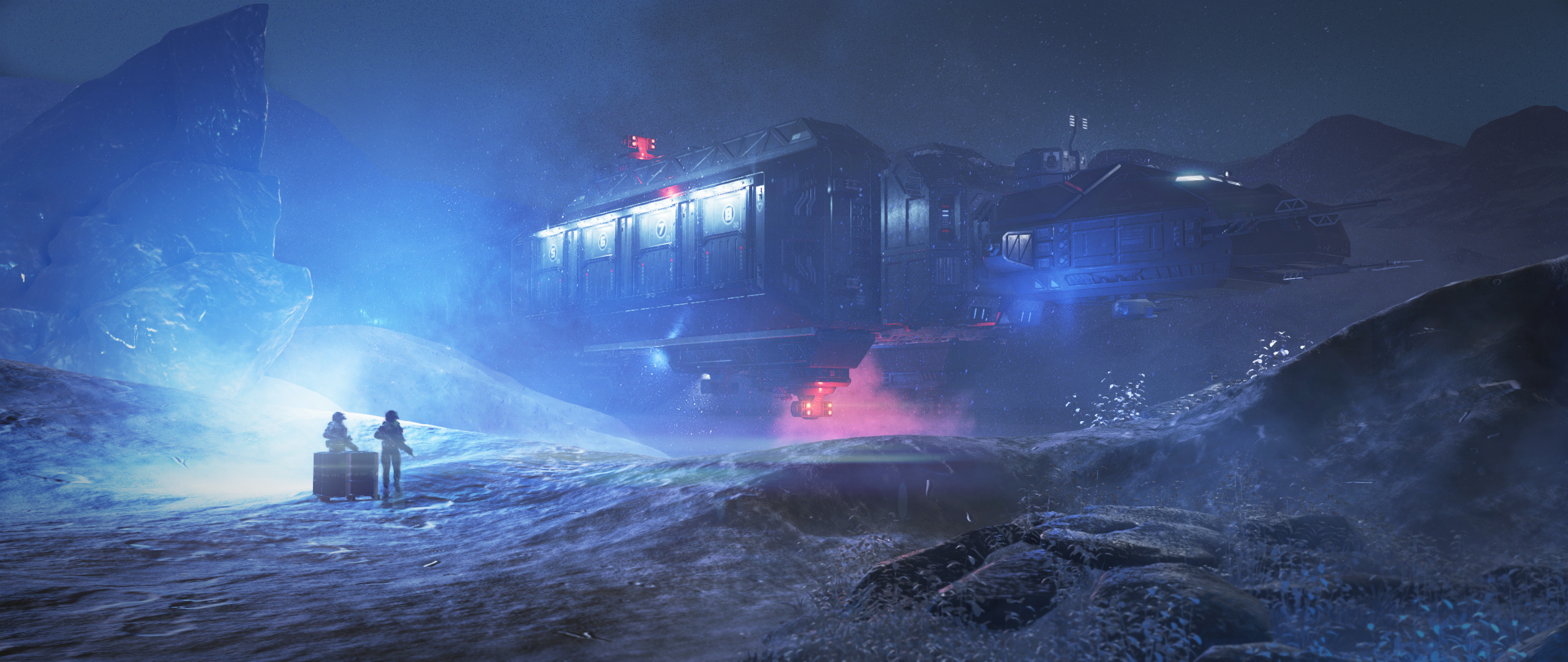

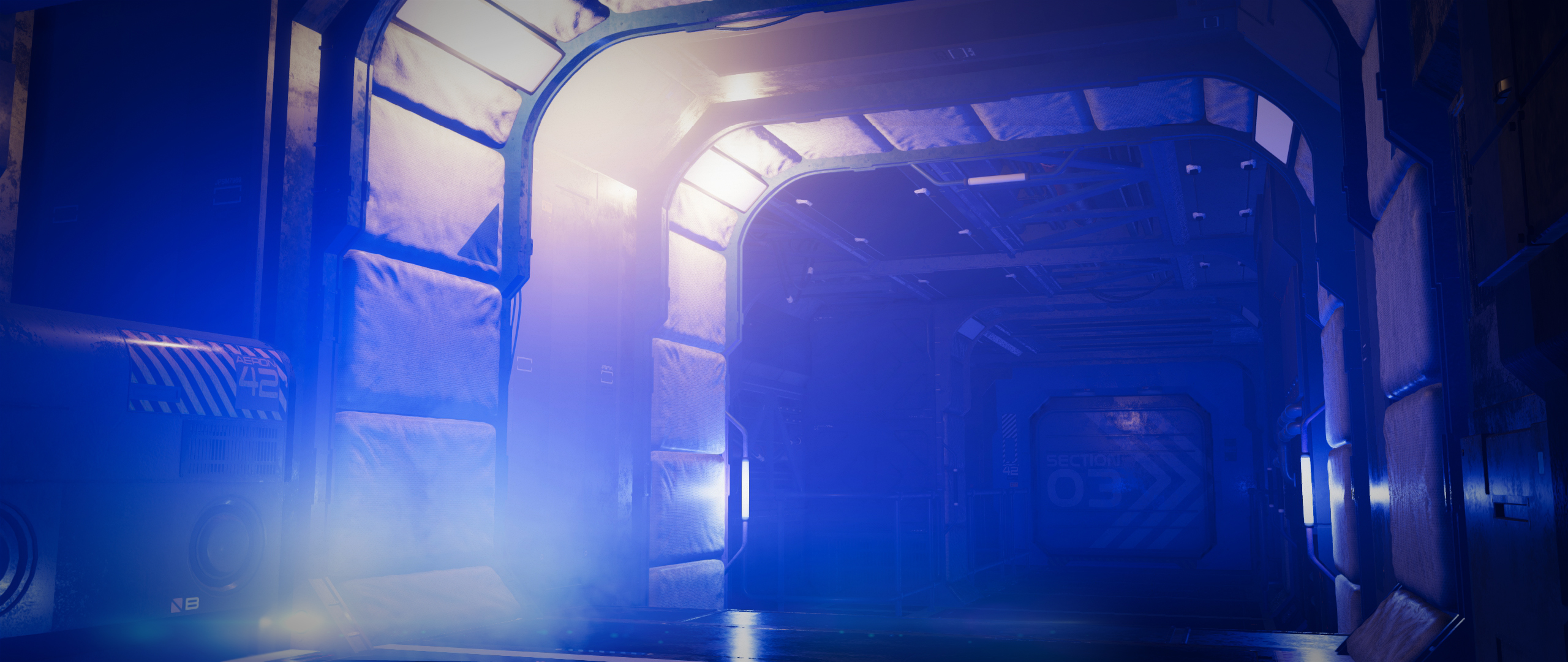

They're certainly not avengers level CG obviously, but if i told people they were made in Iray, i'm pretty sure they'd believe me.
I'm not saying this to cause a flamewar, - i too am looking forward to more high-tier goodies being introduced into daz. The wishlists being presented in this thread are valid, and i'd like to see improvements in a lot of areas too. I'd just like to get my point across that many people will benefit from this, and i hope it will breed a lot of new daz artists who would not have been able to use the software previously. It's the Artist, not the brush, make something awesome.

Thank you for this. Very well said.
New DS Filament Render Engine@chrom - All of the renders are realtime, it obviously took some time to create the scenes, but no time to render them. Some of them use my products, which are drag and drop, but you don't require any products to make renders look like the ones above.
@Paintbox - I'm not sure, i didn't get involved with filament until the port was effectively done, and it was testing time.
I really like your take on things - that everyone should be encouraged to create art, no matter the budget. In our brave new digital world, we often forget those that are left behind simply because they're lacking the basic means to access what we use every day. So thanks for your really valuable input, and also for the clarification that it is indeed always the artist who creates the art, not the renderer.
Loved your example pics by the way!
Daz Studio 4.14 Pro, General Release!I even have a meager system for this stuff -
- Ryzen 2nd Gen 2700 octa-core
- GTX 1660 6GB
- 64GB RAM
So I'm running Iray using both GPU and CPU and it's running great!
I had one crash, but it truly felt like it was my fault, switching from Iray in my viewport to Filament right in the middle of a bunch of setting changes - Iray was busy busy busy.
Installation via DIM went without a hitch, but I just installed the latest nVidia driver to run the Beta. I wonder if that made the difference.
Daz Studio 4.14 Pro, General Release!Holy Moly you guys!!!
Okay, some of you Daz 3D Devs may know me for the die hard Carrara user that I am - I am. I Love Carrara!
Well I've been incredibly hyped about everything that's been going into Daz Studio over the past years - ever since 4.0, but I never really used it as my animation/render studio - just all of the amazing, incredibly handy and powerful tools it has.
This whole Filament thing along with (I haven't found/figured them out yet) the new Animation tools has really got me jazzed.
When another Carrara user turned me on to the Beta with Filament, I gave it a bit of a try - not much time invested into it - but it was cool enough to get me to start putting a bunch of Daz Studio info on my site so that my readers and myself can learn and grow with this thing.
Well one of my awesome readers sponsored me a gift card, which I used to get a cool Genesis 8 Female character and hair for her just last night so I could install and try the new Daz Studio as soon as my Carrara renders were complete.
Oh Man!!!
Okay, I have a lot of Steph videos to watch so I can wrap my head around where things are. I used Filament just fine for getting an animation put together, but not well enough to run it for the render, so I switched to Iray. OMG!!!

 Little Lara Thorne and her Bronwyn Hair are fricken Spectacular! Dropped in an HDRI for both lighting and an environment and set up Iray for speed - something I just kinda started picking up on how to do... kinda.
Well my animation is rendering at roughly a minute per frame, give or take, and the results look fantastic!
Filament is amazing! Even if I stick with Iray for my final renders, Filament looks gorgeous at its absurdly fast render speed!
I know I saw Steph working in a Graph Editor and some other new animation tools. I have to look into that stuff and see how far this adventure takes me!
Now I need to get my hands on Linday's Classic Long Curly Hair with dForce and I bet I could make a Daz Studio Genesis 8 Female version of my Rosie character (My hero, fashioned after my lovely wife)! Lara makes a stunningly similar Rosie 8 - on the right is Rosie 5, a cross-generation Genesis 1 Female (click the image to see the intro video of her)
Wow. Just... Wow!
Great Job! Thanks Team Daz 3D!!!
New DS Filament Render Engine@chrom - All of the renders are realtime, it obviously took some time to create the scenes, but no time to render them. Some of them use my products, which are drag and drop, but you don't require any products to make renders look like the ones above.
@Paintbox - I'm not sure, i didn't get involved with filament until the port was effectively done, and it was testing time.
Rendering stops immediately and gives a black resultLooks like the same problem with a different cause. I updated the Nvidia drivers to the latest version and now it's working just fine.
Keeping DAZ Studio open a long time and doing multiple aborted or unaborted renders (or iRay previews) can have the same effect too. Opening multiple scenes and rendering/part rendering them. Using Filament in the viewport uses video RAM such that you have less video RAM for an iRay render (it's different than doing a iRay viewport preview I think because the iRay viewport preview contents in video RAM can be used to do the iRay render in video RAM too). It's like the problem that folk that try to render an animation with multiple frames in iRay have, not all of the video card RAM gets emptied out between each frame render attempt so that eventually you run out of video RAM.
New DS Filament Render EngineFilament is a great thing for users with small pc setups and for animators the renderings are very very fast.
Do a close rendering with Filament, I don't really see the point, everything is distorted, it is much too bright compared to "texture shaded".
No interest in modifying the parameters for a close rendering, personally, I switch to iray for the close rendering, in order to be as close as possible to the final result, to refine the editing, the "shaded texture" is more than enough.Putting a rendering engine in real time is an excellent thing, speed of rendering, we work "live" in the scene ...
There is still a lot of work to be done to make it 100% operational, a lot of texture problems (broken skins around the face, visible seams, broken reflections, materials that react badly etc.)
If DAZ3d succeeds in correctly implementing future updates and resolving the concerns mentioned above, this engine could revolutionize the use of DAZ, attracting quite a few 3D editors and animators.
Hoping that a marketing model does not set up in parallel with paid addons to "convert" all kinds of things (scripts, shaders etc).Here is my feeling hot, a very good addition with still a lot of work, we are only at the beginning of the Filament adventure on DAZ, let's give it time to set itself up.

Edit: written and translated with Google Translation from French to English, the turn of the sentences may differ from the original.
New DS Filament Render EngineA bit late to the party, but I've been playing with it for a while and sure, it's much quicker than Iray, and yes, for the viewport window it's a step up from textured view, but only a very minor one (and even then, not always) -- at best the results it produces are "OK for a pre-vis" and at worst they're "unusable garbage". I'm aware that this prioritises speed over quality, but when compared against the Blender Eevee/Cycles pairing there's no contest: I probably wouldn't use Eevee for a final render but as an approximation the results are close enough that you can get a good sense of the final look, whereas here the two renderers produce such vastly different results I fail to see the point -- subjectively the results look like a low budget PC game from 2010.
Problems I've run in to so far:
- Emissive lights don't work at all, so you have to use "actual" lights.
- Light from HDRIs just passes through everything. Lighting an interior with an HDRI (through windows, etc.) just does not work as the scene is lit as though the walls don't exist. For a final render this is obviously a complete disaster, but even as a preview it's completely useless.
- Filament seems to be between 5x and 100x more "sensitive" to lights than Iray depending on the source type; this pretty much makes it useless as a preview mode as I get a much better sense of what the scene is going to look like after an iteration or two in Iray preview mode than I do with Filament.
- Diffuse/ambient/incident lighting doesn't happen, so you need fill lights everywhere.
- No ambient occlusion. (Well there seems to be some attempt at faking it in some situations, but it's awful.)
- Materials seem to be hit or miss -- some don't work at all, and some sort of work but still don't look right, and none of them look "PBR" to me.
- Reflections only seem to reflect environment maps, not actual objects (unless there's a setting somewhere I missed)?
- Genesis characters have horrible seams everywhere.
- Hair looks weird.
- Shadow maps are low resolution.
In short I'm going to stick to Iray; preview is fast enough for most purposes, and I'd rather have a decent looking render after a few hours than a terrible one now -- a bird in the hand it not always worth two in the bush!
New DS Filament Render EngineHey guys, i thought i'd just throw my 2c in on the conversation here. As i've mentioned elsewhere on the forums, i threw my support behind this endeavor because i couch and train a lot of budding artists and PA's from developing countries where the purchase of high-end Nvidia cards is almost impossible. I wanted broke students to be able to pick this up as a hobby, even if their only available pc is a 10-year-old laptop that's being held together by duct tape. Lowering the bar of entry is good for daz. As it stands right now, you can pick up daz, grab a load of freebies and get started with rendering in filament without spending a dime. If you're lucky enough to be dual-wielding titans and overclocked i9's, then there's still plenty of goodies lined up for you. It's not replacing iray it's just an addition.
I'm also seeing a lot of comparisons to eevee and UE4, which i don't think is a fair comparison. Eevee and UE4's renderers along with Filament *can* look great if you put forth the effort, but none of them are going to do it for you. Whenever you see awesome quality work in eevee or UE4, or any other engine, i guarantee you that there was a seasoned visual effects artist that created it. We have Iray for people with hardware capable of using effectively, we have filament for those who don't have that luxury. Both of them will look terrible if you don't put forth adequate effort. Both will look great if you do.
Early in the port process when FIlament was still crashing regularly and had no documentation, i made these -
They're certainly not avengers level CG obviously, but if i told people they were made in Iray, i'm pretty sure they'd believe me.
I'm not saying this to cause a flamewar, - i too am looking forward to more high-tier goodies being introduced into daz. The wishlists being presented in this thread are valid, and i'd like to see improvements in a lot of areas too. I'd just like to get my point across that many people will benefit from this, and i hope it will breed a lot of new daz artists who would not have been able to use the software previously. It's the Artist, not the brush, make something awesome.
looks really good - my questions are:
there is mentioned and shown that filament render is very fast - in seconds.
What is regarding the new filament products athmosphere, fire , light pro? Some pics looks really nice.
How much time lasts rendering with these products?
& How much time lasts setting up the items / presets within these products?
I mean if you have a scene built without this product elements the time it takes to setup product items/presets that it looks like in product pics.
I mean especially if using this products to come to such pics lasts seconds, minutes or hours.
Novica & Forum Members Tips & Product Reviews Pt 13Hey, just getting back online. I'm one of the ones who did buy some of the Filament items, this was the price I got (I think it was 20% off cart, 15% for PC+ getting more than two new debuts, but I didn't calculate it out.) I wish I had time to play with it but I just managed to get my studio working again and not too eager to install a new version until I get some have-to-get-done work finished. Thanks so much @kindredarts for coming on the thread. Folks, if you have questions, take advantage! :)
Fire for Filament 74233 1 $8.55 Atmosphere for Filament 74097 1 $8.55 Interior Light Pro for Filament and Iray 74225 1 $8.55 New DS Filament Render EngineHey guys, i thought i'd just throw my 2c in on the conversation here. As i've mentioned elsewhere on the forums, i threw my support behind this endeavor because i coach and train a lot of budding artists and PA's from developing countries where the purchase of high-end Nvidia cards is almost impossible. I wanted broke students to be able to pick this up as a hobby, even if their only available pc is a 10-year-old laptop that's being held together by duct tape. Lowering the bar of entry is good for daz. As it stands right now, you can pick up daz, grab a load of freebies and get started with rendering in filament without spending a dime. If you're lucky enough to be dual-wielding titans and overclocked i9's, then there's still plenty of goodies lined up for you. It's not replacing iray it's just an addition.
I'm also seeing a lot of comparisons to eevee and UE4, which i don't think is a fair comparison. Eevee and UE4's renderers along with Filament *can* look great if you put forth the effort, but none of them are going to do it for you. Whenever you see awesome quality work in eevee or UE4, or any other engine, i guarantee you that there was a seasoned visual effects artist that created it. We have Iray for people with hardware capable of using effectively, we have filament for those who don't have that luxury. Both of them will look terrible if you don't put forth adequate effort. Both will look great if you do.
Early in the port process when FIlament was still crashing regularly and had no documentation, i made these -
They're certainly not avengers level CG obviously, but if i told people they were made in Iray, i'm pretty sure they'd believe me.
I'm not saying this to cause a flamewar, - i too am looking forward to more high-tier goodies being introduced into daz. The wishlists being presented in this thread are valid, and i'd like to see improvements in a lot of areas too. I'd just like to get my point across that many people will benefit from this, and i hope it will breed a lot of new daz artists who would not have been able to use the software previously. It's the Artist, not the brush, make something awesome.
How to stop using Filament!!If the rendered image is black then you probably don't have the required minimum version of the Nvidia driver. Required minimum Nvidia driver is 451.48.
My drivers are fine. I've been rendering in Iray for years now. It was endering IRay fine before I tested Filament.
Daz 3D is part of

Connect
DAZ Productions, Inc.
7533 S Center View Ct #4664
West Jordan, UT 84084Licensing Agreement | Terms of Service | Privacy Policy | EULA
© 2026 Daz Productions Inc. All Rights Reserved.