-
The Great War
yes been after a good WWI British uniform for ages (and other nationalities would be good)
There are a few tanks about. I just did an image of a WW1 British tank and a German one. quite happy with the result.
The German one was a Sketchup model I exported and added more details.Terrain Editor and Heightmap Generators for BryceSlepalex, It looks great for buildings but not quite what had in mind. I was just now searching more for street layout in Sketchup Warehouse and got this one and tested it out quickly in Bryce. There was some buildings which I have removed in Bryce but this is what I was somehow needed. In this instance I can just add buildings, houses, trees, plants, etc. Even the sidewalks/pavements are already in the Sketchup model. I can't believe I have missed this one earlier on searching and now I got something so quick! It's a whole town!

I will give TerraBrush also a try as it is creating nice images looking at yours.
I thought you needed something like this.
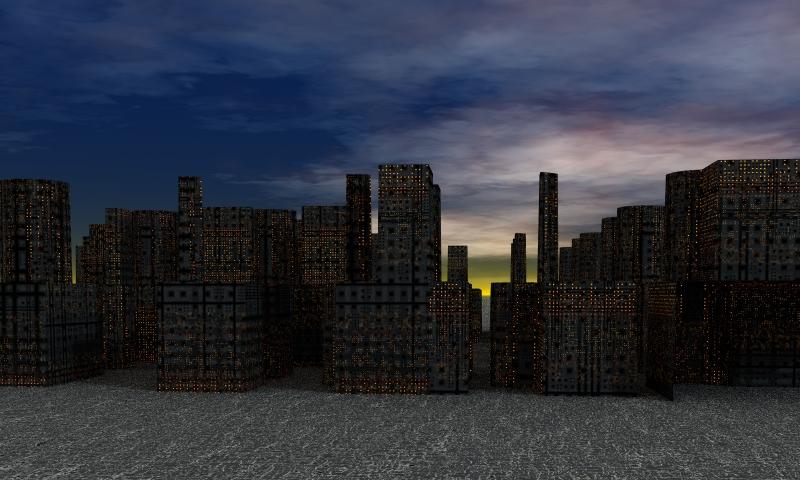
Try dragging your texture from Sketchup to TE as a height map.Terrain Editor and Heightmap Generators for BryceSlepalex, It looks great for buildings but not quite what had in mind. I was just now searching more for street layout in Sketchup Warehouse and got this one and tested it out quickly in Bryce. There was some buildings which I have removed in Bryce but this is what I was somehow needed. In this instance I can just add buildings, houses, trees, plants, etc. Even the sidewalks/pavements are already in the Sketchup model. I can't believe I have missed this one earlier on searching and now I got something so quick! It's a whole town!
I will give TerraBrush also a try as it is creating nice images looking at yours.
Terrain Editor and Heightmap Generators for BryceSlepalex suggested I ask here too.
"On searching today I found a placemaker plugin (not free though) for Sketchup to create layouts for cities, etc. Since Sketchup is not my preferred scene creator, I am wondering if there is a city/town/street generator to use in Bryce specifically. There are so many street maps but not sure how to get it into Bryce - can 2D planes work of such? The terrain height map generator is more mountain related and do not pick up roads. Or what is the easiest way to create street layouts in Bryce?
I have some street kits from ShareCG but was thinking of something more ready-made and not build streets by parts.
I want to create city/town scenes to which I can add all the buildings and houses I got via Sketchup warehouse or any other sites".
I am currently just want a simple flat terrain with various streets but am not feeling like drawing streets from scratch.
I have downloaded World Machine basic (free). So, do I have to import any street map into World Machine to get this flat terrains?

It is unlikely that you will find such a map, but you can schematically create a city block both with the help of TerraBrush and Bryce TE.
If I have time, I will show you how to do it.I have just downloaded TerraBrush afer seeing your post about it. Thank you, will await your help.

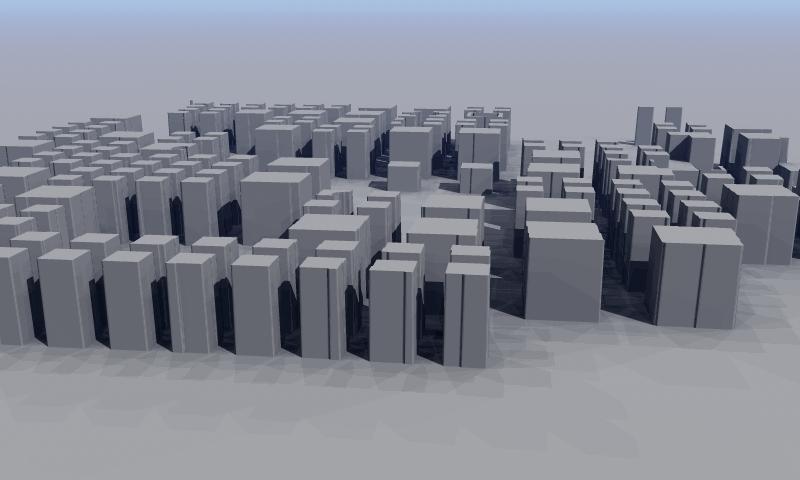
If you mean it, then this is done in 5 minutes in TE.
 Terrain Editor and Heightmap Generators for Bryce
Slepalex suggested I ask here too.
"On searching today I found a placemaker plugin (not free though) for Sketchup to create layouts for cities, etc. Since Sketchup is not my preferred scene creator, I am wondering if there is a city/town/street generator to use in Bryce specifically. There are so many street maps but not sure how to get it into Bryce - can 2D planes work of such? The terrain height map generator is more mountain related and do not pick up roads. Or what is the easiest way to create street layouts in Bryce?
I have some street kits from ShareCG but was thinking of something more ready-made and not build streets by parts.
I want to create city/town scenes to which I can add all the buildings and houses I got via Sketchup warehouse or any other sites".
I am currently just want a simple flat terrain with various streets but am not feeling like drawing streets from scratch.
I have downloaded World Machine basic (free). So, do I have to import any street map into World Machine to get this flat terrains?
It is unlikely that you will find such a map, but you can schematically create a city block both with the help of TerraBrush and Bryce TE.
If I have time, I will show you how to do it.I have just downloaded TerraBrush afer seeing your post about it. Thank you, will await your help.
Terrain Editor and Heightmap Generators for BryceSlepalex suggested I ask here too.
"On searching today I found a placemaker plugin (not free though) for Sketchup to create layouts for cities, etc. Since Sketchup is not my preferred scene creator, I am wondering if there is a city/town/street generator to use in Bryce specifically. There are so many street maps but not sure how to get it into Bryce - can 2D planes work of such? The terrain height map generator is more mountain related and do not pick up roads. Or what is the easiest way to create street layouts in Bryce?
I have some street kits from ShareCG but was thinking of something more ready-made and not build streets by parts.
I want to create city/town scenes to which I can add all the buildings and houses I got via Sketchup warehouse or any other sites".
I am currently just want a simple flat terrain with various streets but am not feeling like drawing streets from scratch.
I have downloaded World Machine basic (free). So, do I have to import any street map into World Machine to get this flat terrains?
It is unlikely that you will find such a map, but you can schematically create a city block both with the help of TerraBrush and Bryce TE.
If I have time, I will show you how to do it.Terrain Editor and Heightmap Generators for BryceSlepalex suggested I ask here too.
"On searching today I found a placemaker plugin (not free though) for Sketchup to create layouts for cities, etc. Since Sketchup is not my preferred scene creator, I am wondering if there is a city/town/street generator to use in Bryce specifically. There are so many street maps but not sure how to get it into Bryce - can 2D planes work of such? The terrain height map generator is more mountain related and do not pick up roads. Or what is the easiest way to create street layouts in Bryce?
I have some street kits from ShareCG but was thinking of something more ready-made and not build streets by parts.
I want to create city/town scenes to which I can add all the buildings and houses I got via Sketchup warehouse or any other sites".
I am currently just want a simple flat terrain with various streets but am not feeling like drawing streets from scratch.
I have downloaded World Machine basic (free). So, do I have to import any street map into World Machine to get this flat terrains?
After using 'terrain height map generator', are there generators for cities/streets layouts?On searching today I found a placemaker plugin (not free though) for Sketchup to create layouts for cities, etc. Since Sketchup is not my preferred scene creator, I am wondering if there is a city/town/street generator to use in Bryce specifically. There are so many street maps but not sure how to get it into Bryce - can 2D planes work of such? The terrain height map generator is more mountain related and do not pick up roads. Or what is the easiest way to create street layouts in Bryce?
I have some street kits from ShareCG but was thinking of something more ready-made and not build streets by parts.
I want to create city/town scenes to which I can add all the buildings and houses I got via Sketchup warehouse or any other sites.
Laura, I don’t understand why to produce several branches on the same topic: heights map generators?
Here you can not ask a question?After using 'terrain height map generator', are there generators for cities/streets layouts?On searching today I found a placemaker plugin (not free though) for Sketchup to create layouts for cities, etc. Since Sketchup is not my preferred scene creator, I am wondering if there is a city/town/street generator to use in Bryce specifically. There are so many street maps but not sure how to get it into Bryce - can 2D planes work of such? The terrain height map generator is more mountain related and do not pick up roads. Or what is the easiest way to create street layouts in Bryce?
I have some street kits from ShareCG but was thinking of something more ready-made and not build streets by parts.
I want to create city/town scenes to which I can add all the buildings and houses I got via Sketchup warehouse or any other sites.
Looking for a large English country estateGoogling I was surprised no Turbosquid jaw dropping priced version of thd Burghley House, in fact none anywhere even though they have virtual tours, countless drone videos and no shortage of images, even the floor plans.
No 3D warehouse model even, and streeview does not get near it to make one in Sketchup.
Looking I don't think it would be too hard to knock up the facia though from castle bits and add some of those various DAZ original spires and roof toppers
!!! The most detailed Circus modelI've been quietly lurking and reading thread for several months. I think you did an awesome job of recreating the helmet.
Trish
Thank you @Stormlyght
Sometimes I feel a bit lost. I wish I would have spent more time on Blender. Probably it's easier to create some stuff with that software. Somehow I got stucked with Sketchup and this helmet really made me sweat. :-)
!!! The most detailed Circus modelThis was a real challenge, since I had never done organic modelling before. I hope I will never have to deal with it again! To do that in Sketchup is so difficult and I think some people around here would have gotten way better results. I would say... it turned out "ok"... not perfect but... ok... :-)
What do you guys think?
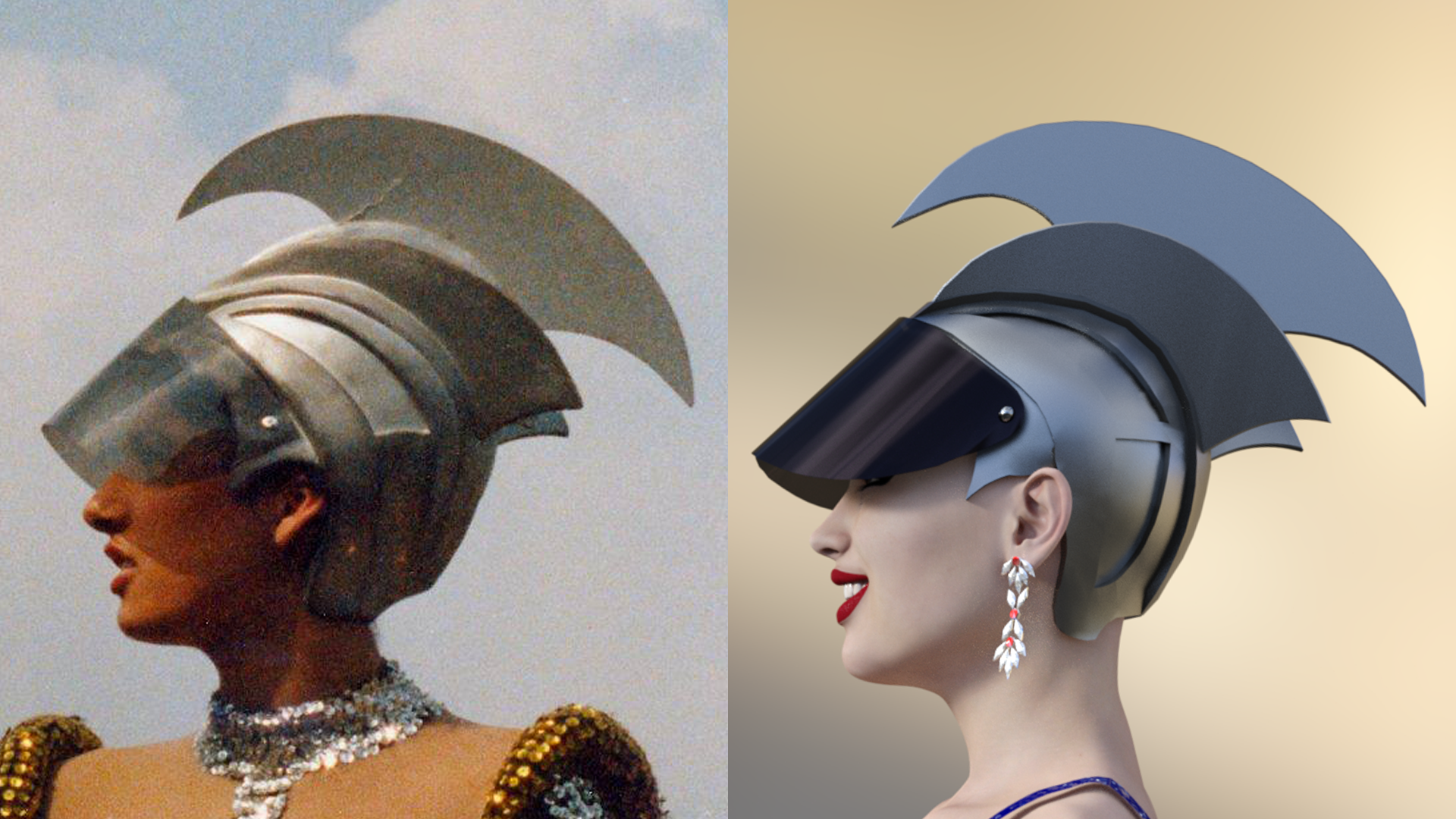
I've been quietly lurking and reading thread for several months. I think you did an awesome job of recreating the helmet.
Trish
!!! The most detailed Circus modelThis was a real challenge, since I had never done organic modelling before. I hope I will never have to deal with it again! To do that in Sketchup is so difficult and I think some people around here would have gotten way better results. I would say... it turned out "ok"... not perfect but... ok... :-)
What do you guys think?
was there ever a thread dedicated to spline modeling?OMG no vertex modeling just splines, I would have never left Sketchup ....
I don't think Sketchup existed back then!
 Sketchup to Daz (shader and texture issues)
The model needs to be UV mapped. I don't know if SketchUp can handle UV mapping.
Sketchup to Daz (shader and texture issues)I have successfully imported a model I created in sketchup 2017 to Daz. Looks good, except when I try adding shader presets or textures, it only changes the color. Does not add textures.
Completely Lost... Chamfer Not Workingbad is a loaded word
tell someone they are a bad driver they explode

there is no bad geometry, some software perfectly happy with ngons and boolean processes
Sketchup is a classic example and even Bryce and Carrara
there is just geometry that does not play nicely in Hexagon and most other software, not bad just does not work well there
was there ever a thread dedicated to spline modeling?OMG no vertex modeling just splines, I would have never left Sketchup ....
Show Us Your Bryce Renders Part 10Thanks everybody for the nice comments to my last scene.
@Dave: Wonderful scenerys. The second picture I like most. I love the water material. Stunning pictures. I assume you used Bryce clouds or are the skies photos?
@akmerlow: Very well done pics. I'd have been frightend to death if I were on your Island an saw this pig

@Horo: Wonderful Island and superb lighting. Thank you very much for the PDF manual for Warped Terrains.
@Launok: Well made scene boutique scene: I am interested in your attempts to populate Bryce with a lot of people. The advantage of Daz3D figures you can pose them, but you are absoluty right, after 3 or 4 it's over. Older characters like Genesis, Victoria 4 or Michael 4 are using less memory. Not only the characters themselves, but also the older clothes. I am not familiar with Sketchup characters, you cannot pose them, can you?
@Hansmar: Interesting and original picture.
@Mermaid: I fully agree the Sunless HDRI skies are awesome. Pretty picture BTW.
Hansmar's post brought me to have a look at Rashad's lighting concept EGDLS once more. First I had the impression it is quite difficult (Sorry Rashad), but I was wrong. Of course it's better to understand the full concept behind it, but the good point is, you don't have to (Sorry Rashad) to get maybe not the best, but a really good result. I used only two DomeLights (of four) to influence the EGDLS light in my scene: AAA Skylight Dome and AAA EarthLightDome. EGDLS is a great concept and scenes are rendered reasonably fast (after all there are four dome lights). I tried it out on old scene of mine. I rendered my first attempt with Premium Effects and TA. The new one is rendered with EGDLS in Super Mode. This is only to avoid Moiré effects. You could also do it in Regular Mode. I am not so fond of the Regular Mode but with EGDLS it works very well.
The first attached picture is the EGDLS render (it can be found also in the Gallery here. The 2nd is the TA render. Both render have not exact the same lighting. I could not resist to play around with the light.
Show Us Your Bryce Renders Part 10@launok, how lowpoly?
Well, this is not quite low-poly but still not in the league of the fully clothed Genesis characters. I remember that I could only put 2-3 Genesis characters in a town scene when Bryce crashes. This whole Sketchup model (see link) is 34 mb but I have chopped out the parts I don't want to use for my need. Exported the chopped parts as .obj ends up only about 12 mb.
This is only 1 idea among many others. I have also noticed people use Daz & Max, etc. characters but somehow makes the files much smaller in size in Sketchup.
An easier way (for me) is searching the Warehouse with advanced search and choose then whatever choices, i.e. last week, 24 hours, etc. to check what is loaded daily (new to old preferably) as to do random searches which do not work well. I am spending quite some time searching there every day if I have time!
I use this link to search: https://3dwarehouse.sketchup.com/advancedsearch.html?backendClass=bothJust want to add that Xnalara characters also works good in Bryce. Xnalara is a free game-based platform.
Daz 3D is part of

Connect
DAZ Productions, Inc.
7533 S Center View Ct #4664
West Jordan, UT 84084Licensing Agreement | Terms of Service | Privacy Policy | EULA
© 2026 Daz Productions Inc. All Rights Reserved.